It’s that time of year again! We’re looking for some new designers to join our always developing team of awesome instructors.
What We’re Looking For
Envato Tuts+ has many areas of content, and while we love a variety of avenues, we’re specifically looking for instructors to create written content. The topics we’re specifically looking for are:
Photo manipulation
Product mockups
Logo design
Adobe Photoshop
Procreate
Affinity Photo
Sketchbook
Vector Software Gurus:
Affinity Designer
Sketch
Inkscape
Your area of expertise not listed? We never turn a good application down!
You must also be comfortable with the English language. We can proof your content, but we can’t rewrite everything for you.
We’re looking for content from quick tips to in-depth tutorials. Most of all, we want instructors who can explain themselves clearly and accurately and produce quality end results. Whether you’re an expert in Adobe Illustrator, Adobe InDesign, Inkscape, Adobe Photoshop, Sketch or any other design package, we want to hear from you!
We are passionate about diversity and inclusion, and this includes design and trends from all corners of the globe. If you want to contribute to our ever-expanding Global Influences content, please send us a pitch.
If you want to know more, please check out this insightful comment on our previous call for new instructors.
What Do You Get Out of It?
There are many benefits to becoming an Envato Tuts+ Instructor:
Getting paid for a subject you’re passionate about is always rewarding. Depending on the content type and subject, you could be billing thousands per month! We pay $250 USD for a standard length tutorial (around 25-30 steps/images).
We have in-depth guides to help you put together your posts, from formatting to tone to screenshot presentation. So if you’re new to tutorial writing, this is a great place to start!
Get your name out into the community. This is especially good if you’re just starting your freelance career.
If you create assets for Envato Market or Envato Elements, then use this opportunity to help promote your items!
Pitch a Tutorial!
While I can tell you which areas we’re specifically looking into, it all comes down to which areas are your strongest and what you feel most confident in teaching. If you are interested in becoming an Envato Tuts+ instructor, why don’t you pitch us an idea? We’re looking forward to hearing from you.
If you’re putting together a magazine, brochure or book, it’s likely that you’ll encounter Adobe InDesign during your design process. This publishing program is the print designer’s everyday tool of choice, but you can also use it to do more unusual tasks, such as creating EPUBs (eBooks), formatting cool typography effects, and designing Pinterest-worthy posters.
If you’re a beginner to InDesign, it can be intimidating knowing how to get started and what tasks the software is suitable for. Here, you’ll find a quick-start guide to InDesign to help you get started on the right foot.
What Is InDesign?
InDesign is a publishing program, which means it’s designed for creating 2D layouts which combine type and images.
Some items you might commonly create in InDesign might include multi-page print publications like magazines and books, stationery items such as business cards and letterheads, promotional media like flyers, booklets, and brochures, and other single-page print layouts like posters and banners.
The more recent CC version of InDesign also has more features that allow designers to create layouts for digital and online, such as eBooks, digital magazines, and social media images.
Manufactured by Adobe, InDesign is part of a core trio of Creative Suite applications, which also includes Photoshop and Illustrator. While Photoshop is designed for editing raster (photographic) images and Illustrator is tailored to creating vector (scaleable) graphics, InDesign is programmed to allow designers to incorporate their edited images as part of a broader layout.
If you’re still not sure whether InDesign is going to be the best software choice for your project, ask yourself whether the design is based around a layout across one page or multiple pages. If so, InDesign is going to be a great pick. If your design is going to be focussed on a single image, such as a photo that requires a lot of editing or a design for a logo, opt for Photoshop or Illustrator instead.
Templates Are a Great Way to Get Started With Learning InDesign
As well as picking up some basic InDesign skills from Envato’s range of beginner tutorials (see below), you can actually learn a huge amount about InDesign by downloading a template.
Opening a template and exploring what’s already been set up for you, such as layers, color swatches, and type, is a fun and easy way to start getting familiar with the InDesign interface.
Here is a selection of some of our favorite templates, which make a great foundation for creating your own unique design:
This minimal magazine template has a simple layout which is intuitive and easy to edit, making it a great template choice for beginners to magazine design.
This magazine template uses more experimental color and transparencies to add visual interest to layouts. It’s deceptively simple in its setup, so again it makes for a perfect magazine template for InDesign beginners.
You can also find out how to adapt this template creatively in this tutorial:
In this tutorial, I’ll show you how to make a magazine by editing an existing InDesign magazine template and create something that looks completely special…
This newsletter and brochure template is a more stylish take on the corporate brochure format. This design is particularly strong on the typography front, so make sure to explore the different styles being used across the template (Window > Styles > Paragraph Styles) to pick up some tips.
A multipurpose brochure is always handy, but this ultra-simple style is particularly versatile. It’s a great example of how strong color and type is a tried-and-tested combination that packs a punch.
Catalogs and lookbooks are another type of print media for which InDesign is the perfect software choice. Lookbooks tend to be very simple in format—pairing images and type together to create a heavily visual result—so they make an ideal template for InDesign beginners to explore.
Stationery sets are really simple to put together in InDesign, but it’s always handy to dip a toe into creating your own by adapting an existing template. This contemporary stationery set is easy to adapt by swapping in a different image for the background and border, or by swapping the sans serif font for a more classic serif.
You can find more of our top InDesign template picks here:
If you’re planning to put together a magazine, book, or brochure, Adobe InDesign is without a doubt going to be your tool of choice. These 25 templates, from…
How to Develop Your InDesign Learning Further With Tutorials
Working your way through a tutorial, either with the goal of picking up a new skill or creating a particular design, is an immersive and effective way to start learning InDesign.
Luckily, you’ll find a huge range of free InDesign tutorials here on Envato Tuts+. If you’re a complete beginner, work your way through the following tutorials, which will help to build your confidence with using InDesign and develop your print design skills along the way.
Threading text within InDesign can hugely improve the experience of editing and amending copy while working on layouts. The process of threading text is linking two or more text frames, allowing text to flow from one separate frame to another.
In this Quick Tip tutorial, you will learn about the various ways you can import image files into an InDesign document and how to replace and rescale them.
Learn how to properly set up the technical specs for your InDesign documents, before you send off your hard work to the printers.
When you have a few basic skills under your belt, you can start to pick up more skills by learning how to create layouts for magazines, posters, or flyers.
This tutorial leads you through the steps of creating a magazine template in InDesign, complete with page numbers, masters, and running headers. It makes a great foundation for creating your own unique magazine designs.
Flyers might be small, but these single-page layouts need to pack a punch if they’re going to attract the eye. Here, you’ll learn how to put together a stylish real estate flyer.
Want to know more about specialist print finishes, like foiling and die-cutting? Invitation tutorials are fantastic ways of picking up some cool print skills. Check out this fall-themed wedding invite tutorial.
Take Your Skills to the Next Level With Courses and Intermediate Tutorials
When you’ve created your first magazine layout or business card in InDesign, you’re ready to deepen your InDesign knowledge and tackle some more niche projects. Learn how to create EPUBs or advanced typography effects through an intermediate tutorial, or become a print design expert with an in-depth course.
Ever wanted to convert your InDesign layouts to eBooks? With the right know-how, it’s super-simple to do. In this tutorial, you’ll learn about three different ways you can quickly turn your designs into interactive PDFs or EPUBs, ready for sharing or selling online.
How to Create Advanced Text Effects in InDesign
These four quick tutorials show you how you can create immersive, advanced typography effects in InDesign in minutes.
In this quick and simple tutorial, you’ll learn how to create a paper cut-out effect which you can apply to any text in Adobe InDesign. This type trend would…
You can’t miss this Games of Thrones-style type effect. Perfect for posters and social media, this effect is quick and easy to create in Adobe InDesign.
In this course, instructor Nicki Hart leads you through the process of creating any print document professionally, all the way through from the initial client brief to revisions and final delivery.
Learn how to create a multi-page booklet in this course, as well as picking up skills applicable to creating catalogs, brochures, and other print publications. You’ll also learn how to use InDesign’s „Print Booklet” feature so you can send your new booklet to print.
This course gives a broad overview of typography and how to apply it to print designs. You’ll learn how to apply fundamental typographic techniques to your own layouts, and you’ll tackle a broad range of project tasks, including typesetting a book and designing a vintage-inspired typographic poster.
Conclusion
InDesign might seem a little intimidating for first-time users, but it’s actually really intuitive to use once you know a few basics.
Downloading InDesign templates is a good way of familiarising yourself with the workspace, before moving on to beginner tutorials to build your knowledge base. You can deepen your understanding of creating more specific print and digital work by following intermediate tutorials and video courses.
Create a simple and easy picture frame effect with Photoshop! Check out these amazing resources below.
20 Best Photo Frame Effects
Need a quick frame for your photo? Try a simple Photoshop mockup. These clever resources help you create realistic scenes with picture frames and more.
Display your art in a vintage frame for an old-world effect, or use a levitating frame for a modern twist! Today we bring you 20 incredible assets to simplify your work.
Hand-picked from the latest premium sections of Envato Elements and Envato Market, these picture frame resources are easy to use for any creative professional or hobbyist.
Want to see these resources in action? Check out our examples below.
Make Amazing Vintage Effects Fast: See Our Examples!
To give you an idea of how easy it is to use these resources, here are two fun examples we’ve tried out!
Display
your favorite posters and more in this simple retro setup. Featuring
several versatile sizes to display your art, this pack lets you mix and
match frames for the perfect wall. Add it to your website for an
impressive professional look.
In this case, I used this mockup pack on a few free stocks from Pixabay. For a quick turnaround, I went with the setup featuring three black frames in a row. Check out my result below! Pretty sweet!
Typography
is stunning all on its own. Now you can display your favorite handwritten
quotes and more with this wondrous mockup set. Inside you’ll get a look at five
Photoshop files with well-organized layers for easy customization.
I tried out this mockup set on this Yellow Bee and Hydrangeas Stock from Pixabay. My favorite room featured a beautiful bicycle, so I used that to complement these photos for a cool look. Experiment with different setups to refresh your designs.
Want to see more options? Check out the rest of these amazing resources below.
There’s no need to print out your work when you can create that same framed look in seconds! Check out this Just Frames print mockup series, featuring 20 smart locations to choose from. Explore amazing brick backgrounds and incredible wood finishes with this high-quality set.
Design a magical room for your photos with this anti-gravity mockup set. These fully customizable Photoshop files make it easy to insert your photos for a cool, anti-gravity effect. Try out different looks featuring white and old oak wood patterns.
A simple frame can do a lot for a photo. Make your work shine with this professional pack of picture frame mockups. Designed for high-resolution photos of portraits, landscapes, and more, this pack is fun and easy to use. Just double-click the smart objects to insert your own pictures.
Need a simple frame against a white background? Try out this clean poster frame mockup. This mockup set features various letter-sized frames in an array of basic and bold colors. You’ll get two Photoshop files to view these frames in landscape or portrait mode and a convenient help file.
Make your poster scene even better with a cute office plant! This A4 frame mockup features a standard professional design against a modern stone background. The background is completely included too, so you won’t have to worry about switching it out. Give it a try!
Want a contemporary space for your art? Try out this epic picture art mockup set dedicated to giving you that sleek vibe. Including several inspiring scenes made from real photos, this set features tall windows and cool furniture. Present your designs in a beautiful manner with this amazing pack.
Poster mockups are a great way to display your art to clients and other professionals. Check out this impeccable set, featuring 10 realistic-looking templates with interchangeable backgrounds. Inside, you’ll find well-organized layers that are easy to customize for efficient editing.
Split your pictures up into rectangular frames with this awesome action. Install the action to enjoy an instant effect you can apply to Facebook headers and more. Included in this download is one Photoshop action file along with simple text instructions to help you achieve this look!
Create a clean 3D display with interesting details. This creative picture frame mockup features editable smart objects, well-organized layers, and a helpful instructional guide. Learn how to change the impact of your work with a striking picture frame effect.
Design an impressive animated frame effect with this cool Photoshop action. Take your portraiture to the next level with unlimited variants to switch up your animation. Get ready to explore 20 color effects that will mesmerize and dazzle. Just watch the animation included.
Transform your backgrounds into simple studios with this easy mockup. Use Adobe Photoshop to present your photographs and illustrations with finesse and style. Check out the 20 high-resolution Photoshop files to try out different color effects.
Quickly emulate the look of vintage photo frames with this useful pack! Download stunning vintage designs that work well with cityscape and landscape photography. Also included are bonus features like 10 stain brushes and more for added distressing.
How would your story look? Easily insert your memories into this simple film strip for an exciting look! Check out this film strip mockup featuring fully editable smart objects for pictures and graphics. Replace the blue backgrounds with your images for a fun and exciting effect!
Can you see your art displayed in a modern interior design? Style your designs with incredible, realistic scenes using this epic picture art frame mockup. Using scenes from real photos, this mockup set is great for beginners to Photoshop. Give it a try!
Minimalism is simple yet purposeful. Now you can create simple, stunning layouts with this Simple Homes Mockup. Enjoy six Photoshop files packed with professionally lit photography. Display these images for your Etsy, Facebook, or Behance projects for an impressive result.
Instantly transform your images with creative, geometric splits. This new photo frame action gives you four amazing styles perfect for the avid photographer. Bring out the best of your work with creative geometric frames that are fully editable and resizable. Download it now!
Make an epic video feedback effect with this effective Photoshop tool. Great for picture frame posters or shots with rectangular edges, this tool allows you to warp your photos instantly for a wicked illusion. Test it out with any image, including text and other graphics.
Design the scene you need with this awesome Framework scene creator. Creatives will enjoy the beautiful selection of high-quality frames and objects to beautify any scene. Showcase your work in its best light with this striking set!
Show Us Your Picture Frame Designs!
Tried any of these assets? Let us know! Tell us your favorite picture frame assets in the comments below.
Want to create these effects yourself? Try out these tutorials:
You know you need a logo for your business today. After all, how else are you going to set yourself apart from the competition, and there is always competition no matter which industry yours belongs to. The question is- how do you create an ideal logo that looks professional and appealing but at the same time communicates your company’s vision and mission statements effortlessly?
There are many factors to consider when you want the perfect logo. These are:
1. Brand Fundamentals
Before you actually get to the design part, you must have a clear mission statement and the values you want to build your brand upon. This is because just creating a top-notch and beautiful logo won’t do much for your business unless there is a strong message backing it up.
The following are some of the most important questions you must ask yourself:
What problem is my company solving?
What is my target demographic (age range, gender, location, educational background, etc.)
What makes my company different than the others in the same industry?
What are my brand’s USPs?
2. The Perfect Logo Tool
Now that you know exactly what kind of brand you want to build, it’s time to pick a good logo designer software/platform.
There is a slew of logo designing software on the Internet. However, only a few are worthy of your time and investment. You must remember what is a logo used for and its significance in the success of your business. So, you may find many cheap or even free logo design software but if you want a professional design with some class, then you should choose a program like Tailor Brands which is powered by AI i.e. one of the most popular new-age technologies with a serious impact in the everyday lives of consumers.
Unlike other basic logo creators in the market which offer sub-par designs, Tailor Brands uses a proprietary algorithm that creates a unique logo design just for you. Since it’s based on several factors such as your brand’s name, industry, business description, etc. not only it’s apt for your needs, it’s different than every other logo out there. If that doesn’t convince you, it’s quite easy on the pockets too!
3. Simplicity
A company logo should be unique, there are no two ways to it. However, it doesn’t mean that you need to make it unnecessarily complicated just so it stands out. In fact, a professional logo is always simple yet effective.
The reason why simplicity is important in every logo is that only when there is less distraction in the design, the impact can be maximum. A simple logo can be identified by your target demographic quickly and it’s easy to put on your marketing entities (presentation slides, corporate gift items, business cards, pens, notepads, etc.)
4. Typography and Colors
When it comes to company logos, then typography alone can make a huge difference. There are many examples that you can check to understand why.
The thing is that typography represents the name of the brand so it’s often the highlight of the logo itself. In fact, you can greatly change the emotion of a logo by choosing a particular typography. Yep, you read it right- typography connote emotions!
The following are different emotions along with fonts that portray them best:
Feminine: Gigi, Kristen
Rude: Agency FB, Impact
Sad: Courier New, Impact
Happy: Comic Sans, Kristen
Similarly, the colors play a big role in logo designs too. Each color has a different impact. So, it’s important that you pick the fonts and colors wisely.
5. Timelessness
An ideal logo is “timeless”. So, your logo should look good today but then also after 10 years, and then 20 years, and so on. In other words, it should have that “classic” quality that makes it appealing irrespective of time and age. Popular examples to refer to for this include Coca-Cola, Google, Nike, etc.
Conclusion
If you want to take your company to the next level, then you must create a brand first. You can start by creating a professional logo for which the points above should help. Good luck!
There are now limited places in the world where a person can be without the internet. A bar, at the hospital, at church, at school. The internet is basically everywhere. It makes the world go round. And the world literally depends on the internet to function. Let’s try to think, can the world function without the internet?
For the younger generations, that’s so hard to imagine. For 21st century teens, the internet is life. Everything that they want is found on the internet. Look at the time that they spend on their cell phones. Their social life is now on social media networks like Facebook, Twitter, and the Gram. So, can they function without the internet…that’s most probably not likely.
Then again, the teens are not the only ones in the world. We also have the grandmothers and grandfathers. These people managed to survive way before the internet was here. So the question would be if they could do it, why can’t the teens of today do it too? Why can’t the youth remove the “media” and just be social? Have you notice that casinos depend on social media to advertise their table games and other exciting games.
Never Going to be the Same Again
The internet did make life a lot easier though. Its use brought with it internet banking, which means no more bank queues. Communicating with people around the world has been made easier because of the internet.
The internet came with easier shopping. Real money online casino games are a direct product of the internet.
The internet just made life easier, so easy that it makes it hard for the world to go round without the internet.
As much as the internet did make life easier, it also resulted in the need for new skills at a lot of jobs. The internet came with modernization and better equipment. Paving way machines. And machines make work faster and better. One machine could do the work of 15 men. Meaning more efficiency.
The internet also brought people closer together. Travelling was made simpler. Communication was made better.
So can the world function without the internet? Who knows…
Project management is tough, it requires to keep a clear overview of many parameters and tasks to do. It gets even tougher when teams are involved, as it makes it more complex and usually means that it’s a larger project. To handle this type of project and manage all the tasks pending, having the right team management tool will be a lifesaver.
There are countless project management tools, but they are often too complicated and involve a steep learning curve that means less productivity. Thus, simplicity is key to better team management, which is exactly what monday.com managed to achieve with their team management app. monday.com aims to make every user feel empowered and part of something bigger than their own individual tasks, and as a result, to boost collective productivity and transparency.
A visual approach to project management
All features are very important in a project management tool: timelines, communication, checklists,… but one thing can make or break your app: the user interface. If the interface is not properly designed, the features will not be used properly.
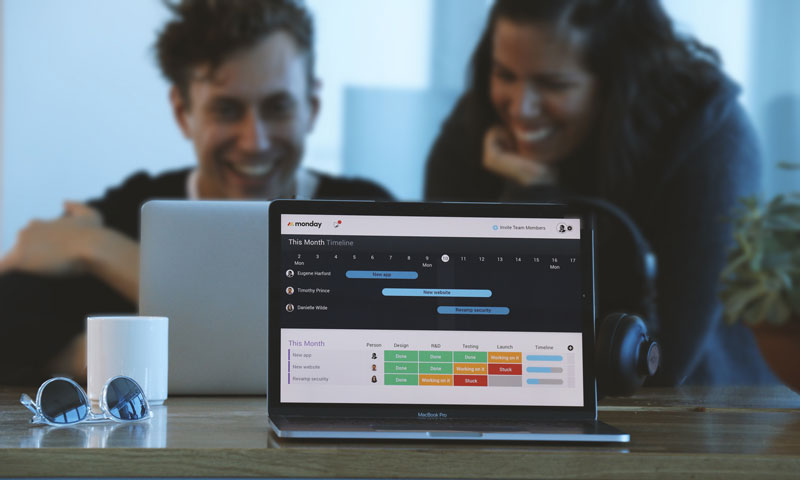
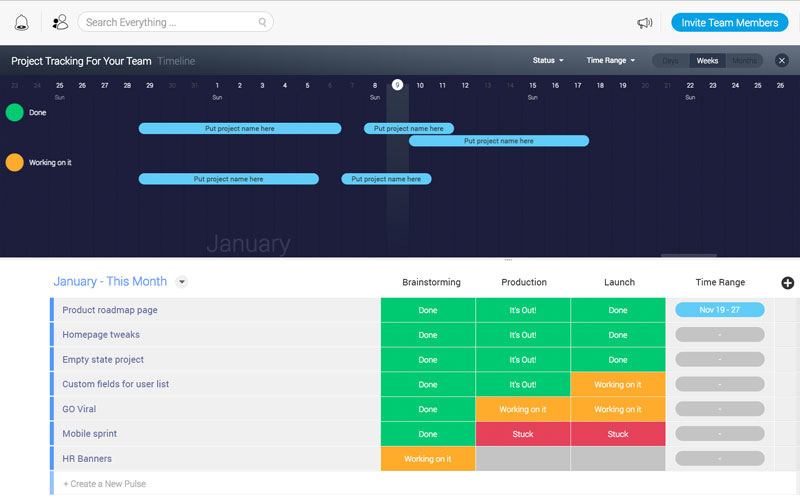
monday.com focused on good design and made a very user-friendly interface with a visual approach. It works very well and makes it quick to get started. A quick overview gives you an idea of what is going on in an intuitive way and directs you on the right path. Here are a couple of screenshots to give you an idea of the user interface.
Above: the timeline makes it simple to have a quick overview, while the to-do list is well-organized with a clever color scheme to know what is done and what is not.
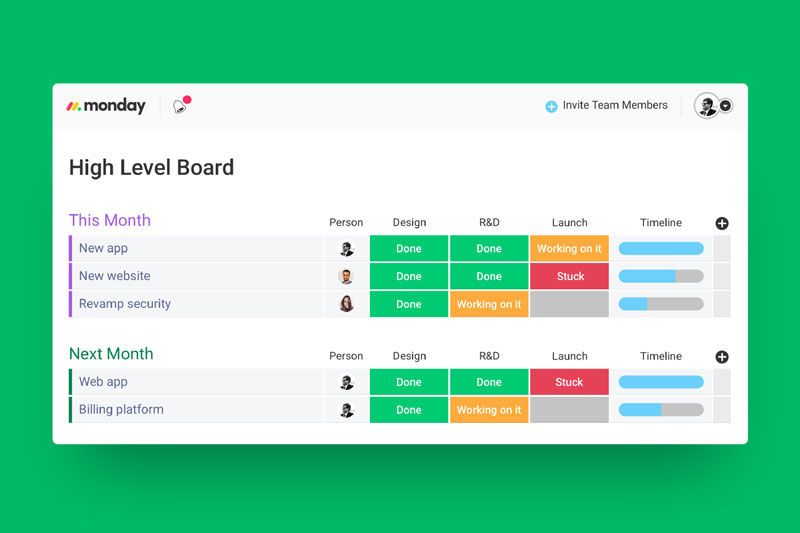
A quick overview of current tasks and upcoming ones, organized by month.
Your project management hub
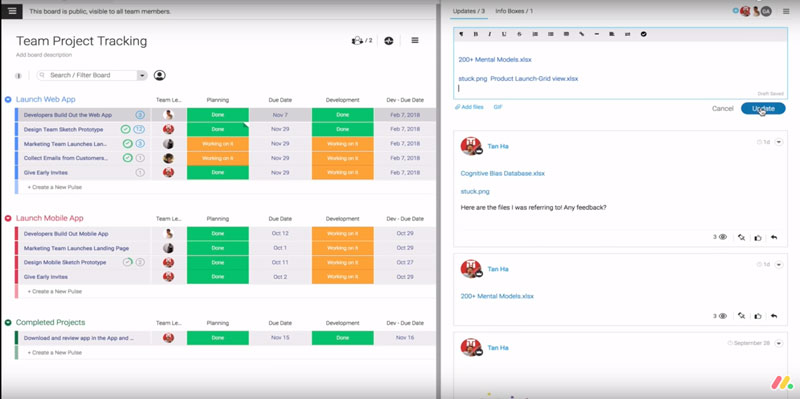
One common issue in projects is that some people can just not keep track of their emails or other messages. Using monday.com, this type of people has no excuses, all communication is centralized, which means that messages will not be lost.
Integration with Google Drive tools or Microsoft Excel also means that you can work with your favorite tools, it will be accessible from your interface. This feature gives your team great incentives to use this team management tool right away.
Easily add files from Dropbox or Google Drive.
On top of that, a powerful built-in search tool allows you to search everything, giving you a productivity boost from quick file access.
Manage your project from anywhere
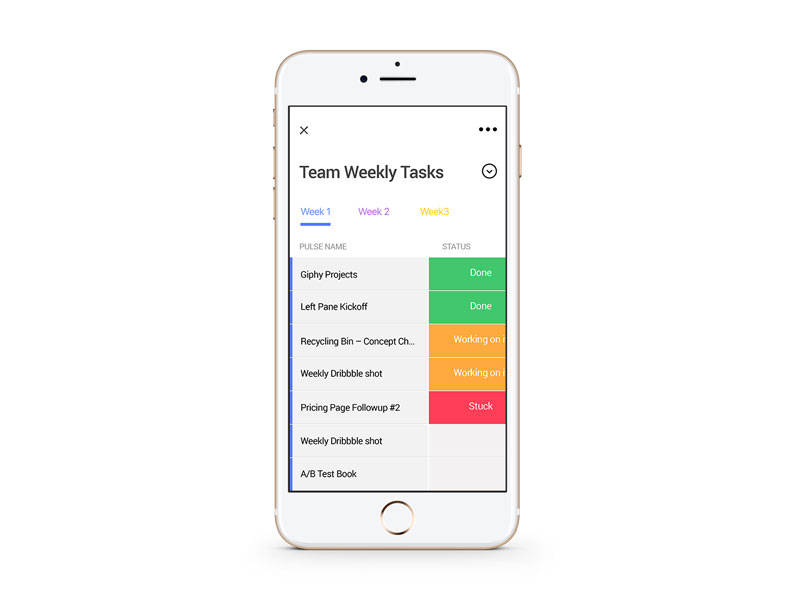
As it should for any flexible worker, you don’t have to stay at your desk to manage your team. The team management tool created by monday.com makes it easy to access all its features from your mobile. Who said you shouldn’t be productive on the road? Obviously, everything is cloud-based so you don’t have to worry about backups or using the right device to access the app.
The app’s user interface on a smartphone.
About monday.com
monday.com is a centralized platform for teams to manage every detail of their work, from high-level roadmap planning to the specifics of day-to-day tasks, while building a culture of transparency.
The platform they built is suitable for any team, no matter the size or nature of the team. It can help a few freelancers to work together or large teams to collaborate across the world, and it doesn’t require a high-level of technical skills. In fact, it is very popular amongst non-tech teams.
The popularity of monday.com is already largely established, with over 22000 teams working with it, from startups to Fortune 500 companies, including WeWork, Samsung, Discovery Channel, Wix, NBC, General Assembly, McDonald’s, Uber, Wix, AOL, and Adidas.
Agregator najlepszych postów o designie, webdesignie, cssie i Internecie