In the time online entrepreneurs change their range of products or reconsider the website content – the web design issues often overlooked. And we can not tell why for sure. Maybe, it is because of the fear to spend extra money and time on a project of the questionable necessity. So, today we would like to figure out is the website redesign could benefit bloggers and e-store owners.
When we say website redesign, we mean the total change of the manner you organize and display your content, the overall appearance of your website pages, and, of course, the implementation of a new users experience. Still, sometimes it is hard to understand if it is time to add some changes to your online presence. That is why we would like to highlight some essential reasons to refresh your website design:
1. Rebranding
It is the obvious reason to change the website look, however, we can not leave it unattended. As the rebranding is a part of every company’s life-cycle, it is important to make your audience aware of it from the first look on your web page. So, either you shift your target market, or change the services list, find a new look for your website, that will reveal the new company course.
2. Bad Bounce Rate
Thank heaven there is a Google Analytics and other platforms that allow evaluating the online performance qualitatively and soberly. One of the most important analytics metrics is the Bounce Rate, which shows the amount of time each visitor spends on your website. If the poor performance takes place – it is another motive to refresh the website design.
3. Your clients feel lost
It is very important to organize your content properly and make sure the search process takes no longer than a few minutes. If your clients can’t proceed single-handedly with such as subscription, personal account log-in, or making requests, you have to change the website navigation system for sure. Otherwise, you will lose potential customers and waste website traffic.
4. Your competitors are better than you
It is okay to compare yourself with other companies, especially with successful ones. If you see the top niche companies redesign their websites – do not hesitate and follow the example. We do not suggest you to copy-paste someone’s ideas and use it for business. Try to stay up-to-date. Explore the latest website trends and use it coupled with your creativity. In such an approach, the competitors’ websites would become a great inspiration source.
5. The mobile-unready website
Isn’t your website mobile-ready yet? But why? This feature is crucial for all the websites today, as the overwhelming majority of people use their mobile devices to explore the Internet and do online shopping. If it is impossible to navigate your website via mobile and the whole content looks poor, make sure to redesign your website and make it fully responsive.
6. Lack of dynamics
Sometimes, you do your best to make everything perfect but don’t really see the result. When it comes to business, a simple desire to sell a product is not enough. You need to experiment to see what works best in terms to catch visitors attention. It is a tricky part, as we all have a very subjective idea of what is interesting and what is not. However, once you achieve the web design that generates leads and sales – you succeed.
If you feel like it is time for you to refresh your e-store or blog then we have a solution for you. Check out the collection of best WordPress themes for blogs and top plugins, that will help you to redesign your website quickly and easily.
Best WordPress Blog Themes
WordPress Theme
Price
Template Category
Imperion
$75
Business Consulting WordPress Themes
Cashmeree
$75
Fashion & Beauty WordPress Templates
Photto
$75
Personal Page WordPress Themes
Fancy Me
$75
Fashion Blog WordPress Theme
AliceBurton
$75
Personal Blog WordPress Theme
Visuelle
$75
Design & Photography WordPress Templates
Richard Gore
$75
Personal Page WordPress Themes
Journez
$75
Travel Guide WordPress Themes
Adverocking
$75
Personal Page WordPress Themes
4News
$75
Best News and Magazine WordPress Themes
Elegacy
$75
Design Studio WordPress Templates
Exibitico
$75
Design & Photography WordPress Templates
CPM
$75
Photographer Portfolio WordPress Themes
Dezingo
$75
Design & Photography WordPress Templates
De Couture
$75
Fashion & Beauty WordPress Templates
Imperion – Multipurpose Corporate WordPress Theme
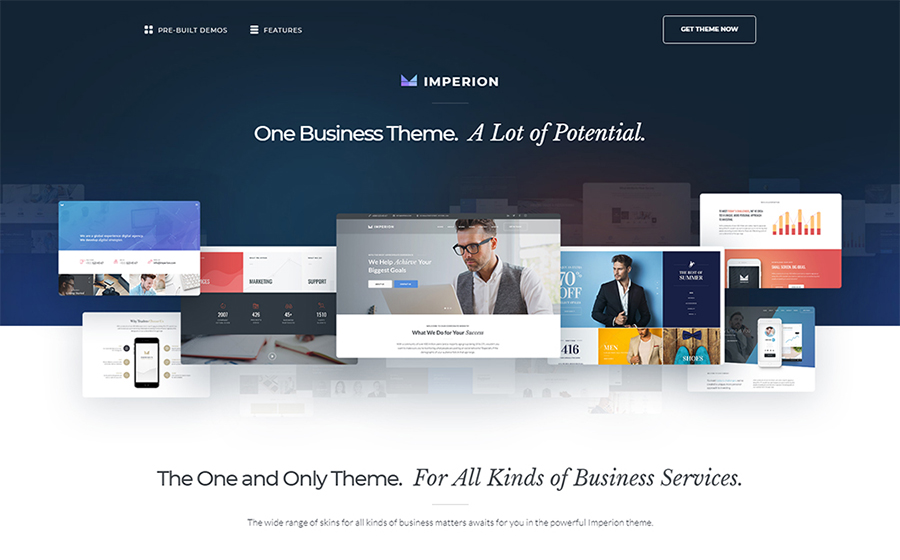
This theme has an advantageous functionality that will bring any business to a whole new level. With a bunch of beautiful ready-made skins you can make outstanding presentations, launch an e-store, build a website for a finance agency and share your business experience around the web.
With vivid skin of Cashmeree theme you can make an alluring fashion website. As this theme was made along the lines of the Mobile First philosophy, your website will look bright and exquisitely on large screens, as well as on tablets and other mobile devices.
Photto – Photographer Blog Elementor WordPress Theme
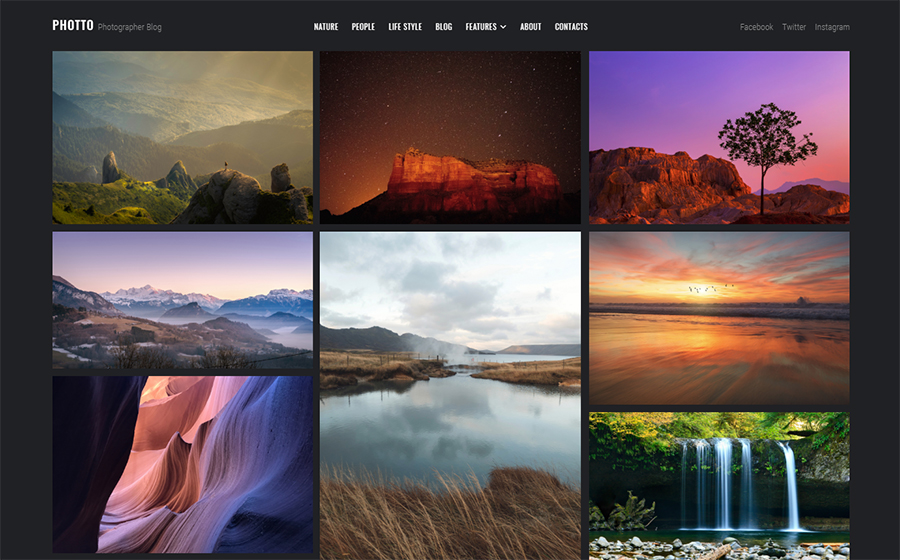
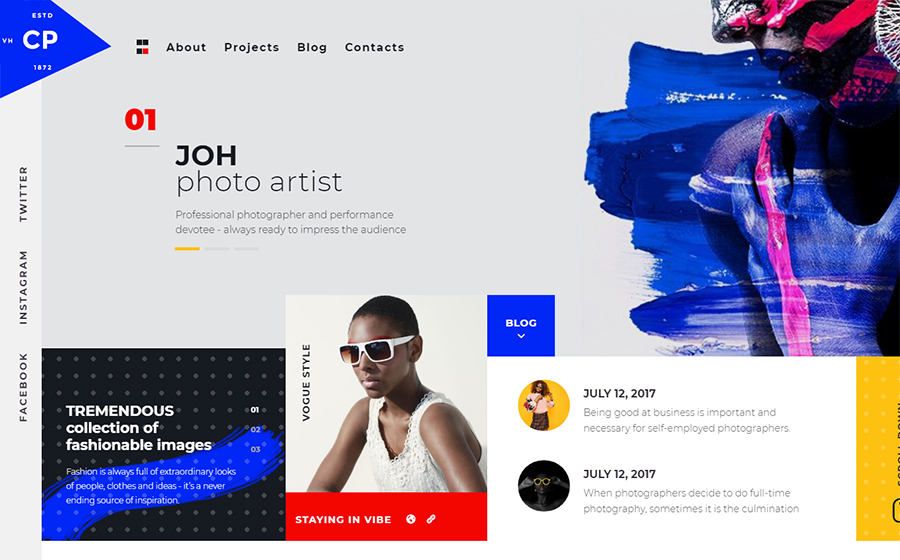
Dreaming about your own photographer blog but don’t really know where to start? Start with Photto theme. It is a gorgeous solution for photographers that allows an effortless creation of a state-of-art online gallery.
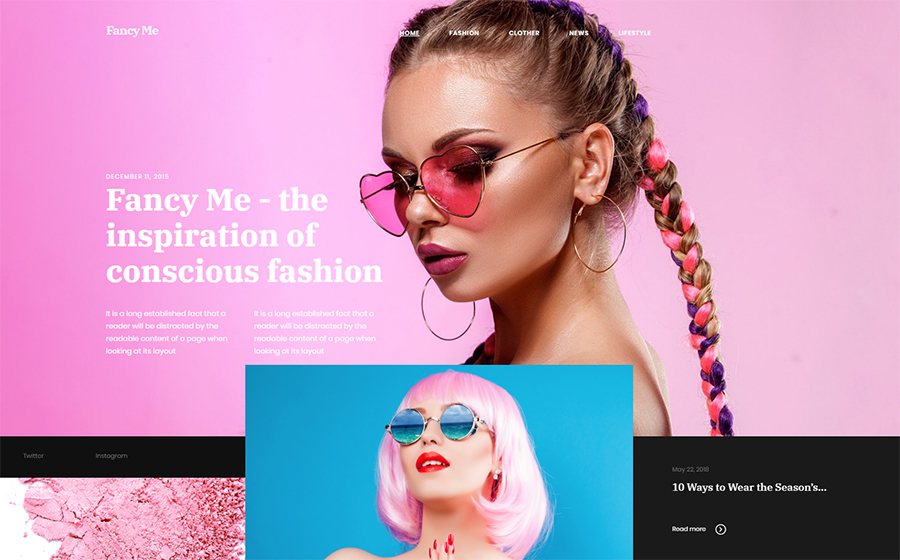
Inspired by latest fashion trends, Fancy Me theme is an excellent choice for your fashion blog. It comes with lots of eye-catching layouts, that are fully-customizable and equipped with amazing functionality provided by premium plugins.
AliceBurton – Personal Blog Elementor WordPress Theme
This theme has a fresh and simple layout that would not distract you visitors from the content you share. Such a theme suits perfectly those bloggers, who want to establish a friendly chilled atmosphere on the personal blog.
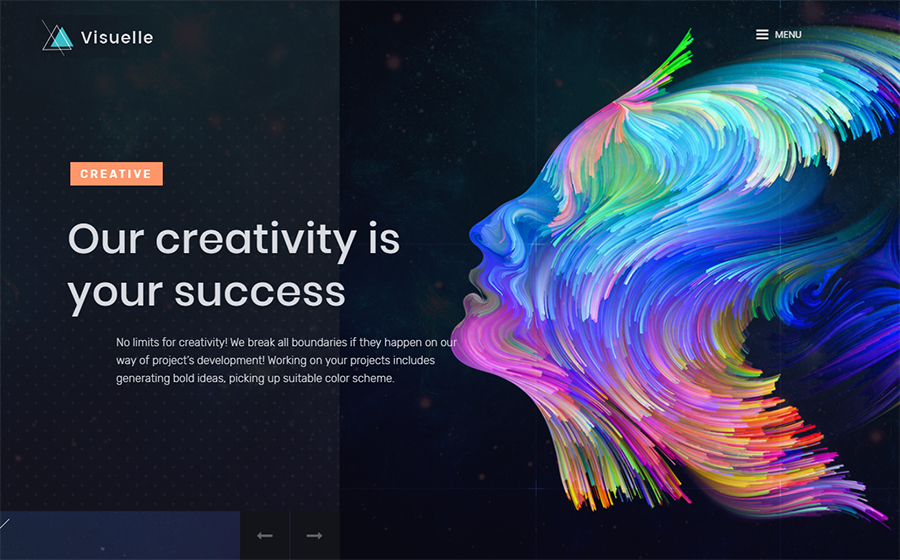
Visualize your wildest dreams and turn them real with Visuelle theme. The very modish and exclusive look of this theme will attract all the creative human being and encourage them to really want explore your website.
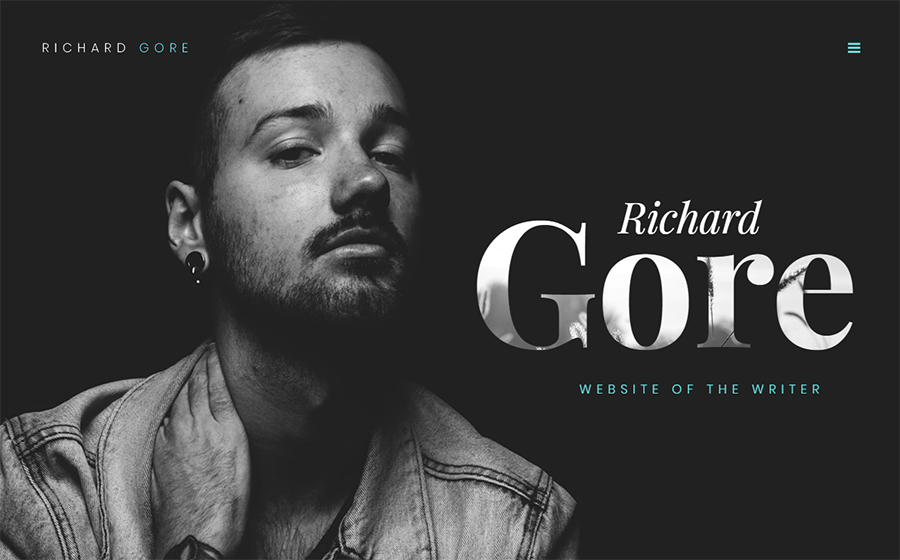
Richard Gore – Writer Portfolio Elementor WordPress Theme
Looking for a nice and classy website design? This customizable WordPress theme comes with amazing plugins, that give you more personalization options and make it possible to boost the efficiency of any website.
Use Journez theme, one of the travelling WordPress themes, to share your incredible travel experience. It has all the needed functionality that will help you to display your content in the most appealing way. Plus, it is great for a mobile use as well.
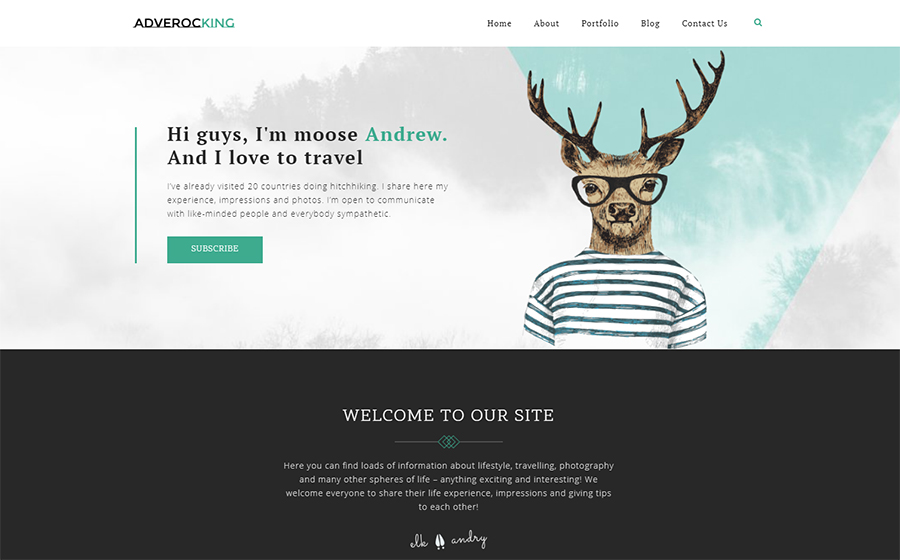
Wanna start a blog or create a lovely portfolio for your photographers work? Give Adverocking theme a go and you won’t regret. It requires no coding skills and has lots of pre-made option that will simplify website designing for you.
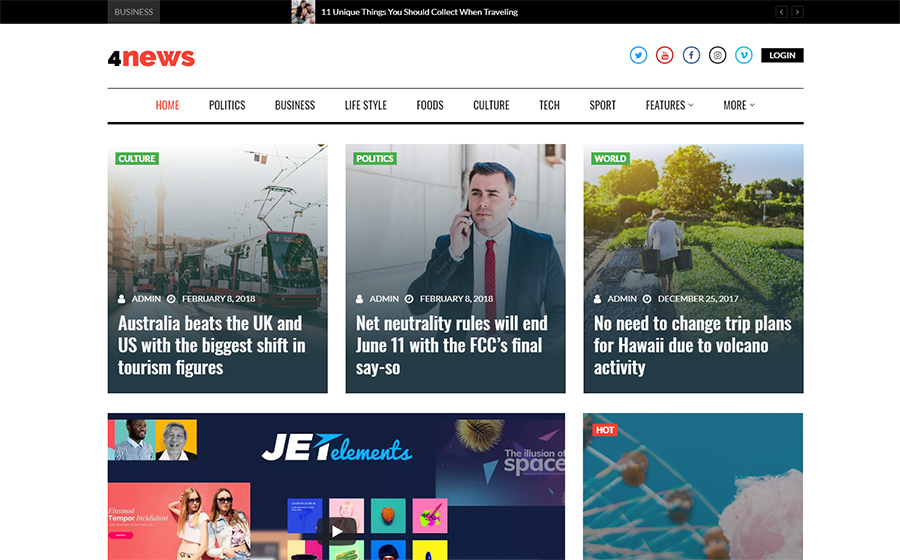
Show this World from the different perspective. With 4News theme you will make a bright and clever news platform. Use a pack of incredibly powerful plugins and stylish Grid style layout to make the content look catchy.
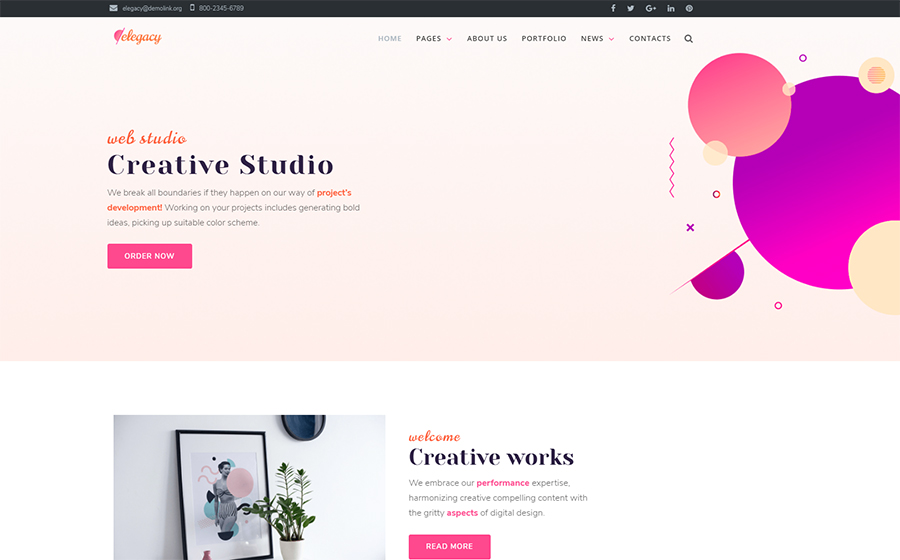
If you choose a theme for your business website, but don’t really know what is the latest web design fashion – pick Elegacy theme. Thus and so, you can be sure, your business has a decent representation and best performance.
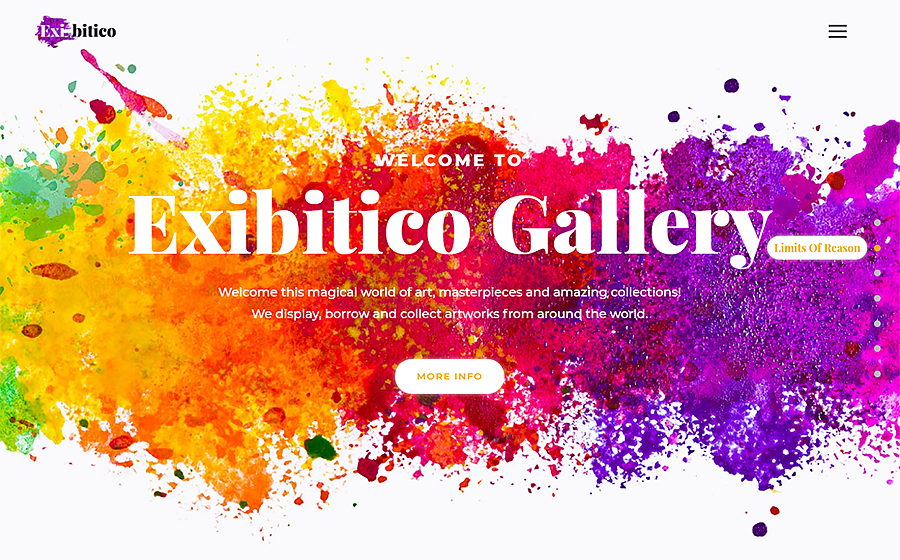
Show off your creativity with Exibitico. This theme it the one to build an outstanding gallery for artworks. This theme This theme has a colorful skin that requires minimum adjustment and stuffed with lots of advanced widgets.
Here is another creative theme for those, who look for something extraordinary. Customize header, footer, and all the website areas using Elementor Live page builder. Drag content modules around the page and create something really special.
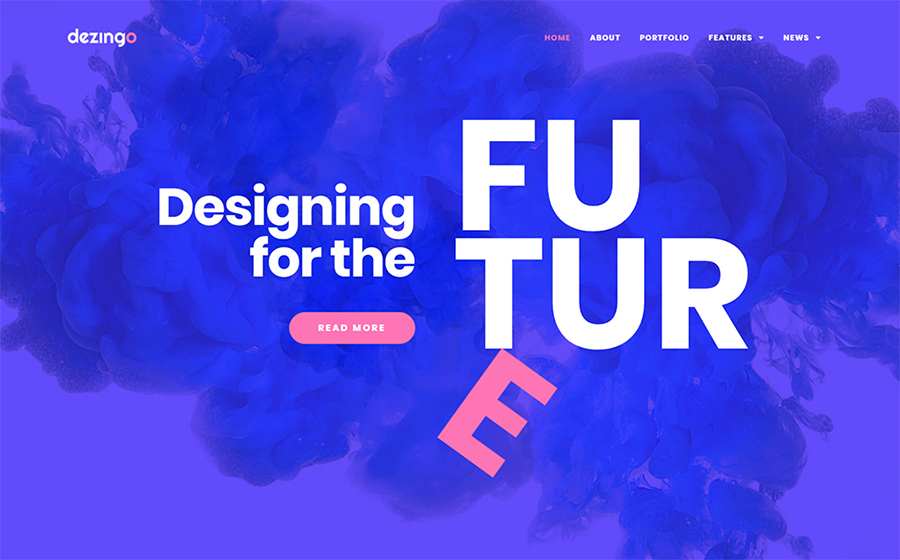
Blow up the Internet with your new creative project. Dezingo theme was made to help entrepreneurs show their startup from the most attractive position, to make audience and potential investors involved.
De Couture – Fancy Fashion & Beauty Blog WordPress Theme
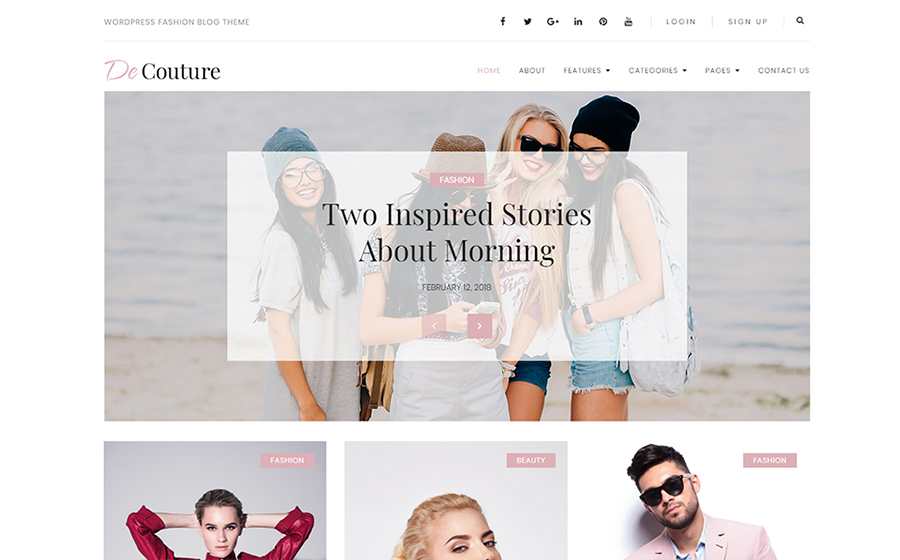
Launch an income-generation store online. With a One-Click installation feature it won’t take long to start your online activity. As the theme is Ecwid Ready and mobile-friendly, it is a great choice for all trendy e-store owners.
As you can see, there are lots of ready-made options for your website, that you can use to not only change its appearance but also increase the volume of visitors and sales. Learning more about plugins for Elementor you can see that anyone can expand the website optional capabilities over the rainbow for $15 only.
In the time online entrepreneurs change their range of products or reconsider the website content – the web design issues often overlooked. And we can not tell why for sure. Maybe, it is because of the fear to spend extra money and time on a project of the questionable necessity. So, today we would like to figure out is the website redesign could benefit bloggers and e-store owners.
When we say website redesign, we mean the total change of the manner you organize and display your content, the overall appearance of your website pages, and, of course, the implementation of a new users experience. Still, sometimes it is hard to understand if it is time to add some changes to your online presence. That is why we would like to highlight some essential reasons to refresh your website design:
1. Rebranding
It is the obvious reason to change the website look, however, we can not leave it unattended. As the rebranding is a part of every company’s life-cycle, it is important to make your audience aware of it from the first look on your web page. So, either you shift your target market, or change the services list, find a new look for your website, that will reveal the new company course.
2. Bad Bounce Rate
Thank heaven there is a Google Analytics and other platforms that allow evaluating the online performance qualitatively and soberly. One of the most important analytics metrics is the Bounce Rate, which shows the amount of time each visitor spends on your website. If the poor performance takes place – it is another motive to refresh the website design.
3. Your clients feel lost
It is very important to organize your content properly and make sure the search process takes no longer than a few minutes. If your clients can’t proceed single-handedly with such as subscription, personal account log-in, or making requests, you have to change the website navigation system for sure. Otherwise, you will lose potential customers and waste website traffic.
4. Your competitors are better than you
It is okay to compare yourself with other companies, especially with successful ones. If you see the top niche companies redesign their websites – do not hesitate and follow the example. We do not suggest you to copy-paste someone’s ideas and use it for business. Try to stay up-to-date. Explore the latest website trends and use it coupled with your creativity. In such an approach, the competitors’ websites would become a great inspiration source.
5. The mobile-unready website
Isn’t your website mobile-ready yet? But why? This feature is crucial for all the websites today, as the overwhelming majority of people use their mobile devices to explore the Internet and do online shopping. If it is impossible to navigate your website via mobile and the whole content looks poor, make sure to redesign your website and make it fully responsive.
6. Lack of dynamics
Sometimes, you do your best to make everything perfect but don’t really see the result. When it comes to business, a simple desire to sell a product is not enough. You need to experiment to see what works best in terms to catch visitors attention. It is a tricky part, as we all have a very subjective idea of what is interesting and what is not. However, once you achieve the web design that generates leads and sales – you succeed.
If you feel like it is time for you to refresh your e-store or blog then we have a solution for you. Check out the collection of best WordPress themes for blogs and top plugins, that will help you to redesign your website quickly and easily.
Best WordPress Blog Themes
WordPress Theme
Price
Template Category
Imperion
$75
Business Consulting WordPress Themes
Cashmeree
$75
Fashion & Beauty WordPress Templates
Photto
$75
Personal Page WordPress Themes
Fancy Me
$75
Fashion Blog WordPress Theme
AliceBurton
$75
Personal Blog WordPress Theme
Visuelle
$75
Design & Photography WordPress Templates
Richard Gore
$75
Personal Page WordPress Themes
Journez
$75
Travel Guide WordPress Themes
Adverocking
$75
Personal Page WordPress Themes
4News
$75
Best News and Magazine WordPress Themes
Elegacy
$75
Design Studio WordPress Templates
Exibitico
$75
Design & Photography WordPress Templates
CPM
$75
Photographer Portfolio WordPress Themes
Dezingo
$75
Design & Photography WordPress Templates
De Couture
$75
Fashion & Beauty WordPress Templates
Imperion – Multipurpose Corporate WordPress Theme
This theme has an advantageous functionality that will bring any business to a whole new level. With a bunch of beautiful ready-made skins you can make outstanding presentations, launch an e-store, build a website for a finance agency and share your business experience around the web.
With vivid skin of Cashmeree theme you can make an alluring fashion website. As this theme was made along the lines of the Mobile First philosophy, your website will look bright and exquisitely on large screens, as well as on tablets and other mobile devices.
Photto – Photographer Blog Elementor WordPress Theme
Dreaming about your own photographer blog but don’t really know where to start? Start with Photto theme. It is a gorgeous solution for photographers that allows an effortless creation of a state-of-art online gallery.
Inspired by latest fashion trends, Fancy Me theme is an excellent choice for your fashion blog. It comes with lots of eye-catching layouts, that are fully-customizable and equipped with amazing functionality provided by premium plugins.
AliceBurton – Personal Blog Elementor WordPress Theme
This theme has a fresh and simple layout that would not distract you visitors from the content you share. Such a theme suits perfectly those bloggers, who want to establish a friendly chilled atmosphere on the personal blog.
Visualize your wildest dreams and turn them real with Visuelle theme. The very modish and exclusive look of this theme will attract all the creative human being and encourage them to really want explore your website.
Richard Gore – Writer Portfolio Elementor WordPress Theme
Looking for a nice and classy website design? This customizable WordPress theme comes with amazing plugins, that give you more personalization options and make it possible to boost the efficiency of any website.
Use Journez theme, one of the travelling WordPress themes, to share your incredible travel experience. It has all the needed functionality that will help you to display your content in the most appealing way. Plus, it is great for a mobile use as well.
Wanna start a blog or create a lovely portfolio for your photographers work? Give Adverocking theme a go and you won’t regret. It requires no coding skills and has lots of pre-made option that will simplify website designing for you.
Show this World from the different perspective. With 4News theme you will make a bright and clever news platform. Use a pack of incredibly powerful plugins and stylish Grid style layout to make the content look catchy.
If you choose a theme for your business website, but don’t really know what is the latest web design fashion – pick Elegacy theme. Thus and so, you can be sure, your business has a decent representation and best performance.
Show off your creativity with Exibitico. This theme it the one to build an outstanding gallery for artworks. This theme This theme has a colorful skin that requires minimum adjustment and stuffed with lots of advanced widgets.
Here is another creative theme for those, who look for something extraordinary. Customize header, footer, and all the website areas using Elementor Live page builder. Drag content modules around the page and create something really special.
Blow up the Internet with your new creative project. Dezingo theme was made to help entrepreneurs show their startup from the most attractive position, to make audience and potential investors involved.
De Couture – Fancy Fashion & Beauty Blog WordPress Theme
Launch an income-generation store online. With a One-Click installation feature it won’t take long to start your online activity. As the theme is Ecwid Ready and mobile-friendly, it is a great choice for all trendy e-store owners.
As you can see, there are lots of ready-made options for your website, that you can use to not only change its appearance but also increase the volume of visitors and sales. Learning more about plugins for Elementor you can see that anyone can expand the website optional capabilities over the rainbow for $15 only.
I got a great email from a fellow named Josh Long the other day. He is, in his words, „relatively new to web design” and was a bit stuck on the concept of getting a site live. I should say that I’m happy to get emails like this an I always read them, but I typically can’t offer tech support over email. If I can respond at all, I normally point people to other community resources.
In this case, it struck me what a perfect moment this is for Josh. He’s a little confused, but he knows enough to be asking a lot of questions and sorting through all this stuff. I figured this was a wonderful opportunity to dig into his questions, hopefully helping him and just maybe helping others in a similar situation.
Here’s one of the original paragraphs Josh sent me, completely unedited:
I’m relatively new to web design, but I’ve taken a few courses on HTML and CSS and I’ve done a Codecademy course on JavaScript. But, (jumping forward probably quite a while here!) after having fully designed and coded a HTML/CSS/JS website or webpage, I don’t fully understand the full process of going from a local site hosted with mamp/wamp to publishing a public site using wordpress(?) or some other host (is WordPress even a host?!) and also finding a server that’s suitable and some way of hosting images/videos or other content. (If that sounded like I didn’t know what half of those meant, it’s because unfortunately I don’t!.. but I’d really like to!)
Can you sense that enthusiasm? I love it.
We worked together a bit to refine many of his questions for this post, but they are still Josh’s words. Here we go!
What is a Domain Registrar? I get they are for registering domain names, but what’s the difference between them? How do you know which one is right for you? A quick search for „best domain hosts” on Google gave me 5 ads for companies who are domain registrars/hosts and 9 „Top 10” style pages that look as though they have some sort of affiliation with at least one company they’re suggesting. Am I just looking for the cheapest one?
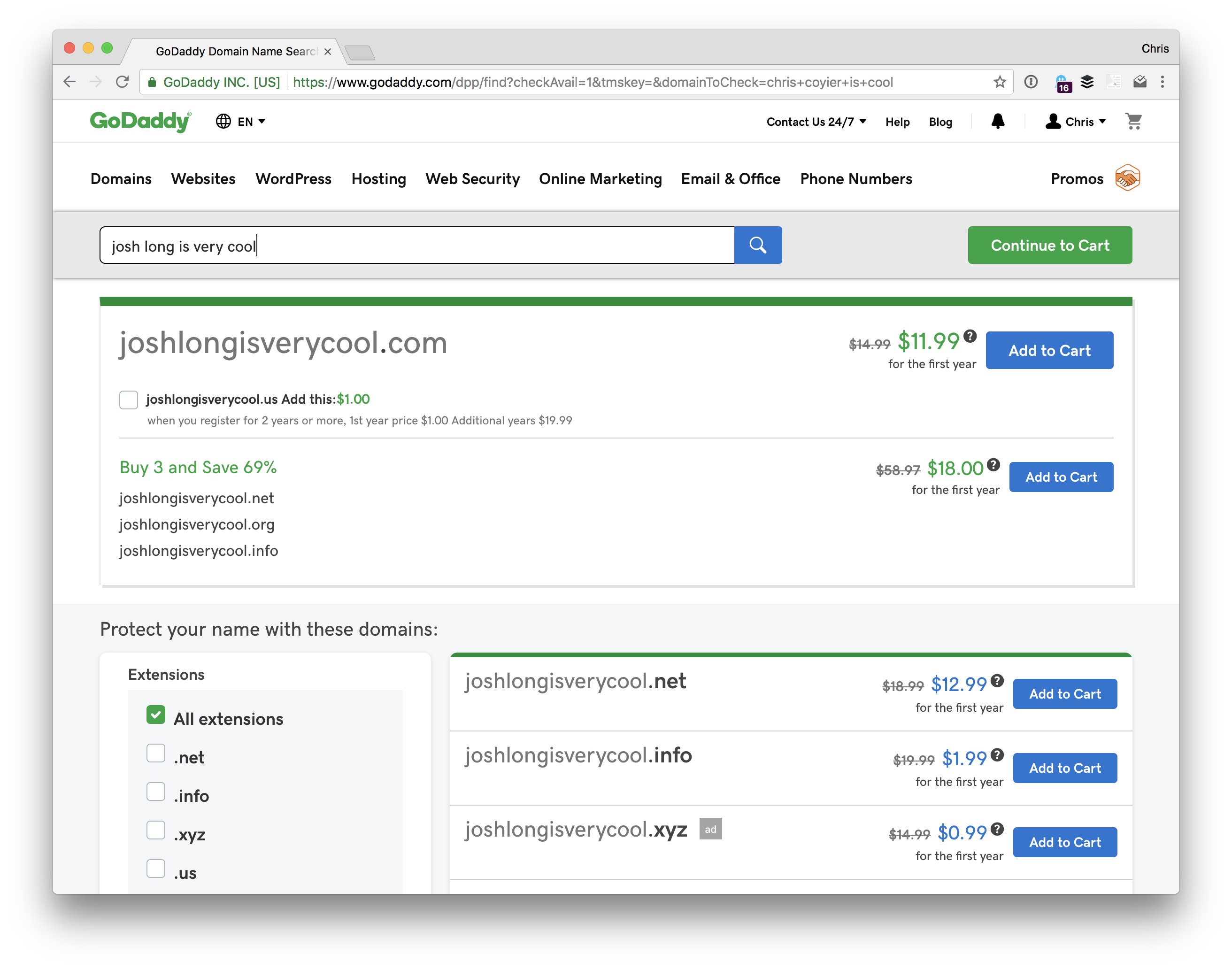
You’re exactly right, domain registrants are for registering domain names. If you want joshlongisverycool.com, you’re going to have to buy it, and domain registrants are companies that help you do that.
Searching for a domain name
It’s a bummer that web search results are so saturated by ads and affiliate-link-saturated SEO-jacked pages. You’ll never get total honesty from that because those pages are full of links promoting whoever will pay them the most to send new customers. Heck, even Google themselves will sell you a domain name.
The truth is that you can’t go too wrong here. Domain names are a bit of a commodity and the hundreds of companies that will sell you one largely compete on marketing.
Some things to watch out for:
Some companies treat the domain as a loss leader. Like a grocery store selling cheap milk to hope you buy some more stuff while you are there. The check out process at any domain registrant will almost certainly try to sell you a bunch of extra stuff. For example, they might try to sell you additional domain names or email hosting you probably don’t need. Just be careful.
Web hosts (which we’re getting to next) will often sell them to you along with hosting. That’s fine I suppose, but I consider it a bit of a conflict of interest. Say you choose to move hosts one day. That hosting company is incentivized in the wrong direction to make that easy for you. If the domain is handled elsewhere, that domain registrant is incentivized the right direction to help you make changes.
I hate to add to the noise for you, but here are some domain registrants that I’ve used personally and aren’t paying for sponsorship here nor are affiliate links:
Our own Sarah Drasner recommends looking at ZEIT domains, which are super interesting in that you buy and manage them entirely over the command line.
I might suggest, if you can see yourself owning several domain names in your life, keeping them consolidated to a single registrant. Managing domains isn’t something you’ll do very often, so it’s easy to lose track of what domains you registered on what registrant, not to mention how/where to change all the settings across different registrants.
I’d also suggest it’s OK to experiment here. That’s how all of us have learned. Pick one with a UI that you don’t hate and a trustable vibe. Maybe your friend also uses that one. Hopefully, it works out fine. If you hate it, it’ll be a little work, but you can always switch.
What is a web host and why do I need one? A Google search throws you a mountain of „best web host” articles and ads. These websites all seem to be full of jargon like „shared hosting” and „managed hosting.” I see things like „suggested hosts” on some sites. How do you find the right web host? I’m not even sure what my needs are. Should I just find the cheapest one?
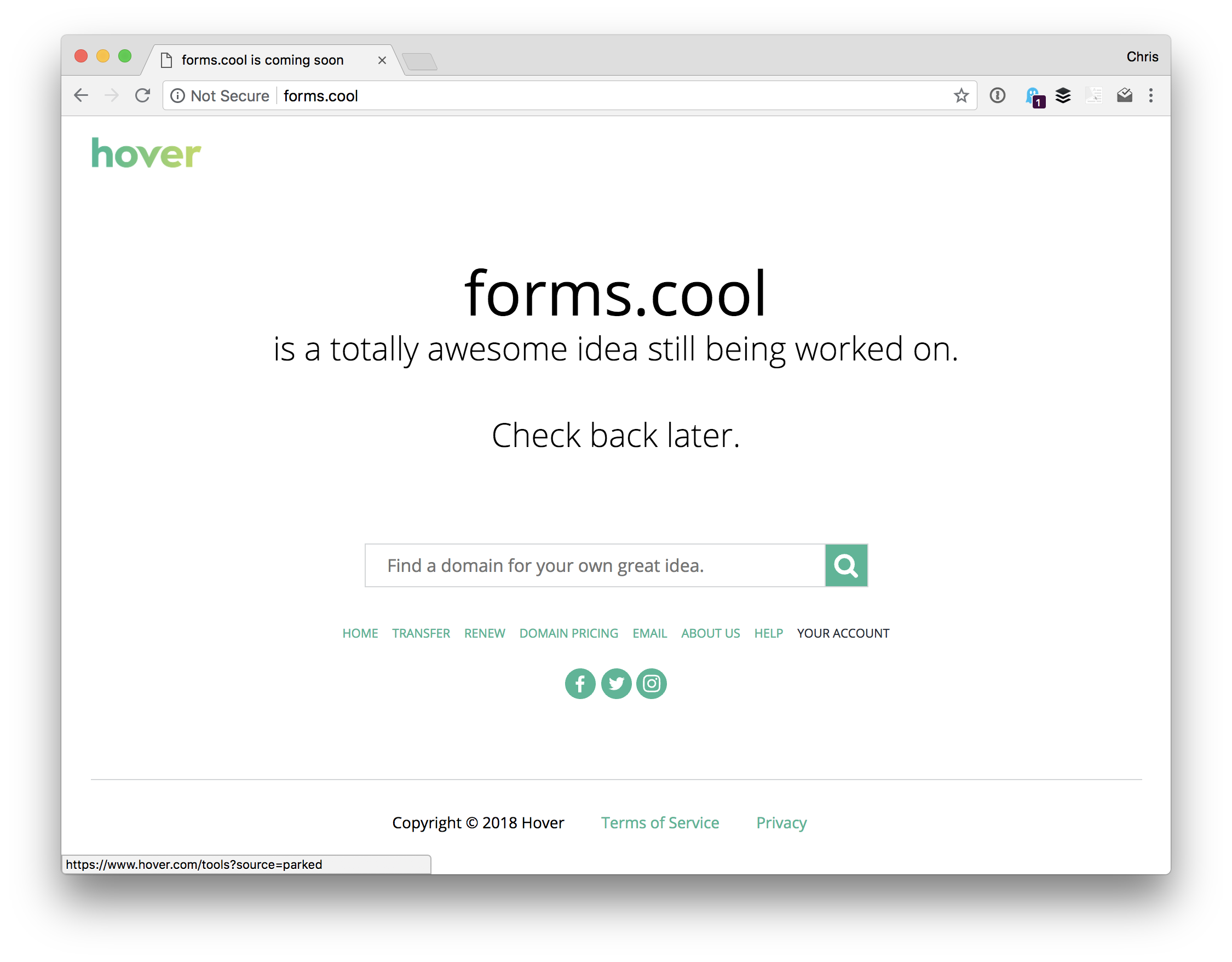
Just because you own a domain doesn’t mean it will do anything. In fact, right after you buy it, it’s likely that the domain registrant slaps up a „coming soon” page for you:
A „coming soon” page you might see immediately after buying a domain name.
To host a website at your new domain, you’ll need to configure the DNS of your new domain to point at a server connected to the internet. Here’s an interesting tidbit… you could do this right from your house if you wanted to. Your Internet Service Provider (ISP) at home probably gives you an IP address. It’s all a bit nerdy, but you could point your domain name at that IP and set up your computer to be a web server that responds to incoming requests and serves up your website. Almost nobody does that though. You don’t want your web server to stop working because you closed your laptop or your ISP changed your IP.
Web hosting services give you that server. Like domain registrants, web hosts are almost a commodity. There are lots of them that provide a similar service, so the price is driven fairly low and they find other things to compete on.
Buying web hosting is a little trickier than buying a domain though. You’ll need to know a little bit about the website you intend to host when making that choice. Will it be a WordPress site? Or another PHP/MySQL-based CMS site (we’ll get to those later)? That means your host will need to support those technologies. Most do, some don’t. You might wanna look in their documentation or literally ask them before pulling the trigger if you are unsure. There are lots of technologies for running websites. Say the site will use Ruby on Rails — that’s a different set of requirements that not all hosts offer. Or Node… Or Python… same story.
If a web host says they specialize in a particular set of technologies, and that’s what you need, that’s probably a decent way to go, particularly in your early days. Let’s take a very limited gander. Again, these are not affiliate or paid-for links and they are somewhat randomly selected web hosts that come to mind for me:
WP Engine is a web host that focuses specifically on WordPress.
BlueHost is has very inexpensive hosting choices, but has essentially the same capabilities as those others.
Now here some other web hosts that are a little less traditional. Forgive the techy terms here — if they don’t mean anything to you, just ignore them.
Netlify does static site hosting, which is great for things like static site generators and JAMstack sites.
Zeit is a host where you interact with it only through the command line.
Digital Ocean has their own way of talking about hosting. They call their servers Droplets, which are kind of like virtual machines with extra features.
Heroku is great for hosting apps with a ready-to-use backend for things like Node, Ruby, Java, and Python.
Again, I’d say it’s OK to, in a sense, make some mistakes here. If you aren’t hosting something particularly mission-critical, like your personal website, pick a host that seems to fit the bill and give it a go. Hopefully, it works out great — if not, you can move. Moving isn’t always super fun, but everybody ends up doing it, and you’ll learn as you go.
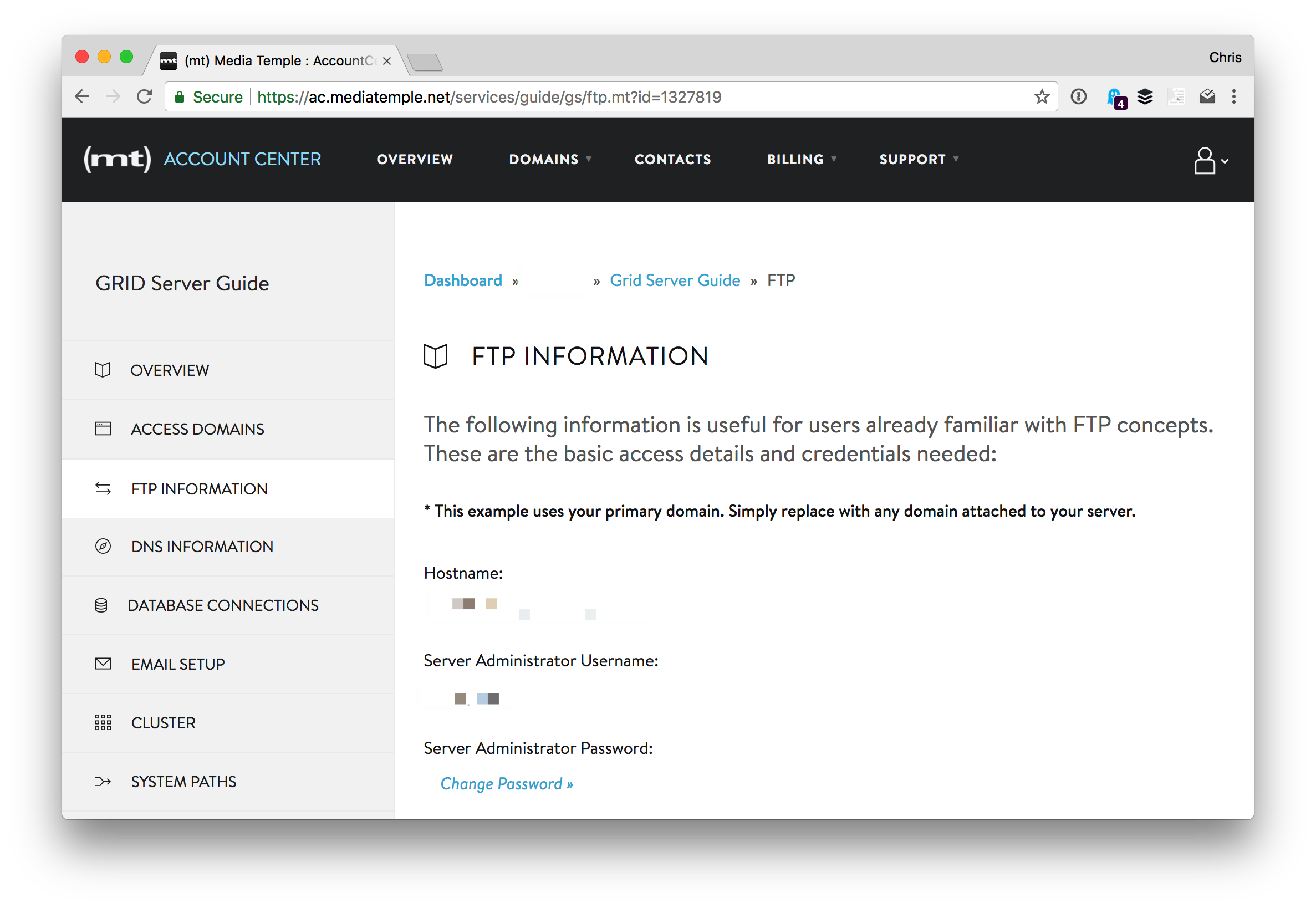
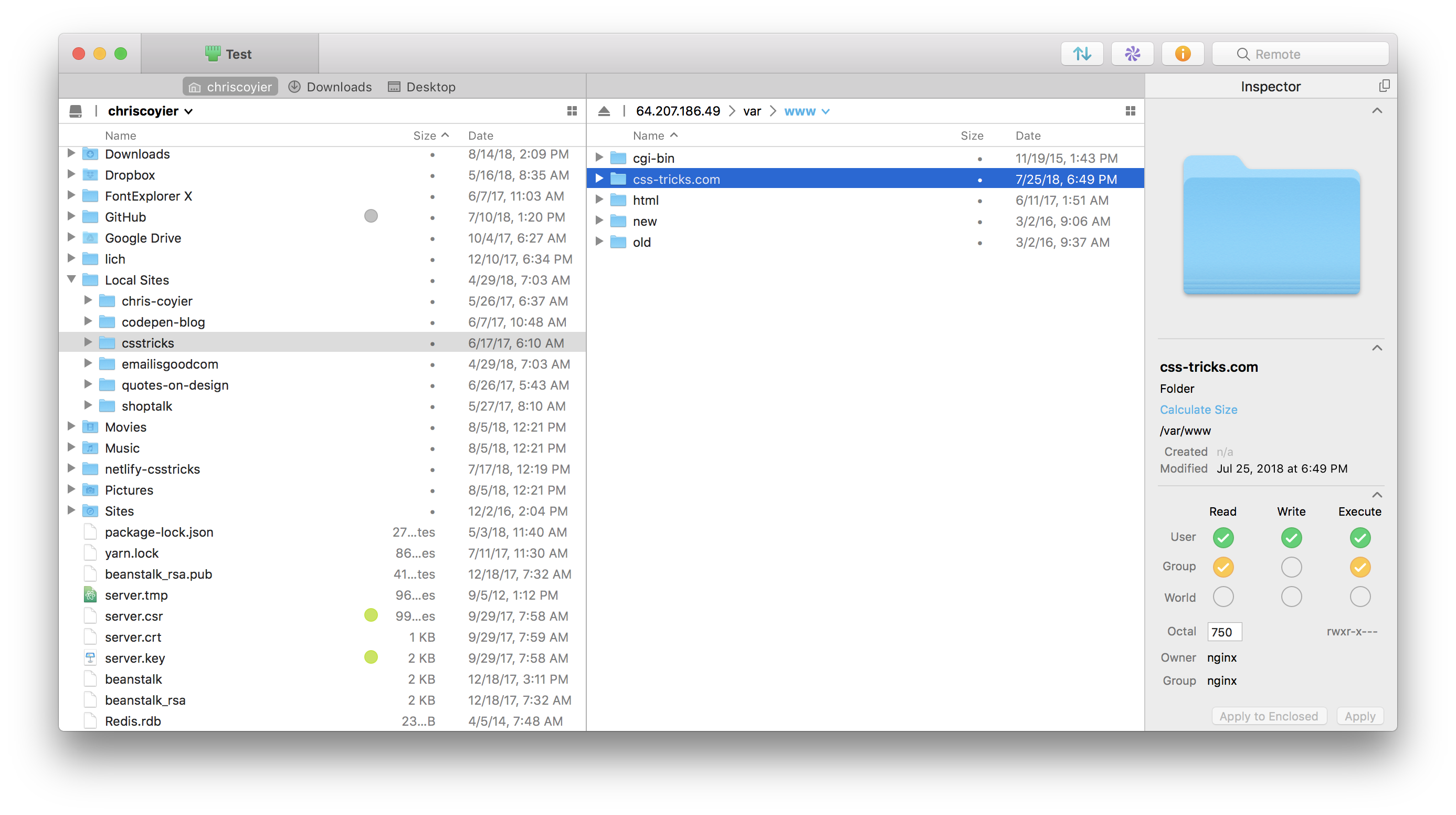
When you buy web hosting, that host is going to tell you how to use it. One common way is that the host will give you SFTP credentials. Then you’ll use software that is built for connecting to servers over SFTP, and that will allow you to upload files to the web server.
This is a magic moment!
Say you’ve been working on a file that is a single index.html file, that loads a style.css file. Upload those files over SFTP into the folder your host tells you is correct public root directory for that site.
That is the process for taking a site from local to live! There is nothing wrong with it, either. This is referred to as deployment, and this is about as basic and simple as it gets. Even fancier ways of doing deployment sometimes ultimately do just this behind the scenes. We’ll get more into deployment later.
Should you bundle your domain registrar and web host into one if a company offers both?
I mentioned this above a little: I’m a fan of not doing that in general. On one hand, it’s mighty handy. Things like shared billing and a single checkout flow. The host will also do things like configuring the DNS for you to be all set up for their hosting and you probably don’t even have to think about it.
But say the day comes where you just don’t like that host anymore. You’ve found a better deal, outgrown them, were turned off by their support or service, or any other reason. You want to move hosts. The problem is that they aren’t just your host, but your domain registrant, too. Do you leave the domain with them and just move hosts? Probably not, you’re trying to leave them. Now you need to move two things. That makes that move all the more perilous, but worse, this company isn’t exactly incentivized to respond quickly and helpfully to your requests since they know they’re losing you as a customer.
What really is a „CMS”? What’s its purpose? WordPress, Joomla, and Drupal are the most popular names I’ve found for content management systems, and from their descriptions, all sound very similar. What are the kinds of features that set one apart from another? Is a CMS all you need to get your website from your local computer to the public internet?
CMS (Content Management System) is a pretty generic term. It means literally anything that helps you manage content. There are, as you’ve seen, some big players like WordPress and CraftCMS. They don’t really have anything directly to do with that connection between working locally on a site and getting that site live. But they do rather complicate it.
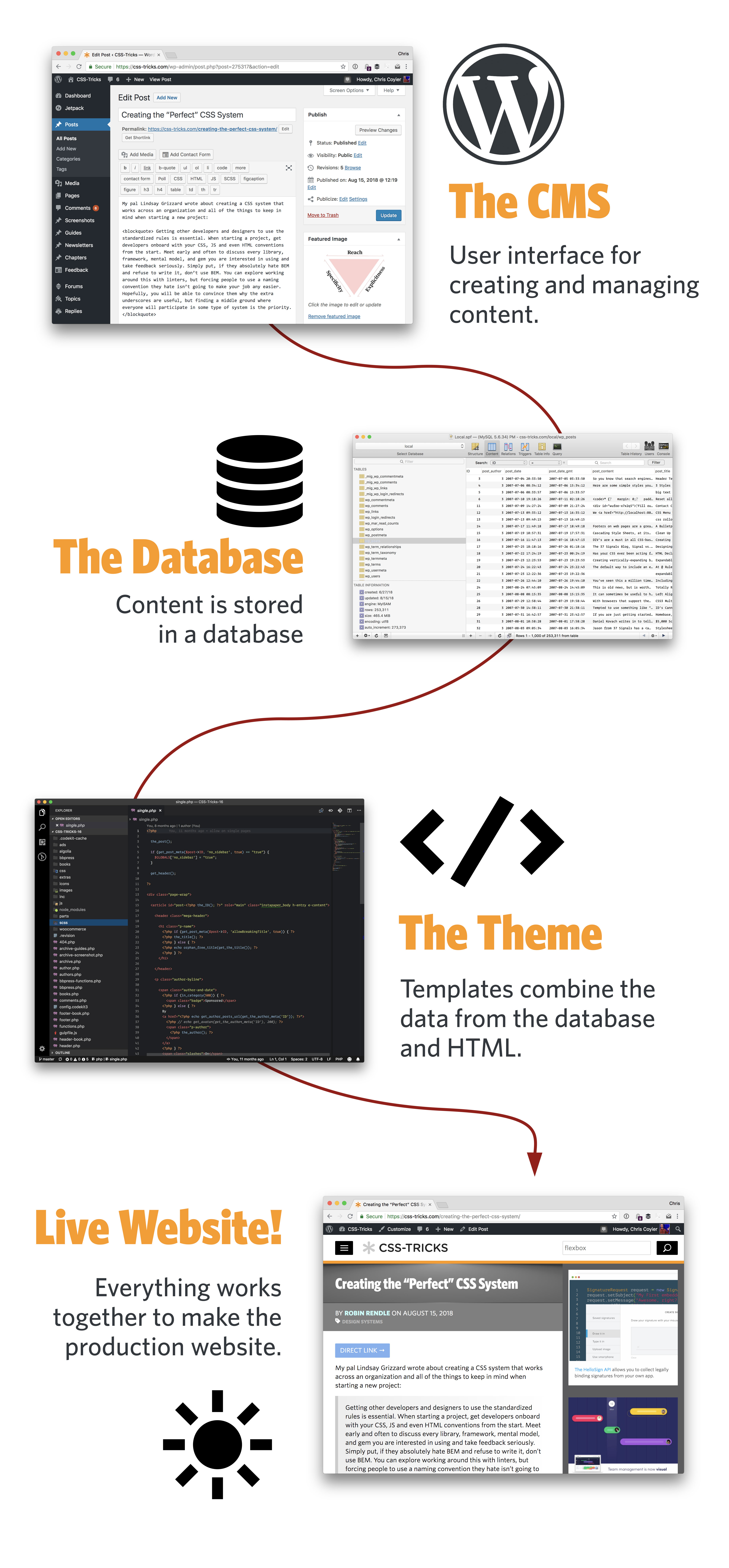
The reason that you’d use a CMS at all is to make working on your site easier. Consider this site you’re looking at right now. There are tens of thousands of pages on this site. It would be untenable for each of them to be a hand-authored file.html file.
Instead, a CMS allows us to craft all those pages by combining data and templates.
Let’s consider the technology behind WordPress, a CMS that works pretty good for CSS-Tricks. In order for WordPress to run, it needs:
PHP (the back-end language)
MySQL (the database)
Apache (the web server)
You can do all that locally!
I use Local by Flywheel for that (Mac and Windows), but there are a number of ways to get those technologies running: MAMP, Docker, Vagrant, etc.
That’ll get you up and running locally with your CMS. That’s a beautiful thing. Having a good local development environment for your site is crucial. But it doesn’t help you get that site live.
We’ll go over getting all this to a live site a bit later, but you should know this: the web server that you run will need to run these same technologies. Looking at the WordPress example from above, your web server will also need to run PHP, MySQL, and Apache. Then you’ll need to set up a system for getting all your files from your local computer to your web server like you would for any other site, but also probably have a system for dealing with the database. The database is a bit tricky as it’s not a „flat file” like most of the rest of your site.
A CMS could be built from any set of technologies, not just the ones listed above. For example, see KeystoneJS. Instead of PHP, Keystone is Node.js. Instead of MySQL for the database, it uses MongoDB. Instead of Apache, it uses Express. Just a different set of technologies. Both of which you can get running locally and on a live web server.
A CMS could even have no database at all! Static site generators are like this. You get the site running locally, and they produce a set of flat files which you move to your live server. A different way to do things, but absolutely still a CMS. What I always say is that the best CMS is one that is customized to your needs.
What is „Asset Hosting”? Are assets not content? What is the difference between a CMS and an asset hosting service? What does an asset host do?
Let’s define an asset: any „flat” file. As in, not dynamically generated like how a CMS might generate an HTML file. Images are a prime example of an „asset.” But it’s also things like CSS and JavaScript files, as well as videos and PDFs.
And before we get any further: you probably don’t need to worry about this right away. Your web host can host assets and that’s plenty fine for your early days on small sites.
One major reason people go with an asset host (probably more commonly referred to as a CDN or Content Delivery Network) is for a speed boost. Asset hosts are also servers, just like your web host’s web server, but they are designed for hosting those flat file assets super fast. So, not only do those assets get delivered to people looking at your site super fast, but your web server is relieved of that burden.
You could even think of something like YouTube as an asset host. That 100 MB video of a butterfly in your garden is a heavy load for your little web server, and potentially a problem if your outgoing bandwidth is capped like it often is. Uploading that video to YouTube puts your video into that whole social universe, but a big reason to do it other than the social stuff is that it’s hosting that video asset for you.
I’ve heard of „repositories”, but don’t really get what they are. I hear stuff like „just upload it to my Git Repository.” What the heck does that mean? I feel like a moron for asking this. What is Git? What is it for? Do I need to use it? Is it involved in the „local to live” process at all?
Sorry you got hit with a „just” there. There is an epidemic in technology conversations where people slip that in to make it seem like what they are about to say is easy and obvious when it could be neither depending on who is reading.
But let’s get into talking about Git repositories.
Git is a specific form of version control. There are others, but Git is so dominant in the web industry that it’s hardly worth mentioning any others.
Let’s say you and me are working on a website together. We’ve purchased a domain and hosting and gotten the site live. We’ve shared the SFTP credentials so we both have access to change the files on the live site. This could be quite dangerous!
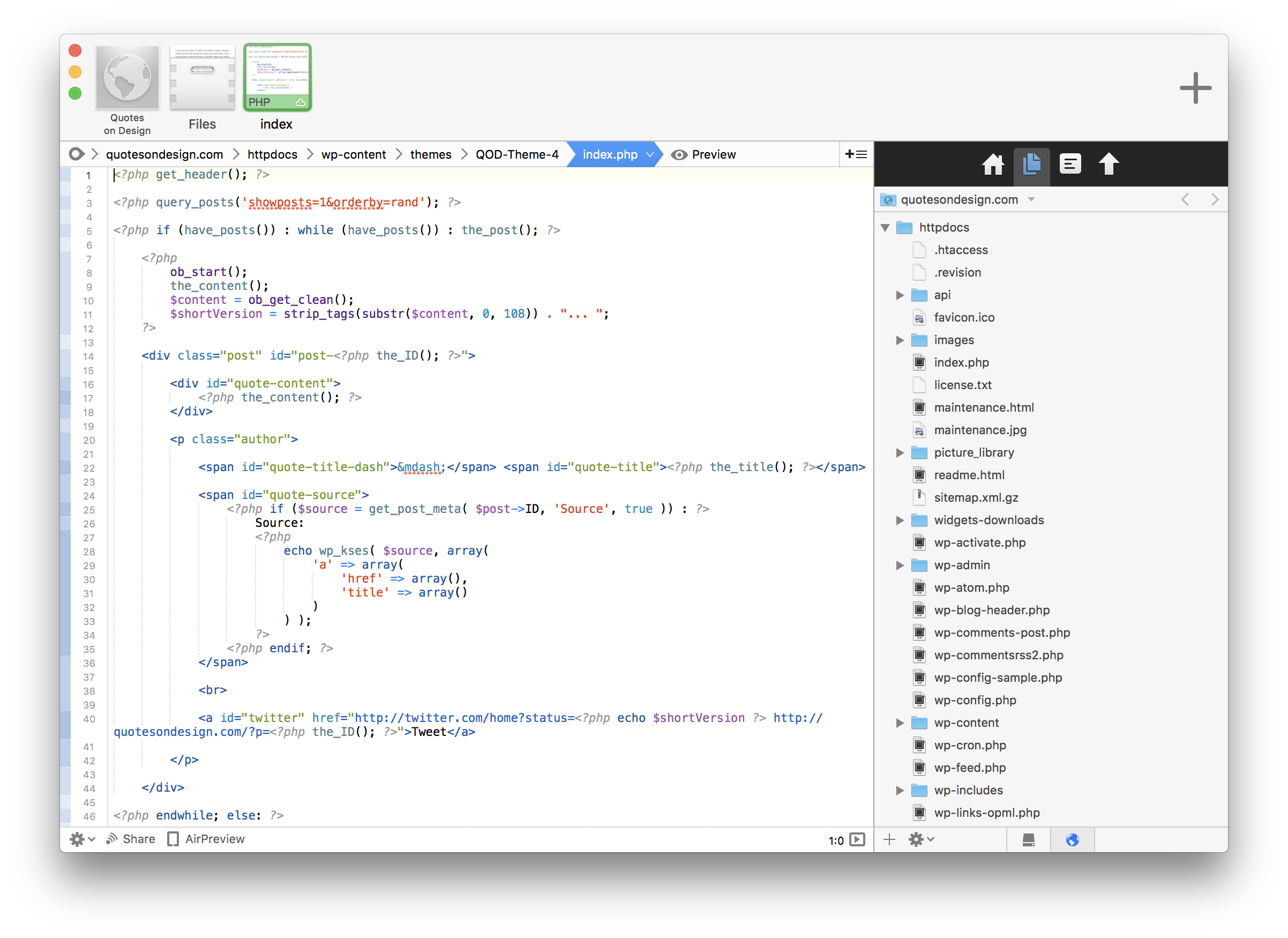
Coda is a code editor that let’s you edit files directly on a sever you’ve connected to over SFTP. Cool, but dangerous!
Say we both edit a file and upload it over SFTP… which change wins? It’s whoever uploaded their file last. We have no idea who has done what. We’re over-writing each other and have no way of staying in sync with each other’s changes, changes immediately affect the live site which could break things and we have no way of undoing changes in case we break things. That’s a situation so unacceptable that it’s really never done.
Instead, we work with version control, like Git. With Git, when we make changes, we commit them to a repository. A repository can be hosted anywhere, even on your local machine. But to make them really useful, they are hosted on the internet somewhere everyone has access to. You’ve surely seen GitHub, which hosts these repositories and adds a bunch of other features like issue tracking. Similar are GitLab and Bitbucket.
Now let’s say you and me are working on that same site, but we’ve set up a Git repository for it. When I make a change, I commit it to the repository. If you want to make a change as well, you have to pull my changes down which merges them into your own copy of the code. Then you can push your changes up to the repository. Like anything, it gets more complicated, but that’s the gist of it.
But a Git repository isn’t the live website. You’re on your own for getting the files from a Git repository to a live site. Fortunately, that’s a situation that everyone faces, so there are lots of options. Good thing your last question is about this!
OK. So now with all that straight… where do you start with going from local to live? Where do you „upload” your HTML, CSS and JavaScript files? How do you link your shiny new domain name to those files and see it out in the wild? Which service is in charge of adding new content to your site, or updating it? Does it get really confusing if you have different companies for each service?
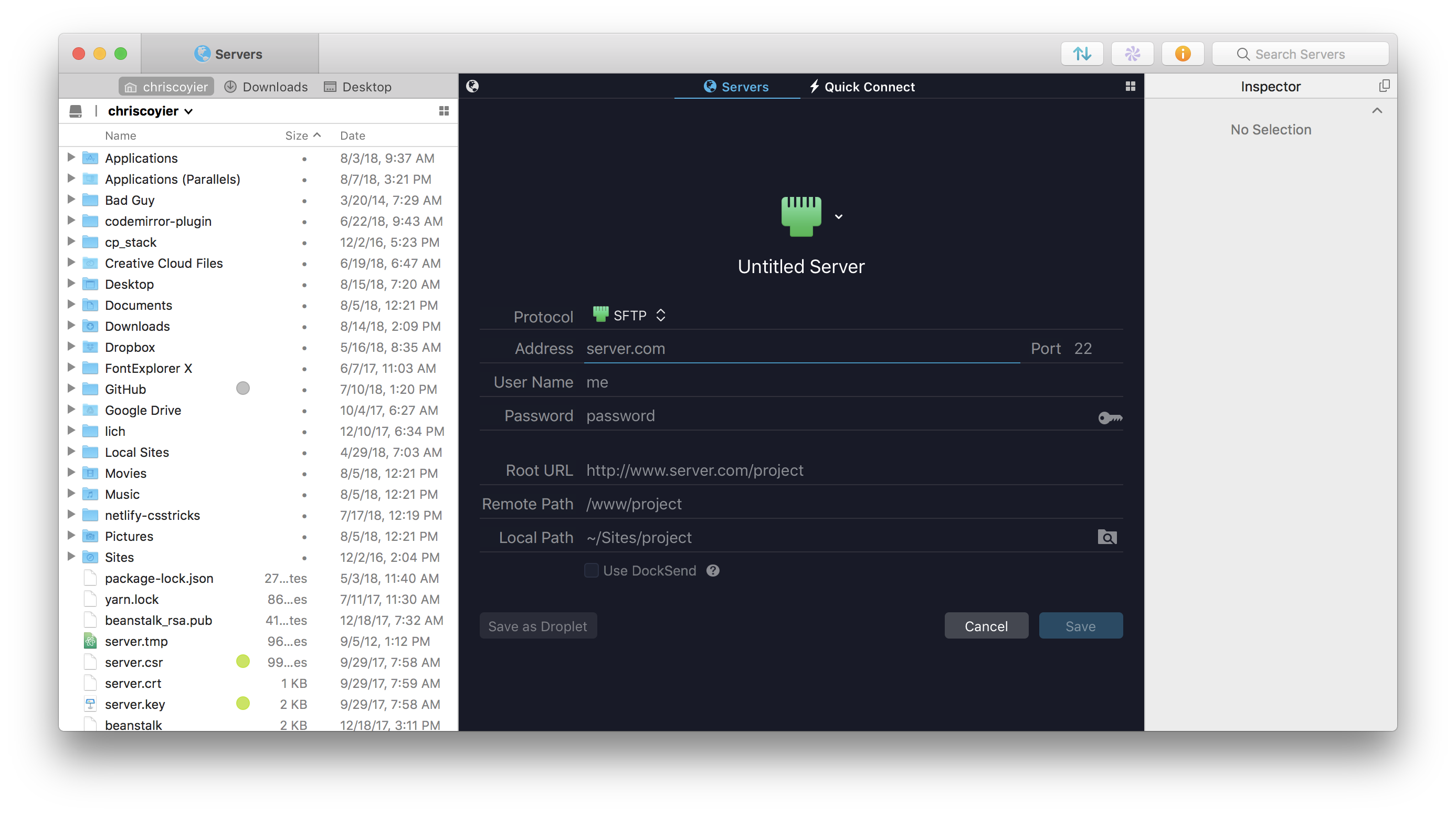
Let’s start with a very simple website on what I’d consider typical web hosting. Say you have just index.html, style.css, and script.js files on your local computer which is your entire website. You’ve purchased a domain name and pointed the DNS settings at a web host. That host has given you SFTP credentials. You’ll use those credentials in an app that allows SFTP connections to log in:
Your host will also tell you which folder is the „public root” of your website. The files there will be out on the public internet for the world to see!
You might hear people refer to the „live” website as a „production” site. When someone asks something like, Did that bug make it to production?” they mean whether the bug is on the live website. „Development” is your local computer. You might also have a „Staging” site, which is a clone of the live website on the same hardware/software of the live site for testing.
Remember earlier when we talked about Git repositories? While the repositories themselves don’t directly help you get the files in them to your web server, most systems that help you with the local-to-live process work with your repositories.
The phrase „local-to-live” refers to deployment. When you have changes that you want to go out to your production website, you deploy them. That’s the process of moving your work from „development” to „production.”
One service that helps with this idea of deployment is Beanstalk. Beanstalk hosts your Git repository, plus you give it the SFTP credentials for your server — that way it can move the files to your web server when you make commits. Cool right? Say you wanted to host that Git repo elsewhere though, like GitHub, Bitbucket, or Gitlab. Check out DeployBoy, which does the same thing, only it can connect to those sites as well. It probably comes as no surprise by now that there are lots of options here, ranging in price and complexity.
Let’s go back to our WordPress example.
You’ve got it running locally (on your computer) just perfectly and now want to go live with it.
You’ve bought a domain name from a registrar.
You’ve purchased hosting that meets WordPress requirements.
You’ve pointed the DNS of the domain name at the web host.
You’ve verified it’s all working (easy way: upload an index.html file in the public root via SFTP and verify that it loads when you type you type the domain name into a browser.)
Now, you’ve still got some work to do:
Set up a Git repository for the site.
Set up a deployment service to move the files from the repository to the live site.
Configure/Set up the live site as needed. For example, you’ll need a database on the live site. You’ll have to create that (your host will have instructions) and do things like run the WordPress installer and update configuration files.
If you have things in your local database that you want to move to the live site, you might be exporting/importing things. That can happen at the raw MySQL level using WordPress’ native import/export features, or a fancy plugin like WP DB Migrate Pro.
It’s a non-trivial amount of work! Sorry. This process is pretty similar for any site though. It’s a matter of configuring and setting up your production web server exactly how it should be, then deploying files to it. Every site is a bit different, but you’ll get the hang of this whole dance.
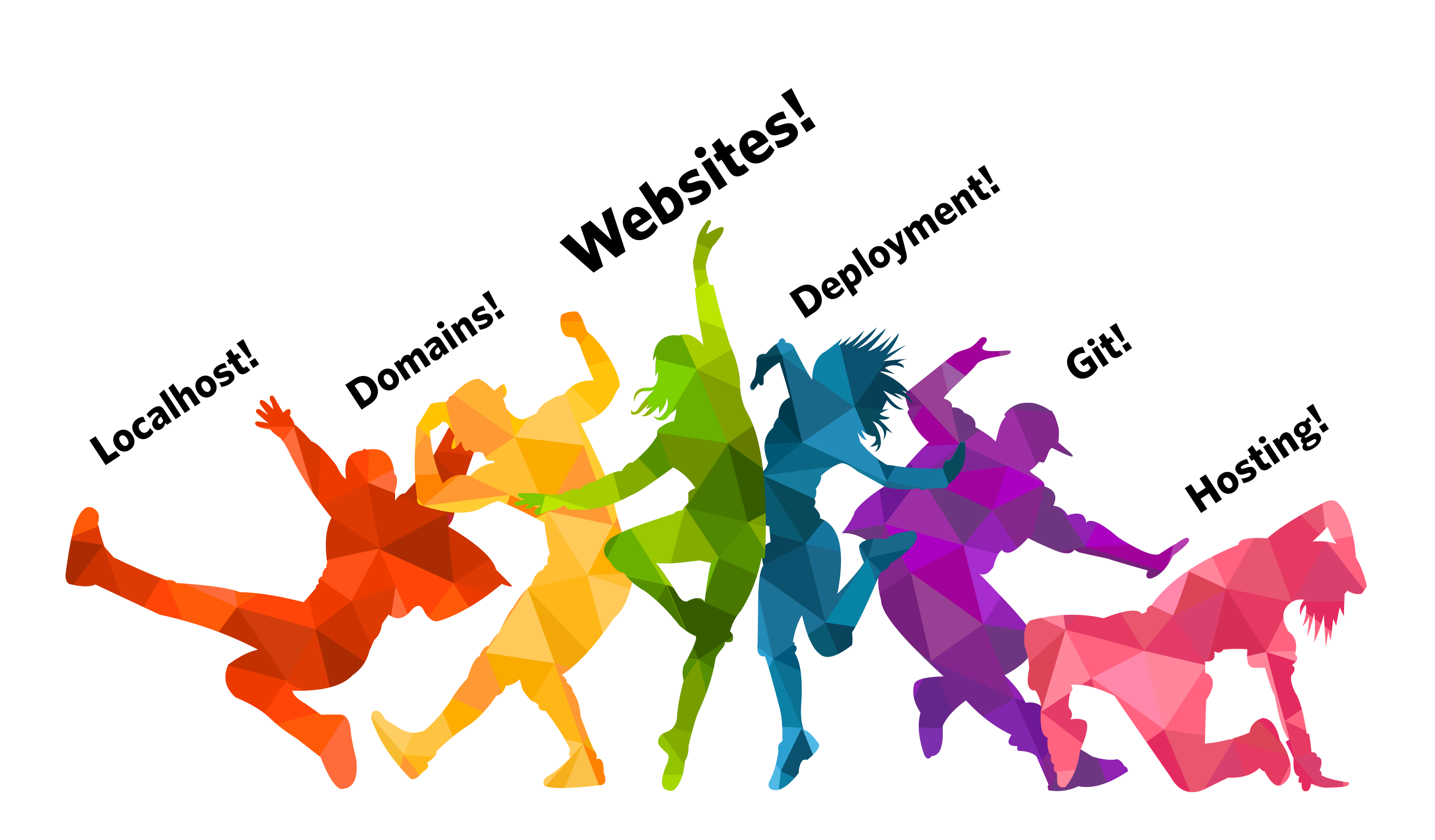
It really is a big dance. I’ve only painted one picture for you here. I tried to pick one that was generic and broad enough that it shows the landscape of what needs to be done. But, at every step in this dance, there are different ways you can do things, different services you can pick, companies trying to help you at different pain points… it’s an ever-changing world.
Right now, Netlify is enjoying a lot of popularity because they are one of the only web hosts that actually helps you with deployment. They’ll watch your Git repositories and do deployment for you! Netlify is for static sites only, but that can be a whole world onto itself. ZEIT also is massively innovative in how it helps with deploying and hosting web projects, including directly connecting with GitHub.
Good luck!
I hope this was helpful. Remember, you aren’t alone in all this. Zillions of other developers have done this before you and there is help to be found on the internet.
Oh, and remember: the best way to learn anything at all is to…
I got a great email from a fellow named Josh Long the other day. He is, in his words, „relatively new to web design” and was a bit stuck on the concept of getting a site live. I should say that I’m happy to get emails like this an I always read them, but I typically can’t offer tech support over email. If I can respond at all, I normally point people to other community resources.
In this case, it struck me what a perfect moment this is for Josh. He’s a little confused, but he knows enough to be asking a lot of questions and sorting through all this stuff. I figured this was a wonderful opportunity to dig into his questions, hopefully helping him and just maybe helping others in a similar situation.
Here’s one of the original paragraphs Josh sent me, completely unedited:
I’m relatively new to web design, but I’ve taken a few courses on HTML and CSS and I’ve done a Codecademy course on JavaScript. But, (jumping forward probably quite a while here!) after having fully designed and coded a HTML/CSS/JS website or webpage, I don’t fully understand the full process of going from a local site hosted with mamp/wamp to publishing a public site using wordpress(?) or some other host (is WordPress even a host?!) and also finding a server that’s suitable and some way of hosting images/videos or other content. (If that sounded like I didn’t know what half of those meant, it’s because unfortunately I don’t!.. but I’d really like to!)
Can you sense that enthusiasm? I love it.
We worked together a bit to refine many of his questions for this post, but they are still Josh’s words. Here we go!
What is a Domain Registrar? I get they are for registering domain names, but what’s the difference between them? How do you know which one is right for you? A quick search for „best domain hosts” on Google gave me 5 ads for companies who are domain registrars/hosts and 9 „Top 10” style pages that look as though they have some sort of affiliation with at least one company they’re suggesting. Am I just looking for the cheapest one?
You’re exactly right, domain registrants are for registering domain names. If you want joshlongisverycool.com, you’re going to have to buy it, and domain registrants are companies that help you do that.
Searching for a domain name
It’s a bummer that web search results are so saturated by ads and affiliate-link-saturated SEO-jacked pages. You’ll never get total honesty from that because those pages are full of links promoting whoever will pay them the most to send new customers. Heck, even Google themselves will sell you a domain name.
The truth is that you can’t go too wrong here. Domain names are a bit of a commodity and the hundreds of companies that will sell you one largely compete on marketing.
Some things to watch out for:
Some companies treat the domain as a loss leader. Like a grocery store selling cheap milk to hope you buy some more stuff while you are there. The check out process at any domain registrant will almost certainly try to sell you a bunch of extra stuff. For example, they might try to sell you additional domain names or email hosting you probably don’t need. Just be careful.
Web hosts (which we’re getting to next) will often sell them to you along with hosting. That’s fine I suppose, but I consider it a bit of a conflict of interest. Say you choose to move hosts one day. That hosting company is incentivized in the wrong direction to make that easy for you. If the domain is handled elsewhere, that domain registrant is incentivized the right direction to help you make changes.
I hate to add to the noise for you, but here are some domain registrants that I’ve used personally and aren’t paying for sponsorship here nor are affiliate links:
Our own Sarah Drasner recommends looking at ZEIT domains, which are super interesting in that you buy and manage them entirely over the command line.
I might suggest, if you can see yourself owning several domain names in your life, keeping them consolidated to a single registrant. Managing domains isn’t something you’ll do very often, so it’s easy to lose track of what domains you registered on what registrant, not to mention how/where to change all the settings across different registrants.
I’d also suggest it’s OK to experiment here. That’s how all of us have learned. Pick one with a UI that you don’t hate and a trustable vibe. Maybe your friend also uses that one. Hopefully, it works out fine. If you hate it, it’ll be a little work, but you can always switch.
What is a web host and why do I need one? A Google search throws you a mountain of „best web host” articles and ads. These websites all seem to be full of jargon like „shared hosting” and „managed hosting.” I see things like „suggested hosts” on some sites. How do you find the right web host? I’m not even sure what my needs are. Should I just find the cheapest one?
Just because you own a domain doesn’t mean it will do anything. In fact, right after you buy it, it’s likely that the domain registrant slaps up a „coming soon” page for you:
A „coming soon” page you might see immediately after buying a domain name.
To host a website at your new domain, you’ll need to configure the DNS of your new domain to point at a server connected to the internet. Here’s an interesting tidbit… you could do this right from your house if you wanted to. Your Internet Service Provider (ISP) at home probably gives you an IP address. It’s all a bit nerdy, but you could point your domain name at that IP and set up your computer to be a web server that responds to incoming requests and serves up your website. Almost nobody does that though. You don’t want your web server to stop working because you closed your laptop or your ISP changed your IP.
Web hosting services give you that server. Like domain registrants, web hosts are almost a commodity. There are lots of them that provide a similar service, so the price is driven fairly low and they find other things to compete on.
Buying web hosting is a little trickier than buying a domain though. You’ll need to know a little bit about the website you intend to host when making that choice. Will it be a WordPress site? Or another PHP/MySQL-based CMS site (we’ll get to those later)? That means your host will need to support those technologies. Most do, some don’t. You might wanna look in their documentation or literally ask them before pulling the trigger if you are unsure. There are lots of technologies for running websites. Say the site will use Ruby on Rails — that’s a different set of requirements that not all hosts offer. Or Node… Or Python… same story.
If a web host says they specialize in a particular set of technologies, and that’s what you need, that’s probably a decent way to go, particularly in your early days. Let’s take a very limited gander. Again, these are not affiliate or paid-for links and they are somewhat randomly selected web hosts that come to mind for me:
WP Engine is a web host that focuses specifically on WordPress.
BlueHost is has very inexpensive hosting choices, but has essentially the same capabilities as those others.
Now here some other web hosts that are a little less traditional. Forgive the techy terms here — if they don’t mean anything to you, just ignore them.
Netlify does static site hosting, which is great for things like static site generators and JAMstack sites.
Zeit is a host where you interact with it only through the command line.
Digital Ocean has their own way of talking about hosting. They call their servers Droplets, which are kind of like virtual machines with extra features.
Heroku is great for hosting apps with a ready-to-use backend for things like Node, Ruby, Java, and Python.
Again, I’d say it’s OK to, in a sense, make some mistakes here. If you aren’t hosting something particularly mission-critical, like your personal website, pick a host that seems to fit the bill and give it a go. Hopefully, it works out great — if not, you can move. Moving isn’t always super fun, but everybody ends up doing it, and you’ll learn as you go.
When you buy web hosting, that host is going to tell you how to use it. One common way is that the host will give you SFTP credentials. Then you’ll use software that is built for connecting to servers over SFTP, and that will allow you to upload files to the web server.
This is a magic moment!
Say you’ve been working on a file that is a single index.html file, that loads a style.css file. Upload those files over SFTP into the folder your host tells you is correct public root directory for that site.
That is the process for taking a site from local to live! There is nothing wrong with it, either. This is referred to as deployment, and this is about as basic and simple as it gets. Even fancier ways of doing deployment sometimes ultimately do just this behind the scenes. We’ll get more into deployment later.
Should you bundle your domain registrar and web host into one if a company offers both?
I mentioned this above a little: I’m a fan of not doing that in general. On one hand, it’s mighty handy. Things like shared billing and a single checkout flow. The host will also do things like configuring the DNS for you to be all set up for their hosting and you probably don’t even have to think about it.
But say the day comes where you just don’t like that host anymore. You’ve found a better deal, outgrown them, were turned off by their support or service, or any other reason. You want to move hosts. The problem is that they aren’t just your host, but your domain registrant, too. Do you leave the domain with them and just move hosts? Probably not, you’re trying to leave them. Now you need to move two things. That makes that move all the more perilous, but worse, this company isn’t exactly incentivized to respond quickly and helpfully to your requests since they know they’re losing you as a customer.
What really is a „CMS”? What’s its purpose? WordPress, Joomla, and Drupal are the most popular names I’ve found for content management systems, and from their descriptions, all sound very similar. What are the kinds of features that set one apart from another? Is a CMS all you need to get your website from your local computer to the public internet?
CMS (Content Management System) is a pretty generic term. It means literally anything that helps you manage content. There are, as you’ve seen, some big players like WordPress and CraftCMS. They don’t really have anything directly to do with that connection between working locally on a site and getting that site live. But they do rather complicate it.
The reason that you’d use a CMS at all is to make working on your site easier. Consider this site you’re looking at right now. There are tens of thousands of pages on this site. It would be untenable for each of them to be a hand-authored file.html file.
Instead, a CMS allows us to craft all those pages by combining data and templates.
Let’s consider the technology behind WordPress, a CMS that works pretty good for CSS-Tricks. In order for WordPress to run, it needs:
PHP (the back-end language)
MySQL (the database)
Apache (the web server)
You can do all that locally!
I use Local by Flywheel for that (Mac and Windows), but there are a number of ways to get those technologies running: MAMP, Docker, Vagrant, etc.
That’ll get you up and running locally with your CMS. That’s a beautiful thing. Having a good local development environment for your site is crucial. But it doesn’t help you get that site live.
We’ll go over getting all this to a live site a bit later, but you should know this: the web server that you run will need to run these same technologies. Looking at the WordPress example from above, your web server will also need to run PHP, MySQL, and Apache. Then you’ll need to set up a system for getting all your files from your local computer to your web server like you would for any other site, but also probably have a system for dealing with the database. The database is a bit tricky as it’s not a „flat file” like most of the rest of your site.
A CMS could be built from any set of technologies, not just the ones listed above. For example, see KeystoneJS. Instead of PHP, Keystone is Node.js. Instead of MySQL for the database, it uses MongoDB. Instead of Apache, it uses Express. Just a different set of technologies. Both of which you can get running locally and on a live web server.
A CMS could even have no database at all! Static site generators are like this. You get the site running locally, and they produce a set of flat files which you move to your live server. A different way to do things, but absolutely still a CMS. What I always say is that the best CMS is one that is customized to your needs.
What is „Asset Hosting”? Are assets not content? What is the difference between a CMS and an asset hosting service? What does an asset host do?
Let’s define an asset: any „flat” file. As in, not dynamically generated like how a CMS might generate an HTML file. Images are a prime example of an „asset.” But it’s also things like CSS and JavaScript files, as well as videos and PDFs.
And before we get any further: you probably don’t need to worry about this right away. Your web host can host assets and that’s plenty fine for your early days on small sites.
One major reason people go with an asset host (probably more commonly referred to as a CDN or Content Delivery Network) is for a speed boost. Asset hosts are also servers, just like your web host’s web server, but they are designed for hosting those flat file assets super fast. So, not only do those assets get delivered to people looking at your site super fast, but your web server is relieved of that burden.
You could even think of something like YouTube as an asset host. That 100 MB video of a butterfly in your garden is a heavy load for your little web server, and potentially a problem if your outgoing bandwidth is capped like it often is. Uploading that video to YouTube puts your video into that whole social universe, but a big reason to do it other than the social stuff is that it’s hosting that video asset for you.
I’ve heard of „repositories”, but don’t really get what they are. I hear stuff like „just upload it to my Git Repository.” What the heck does that mean? I feel like a moron for asking this. What is Git? What is it for? Do I need to use it? Is it involved in the „local to live” process at all?
Sorry you got hit with a „just” there. There is an epidemic in technology conversations where people slip that in to make it seem like what they are about to say is easy and obvious when it could be neither depending on who is reading.
But let’s get into talking about Git repositories.
Git is a specific form of version control. There are others, but Git is so dominant in the web industry that it’s hardly worth mentioning any others.
Let’s say you and me are working on a website together. We’ve purchased a domain and hosting and gotten the site live. We’ve shared the SFTP credentials so we both have access to change the files on the live site. This could be quite dangerous!
Coda is a code editor that let’s you edit files directly on a sever you’ve connected to over SFTP. Cool, but dangerous!
Say we both edit a file and upload it over SFTP… which change wins? It’s whoever uploaded their file last. We have no idea who has done what. We’re over-writing each other and have no way of staying in sync with each other’s changes, changes immediately affect the live site which could break things and we have no way of undoing changes in case we break things. That’s a situation so unacceptable that it’s really never done.
Instead, we work with version control, like Git. With Git, when we make changes, we commit them to a repository. A repository can be hosted anywhere, even on your local machine. But to make them really useful, they are hosted on the internet somewhere everyone has access to. You’ve surely seen GitHub, which hosts these repositories and adds a bunch of other features like issue tracking. Similar are GitLab and Bitbucket.
Now let’s say you and me are working on that same site, but we’ve set up a Git repository for it. When I make a change, I commit it to the repository. If you want to make a change as well, you have to pull my changes down which merges them into your own copy of the code. Then you can push your changes up to the repository. Like anything, it gets more complicated, but that’s the gist of it.
But a Git repository isn’t the live website. You’re on your own for getting the files from a Git repository to a live site. Fortunately, that’s a situation that everyone faces, so there are lots of options. Good thing your last question is about this!
OK. So now with all that straight… where do you start with going from local to live? Where do you „upload” your HTML, CSS and JavaScript files? How do you link your shiny new domain name to those files and see it out in the wild? Which service is in charge of adding new content to your site, or updating it? Does it get really confusing if you have different companies for each service?
Let’s start with a very simple website on what I’d consider typical web hosting. Say you have just index.html, style.css, and script.js files on your local computer which is your entire website. You’ve purchased a domain name and pointed the DNS settings at a web host. That host has given you SFTP credentials. You’ll use those credentials in an app that allows SFTP connections to log in:
Your host will also tell you which folder is the „public root” of your website. The files there will be out on the public internet for the world to see!
You might hear people refer to the „live” website as a „production” site. When someone asks something like, Did that bug make it to production?” they mean whether the bug is on the live website. „Development” is your local computer. You might also have a „Staging” site, which is a clone of the live website on the same hardware/software of the live site for testing.
Remember earlier when we talked about Git repositories? While the repositories themselves don’t directly help you get the files in them to your web server, most systems that help you with the local-to-live process work with your repositories.
The phrase „local-to-live” refers to deployment. When you have changes that you want to go out to your production website, you deploy them. That’s the process of moving your work from „development” to „production.”
One service that helps with this idea of deployment is Beanstalk. Beanstalk hosts your Git repository, plus you give it the SFTP credentials for your server — that way it can move the files to your web server when you make commits. Cool right? Say you wanted to host that Git repo elsewhere though, like GitHub, Bitbucket, or Gitlab. Check out DeployBoy, which does the same thing, only it can connect to those sites as well. It probably comes as no surprise by now that there are lots of options here, ranging in price and complexity.
Let’s go back to our WordPress example.
You’ve got it running locally (on your computer) just perfectly and now want to go live with it.
You’ve bought a domain name from a registrar.
You’ve purchased hosting that meets WordPress requirements.
You’ve pointed the DNS of the domain name at the web host.
You’ve verified it’s all working (easy way: upload an index.html file in the public root via SFTP and verify that it loads when you type you type the domain name into a browser.)
Now, you’ve still got some work to do:
Set up a Git repository for the site.
Set up a deployment service to move the files from the repository to the live site.
Configure/Set up the live site as needed. For example, you’ll need a database on the live site. You’ll have to create that (your host will have instructions) and do things like run the WordPress installer and update configuration files.
If you have things in your local database that you want to move to the live site, you might be exporting/importing things. That can happen at the raw MySQL level using WordPress’ native import/export features, or a fancy plugin like WP DB Migrate Pro.
It’s a non-trivial amount of work! Sorry. This process is pretty similar for any site though. It’s a matter of configuring and setting up your production web server exactly how it should be, then deploying files to it. Every site is a bit different, but you’ll get the hang of this whole dance.
It really is a big dance. I’ve only painted one picture for you here. I tried to pick one that was generic and broad enough that it shows the landscape of what needs to be done. But, at every step in this dance, there are different ways you can do things, different services you can pick, companies trying to help you at different pain points… it’s an ever-changing world.
Right now, Netlify is enjoying a lot of popularity because they are one of the only web hosts that actually helps you with deployment. They’ll watch your Git repositories and do deployment for you! Netlify is for static sites only, but that can be a whole world onto itself. ZEIT also is massively innovative in how it helps with deploying and hosting web projects, including directly connecting with GitHub.
Good luck!
I hope this was helpful. Remember, you aren’t alone in all this. Zillions of other developers have done this before you and there is help to be found on the internet.
Oh, and remember: the best way to learn anything at all is to…
Tired of slow, unreliable web hosting? See how easy it is to self-host your next project on DigitalOcean’s cloud platform. Build and manage ultra-fast websites, blogs, and other static web pages using our user-friendly control panel or simple API, all with a 99.99% uptime SLA. Save time using our One-Click install apps for WordPress, Ghost and Discourse. Never worry about running out of storage space again with Spaces — highly scalable, affordable object storage.
Sign up today with a free $100 credit for CSS-Tricks readers.
Need a fancy font? Check out this inspiring list of premium resources!
20 Best Decorative Fonts
How do you stand out from the crowd in design? Though many are pulled to the popular minimalist trends, designers are now learning the incredible benefits of stepping out of their comfort zone.
Maybe your work just needs a refresher. So try out a new font with fancy alphabet letters!
Today, we bring you a phenomenal collection of 20 premium fonts to upgrade your work. Transform your designs with stylish, decorative fonts that will leave your audience in wonder.
Add beautiful characters to your projects with cool letters, swashes, and decorations. No matter your personal style preferences, these premium fonts will freshen up your work for impressive results.
Let’s start off with this beauty, the Kaley typeface. A modern, elegant font with subtly decorative letters, this font is very classy and sophisticated. It also supports multiple languages! Create a harmonious appearance for your headlines and text using this wonderful, inviting font.
Quality is an extraordinary decorative font like no other. It features a simple script design with inspiring floral decorations for the avid nature enthusiast. Launch your natural brand with a stunning font style that is sleek and sophisticated. Try it out on logos, packaging, and even creative headlines!
Cultures from all over the world inspire design every day. This soft vintage decor font is crafted after common Scandinavian patterns and themes. Enjoy your creative process even more by combining this font with beautiful craft projects or vintage-inspired design. Included is one regular font as well as a bold type, and they come in various formats.
The Victorian era was the age of elaborate letters and fascinating decorations. Draw inspiration from this creative era with the impeccable Caernarfon font. Created to emulate the popular styles of vintage branding, this type features a four-font system you can layer for even more impact.
Our next font is another incredible design inspired by the Victorian era. The Morning Glory typeface is a clever take on the fashion, politics, and creative branding of the past. Use it on many cool projects from clothing merchandise to vintage posters and books!
Take your vintage designs to a whole new level with the Brewski Brewery typeface. Inspired by the relaxed vibes of vintage brewery packaging, this typeface features strong, hand-drawn letters that are sure to make an impact. Enjoy a full pack of letters, numbers, and symbols in this set!
Sometimes the path you need to take is the one covered in vintage decoration. The Pathways font is the perfect mix of retro design and lovely, handmade script letters. Featuring three different styles, including circular strokes, rectangular strokes, and a rough version, this font is clean and easy to use.
Creating messy letters is a lot harder than it looks. That’s why the Burnts Maker font is essential for any new designer. Tag your favorite t-shirts, album covers, and festival posters with fast, hand-drawn letters. Embrace the cool style of street culture with this premium font.
Designers are often inspired by famous stories to create their elaborate fonts. And this decorative typeface is no different. It draws inspiration from the eclectic vintage typefaces of the past for a full pack of eight creative fonts with fascinating details. Use it on books, posters, and more!
Fancy a lovely script for your latest project? Check out the stunning Karmela script. A great font type for magazines, logos, and more, this font is inspired by the incredible handmade brush lettering of the 50s and 60s. Pair it with your favorite vintage projects for the perfect combo!
Halloween is right around the corner, so now is the time to load up on fancy spooky fonts! This awesome Jack Reacher typeface, for instance, is the embodiment of Halloween itself. It features tall, bold letters with sharp serif details for more flair and style. Add it to your Halloween posters for more magic!
Do you love vintage design? Many decorative fonts incorporate amazing handwritten techniques just like the designs from long ago. Now you can make a well-crafted logo or headline with the fascinating MacLaurent font. A set of display typefaces with upper and lowercase letters, this download also features a helpful web font.
Embody
the rocker spirit with the awesome Spacethink typeface. Featuring five
style options to diversify your projects, this typeface pack is edgy
and unique. Get the latest update to enjoy fantastic typefaces for
logos, concert gigs, and album covers.
Explore the futuristic flair of space design with the stunning Auro font. This font features a unique design inspired by the galaxy and various constellations. It gives off a cool, futuristic vibe that is great for space posters, alien themes, and everything in between. Try it out with a bold, glowing effect like the example below!
Geometric shapes have always been a part of impressive design. That’s why many designers use them in their typefaces, like the Geomath font. This pack features three extraordinary fonts with 175 ornaments to decorate your designs even further. Check it out!
If you love the tech world as much as the next creative, then you’re sure to love the Geeko font. A creative, tech-inspired typeface, this font is influenced by motherboards and supremely minimalist design. Create a compelling logo today with just one extraordinary font!
Glitch effects are usually applied to photos, but now you can use them for font types too! The awesome Lucy Glitch typeface pulls off the clever look of digital failure for an impactful new font. Check out the full set of letters, numbers, and symbols in this set to pair with your next project.
Toughen up your brand with mighty, strong letters. The Clobot font is stylish but firm. It features a versatile set of alternative letters and ligature glyphs to allow you to explore many font options. Best suited to posters and t-shirt designs, this typeface is one you’ll definitely want in your arsenal!
Hello stranger. Is design on your mind today? Match the perfect script font to your typography with this fancy, handwritten typeface. Featuring a natural, handmade design with casually written letters, this font supports many languages and formats. Give it a shot!
2018 has been the year for space design. With ultraviolet as the color of the year, many designers are drawn to space-themed fonts like this futuristic, decorative type. Just plug in your name or favorite phrase to test-drive this font in seconds. Check it out!
More Font Inspiration
Ready to get fancy? Explore many creative styles with decorative fonts your audience will love. I hope this collection has inspired you with many ways to approach inviting typographic design.
Need more cool fancy fonts? Check out these collections:
Need a fancy font? Check out this inspiring list of premium resources!
20 Best Decorative Fonts
How do you stand out from the crowd in design? Though many are pulled to the popular minimalist trends, designers are now learning the incredible benefits of stepping out of their comfort zone.
Maybe your work just needs a refresher. So try out a new font with fancy alphabet letters!
Today, we bring you a phenomenal collection of 20 premium fonts to upgrade your work. Transform your designs with stylish, decorative fonts that will leave your audience in wonder.
Add beautiful characters to your projects with cool letters, swashes, and decorations. No matter your personal style preferences, these premium fonts will freshen up your work for impressive results.
Let’s start off with this beauty, the Kaley typeface. A modern, elegant font with subtly decorative letters, this font is very classy and sophisticated. It also supports multiple languages! Create a harmonious appearance for your headlines and text using this wonderful, inviting font.
Quality is an extraordinary decorative font like no other. It features a simple script design with inspiring floral decorations for the avid nature enthusiast. Launch your natural brand with a stunning font style that is sleek and sophisticated. Try it out on logos, packaging, and even creative headlines!
Cultures from all over the world inspire design every day. This soft vintage decor font is crafted after common Scandinavian patterns and themes. Enjoy your creative process even more by combining this font with beautiful craft projects or vintage-inspired design. Included is one regular font as well as a bold type, and they come in various formats.
The Victorian era was the age of elaborate letters and fascinating decorations. Draw inspiration from this creative era with the impeccable Caernarfon font. Created to emulate the popular styles of vintage branding, this type features a four-font system you can layer for even more impact.
Our next font is another incredible design inspired by the Victorian era. The Morning Glory typeface is a clever take on the fashion, politics, and creative branding of the past. Use it on many cool projects from clothing merchandise to vintage posters and books!
Take your vintage designs to a whole new level with the Brewski Brewery typeface. Inspired by the relaxed vibes of vintage brewery packaging, this typeface features strong, hand-drawn letters that are sure to make an impact. Enjoy a full pack of letters, numbers, and symbols in this set!
Sometimes the path you need to take is the one covered in vintage decoration. The Pathways font is the perfect mix of retro design and lovely, handmade script letters. Featuring three different styles, including circular strokes, rectangular strokes, and a rough version, this font is clean and easy to use.
Creating messy letters is a lot harder than it looks. That’s why the Burnts Maker font is essential for any new designer. Tag your favorite t-shirts, album covers, and festival posters with fast, hand-drawn letters. Embrace the cool style of street culture with this premium font.
Designers are often inspired by famous stories to create their elaborate fonts. And this decorative typeface is no different. It draws inspiration from the eclectic vintage typefaces of the past for a full pack of eight creative fonts with fascinating details. Use it on books, posters, and more!
Fancy a lovely script for your latest project? Check out the stunning Karmela script. A great font type for magazines, logos, and more, this font is inspired by the incredible handmade brush lettering of the 50s and 60s. Pair it with your favorite vintage projects for the perfect combo!
Halloween is right around the corner, so now is the time to load up on fancy spooky fonts! This awesome Jack Reacher typeface, for instance, is the embodiment of Halloween itself. It features tall, bold letters with sharp serif details for more flair and style. Add it to your Halloween posters for more magic!
Do you love vintage design? Many decorative fonts incorporate amazing handwritten techniques just like the designs from long ago. Now you can make a well-crafted logo or headline with the fascinating MacLaurent font. A set of display typefaces with upper and lowercase letters, this download also features a helpful web font.
Embody
the rocker spirit with the awesome Spacethink typeface. Featuring five
style options to diversify your projects, this typeface pack is edgy
and unique. Get the latest update to enjoy fantastic typefaces for
logos, concert gigs, and album covers.
Explore the futuristic flair of space design with the stunning Auro font. This font features a unique design inspired by the galaxy and various constellations. It gives off a cool, futuristic vibe that is great for space posters, alien themes, and everything in between. Try it out with a bold, glowing effect like the example below!
Geometric shapes have always been a part of impressive design. That’s why many designers use them in their typefaces, like the Geomath font. This pack features three extraordinary fonts with 175 ornaments to decorate your designs even further. Check it out!
If you love the tech world as much as the next creative, then you’re sure to love the Geeko font. A creative, tech-inspired typeface, this font is influenced by motherboards and supremely minimalist design. Create a compelling logo today with just one extraordinary font!
Glitch effects are usually applied to photos, but now you can use them for font types too! The awesome Lucy Glitch typeface pulls off the clever look of digital failure for an impactful new font. Check out the full set of letters, numbers, and symbols in this set to pair with your next project.
Toughen up your brand with mighty, strong letters. The Clobot font is stylish but firm. It features a versatile set of alternative letters and ligature glyphs to allow you to explore many font options. Best suited to posters and t-shirt designs, this typeface is one you’ll definitely want in your arsenal!
Hello stranger. Is design on your mind today? Match the perfect script font to your typography with this fancy, handwritten typeface. Featuring a natural, handmade design with casually written letters, this font supports many languages and formats. Give it a shot!
2018 has been the year for space design. With ultraviolet as the color of the year, many designers are drawn to space-themed fonts like this futuristic, decorative type. Just plug in your name or favorite phrase to test-drive this font in seconds. Check it out!
More Font Inspiration
Ready to get fancy? Explore many creative styles with decorative fonts your audience will love. I hope this collection has inspired you with many ways to approach inviting typographic design.
Need more cool fancy fonts? Check out these collections:
Need a fancy font? Check out this inspiring list of premium resources!
20 Best Decorative Fonts
How do you stand out from the crowd in design? Though many are pulled to the popular minimalist trends, designers are now learning the incredible benefits of stepping out of their comfort zone.
Maybe your work just needs a refresher. So try out a new font with fancy alphabet letters!
Today, we bring you a phenomenal collection of 20 premium fonts to upgrade your work. Transform your designs with stylish, decorative fonts that will leave your audience in wonder.
Add beautiful characters to your projects with cool letters, swashes, and decorations. No matter your personal style preferences, these premium fonts will freshen up your work for impressive results.
Let’s start off with this beauty, the Kaley typeface. A modern, elegant font with subtly decorative letters, this font is very classy and sophisticated. It also supports multiple languages! Create a harmonious appearance for your headlines and text using this wonderful, inviting font.
Quality is an extraordinary decorative font like no other. It features a simple script design with inspiring floral decorations for the avid nature enthusiast. Launch your natural brand with a stunning font style that is sleek and sophisticated. Try it out on logos, packaging, and even creative headlines!
Cultures from all over the world inspire design every day. This soft vintage decor font is crafted after common Scandinavian patterns and themes. Enjoy your creative process even more by combining this font with beautiful craft projects or vintage-inspired design. Included is one regular font as well as a bold type, and they come in various formats.
The Victorian era was the age of elaborate letters and fascinating decorations. Draw inspiration from this creative era with the impeccable Caernarfon font. Created to emulate the popular styles of vintage branding, this type features a four-font system you can layer for even more impact.
Our next font is another incredible design inspired by the Victorian era. The Morning Glory typeface is a clever take on the fashion, politics, and creative branding of the past. Use it on many cool projects from clothing merchandise to vintage posters and books!
Take your vintage designs to a whole new level with the Brewski Brewery typeface. Inspired by the relaxed vibes of vintage brewery packaging, this typeface features strong, hand-drawn letters that are sure to make an impact. Enjoy a full pack of letters, numbers, and symbols in this set!
Sometimes the path you need to take is the one covered in vintage decoration. The Pathways font is the perfect mix of retro design and lovely, handmade script letters. Featuring three different styles, including circular strokes, rectangular strokes, and a rough version, this font is clean and easy to use.
Creating messy letters is a lot harder than it looks. That’s why the Burnts Maker font is essential for any new designer. Tag your favorite t-shirts, album covers, and festival posters with fast, hand-drawn letters. Embrace the cool style of street culture with this premium font.
Designers are often inspired by famous stories to create their elaborate fonts. And this decorative typeface is no different. It draws inspiration from the eclectic vintage typefaces of the past for a full pack of eight creative fonts with fascinating details. Use it on books, posters, and more!
Fancy a lovely script for your latest project? Check out the stunning Karmela script. A great font type for magazines, logos, and more, this font is inspired by the incredible handmade brush lettering of the 50s and 60s. Pair it with your favorite vintage projects for the perfect combo!
Halloween is right around the corner, so now is the time to load up on fancy spooky fonts! This awesome Jack Reacher typeface, for instance, is the embodiment of Halloween itself. It features tall, bold letters with sharp serif details for more flair and style. Add it to your Halloween posters for more magic!
Do you love vintage design? Many decorative fonts incorporate amazing handwritten techniques just like the designs from long ago. Now you can make a well-crafted logo or headline with the fascinating MacLaurent font. A set of display typefaces with upper and lowercase letters, this download also features a helpful web font.
Embody
the rocker spirit with the awesome Spacethink typeface. Featuring five
style options to diversify your projects, this typeface pack is edgy
and unique. Get the latest update to enjoy fantastic typefaces for
logos, concert gigs, and album covers.
Explore the futuristic flair of space design with the stunning Auro font. This font features a unique design inspired by the galaxy and various constellations. It gives off a cool, futuristic vibe that is great for space posters, alien themes, and everything in between. Try it out with a bold, glowing effect like the example below!
Geometric shapes have always been a part of impressive design. That’s why many designers use them in their typefaces, like the Geomath font. This pack features three extraordinary fonts with 175 ornaments to decorate your designs even further. Check it out!
If you love the tech world as much as the next creative, then you’re sure to love the Geeko font. A creative, tech-inspired typeface, this font is influenced by motherboards and supremely minimalist design. Create a compelling logo today with just one extraordinary font!
Glitch effects are usually applied to photos, but now you can use them for font types too! The awesome Lucy Glitch typeface pulls off the clever look of digital failure for an impactful new font. Check out the full set of letters, numbers, and symbols in this set to pair with your next project.
Toughen up your brand with mighty, strong letters. The Clobot font is stylish but firm. It features a versatile set of alternative letters and ligature glyphs to allow you to explore many font options. Best suited to posters and t-shirt designs, this typeface is one you’ll definitely want in your arsenal!
Hello stranger. Is design on your mind today? Match the perfect script font to your typography with this fancy, handwritten typeface. Featuring a natural, handmade design with casually written letters, this font supports many languages and formats. Give it a shot!
2018 has been the year for space design. With ultraviolet as the color of the year, many designers are drawn to space-themed fonts like this futuristic, decorative type. Just plug in your name or favorite phrase to test-drive this font in seconds. Check it out!
More Font Inspiration
Ready to get fancy? Explore many creative styles with decorative fonts your audience will love. I hope this collection has inspired you with many ways to approach inviting typographic design.
Need more cool fancy fonts? Check out these collections:
Need a fancy font? Check out this inspiring list of premium resources!
20 Best Decorative Fonts
How do you stand out from the crowd in design? Though many are pulled to the popular minimalist trends, designers are now learning the incredible benefits of stepping out of their comfort zone.
Maybe your work just needs a refresher. So try out a new font with fancy alphabet letters!
Today, we bring you a phenomenal collection of 20 premium fonts to upgrade your work. Transform your designs with stylish, decorative fonts that will leave your audience in wonder.
Add beautiful characters to your projects with cool letters, swashes, and decorations. No matter your personal style preferences, these premium fonts will freshen up your work for impressive results.
Let’s start off with this beauty, the Kaley typeface. A modern, elegant font with subtly decorative letters, this font is very classy and sophisticated. It also supports multiple languages! Create a harmonious appearance for your headlines and text using this wonderful, inviting font.
Quality is an extraordinary decorative font like no other. It features a simple script design with inspiring floral decorations for the avid nature enthusiast. Launch your natural brand with a stunning font style that is sleek and sophisticated. Try it out on logos, packaging, and even creative headlines!
Cultures from all over the world inspire design every day. This soft vintage decor font is crafted after common Scandinavian patterns and themes. Enjoy your creative process even more by combining this font with beautiful craft projects or vintage-inspired design. Included is one regular font as well as a bold type, and they come in various formats.
The Victorian era was the age of elaborate letters and fascinating decorations. Draw inspiration from this creative era with the impeccable Caernarfon font. Created to emulate the popular styles of vintage branding, this type features a four-font system you can layer for even more impact.
Our next font is another incredible design inspired by the Victorian era. The Morning Glory typeface is a clever take on the fashion, politics, and creative branding of the past. Use it on many cool projects from clothing merchandise to vintage posters and books!
Take your vintage designs to a whole new level with the Brewski Brewery typeface. Inspired by the relaxed vibes of vintage brewery packaging, this typeface features strong, hand-drawn letters that are sure to make an impact. Enjoy a full pack of letters, numbers, and symbols in this set!
Sometimes the path you need to take is the one covered in vintage decoration. The Pathways font is the perfect mix of retro design and lovely, handmade script letters. Featuring three different styles, including circular strokes, rectangular strokes, and a rough version, this font is clean and easy to use.
Creating messy letters is a lot harder than it looks. That’s why the Burnts Maker font is essential for any new designer. Tag your favorite t-shirts, album covers, and festival posters with fast, hand-drawn letters. Embrace the cool style of street culture with this premium font.
Designers are often inspired by famous stories to create their elaborate fonts. And this decorative typeface is no different. It draws inspiration from the eclectic vintage typefaces of the past for a full pack of eight creative fonts with fascinating details. Use it on books, posters, and more!
Fancy a lovely script for your latest project? Check out the stunning Karmela script. A great font type for magazines, logos, and more, this font is inspired by the incredible handmade brush lettering of the 50s and 60s. Pair it with your favorite vintage projects for the perfect combo!
Halloween is right around the corner, so now is the time to load up on fancy spooky fonts! This awesome Jack Reacher typeface, for instance, is the embodiment of Halloween itself. It features tall, bold letters with sharp serif details for more flair and style. Add it to your Halloween posters for more magic!
Do you love vintage design? Many decorative fonts incorporate amazing handwritten techniques just like the designs from long ago. Now you can make a well-crafted logo or headline with the fascinating MacLaurent font. A set of display typefaces with upper and lowercase letters, this download also features a helpful web font.
Embody
the rocker spirit with the awesome Spacethink typeface. Featuring five
style options to diversify your projects, this typeface pack is edgy
and unique. Get the latest update to enjoy fantastic typefaces for
logos, concert gigs, and album covers.
Explore the futuristic flair of space design with the stunning Auro font. This font features a unique design inspired by the galaxy and various constellations. It gives off a cool, futuristic vibe that is great for space posters, alien themes, and everything in between. Try it out with a bold, glowing effect like the example below!
Geometric shapes have always been a part of impressive design. That’s why many designers use them in their typefaces, like the Geomath font. This pack features three extraordinary fonts with 175 ornaments to decorate your designs even further. Check it out!
If you love the tech world as much as the next creative, then you’re sure to love the Geeko font. A creative, tech-inspired typeface, this font is influenced by motherboards and supremely minimalist design. Create a compelling logo today with just one extraordinary font!
Glitch effects are usually applied to photos, but now you can use them for font types too! The awesome Lucy Glitch typeface pulls off the clever look of digital failure for an impactful new font. Check out the full set of letters, numbers, and symbols in this set to pair with your next project.
Toughen up your brand with mighty, strong letters. The Clobot font is stylish but firm. It features a versatile set of alternative letters and ligature glyphs to allow you to explore many font options. Best suited to posters and t-shirt designs, this typeface is one you’ll definitely want in your arsenal!
Hello stranger. Is design on your mind today? Match the perfect script font to your typography with this fancy, handwritten typeface. Featuring a natural, handmade design with casually written letters, this font supports many languages and formats. Give it a shot!
2018 has been the year for space design. With ultraviolet as the color of the year, many designers are drawn to space-themed fonts like this futuristic, decorative type. Just plug in your name or favorite phrase to test-drive this font in seconds. Check it out!
More Font Inspiration
Ready to get fancy? Explore many creative styles with decorative fonts your audience will love. I hope this collection has inspired you with many ways to approach inviting typographic design.
Need more cool fancy fonts? Check out these collections:
Need a fancy font? Check out this inspiring list of premium resources!
20 Best Decorative Fonts
How do you stand out from the crowd in design? Though many are pulled to the popular minimalist trends, designers are now learning the incredible benefits of stepping out of their comfort zone.
Maybe your work just needs a refresher. So try out a new font with fancy alphabet letters!
Today, we bring you a phenomenal collection of 20 premium fonts to upgrade your work. Transform your designs with stylish, decorative fonts that will leave your audience in wonder.
Add beautiful characters to your projects with cool letters, swashes, and decorations. No matter your personal style preferences, these premium fonts will freshen up your work for impressive results.
Let’s start off with this beauty, the Kaley typeface. A modern, elegant font with subtly decorative letters, this font is very classy and sophisticated. It also supports multiple languages! Create a harmonious appearance for your headlines and text using this wonderful, inviting font.
Quality is an extraordinary decorative font like no other. It features a simple script design with inspiring floral decorations for the avid nature enthusiast. Launch your natural brand with a stunning font style that is sleek and sophisticated. Try it out on logos, packaging, and even creative headlines!
Cultures from all over the world inspire design every day. This soft vintage decor font is crafted after common Scandinavian patterns and themes. Enjoy your creative process even more by combining this font with beautiful craft projects or vintage-inspired design. Included is one regular font as well as a bold type, and they come in various formats.
The Victorian era was the age of elaborate letters and fascinating decorations. Draw inspiration from this creative era with the impeccable Caernarfon font. Created to emulate the popular styles of vintage branding, this type features a four-font system you can layer for even more impact.
Our next font is another incredible design inspired by the Victorian era. The Morning Glory typeface is a clever take on the fashion, politics, and creative branding of the past. Use it on many cool projects from clothing merchandise to vintage posters and books!
Take your vintage designs to a whole new level with the Brewski Brewery typeface. Inspired by the relaxed vibes of vintage brewery packaging, this typeface features strong, hand-drawn letters that are sure to make an impact. Enjoy a full pack of letters, numbers, and symbols in this set!
Sometimes the path you need to take is the one covered in vintage decoration. The Pathways font is the perfect mix of retro design and lovely, handmade script letters. Featuring three different styles, including circular strokes, rectangular strokes, and a rough version, this font is clean and easy to use.
Creating messy letters is a lot harder than it looks. That’s why the Burnts Maker font is essential for any new designer. Tag your favorite t-shirts, album covers, and festival posters with fast, hand-drawn letters. Embrace the cool style of street culture with this premium font.
Designers are often inspired by famous stories to create their elaborate fonts. And this decorative typeface is no different. It draws inspiration from the eclectic vintage typefaces of the past for a full pack of eight creative fonts with fascinating details. Use it on books, posters, and more!
Fancy a lovely script for your latest project? Check out the stunning Karmela script. A great font type for magazines, logos, and more, this font is inspired by the incredible handmade brush lettering of the 50s and 60s. Pair it with your favorite vintage projects for the perfect combo!
Halloween is right around the corner, so now is the time to load up on fancy spooky fonts! This awesome Jack Reacher typeface, for instance, is the embodiment of Halloween itself. It features tall, bold letters with sharp serif details for more flair and style. Add it to your Halloween posters for more magic!
Do you love vintage design? Many decorative fonts incorporate amazing handwritten techniques just like the designs from long ago. Now you can make a well-crafted logo or headline with the fascinating MacLaurent font. A set of display typefaces with upper and lowercase letters, this download also features a helpful web font.
Embody
the rocker spirit with the awesome Spacethink typeface. Featuring five
style options to diversify your projects, this typeface pack is edgy
and unique. Get the latest update to enjoy fantastic typefaces for
logos, concert gigs, and album covers.
Explore the futuristic flair of space design with the stunning Auro font. This font features a unique design inspired by the galaxy and various constellations. It gives off a cool, futuristic vibe that is great for space posters, alien themes, and everything in between. Try it out with a bold, glowing effect like the example below!
Geometric shapes have always been a part of impressive design. That’s why many designers use them in their typefaces, like the Geomath font. This pack features three extraordinary fonts with 175 ornaments to decorate your designs even further. Check it out!
If you love the tech world as much as the next creative, then you’re sure to love the Geeko font. A creative, tech-inspired typeface, this font is influenced by motherboards and supremely minimalist design. Create a compelling logo today with just one extraordinary font!
Glitch effects are usually applied to photos, but now you can use them for font types too! The awesome Lucy Glitch typeface pulls off the clever look of digital failure for an impactful new font. Check out the full set of letters, numbers, and symbols in this set to pair with your next project.
Toughen up your brand with mighty, strong letters. The Clobot font is stylish but firm. It features a versatile set of alternative letters and ligature glyphs to allow you to explore many font options. Best suited to posters and t-shirt designs, this typeface is one you’ll definitely want in your arsenal!
Hello stranger. Is design on your mind today? Match the perfect script font to your typography with this fancy, handwritten typeface. Featuring a natural, handmade design with casually written letters, this font supports many languages and formats. Give it a shot!
2018 has been the year for space design. With ultraviolet as the color of the year, many designers are drawn to space-themed fonts like this futuristic, decorative type. Just plug in your name or favorite phrase to test-drive this font in seconds. Check it out!
More Font Inspiration
Ready to get fancy? Explore many creative styles with decorative fonts your audience will love. I hope this collection has inspired you with many ways to approach inviting typographic design.
Need more cool fancy fonts? Check out these collections: