If you are a Figma user, you already enjoy the simplicity of use of the collaborative design tool for regular design tasks. Using plugins, it’s possible to even take Figma a step further and add cool features.
The color search plugin programmed by Joel Califa is one of these nifty additions that make the experience awesome. It allows you to search for colors more intuitively by entering any name and suggesting five colors. For example, if you want a banana color but don’t know how to mix colors to recreate it, all you have to do is to type banana in the search box.
If you are a Figma user, you already enjoy the simplicity of use of the collaborative design tool for regular design tasks. Using plugins, it’s possible to even take Figma a step further and add cool features.
The color search plugin programmed by Joel Califa is one of these nifty additions that make the experience awesome. It allows you to search for colors more intuitively by entering any name and suggesting five colors. For example, if you want a banana color but don’t know how to mix colors to recreate it, all you have to do is to type banana in the search box.
On top of having top-notch mechanics skills, Brent Walter is a pretty creative guy with a taste for design. Using parts of original Volkswagen Beetles, he built these cool mini-bikes that prominently display one of the most unique design features of the car. The result is just as cute as one could expect.
Building websites is programming. Writing HTML and CSS is programming. I am a programmer, and if you’re here, reading CSS-Tricks, chances are you’re a programmer, too.
The thing is, the details in programming layout with CSS are different, for example, than the details in programming API endpoints with Ruby. Or machine learning with Python. Or programming a browser engine with C++.
But those differences are details! A lot of details, but still… details. It’s all programming.
I see programmers like this:
Where do HTML and CSS fit into this weird and cute universe? What is it to program user interface on the web?
Programming boxes, I like to say. Everything is a box, and as HTML/CSS programmers, we program boxes within the domain of the browser. Like this:
Cute. So?
So…I believe that we, both as individual programmers and together, as the web slice of the tech industry, need to arrive at a more holistic and inclusive understanding of what it means to be a programmer. This outlook not only makes tech a more welcoming place, but it makes us programmers more powerful and more adaptable.
To me – well, me in 2019 – programming is writing1 instructions for computers that other programmers, such as your future self, are able to read and maintain. As programmer, I am confident that, once I know one language well, I can learn another one2. At the end of the day, it’s all made of the same stuff.
And yet…
I have been a programmer in this sense for around eight years, but up until about two years ago, I didn’t see myself as one. In fact, I was actively opposed to calling myself a programmer, and in recent times I’ve heard the same sentiment from others. Why, exactly? Is this a reaction to the „not real programming” phenomenon? Is that still happening? What are the impacts? What were the impacts, for me and for others?
Yes, I know 'gatekeeping’ – that is, the self-inflating exclusion of others from a community or identity – is a thing, and that some people are just jerks, but I think there is more to this story.
So, what’s interesting to me3 about building websites this year? Talking to others who build websites4 and beginning the process of answering these burning questions.
Box programmers: Do they know things? What do they know? Let’s find out!! In 2020, my goal is to learn learn Rust, a low-level programming language similar to C++. Correction: my goal is to start learning Rust – that is more than a one year undertaking. Why Rust? Keep an eye on my blog, I’ll write more about this soon enough. ↩
It was hard to choose what to write about for this post! I’m interested in a lot of things, specifically unit testing CSS, my job as a Design Engineer, and exploring/sharing more about CSS algorithms.
What do you think, CSS-Tricks reader? Do you call yourself a programmer? Why, or why not? Have you experienced this „not real programming” phenomenon? How did it impact you? Feel free to write me a Twitter message or send me an email.
Eighteen years into this game, I love to reminisce back to the good ol’ days of the early to mid-2000s when there was an explosion of creativity on the web. It felt fresh and unbridled, with boundaries expected to be pushed at every turn, and they were. This was mainly down to one thing, the thing of nightmares to some, Flash! It, of course, had some big inherent flaws, but love it or hate it, certainly helped pave the way for what we expected from the open web. Sure, it was probably a more drawn-out process than we’d hoped for, but with some savage new advancements made over the last few years, I now feel that things are really starting to get proper juicy.
Several things come to mind that get me excited these days in designing and developing for the web, some widely adopted now like SVG (even though technically old) and WebGL animation, which draw some obvious parallels to the Flash era. Certainly, CSS Grid stood up and made itself known, shouting from the parapets about how the shackles of layout are now a thing of the past. Kudos to awesome people like Rachel Andrew and Jen Simmons for their serious efforts in educating us mere mortals in this area, helping make the learning curve and adoption that bit more palatable and accessible.
Looking around today you can see how advancements like Grid have helped elevate the rise of more asymmetric layouts, with design styles like Brutalism design going through a bit of a trend over the last year or so. But over time it felt as though typography might have taken the back seat a tad with all the other successes happening in pushing the web forward. Now enter variable fonts 🥳
Variable fonts have certainly piqued my interest this past year or so. Not only do they give us the obvious boost in performance with fewer https requests and smaller sizes compared to the bundles of web fonts we all inject into our pages, but we also gain more control over typography in terms of readability and accessibility. Say goodbye to cheekily adding muddy sacrificial faux bold or italic styles to our CSS!
Taking this further, I feel that variable fonts have really unlocked the door to new creative possibilities that we’re only just scratching the surface of. Having the ability to interpolate between different values of the axes just screams out for animation. We have the standardized set of 5 registered axes like font-weight, font-stretch, font-style, etc. which are straight forward enough to appreciate, but when it comes to custom axes via font-variation-settings, things start getting crazy and fun. Type designers can use the interpolation in custom axes to create some really off the wall things beyond, well… text. Just check out Typearture’s fab variable font experiments to see what I mean.
A few months back I was privileged to be invited to experiment with and test Greensock’s newly released GSAP 3, which I’m also most definitely excited about. It boasts a new simplified API and 50+ new features, yet is only about half the file size as the previous version. This is currently my catnip though: layering GSAP on top of variable fonts in CodePen to create some lovely kinetic typography in the DOM. This kind of magic, until now I guess, has been more attributed to WebGL, Processing and After Effects. Now, throw some GSAP plugins on top again, and you can definitely create some very cool and unique stuff. I would suggest, however, that you use this new creative power of animating variable fonts in whichever way you do it sparingly, as reflow could become an issue with jank.
I’m excited to see what people will create using variable fonts over the next year as it becomes more widely adopted. Not just limited to typographic treatments in layouts, but also in terms of animation and micro-interactions. It looks like a big undertaking for designers in creating such fonts, but credit to them. I’m sure we’ll be all the more appreciative. Thanks in advance type designers!
I started this year on a new path at Knowbility — to help people and organizations create accessible content and apps. But what was exciting and helped motivate me more were two things:
WebAIM’s Accessibility Analysis of One Million Page Homepages. With over 97% of sites having WCAG failure of some kind, it’s a stinging indictment on our industry. There’s a lot of work to be done — that means outreach and education, helping other developers incorporate accessibility into their workflows, coding pull requests with accessibility fixes, making certain components for design systems are accessible and much more.
The Supreme Court of the United States rejecting Domino’s appeal. The Supreme Court leaves the Ninth Circuit federal appeals court’s ruling, which means that people with disabilities who have trouble with sites or apps that are not accessible can bring claims under the Americans with Disabilities Act (ADA). This result means that organizations can’t kick the proverbial can down the road for making their apps and products accessible.
In regards to the One Million Pages, I noticed that web designers and developers outside of accessibility circles discussing accessibility with a sustained focus I hadn’t witnessed before.
And I would have conversations with people outside web design and development altogether about accessibility due to this court case alone. Companies and organizations were watching it very closely.
This added increased awareness from both WebAIM’s report and the Domino’s appeal has helped fuel the discussion, making it easier to keep the conversation going to make digital accessible to all.
I’ve been thinking about the question for a solid month now. What about building websites has you interested this year? The question pervaded my solitary thoughts and played in the background during my conversations. I’d love to just tell you the answer I’ve come to, but the more interesting part was my thought journey in getting there.
I jumped at the opportunity to write up my thoughts on this because in general, I am delighted to dive into a conversation about anything that gets me excited. Writing, though, is heavy with irony in my life. There are so many exciting things that I’d love to write about, but I never get asked to write about them. That is of course, until I do, and my mind goes blank.
Even when I properly sat down, cleared my desk, and got out a fresh notebook out to brainstorm and reflect… I still couldn’t really come up with an answer. It worried me.
I thought that maybe my answer would be too meta. Or maybe I couldn’t really notice the thing I’m interested in the most because it’s already seamlessly integrated into my workflow? Nonetheless, I started by collecting thoughts by way of the insta-question-answer technique, where you rapid-fire ask yourself a bunch of questions and say the first thing that comes to mind. This is a great technique when you want to get a quick, reasonably honest answer about something. If you can go fast enough, your brain’s first answer is fairly genuine and generally, the one you have, consciously or subconsciously, spent time thinking about. You also have to place an injunction on your rational brain’s inherent desire to veto your real answers (what if someone sees!) and replace them with more polished ones.
Let’s Play: This Year’s Favorites
What’s your favorite song from this year? OldTown Road. I want more black cowboys wearing yellow to exist. I didn’t realize how much I wanted that to exist until I saw that performance.
What movie did you like the most? Godzilla: King of the Monsters. Obviously, even though that little girl should have died like 20 times. I know I probably should have said Avengers End Game because that movie was everything but it’s Godzilla. King of the Monsters. So he has to win.
Favorite tech upgrade? Automating my lights. I was a little behind the curve on this one but it’s been great.
Mobile App? Kami 2. Super fun to play.
What about building websites has interested you this year? Um…
My brain shut down. There was no answer, only silence.
I thought of the answers I shouldwant to say. That the increased focus on accessibility is encouraging. That the new edition of Ember feels pretty nice once you get over not having magic anymore. That design systems done right, paired with a framework done right, is pure productivity bliss.
Truth is, I probably could have made any of those answers work, and no one would be the wiser. After all, they are satisfying answers. Deeply satisfying. Years of passion, patience, and persistence is yielding the fruits of our labor. But none of these answers set isInteresting to true for me. So I kept thinking. Surely the answer would come to me if I let it hang around in my sub-conscious a little more.
A week came and went, but there was still nothing.
I started to become a little anxious. What did it mean? Was I burnt out? Was I just not interested in building websites anymore? Have I lost the spark? Maybe I was just not talented enough to write an article like this? Did I say "yes" to the wrong thing? As tempting as it was to crawl into bed under my covers and continue this downward spiral into the endless black hole „what does it all mean”, I decided to make a strong cup of tea and lean on the skills I have developed over the last 20 plus years of building for the web.
Problem Solving Skills
We already have everything we need. There is no need for self-improvement. All these trips that we lay on ourselves—the heavy-duty fearing that we’re bad and hoping that we’re good, the identities that we so dearly cling to, the rage, the jealousy and the addictions of all kinds—never touch our basic wealth. They are like clouds that temporarily block the sun. But all the time our warmth and brilliance are right here. This is who we really are. We are one blink of an eye away from being fully awake.
This quote is from a prominent Zen Buddhist and one that I reach for when I get stuck inside myself. I remind myself that I already know the answer, I just need to use the tools I have to bring it out and let it shine. I needed to trust the process that has worked time and time again for me: slow up, write everything down, and just ship it.
Part 1) Slow Up
I had become so engrossed in the every-day mundane I was missing the inspiration. It’s easy to get bogged down in lines of code, JIRA tickets, and quarterly goals, all the while explaining ad nauseum that developers should reach for semantic HTML first. I recognize the signs now and knew what I needed to do. I needed to slow down to get faster. Sounds counter-intuitive, right? But it’s the same in software engineering: slow is fast. We have proven, time and time again, that when we rush solutions we incur technical debt that we are unlikely to ever repay.
So I took some time to catch my breath and feed my creativity.
I read a book. I watched an interview with an author. I learned from a video series about a standup comedian talking about their process in creating. I sat still and listened to some cello music.
Part 2) Write Everything Down
The next part of my process is to write things down. When creative inspiration is missing, I turn to functional discipline. I have learned that they are the yin and yang of my creative process as a whole. So, I started to make lists. I listed all of the things I have shipped so far this year. I listed all of the conferences where I gave talks and the conferences where I wanted to give talks but didn’t. I wrote down the things that gave me confidence this past year and the things that made me feel like an imposter. I looked at my goals from the start of the year and made a list of the things I’d done for each goal.
Then I started writing a little more, this time in paragraphs. I transcribed one of my talks and took notes on where I would do better next time. I write a review of one of my annual goals and thought a bit more deeply about what motivates and inspires me.
Part 3) Just Ship It
Then it came to me. I knew the answer.
It was nothing, but it was everything.
Nothing specifically about building websites has specifically interested me this year – but I’m still as interested as ever in building them. The answer to „what about building websites has interested you this year” is simply a resounding „Yes”.
Yes, because I still love thinking about design, components, and the perfect information architecture. Yes, because as much as I swear at my code, I keep coming back to it, keep finding new things to love about it, keep feeling energized when that idea just clicks and something great happens. Yes, because despite doing this for 22 years, I still want to get up and do it again tomorrow.
And that’s when I knew that I could just ship it.
The tech of today, the tech of tomorrow
We are at a specific time and place in tech. Those of us who are building for the web have become more aware of how the tech we create effects those around us. We are starting to accept our responsibility for the lines of code that we write, and see that we cannot merely pass the buck to our supervisors and bosses to make ethical decisions. We are demanding more of ourselves, demanding more from the code we write and the systems we use, demanding more from the giants of technology who seek to abdicate responsibility for how their tech is used.
At the same time, we are figuring out how to climb the proverbial mountain together, while recapturing the fun we had back in the days we called ourselves „webmasters”. We are learning to be kinder to ourselves and others. We are figuring out how to make creating for the web easier to learn and to do and we are breaking down the walls that kept far too many people out for too long.
I was watching my son while he was absorbed in lightsaber battles in virtual reality and thinking about how his childhood is so different than mine. The tech I had back then isn’t anything near the tech I have today, and the tech he has today won’t be the tech he has as an adult. What do I imagine that will look like? Even bigger than that, what do I want to help bring into existence?
The truth is, it’s all interesting to me. All of it. I can’t wait to see we do next and I’m so here for it.
Do you need an impactful and effective way to promote your small or medium-sized business in 2020? It’s tough to find advertising that balances high-value information and promotion.
Traditional forms of advertising, like business flyers, are still effective. Tried, tested, and true promotional methods can still get the word out about your business.
Direct Marketing Association statistics show that as many as 79% of people retain, share, or at least look at the contents of a flyer or leaflet. Another 48% indicate that they respond to flyer advertising. Also, business flyers are one of the most cost-effective advertising methods, as Entrepreneur notes. Put simply; flyers get the job done!
If you don’t have a design background, designing your creative template for business flyers can be hard. Even if you’re a designer, you may not have the time to design your flyer. Entrepreneurs are notoriously busy.
And for marketers or graphic designers who assist small business owners, a professional flyer template could be what you need to help your client tap into their target audience.If you’re on a deadline or you’ve got a tight budget, then a pre-designed, informational flyer template can be a great solution.
The Best Business Flyer Templates on Envato Elements (With Unlimited Use)
There are thousands of the best ideas for business flyers on Envato Elements. It’s a great offer: download as many as you want for one low price.
Each of these awesome flyer template designs from Envato Elements has tons of professional and creative marketing options. They’re stacked with pro design features and great visuals to choose from. They’re also quick and easy to work with.
Choose between thousands of creative example of business flyers on Envato Elements – (flyer inspiration 2020).
Grab one of these professional corporate information flyer templates or product flyer templates. Quickly create a memorable sales impression. They come with a ready-to-use design for a flyer to showcase your:
product or service promotions
current sales discounts
upcoming corporate events
company advertising campaigns
brand messaging, and more
Just add your key advertising ideas, creative graphics, and preferred colors to these already visually impactful Photoshop, Illustrator or InDesign templates. Swiftly prep your business flyer design with your custom info. Then, you’re ready to print an impactful marketing flyer, and use it to help your company reach your KPIs.
Business Flyers Template Inspiration (New From Envato Elements – For 2020)
Need flyer inspiration for your 2020 marketing? Or, great design for a flyer? Here are a handful of the best flyer examples for business (with creative and professional layouts) that are trending on Envato Elements.
This set includes multi-purpose minimal, clean and best-designed flyers. These are perfect for any corporate or company projects. This informational flyer template design is 100% customizable. It’s easy to use the layered PSD file. All objects are resizable, with no quality loss, removable and editable. A4 size with bleed.
This modern minimalistic design for the flyer is an ideal information flyer example template for businesses to keep handy for any corporate promotional use. It’s easy to use with smart object image placeholders, and all text is quick to edit with the text tool.
Create printable business advertising—best flyers within minutes without much cost. Free business flyer templates found online are good, but they’re nothing like this premium creative template.
Whether you’re looking for training flyers or corporate fliers, this is a great choice! This is one of the best business flyer samples for business on Envato Elements for 2020.
It’s formatted for an A4 size creative corporate design for a flyer with bleed. There’s enough space for a nice large image that can be used to grab attention. The simple color shading on the background of the fonts gives it a creative geometric look. It’s a well-organized layered flyer design template that’s easy to edit.
Do you need a double-sided template for a flyer presentation? This double-sided flyer design is a fully layered and editable Adobe Illustrator template giving you double the exposure. It comes with eight vector EPS files and is in print-ready format. Using free business flyer templates found online can be limiting and risky. Using a premium flyer template like this is a wiser choice.
Here’s a professional, clean, yet creative multipurpose flyer design layout. It comes with three PSD files, well-organized layers and is fully editable. It’s 100% vector and is print-ready. It’s an Adobe Photoshop template that’s very useful to have.
This one’s easy to edit and adapt to any business–marketing, finance, banking, business, corporation, startups, and many more. Use your promotional information in this creative flyer design, along with catchy images with the right colors to grab your target audiences’ attention.
This design features a simple and pleasant arrangement of layers, which helps with adjusting the flyer layout to your requirements. There are two Abobe Photoshop files, A4-size templates with smart objects, unlimited colors, and free fonts and free icons.
Envato Elements (Design Without Limits)
Envato Elements – Unlimited creative template downloads for one low price.
Envato Elements has a single compelling (all-inclusive) offer:
Sign up for Envato Elements. You’ll get access to thousands of creative graphics and templates (with unlimited use), from web themes to creative flyer templates, and more—all for one low price.
Get unlimited downloads from a massive digital warehouse of creative assets.
That’s right! Download as many creative templates and graphics as you want. Then customize them to fit any of your project needs.
While Envato Elements is a powerful option, if you prefer to buy new Business Flyer Templates one at a time (instead of getting unlimited access to hundreds of creative designs), check out the selection from our GraphicRiver marketplace below.
18+ Best Business Flyer Templates (Design From Envato Market – For 2020)
We’ve got you covered if you need to buy a template one at a time. In our business flyer example templates category on GraphicRiver, choose from thousands of creative ideas for flyers for a business that are modern, easily editable, feature a minimalist design, and won’t break the bank.
We’ve got many professionally designed examples of business flyer templates on Envato Market as well, such as these trending best-sellers for 2020 below:
Grab one of these information flyer templates for business now. Choose the best-designed corporate or training flyers you need. Add your photos. Quickly customize your information. Insert your branding and get them ready to be printed. That way you can distribute them to your potential audience and get new clients walking in the door.
Here are over 18 of the best professional flyer templates for marketing in 2020. They come with creative design styles and various layouts to choose from. There are tons of creative designs, with stylish layouts—ideas for business flyers in 2020. It’s time to get stimulated with these great business flyer ideas below:
This good flyer design template has a modern look with a pop of color. It would work as a corporate flyer or even a training flyer. This template is easy to edit. You’ve got three color
options to choose between. Pick the color that suits your business. Easily add any image of your
choice by dragging and dropping the image into place. This flyer comes in A4
letter size, making it easy to mail your flyer.
This Corporate Flyer is a multipurpose template
that can be fully edited. This template comes in A4 Letter size, which means
that you can easily mail the flyer if needed. There are four color scheme
options to choose from. This template also comes with icons that help you emphasize
your points.
Modern Corporate Flyer Template is multipurpose business template. This template comes in A4 letter size and is ready to print. Modern Corporate Flyer Template also comes with five different color schemes that you can choose for your flyer. You can fully edit the template so that you can get the template that fits your business.
Now’s your chance to use one of the latest and hottest 2020 design trends as your template for business flyer. This is one of the best flyer examples for business on GraphicRiver.
This template is infused with Google’s Material Design (flyer ideas for business, pricing flyer) in its layout and presentation. These best-designed flyers are perfect for agencies, web designers and other creatives striving to sell their design savvy to leads and customers. These are fantastic flyer ideas for business, pricing flyers, training flyers, and more.
It features card-based sorting of visual information. So, your readers can quickly pick out the important services your small business provides. With two PSD files and one txt (help file), you can easily customize it to fit your brand.
Tell leads and prospects what your small business is all about. Here’s a straightforward, attractive presentation in an intelligent company flyer design template that’ll help you do it. It features three templates of different colors. It can communicate your company values and services in legible columns and easy-to-read bullet points.
Hand these out at the front offices of local businesses in your area or distribute them as direct-mail pieces. With included Vectors EPS and AI Illustrator files, this flyer is available in size A4.
Versatile and fully customizable, use this premium product flyer template for app promotion or for any kind of web or digital agency. With bold colors and directional cues galore, you’ll find it very easy to tell leads and customers about your app or your agency’s services!
All text is neatly chunked into small, digestible information so that readers can pick out the most vital data quickly. It comes in letter size with fully editable Photoshop PSD files. A premium product flyer template that’ll help you stand out from the crowd, unlike many free business flyer templates out there.
This clean and minimalist flyer information template set features copious white space. So, you can highlight your small business’ message without any distractions getting in the way.
It’s editable in both Photoshop and Illustrator. It’s a useful solution to convey your unique selling proposition in ways that resonate with your customers. Choose it for direct-mail campaigns as well as straightforward promotions. For example: leave it with the receptionists or office managers in neighborhood businesses.
Do you need great business flyer ideas for showcasing your marketing information in 2020? It can be hard to make rote figures and statistics jump out at your leads, customers or even associates. But these product flyer ideas for business pricing flyer does this with efficiency, thanks to its handy pricing table.
This makes it the perfect resource at any small business meeting where hard data needs to be showcased in an easy-to-understand presentation. Sold in standard U.S. letter size, this informational flyer design is print-ready. It’s a cinch to edit and customize and comes with three PSD files and one TXT or help file.
Your leads and customers will gladly take the time to read through your business flyer if it’s legible. This creative agency flyer complements the recipient’s reading flow by organizing your marketing message into digestible, easy-to-read chunks of text neatly aligned into columns for better retention. This flyer comes in both A4 and Letter sizes. It’s completely editable and supports PSD for simple customization of your content.
Are you looking for a versatile and flexible way to promote your business? With this four-design flyer, you can move around blocks of content to customize your company information to fit with how your readers consume data. Take advantage of its grid system to highlight the most vital stats, data, and figures behind your small business. It features InDesign CS5.5 & IDML CS4 formats and is print-ready for your convenience.
A good example of business flyer templates. It’s customizable and comes in a Photoshop file format and three print sizes: A3, A4 and US Letter. All the templates are fully editable and feature a three color-scheme variation that lets you to incorporate color contrast and vibrancy to draw the eyes of your readers. This flyer is ideal for many purposes:
Featuring two layered and print-ready PSDs, this conference and event flyer is perfect for showcasing coming attractions at your business. Get the word out about your upcoming event.
These templates are fully customizable in Photoshop CS, feature custom shapes, and rely on modern and minimalist design to promote your message with no clutter or confusion. With generous white space and padding, this flyer will make your central message stand out. This premium flyer template is professionally and creatively designed, unlike many free business flyer templates online.
Great for showing off product and clothing lines, this promotional flyer information template is available in three, unique designs. Use the power of visuals to communicate the stylishness of your store’s fashions or the luster of your brand’s jewelry. This handy flyer has generous room for images.
This flyer features fully editable layers. So, you’re in complete control of where to place text, images, and colors. It includes Photoshop PSD and AI Illustrator graphics files.
Print-ready and featuring 24 files in total (four flyer layouts with three color variations and two sizes), this Endless Infinity example of business flyer design enables successful promotion and communication. It’s one of the most vibrant, creative web design flyers you’ll find.
With bigger headline fonts to draw the eyes of your readers to what’s important and bullet-point organization, you can tell leads and customers what your business is all about. It comes in Illustrator (.ai) CS6+ file format and A4 and A4 sizes.
Bargain-priced so it won’t hurt your wallet, this business ad flyer comes with InDesign INDD graphic files. Communicate to your leads and clients directly and clearly with this no-frills and straight-to-the-point, one-page template.
This template is ideal for advertising and calling attention to your small business seminars, workshops, lectures, conferences, and events. With a contrasting design that highlights the most important information right away, use it in everything from direct-mailing campaigns to handouts to passersby.
These best-designed flyers boast a four-color variation and full customization. They’re a handy tool to tell your customer base about what your business stands for and its services.
Use the neutral colors like black and white in the background to make your product and service descriptions pop right off the page. It features a 300-DPI resolution and Photoshop PSD files. This is a very useful promotion to pass around town or distribute in the mail.
Grab the attention of leads and prospects right away with these information flyer templates for business from MomentStudio. Its card-based design is versatile and flexible. Move around its content blocks in whatever alignment you wish because it’s fully editable and customizable.
With two flyer layout variations and many color-contrast combinations, design agencies and marketing consultants will enjoy an easy time presenting their list of services. This informational flyer template comes with Photoshop PSD, Vector EPS, and AI Illustrator graphics files.
Corporate Flyer V.01 comes with two premade color schemes to choose from. You can easily edit this template to fit the needs of your business. There’s also a space for a QR code so that you can link to more
information. This template comes in A4 paper size and is print ready. Corporate Flyer V.01 is perfect for anyone looking for a modern flyer.
Corporate Flyer is great for anyone who’s not good at making decisions because this template comes with just one color scheme option. But it’s a great choice if you’re in a hurry and need to get a flyer done without editing too much. The modern contemporary geometric design on this flyer makes it interesting enough to draw the reader in and hold their attention.
How to Use a Flyer Design Template to Create a Modern Flyer Design
Let’s learn the basics of how to customize a good flyer design template. For this example, we’ll use the Flyer template from Envato Elements, pictured below:
This is what the template looks like without any changes to it.
Let’s get started.
Step 1. Remove Unwanted Elements
It’s important to note that you don’t have to use all the elements on the flyer’s design. If you see an object on the template that you don’t want on your flyer, there’s a simple solution: remove it.
Click on the object that you don’t want. Handles appear to let you know that you’ve selected the object.
In this illustration, I’ve selected the object in the upper left. You can tell the object is selected because the handles appeared.
Next hit Delete on your keyboard. This removes the object that you want to get rid of.
Step 2. Add an Image
Now we’ll learn how to add an image to the flyer template.
Start by clicking on the Insert tab. Under the Insert tab, click on the Pictures button.
A drop-down menu appears. Next, click on the option of where your picture is located. Then, select the photo that you’d like to add. The photo will appear on the template and you can adjust the photo size to suit your needs.
How to add a photo to your flyer design template.
Step 3. Change the Template Text
Finally, you’ll learn how to change the text on a template.
Click on the text that you’d like to change. You’ll know the text is selected when the handles appear around the text. Next, hit Delete on your keyboard.
How to add change to the words in your template.
You’ve successfully gotten rid of the unwanted text. Now you can leave that area blank or add new text of your choice. To add the new text, start typing where you deleted the previous text.
You’ve just customized a flyer design template!
10+ Best Informational (Industry-Specific) Business Flyer Templates For 2020
If you’re in a specific industry, we’ve also got information flyer example templates for you. Here are a few of our best industry-specific information flyer examples for businesses:
A good marketing flyer template that’s designed professionally, creatively and very industry specific. You’ll save yourself loads of time by looking through our selection of beauty-specific print templates on Envato Elements and downloading templates suited to your needs. Edit these templates within minutes and start marketing your business immediately.
A two-page flyer with information on your upcoming expo, course layout, semester intake or even early bird promotion can take your brand a long way. Provide all relevant information and contact details to students quickly and easily. Browse through our selection of other education-specific print templates that are helpful for you as you market your educational institution.
Do you need to bring in more customers now? Look no further. This barbershop business flyer example template is one of many barber-specific print templates you can use to market your barbershop business creatively and professionally.
This is a beautiful one-page handout template made for the travel industry. Create a flyer that gives your destination images the focus, allowing them to not only grab attention but also to entice your audiences.
As they say, a picture paints a thousand words. There are hundreds of creative and well-designed travel-specific print templates to choose from on Envato Elements so that you can paint your travel picture.
Create yoga flyers to market your yoga business during slow seasons. This yoga template is just a sneak peek of yoga-specific print templates on Envato Elements. Browse through our wide collection now and download all you need to get your yoga business booming.
Here’s a 4-in-1 professional and creative restaurant business handout templates bundle. Create business advertising flyers to entice potential customers with mouth-watering gastronomical images and irresistible promotions. Browse through a wide selection of professional restaurant-specific one page handout templates on GraphicRiver. Market your restaurant the smart way.
Are you a gym owner, a fitness coach, or a freelance boot camp instructor in need for more signups? Create a fitness business advertising flyer easily without breaking the bank with this well designed and layered information flyer template. Also, check out other fitness-specific one page handout template examples on GraphicRiver. Pick the ones that fit your needs best.
Here’s a professional and clean medical flyer presentation that’s suitable for any health care institution that needs to promote its services. Change the text and images, and you’re ready to print. There are hundreds of creative and well-designed medical business flyer sample templates to choose from on GraphicRiver.
Set yourself apart from other photographers. Don’t let word of mouth be your main marketing strategy. Get a professional, yet creative looking, company flyer design. Give it out during expos or roadshows you’re involved in.
There’s nothing like showcasing your work on print to potential customers. Get more business flyer samples. Buy new photography marketing flyer templates one at a time from GraphicRiver.
Clearly display interior and exterior images, information about a property, its features, and most importantly—your contact details. A real estate marketing one pager template like this is helpful to get the word out about a property for sale or rent.
Presentation flyers have been used for years in this industry. That’s because they work. Want more choices? Explore 40 professional real estate flyer presentation templates to get your hands on templates that suit your business.
This marketing one-pager template is suitable for all building industries like construction, renovation, building, real estate, handyman, repair works, engineering, and hardware store businesses. Create stunning presentation flyers quick and easy. Looking for something different? Check out other construction business flyer design templates on GraphicRiver.
5 Creative Business Flyer Ideas for 2020
Designing your own flyer or brochure is one thing. Whether you make your own or buy a professional flyer template, once you’ve got your visually attractive and on-point corporate flyers ready to go there’s still the matter of using them effectively to market your business. Here are a few useful tips and actionable business flyer ideas to accomplish that.
1. Aligning Your Offline and Online Initiatives
Make sure your look and feel are consistent across all your platforms:
website
social media
business cards
and now flyers
But what about your messaging?
That’s equally important in this day and age. When someone receives your flyer and considering your offer, they may hop on to your website or social channels to gather more information. Maybe you’re even deliberately leading them online.
In this case, your flyers should be an enticing summary of your website. A customer should see a connection. A disconnect may confuse them and potentially put them off.
Here’s a corporate Business Flyer that’s a summary of your website and leads customers online for more information
2. Print Your Flyers on High-Quality Paper
Even corporate flyers that have a cutting-edge design won’t have a powerful and persuasive impact if they’re printed on cheap paper. Remember that flyers are a tactile and palpable experience!
So, invest in the high-quality paper: smooth with a matte finish for a modern design and a little gloss with a textured finish for a more vintage feel.
3. Research Where to Leave Your Flyers
Here’s an example of flyer with a cutting-edge design that’ll catch the attention of your audience.
Flyer marketing is only as effective as researching where your target demographic spends its time and so is likelier to see and read your flyers. For instance, if your target audience is students then leaving flyers at the library is a smart move. If your audience happens to be tech-savvy people, then leaving them at downtown coffee shops would be ideal.
4. Track Your Conversions Through Flyers
One of the best ways to know if your business flyers are doing the trick is to have a flyer specific promotion. Offer a discount if a customer presents your flyer or mention a promo code on the flyer that’s not used anywhere else. This way, you’ll be able to figure out if your initiatives are working or need some improvement.
Having said that, it’s also important to track your overall increase in business and sales. The flyers may have an indirect impact on your business.
You’ll be doing a lot of physical work to distribute your business flyers, so get ready to invest some effort. Whether it’s placing your flyers under the windshield wipers of cars, distributing them to the front desks of other businesses in your neighborhood, or mailing them out to prospects directly, you’re going to have to do some heavy lifting to make your flyer campaign a success!
Make the most of your new best flyers and distribute them where they’ll make the most impact. Also, if you’re a marketer or designer, help your clients make the right decisions on how to set up their creative flyers to be professionally produced—with a proper paper choice. And then help them set up a plan to distribute their new best flyers and track the conversions effectively.
Where to Find the Best Creative Flyer Design Templates in 2020 (Envato Elements vs GraphicRiver)
Both Envato Elements and GraphicRiver have trendy, creative flyer design templates with high-quality visual designs that are 2020 ready. But, should you use GraphicRiver or Envato Elements? And, what are the key benefits of each?
1. Key Benefits of Envato Elements
Envato Elements is a premium subscription service that gives you unlimited creative template downloads for a single monthly fee. That’s a powerful offer.
Best creative flyer design templates on Envato Elements (2020).
2. Key Benefits of GraphicRiver (& Envato Market)
GraphicRiver is the leading digital marketplace for purchasing single-use graphics and visual assets. It’s part of the Envato Market suite of online marketplaces that cater to numerous creative digital asset needs.
If you’re a serial entrepreneur launching new brands regularly, a marketer with many projects to promote, or a graphic or web designer with several clients to serve, then Envato Elements offers a great bang for your buck. Sign up for Envato Elements now.
Or, if you just need a single creative company flyer design template or another file type to download right now, then head over to GraphicRiver (or another Envato Market site) to find what you need.
Find More Business Flyers
Didn’t find the business flyer sample template you were looking for? Check out flyer design templates below:
So, don’t miss out on these very helpful business flyer designs. They’ll speed up your marketing efforts and bring you (or your client) to winning company or advertising goals quicker.
Grab the one that’s right for your small business marketing campaign today. Customize it quickly and start promoting your business the smart way.
For flyers, you can customize right in your browser, you can also check out Placeit’s flyer maker. Create eye-catching flyer designs that you can easily customize to fit your company’s needs.
Editorial Note: Our staff updates this post regularly—adding fresh (new) templates for business flyers with the best, trending flyer designs.
Do you need an impactful and effective way to promote your small or medium-sized business in 2020? It’s tough to find advertising that balances high-value information and promotion.
Traditional forms of advertising, like business flyers, are still effective. Tried, tested, and true promotional methods can still get the word out about your business.
Direct Marketing Association statistics show that as many as 79% of people retain, share, or at least look at the contents of a flyer or leaflet. Another 48% indicate that they respond to flyer advertising. Also, business flyers are one of the most cost-effective advertising methods, as Entrepreneur notes. Put simply; flyers get the job done!
If you don’t have a design background, designing your creative template for business flyers can be hard. Even if you’re a designer, you may not have the time to design your flyer. Entrepreneurs are notoriously busy.
And for marketers or graphic designers who assist small business owners, a professional flyer template could be what you need to help your client tap into their target audience.If you’re on a deadline or you’ve got a tight budget, then a pre-designed, informational flyer template can be a great solution.
The Best Business Flyer Templates on Envato Elements (With Unlimited Use)
There are thousands of the best ideas for business flyers on Envato Elements. It’s a great offer: download as many as you want for one low price.
Each of these awesome flyer template designs from Envato Elements has tons of professional and creative marketing options. They’re stacked with pro design features and great visuals to choose from. They’re also quick and easy to work with.
Choose between thousands of creative example of business flyers on Envato Elements – (flyer inspiration 2020).
Grab one of these professional corporate information flyer templates or product flyer templates. Quickly create a memorable sales impression. They come with a ready-to-use design for a flyer to showcase your:
product or service promotions
current sales discounts
upcoming corporate events
company advertising campaigns
brand messaging, and more
Just add your key advertising ideas, creative graphics, and preferred colors to these already visually impactful Photoshop, Illustrator or InDesign templates. Swiftly prep your business flyer design with your custom info. Then, you’re ready to print an impactful marketing flyer, and use it to help your company reach your KPIs.
Business Flyers Template Inspiration (New From Envato Elements – For 2020)
Need flyer inspiration for your 2020 marketing? Or, great design for a flyer? Here are a handful of the best flyer examples for business (with creative and professional layouts) that are trending on Envato Elements.
This set includes multi-purpose minimal, clean and best-designed flyers. These are perfect for any corporate or company projects. This informational flyer template design is 100% customizable. It’s easy to use the layered PSD file. All objects are resizable, with no quality loss, removable and editable. A4 size with bleed.
This modern minimalistic design for the flyer is an ideal information flyer example template for businesses to keep handy for any corporate promotional use. It’s easy to use with smart object image placeholders, and all text is quick to edit with the text tool.
Create printable business advertising—best flyers within minutes without much cost. Free business flyer templates found online are good, but they’re nothing like this premium creative template.
Whether you’re looking for training flyers or corporate fliers, this is a great choice! This is one of the best business flyer samples for business on Envato Elements for 2020.
It’s formatted for an A4 size creative corporate design for a flyer with bleed. There’s enough space for a nice large image that can be used to grab attention. The simple color shading on the background of the fonts gives it a creative geometric look. It’s a well-organized layered flyer design template that’s easy to edit.
Do you need a double-sided template for a flyer presentation? This double-sided flyer design is a fully layered and editable Adobe Illustrator template giving you double the exposure. It comes with eight vector EPS files and is in print-ready format. Using free business flyer templates found online can be limiting and risky. Using a premium flyer template like this is a wiser choice.
Here’s a professional, clean, yet creative multipurpose flyer design layout. It comes with three PSD files, well-organized layers and is fully editable. It’s 100% vector and is print-ready. It’s an Adobe Photoshop template that’s very useful to have.
This one’s easy to edit and adapt to any business–marketing, finance, banking, business, corporation, startups, and many more. Use your promotional information in this creative flyer design, along with catchy images with the right colors to grab your target audiences’ attention.
This design features a simple and pleasant arrangement of layers, which helps with adjusting the flyer layout to your requirements. There are two Abobe Photoshop files, A4-size templates with smart objects, unlimited colors, and free fonts and free icons.
Envato Elements (Design Without Limits)
Envato Elements – Unlimited creative template downloads for one low price.
Envato Elements has a single compelling (all-inclusive) offer:
Sign up for Envato Elements. You’ll get access to thousands of creative graphics and templates (with unlimited use), from web themes to creative flyer templates, and more—all for one low price.
Get unlimited downloads from a massive digital warehouse of creative assets.
That’s right! Download as many creative templates and graphics as you want. Then customize them to fit any of your project needs.
While Envato Elements is a powerful option, if you prefer to buy new Business Flyer Templates one at a time (instead of getting unlimited access to hundreds of creative designs), check out the selection from our GraphicRiver marketplace below.
18+ Best Business Flyer Templates (Design From Envato Market – For 2020)
We’ve got you covered if you need to buy a template one at a time. In our business flyer example templates category on GraphicRiver, choose from thousands of creative ideas for flyers for a business that are modern, easily editable, feature a minimalist design, and won’t break the bank.
We’ve got many professionally designed examples of business flyer templates on Envato Market as well, such as these trending best-sellers for 2020 below:
Grab one of these information flyer templates for business now. Choose the best-designed corporate or training flyers you need. Add your photos. Quickly customize your information. Insert your branding and get them ready to be printed. That way you can distribute them to your potential audience and get new clients walking in the door.
Here are over 18 of the best professional flyer templates for marketing in 2020. They come with creative design styles and various layouts to choose from. There are tons of creative designs, with stylish layouts—ideas for business flyers in 2020. It’s time to get stimulated with these great business flyer ideas below:
This good flyer design template has a modern look with a pop of color. It would work as a corporate flyer or even a training flyer. This template is easy to edit. You’ve got three color
options to choose between. Pick the color that suits your business. Easily add any image of your
choice by dragging and dropping the image into place. This flyer comes in A4
letter size, making it easy to mail your flyer.
This Corporate Flyer is a multipurpose template
that can be fully edited. This template comes in A4 Letter size, which means
that you can easily mail the flyer if needed. There are four color scheme
options to choose from. This template also comes with icons that help you emphasize
your points.
Modern Corporate Flyer Template is multipurpose business template. This template comes in A4 letter size and is ready to print. Modern Corporate Flyer Template also comes with five different color schemes that you can choose for your flyer. You can fully edit the template so that you can get the template that fits your business.
Now’s your chance to use one of the latest and hottest 2020 design trends as your template for business flyer. This is one of the best flyer examples for business on GraphicRiver.
This template is infused with Google’s Material Design (flyer ideas for business, pricing flyer) in its layout and presentation. These best-designed flyers are perfect for agencies, web designers and other creatives striving to sell their design savvy to leads and customers. These are fantastic flyer ideas for business, pricing flyers, training flyers, and more.
It features card-based sorting of visual information. So, your readers can quickly pick out the important services your small business provides. With two PSD files and one txt (help file), you can easily customize it to fit your brand.
Tell leads and prospects what your small business is all about. Here’s a straightforward, attractive presentation in an intelligent company flyer design template that’ll help you do it. It features three templates of different colors. It can communicate your company values and services in legible columns and easy-to-read bullet points.
Hand these out at the front offices of local businesses in your area or distribute them as direct-mail pieces. With included Vectors EPS and AI Illustrator files, this flyer is available in size A4.
Versatile and fully customizable, use this premium product flyer template for app promotion or for any kind of web or digital agency. With bold colors and directional cues galore, you’ll find it very easy to tell leads and customers about your app or your agency’s services!
All text is neatly chunked into small, digestible information so that readers can pick out the most vital data quickly. It comes in letter size with fully editable Photoshop PSD files. A premium product flyer template that’ll help you stand out from the crowd, unlike many free business flyer templates out there.
This clean and minimalist flyer information template set features copious white space. So, you can highlight your small business’ message without any distractions getting in the way.
It’s editable in both Photoshop and Illustrator. It’s a useful solution to convey your unique selling proposition in ways that resonate with your customers. Choose it for direct-mail campaigns as well as straightforward promotions. For example: leave it with the receptionists or office managers in neighborhood businesses.
Do you need great business flyer ideas for showcasing your marketing information in 2020? It can be hard to make rote figures and statistics jump out at your leads, customers or even associates. But these product flyer ideas for business pricing flyer does this with efficiency, thanks to its handy pricing table.
This makes it the perfect resource at any small business meeting where hard data needs to be showcased in an easy-to-understand presentation. Sold in standard U.S. letter size, this informational flyer design is print-ready. It’s a cinch to edit and customize and comes with three PSD files and one TXT or help file.
Your leads and customers will gladly take the time to read through your business flyer if it’s legible. This creative agency flyer complements the recipient’s reading flow by organizing your marketing message into digestible, easy-to-read chunks of text neatly aligned into columns for better retention. This flyer comes in both A4 and Letter sizes. It’s completely editable and supports PSD for simple customization of your content.
Are you looking for a versatile and flexible way to promote your business? With this four-design flyer, you can move around blocks of content to customize your company information to fit with how your readers consume data. Take advantage of its grid system to highlight the most vital stats, data, and figures behind your small business. It features InDesign CS5.5 & IDML CS4 formats and is print-ready for your convenience.
A good example of business flyer templates. It’s customizable and comes in a Photoshop file format and three print sizes: A3, A4 and US Letter. All the templates are fully editable and feature a three color-scheme variation that lets you to incorporate color contrast and vibrancy to draw the eyes of your readers. This flyer is ideal for many purposes:
Featuring two layered and print-ready PSDs, this conference and event flyer is perfect for showcasing coming attractions at your business. Get the word out about your upcoming event.
These templates are fully customizable in Photoshop CS, feature custom shapes, and rely on modern and minimalist design to promote your message with no clutter or confusion. With generous white space and padding, this flyer will make your central message stand out. This premium flyer template is professionally and creatively designed, unlike many free business flyer templates online.
Great for showing off product and clothing lines, this promotional flyer information template is available in three, unique designs. Use the power of visuals to communicate the stylishness of your store’s fashions or the luster of your brand’s jewelry. This handy flyer has generous room for images.
This flyer features fully editable layers. So, you’re in complete control of where to place text, images, and colors. It includes Photoshop PSD and AI Illustrator graphics files.
Print-ready and featuring 24 files in total (four flyer layouts with three color variations and two sizes), this Endless Infinity example of business flyer design enables successful promotion and communication. It’s one of the most vibrant, creative web design flyers you’ll find.
With bigger headline fonts to draw the eyes of your readers to what’s important and bullet-point organization, you can tell leads and customers what your business is all about. It comes in Illustrator (.ai) CS6+ file format and A4 and A4 sizes.
Bargain-priced so it won’t hurt your wallet, this business ad flyer comes with InDesign INDD graphic files. Communicate to your leads and clients directly and clearly with this no-frills and straight-to-the-point, one-page template.
This template is ideal for advertising and calling attention to your small business seminars, workshops, lectures, conferences, and events. With a contrasting design that highlights the most important information right away, use it in everything from direct-mailing campaigns to handouts to passersby.
These best-designed flyers boast a four-color variation and full customization. They’re a handy tool to tell your customer base about what your business stands for and its services.
Use the neutral colors like black and white in the background to make your product and service descriptions pop right off the page. It features a 300-DPI resolution and Photoshop PSD files. This is a very useful promotion to pass around town or distribute in the mail.
Grab the attention of leads and prospects right away with these information flyer templates for business from MomentStudio. Its card-based design is versatile and flexible. Move around its content blocks in whatever alignment you wish because it’s fully editable and customizable.
With two flyer layout variations and many color-contrast combinations, design agencies and marketing consultants will enjoy an easy time presenting their list of services. This informational flyer template comes with Photoshop PSD, Vector EPS, and AI Illustrator graphics files.
Corporate Flyer V.01 comes with two premade color schemes to choose from. You can easily edit this template to fit the needs of your business. There’s also a space for a QR code so that you can link to more
information. This template comes in A4 paper size and is print ready. Corporate Flyer V.01 is perfect for anyone looking for a modern flyer.
Corporate Flyer is great for anyone who’s not good at making decisions because this template comes with just one color scheme option. But it’s a great choice if you’re in a hurry and need to get a flyer done without editing too much. The modern contemporary geometric design on this flyer makes it interesting enough to draw the reader in and hold their attention.
How to Use a Flyer Design Template to Create a Modern Flyer Design
Let’s learn the basics of how to customize a good flyer design template. For this example, we’ll use the Flyer template from Envato Elements, pictured below:
This is what the template looks like without any changes to it.
Let’s get started.
Step 1. Remove Unwanted Elements
It’s important to note that you don’t have to use all the elements on the flyer’s design. If you see an object on the template that you don’t want on your flyer, there’s a simple solution: remove it.
Click on the object that you don’t want. Handles appear to let you know that you’ve selected the object.
In this illustration, I’ve selected the object in the upper left. You can tell the object is selected because the handles appeared.
Next hit Delete on your keyboard. This removes the object that you want to get rid of.
Step 2. Add an Image
Now we’ll learn how to add an image to the flyer template.
Start by clicking on the Insert tab. Under the Insert tab, click on the Pictures button.
A drop-down menu appears. Next, click on the option of where your picture is located. Then, select the photo that you’d like to add. The photo will appear on the template and you can adjust the photo size to suit your needs.
How to add a photo to your flyer design template.
Step 3. Change the Template Text
Finally, you’ll learn how to change the text on a template.
Click on the text that you’d like to change. You’ll know the text is selected when the handles appear around the text. Next, hit Delete on your keyboard.
How to add change to the words in your template.
You’ve successfully gotten rid of the unwanted text. Now you can leave that area blank or add new text of your choice. To add the new text, start typing where you deleted the previous text.
You’ve just customized a flyer design template!
10+ Best Informational (Industry-Specific) Business Flyer Templates For 2020
If you’re in a specific industry, we’ve also got information flyer example templates for you. Here are a few of our best industry-specific information flyer examples for businesses:
A good marketing flyer template that’s designed professionally, creatively and very industry specific. You’ll save yourself loads of time by looking through our selection of beauty-specific print templates on Envato Elements and downloading templates suited to your needs. Edit these templates within minutes and start marketing your business immediately.
A two-page flyer with information on your upcoming expo, course layout, semester intake or even early bird promotion can take your brand a long way. Provide all relevant information and contact details to students quickly and easily. Browse through our selection of other education-specific print templates that are helpful for you as you market your educational institution.
Do you need to bring in more customers now? Look no further. This barbershop business flyer example template is one of many barber-specific print templates you can use to market your barbershop business creatively and professionally.
This is a beautiful one-page handout template made for the travel industry. Create a flyer that gives your destination images the focus, allowing them to not only grab attention but also to entice your audiences.
As they say, a picture paints a thousand words. There are hundreds of creative and well-designed travel-specific print templates to choose from on Envato Elements so that you can paint your travel picture.
Create yoga flyers to market your yoga business during slow seasons. This yoga template is just a sneak peek of yoga-specific print templates on Envato Elements. Browse through our wide collection now and download all you need to get your yoga business booming.
Here’s a 4-in-1 professional and creative restaurant business handout templates bundle. Create business advertising flyers to entice potential customers with mouth-watering gastronomical images and irresistible promotions. Browse through a wide selection of professional restaurant-specific one page handout templates on GraphicRiver. Market your restaurant the smart way.
Are you a gym owner, a fitness coach, or a freelance boot camp instructor in need for more signups? Create a fitness business advertising flyer easily without breaking the bank with this well designed and layered information flyer template. Also, check out other fitness-specific one page handout template examples on GraphicRiver. Pick the ones that fit your needs best.
Here’s a professional and clean medical flyer presentation that’s suitable for any health care institution that needs to promote its services. Change the text and images, and you’re ready to print. There are hundreds of creative and well-designed medical business flyer sample templates to choose from on GraphicRiver.
Set yourself apart from other photographers. Don’t let word of mouth be your main marketing strategy. Get a professional, yet creative looking, company flyer design. Give it out during expos or roadshows you’re involved in.
There’s nothing like showcasing your work on print to potential customers. Get more business flyer samples. Buy new photography marketing flyer templates one at a time from GraphicRiver.
Clearly display interior and exterior images, information about a property, its features, and most importantly—your contact details. A real estate marketing one pager template like this is helpful to get the word out about a property for sale or rent.
Presentation flyers have been used for years in this industry. That’s because they work. Want more choices? Explore 40 professional real estate flyer presentation templates to get your hands on templates that suit your business.
This marketing one-pager template is suitable for all building industries like construction, renovation, building, real estate, handyman, repair works, engineering, and hardware store businesses. Create stunning presentation flyers quick and easy. Looking for something different? Check out other construction business flyer design templates on GraphicRiver.
5 Creative Business Flyer Ideas for 2020
Designing your own flyer or brochure is one thing. Whether you make your own or buy a professional flyer template, once you’ve got your visually attractive and on-point corporate flyers ready to go there’s still the matter of using them effectively to market your business. Here are a few useful tips and actionable business flyer ideas to accomplish that.
1. Aligning Your Offline and Online Initiatives
Make sure your look and feel are consistent across all your platforms:
website
social media
business cards
and now flyers
But what about your messaging?
That’s equally important in this day and age. When someone receives your flyer and considering your offer, they may hop on to your website or social channels to gather more information. Maybe you’re even deliberately leading them online.
In this case, your flyers should be an enticing summary of your website. A customer should see a connection. A disconnect may confuse them and potentially put them off.
Here’s a corporate Business Flyer that’s a summary of your website and leads customers online for more information
2. Print Your Flyers on High-Quality Paper
Even corporate flyers that have a cutting-edge design won’t have a powerful and persuasive impact if they’re printed on cheap paper. Remember that flyers are a tactile and palpable experience!
So, invest in the high-quality paper: smooth with a matte finish for a modern design and a little gloss with a textured finish for a more vintage feel.
3. Research Where to Leave Your Flyers
Here’s an example of flyer with a cutting-edge design that’ll catch the attention of your audience.
Flyer marketing is only as effective as researching where your target demographic spends its time and so is likelier to see and read your flyers. For instance, if your target audience is students then leaving flyers at the library is a smart move. If your audience happens to be tech-savvy people, then leaving them at downtown coffee shops would be ideal.
4. Track Your Conversions Through Flyers
One of the best ways to know if your business flyers are doing the trick is to have a flyer specific promotion. Offer a discount if a customer presents your flyer or mention a promo code on the flyer that’s not used anywhere else. This way, you’ll be able to figure out if your initiatives are working or need some improvement.
Having said that, it’s also important to track your overall increase in business and sales. The flyers may have an indirect impact on your business.
You’ll be doing a lot of physical work to distribute your business flyers, so get ready to invest some effort. Whether it’s placing your flyers under the windshield wipers of cars, distributing them to the front desks of other businesses in your neighborhood, or mailing them out to prospects directly, you’re going to have to do some heavy lifting to make your flyer campaign a success!
Make the most of your new best flyers and distribute them where they’ll make the most impact. Also, if you’re a marketer or designer, help your clients make the right decisions on how to set up their creative flyers to be professionally produced—with a proper paper choice. And then help them set up a plan to distribute their new best flyers and track the conversions effectively.
Where to Find the Best Creative Flyer Design Templates in 2020 (Envato Elements vs GraphicRiver)
Both Envato Elements and GraphicRiver have trendy, creative flyer design templates with high-quality visual designs that are 2020 ready. But, should you use GraphicRiver or Envato Elements? And, what are the key benefits of each?
1. Key Benefits of Envato Elements
Envato Elements is a premium subscription service that gives you unlimited creative template downloads for a single monthly fee. That’s a powerful offer.
Best creative flyer design templates on Envato Elements (2020).
2. Key Benefits of GraphicRiver (& Envato Market)
GraphicRiver is the leading digital marketplace for purchasing single-use graphics and visual assets. It’s part of the Envato Market suite of online marketplaces that cater to numerous creative digital asset needs.
If you’re a serial entrepreneur launching new brands regularly, a marketer with many projects to promote, or a graphic or web designer with several clients to serve, then Envato Elements offers a great bang for your buck. Sign up for Envato Elements now.
Or, if you just need a single creative company flyer design template or another file type to download right now, then head over to GraphicRiver (or another Envato Market site) to find what you need.
Find More Business Flyers
Didn’t find the business flyer sample template you were looking for? Check out flyer design templates below:
So, don’t miss out on these very helpful business flyer designs. They’ll speed up your marketing efforts and bring you (or your client) to winning company or advertising goals quicker.
Grab the one that’s right for your small business marketing campaign today. Customize it quickly and start promoting your business the smart way.
For flyers, you can customize right in your browser, you can also check out Placeit’s flyer maker. Create eye-catching flyer designs that you can easily customize to fit your company’s needs.
Editorial Note: Our staff updates this post regularly—adding fresh (new) templates for business flyers with the best, trending flyer designs.
Do you need an impactful and effective way to promote your small or medium-sized business in 2020? It’s tough to find advertising that balances high-value information and promotion.
Traditional forms of advertising, like business flyers, are still effective. Tried, tested, and true promotional methods can still get the word out about your business.
Direct Marketing Association statistics show that as many as 79% of people retain, share, or at least look at the contents of a flyer or leaflet. Another 48% indicate that they respond to flyer advertising. Also, business flyers are one of the most cost-effective advertising methods, as Entrepreneur notes. Put simply; flyers get the job done!
If you don’t have a design background, designing your creative template for business flyers can be hard. Even if you’re a designer, you may not have the time to design your flyer. Entrepreneurs are notoriously busy.
And for marketers or graphic designers who assist small business owners, a professional flyer template could be what you need to help your client tap into their target audience.If you’re on a deadline or you’ve got a tight budget, then a pre-designed, informational flyer template can be a great solution.
The Best Business Flyer Templates on Envato Elements (With Unlimited Use)
There are thousands of the best ideas for business flyers on Envato Elements. It’s a great offer: download as many as you want for one low price.
Each of these awesome flyer template designs from Envato Elements has tons of professional and creative marketing options. They’re stacked with pro design features and great visuals to choose from. They’re also quick and easy to work with.
Choose between thousands of creative example of business flyers on Envato Elements – (flyer inspiration 2020).
Grab one of these professional corporate information flyer templates or product flyer templates. Quickly create a memorable sales impression. They come with a ready-to-use design for a flyer to showcase your:
product or service promotions
current sales discounts
upcoming corporate events
company advertising campaigns
brand messaging, and more
Just add your key advertising ideas, creative graphics, and preferred colors to these already visually impactful Photoshop, Illustrator or InDesign templates. Swiftly prep your business flyer design with your custom info. Then, you’re ready to print an impactful marketing flyer, and use it to help your company reach your KPIs.
Business Flyers Template Inspiration (New From Envato Elements – For 2020)
Need flyer inspiration for your 2020 marketing? Or, great design for a flyer? Here are a handful of the best flyer examples for business (with creative and professional layouts) that are trending on Envato Elements.
This set includes multi-purpose minimal, clean and best-designed flyers. These are perfect for any corporate or company projects. This informational flyer template design is 100% customizable. It’s easy to use the layered PSD file. All objects are resizable, with no quality loss, removable and editable. A4 size with bleed.
This modern minimalistic design for the flyer is an ideal information flyer example template for businesses to keep handy for any corporate promotional use. It’s easy to use with smart object image placeholders, and all text is quick to edit with the text tool.
Create printable business advertising—best flyers within minutes without much cost. Free business flyer templates found online are good, but they’re nothing like this premium creative template.
Whether you’re looking for training flyers or corporate fliers, this is a great choice! This is one of the best business flyer samples for business on Envato Elements for 2020.
It’s formatted for an A4 size creative corporate design for a flyer with bleed. There’s enough space for a nice large image that can be used to grab attention. The simple color shading on the background of the fonts gives it a creative geometric look. It’s a well-organized layered flyer design template that’s easy to edit.
Do you need a double-sided template for a flyer presentation? This double-sided flyer design is a fully layered and editable Adobe Illustrator template giving you double the exposure. It comes with eight vector EPS files and is in print-ready format. Using free business flyer templates found online can be limiting and risky. Using a premium flyer template like this is a wiser choice.
Here’s a professional, clean, yet creative multipurpose flyer design layout. It comes with three PSD files, well-organized layers and is fully editable. It’s 100% vector and is print-ready. It’s an Adobe Photoshop template that’s very useful to have.
This one’s easy to edit and adapt to any business–marketing, finance, banking, business, corporation, startups, and many more. Use your promotional information in this creative flyer design, along with catchy images with the right colors to grab your target audiences’ attention.
This design features a simple and pleasant arrangement of layers, which helps with adjusting the flyer layout to your requirements. There are two Abobe Photoshop files, A4-size templates with smart objects, unlimited colors, and free fonts and free icons.
Envato Elements (Design Without Limits)
Envato Elements – Unlimited creative template downloads for one low price.
Envato Elements has a single compelling (all-inclusive) offer:
Sign up for Envato Elements. You’ll get access to thousands of creative graphics and templates (with unlimited use), from web themes to creative flyer templates, and more—all for one low price.
Get unlimited downloads from a massive digital warehouse of creative assets.
That’s right! Download as many creative templates and graphics as you want. Then customize them to fit any of your project needs.
While Envato Elements is a powerful option, if you prefer to buy new Business Flyer Templates one at a time (instead of getting unlimited access to hundreds of creative designs), check out the selection from our GraphicRiver marketplace below.
18+ Best Business Flyer Templates (Design From Envato Market – For 2020)
We’ve got you covered if you need to buy a template one at a time. In our business flyer example templates category on GraphicRiver, choose from thousands of creative ideas for flyers for a business that are modern, easily editable, feature a minimalist design, and won’t break the bank.
We’ve got many professionally designed examples of business flyer templates on Envato Market as well, such as these trending best-sellers for 2020 below:
Grab one of these information flyer templates for business now. Choose the best-designed corporate or training flyers you need. Add your photos. Quickly customize your information. Insert your branding and get them ready to be printed. That way you can distribute them to your potential audience and get new clients walking in the door.
Here are over 18 of the best professional flyer templates for marketing in 2020. They come with creative design styles and various layouts to choose from. There are tons of creative designs, with stylish layouts—ideas for business flyers in 2020. It’s time to get stimulated with these great business flyer ideas below:
This good flyer design template has a modern look with a pop of color. It would work as a corporate flyer or even a training flyer. This template is easy to edit. You’ve got three color
options to choose between. Pick the color that suits your business. Easily add any image of your
choice by dragging and dropping the image into place. This flyer comes in A4
letter size, making it easy to mail your flyer.
This Corporate Flyer is a multipurpose template
that can be fully edited. This template comes in A4 Letter size, which means
that you can easily mail the flyer if needed. There are four color scheme
options to choose from. This template also comes with icons that help you emphasize
your points.
Modern Corporate Flyer Template is multipurpose business template. This template comes in A4 letter size and is ready to print. Modern Corporate Flyer Template also comes with five different color schemes that you can choose for your flyer. You can fully edit the template so that you can get the template that fits your business.
Now’s your chance to use one of the latest and hottest 2020 design trends as your template for business flyer. This is one of the best flyer examples for business on GraphicRiver.
This template is infused with Google’s Material Design (flyer ideas for business, pricing flyer) in its layout and presentation. These best-designed flyers are perfect for agencies, web designers and other creatives striving to sell their design savvy to leads and customers. These are fantastic flyer ideas for business, pricing flyers, training flyers, and more.
It features card-based sorting of visual information. So, your readers can quickly pick out the important services your small business provides. With two PSD files and one txt (help file), you can easily customize it to fit your brand.
Tell leads and prospects what your small business is all about. Here’s a straightforward, attractive presentation in an intelligent company flyer design template that’ll help you do it. It features three templates of different colors. It can communicate your company values and services in legible columns and easy-to-read bullet points.
Hand these out at the front offices of local businesses in your area or distribute them as direct-mail pieces. With included Vectors EPS and AI Illustrator files, this flyer is available in size A4.
Versatile and fully customizable, use this premium product flyer template for app promotion or for any kind of web or digital agency. With bold colors and directional cues galore, you’ll find it very easy to tell leads and customers about your app or your agency’s services!
All text is neatly chunked into small, digestible information so that readers can pick out the most vital data quickly. It comes in letter size with fully editable Photoshop PSD files. A premium product flyer template that’ll help you stand out from the crowd, unlike many free business flyer templates out there.
This clean and minimalist flyer information template set features copious white space. So, you can highlight your small business’ message without any distractions getting in the way.
It’s editable in both Photoshop and Illustrator. It’s a useful solution to convey your unique selling proposition in ways that resonate with your customers. Choose it for direct-mail campaigns as well as straightforward promotions. For example: leave it with the receptionists or office managers in neighborhood businesses.
Do you need great business flyer ideas for showcasing your marketing information in 2020? It can be hard to make rote figures and statistics jump out at your leads, customers or even associates. But these product flyer ideas for business pricing flyer does this with efficiency, thanks to its handy pricing table.
This makes it the perfect resource at any small business meeting where hard data needs to be showcased in an easy-to-understand presentation. Sold in standard U.S. letter size, this informational flyer design is print-ready. It’s a cinch to edit and customize and comes with three PSD files and one TXT or help file.
Your leads and customers will gladly take the time to read through your business flyer if it’s legible. This creative agency flyer complements the recipient’s reading flow by organizing your marketing message into digestible, easy-to-read chunks of text neatly aligned into columns for better retention. This flyer comes in both A4 and Letter sizes. It’s completely editable and supports PSD for simple customization of your content.
Are you looking for a versatile and flexible way to promote your business? With this four-design flyer, you can move around blocks of content to customize your company information to fit with how your readers consume data. Take advantage of its grid system to highlight the most vital stats, data, and figures behind your small business. It features InDesign CS5.5 & IDML CS4 formats and is print-ready for your convenience.
A good example of business flyer templates. It’s customizable and comes in a Photoshop file format and three print sizes: A3, A4 and US Letter. All the templates are fully editable and feature a three color-scheme variation that lets you to incorporate color contrast and vibrancy to draw the eyes of your readers. This flyer is ideal for many purposes:
Featuring two layered and print-ready PSDs, this conference and event flyer is perfect for showcasing coming attractions at your business. Get the word out about your upcoming event.
These templates are fully customizable in Photoshop CS, feature custom shapes, and rely on modern and minimalist design to promote your message with no clutter or confusion. With generous white space and padding, this flyer will make your central message stand out. This premium flyer template is professionally and creatively designed, unlike many free business flyer templates online.
Great for showing off product and clothing lines, this promotional flyer information template is available in three, unique designs. Use the power of visuals to communicate the stylishness of your store’s fashions or the luster of your brand’s jewelry. This handy flyer has generous room for images.
This flyer features fully editable layers. So, you’re in complete control of where to place text, images, and colors. It includes Photoshop PSD and AI Illustrator graphics files.
Print-ready and featuring 24 files in total (four flyer layouts with three color variations and two sizes), this Endless Infinity example of business flyer design enables successful promotion and communication. It’s one of the most vibrant, creative web design flyers you’ll find.
With bigger headline fonts to draw the eyes of your readers to what’s important and bullet-point organization, you can tell leads and customers what your business is all about. It comes in Illustrator (.ai) CS6+ file format and A4 and A4 sizes.
Bargain-priced so it won’t hurt your wallet, this business ad flyer comes with InDesign INDD graphic files. Communicate to your leads and clients directly and clearly with this no-frills and straight-to-the-point, one-page template.
This template is ideal for advertising and calling attention to your small business seminars, workshops, lectures, conferences, and events. With a contrasting design that highlights the most important information right away, use it in everything from direct-mailing campaigns to handouts to passersby.
These best-designed flyers boast a four-color variation and full customization. They’re a handy tool to tell your customer base about what your business stands for and its services.
Use the neutral colors like black and white in the background to make your product and service descriptions pop right off the page. It features a 300-DPI resolution and Photoshop PSD files. This is a very useful promotion to pass around town or distribute in the mail.
Grab the attention of leads and prospects right away with these information flyer templates for business from MomentStudio. Its card-based design is versatile and flexible. Move around its content blocks in whatever alignment you wish because it’s fully editable and customizable.
With two flyer layout variations and many color-contrast combinations, design agencies and marketing consultants will enjoy an easy time presenting their list of services. This informational flyer template comes with Photoshop PSD, Vector EPS, and AI Illustrator graphics files.
Corporate Flyer V.01 comes with two premade color schemes to choose from. You can easily edit this template to fit the needs of your business. There’s also a space for a QR code so that you can link to more
information. This template comes in A4 paper size and is print ready. Corporate Flyer V.01 is perfect for anyone looking for a modern flyer.
Corporate Flyer is great for anyone who’s not good at making decisions because this template comes with just one color scheme option. But it’s a great choice if you’re in a hurry and need to get a flyer done without editing too much. The modern contemporary geometric design on this flyer makes it interesting enough to draw the reader in and hold their attention.
How to Use a Flyer Design Template to Create a Modern Flyer Design
Let’s learn the basics of how to customize a good flyer design template. For this example, we’ll use the Flyer template from Envato Elements, pictured below:
This is what the template looks like without any changes to it.
Let’s get started.
Step 1. Remove Unwanted Elements
It’s important to note that you don’t have to use all the elements on the flyer’s design. If you see an object on the template that you don’t want on your flyer, there’s a simple solution: remove it.
Click on the object that you don’t want. Handles appear to let you know that you’ve selected the object.
In this illustration, I’ve selected the object in the upper left. You can tell the object is selected because the handles appeared.
Next hit Delete on your keyboard. This removes the object that you want to get rid of.
Step 2. Add an Image
Now we’ll learn how to add an image to the flyer template.
Start by clicking on the Insert tab. Under the Insert tab, click on the Pictures button.
A drop-down menu appears. Next, click on the option of where your picture is located. Then, select the photo that you’d like to add. The photo will appear on the template and you can adjust the photo size to suit your needs.
How to add a photo to your flyer design template.
Step 3. Change the Template Text
Finally, you’ll learn how to change the text on a template.
Click on the text that you’d like to change. You’ll know the text is selected when the handles appear around the text. Next, hit Delete on your keyboard.
How to add change to the words in your template.
You’ve successfully gotten rid of the unwanted text. Now you can leave that area blank or add new text of your choice. To add the new text, start typing where you deleted the previous text.
You’ve just customized a flyer design template!
10+ Best Informational (Industry-Specific) Business Flyer Templates For 2020
If you’re in a specific industry, we’ve also got information flyer example templates for you. Here are a few of our best industry-specific information flyer examples for businesses:
A good marketing flyer template that’s designed professionally, creatively and very industry specific. You’ll save yourself loads of time by looking through our selection of beauty-specific print templates on Envato Elements and downloading templates suited to your needs. Edit these templates within minutes and start marketing your business immediately.
A two-page flyer with information on your upcoming expo, course layout, semester intake or even early bird promotion can take your brand a long way. Provide all relevant information and contact details to students quickly and easily. Browse through our selection of other education-specific print templates that are helpful for you as you market your educational institution.
Do you need to bring in more customers now? Look no further. This barbershop business flyer example template is one of many barber-specific print templates you can use to market your barbershop business creatively and professionally.
This is a beautiful one-page handout template made for the travel industry. Create a flyer that gives your destination images the focus, allowing them to not only grab attention but also to entice your audiences.
As they say, a picture paints a thousand words. There are hundreds of creative and well-designed travel-specific print templates to choose from on Envato Elements so that you can paint your travel picture.
Create yoga flyers to market your yoga business during slow seasons. This yoga template is just a sneak peek of yoga-specific print templates on Envato Elements. Browse through our wide collection now and download all you need to get your yoga business booming.
Here’s a 4-in-1 professional and creative restaurant business handout templates bundle. Create business advertising flyers to entice potential customers with mouth-watering gastronomical images and irresistible promotions. Browse through a wide selection of professional restaurant-specific one page handout templates on GraphicRiver. Market your restaurant the smart way.
Are you a gym owner, a fitness coach, or a freelance boot camp instructor in need for more signups? Create a fitness business advertising flyer easily without breaking the bank with this well designed and layered information flyer template. Also, check out other fitness-specific one page handout template examples on GraphicRiver. Pick the ones that fit your needs best.
Here’s a professional and clean medical flyer presentation that’s suitable for any health care institution that needs to promote its services. Change the text and images, and you’re ready to print. There are hundreds of creative and well-designed medical business flyer sample templates to choose from on GraphicRiver.
Set yourself apart from other photographers. Don’t let word of mouth be your main marketing strategy. Get a professional, yet creative looking, company flyer design. Give it out during expos or roadshows you’re involved in.
There’s nothing like showcasing your work on print to potential customers. Get more business flyer samples. Buy new photography marketing flyer templates one at a time from GraphicRiver.
Clearly display interior and exterior images, information about a property, its features, and most importantly—your contact details. A real estate marketing one pager template like this is helpful to get the word out about a property for sale or rent.
Presentation flyers have been used for years in this industry. That’s because they work. Want more choices? Explore 40 professional real estate flyer presentation templates to get your hands on templates that suit your business.
This marketing one-pager template is suitable for all building industries like construction, renovation, building, real estate, handyman, repair works, engineering, and hardware store businesses. Create stunning presentation flyers quick and easy. Looking for something different? Check out other construction business flyer design templates on GraphicRiver.
5 Creative Business Flyer Ideas for 2020
Designing your own flyer or brochure is one thing. Whether you make your own or buy a professional flyer template, once you’ve got your visually attractive and on-point corporate flyers ready to go there’s still the matter of using them effectively to market your business. Here are a few useful tips and actionable business flyer ideas to accomplish that.
1. Aligning Your Offline and Online Initiatives
Make sure your look and feel are consistent across all your platforms:
website
social media
business cards
and now flyers
But what about your messaging?
That’s equally important in this day and age. When someone receives your flyer and considering your offer, they may hop on to your website or social channels to gather more information. Maybe you’re even deliberately leading them online.
In this case, your flyers should be an enticing summary of your website. A customer should see a connection. A disconnect may confuse them and potentially put them off.
Here’s a corporate Business Flyer that’s a summary of your website and leads customers online for more information
2. Print Your Flyers on High-Quality Paper
Even corporate flyers that have a cutting-edge design won’t have a powerful and persuasive impact if they’re printed on cheap paper. Remember that flyers are a tactile and palpable experience!
So, invest in the high-quality paper: smooth with a matte finish for a modern design and a little gloss with a textured finish for a more vintage feel.
3. Research Where to Leave Your Flyers
Here’s an example of flyer with a cutting-edge design that’ll catch the attention of your audience.
Flyer marketing is only as effective as researching where your target demographic spends its time and so is likelier to see and read your flyers. For instance, if your target audience is students then leaving flyers at the library is a smart move. If your audience happens to be tech-savvy people, then leaving them at downtown coffee shops would be ideal.
4. Track Your Conversions Through Flyers
One of the best ways to know if your business flyers are doing the trick is to have a flyer specific promotion. Offer a discount if a customer presents your flyer or mention a promo code on the flyer that’s not used anywhere else. This way, you’ll be able to figure out if your initiatives are working or need some improvement.
Having said that, it’s also important to track your overall increase in business and sales. The flyers may have an indirect impact on your business.
You’ll be doing a lot of physical work to distribute your business flyers, so get ready to invest some effort. Whether it’s placing your flyers under the windshield wipers of cars, distributing them to the front desks of other businesses in your neighborhood, or mailing them out to prospects directly, you’re going to have to do some heavy lifting to make your flyer campaign a success!
Make the most of your new best flyers and distribute them where they’ll make the most impact. Also, if you’re a marketer or designer, help your clients make the right decisions on how to set up their creative flyers to be professionally produced—with a proper paper choice. And then help them set up a plan to distribute their new best flyers and track the conversions effectively.
Where to Find the Best Creative Flyer Design Templates in 2020 (Envato Elements vs GraphicRiver)
Both Envato Elements and GraphicRiver have trendy, creative flyer design templates with high-quality visual designs that are 2020 ready. But, should you use GraphicRiver or Envato Elements? And, what are the key benefits of each?
1. Key Benefits of Envato Elements
Envato Elements is a premium subscription service that gives you unlimited creative template downloads for a single monthly fee. That’s a powerful offer.
Best creative flyer design templates on Envato Elements (2020).
2. Key Benefits of GraphicRiver (& Envato Market)
GraphicRiver is the leading digital marketplace for purchasing single-use graphics and visual assets. It’s part of the Envato Market suite of online marketplaces that cater to numerous creative digital asset needs.
If you’re a serial entrepreneur launching new brands regularly, a marketer with many projects to promote, or a graphic or web designer with several clients to serve, then Envato Elements offers a great bang for your buck. Sign up for Envato Elements now.
Or, if you just need a single creative company flyer design template or another file type to download right now, then head over to GraphicRiver (or another Envato Market site) to find what you need.
Find More Business Flyers
Didn’t find the business flyer sample template you were looking for? Check out flyer design templates below:
So, don’t miss out on these very helpful business flyer designs. They’ll speed up your marketing efforts and bring you (or your client) to winning company or advertising goals quicker.
Grab the one that’s right for your small business marketing campaign today. Customize it quickly and start promoting your business the smart way.
For flyers, you can customize right in your browser, you can also check out Placeit’s flyer maker. Create eye-catching flyer designs that you can easily customize to fit your company’s needs.
Editorial Note: Our staff updates this post regularly—adding fresh (new) templates for business flyers with the best, trending flyer designs.
Agregator najlepszych postów o designie, webdesignie, cssie i Internecie
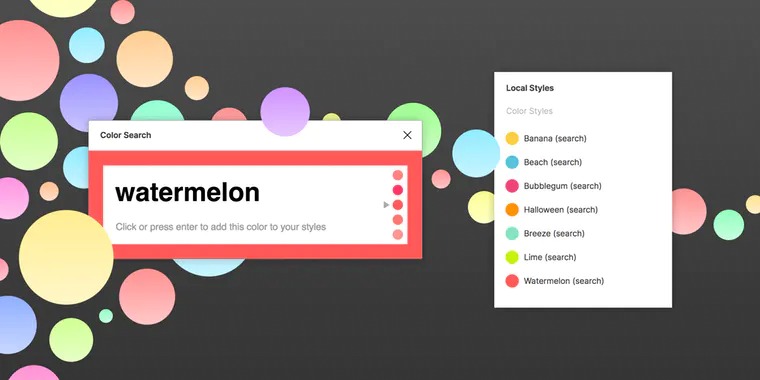
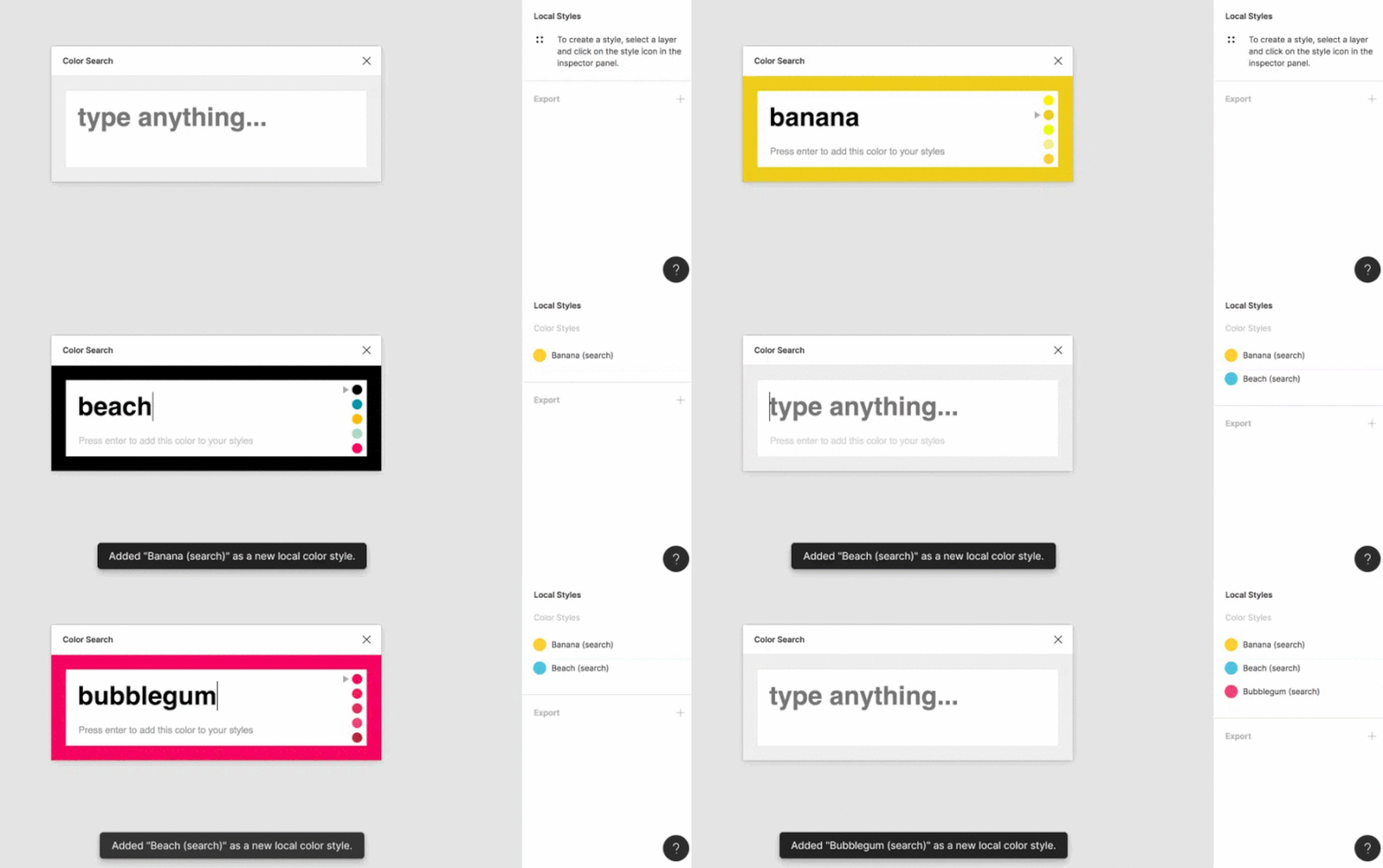
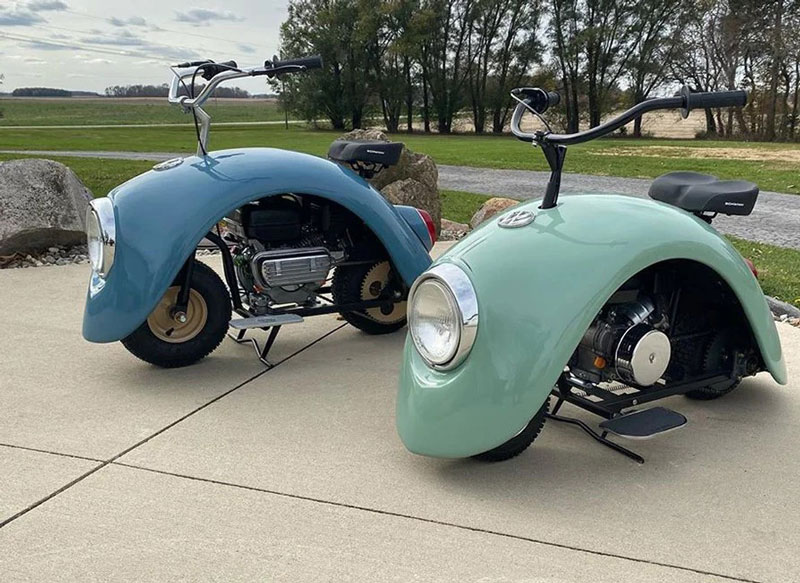
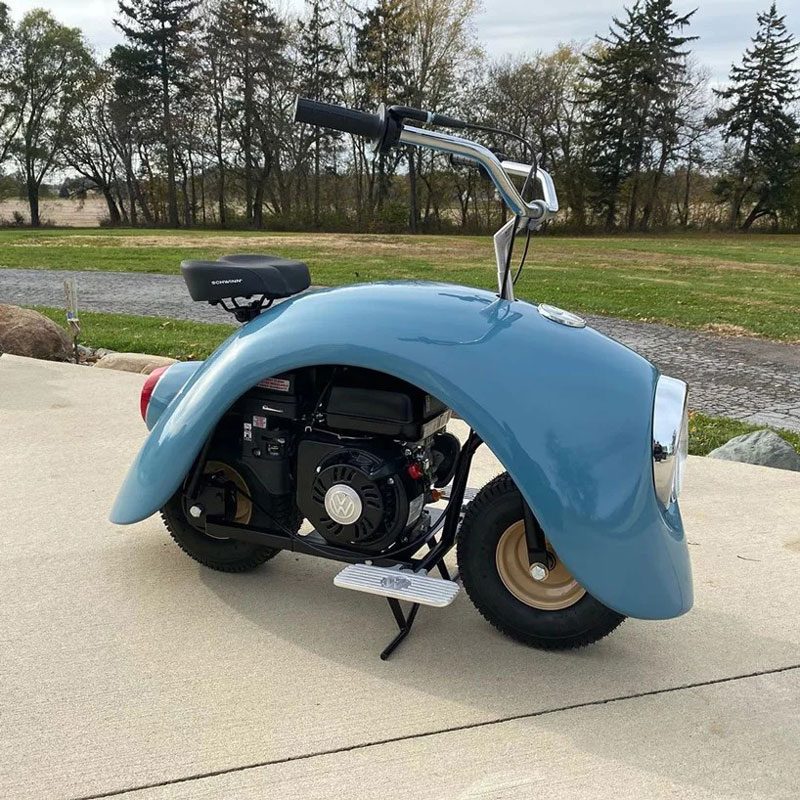
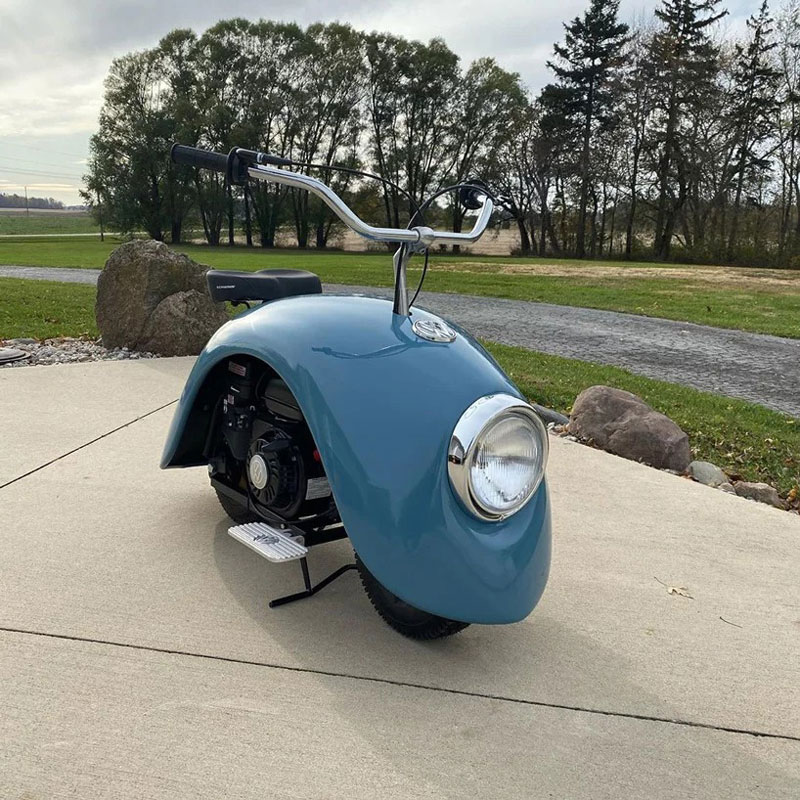
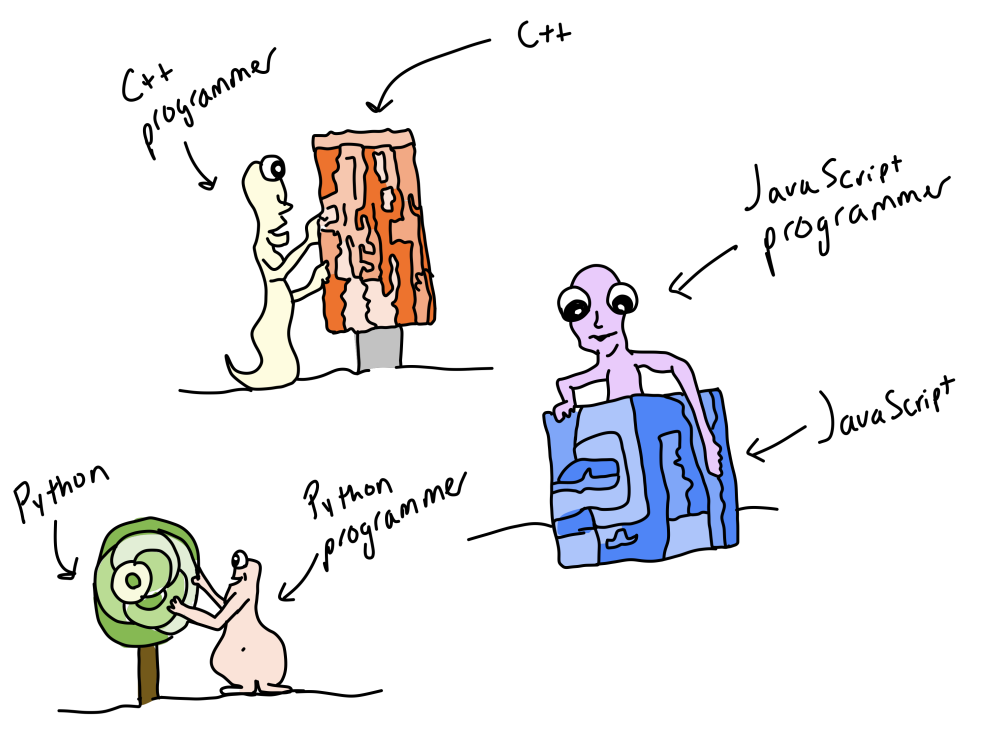
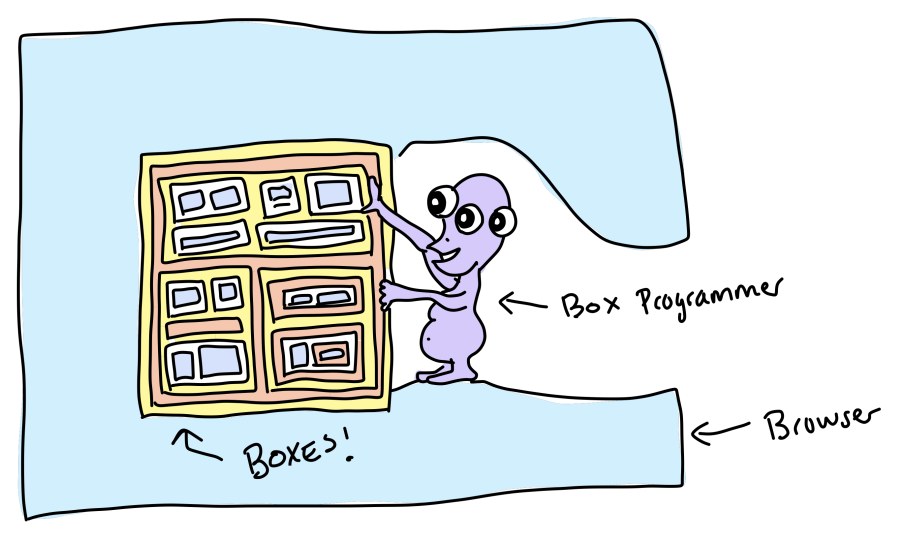


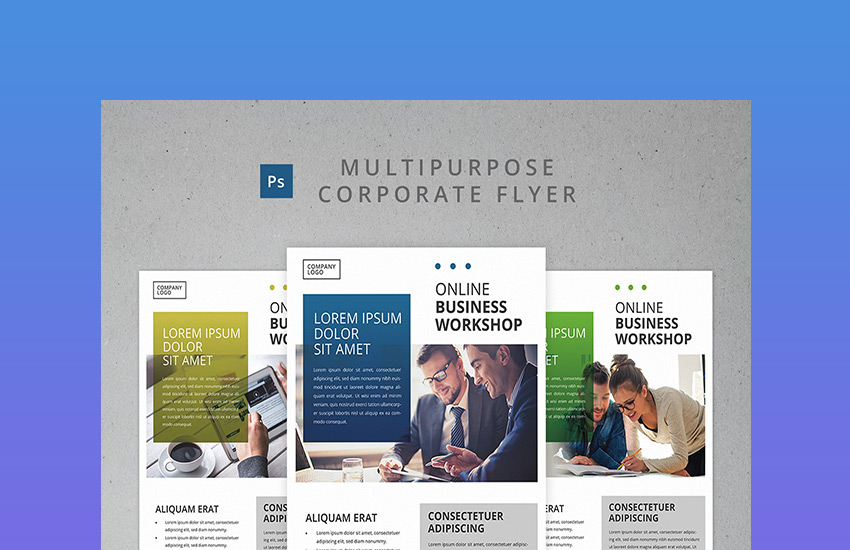


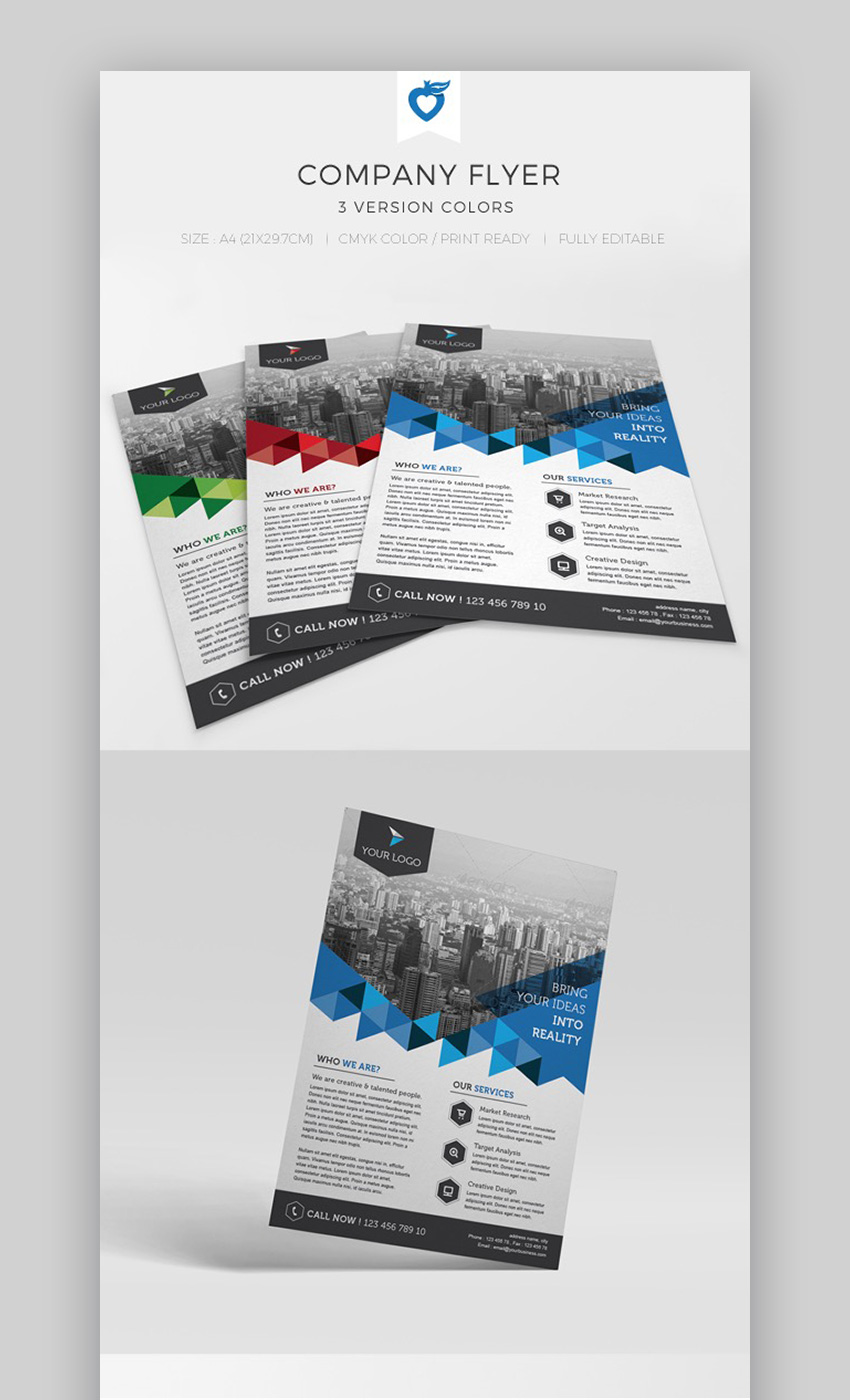


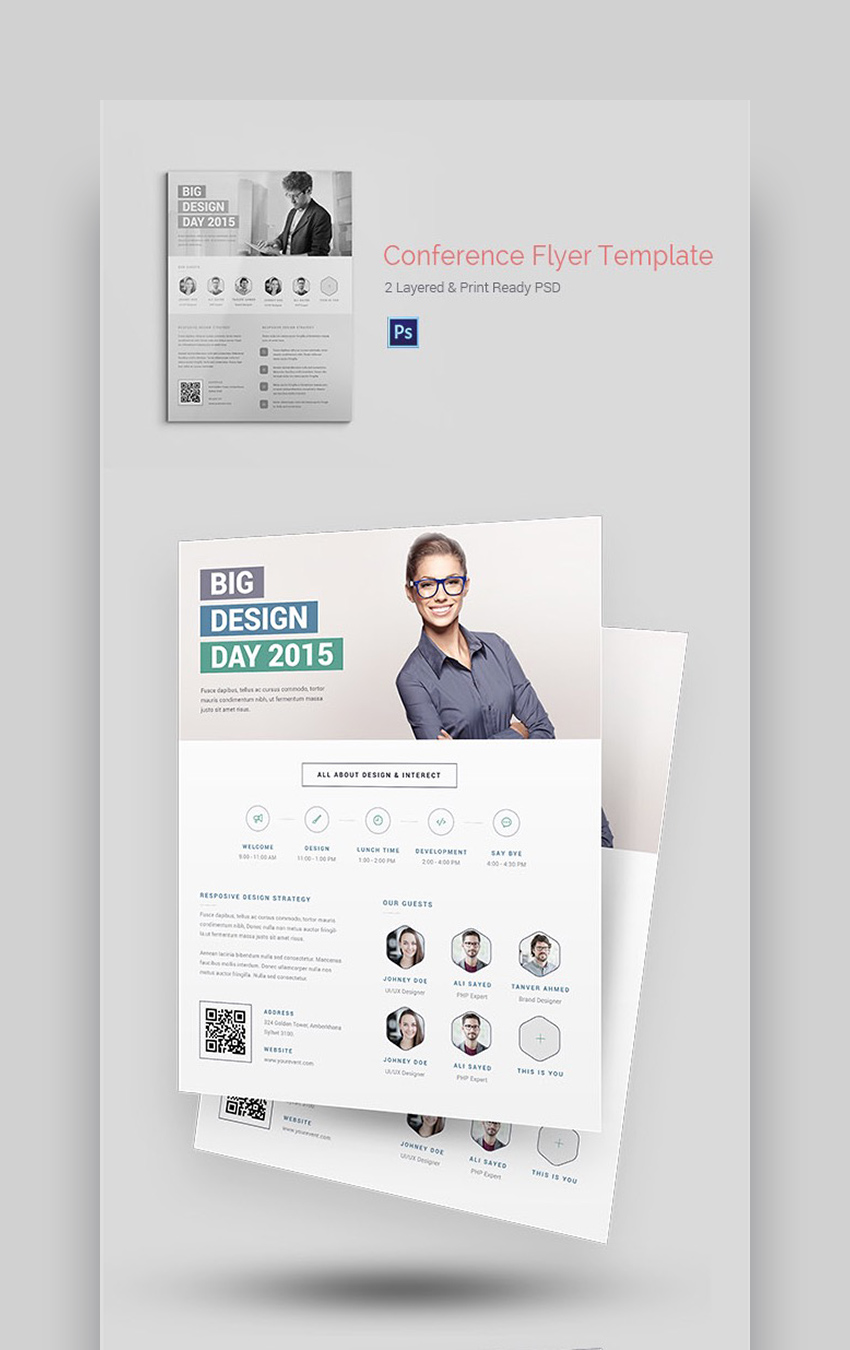


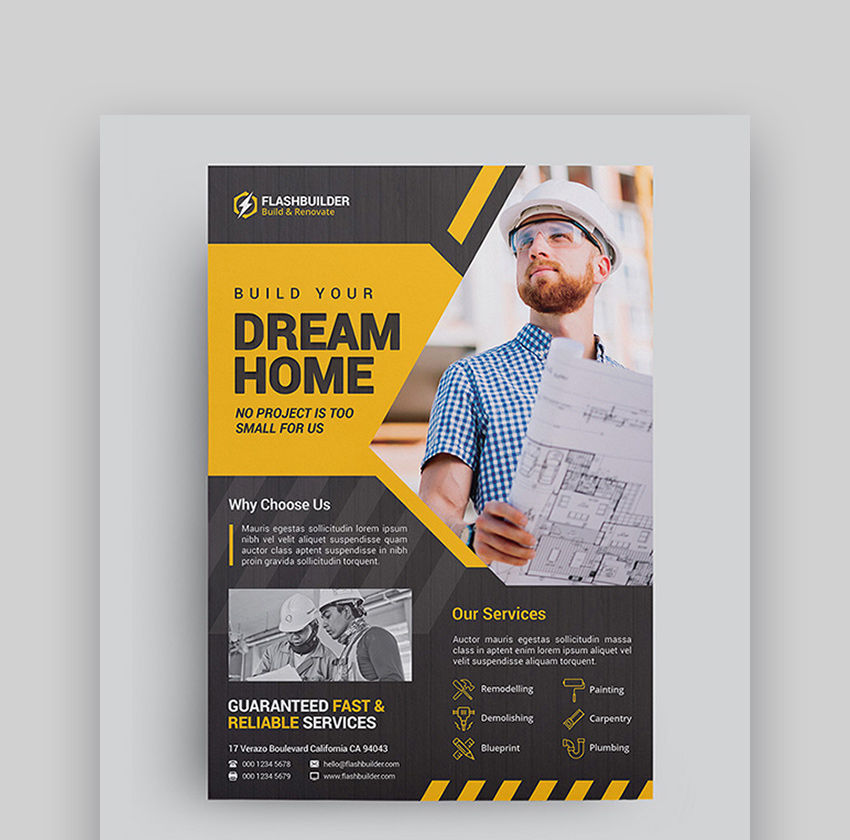


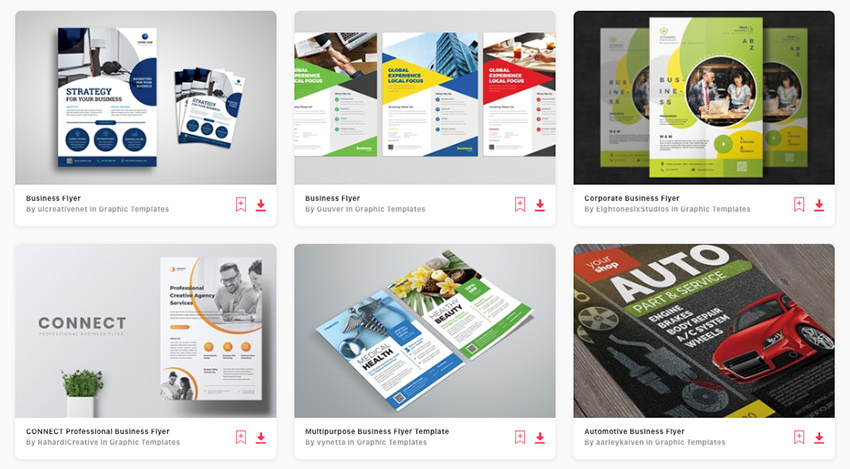

.jpg)