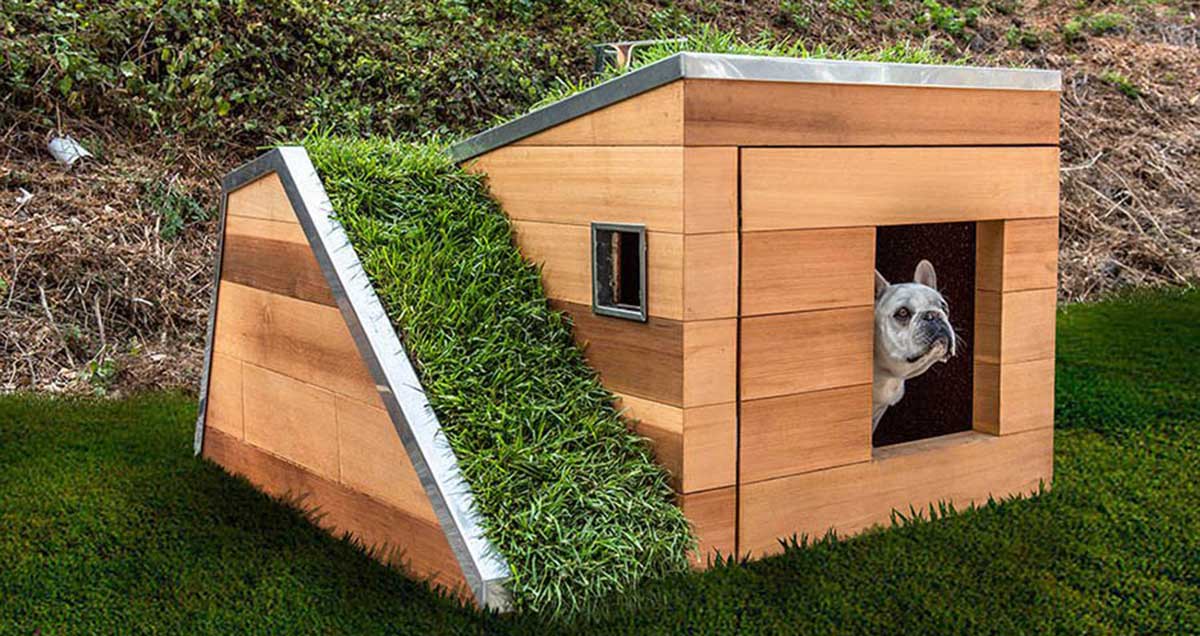
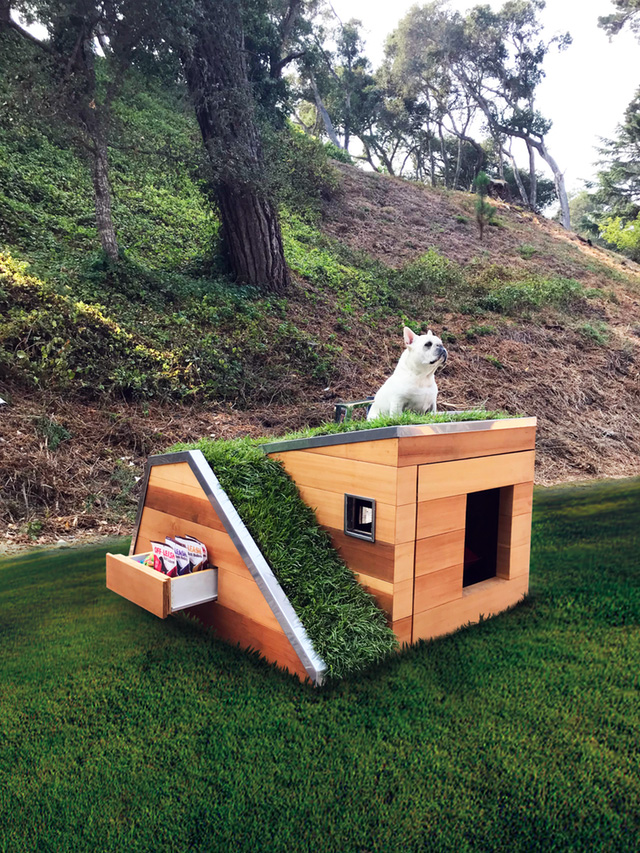
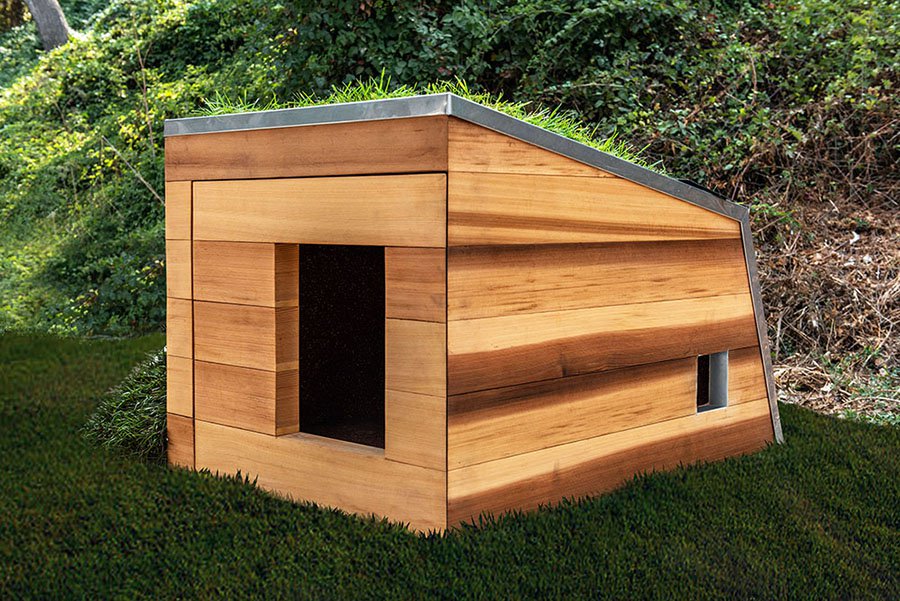
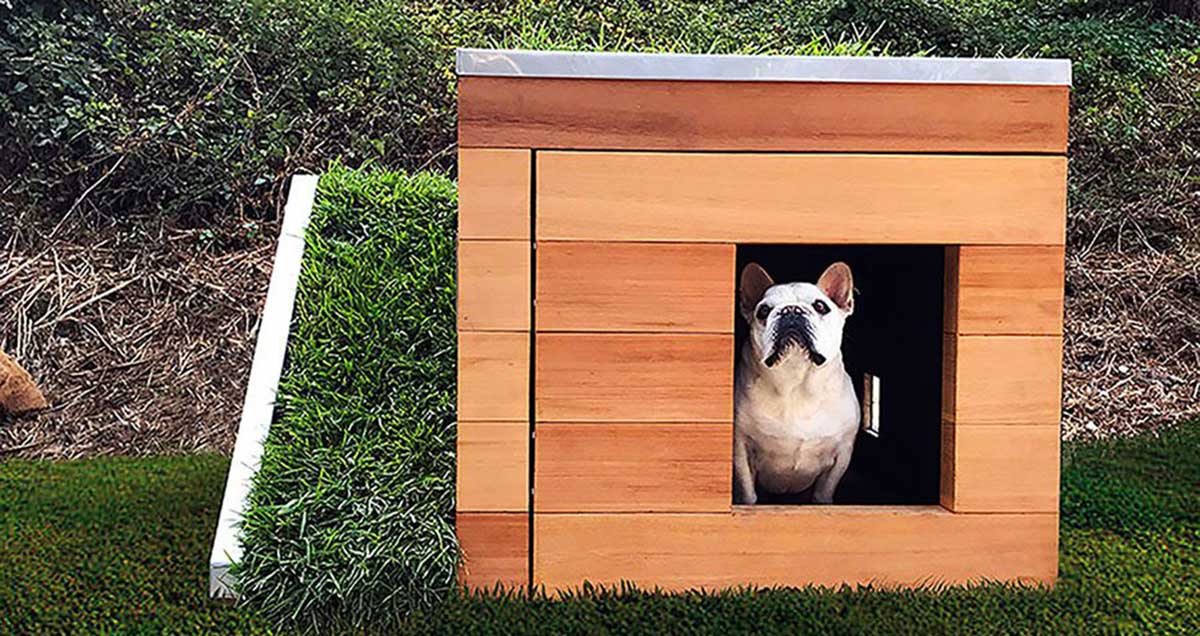
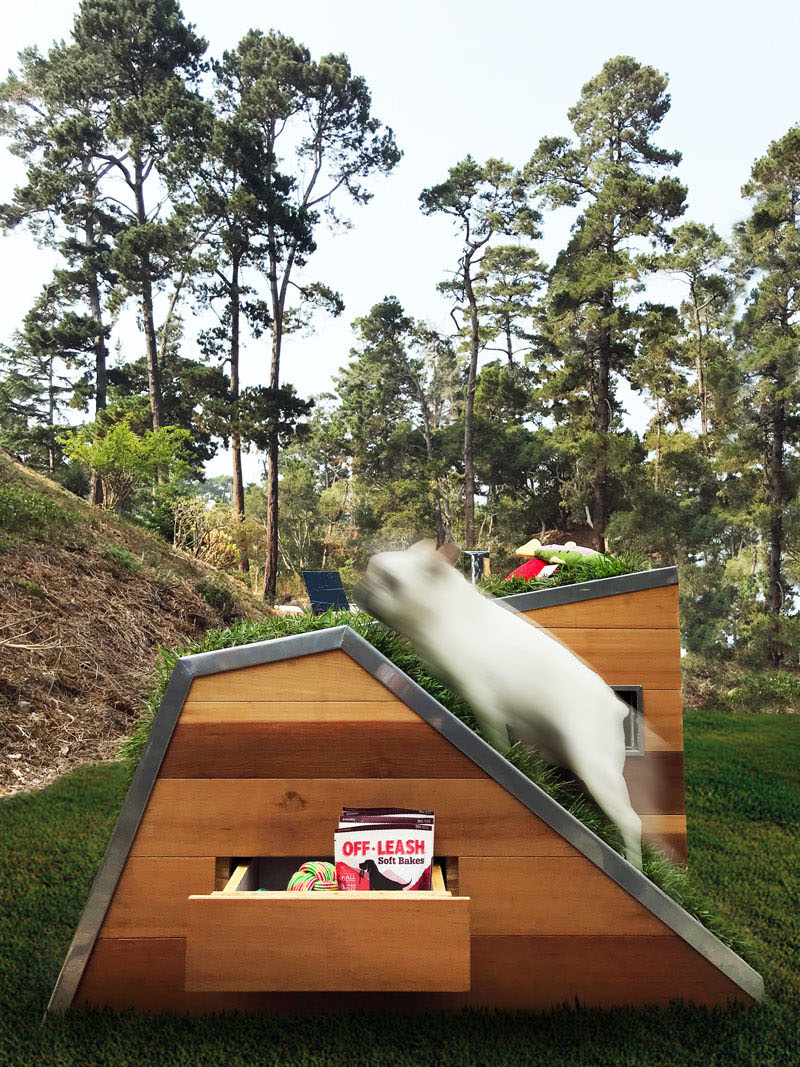
Can’t let your dog live in the house but still think that he deserves a cool and trendy doghouse? Look no further and get this house for your four-legged friend.
Named Doggy Dreamhouse, the doghouse is eco-friendly and offers a natural roof with a view for the dog. It was designed by Studio Schicketanz.
Great designers tend to be extremely talented and also work
hard to hone their skills. However, it’s equally important to own and master
the tools of the trade. Having access to the latest technologies might help you
work more efficiently and become highly successful in your industry.
As the majority of the work is done digitally, designers
should have a powerful computer to work flawlessly with big files. It’s also
essential to have a big external hard drive to store them and have a backup in
case something goes wrong. And don’t forget about a comfortable chair, because
working with excruciating back pain can badly affect your productivity.
Discover these eight pieces of technology every designer should have.
Although it’s totally fine to create your drafts using
artist’s pencils and high-quality sketchbooks, you’ll still need to work on
them digitally. The best course of action is to scan or photograph your drafts,
and then finish the work using tools such as the Wacom Intuos, a Huion
1060PLUS, or even an iPad Pro.
A Powerful Laptop or Desktop PC
If you tend to always carry your work with you and spend
time in coffee shops or co-working spaces, a laptop is probably the best
choice. Otherwise, a powerful desktop PC back home should do the job. Pay
special attention to the screen resolution, the RAM memory, and the processor —
since you’ll be working with heavy graphics all the time.
An Incredible Monitor With a
Calibrator
It goes without saying that having a high-definition
monitor is of the utmost importance for a designer. You need to be able to see
the colors perfectly as it would be a disaster if they were different from the
final product. Monitor calibrators can help set up the ideal brightness, gray
balancing, and other settings. Plus, they have room light monitoring. It’s
definitely a must-have!
A Big External Hard Drive
Depending on the type of work you’re doing, you’ll be
dealing with massive files. They usually tend to eat up most of the local
storage, so an external hard drive is essential if you need more space. They’re
also perfect to sync your backups as no one wants to lose a day’s work because
of a power cut.
The Latest Software
It would be great if you could create amazing content with
the pre-installed software that comes with your laptop, but that’s rarely the
case. Most designers tend to use Adobe Creative Cloud, which comes with InDesign,
Photoshop, and Illustrator. They may also use tools such as Corel Painter and
Affinity Designer. They’re not cheap, but it’s an investment that’s worth
making.
A Top-of-the-Line Smartphone
Everybody seems to need a smartphone nowadays, but
designers are a special case — they require a powerful device with a capable
network. A great option would be T-Mobile’s iPhone 6s Plus with its 12MP camera and
retina HD display. When you take into consideration that T-Mobile is the
fastest network, you won’t have problems checking those big files on the go.
Quality Speakers or Headphones
Did you know that listening to music while working can drastically improve your productivity? Studies show that depending
on the type of work (problem-solving, data entry, etc.), you might want to
listen to classical music, pop songs, or even dance music! With that in mind,
it’s probably a good idea to have top-notch speakers or headphones so you can
get more accomplished while listening to the right tunes.
A Comfortable Chair
If you’ve ever tried to work with never-ending back pain,
then you know how important a comfortable chair is. As you struggle to focus on
your projects, your productivity decreases and consequently your earnings. The
right ergonomic chair can help with your back, but also with repetitive strain
injury and even with blood flow.
Being a designer is no easy feat. Apart from constantly
trying to come up with interesting ideas for your projects, you also need
incredible artistic skills. But if you don’t have the right tools to work with,
all that talent could be wasted. When you invest in high-quality technology,
you’re also investing in your career.
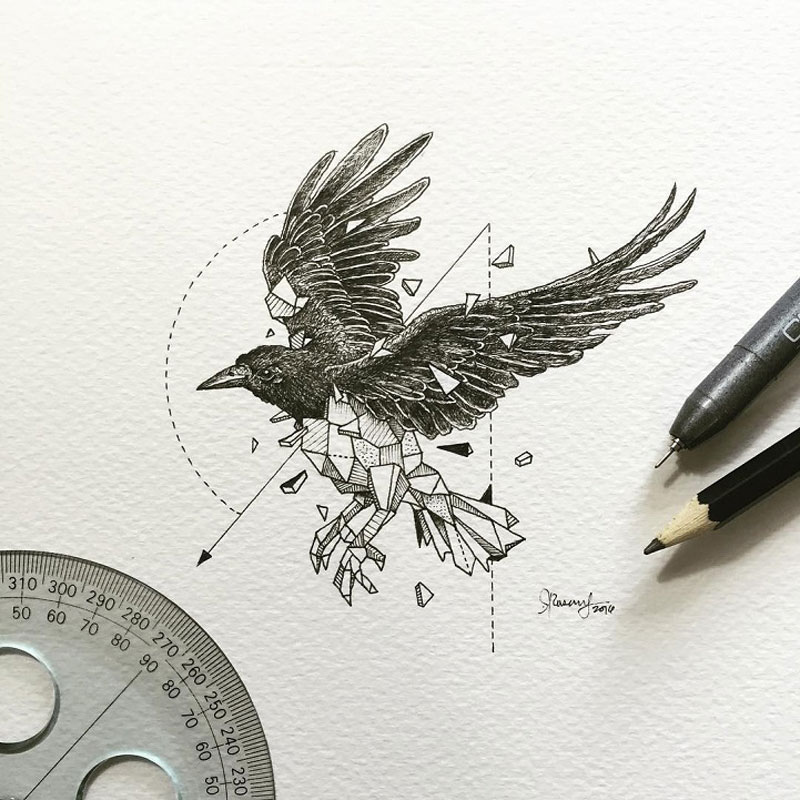
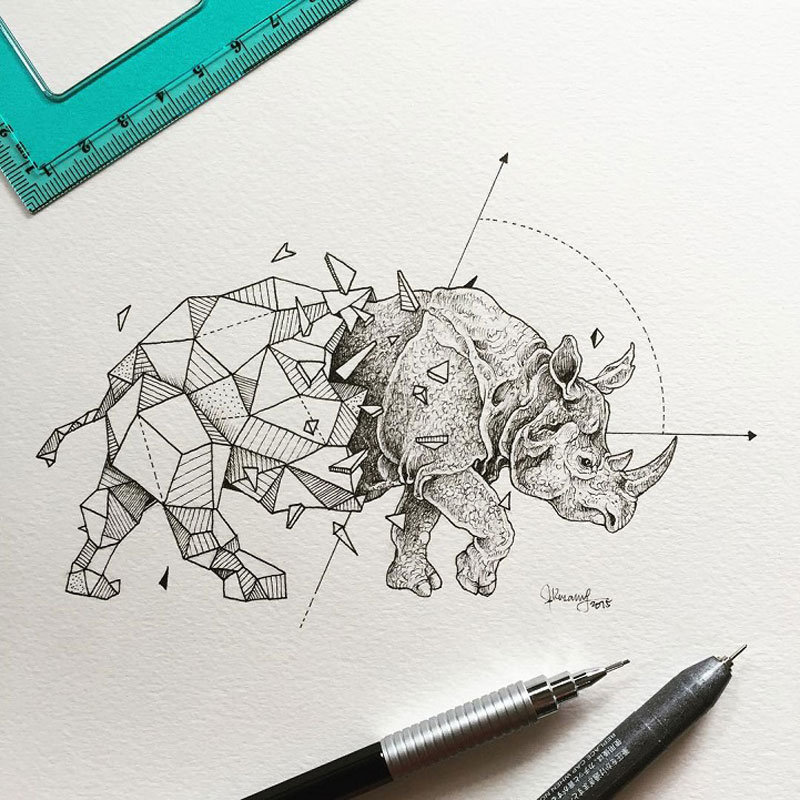
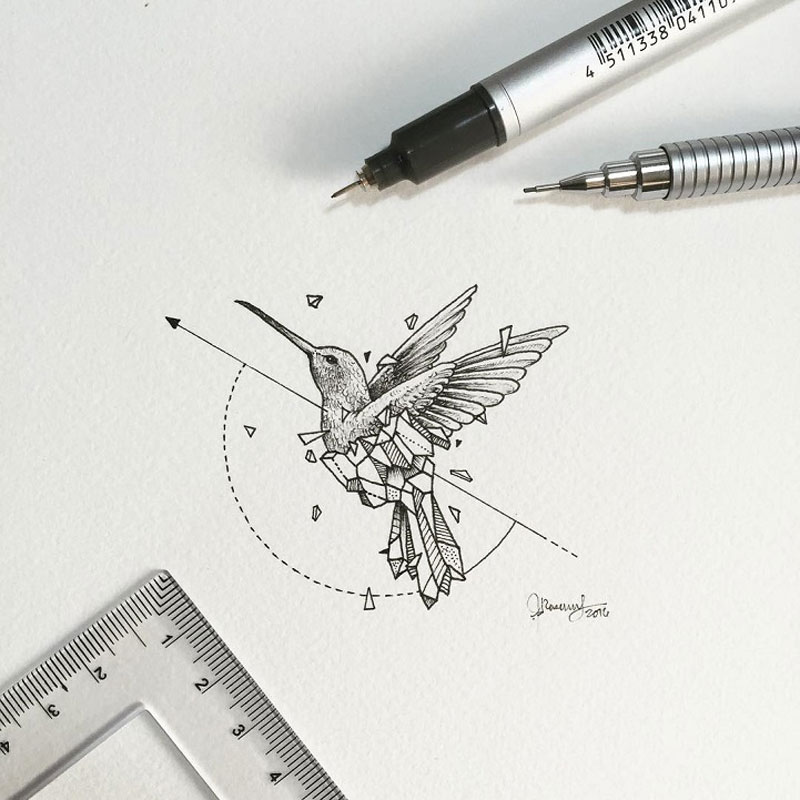
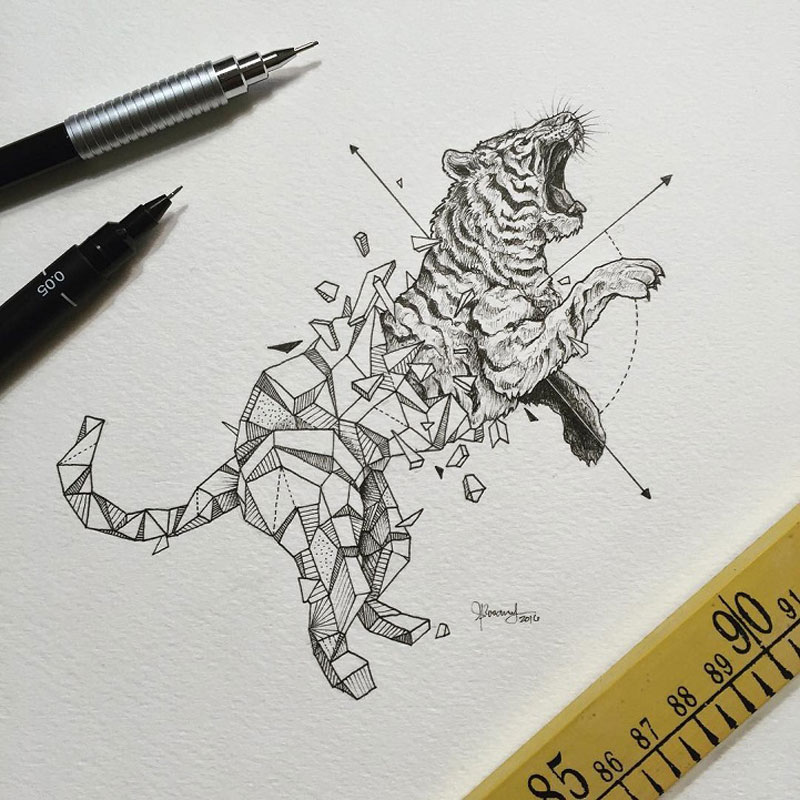
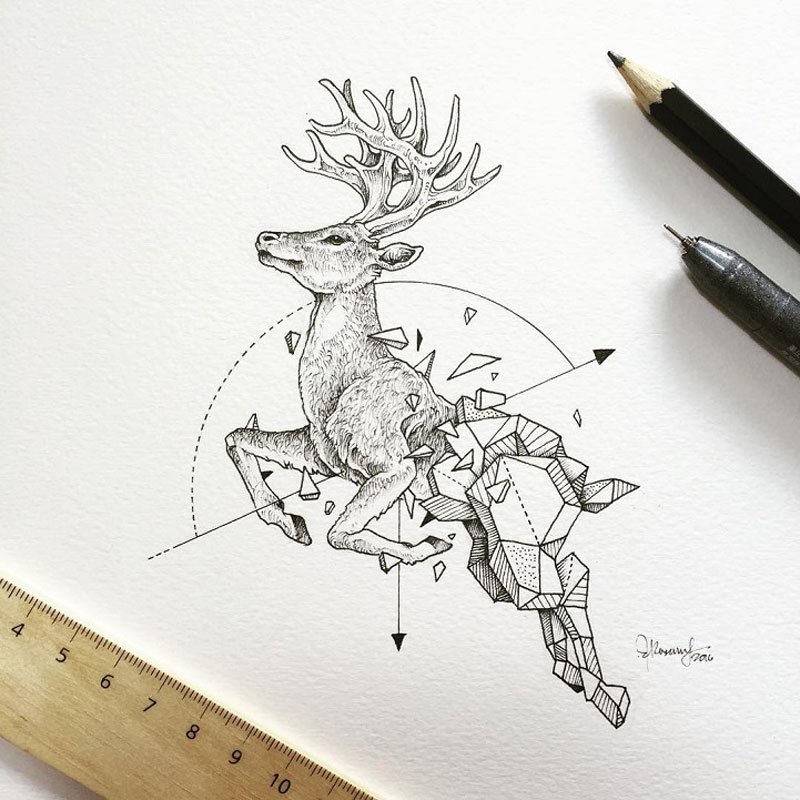
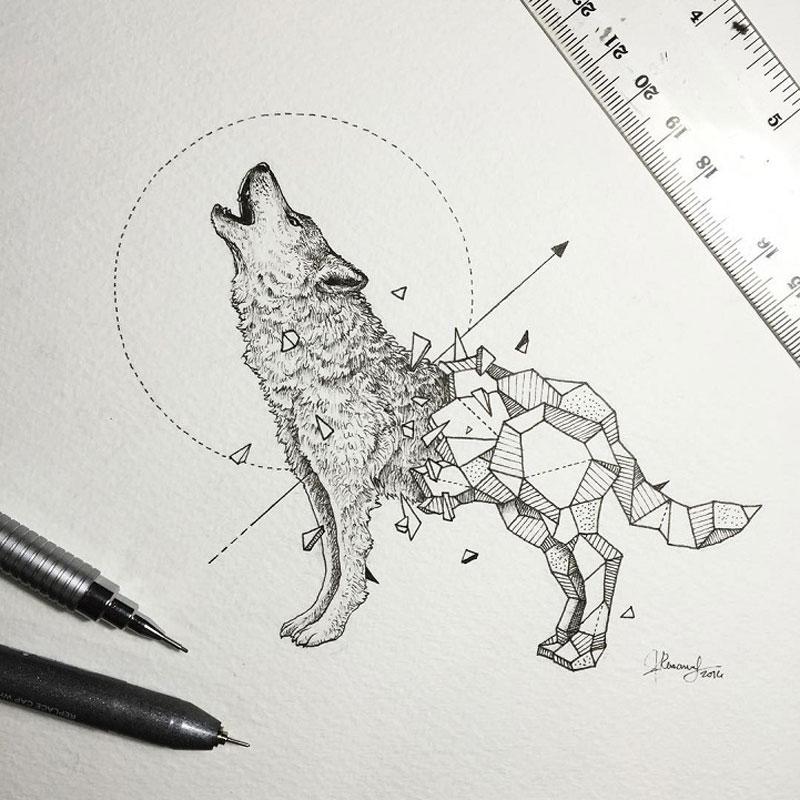
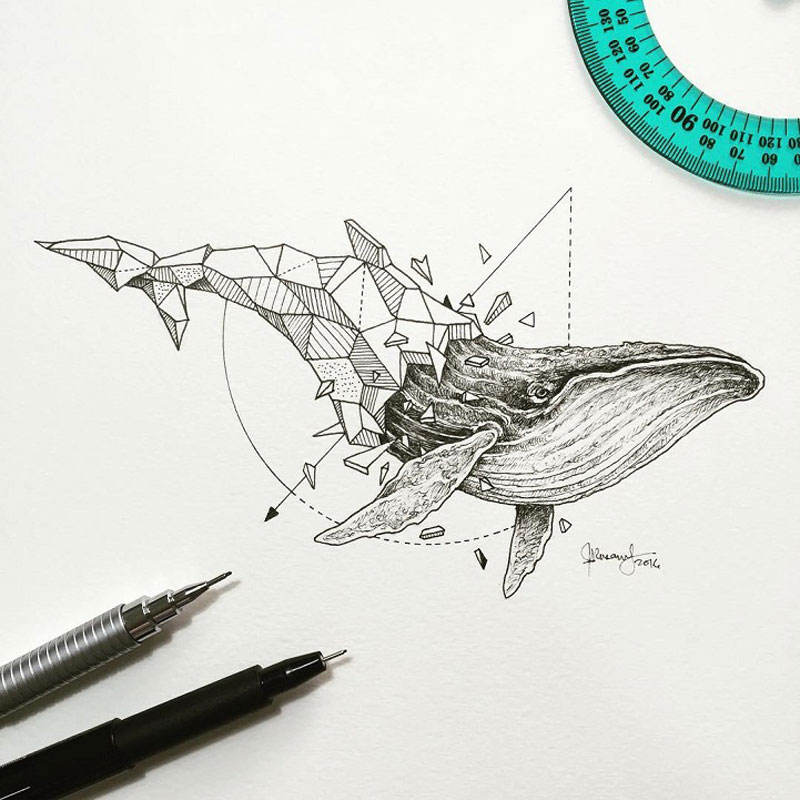
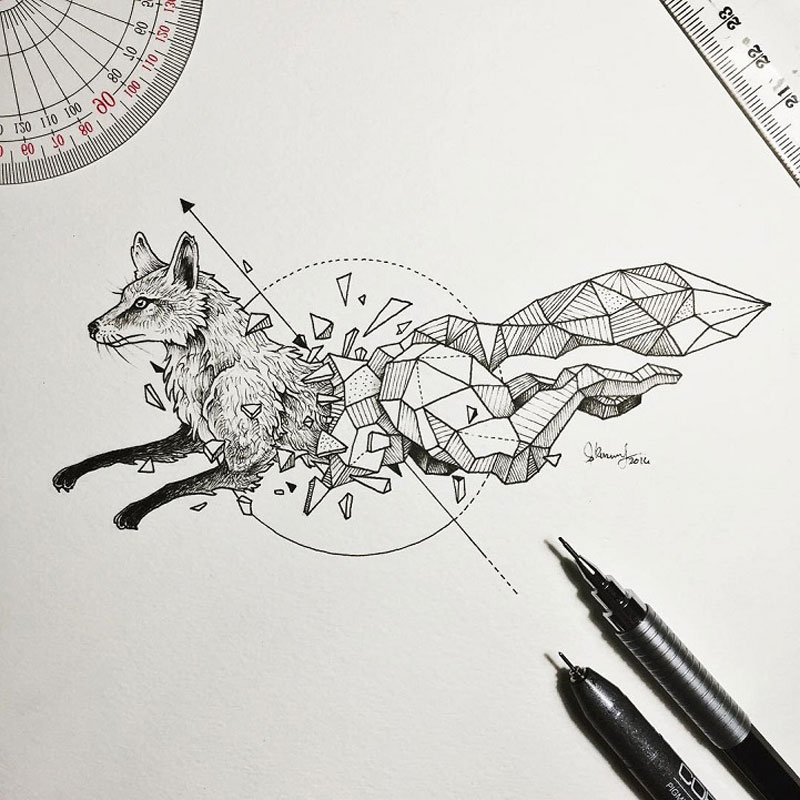
It’s not the first time we publish work by Filipino illustrator Kerby Rosanes on Designer Daily, we already featured some of his sketches and doodles.
We will probably have to feature him again in the future, as he keeps on producing stunning work, like these animals popping out of geometric shapes. If you enjoy this work, make sure to follow the artist through the social links you’ll find on his website.
It’s not the first time we publish work by Filipino illustrator Kerby Rosanes on Designer Daily, we already featured some of his sketches and doodles.
We will probably have to feature him again in the future, as he keeps on producing stunning work, like these animals popping out of geometric shapes. If you enjoy this work, make sure to follow the artist through the social links you’ll find on his website.
If you put a link on cats.html that links to /dogs.html (an „absolute” path), it’s going to 404 — there is no dogs.html at the base/root level of this site! The / at the beginning of the path means „start at the very bottom level and go up from there” (with public/ being the very bottom level).
That link on cats.html would need to be written as either ./dogs.html (start one directory back and work up) or /animals/dogs.html (explicitly state which directory to start at).
Absolute URLs get longer, naturally, the more complex the directory structure.
With a structure like this, for dogs.html to link to cats.html, it would have to be either…
<!-- Notice the TWO dots, meaning back up another folder level -->
<a href="../c/cats.html">cats</a>

<!-- Or absolute -->
<a href="/animals/pets/c/cats.html">cats</a>
It’s worth noting in this scenario that if animals/ was renamed animal/, then the relative link would still work, but the absolute link would not. That can be a downside to using absolute links. When you’re that specific, making a change to the path will impact your links.
We’ve only looked at HTML linking to HTML, but this idea is universal to the web (and computers, basically). For example, in a CSS file, you might have:
body {
  /* Back up one level from /images and follow this path */
  background-image: url(./images/pattern.png);
}
…then that becomes wrong because your CSS file is now nested in another directory and is referencing paths from a deeper level. You’d need to back up another folder level again with two dots, like ../images/pattern.png.
One URL format isn’t better than another — it just depends on what you think is more useful and intuitive at the time.
For me, I think about what is the least likely thing to change. For something like an image asset, I find it very unlikely that I’ll ever move it, so linking to it with an absolute URL path (e.g. /images/pattern.png) seems the safest. But for linking documents together that all happen to be in the same directory, it seems safer to link them relatively.
Guides, resources and discussions about Semantic HTML are often focused around specific elements, like a heading, or a sectioning element, or a list. It’s not often that we talk specifically about how we can combine HTML elements to increase their effectiveness.
Normally, when we introduce HTML, we talk about how it is used to apply meaning to content in a document, and we do this by using examples like:
„Is it a paragraph?”
„Is it a heading?”
„Is it a numbered list”
„Is it a button”
We use these examples because they are easy to understand — it’s a single piece or chunk of the same content that needs to be represented in a particular way. This is useful, but it only scratches the surface of how we can use and combine elements to provide more context and meaning.
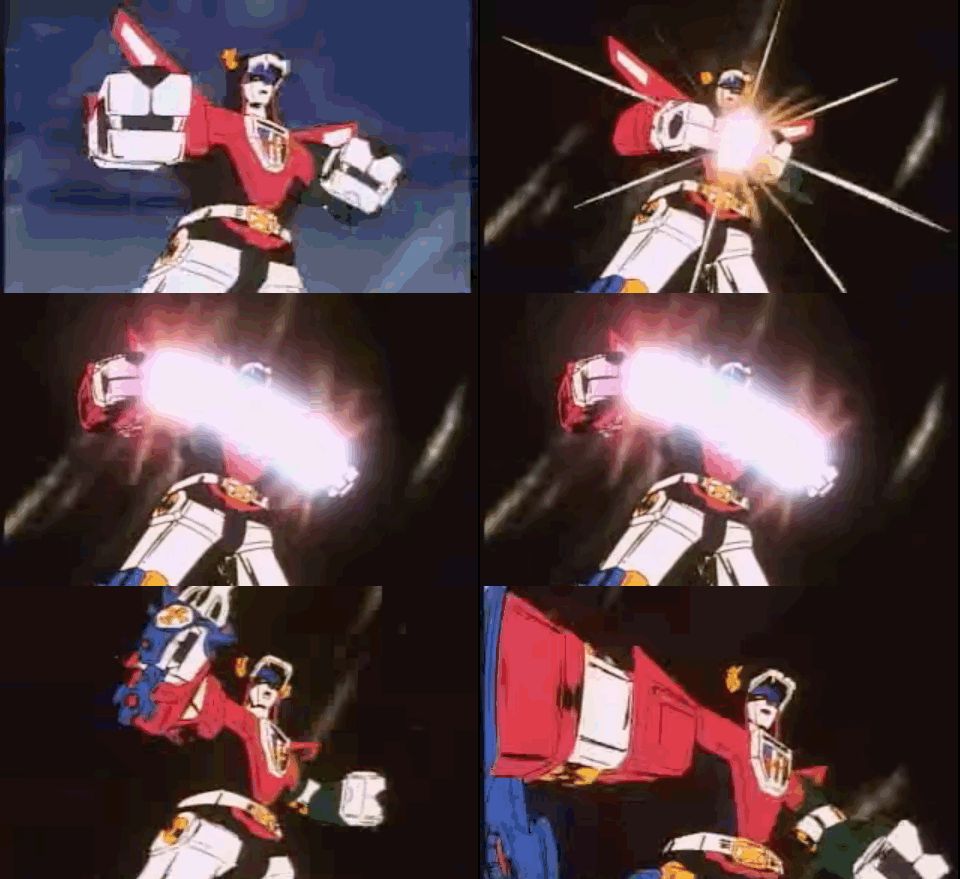
You remember Voltron, right? Each member of the Voltron force was powerful in their own right, but it was when they combined together to form a towering figure that their mighty powers became unstoppable.
The same is true of HTML elements. I have a few favorite combinations that I’ll take you through. They may seem obscure, but you’d be surprised at how often they come up when you take the time to think outside of divs and spans.
Abbreviations and Definitions
<abbr> and <dfn> are two of my favorite HTML elements. I particularly like them because they work really well together.
You can combine the abbreviation and definition elements to allow browsers, search bots, and other technologies to recognize that something is being defined and that the acronym is associated to that phrase.
<p>
  The <dfn><abbr title="International Good
  Dog Association">IGDA</abbr></dfn> is an international,
  not-for-profit organization responsible for determining
  that all dogs are good.
</p>
In the above example, I’m defining that the acronym „IGDA” as „International Good Dogs Association.” I do this by wrapping the acronym in an <abbr> element with a title attribute defining the full name. By adding the <dfn> element around the abbreviation, it indicates that the surrounding paragraph defines the term „International Good Dogs Association.”
The <abbr> element is useful because it can tell screen readers what they should read, while also providing a useful visual representation in the form of a tooltip explaining what the abbreviation is.
Visual representation of <abbr> and <dfn>.
Keyboard, Sample and Variable
If you haven’t heard of these elements, then get ready to have your socks blown off, because they are awesome.
First up, the <kbd> element is used to represent text for a textual user input (e.g. from a keyboard). You can also nest multiple <kbd> elements to represent multiple keystrokes. I love this because, as developers, we find ourselves (hopefully) writing documentation, blog posts, and guides on a regular basis and HTML provides us with native ways to represent this content straight out of the box!
If I wanted to tell someone how you copy and paste with the keyboard, I could mark it up like the code below.
<p>I like to <kbd><kbd>Ctrl</kbd>+<kbd>C</kbd></kbd> and <kbd><kbd>Ctrl</kbd>+<kbd>V</kbd></kbd> a lot.</p>
It looks a bit nuts but the above code, when rendered, looks like the following without any styling applied to it. If you are wondering why kbd is nested inside another kbd element, what this does is specify that the key or input is part of a larger input. Even more combined superpowers!
You can further target the <kbd> elements with CSS to make it look more like little keyboard controls. (Note: Browsers tend to render this by default with a monospace font.)
If you’re wondering what the difference is between using <kbd> versus a span, I believe it comes down to information. I will repeat this sentiment a lot: we do not know how someone is going to consume our HTML, so give your content it’s best chance by representing it in the most meaningful and contextual way possible. If you are still not on board, then please go read my post about HTML as told by TypeScript.
The <samp> element is really cool because you can nest it inside the <kbd> element and vice versa. WHAT? I know, so versatile! Let’s have a look at some examples from MDN.
The following code is an example of nesting a <samp> element inside a <kbd> element. This is used to mark up content that represents input based on the text displayed by the system (e.g. button names).
<p>To save the image file, select <kbd><kbd><samp>File</samp></kbd> - <kbd><samp>Save as...</samp></kbd></kbd>.
</p>
In the above code, we define our keyboard shortcuts the same as our previous example, but we also determine that the menu and menu item names (contained within both <kbd> and <samp>) are an input selected from something displayed by the system, e.g. a dialog or widget.
In other words, this piece of text is a message from the system which has some user inputs that you need to follow (like File and Save as…).
Whereas, when we nest <kbd> inside <samp>, we determine that the input has been echoed back to the user by the system.
<p><samp>yarn start:theproject does not exist, did you mean:</p>
<blockquote><samp><kbd>yarn start:the-project</kbd></samp></blockquote>
Finally, the <var> element! This is used to mark up the name of a variable in math or programming, for example:
<var>E</var> = <var>m</var><var>c</var><sup>2</sup>.
<samp>Error: <var>console<var> is undefined.</samp>
Here you can start to see how combining <var> with other elements like <pre>, <code>, <kbd> or <samp> starts to make your content’s markup more explicit by adding more context. Anything that interprets your HTML markup can start to derive more meaning from the elements you are using rather than just assuming that it’s all standard text.
If you put this content in a paragraph with some spans, there is no way for technology to distinguish this from any other old text on your page. You don’t have to resort to <span> or a <div> to represent this content because HTML already provides us with more semantically accurate elements we can use. HTML is not just about presentation; it’s about meaning. Various technologies outside of visual rendering engines rely on this meaning to make decisions about how to communicate our content in the most meaningful way (e.g. screen readers, text to voice, reading apps, bots, or the next big thing in the future).
Figures
Figures (<figure>) are a great example of a power combination element. Unfortunately, I think it is widely misused and under appreciated (much like <aside>, which I could talk about for hours). The obvious combination you are probably familiar with is using <figure> and <figcaption> together. We often use this duo to represent graphical content like images, illustrations and diagrams — but it can also be used for things like code, poems and quotes!
Because a figure is so flexible in what kind of content it represents, there are a bunch of different HTML elements you can use within a figure to provide more context around the type of content you are putting in your page.
Figcaption
The <figure> element is often seen with an optional <figcaption> which represents a caption or legend for a figure. It should be the first child or last child of the <figure> element. You can also use any flow content (e.g. paragraphs, headings, etc.) in the <figcaption> to provide more context and you can have multiple images inside a <figure> represented by a single <figcaption>.
<figure>
  <img src="jello.jpg" alt="Golden Retriever Puppy" />
  <figcaption>Jello the Golden Retriever enjoying being carried home.</figcaption>
</figure>
Preformatted Text
The <pre> element is used to display preformatted text or code and is usually rendered using a monospace font. While <pre> can be used on its own, it can also be combined with <figure> and <figcaption>. By doing this, the content inside the <pre> element becomes more accessible to assistive technologies, like screen readers, since it allows us to use <figcaption> as a label for the text or code.
We can go even further by combining the <pre> and <code> elements to identify the pre- formatted content as code.
Because <code> is considered flow content, it can also be used inside a <figcaption> to mark up inline references to code (i.e. a single phrase or line).
Cite and Blockquote
Quotations are something I use a lot and it honestly didn’t occur to me it could be used as part of a figure. But it still makes sense to use cite or quotation if the content they contain is relevant to the overall content, even if it is not part of the main document flow.
I like the example of using a figure for poems, mainly so I could share the amazing poem I wrote about my dog. Here I use the <cite> element inside the <figcaption>:
<figure>
  <p>
    Jello - A little fluffy dog.
    Hello!
    Squishy Jello - you little fluffy fellow.
    BOUNCY yellow Jello.
        A very mellow fellow.
    EATING MY MARSHMALLOW.
  </p>
  <figcaption><cite>Eating my Marshmallow by Mandy Michael</figcaption>
</figure>
It’s easy to fall into the trap of thinking that the figure element is just for images or image-like content, but you can use it for content like audio, video, charts, poems, quotations or even tables of statistics. Because the element is so versatile you can combine it with so many other elements to provide more and more context about the figure for assistive technology, browsers, and other technologies consuming your website.
Wrapping Up
These are just some of the ways HTML elements can be combined for better context. HTML elements are indeed useful and valuable on their own when used as isolated pieces — and using them this way is a good first step. But, like Voltron, when you combine HTML elements together, the individual pieces form a greater whole and gain much more meaning and power. It’s important that we don’t think of HTML as individual pieces of code, but parts of a whole because HTML is really a mass of totally amazing combinations.
You can combine and use HTML elements in any number of ways to best represent your content. Don’t simply stick to the same old things you know; take the time to explore HTML and learn about all it has to offer. Like any language, we should make the most of it and use it to its full potential.
The more accurate you are in marking up your content, the better that content will be represented across technologies, and the more prepared it will be for any anything else that is used to interpret your HTML in the future.
So, go forth and HTML elements, unite!
Resources
In my opinion, the best resource for learning and understanding how to use HTML (outside of the spec itself) is the MDN Web Docs. It lists all the HTML elements you could ever need.
The following are among the elements covered in this post:
We’ve all seen articles like „The Top 5 Ways To Fix Your Sign Up Flow and Get On With Your Life.” Articles like this aren’t wrong or bad, they are just shallow and a bit junk food-y and BuzzFeed-y. Of course, a designer’s actual job is complicated, nuanced, and difficult. But deep dives into all that are far less common.
It’s clear that the currency of design discourse is really concerned with the “how” of design, not the “why” of it. As Teixeira and Braga write:
While designers tend to be skeptical of magic formulas—we’re decidedly suspicious of self-help gurus, magic diets, or miraculous career advice—we have a surprisingly high tolerance for formulaic solutions when it comes to design.
That’s a pointed criticism but, from my perspective, it’s also quite accurate.
Promote your brand with beautiful visuals. Check out this list of amazing places to find t-shirt mockup templates online.
20+ Best T-Shirt & Clothing Mockup Templates
Launching your own apparel brand is exciting. But making the visuals for your website, stationery, and social media platforms gets a little exhausting.
That’s why you should cut your work time in half by using a solid t-shirt mockup generator. These special tools display your designs on high-quality images using customizable templates.
In most cases, all you have to do is upload your design to any t-shirt mockup to get started making high-quality content. Take it a step even further by experimenting with color, layout and texture for more options.
Ready to create something great? Explore this selection of free and premium mockup generators to customize your t-shirt and clothing designs.
Placeit mockups make design easier by giving you exactly what you need for apparel branding. Start by using their t-shirt mockup tool, created specifically to customize your design fast.
It works by letting you simply choose whichever preset graphic you like. Then you can customize the graphic even further with various text choices and background colors for a unique look.
But if you’re looking for something faster, consider one of the countless premade templates already available for both t-shirt and clothing design.
There’s no better t-shirt template than one with unlimited options. And this clean design features a simple white tee you can customize with any background. Insert a rustic wooden floor or upgrade the look with bright pastel colors. Pair the perfect scene to your clever tee design.
Every basic tee features a crew neck or rounded top. So it’s no wonder why most templates you see use this particular cut. For the best results, consider the environment your apparel will appear in. Download a crew neck mockup like the one below to pair your graphics with a cool interior setting.
Whether you need a model frolicking among nature or just in a studio, Placeit has many model mockups to choose from. This template features a stunning model with a coy, relaxed expression, for instance. Remember, fitting your tee to the overall style of the photograph makes a huge difference. So make it count by picking the right photo!
The most important part of your tee is the graphic. So take advantage of closeup mockups like this template to grab your audience’s attention. This template features a simple white tee with a subtle wooden background. The lower sections do get cut off, however, so consider a graphic that utilizes this space wisely.
Create an awesome pile of tees with this minimalist t-shirt mockup. The unique folded design presents your shirts in an organized pile with plenty of room to show off your graphic. You can even color the shirts individually for a cool multicolored effect.
What would you do with an unlimited amount of inspiration at your fingertips? Envato Elements makes that happen with one monthly subscription.
These templates feature a variety of styles and themes to satisfy any creative scenario. And if you can afford the monthly fee, your creativity will thank you later.
If all you need is a simple white tee then look no further. This minimalist layout features a wrinkled white t-shirt with plenty of room for your favorite quotes or graphics. Easily update this pack of 10 high-resolution templates using Adobe Photoshop.
Or lay out the perfect outfit for your t-shirt design. This mockup template features a cool „outfit of the day” vibe inspired by many fashion sites and online posts. The folded tee cuts off a portion of the graphic, so keep that in mind when exploring different t-shirt visuals.
Envato Elements is also great for staying ahead of the game with modern graphics. This t-shirt mockup features the latest trends that explore minimalist geometric shapes and retro colors. Create a cool 90s tee like the one below to put in your website or portfolio.
Or keep it simple with this t-shirt mockup featuring a realistic folded effect. This pack comes with many advanced, easy-to-use mockups that explore several ways to present apparel design. As with other templates, you can also substitute the background for the one you prefer.
Display your shirt in a beautiful vintage box like this awesome t-shirt mockup. This template features a well-organized Photoshop file with fully editable layers you can customize fast. And since all the elements are completely editable, you can modify everything from the box cover to the background color.
Our next t-shirt generator is free to use for any designer on a budget! Shirtmockup.com generates free t-shirt mockups in a simple three-step process. First, upload the graphic you’d like, and then choose the size and shirt color. Now save the image and presto! You’ve got a great new professional t-shirt.
Unlike the other sites, this one only lets you use only this particular tee. Let’s see how it looks in my example below.
Here is a before and after look at how my design would appear on this shirt. Feel free to adjust the size or rotate your images to the position you like best. Keep in mind you’ll be forced to use the gray background without a premium account, but you can always replace it pretty easily if you’re familiar with Adobe Photoshop.
Next up on our list of mockup generators is Creative Market, an online resource dedicated to bringing you high-quality templates.
Purchase templates individually or sign up and go pro to download unlimited assets. There’s also a weekly selection of free goodies with many helpful picks.
Apparel mockup bundles are a great resource for designers who want multiple options for one price. This incredible pack features t-shirt templates in a variety of styles including crew necks, hoodies, and even tank tops. Switch out the graphics for your own to fill up your online shop.
Buyers want to know exactly what they’re getting into when they purchase online. That’s why it’s important to include front and back versions of your tees just like this example below. Try a bold tee color to help your graphic stand out before customizing it with more details.
The downside to some mockups is that they limit the tee color to just black or white. Now you can create an unlimited amount of choices with this infinity color t-shirt mockup set. Get photo-realistic results with fully editable backgrounds. Create the perfect colors for your brand!
With Creative Market templates, you also get access to a variety of shirt styles like this sophisticated polo shirt mockup. A sleek and modern design, this template cuts the model off right at the perfect level so that all the focus is where you want it…on the tee!
When all else fails, keep the design as simple as possible. This black t-shirt mockup template is a pretty straightforward resource for designers on the go. There are no extra bells or whistles to over-complicate the design, and it also features realistic wrinkles and texture for a high-quality look. Check it out!
Our last t-shirt generator comes from Printful, a site with a built-in mockup generator that also assists you in making and shipping tees online. Just put your brand all over their products to get started with a new online business.
Here are a few of their best options for apparel design.
Need a mockup with a simple model photo and shirt? Then check out this minimalist style. This white t-shirt mockup is easy to use with your own graphics. Just center your design on the model’s body and add text or clipart to finalize the look. A great starter template!
Perhaps your online boutique needs a few clean photos to make it truly shine. Check out this amazing women’s t-shirt mockup to help you do just that! Here I chose a simple heather gray shirt, but you can switch out the colors for more bold results!
Custom t-shirts are great for the whole family! And one of the many benefits of Printful is that you can see both the front and back t-shirt designs before sending them to print. This awesome mockup includes a simple children’s tee you can modify with any color. I chose blue!
Create the perfect princess tee with this sweet and adorable mockup. This mockup is specifically made for children’s apparel, so make sure your graphic is appropriate for the style. Add a simple quote to the front or a fun picture on the back!
Don’t forget the baby in the family! A cute tee like this one can be updated easily with any clipart you like. Just pick the main color you want, and then insert the text or image to enjoy a sweet design for your little baby. What would you put on this tee?
Conclusion
Every brand counts on a solid professional image to sell their products. So make your efforts stand out with incredible t-shirt mockups. Explore more amazing tools like Placeit and others to create stylish tees your customers will love.
Or learn t-shirt design with our easy lessons! Check out these tutorials:
Promote your brand with beautiful visuals. Check out this list of amazing places to find t-shirt mockup templates online.
20+ Best T-Shirt & Clothing Mockup Templates
Launching your own apparel brand is exciting. But making the visuals for your website, stationery, and social media platforms gets a little exhausting.
That’s why you should cut your work time in half by using a solid t-shirt mockup generator. These special tools display your designs on high-quality images using customizable templates.
In most cases, all you have to do is upload your design to any t-shirt mockup to get started making high-quality content. Take it a step even further by experimenting with color, layout and texture for more options.
Ready to create something great? Explore this selection of free and premium mockup generators to customize your t-shirt and clothing designs.
Placeit mockups make design easier by giving you exactly what you need for apparel branding. Start by using their t-shirt mockup tool, created specifically to customize your design fast.
It works by letting you simply choose whichever preset graphic you like. Then you can customize the graphic even further with various text choices and background colors for a unique look.
But if you’re looking for something faster, consider one of the countless premade templates already available for both t-shirt and clothing design.
There’s no better t-shirt template than one with unlimited options. And this clean design features a simple white tee you can customize with any background. Insert a rustic wooden floor or upgrade the look with bright pastel colors. Pair the perfect scene to your clever tee design.
Every basic tee features a crew neck or rounded top. So it’s no wonder why most templates you see use this particular cut. For the best results, consider the environment your apparel will appear in. Download a crew neck mockup like the one below to pair your graphics with a cool interior setting.
Whether you need a model frolicking among nature or just in a studio, Placeit has many model mockups to choose from. This template features a stunning model with a coy, relaxed expression, for instance. Remember, fitting your tee to the overall style of the photograph makes a huge difference. So make it count by picking the right photo!
The most important part of your tee is the graphic. So take advantage of closeup mockups like this template to grab your audience’s attention. This template features a simple white tee with a subtle wooden background. The lower sections do get cut off, however, so consider a graphic that utilizes this space wisely.
Create an awesome pile of tees with this minimalist t-shirt mockup. The unique folded design presents your shirts in an organized pile with plenty of room to show off your graphic. You can even color the shirts individually for a cool multicolored effect.
What would you do with an unlimited amount of inspiration at your fingertips? Envato Elements makes that happen with one monthly subscription.
These templates feature a variety of styles and themes to satisfy any creative scenario. And if you can afford the monthly fee, your creativity will thank you later.
If all you need is a simple white tee then look no further. This minimalist layout features a wrinkled white t-shirt with plenty of room for your favorite quotes or graphics. Easily update this pack of 10 high-resolution templates using Adobe Photoshop.
Or lay out the perfect outfit for your t-shirt design. This mockup template features a cool „outfit of the day” vibe inspired by many fashion sites and online posts. The folded tee cuts off a portion of the graphic, so keep that in mind when exploring different t-shirt visuals.
Envato Elements is also great for staying ahead of the game with modern graphics. This t-shirt mockup features the latest trends that explore minimalist geometric shapes and retro colors. Create a cool 90s tee like the one below to put in your website or portfolio.
Or keep it simple with this t-shirt mockup featuring a realistic folded effect. This pack comes with many advanced, easy-to-use mockups that explore several ways to present apparel design. As with other templates, you can also substitute the background for the one you prefer.
Display your shirt in a beautiful vintage box like this awesome t-shirt mockup. This template features a well-organized Photoshop file with fully editable layers you can customize fast. And since all the elements are completely editable, you can modify everything from the box cover to the background color.
Our next t-shirt generator is free to use for any designer on a budget! Shirtmockup.com generates free t-shirt mockups in a simple three-step process. First, upload the graphic you’d like, and then choose the size and shirt color. Now save the image and presto! You’ve got a great new professional t-shirt.
Unlike the other sites, this one only lets you use only this particular tee. Let’s see how it looks in my example below.
Here is a before and after look at how my design would appear on this shirt. Feel free to adjust the size or rotate your images to the position you like best. Keep in mind you’ll be forced to use the gray background without a premium account, but you can always replace it pretty easily if you’re familiar with Adobe Photoshop.
Next up on our list of mockup generators is Creative Market, an online resource dedicated to bringing you high-quality templates.
Purchase templates individually or sign up and go pro to download unlimited assets. There’s also a weekly selection of free goodies with many helpful picks.
Apparel mockup bundles are a great resource for designers who want multiple options for one price. This incredible pack features t-shirt templates in a variety of styles including crew necks, hoodies, and even tank tops. Switch out the graphics for your own to fill up your online shop.
Buyers want to know exactly what they’re getting into when they purchase online. That’s why it’s important to include front and back versions of your tees just like this example below. Try a bold tee color to help your graphic stand out before customizing it with more details.
The downside to some mockups is that they limit the tee color to just black or white. Now you can create an unlimited amount of choices with this infinity color t-shirt mockup set. Get photo-realistic results with fully editable backgrounds. Create the perfect colors for your brand!
With Creative Market templates, you also get access to a variety of shirt styles like this sophisticated polo shirt mockup. A sleek and modern design, this template cuts the model off right at the perfect level so that all the focus is where you want it…on the tee!
When all else fails, keep the design as simple as possible. This black t-shirt mockup template is a pretty straightforward resource for designers on the go. There are no extra bells or whistles to over-complicate the design, and it also features realistic wrinkles and texture for a high-quality look. Check it out!
Our last t-shirt generator comes from Printful, a site with a built-in mockup generator that also assists you in making and shipping tees online. Just put your brand all over their products to get started with a new online business.
Here are a few of their best options for apparel design.
Need a mockup with a simple model photo and shirt? Then check out this minimalist style. This white t-shirt mockup is easy to use with your own graphics. Just center your design on the model’s body and add text or clipart to finalize the look. A great starter template!
Perhaps your online boutique needs a few clean photos to make it truly shine. Check out this amazing women’s t-shirt mockup to help you do just that! Here I chose a simple heather gray shirt, but you can switch out the colors for more bold results!
Custom t-shirts are great for the whole family! And one of the many benefits of Printful is that you can see both the front and back t-shirt designs before sending them to print. This awesome mockup includes a simple children’s tee you can modify with any color. I chose blue!
Create the perfect princess tee with this sweet and adorable mockup. This mockup is specifically made for children’s apparel, so make sure your graphic is appropriate for the style. Add a simple quote to the front or a fun picture on the back!
Don’t forget the baby in the family! A cute tee like this one can be updated easily with any clipart you like. Just pick the main color you want, and then insert the text or image to enjoy a sweet design for your little baby. What would you put on this tee?
Conclusion
Every brand counts on a solid professional image to sell their products. So make your efforts stand out with incredible t-shirt mockups. Explore more amazing tools like Placeit and others to create stylish tees your customers will love.
Or learn t-shirt design with our easy lessons! Check out these tutorials:
Promote your brand with beautiful visuals. Check out this list of amazing places to find t-shirt mockup templates online.
20+ Best T-Shirt & Clothing Mockup Templates
Launching your own apparel brand is exciting. But making the visuals for your website, stationery, and social media platforms gets a little exhausting.
That’s why you should cut your work time in half by using a solid t-shirt mockup generator. These special tools display your designs on high-quality images using customizable templates.
In most cases, all you have to do is upload your design to any t-shirt mockup to get started making high-quality content. Take it a step even further by experimenting with color, layout and texture for more options.
Ready to create something great? Explore this selection of free and premium mockup generators to customize your t-shirt and clothing designs.
Placeit mockups make design easier by giving you exactly what you need for apparel branding. Start by using their t-shirt mockup tool, created specifically to customize your design fast.
It works by letting you simply choose whichever preset graphic you like. Then you can customize the graphic even further with various text choices and background colors for a unique look.
But if you’re looking for something faster, consider one of the countless premade templates already available for both t-shirt and clothing design.
There’s no better t-shirt template than one with unlimited options. And this clean design features a simple white tee you can customize with any background. Insert a rustic wooden floor or upgrade the look with bright pastel colors. Pair the perfect scene to your clever tee design.
Every basic tee features a crew neck or rounded top. So it’s no wonder why most templates you see use this particular cut. For the best results, consider the environment your apparel will appear in. Download a crew neck mockup like the one below to pair your graphics with a cool interior setting.
Whether you need a model frolicking among nature or just in a studio, Placeit has many model mockups to choose from. This template features a stunning model with a coy, relaxed expression, for instance. Remember, fitting your tee to the overall style of the photograph makes a huge difference. So make it count by picking the right photo!
The most important part of your tee is the graphic. So take advantage of closeup mockups like this template to grab your audience’s attention. This template features a simple white tee with a subtle wooden background. The lower sections do get cut off, however, so consider a graphic that utilizes this space wisely.
Create an awesome pile of tees with this minimalist t-shirt mockup. The unique folded design presents your shirts in an organized pile with plenty of room to show off your graphic. You can even color the shirts individually for a cool multicolored effect.
What would you do with an unlimited amount of inspiration at your fingertips? Envato Elements makes that happen with one monthly subscription.
These templates feature a variety of styles and themes to satisfy any creative scenario. And if you can afford the monthly fee, your creativity will thank you later.
If all you need is a simple white tee then look no further. This minimalist layout features a wrinkled white t-shirt with plenty of room for your favorite quotes or graphics. Easily update this pack of 10 high-resolution templates using Adobe Photoshop.
Or lay out the perfect outfit for your t-shirt design. This mockup template features a cool „outfit of the day” vibe inspired by many fashion sites and online posts. The folded tee cuts off a portion of the graphic, so keep that in mind when exploring different t-shirt visuals.
Envato Elements is also great for staying ahead of the game with modern graphics. This t-shirt mockup features the latest trends that explore minimalist geometric shapes and retro colors. Create a cool 90s tee like the one below to put in your website or portfolio.
Or keep it simple with this t-shirt mockup featuring a realistic folded effect. This pack comes with many advanced, easy-to-use mockups that explore several ways to present apparel design. As with other templates, you can also substitute the background for the one you prefer.
Display your shirt in a beautiful vintage box like this awesome t-shirt mockup. This template features a well-organized Photoshop file with fully editable layers you can customize fast. And since all the elements are completely editable, you can modify everything from the box cover to the background color.
Our next t-shirt generator is free to use for any designer on a budget! Shirtmockup.com generates free t-shirt mockups in a simple three-step process. First, upload the graphic you’d like, and then choose the size and shirt color. Now save the image and presto! You’ve got a great new professional t-shirt.
Unlike the other sites, this one only lets you use only this particular tee. Let’s see how it looks in my example below.
Here is a before and after look at how my design would appear on this shirt. Feel free to adjust the size or rotate your images to the position you like best. Keep in mind you’ll be forced to use the gray background without a premium account, but you can always replace it pretty easily if you’re familiar with Adobe Photoshop.
Next up on our list of mockup generators is Creative Market, an online resource dedicated to bringing you high-quality templates.
Purchase templates individually or sign up and go pro to download unlimited assets. There’s also a weekly selection of free goodies with many helpful picks.
Apparel mockup bundles are a great resource for designers who want multiple options for one price. This incredible pack features t-shirt templates in a variety of styles including crew necks, hoodies, and even tank tops. Switch out the graphics for your own to fill up your online shop.
Buyers want to know exactly what they’re getting into when they purchase online. That’s why it’s important to include front and back versions of your tees just like this example below. Try a bold tee color to help your graphic stand out before customizing it with more details.
The downside to some mockups is that they limit the tee color to just black or white. Now you can create an unlimited amount of choices with this infinity color t-shirt mockup set. Get photo-realistic results with fully editable backgrounds. Create the perfect colors for your brand!
With Creative Market templates, you also get access to a variety of shirt styles like this sophisticated polo shirt mockup. A sleek and modern design, this template cuts the model off right at the perfect level so that all the focus is where you want it…on the tee!
When all else fails, keep the design as simple as possible. This black t-shirt mockup template is a pretty straightforward resource for designers on the go. There are no extra bells or whistles to over-complicate the design, and it also features realistic wrinkles and texture for a high-quality look. Check it out!
Our last t-shirt generator comes from Printful, a site with a built-in mockup generator that also assists you in making and shipping tees online. Just put your brand all over their products to get started with a new online business.
Here are a few of their best options for apparel design.
Need a mockup with a simple model photo and shirt? Then check out this minimalist style. This white t-shirt mockup is easy to use with your own graphics. Just center your design on the model’s body and add text or clipart to finalize the look. A great starter template!
Perhaps your online boutique needs a few clean photos to make it truly shine. Check out this amazing women’s t-shirt mockup to help you do just that! Here I chose a simple heather gray shirt, but you can switch out the colors for more bold results!
Custom t-shirts are great for the whole family! And one of the many benefits of Printful is that you can see both the front and back t-shirt designs before sending them to print. This awesome mockup includes a simple children’s tee you can modify with any color. I chose blue!
Create the perfect princess tee with this sweet and adorable mockup. This mockup is specifically made for children’s apparel, so make sure your graphic is appropriate for the style. Add a simple quote to the front or a fun picture on the back!
Don’t forget the baby in the family! A cute tee like this one can be updated easily with any clipart you like. Just pick the main color you want, and then insert the text or image to enjoy a sweet design for your little baby. What would you put on this tee?
Conclusion
Every brand counts on a solid professional image to sell their products. So make your efforts stand out with incredible t-shirt mockups. Explore more amazing tools like Placeit and others to create stylish tees your customers will love.
Or learn t-shirt design with our easy lessons! Check out these tutorials: