Archiwum kategorii: Design

Monstroid WordPress Theme Ultimate Update

Post pobrano z: Monstroid WordPress Theme Ultimate Update

This fall TemplateMonster marketplace made some noise with a bunch of cool updates including an update of Monstroid2 theme, and now it’s time for another one. Monstroid WordPress theme the one released in 2016 got an ultimate update.

Why Was it Updated?

It’s all about page builders, as you know these days Elementor is about to become the most popular WordPress page builder ever released. This means that all WordPress themes manufactured should make sure that their product is compatible with this builder.

What Does It Mean for You?

If you want to build a powerful WordPress website you need to be sure that it’s up-to-date and corresponds fully to last design and development techniques.

Having Elementor on board of your website means that it’s 100% up-to-date and can offer you tons of amazing features.

Why Did We Use Elementor Builder?

Originally Monstroid WordPress theme was customized using shortcodes, at that times it was a reasonable and full-proof solution, but now when users are obsessed with simplicity Elementor builder seems to be only solution.

Even though Elementor is not the only one builder on the market, it’s so simple to use that even users with minor development skills can easily customize any theme.

What’s so Special About Monstroid Theme?

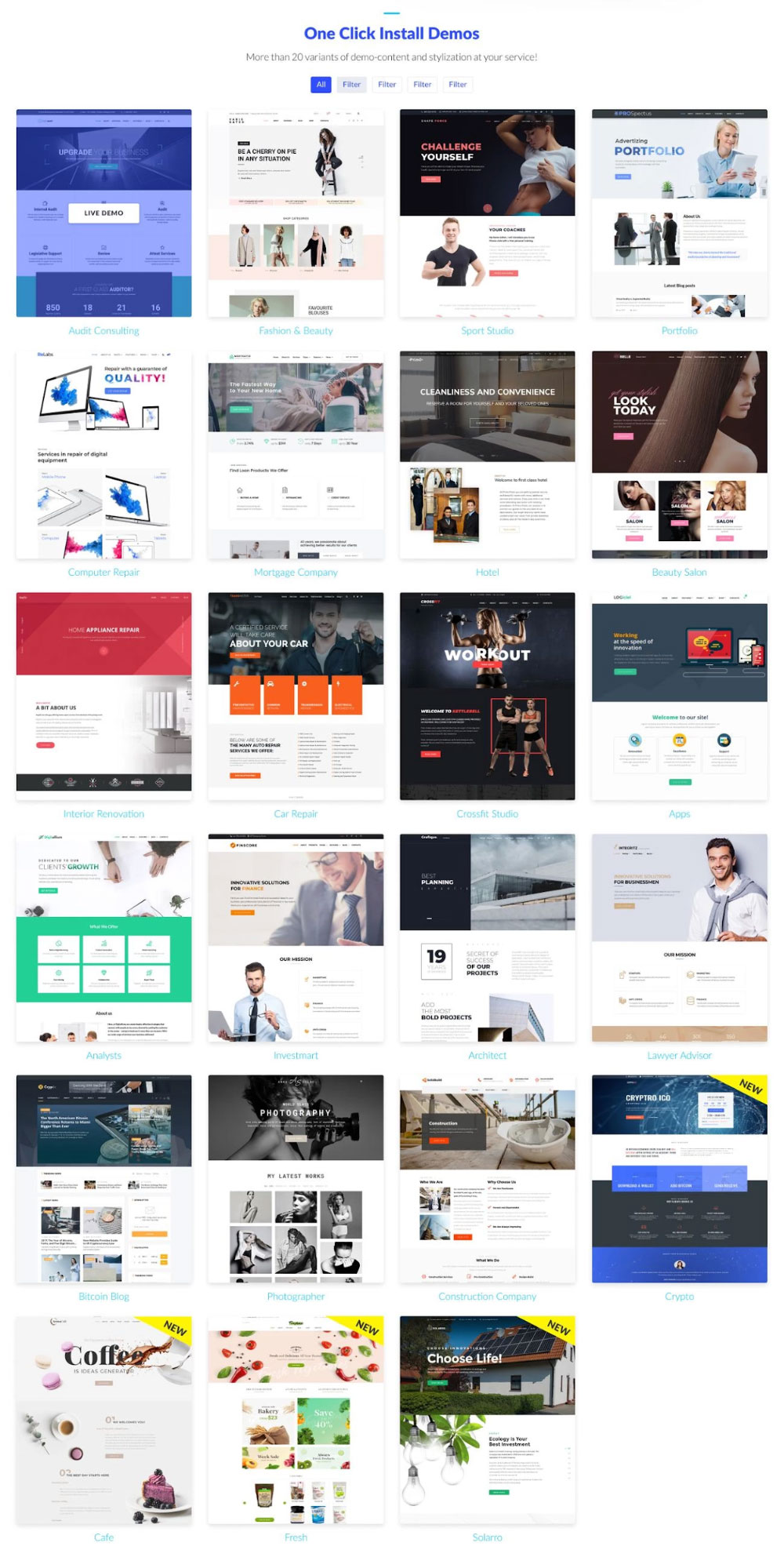
Every Monstroid theme owner will get a pack of 20 multipurpose Elementor child themes that can be used as a basis for their website.

Cryplix Bitcoin Blog
Variegated Fashion & Beauty
Shape Force Sport Studio
PROSpectus Portfolio
ReLabs Computer Repair
Mortgages Mortgage Company
EasyAudit Audit Consulting
Primo Hotel
MaBelle Beauty Salon
Repifix Interior Renovation
Transmister Car Repair
Kettlebell Crossfit Studio
LOGiciel SEO Company
Digitallium Analysts
Finscore Investmart
Grafique Architect
Integritz Lawyer Advisor
Anna Solas Photographer
SolidBuild Construction Company

Check out these demos on the image below.

No matter which of these themes you will choose you’ll be able to create on their basis any website, be it a blog, informational website, store, landing page or whatever else.

How to Install Monstroid Theme?

Let’s check out the installation process of Monstroid theme.

Step 1

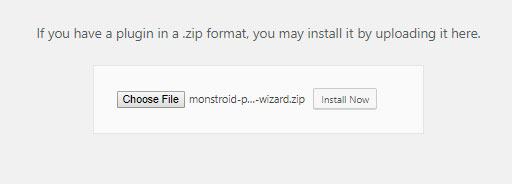
As it was previously Monstroid theme begins with an installation of Wizard plugin, an onboarding solution developed by Zemez.

Step 2

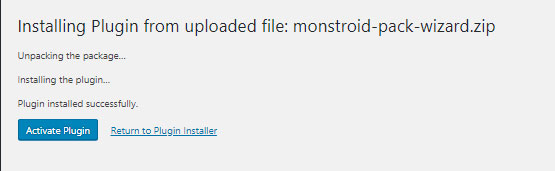
After it’s installed activate it.

Step 3

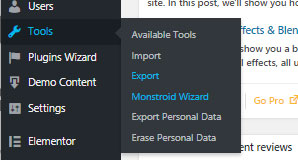
After you’ve installed and activated the plugin let’s visit the Monstroid Wizard in your Tools section, with its help you can install any theme included into the Monstroid package.

Step 4

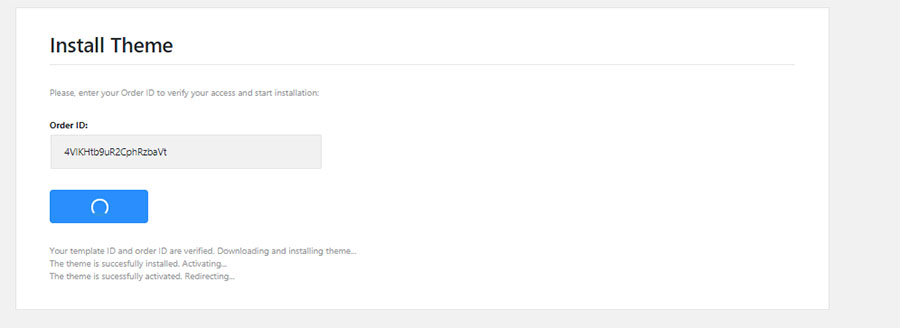
But first of all you need to prove that you own this Monstroid theme by verifying your order id.

Step 5

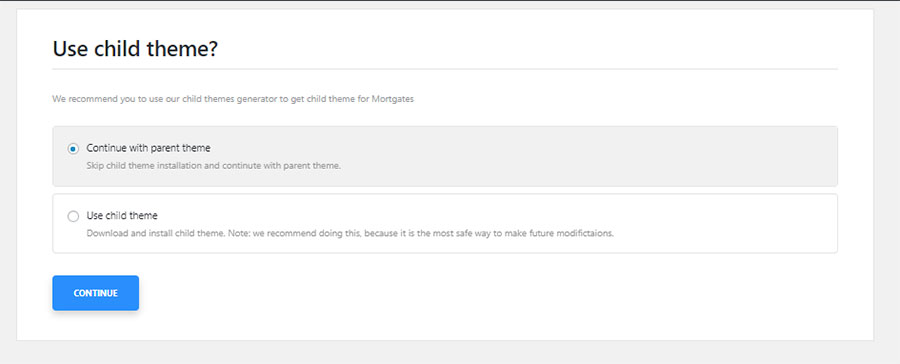
After verification step the wizard will ask you if you want to install a child theme or use the parent.

Step 6

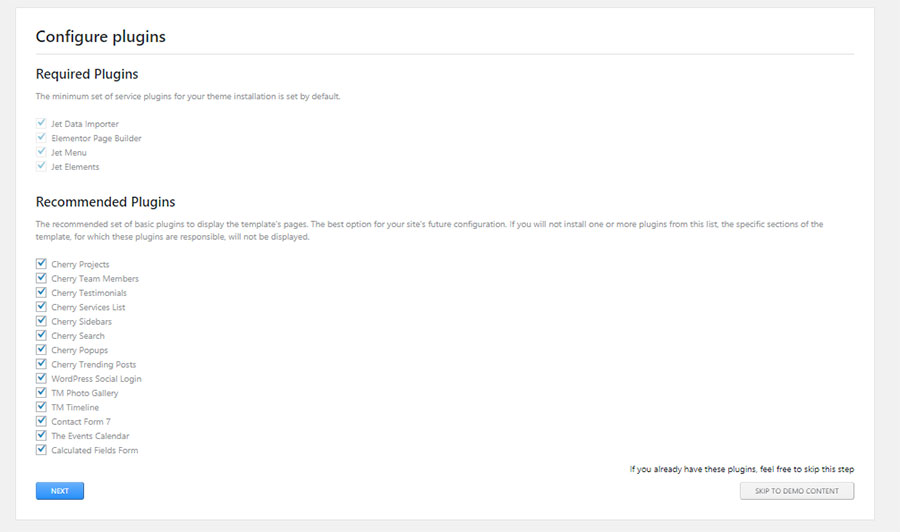
After you choose the type of the theme wizard will begin installing the plugins, on this step it will offer either to install all of them or skip to the next step.

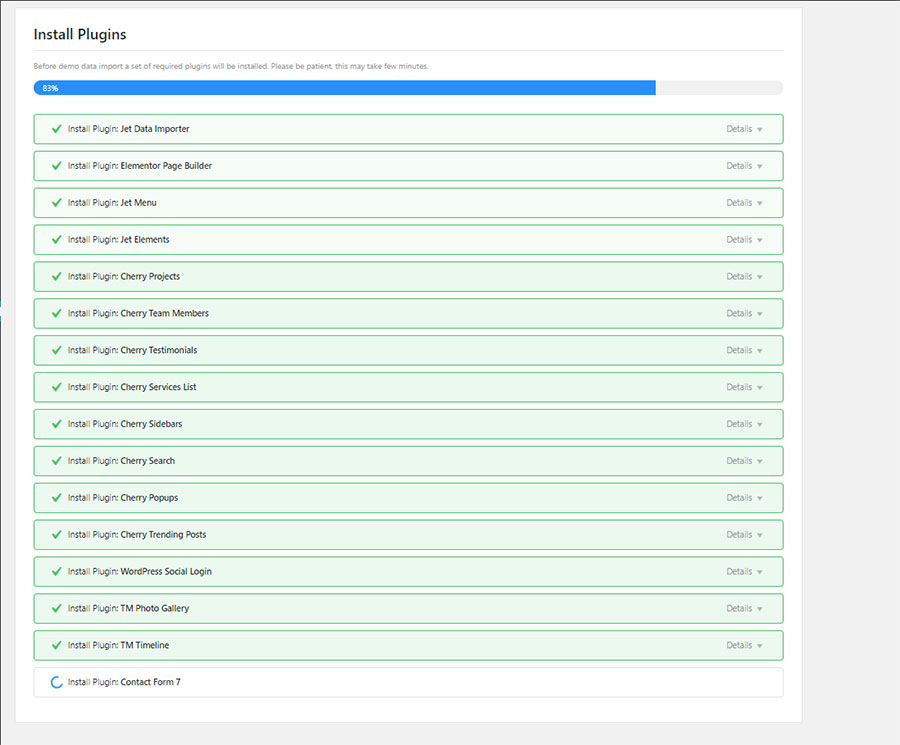
Plugins installation is in progress.

Step 7

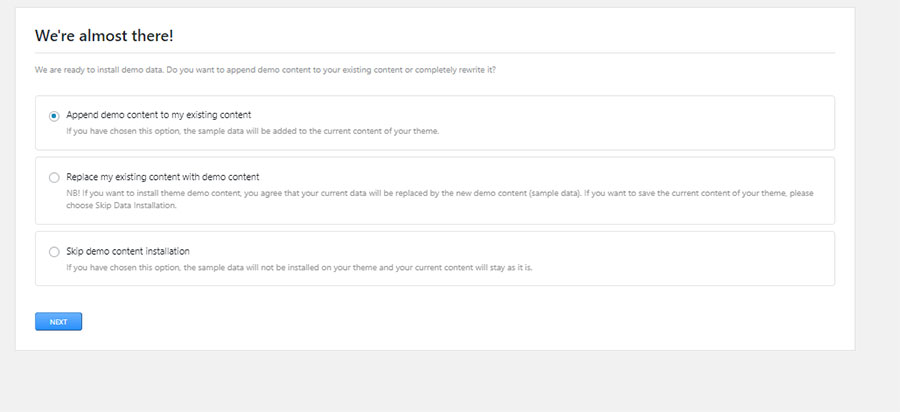
After the theme is installed the wizard will ask you if you want to upload sample content or not if you’re making a clean installation then you can install it if you already have some content on your website you should skip this step.

Step 8

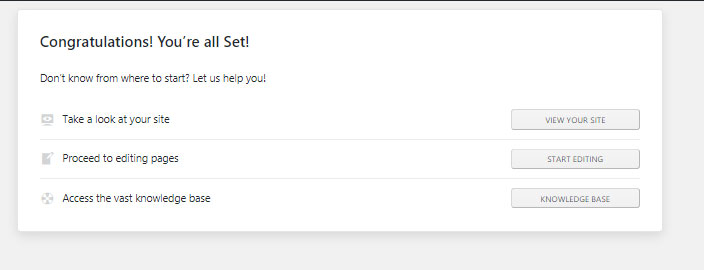
When you see this page, it means that you managed to install successfully all themes components.

Customization Process

As I already said Monstroid theme is built with Elementor builder, with its help you can create absolutely amazing layouts or edit pre-designed pages in a few clicks. You can check out these short videos to see how awesome easily you can edit this theme in Elementor interface.

How to Build a Store With Monstroid Theme?

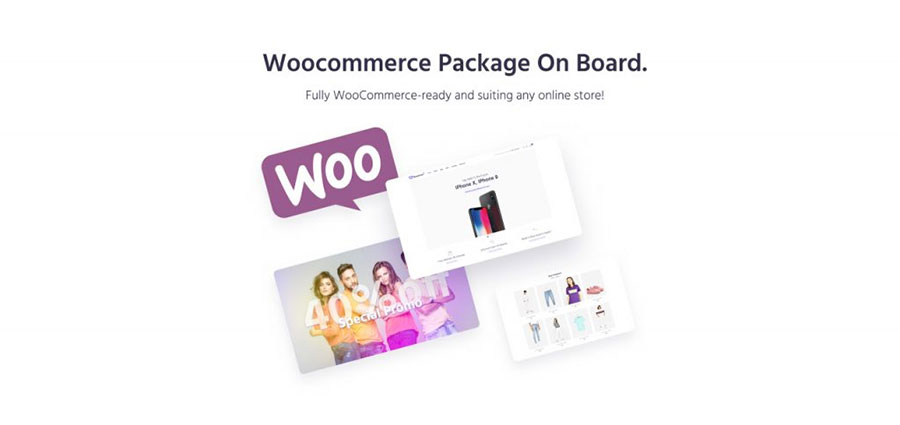
The Monstroid theme, as well as all of its skins, are 100% compatible with WooCommerce, all themes contain a set of pre-designed eCommerce pages, just add your product, payment system and your store is ready to sell your products.

What Plugins are Included?

Here’s the list of plugins that are installed.

  1. Booked Appointments
  2. TM Mega Menu
  3. TM Photo Gallery
  4. TM Timeline
  5. Contact Form 7
  6. Simple File Downloader
  7. Shortcode Widget
  8. WordPress Social Login
  9. Cherry PopUps
  10. Cherry Testimonials
  11. Cherry Search
  12. Cherry Services List
  13. Cherry Team Members
  14. Cherry Sidebars
  15. Cherry Socialize
  16. Cherry Projects
  17. Jet Data Importer
  18. Elementor Page Builder
  19. Jet Elements addon For Elementor

The initial set of plugins may vary depending on the skin you choose.

Pricing and Licensing

The theme is released under the single site license, the price tag $75, optionally you can buy the developer license which grants you the right to use this theme on 5 domains.

Why Monstroid When There’s Monstroid2?

Now we’re going to discuss the most important question.

Pricing and Licensing

The theme is released under the single site license, the price tag $75, optionally you can buy the developer license which grants you the right to use this theme on 5 domains.

Why Monstroid When There’s Monstroid2?

Now we’re going to discuss the most important question.

If both Monstroid themes are multipurpose and are compatible with Elementor which one should you choose?

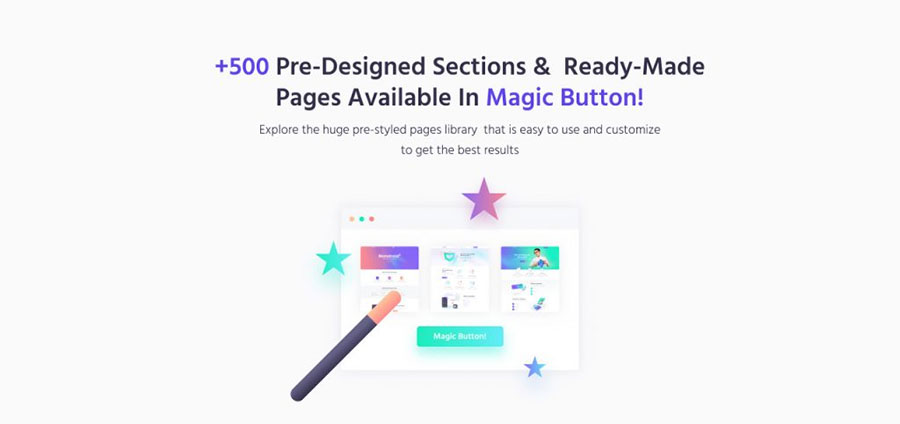
You know it’s a matter of tastes, the Monstroid2 these is a lot more robust and has one interesting thing called Magic Button. You can find it in the Elementor interface.

With the help of this button, you can get access to all sections and blocks from all skins included in the Monstroid2 theme.

The button makes you omnipresent thus you can access all skins at once, or one at a time. By accessing all skins you can add any section to any other pre-designed or a new page. This feature is really amazing.

Both themes are able to cover all business niches due to their extreme customizability. Which one to choose is up to you. If you something more robust than it’s Monstroid2 if you need something smaller than it’s the Monstroid.

Support & Updates

Both Monstroid themes are covered by lifetime support and updates. Monstroid2 received updates once every week that include new Elementor sections and skins, Monstroid theme receives monthly updates.

Over to You

Monstroid themes among all WordPress themes are like the Note series of Samsung smartphones, once you try it, you will never be able to quit it. All-in-all you can follow this upgrade scheme – start with the Monstroid theme and when your business scales significantly you can move on to Monstroid2.

P.S. When you build your website with Monstroid don’t forget to drop a link in the comments.

Monstroid WordPress Theme Ultimate Update

Post pobrano z: Monstroid WordPress Theme Ultimate Update

This fall TemplateMonster marketplace made some noise with a bunch of cool updates including an update of Monstroid2 theme, and now it’s time for another one. Monstroid WordPress theme the one released in 2016 got an ultimate update.

Why Was it Updated?

It’s all about page builders, as you know these days Elementor is about to become the most popular WordPress page builder ever released. This means that all WordPress themes manufactured should make sure that their product is compatible with this builder.

What Does It Mean for You?

If you want to build a powerful WordPress website you need to be sure that it’s up-to-date and corresponds fully to last design and development techniques.

Having Elementor on board of your website means that it’s 100% up-to-date and can offer you tons of amazing features.

Why Did We Use Elementor Builder?

Originally Monstroid WordPress theme was customized using shortcodes, at that times it was a reasonable and full-proof solution, but now when users are obsessed with simplicity Elementor builder seems to be only solution.

Even though Elementor is not the only one builder on the market, it’s so simple to use that even users with minor development skills can easily customize any theme.

What’s so Special About Monstroid Theme?

Every Monstroid theme owner will get a pack of 20 multipurpose Elementor child themes that can be used as a basis for their website.

Cryplix Bitcoin Blog
Variegated Fashion & Beauty
Shape Force Sport Studio
PROSpectus Portfolio
ReLabs Computer Repair
Mortgages Mortgage Company
EasyAudit Audit Consulting
Primo Hotel
MaBelle Beauty Salon
Repifix Interior Renovation
Transmister Car Repair
Kettlebell Crossfit Studio
LOGiciel SEO Company
Digitallium Analysts
Finscore Investmart
Grafique Architect
Integritz Lawyer Advisor
Anna Solas Photographer
SolidBuild Construction Company

Check out these demos on the image below.

No matter which of these themes you will choose you’ll be able to create on their basis any website, be it a blog, informational website, store, landing page or whatever else.

How to Install Monstroid Theme?

Let’s check out the installation process of Monstroid theme.

Step 1

As it was previously Monstroid theme begins with an installation of Wizard plugin, an onboarding solution developed by Zemez.

Step 2

After it’s installed activate it.

Step 3

After you’ve installed and activated the plugin let’s visit the Monstroid Wizard in your Tools section, with its help you can install any theme included into the Monstroid package.

Step 4

But first of all you need to prove that you own this Monstroid theme by verifying your order id.

Step 5

After verification step the wizard will ask you if you want to install a child theme or use the parent.

Step 6

After you choose the type of the theme wizard will begin installing the plugins, on this step it will offer either to install all of them or skip to the next step.

Plugins installation is in progress.

Step 7

After the theme is installed the wizard will ask you if you want to upload sample content or not if you’re making a clean installation then you can install it if you already have some content on your website you should skip this step.

Step 8

When you see this page, it means that you managed to install successfully all themes components.

Customization Process

As I already said Monstroid theme is built with Elementor builder, with its help you can create absolutely amazing layouts or edit pre-designed pages in a few clicks. You can check out these short videos to see how awesome easily you can edit this theme in Elementor interface.

How to Build a Store With Monstroid Theme?

The Monstroid theme, as well as all of its skins, are 100% compatible with WooCommerce, all themes contain a set of pre-designed eCommerce pages, just add your product, payment system and your store is ready to sell your products.

What Plugins are Included?

Here’s the list of plugins that are installed.

  1. Booked Appointments
  2. TM Mega Menu
  3. TM Photo Gallery
  4. TM Timeline
  5. Contact Form 7
  6. Simple File Downloader
  7. Shortcode Widget
  8. WordPress Social Login
  9. Cherry PopUps
  10. Cherry Testimonials
  11. Cherry Search
  12. Cherry Services List
  13. Cherry Team Members
  14. Cherry Sidebars
  15. Cherry Socialize
  16. Cherry Projects
  17. Jet Data Importer
  18. Elementor Page Builder
  19. Jet Elements addon For Elementor

The initial set of plugins may vary depending on the skin you choose.

Pricing and Licensing

The theme is released under the single site license, the price tag $75, optionally you can buy the developer license which grants you the right to use this theme on 5 domains.

Why Monstroid When There’s Monstroid2?

Now we’re going to discuss the most important question.

Pricing and Licensing

The theme is released under the single site license, the price tag $75, optionally you can buy the developer license which grants you the right to use this theme on 5 domains.

Why Monstroid When There’s Monstroid2?

Now we’re going to discuss the most important question.

If both Monstroid themes are multipurpose and are compatible with Elementor which one should you choose?

You know it’s a matter of tastes, the Monstroid2 these is a lot more robust and has one interesting thing called Magic Button. You can find it in the Elementor interface.

With the help of this button, you can get access to all sections and blocks from all skins included in the Monstroid2 theme.

The button makes you omnipresent thus you can access all skins at once, or one at a time. By accessing all skins you can add any section to any other pre-designed or a new page. This feature is really amazing.

Both themes are able to cover all business niches due to their extreme customizability. Which one to choose is up to you. If you something more robust than it’s Monstroid2 if you need something smaller than it’s the Monstroid.

Support & Updates

Both Monstroid themes are covered by lifetime support and updates. Monstroid2 received updates once every week that include new Elementor sections and skins, Monstroid theme receives monthly updates.

Over to You

Monstroid themes among all WordPress themes are like the Note series of Samsung smartphones, once you try it, you will never be able to quit it. All-in-all you can follow this upgrade scheme – start with the Monstroid theme and when your business scales significantly you can move on to Monstroid2.

P.S. When you build your website with Monstroid don’t forget to drop a link in the comments.

An interview with James Lewis, type designer

Post pobrano z: An interview with James Lewis, type designer

How did you discover typography and decide that it could become your job?

I first came into practising typography at the age of only 14. I was looking for something, anything, to do other than play video games which I had become completely bored of. I begin by learning copperplate calligraphy, then hand lettering, and  finally type design and graphic design at University here in Cardiff, UK.

Do you have some advice for a young designer who would like to get started with font design?

I get this question on Instagram almost everyday and my advise is always the same: follow your interest and fully immerse yourself into the process of type design and the culture surrounding it. Read books, take courses, and fall in love.

Where do you find inspiration for new typeface creation?

Inspiration can come from anywhere, you just have to be open to receiving it. I’ve been exploring 3D lettering for over 2 years now and I continually got asked if there were any font’s out there similar to what I was drawing. VERSA was borne to fill that void whilst being versatile enough to be used across a multitude of applications. 

You made yourself a reputation for layered font, what do you like about layered fonts in particular?

The layered font gives the user a whole other lever ( pun intended 😉 ) of creative options. Seeing the font used by designers all over the world in creative ways I didn’t even think of during production has been so rewarding. 

You recently released Versa, a 3D font family, can you tell us more about it?

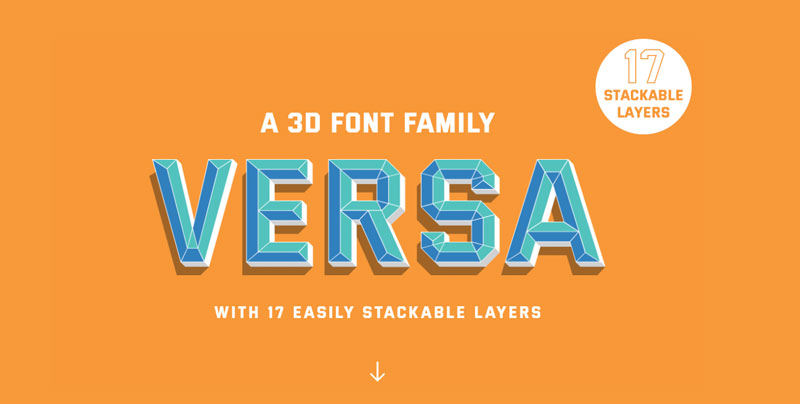
Versa is a seventeen layered font family. It’s the first font ever that includes a variable depth, meaning it’s not only 3D but the user can decide just how much they want the word to pop of the page! The 3D design follows a tradition rooted in sign painting whilst its geometric forms allows the font to be very versatile, hence the name VERSA. The font is available in three packages Basic, Pro, & Advanced, each providing a different amount of font files at a corespoinding price making the font accessible to everyone from lettering hobbyists to multinational creative agencies.  https://www.versafont.com/

What are the challenges of starting your own type foundry?

There are many challenges to starting your own type foundry. Similar to a vineyard it takes a while to produce just one product and even longer to build a reputation for quality products. It’s definitely a long game but I enjoy the process and find typeface design a great project to work on between lettering & logo design client projects.

And now for a classic question, any favorite typeface?

My favourite font of all time is akzidenz grotesk. Despite being released in the late 1800’s it remains a workhorse of a sans serif and influenced the most famous font ever Helvetica. 

An interview with James Lewis, type designer

Post pobrano z: An interview with James Lewis, type designer

How did you discover typography and decide that it could become your job?

I first came into practising typography at the age of only 14. I was looking for something, anything, to do other than play video games which I had become completely bored of. I begin by learning copperplate calligraphy, then hand lettering, and  finally type design and graphic design at University here in Cardiff, UK.

Do you have some advice for a young designer who would like to get started with font design?

I get this question on Instagram almost everyday and my advise is always the same: follow your interest and fully immerse yourself into the process of type design and the culture surrounding it. Read books, take courses, and fall in love.

Where do you find inspiration for new typeface creation?

Inspiration can come from anywhere, you just have to be open to receiving it. I’ve been exploring 3D lettering for over 2 years now and I continually got asked if there were any font’s out there similar to what I was drawing. VERSA was borne to fill that void whilst being versatile enough to be used across a multitude of applications. 

You made yourself a reputation for layered font, what do you like about layered fonts in particular?

The layered font gives the user a whole other lever ( pun intended 😉 ) of creative options. Seeing the font used by designers all over the world in creative ways I didn’t even think of during production has been so rewarding. 

You recently released Versa, a 3D font family, can you tell us more about it?

Versa is a seventeen layered font family. It’s the first font ever that includes a variable depth, meaning it’s not only 3D but the user can decide just how much they want the word to pop of the page! The 3D design follows a tradition rooted in sign painting whilst its geometric forms allows the font to be very versatile, hence the name VERSA. The font is available in three packages Basic, Pro, & Advanced, each providing a different amount of font files at a corespoinding price making the font accessible to everyone from lettering hobbyists to multinational creative agencies.  https://www.versafont.com/

What are the challenges of starting your own type foundry?

There are many challenges to starting your own type foundry. Similar to a vineyard it takes a while to produce just one product and even longer to build a reputation for quality products. It’s definitely a long game but I enjoy the process and find typeface design a great project to work on between lettering & logo design client projects.

And now for a classic question, any favorite typeface?

My favourite font of all time is akzidenz grotesk. Despite being released in the late 1800’s it remains a workhorse of a sans serif and influenced the most famous font ever Helvetica. 

8 Pieces of Technology Every Designer Should Have

Post pobrano z: 8 Pieces of Technology Every Designer Should Have

Great designers tend to be extremely talented and also work
hard to hone their skills. However, it’s equally important to own and master
the tools of the trade. Having access to the latest technologies might help you
work more efficiently and become highly successful in your industry.

As the majority of the work is done digitally, designers
should have a powerful computer to work flawlessly with big files. It’s also
essential to have a big external hard drive to store them and have a backup in
case something goes wrong. And don’t forget about a comfortable chair, because
working with excruciating back pain can badly affect your productivity.
Discover these eight pieces of technology every designer should have.

A Tablet and Stylus Pen

Image via Flickr by Teal Jeep

Although it’s totally fine to create your drafts using
artist’s pencils and high-quality sketchbooks, you’ll still need to work on
them digitally. The best course of action is to scan or photograph your drafts,
and then finish the work using tools such as the Wacom Intuos, a Huion
1060PLUS, or even an iPad Pro.

A Powerful Laptop or Desktop PC

If you tend to always carry your work with you and spend
time in coffee shops or co-working spaces, a laptop is probably the best
choice. Otherwise, a powerful desktop PC back home should do the job. Pay
special attention to the screen resolution, the RAM memory, and the processor —
since you’ll be working with heavy graphics all the time.

An Incredible Monitor With a
Calibrator

It goes without saying that having a high-definition
monitor is of the utmost importance for a designer. You need to be able to see
the colors perfectly as it would be a disaster if they were different from the
final product. Monitor calibrators can help set up the ideal brightness, gray
balancing, and other settings. Plus, they have room light monitoring. It’s
definitely a must-have!

A Big External Hard Drive

Depending on the type of work you’re doing, you’ll be
dealing with massive files. They usually tend to eat up most of the local
storage, so an external hard drive is essential if you need more space. They’re
also perfect to sync your backups as no one wants to lose a day’s work because
of a power cut.

The Latest Software

It would be great if you could create amazing content with
the pre-installed software that comes with your laptop, but that’s rarely the
case. Most designers tend to use Adobe Creative Cloud, which comes with InDesign,
Photoshop, and Illustrator. They may also use tools such as Corel Painter and
Affinity Designer. They’re not cheap, but it’s an investment that’s worth
making.

A Top-of-the-Line Smartphone

Everybody seems to need a smartphone nowadays, but
designers are a special case — they require a powerful device with a capable
network. A great option would be T-Mobile’s iPhone 6s Plus with its 12MP camera and
retina HD display. When you take into consideration that T-Mobile is the
fastest network, you won’t have problems checking those big files on the go.

Quality Speakers or Headphones

Did you know that listening to music while working can drastically improve your productivity? Studies show that depending
on the type of work (problem-solving, data entry, etc.), you might want to
listen to classical music, pop songs, or even dance music! With that in mind,
it’s probably a good idea to have top-notch speakers or headphones so you can
get more accomplished while listening to the right tunes.

A Comfortable Chair

If you’ve ever tried to work with never-ending back pain,
then you know how important a comfortable chair is. As you struggle to focus on
your projects, your productivity decreases and consequently your earnings. The
right ergonomic chair can help with your back, but also with repetitive strain
injury and even with blood flow.

Being a designer is no easy feat. Apart from constantly
trying to come up with interesting ideas for your projects, you also need
incredible artistic skills. But if you don’t have the right tools to work with,
all that talent could be wasted. When you invest in high-quality technology,
you’re also investing in your career.

8 Pieces of Technology Every Designer Should Have

Post pobrano z: 8 Pieces of Technology Every Designer Should Have

Great designers tend to be extremely talented and also work
hard to hone their skills. However, it’s equally important to own and master
the tools of the trade. Having access to the latest technologies might help you
work more efficiently and become highly successful in your industry.

As the majority of the work is done digitally, designers
should have a powerful computer to work flawlessly with big files. It’s also
essential to have a big external hard drive to store them and have a backup in
case something goes wrong. And don’t forget about a comfortable chair, because
working with excruciating back pain can badly affect your productivity.
Discover these eight pieces of technology every designer should have.

A Tablet and Stylus Pen

Image via Flickr by Teal Jeep

Although it’s totally fine to create your drafts using
artist’s pencils and high-quality sketchbooks, you’ll still need to work on
them digitally. The best course of action is to scan or photograph your drafts,
and then finish the work using tools such as the Wacom Intuos, a Huion
1060PLUS, or even an iPad Pro.

A Powerful Laptop or Desktop PC

If you tend to always carry your work with you and spend
time in coffee shops or co-working spaces, a laptop is probably the best
choice. Otherwise, a powerful desktop PC back home should do the job. Pay
special attention to the screen resolution, the RAM memory, and the processor —
since you’ll be working with heavy graphics all the time.

An Incredible Monitor With a
Calibrator

It goes without saying that having a high-definition
monitor is of the utmost importance for a designer. You need to be able to see
the colors perfectly as it would be a disaster if they were different from the
final product. Monitor calibrators can help set up the ideal brightness, gray
balancing, and other settings. Plus, they have room light monitoring. It’s
definitely a must-have!

A Big External Hard Drive

Depending on the type of work you’re doing, you’ll be
dealing with massive files. They usually tend to eat up most of the local
storage, so an external hard drive is essential if you need more space. They’re
also perfect to sync your backups as no one wants to lose a day’s work because
of a power cut.

The Latest Software

It would be great if you could create amazing content with
the pre-installed software that comes with your laptop, but that’s rarely the
case. Most designers tend to use Adobe Creative Cloud, which comes with InDesign,
Photoshop, and Illustrator. They may also use tools such as Corel Painter and
Affinity Designer. They’re not cheap, but it’s an investment that’s worth
making.

A Top-of-the-Line Smartphone

Everybody seems to need a smartphone nowadays, but
designers are a special case — they require a powerful device with a capable
network. A great option would be T-Mobile’s iPhone 6s Plus with its 12MP camera and
retina HD display. When you take into consideration that T-Mobile is the
fastest network, you won’t have problems checking those big files on the go.

Quality Speakers or Headphones

Did you know that listening to music while working can drastically improve your productivity? Studies show that depending
on the type of work (problem-solving, data entry, etc.), you might want to
listen to classical music, pop songs, or even dance music! With that in mind,
it’s probably a good idea to have top-notch speakers or headphones so you can
get more accomplished while listening to the right tunes.

A Comfortable Chair

If you’ve ever tried to work with never-ending back pain,
then you know how important a comfortable chair is. As you struggle to focus on
your projects, your productivity decreases and consequently your earnings. The
right ergonomic chair can help with your back, but also with repetitive strain
injury and even with blood flow.

Being a designer is no easy feat. Apart from constantly
trying to come up with interesting ideas for your projects, you also need
incredible artistic skills. But if you don’t have the right tools to work with,
all that talent could be wasted. When you invest in high-quality technology,
you’re also investing in your career.

Illustrations of wild animals bursting out of geometric encasings

Post pobrano z: Illustrations of wild animals bursting out of geometric encasings

It’s not the first time we publish work by Filipino illustrator Kerby Rosanes on Designer Daily, we already featured some of his sketches and doodles.

We will probably have to feature him again in the future, as he keeps on producing stunning work, like these animals popping out of geometric shapes. If you enjoy this work, make sure to follow the artist through the social links you’ll find on his website.

Illustrations of wild animals bursting out of geometric encasings

Post pobrano z: Illustrations of wild animals bursting out of geometric encasings

It’s not the first time we publish work by Filipino illustrator Kerby Rosanes on Designer Daily, we already featured some of his sketches and doodles.

We will probably have to feature him again in the future, as he keeps on producing stunning work, like these animals popping out of geometric shapes. If you enjoy this work, make sure to follow the artist through the social links you’ll find on his website.