Archiwum kategorii: Web Tools

How to Make a Banner

Post pobrano z: How to Make a Banner
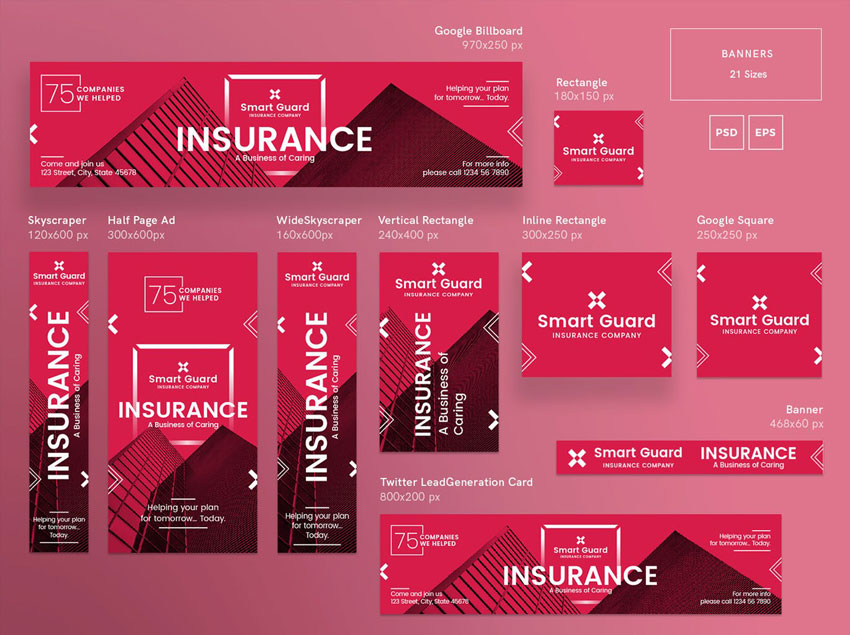
Final product image
What You’ll Be Creating

Looking to boost your online traffic? Website banners are a great addition to your marketing campaign that can enhance your online presence, and in this tutorial I’m going to show you how to make a banner.

In this article, you will find out what web banners are, what makes them effective, and a few shortcuts when it comes to creating your own website banner. I’ll also provide you with a couple of tutorials on how to make a banner using Adobe Photoshop and Illustrator. 

Don’t know how to use this software? Placeit is a great online banner maker that’s easy to use and quick to customize. With hundreds of options to choose from, you are sure to find a banner template that suits your needs. Envato Elements also offers amazing and effective web banner templates and stock photos that can help you create a stunning campaign. 

The advertising world has evolved from printed ads to website banners. You can see them on Facebook ads, Instagram sponsored content, and on any website you are browsing. They are strategically placed and designed to attract consumers like you and me. The main purpose of these web banners is to sell a product, announce sales, and grab our attention. That’s why banner design is a very important element of your campaign, so let’s dive in!

Social Media Banners

A social media banner should be a visual representation of your brand and what you do. You can find these on sites ranging from LinkedIn, Facebook, and Twitter to many gaming sites.

The purpose of a banner is to provide information to potential consumers—sort of a welcome image. It can also be used as a marketing tool or as part of a campaign to promote an event and boost your appearance online. Using social media banners effectively can add value to a company by increasing followers and driving engagement.

Explore some Twitter header maker templatesYouTube banner maker templates, or Facebook banner makers that can help you take your business to the next level.

Social media banner

Ad Banners

In a similar way to social media banners, ad banners are a marketing campaign displayed on a website. The website banner can be image- or multimedia-based, and the intent is to drive traffic to a specific website by linking to it. Whether it’s promoting a new product or service, the main function of a banner is to get clicked on. Website banners are used on high-traffic websites and usually on websites that have something in common with the ad.

Here are some great looking ad maker templates that are easy to customize and get them on brand for your next campaign.

Ad banner

Banner Content

If you are either using a web ad maker or creating one of your own, there are a few things to take in consideration. Since consumers aren’t looking for ads, website banners need to be attention grabbers. There’s a good chance that consumers were looking at a website for something else, and they just happened to stumble upon your ad.

The main elements to include on a web banner design are: 

  • your logo
  • the offer
  • the call to action

The offer needs to be short and sweet. Consumers are lending you less than a second while scrolling through a website, so your website banner needs to be simple when it comes to body copy. 

Last and most importantly, you need to include a call to action. This is some text or a button with an invitation to the consumer. For instance, “join now” or “check out today’s deals” are great phrases to generate some interest in your offer. The design of this button needs to be on brand, noticeable, and clear.

Here are some amazing website banner designs that have distinct call to action buttons.

Banner content

Banner Imagery

You can create a great web banner design with only typography, but quality images are a good addition. When it comes to web banners, use relevant images that enhance the message. Remember about those limited attention spans, so be sure to grab them with stunning photography. If you can’t afford to set up a custom photo shoot, there are other great options like Envato Elements that can help you make a banner. With an extensive library, you are sure to find images that are great for advertising.

Or make a banner with Placeit, which is a great option too! They offer stock images with their web banner templates that can help you achieve the design you are looking for.

Banner imgery

Audience Considerations

Focusing your advertising banner on a specific target audience can create a better outcome for your campaign. Consider what websites or social media platforms your audience might be spending their time on. Also consider what images are relevant to your audience and your web banner—this can them relate to the product or service on a deeper level. 

Facebook is popular across multiple demographics and offers very detailed targeting options. Instagram is great with millennials, and you can create posts with multiple images, stories, and videos. If you happen to create a video ad, YouTube has the ability to display In-Stream Ads before, during or after a video.

Gathering data is a great way to successfully create a marketing campaign that will reach your consumers. Google AdWords will offer insight into how consumers are interacting with the banners. Testing and analyzing is great to see if your advertising campaign is working as you intended. Social media platforms offer instant feedback by looking at the reports. Use this as an advantage to measure your results and tweak your banner design as you need.

Here are a few target specific online ad maker templates that can help you reach your audience easily: fashion web banners and food banner templates.

Audience considerations

How to Create Your Own Banner

Adobe Photoshop

Photoshop is a great tool if your banner design will rely heavily on imagery. This piece of software is usually the first one many people get introduced to and is the easiest to understand. If you are using the newest CC version, the software now allows you to create multiple artboards. So you can create multiple banner sizes in one document and make sure they all match.

If you are looking for tutorials on how to make a banner in Adobe Photoshop, Melody Nieves shows you how to create a designer-inspired banner with multiple levitating assets. This tutorial is great if you are looking for Facebook/Twitter header banners. Check it out!

Levitating banner tutorial
How to Create a Design-Inspired Photo Manipulation for Twitter/Facebook Banners

Adobe Illustrator

Make a banner with Illustrator if you will be creating vectors in your design. If you will be using multiple sizes and layouts, Illustrator is great so you can get an overview of all the website banners and make sure they all match.

If you are looking for a tutorial on how to make a banner in Illustrator, Vladimir Galantsev shows you how to make a medical banner.

Medical banner tutorial
How to Create a Medical Banner With Icons in Adobe Illustrator

Placeit

If you don’t have time but still want to get involved with the design of your web banner, Placeit is a great option. Placeit is one of the fastest-growing mockup websites and is also a great online ad maker. It is easy to use, and you can create designs as easily as filling out a form. They have an expanding collection of affordable assets ready to be used.

Add your logo, copy, and your image. Browse through the different fonts and extensive image library as you design your web banner. The website will automatically translate all your designs into different web banner ad dimensions you might need.

YouTube Banner Maker

Placeit’s YouTube banner creator will help you improve the look of your channel. Use one of their stock photos or add your own and personalize it with your colors.

Youtube banner maker
Placeit YouTube Banner

Facebook Banner Maker

Maximize your campaign by personalizing this Facebook banner with your own brand colors. Explore many more styles on Placeit to fit your product or service.

Facebook banner maker
Placeit Facebook Ad

Twitter Banner Maker

Get amazing visuals with just a few clicks with Placeit’s Twitter header maker. Creating a Twitter header banner is fun and easy, and it takes only a few minutes!

Twitter banner maker
Placeit Twitter Banner

Twitch Banner Maker

Create amazing Twitch banners with Placeit’s Twitch banner maker—no software needed. Placeit’s interface is easy to use—choose from many avatars or add your own and coordinate the colors. You are all set to start streaming!

Twitch banner maker
Placeit Twitch Banner

Custom Banner Maker

Looking for a custom online banner maker? Placeit offers multiple sizes when you create web banners. Choose a template, customize it, and Placeit will generate other sizes that you might want to use.

Custom banner maker
Placeit Custom Banner Maker

Premium Asset Templates

If you are familiar with some of the Adobe software, a banner template is a great way to start your marketing campaign. We’ve put together a list with templates for different social media ads and website banners.

Facebook Ad Templates

This Facebook banner template will grab your audience’s attention quickly due to the high contrast in each image. This trendy template will make your page look cool and edgy. The pack includes ad templates, photo templates, and profile picture templates. The text, images, and background are easily editable in both Photoshop and Illustrator.

Facebook ad templates
Facebook Ad Templates

Social Media Pack Template

This set contains square layouts suitable for Instagram, Facebook, and Twitter posts. Create colorful posts to sell or advertise your product or services effectively. If you are familiar with Illustrator, this is the set for you.

Social media pack template
Social Media Pack

Gaming Channel YouTube Banner

This customizable YouTube banner creator offers five different styles. With well-organized layers, you are sure to get your subscriber count going up. The set is easily editable in Photoshop and includes free fonts.

Gaming channel youtube banner
Gaming Channel YouTube Banner

Animated Black Red Instagram Stories

Stand out from the crowd with this amazing set, which contains animated and static templates. These unique and stylish banners can be used on your Instagram stories, Facebook, Twitter, and others. The templates are sized for mobile screens, and the files can be edited with Photoshop.

Animated black red instagram stories
Animated Black Red Instagram Stories

Multipurpose Banners Ad

This template includes 15 banner sizes, including sizes for Google ads and Facebook ads. Colors and text are fully editable, and the template includes fonts. You are sure to find the size you need in this package.

Multipurpose banners ad
Multipurpose Banner Ad

Insurance Company Banner Pack

This banner template pack is perfect for event invitations, party supplies, and labels. It is clean, professional, and perfect to grab your target’s attention. If you dabble in Photoshop and Illustrator, then this pack is for you. Whether you need an ad for Facebook, Twitter, YouTube, Google or Adroll, this pack has got you covered.

Insurance company banner pack
Insurance Company Banner Pack

80 Banners Shop Edition

Following the latest trends in design, this stylish banner is perfect for your website, mobile app, blog, or social media. These banners are resizable and fully editable, including a video tutorial to walk you through the process.

80s banners shop edition
80 Banners Shop Edition

Flat Banner Collection

These flat line vector-based banners are easily resizable and great for social media, digital marketing, sales, etc. The set contains six flat banners, highly customizable and editable in Adobe Illustrator.

Flat banner collection
Flat Banner Collection

Mobile Web App Banner Ads

This pack offers web banners that are great for promoting a smartphone application. It comes with 18 scalable sizes that are easy to edit. The sizes are optimized for AdWords templates, Twitter, Facebook, Instagram, and Pinterest.

Mobile web app banner ads
Mobile Web Banner Ad

Twitch Layout Bundle

Show off this Twitch layout bundle template on your next gaming session. If you dabble in Adobe Photoshop, this bundle is perfect for you. It includes different themes and screens, so just add your logo, change up the font, and you are ready to go!

Twitch layout bundle
Twitch Layout Bundle

There You Have It!

The internet is full of web banners, and if you want to grab your potential consumer’s attention, your banner needs to be well designed and have a strong impact. We’ve covered key points and the considerations you should have when designing a website banner.

Planning your next marketing campaign shouldn’t be difficult. With the help of our many templates from Envato Elements, you are sure to find something to get you started. Placeit is an all-in-one online banner maker—whether you need an ad for Facebook, Twitter, Twitch, or YouTube, Placeit has got you covered.

I hope this article inspires your next marketing campaign and drives traffic and sales to your business.

If you would like to explore more template ideas, you can find many customizable YouTube banner templates and Twitter banner templates. over at Envato Elements and GraphicRiver. Check it out!

If you liked this article, you might like these:

How to Make a Banner

Post pobrano z: How to Make a Banner

Final product image
What You’ll Be Creating

Looking to boost your online traffic? Website banners are a great addition to your marketing campaign that can enhance your online presence, and in this tutorial I’m going to show you how to make a banner.

In this article, you will find out what web banners are, what makes them effective, and a few shortcuts when it comes to creating your own website banner. I’ll also provide you with a couple of tutorials on how to make a banner using Adobe Photoshop and Illustrator. 

Don’t know how to use this software? Placeit is a great online banner maker that’s easy to use and quick to customize. With hundreds of options to choose from, you are sure to find a banner template that suits your needs. Envato Elements also offers amazing and effective web banner templates and stock photos that can help you create a stunning campaign. 

The advertising world has evolved from printed ads to website banners. You can see them on Facebook ads, Instagram sponsored content, and on any website you are browsing. They are strategically placed and designed to attract consumers like you and me. The main purpose of these web banners is to sell a product, announce sales, and grab our attention. That’s why banner design is a very important element of your campaign, so let’s dive in!

Social Media Banners

A social media banner should be a visual representation of your brand and what you do. You can find these on sites ranging from LinkedIn, Facebook, and Twitter to many gaming sites.

The purpose of a banner is to provide information to potential consumers—sort of a welcome image. It can also be used as a marketing tool or as part of a campaign to promote an event and boost your appearance online. Using social media banners effectively can add value to a company by increasing followers and driving engagement.

Explore some Twitter header maker templatesYouTube banner maker templates, or Facebook banner makers that can help you take your business to the next level.

Social media banner

Ad Banners

In a similar way to social media banners, ad banners are a marketing campaign displayed on a website. The website banner can be image- or multimedia-based, and the intent is to drive traffic to a specific website by linking to it. Whether it’s promoting a new product or service, the main function of a banner is to get clicked on. Website banners are used on high-traffic websites and usually on websites that have something in common with the ad.

Here are some great looking ad maker templates that are easy to customize and get them on brand for your next campaign.

Ad banner

Banner Content

If you are either using a web ad maker or creating one of your own, there are a few things to take in consideration. Since consumers aren’t looking for ads, website banners need to be attention grabbers. There’s a good chance that consumers were looking at a website for something else, and they just happened to stumble upon your ad.

The main elements to include on a web banner design are: 

  • your logo
  • the offer
  • the call to action

The offer needs to be short and sweet. Consumers are lending you less than a second while scrolling through a website, so your website banner needs to be simple when it comes to body copy. 

Last and most importantly, you need to include a call to action. This is some text or a button with an invitation to the consumer. For instance, “join now” or “check out today’s deals” are great phrases to generate some interest in your offer. The design of this button needs to be on brand, noticeable, and clear.

Here are some amazing website banner designs that have distinct call to action buttons.

Banner content

Banner Imagery

You can create a great web banner design with only typography, but quality images are a good addition. When it comes to web banners, use relevant images that enhance the message. Remember about those limited attention spans, so be sure to grab them with stunning photography. If you can’t afford to set up a custom photo shoot, there are other great options like Envato Elements that can help you make a banner. With an extensive library, you are sure to find images that are great for advertising.

Or make a banner with Placeit, which is a great option too! They offer stock images with their web banner templates that can help you achieve the design you are looking for.

Banner imgery

Audience Considerations

Focusing your advertising banner on a specific target audience can create a better outcome for your campaign. Consider what websites or social media platforms your audience might be spending their time on. Also consider what images are relevant to your audience and your web banner—this can them relate to the product or service on a deeper level. 

Facebook is popular across multiple demographics and offers very detailed targeting options. Instagram is great with millennials, and you can create posts with multiple images, stories, and videos. If you happen to create a video ad, YouTube has the ability to display In-Stream Ads before, during or after a video.

Gathering data is a great way to successfully create a marketing campaign that will reach your consumers. Google AdWords will offer insight into how consumers are interacting with the banners. Testing and analyzing is great to see if your advertising campaign is working as you intended. Social media platforms offer instant feedback by looking at the reports. Use this as an advantage to measure your results and tweak your banner design as you need.

Here are a few target specific online ad maker templates that can help you reach your audience easily: fashion web banners and food banner templates.

Audience considerations

How to Create Your Own Banner

Adobe Photoshop

Photoshop is a great tool if your banner design will rely heavily on imagery. This piece of software is usually the first one many people get introduced to and is the easiest to understand. If you are using the newest CC version, the software now allows you to create multiple artboards. So you can create multiple banner sizes in one document and make sure they all match.

If you are looking for tutorials on how to make a banner in Adobe Photoshop, Melody Nieves shows you how to create a designer-inspired banner with multiple levitating assets. This tutorial is great if you are looking for Facebook/Twitter header banners. Check it out!

Levitating banner tutorial
How to Create a Design-Inspired Photo Manipulation for Twitter/Facebook Banners

Adobe Illustrator

Make a banner with Illustrator if you will be creating vectors in your design. If you will be using multiple sizes and layouts, Illustrator is great so you can get an overview of all the website banners and make sure they all match.

If you are looking for a tutorial on how to make a banner in Illustrator, Vladimir Galantsev shows you how to make a medical banner.

Medical banner tutorial
How to Create a Medical Banner With Icons in Adobe Illustrator

Placeit

If you don’t have time but still want to get involved with the design of your web banner, Placeit is a great option. Placeit is one of the fastest-growing mockup websites and is also a great online ad maker. It is easy to use, and you can create designs as easily as filling out a form. They have an expanding collection of affordable assets ready to be used.

Add your logo, copy, and your image. Browse through the different fonts and extensive image library as you design your web banner. The website will automatically translate all your designs into different web banner ad dimensions you might need.

YouTube Banner Maker

Placeit’s YouTube banner creator will help you improve the look of your channel. Use one of their stock photos or add your own and personalize it with your colors.

Youtube banner maker
Placeit YouTube Banner

Facebook Banner Maker

Maximize your campaign by personalizing this Facebook banner with your own brand colors. Explore many more styles on Placeit to fit your product or service.

Facebook banner maker
Placeit Facebook Ad

Twitter Banner Maker

Get amazing visuals with just a few clicks with Placeit’s Twitter header maker. Creating a Twitter header banner is fun and easy, and it takes only a few minutes!

Twitter banner maker
Placeit Twitter Banner

Twitch Banner Maker

Create amazing Twitch banners with Placeit’s Twitch banner maker—no software needed. Placeit’s interface is easy to use—choose from many avatars or add your own and coordinate the colors. You are all set to start streaming!

Twitch banner maker
Placeit Twitch Banner

Custom Banner Maker

Looking for a custom online banner maker? Placeit offers multiple sizes when you create web banners. Choose a template, customize it, and Placeit will generate other sizes that you might want to use.

Custom banner maker
Placeit Custom Banner Maker

Premium Asset Templates

If you are familiar with some of the Adobe software, a banner template is a great way to start your marketing campaign. We’ve put together a list with templates for different social media ads and website banners.

Facebook Ad Templates

This Facebook banner template will grab your audience’s attention quickly due to the high contrast in each image. This trendy template will make your page look cool and edgy. The pack includes ad templates, photo templates, and profile picture templates. The text, images, and background are easily editable in both Photoshop and Illustrator.

Facebook ad templates
Facebook Ad Templates

Social Media Pack Template

This set contains square layouts suitable for Instagram, Facebook, and Twitter posts. Create colorful posts to sell or advertise your product or services effectively. If you are familiar with Illustrator, this is the set for you.

Social media pack template
Social Media Pack

Gaming Channel YouTube Banner

This customizable YouTube banner creator offers five different styles. With well-organized layers, you are sure to get your subscriber count going up. The set is easily editable in Photoshop and includes free fonts.

Gaming channel youtube banner
Gaming Channel YouTube Banner

Animated Black Red Instagram Stories

Stand out from the crowd with this amazing set, which contains animated and static templates. These unique and stylish banners can be used on your Instagram stories, Facebook, Twitter, and others. The templates are sized for mobile screens, and the files can be edited with Photoshop.

Animated black red instagram stories
Animated Black Red Instagram Stories

Multipurpose Banners Ad

This template includes 15 banner sizes, including sizes for Google ads and Facebook ads. Colors and text are fully editable, and the template includes fonts. You are sure to find the size you need in this package.

Multipurpose banners ad
Multipurpose Banner Ad

Insurance Company Banner Pack

This banner template pack is perfect for event invitations, party supplies, and labels. It is clean, professional, and perfect to grab your target’s attention. If you dabble in Photoshop and Illustrator, then this pack is for you. Whether you need an ad for Facebook, Twitter, YouTube, Google or Adroll, this pack has got you covered.

Insurance company banner pack
Insurance Company Banner Pack

80 Banners Shop Edition

Following the latest trends in design, this stylish banner is perfect for your website, mobile app, blog, or social media. These banners are resizable and fully editable, including a video tutorial to walk you through the process.

80s banners shop edition
80 Banners Shop Edition

Flat Banner Collection

These flat line vector-based banners are easily resizable and great for social media, digital marketing, sales, etc. The set contains six flat banners, highly customizable and editable in Adobe Illustrator.

Flat banner collection
Flat Banner Collection

Mobile Web App Banner Ads

This pack offers web banners that are great for promoting a smartphone application. It comes with 18 scalable sizes that are easy to edit. The sizes are optimized for AdWords templates, Twitter, Facebook, Instagram, and Pinterest.

Mobile web app banner ads
Mobile Web Banner Ad

Twitch Layout Bundle

Show off this Twitch layout bundle template on your next gaming session. If you dabble in Adobe Photoshop, this bundle is perfect for you. It includes different themes and screens, so just add your logo, change up the font, and you are ready to go!

Twitch layout bundle
Twitch Layout Bundle

There You Have It!

The internet is full of web banners, and if you want to grab your potential consumer’s attention, your banner needs to be well designed and have a strong impact. We’ve covered key points and the considerations you should have when designing a website banner.

Planning your next marketing campaign shouldn’t be difficult. With the help of our many templates from Envato Elements, you are sure to find something to get you started. Placeit is an all-in-one online banner maker—whether you need an ad for Facebook, Twitter, Twitch, or YouTube, Placeit has got you covered.

I hope this article inspires your next marketing campaign and drives traffic and sales to your business.

If you would like to explore more template ideas, you can find many customizable YouTube banner templates and Twitter banner templates. over at Envato Elements and GraphicRiver. Check it out!

If you liked this article, you might like these:

Standard & International Brochure Formats and Dimensions

Post pobrano z: Standard & International Brochure Formats and Dimensions

Final product image
What You’ll Be Creating

Choosing a brochure size can be confusing. If you’re working on a marketing campaign, creating an impact on a potential client is important. Whether you are a designer or not, this guide is essential in helping you choose your next business strategy.

In this article, you’ll find the most frequently used brochure sizes internationally (ISO 216) and in the US and Canada (ANSI). We also list the most typical fold types used in brochures. This will dictate how your customers navigate the brochure and how you will organize the information.

Once you’ve decided on a size and fold, it is time to get designing! You’ll find links to a selection of our tutorials at the end of this article on how to make a brochure. Don’t have time to design? We also list some examples of our brochure templates from Envato Elements and GraphicRiver, so we’ve got you covered! 

International Brochure Printing Sizes

A4 (210 x 297 mm)

Customers are most familiar with brochures this size. An A4 brochure is a flat open A3 paper folded in half. This size allows you to pack in a good amount of information, photos, and graphics. It is simple and straightforward, and it’ll get the job done.

A4 210 x 297 mm

A5 (148 x 210 mm)

An A5 brochure is an A4 page size folded in half. It is compact, and it’s perfect if you are providing only key information. It has enough room to still get creative and make something visually striking.

A5 148 x 210 mm

A3 (297 x 420 mm)

A3 brochures are not as common because the printing costs can rise very quickly. On the other hand, this size can create a visual impact and make it perfect for displaying multiple images or large images. 

A3 297 x 420 mm

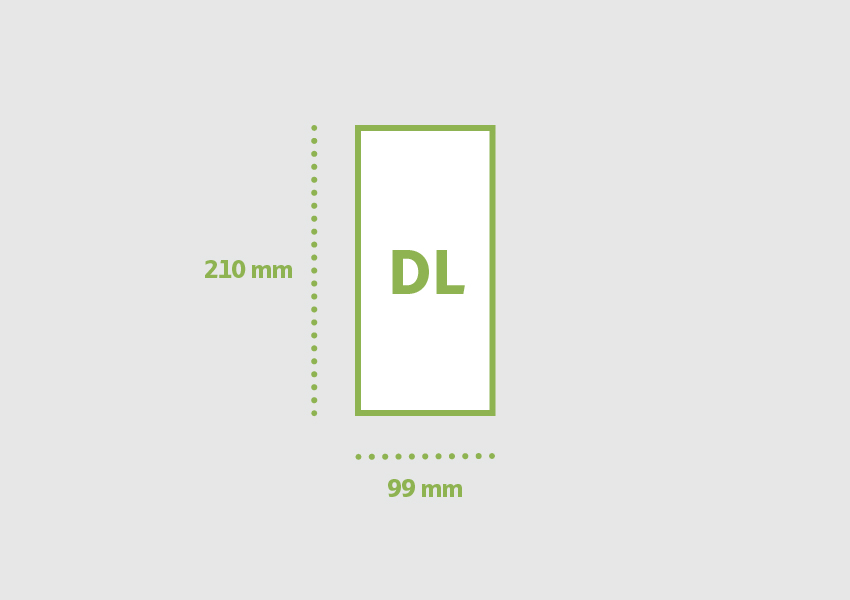
DL (99 x 210 mm)

DL stands for 'Dimension Lengthwise.’ This is an A4 sheet, folded lengthwise twice to create three panels. Also known as a trifold, this size is perfect for menus and mail campaigns because it fits into a DL envelope.

DL 99 x 210 mm

Square (210 x 210 mm, size varies depending on printing house)

Square brochures are not as common but are great if you want to stand out and create something different. The product can feel premium when you are using an abnormal size. Always talk to your printing house to hear what they offer—they might be able to help you out during the process.

Square 210 x 210 mm

Standard US and Canada Brochure Printing Sizes

Letter (8.5 x 11 in)

A Letter size brochure is the sister of the A4 size—it is slightly wider and shorter in length. A Letter size brochure is a Tabloid paper size folded in half. This brochure provides a balanced area of body and images. 

Letter 85 x 11 in

Legal (8.5 x 14 in)

If your design looks too crammed on a letter size brochure, the legal size is here to the rescue. It is slightly taller than the Letter size, while maintaining the width. You can use this size as half-fold, trifold, or a four-panel brochure.

Legal 85 x 14 in

Half Letter (8.5 x 5.5 in)

Also called memo, this is the smallest standard brochure size. If you want to focus on specific products or services—while keeping costs low—this size is for you.

Half Letter 85 x 55 in

Tabloid (11 x 17 in)

This size is similar to A3. It is not as common as other sizes but has a strong visual impact if you are using it as it is. If folded, you can use it as a bifold, trifold, or four-panel brochure.

Tabloid 11 x 17 in

Square (8 x 8 in, size varies depending on printing house)

This unusual brochure size makes the design stand out. It can instantly have a premium feel when handed to customers. This size varies depending on the printing house, so it’s best to contact them to see what’s possible. 

Square 8 x 8 in

Most Common Fold Types

Bifold

This is the most popular fold—it is a sheet folded in half. When open, it presents the reader with two main panels. It is simple and quick to produce and fold. 

Bifold

Trifold

This fold divides the sheet of paper into three. It is a slimmer brochure and easier to carry around. The panels fold on top of each other, usually the left panel over the center and the right panel on top. It provides a total of six equally divided panels, which can be tricky to set up (we’ve got a tutorial on that!), but it provides enough real estate to present your idea.  

Trifold

Z-fold

This is another popular fold, containing six equal panels that fold like an accordion. With this layout, you have the ability to create a design that spreads across all three panels on each side. This is perfect for displaying large imagery. 

Z-fold

Gatefold

A gatefold is a sheet of paper with a center panel as wide as the side panels. These side panels fold inwards, meeting in the middle. Because of the unique opening style, this fold is perfect if you want to highlight a product or service in the center panel. 

Gate Fold

Roll-Fold

A roll-fold brochure has four panels that each roll into each other. Since this brochure folds into itself, the panels need to be adjusted individually to allow for a perfect fold. This fold is great for information that has structure, say a guide or handbook. 

Roll Fold

Premium Brochure Templates

Not ready to design your own brochure yet? Not a problem! Below, we’ve compiled a few professional brochure templates. These are quick and easy to customize, and did I mention print-ready too?

Corporate Bi-Fold Brochure

Bring your business to life with this easily editable brochure template. This print-ready multipurpose brochure is available in Letter and A4 sizes. It also contains free icons on the interior and free fonts. Perfect to take your business to the next level.

Corporate Bi-Fold Brochure

Travel Agency Tri-Fold

Trying to get your customers to take a vacation? This trifold brochure is perfect to display beautiful large landscapes. Minimal, simple, and straightforward. Sometimes that’s all you need! 

Travel Agency Tri-fold

Square Trifold Brochure 02

Looking to stand out amongst your customers? Try this square format trifold brochure—perfect if you are looking to display big images. This brochure is compatible with InDesign and print-ready. It is all ready for you to drop in your images and send it off to the presses!

Square Trifold Brochure

Trifold Brochure Template 02

This professional trifold brochure template is perfect for your business. Simply add your own copy and images and, if you’d like, adapt the colors to go with your brand. This A4 trifold brochure is print-ready and compatible with Photoshop.

Trifold Brochure Template 02

Business Marketing 4-Fold Brochure

If you need something slightly bigger than a trifold, here’s a four-panel brochure. This brochure folds out to a DL brochure and is already set up for US dimensions too! It comes with free fonts, icons, and unlimited colors.

Business Marketing 4-Fold Brochure

Square Gate Fold Brochure

Looking to make an impact? This square gatefold is perfect if you want to highlight information in the center. This brochure is Photoshop compatible and measures 210 x 210 mm. 

Square Gate Fold Brochure

Deciding on a brochure size and fold can be complicated, but it shouldn’t be. This guide lists the basics you need to consider when you are planning your next marketing campaign. If you are an avid Photoshop or InDesign user, we’ve also compiled a list of templates that can help you out. If you would like to explore more template ideas, you can find many customizable brochures and flyers over at Envato Elements and GraphicRiver. Check it out!

If you are ready to design your very own brochure, take a look at some of our tutorials below on how to make a brochure. They are perfect to get you started! 

If you liked this tutorial, you might like these:

Standard & International Brochure Formats and Dimensions

Post pobrano z: Standard & International Brochure Formats and Dimensions

Final product image
What You’ll Be Creating

Choosing a brochure size can be confusing. If you’re working on a marketing campaign, creating an impact on a potential client is important. Whether you are a designer or not, this guide is essential in helping you choose your next business strategy.

In this article, you’ll find the most frequently used brochure sizes internationally (ISO 216) and in the US and Canada (ANSI). We also list the most typical fold types used in brochures. This will dictate how your customers navigate the brochure and how you will organize the information.

Once you’ve decided on a size and fold, it is time to get designing! You’ll find links to a selection of our tutorials at the end of this article on how to make a brochure. Don’t have time to design? We also list some examples of our brochure templates from Envato Elements and GraphicRiver, so we’ve got you covered! 

International Brochure Printing Sizes

A4 (210 x 297 mm)

Customers are most familiar with brochures this size. An A4 brochure is a flat open A3 paper folded in half. This size allows you to pack in a good amount of information, photos, and graphics. It is simple and straightforward, and it’ll get the job done.

A4 210 x 297 mm

A5 (148 x 210 mm)

An A5 brochure is an A4 page size folded in half. It is compact, and it’s perfect if you are providing only key information. It has enough room to still get creative and make something visually striking.

A5 148 x 210 mm

A3 (297 x 420 mm)

A3 brochures are not as common because the printing costs can rise very quickly. On the other hand, this size can create a visual impact and make it perfect for displaying multiple images or large images. 

A3 297 x 420 mm

DL (99 x 210 mm)

DL stands for 'Dimension Lengthwise.’ This is an A4 sheet, folded lengthwise twice to create three panels. Also known as a trifold, this size is perfect for menus and mail campaigns because it fits into a DL envelope.

DL 99 x 210 mm

Square (210 x 210 mm, size varies depending on printing house)

Square brochures are not as common but are great if you want to stand out and create something different. The product can feel premium when you are using an abnormal size. Always talk to your printing house to hear what they offer—they might be able to help you out during the process.

Square 210 x 210 mm

Standard US and Canada Brochure Printing Sizes

Letter (8.5 x 11 in)

A Letter size brochure is the sister of the A4 size—it is slightly wider and shorter in length. A Letter size brochure is a Tabloid paper size folded in half. This brochure provides a balanced area of body and images. 

Letter 85 x 11 in

Legal (8.5 x 14 in)

If your design looks too crammed on a letter size brochure, the legal size is here to the rescue. It is slightly taller than the Letter size, while maintaining the width. You can use this size as half-fold, trifold, or a four-panel brochure.

Legal 85 x 14 in

Half Letter (8.5 x 5.5 in)

Also called memo, this is the smallest standard brochure size. If you want to focus on specific products or services—while keeping costs low—this size is for you.

Half Letter 85 x 55 in

Tabloid (11 x 17 in)

This size is similar to A3. It is not as common as other sizes but has a strong visual impact if you are using it as it is. If folded, you can use it as a bifold, trifold, or four-panel brochure.

Tabloid 11 x 17 in

Square (8 x 8 in, size varies depending on printing house)

This unusual brochure size makes the design stand out. It can instantly have a premium feel when handed to customers. This size varies depending on the printing house, so it’s best to contact them to see what’s possible. 

Square 8 x 8 in

Most Common Fold Types

Bifold

This is the most popular fold—it is a sheet folded in half. When open, it presents the reader with two main panels. It is simple and quick to produce and fold. 

Bifold

Trifold

This fold divides the sheet of paper into three. It is a slimmer brochure and easier to carry around. The panels fold on top of each other, usually the left panel over the center and the right panel on top. It provides a total of six equally divided panels, which can be tricky to set up (we’ve got a tutorial on that!), but it provides enough real estate to present your idea.  

Trifold

Z-fold

This is another popular fold, containing six equal panels that fold like an accordion. With this layout, you have the ability to create a design that spreads across all three panels on each side. This is perfect for displaying large imagery. 

Z-fold

Gatefold

A gatefold is a sheet of paper with a center panel as wide as the side panels. These side panels fold inwards, meeting in the middle. Because of the unique opening style, this fold is perfect if you want to highlight a product or service in the center panel. 

Gate Fold

Roll-Fold

A roll-fold brochure has four panels that each roll into each other. Since this brochure folds into itself, the panels need to be adjusted individually to allow for a perfect fold. This fold is great for information that has structure, say a guide or handbook. 

Roll Fold

Premium Brochure Templates

Not ready to design your own brochure yet? Not a problem! Below, we’ve compiled a few professional brochure templates. These are quick and easy to customize, and did I mention print-ready too?

Corporate Bi-Fold Brochure

Bring your business to life with this easily editable brochure template. This print-ready multipurpose brochure is available in Letter and A4 sizes. It also contains free icons on the interior and free fonts. Perfect to take your business to the next level.

Corporate Bi-Fold Brochure

Travel Agency Tri-Fold

Trying to get your customers to take a vacation? This trifold brochure is perfect to display beautiful large landscapes. Minimal, simple, and straightforward. Sometimes that’s all you need! 

Travel Agency Tri-fold

Square Trifold Brochure 02

Looking to stand out amongst your customers? Try this square format trifold brochure—perfect if you are looking to display big images. This brochure is compatible with InDesign and print-ready. It is all ready for you to drop in your images and send it off to the presses!

Square Trifold Brochure

Trifold Brochure Template 02

This professional trifold brochure template is perfect for your business. Simply add your own copy and images and, if you’d like, adapt the colors to go with your brand. This A4 trifold brochure is print-ready and compatible with Photoshop.

Trifold Brochure Template 02

Business Marketing 4-Fold Brochure

If you need something slightly bigger than a trifold, here’s a four-panel brochure. This brochure folds out to a DL brochure and is already set up for US dimensions too! It comes with free fonts, icons, and unlimited colors.

Business Marketing 4-Fold Brochure

Square Gate Fold Brochure

Looking to make an impact? This square gatefold is perfect if you want to highlight information in the center. This brochure is Photoshop compatible and measures 210 x 210 mm. 

Square Gate Fold Brochure

Deciding on a brochure size and fold can be complicated, but it shouldn’t be. This guide lists the basics you need to consider when you are planning your next marketing campaign. If you are an avid Photoshop or InDesign user, we’ve also compiled a list of templates that can help you out. If you would like to explore more template ideas, you can find many customizable brochures and flyers over at Envato Elements and GraphicRiver. Check it out!

If you are ready to design your very own brochure, take a look at some of our tutorials below on how to make a brochure. They are perfect to get you started! 

If you liked this tutorial, you might like these:

Standard & International Brochure Formats and Dimensions

Post pobrano z: Standard & International Brochure Formats and Dimensions

Final product image
What You’ll Be Creating

Choosing a brochure size can be confusing. If you’re working on a marketing campaign, creating an impact on a potential client is important. Whether you are a designer or not, this guide is essential in helping you choose your next business strategy.

In this article, you’ll find the most frequently used brochure sizes internationally (ISO 216) and in the US and Canada (ANSI). We also list the most typical fold types used in brochures. This will dictate how your customers navigate the brochure and how you will organize the information.

Once you’ve decided on a size and fold, it is time to get designing! You’ll find links to a selection of our tutorials at the end of this article on how to make a brochure. Don’t have time to design? We also list some examples of our brochure templates from Envato Elements and GraphicRiver, so we’ve got you covered! 

International Brochure Printing Sizes

A4 (210 x 297 mm)

Customers are most familiar with brochures this size. An A4 brochure is a flat open A3 paper folded in half. This size allows you to pack in a good amount of information, photos, and graphics. It is simple and straightforward, and it’ll get the job done.

A4 210 x 297 mm

A5 (148 x 210 mm)

An A5 brochure is an A4 page size folded in half. It is compact, and it’s perfect if you are providing only key information. It has enough room to still get creative and make something visually striking.

A5 148 x 210 mm

A3 (297 x 420 mm)

A3 brochures are not as common because the printing costs can rise very quickly. On the other hand, this size can create a visual impact and make it perfect for displaying multiple images or large images. 

A3 297 x 420 mm

DL (99 x 210 mm)

DL stands for 'Dimension Lengthwise.’ This is an A4 sheet, folded lengthwise twice to create three panels. Also known as a trifold, this size is perfect for menus and mail campaigns because it fits into a DL envelope.

DL 99 x 210 mm

Square (210 x 210 mm, size varies depending on printing house)

Square brochures are not as common but are great if you want to stand out and create something different. The product can feel premium when you are using an abnormal size. Always talk to your printing house to hear what they offer—they might be able to help you out during the process.

Square 210 x 210 mm

Standard US and Canada Brochure Printing Sizes

Letter (8.5 x 11 in)

A Letter size brochure is the sister of the A4 size—it is slightly wider and shorter in length. A Letter size brochure is a Tabloid paper size folded in half. This brochure provides a balanced area of body and images. 

Letter 85 x 11 in

Legal (8.5 x 14 in)

If your design looks too crammed on a letter size brochure, the legal size is here to the rescue. It is slightly taller than the Letter size, while maintaining the width. You can use this size as half-fold, trifold, or a four-panel brochure.

Legal 85 x 14 in

Half Letter (8.5 x 5.5 in)

Also called memo, this is the smallest standard brochure size. If you want to focus on specific products or services—while keeping costs low—this size is for you.

Half Letter 85 x 55 in

Tabloid (11 x 17 in)

This size is similar to A3. It is not as common as other sizes but has a strong visual impact if you are using it as it is. If folded, you can use it as a bifold, trifold, or four-panel brochure.

Tabloid 11 x 17 in

Square (8 x 8 in, size varies depending on printing house)

This unusual brochure size makes the design stand out. It can instantly have a premium feel when handed to customers. This size varies depending on the printing house, so it’s best to contact them to see what’s possible. 

Square 8 x 8 in

Most Common Fold Types

Bifold

This is the most popular fold—it is a sheet folded in half. When open, it presents the reader with two main panels. It is simple and quick to produce and fold. 

Bifold

Trifold

This fold divides the sheet of paper into three. It is a slimmer brochure and easier to carry around. The panels fold on top of each other, usually the left panel over the center and the right panel on top. It provides a total of six equally divided panels, which can be tricky to set up (we’ve got a tutorial on that!), but it provides enough real estate to present your idea.  

Trifold

Z-fold

This is another popular fold, containing six equal panels that fold like an accordion. With this layout, you have the ability to create a design that spreads across all three panels on each side. This is perfect for displaying large imagery. 

Z-fold

Gatefold

A gatefold is a sheet of paper with a center panel as wide as the side panels. These side panels fold inwards, meeting in the middle. Because of the unique opening style, this fold is perfect if you want to highlight a product or service in the center panel. 

Gate Fold

Roll-Fold

A roll-fold brochure has four panels that each roll into each other. Since this brochure folds into itself, the panels need to be adjusted individually to allow for a perfect fold. This fold is great for information that has structure, say a guide or handbook. 

Roll Fold

Premium Brochure Templates

Not ready to design your own brochure yet? Not a problem! Below, we’ve compiled a few professional brochure templates. These are quick and easy to customize, and did I mention print-ready too?

Corporate Bi-Fold Brochure

Bring your business to life with this easily editable brochure template. This print-ready multipurpose brochure is available in Letter and A4 sizes. It also contains free icons on the interior and free fonts. Perfect to take your business to the next level.

Corporate Bi-Fold Brochure

Travel Agency Tri-Fold

Trying to get your customers to take a vacation? This trifold brochure is perfect to display beautiful large landscapes. Minimal, simple, and straightforward. Sometimes that’s all you need! 

Travel Agency Tri-fold

Square Trifold Brochure 02

Looking to stand out amongst your customers? Try this square format trifold brochure—perfect if you are looking to display big images. This brochure is compatible with InDesign and print-ready. It is all ready for you to drop in your images and send it off to the presses!

Square Trifold Brochure

Trifold Brochure Template 02

This professional trifold brochure template is perfect for your business. Simply add your own copy and images and, if you’d like, adapt the colors to go with your brand. This A4 trifold brochure is print-ready and compatible with Photoshop.

Trifold Brochure Template 02

Business Marketing 4-Fold Brochure

If you need something slightly bigger than a trifold, here’s a four-panel brochure. This brochure folds out to a DL brochure and is already set up for US dimensions too! It comes with free fonts, icons, and unlimited colors.

Business Marketing 4-Fold Brochure

Square Gate Fold Brochure

Looking to make an impact? This square gatefold is perfect if you want to highlight information in the center. This brochure is Photoshop compatible and measures 210 x 210 mm. 

Square Gate Fold Brochure

Deciding on a brochure size and fold can be complicated, but it shouldn’t be. This guide lists the basics you need to consider when you are planning your next marketing campaign. If you are an avid Photoshop or InDesign user, we’ve also compiled a list of templates that can help you out. If you would like to explore more template ideas, you can find many customizable brochures and flyers over at Envato Elements and GraphicRiver. Check it out!

If you are ready to design your very own brochure, take a look at some of our tutorials below on how to make a brochure. They are perfect to get you started! 

If you liked this tutorial, you might like these:

Standard & International Brochure Formats and Dimensions

Post pobrano z: Standard & International Brochure Formats and Dimensions

Final product image
What You’ll Be Creating

Choosing a brochure size can be confusing. If you’re working on a marketing campaign, creating an impact on a potential client is important. Whether you are a designer or not, this guide is essential in helping you choose your next business strategy.

In this article, you’ll find the most frequently used brochure sizes internationally (ISO 216) and in the US and Canada (ANSI). We also list the most typical fold types used in brochures. This will dictate how your customers navigate the brochure and how you will organize the information.

Once you’ve decided on a size and fold, it is time to get designing! You’ll find links to a selection of our tutorials at the end of this article on how to make a brochure. Don’t have time to design? We also list some examples of our brochure templates from Envato Elements and GraphicRiver, so we’ve got you covered! 

International Brochure Printing Sizes

A4 (210 x 297 mm)

Customers are most familiar with brochures this size. An A4 brochure is a flat open A3 paper folded in half. This size allows you to pack in a good amount of information, photos, and graphics. It is simple and straightforward, and it’ll get the job done.

A4 210 x 297 mm

A5 (148 x 210 mm)

An A5 brochure is an A4 page size folded in half. It is compact, and it’s perfect if you are providing only key information. It has enough room to still get creative and make something visually striking.

A5 148 x 210 mm

A3 (297 x 420 mm)

A3 brochures are not as common because the printing costs can rise very quickly. On the other hand, this size can create a visual impact and make it perfect for displaying multiple images or large images. 

A3 297 x 420 mm

DL (99 x 210 mm)

DL stands for 'Dimension Lengthwise.’ This is an A4 sheet, folded lengthwise twice to create three panels. Also known as a trifold, this size is perfect for menus and mail campaigns because it fits into a DL envelope.

DL 99 x 210 mm

Square (210 x 210 mm, size varies depending on printing house)

Square brochures are not as common but are great if you want to stand out and create something different. The product can feel premium when you are using an abnormal size. Always talk to your printing house to hear what they offer—they might be able to help you out during the process.

Square 210 x 210 mm

Standard US and Canada Brochure Printing Sizes

Letter (8.5 x 11 in)

A Letter size brochure is the sister of the A4 size—it is slightly wider and shorter in length. A Letter size brochure is a Tabloid paper size folded in half. This brochure provides a balanced area of body and images. 

Letter 85 x 11 in

Legal (8.5 x 14 in)

If your design looks too crammed on a letter size brochure, the legal size is here to the rescue. It is slightly taller than the Letter size, while maintaining the width. You can use this size as half-fold, trifold, or a four-panel brochure.

Legal 85 x 14 in

Half Letter (8.5 x 5.5 in)

Also called memo, this is the smallest standard brochure size. If you want to focus on specific products or services—while keeping costs low—this size is for you.

Half Letter 85 x 55 in

Tabloid (11 x 17 in)

This size is similar to A3. It is not as common as other sizes but has a strong visual impact if you are using it as it is. If folded, you can use it as a bifold, trifold, or four-panel brochure.

Tabloid 11 x 17 in

Square (8 x 8 in, size varies depending on printing house)

This unusual brochure size makes the design stand out. It can instantly have a premium feel when handed to customers. This size varies depending on the printing house, so it’s best to contact them to see what’s possible. 

Square 8 x 8 in

Most Common Fold Types

Bifold

This is the most popular fold—it is a sheet folded in half. When open, it presents the reader with two main panels. It is simple and quick to produce and fold. 

Bifold

Trifold

This fold divides the sheet of paper into three. It is a slimmer brochure and easier to carry around. The panels fold on top of each other, usually the left panel over the center and the right panel on top. It provides a total of six equally divided panels, which can be tricky to set up (we’ve got a tutorial on that!), but it provides enough real estate to present your idea.  

Trifold

Z-fold

This is another popular fold, containing six equal panels that fold like an accordion. With this layout, you have the ability to create a design that spreads across all three panels on each side. This is perfect for displaying large imagery. 

Z-fold

Gatefold

A gatefold is a sheet of paper with a center panel as wide as the side panels. These side panels fold inwards, meeting in the middle. Because of the unique opening style, this fold is perfect if you want to highlight a product or service in the center panel. 

Gate Fold

Roll-Fold

A roll-fold brochure has four panels that each roll into each other. Since this brochure folds into itself, the panels need to be adjusted individually to allow for a perfect fold. This fold is great for information that has structure, say a guide or handbook. 

Roll Fold

Premium Brochure Templates

Not ready to design your own brochure yet? Not a problem! Below, we’ve compiled a few professional brochure templates. These are quick and easy to customize, and did I mention print-ready too?

Corporate Bi-Fold Brochure

Bring your business to life with this easily editable brochure template. This print-ready multipurpose brochure is available in Letter and A4 sizes. It also contains free icons on the interior and free fonts. Perfect to take your business to the next level.

Corporate Bi-Fold Brochure

Travel Agency Tri-Fold

Trying to get your customers to take a vacation? This trifold brochure is perfect to display beautiful large landscapes. Minimal, simple, and straightforward. Sometimes that’s all you need! 

Travel Agency Tri-fold

Square Trifold Brochure 02

Looking to stand out amongst your customers? Try this square format trifold brochure—perfect if you are looking to display big images. This brochure is compatible with InDesign and print-ready. It is all ready for you to drop in your images and send it off to the presses!

Square Trifold Brochure

Trifold Brochure Template 02

This professional trifold brochure template is perfect for your business. Simply add your own copy and images and, if you’d like, adapt the colors to go with your brand. This A4 trifold brochure is print-ready and compatible with Photoshop.

Trifold Brochure Template 02

Business Marketing 4-Fold Brochure

If you need something slightly bigger than a trifold, here’s a four-panel brochure. This brochure folds out to a DL brochure and is already set up for US dimensions too! It comes with free fonts, icons, and unlimited colors.

Business Marketing 4-Fold Brochure

Square Gate Fold Brochure

Looking to make an impact? This square gatefold is perfect if you want to highlight information in the center. This brochure is Photoshop compatible and measures 210 x 210 mm. 

Square Gate Fold Brochure

Deciding on a brochure size and fold can be complicated, but it shouldn’t be. This guide lists the basics you need to consider when you are planning your next marketing campaign. If you are an avid Photoshop or InDesign user, we’ve also compiled a list of templates that can help you out. If you would like to explore more template ideas, you can find many customizable brochures and flyers over at Envato Elements and GraphicRiver. Check it out!

If you are ready to design your very own brochure, take a look at some of our tutorials below on how to make a brochure. They are perfect to get you started! 

If you liked this tutorial, you might like these:

Standard & International Brochure Formats and Dimensions

Post pobrano z: Standard & International Brochure Formats and Dimensions

Final product image
What You’ll Be Creating

Choosing a brochure size can be confusing. If you’re working on a marketing campaign, creating an impact on a potential client is important. Whether you are a designer or not, this guide is essential in helping you choose your next business strategy.

In this article, you’ll find the most frequently used brochure sizes internationally (ISO 216) and in the US and Canada (ANSI). We also list the most typical fold types used in brochures. This will dictate how your customers navigate the brochure and how you will organize the information.

Once you’ve decided on a size and fold, it is time to get designing! You’ll find links to a selection of our tutorials at the end of this article on how to make a brochure. Don’t have time to design? We also list some examples of our brochure templates from Envato Elements and GraphicRiver, so we’ve got you covered! 

International Brochure Printing Sizes

A4 (210 x 297 mm)

Customers are most familiar with brochures this size. An A4 brochure is a flat open A3 paper folded in half. This size allows you to pack in a good amount of information, photos, and graphics. It is simple and straightforward, and it’ll get the job done.

A4 210 x 297 mm

A5 (148 x 210 mm)

An A5 brochure is an A4 page size folded in half. It is compact, and it’s perfect if you are providing only key information. It has enough room to still get creative and make something visually striking.

A5 148 x 210 mm

A3 (297 x 420 mm)

A3 brochures are not as common because the printing costs can rise very quickly. On the other hand, this size can create a visual impact and make it perfect for displaying multiple images or large images. 

A3 297 x 420 mm

DL (99 x 210 mm)

DL stands for 'Dimension Lengthwise.’ This is an A4 sheet, folded lengthwise twice to create three panels. Also known as a trifold, this size is perfect for menus and mail campaigns because it fits into a DL envelope.

DL 99 x 210 mm

Square (210 x 210 mm, size varies depending on printing house)

Square brochures are not as common but are great if you want to stand out and create something different. The product can feel premium when you are using an abnormal size. Always talk to your printing house to hear what they offer—they might be able to help you out during the process.

Square 210 x 210 mm

Standard US and Canada Brochure Printing Sizes

Letter (8.5 x 11 in)

A Letter size brochure is the sister of the A4 size—it is slightly wider and shorter in length. A Letter size brochure is a Tabloid paper size folded in half. This brochure provides a balanced area of body and images. 

Letter 85 x 11 in

Legal (8.5 x 14 in)

If your design looks too crammed on a letter size brochure, the legal size is here to the rescue. It is slightly taller than the Letter size, while maintaining the width. You can use this size as half-fold, trifold, or a four-panel brochure.

Legal 85 x 14 in

Half Letter (8.5 x 5.5 in)

Also called memo, this is the smallest standard brochure size. If you want to focus on specific products or services—while keeping costs low—this size is for you.

Half Letter 85 x 55 in

Tabloid (11 x 17 in)

This size is similar to A3. It is not as common as other sizes but has a strong visual impact if you are using it as it is. If folded, you can use it as a bifold, trifold, or four-panel brochure.

Tabloid 11 x 17 in

Square (8 x 8 in, size varies depending on printing house)

This unusual brochure size makes the design stand out. It can instantly have a premium feel when handed to customers. This size varies depending on the printing house, so it’s best to contact them to see what’s possible. 

Square 8 x 8 in

Most Common Fold Types

Bifold

This is the most popular fold—it is a sheet folded in half. When open, it presents the reader with two main panels. It is simple and quick to produce and fold. 

Bifold

Trifold

This fold divides the sheet of paper into three. It is a slimmer brochure and easier to carry around. The panels fold on top of each other, usually the left panel over the center and the right panel on top. It provides a total of six equally divided panels, which can be tricky to set up (we’ve got a tutorial on that!), but it provides enough real estate to present your idea.  

Trifold

Z-fold

This is another popular fold, containing six equal panels that fold like an accordion. With this layout, you have the ability to create a design that spreads across all three panels on each side. This is perfect for displaying large imagery. 

Z-fold

Gatefold

A gatefold is a sheet of paper with a center panel as wide as the side panels. These side panels fold inwards, meeting in the middle. Because of the unique opening style, this fold is perfect if you want to highlight a product or service in the center panel. 

Gate Fold

Roll-Fold

A roll-fold brochure has four panels that each roll into each other. Since this brochure folds into itself, the panels need to be adjusted individually to allow for a perfect fold. This fold is great for information that has structure, say a guide or handbook. 

Roll Fold

Premium Brochure Templates

Not ready to design your own brochure yet? Not a problem! Below, we’ve compiled a few professional brochure templates. These are quick and easy to customize, and did I mention print-ready too?

Corporate Bi-Fold Brochure

Bring your business to life with this easily editable brochure template. This print-ready multipurpose brochure is available in Letter and A4 sizes. It also contains free icons on the interior and free fonts. Perfect to take your business to the next level.

Corporate Bi-Fold Brochure

Travel Agency Tri-Fold

Trying to get your customers to take a vacation? This trifold brochure is perfect to display beautiful large landscapes. Minimal, simple, and straightforward. Sometimes that’s all you need! 

Travel Agency Tri-fold

Square Trifold Brochure 02

Looking to stand out amongst your customers? Try this square format trifold brochure—perfect if you are looking to display big images. This brochure is compatible with InDesign and print-ready. It is all ready for you to drop in your images and send it off to the presses!

Square Trifold Brochure

Trifold Brochure Template 02

This professional trifold brochure template is perfect for your business. Simply add your own copy and images and, if you’d like, adapt the colors to go with your brand. This A4 trifold brochure is print-ready and compatible with Photoshop.

Trifold Brochure Template 02

Business Marketing 4-Fold Brochure

If you need something slightly bigger than a trifold, here’s a four-panel brochure. This brochure folds out to a DL brochure and is already set up for US dimensions too! It comes with free fonts, icons, and unlimited colors.

Business Marketing 4-Fold Brochure

Square Gate Fold Brochure

Looking to make an impact? This square gatefold is perfect if you want to highlight information in the center. This brochure is Photoshop compatible and measures 210 x 210 mm. 

Square Gate Fold Brochure

Deciding on a brochure size and fold can be complicated, but it shouldn’t be. This guide lists the basics you need to consider when you are planning your next marketing campaign. If you are an avid Photoshop or InDesign user, we’ve also compiled a list of templates that can help you out. If you would like to explore more template ideas, you can find many customizable brochures and flyers over at Envato Elements and GraphicRiver. Check it out!

If you are ready to design your very own brochure, take a look at some of our tutorials below on how to make a brochure. They are perfect to get you started! 

If you liked this tutorial, you might like these:

Standard & International Brochure Formats and Dimensions

Post pobrano z: Standard & International Brochure Formats and Dimensions

Final product image
What You’ll Be Creating

Choosing a brochure size can be confusing. If you’re working on a marketing campaign, creating an impact on a potential client is important. Whether you are a designer or not, this guide is essential in helping you choose your next business strategy.

In this article, you’ll find the most frequently used brochure sizes internationally (ISO 216) and in the US and Canada (ANSI). We also list the most typical fold types used in brochures. This will dictate how your customers navigate the brochure and how you will organize the information.

Once you’ve decided on a size and fold, it is time to get designing! You’ll find links to a selection of our tutorials at the end of this article on how to make a brochure. Don’t have time to design? We also list some examples of our brochure templates from Envato Elements and GraphicRiver, so we’ve got you covered! 

International Brochure Printing Sizes

A4 (210 x 297 mm)

Customers are most familiar with brochures this size. An A4 brochure is a flat open A3 paper folded in half. This size allows you to pack in a good amount of information, photos, and graphics. It is simple and straightforward, and it’ll get the job done.

A4 210 x 297 mm

A5 (148 x 210 mm)

An A5 brochure is an A4 page size folded in half. It is compact, and it’s perfect if you are providing only key information. It has enough room to still get creative and make something visually striking.

A5 148 x 210 mm

A3 (297 x 420 mm)

A3 brochures are not as common because the printing costs can rise very quickly. On the other hand, this size can create a visual impact and make it perfect for displaying multiple images or large images. 

A3 297 x 420 mm

DL (99 x 210 mm)

DL stands for 'Dimension Lengthwise.’ This is an A4 sheet, folded lengthwise twice to create three panels. Also known as a trifold, this size is perfect for menus and mail campaigns because it fits into a DL envelope.

DL 99 x 210 mm

Square (210 x 210 mm, size varies depending on printing house)

Square brochures are not as common but are great if you want to stand out and create something different. The product can feel premium when you are using an abnormal size. Always talk to your printing house to hear what they offer—they might be able to help you out during the process.

Square 210 x 210 mm

Standard US and Canada Brochure Printing Sizes

Letter (8.5 x 11 in)

A Letter size brochure is the sister of the A4 size—it is slightly wider and shorter in length. A Letter size brochure is a Tabloid paper size folded in half. This brochure provides a balanced area of body and images. 

Letter 85 x 11 in

Legal (8.5 x 14 in)

If your design looks too crammed on a letter size brochure, the legal size is here to the rescue. It is slightly taller than the Letter size, while maintaining the width. You can use this size as half-fold, trifold, or a four-panel brochure.

Legal 85 x 14 in

Half Letter (8.5 x 5.5 in)

Also called memo, this is the smallest standard brochure size. If you want to focus on specific products or services—while keeping costs low—this size is for you.

Half Letter 85 x 55 in

Tabloid (11 x 17 in)

This size is similar to A3. It is not as common as other sizes but has a strong visual impact if you are using it as it is. If folded, you can use it as a bifold, trifold, or four-panel brochure.

Tabloid 11 x 17 in

Square (8 x 8 in, size varies depending on printing house)

This unusual brochure size makes the design stand out. It can instantly have a premium feel when handed to customers. This size varies depending on the printing house, so it’s best to contact them to see what’s possible. 

Square 8 x 8 in

Most Common Fold Types

Bifold

This is the most popular fold—it is a sheet folded in half. When open, it presents the reader with two main panels. It is simple and quick to produce and fold. 

Bifold

Trifold

This fold divides the sheet of paper into three. It is a slimmer brochure and easier to carry around. The panels fold on top of each other, usually the left panel over the center and the right panel on top. It provides a total of six equally divided panels, which can be tricky to set up (we’ve got a tutorial on that!), but it provides enough real estate to present your idea.  

Trifold

Z-fold

This is another popular fold, containing six equal panels that fold like an accordion. With this layout, you have the ability to create a design that spreads across all three panels on each side. This is perfect for displaying large imagery. 

Z-fold

Gatefold

A gatefold is a sheet of paper with a center panel as wide as the side panels. These side panels fold inwards, meeting in the middle. Because of the unique opening style, this fold is perfect if you want to highlight a product or service in the center panel. 

Gate Fold

Roll-Fold

A roll-fold brochure has four panels that each roll into each other. Since this brochure folds into itself, the panels need to be adjusted individually to allow for a perfect fold. This fold is great for information that has structure, say a guide or handbook. 

Roll Fold

Premium Brochure Templates

Not ready to design your own brochure yet? Not a problem! Below, we’ve compiled a few professional brochure templates. These are quick and easy to customize, and did I mention print-ready too?

Corporate Bi-Fold Brochure

Bring your business to life with this easily editable brochure template. This print-ready multipurpose brochure is available in Letter and A4 sizes. It also contains free icons on the interior and free fonts. Perfect to take your business to the next level.

Corporate Bi-Fold Brochure

Travel Agency Tri-Fold

Trying to get your customers to take a vacation? This trifold brochure is perfect to display beautiful large landscapes. Minimal, simple, and straightforward. Sometimes that’s all you need! 

Travel Agency Tri-fold

Square Trifold Brochure 02

Looking to stand out amongst your customers? Try this square format trifold brochure—perfect if you are looking to display big images. This brochure is compatible with InDesign and print-ready. It is all ready for you to drop in your images and send it off to the presses!

Square Trifold Brochure

Trifold Brochure Template 02

This professional trifold brochure template is perfect for your business. Simply add your own copy and images and, if you’d like, adapt the colors to go with your brand. This A4 trifold brochure is print-ready and compatible with Photoshop.

Trifold Brochure Template 02

Business Marketing 4-Fold Brochure

If you need something slightly bigger than a trifold, here’s a four-panel brochure. This brochure folds out to a DL brochure and is already set up for US dimensions too! It comes with free fonts, icons, and unlimited colors.

Business Marketing 4-Fold Brochure

Square Gate Fold Brochure

Looking to make an impact? This square gatefold is perfect if you want to highlight information in the center. This brochure is Photoshop compatible and measures 210 x 210 mm. 

Square Gate Fold Brochure

Deciding on a brochure size and fold can be complicated, but it shouldn’t be. This guide lists the basics you need to consider when you are planning your next marketing campaign. If you are an avid Photoshop or InDesign user, we’ve also compiled a list of templates that can help you out. If you would like to explore more template ideas, you can find many customizable brochures and flyers over at Envato Elements and GraphicRiver. Check it out!

If you are ready to design your very own brochure, take a look at some of our tutorials below on how to make a brochure. They are perfect to get you started! 

If you liked this tutorial, you might like these:

Standard & International Brochure Formats and Dimensions

Post pobrano z: Standard & International Brochure Formats and Dimensions

Final product image
What You’ll Be Creating

Choosing a brochure size can be confusing. If you’re working on a marketing campaign, creating an impact on a potential client is important. Whether you are a designer or not, this guide is essential in helping you choose your next business strategy.

In this article, you’ll find the most frequently used brochure sizes internationally (ISO 216) and in the US and Canada (ANSI). We also list the most typical fold types used in brochures. This will dictate how your customers navigate the brochure and how you will organize the information.

Once you’ve decided on a size and fold, it is time to get designing! You’ll find links to a selection of our tutorials at the end of this article on how to make a brochure. Don’t have time to design? We also list some examples of our brochure templates from Envato Elements and GraphicRiver, so we’ve got you covered! 

International Brochure Printing Sizes

A4 (210 x 297 mm)

Customers are most familiar with brochures this size. An A4 brochure is a flat open A3 paper folded in half. This size allows you to pack in a good amount of information, photos, and graphics. It is simple and straightforward, and it’ll get the job done.

A4 210 x 297 mm

A5 (148 x 210 mm)

An A5 brochure is an A4 page size folded in half. It is compact, and it’s perfect if you are providing only key information. It has enough room to still get creative and make something visually striking.

A5 148 x 210 mm

A3 (297 x 420 mm)

A3 brochures are not as common because the printing costs can rise very quickly. On the other hand, this size can create a visual impact and make it perfect for displaying multiple images or large images. 

A3 297 x 420 mm

DL (99 x 210 mm)

DL stands for 'Dimension Lengthwise.’ This is an A4 sheet, folded lengthwise twice to create three panels. Also known as a trifold, this size is perfect for menus and mail campaigns because it fits into a DL envelope.

DL 99 x 210 mm

Square (210 x 210 mm, size varies depending on printing house)

Square brochures are not as common but are great if you want to stand out and create something different. The product can feel premium when you are using an abnormal size. Always talk to your printing house to hear what they offer—they might be able to help you out during the process.

Square 210 x 210 mm

Standard US and Canada Brochure Printing Sizes

Letter (8.5 x 11 in)

A Letter size brochure is the sister of the A4 size—it is slightly wider and shorter in length. A Letter size brochure is a Tabloid paper size folded in half. This brochure provides a balanced area of body and images. 

Letter 85 x 11 in

Legal (8.5 x 14 in)

If your design looks too crammed on a letter size brochure, the legal size is here to the rescue. It is slightly taller than the Letter size, while maintaining the width. You can use this size as half-fold, trifold, or a four-panel brochure.

Legal 85 x 14 in

Half Letter (8.5 x 5.5 in)

Also called memo, this is the smallest standard brochure size. If you want to focus on specific products or services—while keeping costs low—this size is for you.

Half Letter 85 x 55 in

Tabloid (11 x 17 in)

This size is similar to A3. It is not as common as other sizes but has a strong visual impact if you are using it as it is. If folded, you can use it as a bifold, trifold, or four-panel brochure.

Tabloid 11 x 17 in

Square (8 x 8 in, size varies depending on printing house)

This unusual brochure size makes the design stand out. It can instantly have a premium feel when handed to customers. This size varies depending on the printing house, so it’s best to contact them to see what’s possible. 

Square 8 x 8 in

Most Common Fold Types

Bifold

This is the most popular fold—it is a sheet folded in half. When open, it presents the reader with two main panels. It is simple and quick to produce and fold. 

Bifold

Trifold

This fold divides the sheet of paper into three. It is a slimmer brochure and easier to carry around. The panels fold on top of each other, usually the left panel over the center and the right panel on top. It provides a total of six equally divided panels, which can be tricky to set up (we’ve got a tutorial on that!), but it provides enough real estate to present your idea.  

Trifold

Z-fold

This is another popular fold, containing six equal panels that fold like an accordion. With this layout, you have the ability to create a design that spreads across all three panels on each side. This is perfect for displaying large imagery. 

Z-fold

Gatefold

A gatefold is a sheet of paper with a center panel as wide as the side panels. These side panels fold inwards, meeting in the middle. Because of the unique opening style, this fold is perfect if you want to highlight a product or service in the center panel. 

Gate Fold

Roll-Fold

A roll-fold brochure has four panels that each roll into each other. Since this brochure folds into itself, the panels need to be adjusted individually to allow for a perfect fold. This fold is great for information that has structure, say a guide or handbook. 

Roll Fold

Premium Brochure Templates

Not ready to design your own brochure yet? Not a problem! Below, we’ve compiled a few professional brochure templates. These are quick and easy to customize, and did I mention print-ready too?

Corporate Bi-Fold Brochure

Bring your business to life with this easily editable brochure template. This print-ready multipurpose brochure is available in Letter and A4 sizes. It also contains free icons on the interior and free fonts. Perfect to take your business to the next level.

Corporate Bi-Fold Brochure

Travel Agency Tri-Fold

Trying to get your customers to take a vacation? This trifold brochure is perfect to display beautiful large landscapes. Minimal, simple, and straightforward. Sometimes that’s all you need! 

Travel Agency Tri-fold

Square Trifold Brochure 02

Looking to stand out amongst your customers? Try this square format trifold brochure—perfect if you are looking to display big images. This brochure is compatible with InDesign and print-ready. It is all ready for you to drop in your images and send it off to the presses!

Square Trifold Brochure

Trifold Brochure Template 02

This professional trifold brochure template is perfect for your business. Simply add your own copy and images and, if you’d like, adapt the colors to go with your brand. This A4 trifold brochure is print-ready and compatible with Photoshop.

Trifold Brochure Template 02

Business Marketing 4-Fold Brochure

If you need something slightly bigger than a trifold, here’s a four-panel brochure. This brochure folds out to a DL brochure and is already set up for US dimensions too! It comes with free fonts, icons, and unlimited colors.

Business Marketing 4-Fold Brochure

Square Gate Fold Brochure

Looking to make an impact? This square gatefold is perfect if you want to highlight information in the center. This brochure is Photoshop compatible and measures 210 x 210 mm. 

Square Gate Fold Brochure

Deciding on a brochure size and fold can be complicated, but it shouldn’t be. This guide lists the basics you need to consider when you are planning your next marketing campaign. If you are an avid Photoshop or InDesign user, we’ve also compiled a list of templates that can help you out. If you would like to explore more template ideas, you can find many customizable brochures and flyers over at Envato Elements and GraphicRiver. Check it out!

If you are ready to design your very own brochure, take a look at some of our tutorials below on how to make a brochure. They are perfect to get you started! 

If you liked this tutorial, you might like these:

How to Make a Banner With an Online Banner Maker

Post pobrano z: How to Make a Banner With an Online Banner Maker

Final product image
What You’ll Be Creating

Need to create a banner design but don’t have the required tools or skills? Well, what if I told you that you can use an online banner maker that comes with a large selection of banner templates that you can choose and customize?

If that sounds interesting, follow me in this tutorial as you will learn how to make a banner using a banner maker.

We’re going to rely on Placeit’s Digital Banner Maker, so no matter whether you’re a designer or not, at the end you should be able to put together a great-looking design.

You can view this video and many more on our Envato Tuts+ YouTube Channel.

How to Make a Banner Using Placeit’s Banner Maker

First, make sure
you navigate to the Placeit website and create an account since you’re going to
need it later on in order to download the final design.

Step 1

Once you’re ready, you can access the tool using the site’s top menu, by
heading over to Designs and then clicking on Banner Maker.

locating the banner maker

Step 2

Here, you’ll find
a truly impressive library of banner templates to choose from.

If you need help figuring out which template will be a better fit, you
can use the three text input boxes found at the top of the page, which will
give you a quick preview of how they would actually look once you add your
own text.

banner templates preview

Step 3

Once you’ve made
up your mind, you can further customize the design by clicking on it, which
will open it up in a new window tab.

Here, you’ll be
greeted by the actual banner front and center, which will be surrounded by a
couple of options which may vary depending on the template itself.

Usually on the left side you’ll have all your text-related options,
while on the right one you’ll find your shape and background-related ones.

example of banner customization interface

Step 4

To change the
default text, all you have to do is click on its corresponding input box, and then
overwrite the preview text with your own.

You can further adjust the text by changing its font and even its color
using the underlying dropdown lists.

changing the text font

Step 5

When it comes to colors, you can either choose
from one of the predefined values, or you can click on More and use a custom
one of your own.

changing the text color

Step 6

If needed, you can actually hide a text line by
unchecking the little checkbox found in front of it.

example of hiding a text line

Step 7

Moving on down,
you’ll see that we have the option of uploading our own logo, but for this
example I’m going to leave that out.

If we move on to the right side of the page, we’ll see an option called
Banner, which will allow us to change the color of the shape found underneath
our text.

example of changing the color of the banner

Step 8

We then have Button, which lets us change the
color and style of the call to action button.

adjusting the call to action button

Step 9

Lastly we have
another option called Background, which as the name suggests allows us to
change the color and style of the background.

To be honest, I really like the default floral pattern, so for this
example I’m going to leave it as it is.

adjusting the background

Step 10

Since the template supports interactive editing,
we can easily adjust the position of some of our banner’s composing elements by
first clicking on them in order to bring up their bounding box, and then simply
clicking and dragging in order to reposition them as needed.

example of re positioning a shape

Step 11

You can also resize them by hovering over the
bounding box’s corners, and then clicking and dragging either outwards or
inwards depending on what you’re trying to achieve.

example of resizing a shape

Step 12

If for some reason you’re not happy with the
result, you can easily undo all the changes by using the Reset Layout button.

example of using the reset layout button

Step 13

Once you’ve finished customizing the template
using the Digital Banner Maker, you can download the resulting design by simply
clicking on the Download button, which will charge you a small fee every time
you use it.

example of downloading the final design

Conclusion

No matter whether you’re a designer or not, you can quickly create a banner using Placeit’s Banner Maker, which as we just saw is actually really fun and easy to use.

As always, I hope you had fun watching this video and most importantly managed to learn something new and useful during the process!

Build Your Designer Skills!

Just finished going through this quick tutorial, and feel like learning more? Well, if that’s the case, you’re in luck, since I took the time to put together this little list that should keep you going for the following days!