

settler
Mie Ayam Mbak Ina


30 Enlightening Magazine Illustrations
Post pobrano z: 30 Enlightening Magazine Illustrations
A Magazine usually has some philosophy and meaningful concept behind it and an illustration could help describe those two elements well to the audience. Illustrations in Magazine designs help designers to deliver the message, and it also helps people to understand and interpret the message in an easier way. Since a picture is worth a thousand words, an illustration could be very effective.
Nowadays, with the increasing number of creative designers, illustration in magazines is just getting wittier and more fun. Therefore, this time I will share a collection of illustrations in magazines for your inspiration.


 Mari Kaneko


Conclusion
That’s it, Thanks so much for stopping by, I hope you enjoyed this collection and was inspired by the Magazines that I have compiled for you. If there are any of them that impacted you more than the others, tell me about it below. Until next time, have a great day.
How to Create a Gzhel Pottery Russian Pattern in Adobe Illustrator
Post pobrano z: How to Create a Gzhel Pottery Russian Pattern in Adobe Illustrator
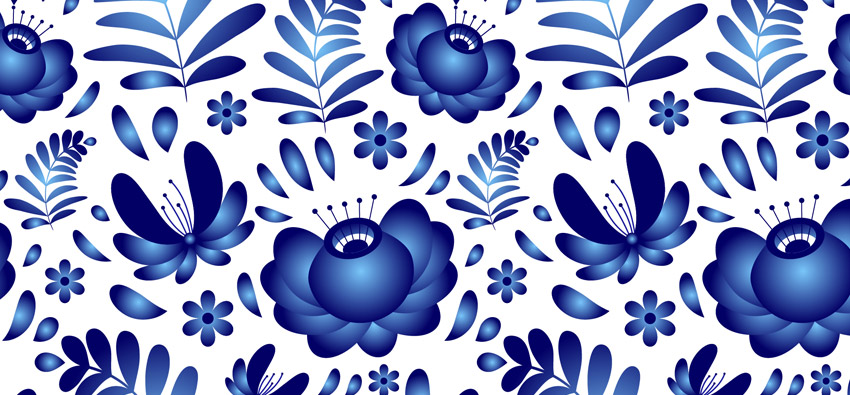
In this tutorial, you will learn how to create and use an Art Brush in Adobe Illustrator to create a vector traditional Russian pottery design called Gzhel!
Along the way, you will learn how to create a seamless pattern from any elements. Our Gzhel pottery flowers and decorations can be used in any Russian style designs.
Elegant and decorative, Gzhel was created in the 17th century in the village with the same name. That village had deposits of high-quality clay and was famous for its pottery, tiles, and simple children’s toys made from clay. The Gzhel pottery design is traditionally blue, with floral curls, leaves, and flower.
You can find awesome ready-to-use Gzhel vector ornaments on GraphicRiver. Check them for inspiration.
In this tutorial, I’ll show you how to create a beautiful floral design in traditional Russian Gzhel style. Let’s start!
1. How to Make the First Flower
Step 1
Create a New Document (File > New) with these settings:
- Number of Artboards: 1
- Width: 1000 px
- Height: 1000 px
- Units: Pixels
- Color Mode: RGB
Step 2
Show Ruler (Command-R or View > Rulers > Show Rulers) and drag the vertical ruler to your artboard. Our flower will be symmetrical, so we need a center guideline.
Step 3
Make a 200 x 200 px circle; you can set the size in the Transform panel (Window > Transform). To draw a perfect circle, use the Ellipse Tool (L) and hold Shift. Color it to a Gradient (Window > Gradient), type Radial, and use the colors #78C5F8and #030065. To edit an object’s gradient, you can select your circle, press G, and drag the sliders.

Step 4
Create another ellipse with the Ellipse Tool (L) and color it in #030065. Select your new ellipse, copy (Command-C) and paste to front (Command-F). Hold Alt and make it smaller. Color it with the same gradient as the big circle, but the gradient’s type is Linear. To pick the same color or gradient, use the Eye Dropper Tool (I) and click on the object with the desired style.

Step 5
Create a new ellipse, color it to white (#ffffff), copy (Command-C) and paste in front (Command-F). Hold Alt and make it smaller. Color the new ellipse in #030065.
Select the bottom ellipse with a linear gradient, copy (Command-C) and paste in front (Command-F). Bring to front (Command-Shift-]). Select the top three ellipses and click Crop from the Pathfinder panel (Window > Pathfinder).
Object > Path > Clean Up to delete any unwanted objects after using the Crop Tool.

Step 6
Draw an ellipse and color it with the radial gradient (pick it with the Eye Dropper Tool (I) from the big circle). With the Direct Selection Tool (A), select the bottom anchor point, and convert this point to a corner with the button from the top panel.

Step 7
Send this leaf to the back (Command-Shift-[) and move it under the main shape. With the Selection Tool (V), you can transform and rotate it.
Copy the leaf and paste it to the back (Command-B), and then move the new leaf under the first one and rotate it. Repeat with the other leaves.

Step 8
Select all leaves, copy (Command-C) and paste to front (Command-F). From the Transform panel menu (Window > Transform), select Flip Horizontal. Or right-click on your selected objects and select Transform > Reflect.

Move your reflected copy to make a nice symmetrical flower. Create an ellipse with the same linear gradient, send it to back (Command-Shift-[), and place it in the center.

Step 9
With the Pen Tool (P), create a line with 2 px Weight and #030065 color. To change the stroke’s parameters, use the Stroke panel (Window > Stroke). On the top of your stroke, add the small, dark blue circle. Select the circle and line, copy (Command-C), paste to front (Command-F), and flip it horizontally. Move it to the right place.

Double-click on the Blend Tool from the Tools panel to open its settings. Select Spacing: Specified Steps, 3 steps. Press OK. Choose the Blend Tool, click on the first circle, and click the second. Now we have five circles.

Release the tool (I usually simply activate the Selection Tool (V) and choose the necessary tool again) and repeat with the lines.
Step 10
Select the anchor point with the Direct Selection Tool (A) from the big circle and convert it to a corner, as we did with the leaves. Move and transform it a bit to make it look nice. Also, I’ve moved the flower’s inner part to the bottom. To select several objects (or anchor points), hold Shift.

Select all the elements and Group (Command-G) them.
Congratulations—our first element is ready!
2. How to Make the Drop Art Brush
Step 1
To hide and unhide the guidelines, use Command-;.
Draw an ellipse with a color of #030065. With the Direct Selection Tool (A), select the bottom anchor point and convert it to a corner. With the same tool, select the two middle anchor points (hold Shift to select several points) and move them up. You can use the keyboard arrows to move anchor points.

Step 2
Open the Brush panel (Window > Brushes) and simply move your drop inside the open panel. Choose the Art Brush type.

In the brush options that appear, name your brush and select Stretch to Fit Stroke Length.

Step 3
Time to check the new brush. With the Pencil Tool (N), draw random strokes and apply them to our drop brush. Be sure that the fill color (the top square) is empty.
Looks nice!

3. How to Make a Branch With Leaves
Step 1
With the Line Segment Tool (\), draw a line. With the Pencil Tool (N), add some branches. Select your branches, copy (Command-C), paste to front (Command-F), and flip it horizontally. Move it to the right place. We have something like a tree now.

Step 2
Duplicate our Drop brush (select the appropriate brush in the Brushes panel, go to the panel menu, and select Duplicate Brush). Double-click on the copy, rename the brush, and change the width to 40%.

Step 3
Select your branch lines (except the vertical line) and apply to them your Drop brush 2.

Step 4
Select the vertical line in the Stroke panel (Window > Stroke). Set 8 px Weight and smooth corner and cap. Select the Width Tool from the Tools panel (Shift-W), select the bottom anchor point, and make it narrower (drag to the side).

Step 5
Select all the branch’s elements and go to Object > Expand Appearance, Object > Path > Outline Stroke, Object > Path > Clean Up. Select all and click Unite from the Pathfinder panel (Window > Pathfinder).

Step 6
Now we have a lot of unnecessary points. Go to Object > Path > Simplify and edit your parameters to have a nice look without excess points. Unite it again with the Pathfinder panel.

Select your branch and move it to the open brush panel. Create a new Art Brush. Choose the Scale Proportionately option.

Step 7
Check your new brush with random strokes. Looks nice!

Step 8
To color your branches with gradients, select them and go to Object > Expand Appearance, Object > Path > Clean Up. To edit the gradient, use the Gradient Tool (G) and move the white gradient tool. Be sure that the active color is the fill color (top square).

4. How to Make the Second Flower
Step 1
Unhide the guidelines (Command-;). You can use the old guideline or click on the vertical ruler and drag it to your artboard. With Drop brush 2, draw a stroke (B key for the Brush Tool). Set 2 px Stroke Weight.

Step 2
Draw other leaves. Set 1.5 px Stroke Weight for the second and 1 px Stroke Weight for the others.

Step 3
Select all the leaves and go to Object > Expand Appearance, Object > Path > Clean Up. Color all leaves except the first to Radial Gradient like the first big flower we did before, using the Eye Dropper Tool (I). Arrange the objects by sending them back. Simply select the relevant leaf and use the Command-Shift-[ shortcut. The dark blue leaf (the first) is on the top.

Step 4
Select all leaves, copy (Command-C), paste to front (Command-F), and flip them horizontally. Move if necessary. In the center, add a small circle with the same Radial Gradient. Use the Ellipse Tool (L) while holding Shift to create a perfect circle.

Step 5
With the Pencil Tool (N), draw several strokes with a color of dark blue #030065 and Stroke Weight of 3 px. On the top of your strokes, add some dark blue circles. Select the strokes and circles and send them to back (Command-Shift-[). Select all the elements of your flower and group them (Command-G).

5. How to Make a Small Additional Flower
Step 1
With the Polygon Tool (this tool is located in the same spot as the Rectangle or Ellipse Tool on the Tools panel—right-click on it and you will see all variants), draw a polygon with six corners. Use the up and down keyboard arrows to change the corners amount while drawing it.

Step 2
Select your polygon, go to Effects > Distort & Transform > Pucker & Bloat, and set the parameters to have a nice flower shape. Object > Expand Appearance afterwards.

Step 3
Color the flower with a Radial Gradient and add a small dark blue circle to the center. To align the circle and flower, use the Align panel (Window > Align), selecting Horizontal Align Center and Vertical Align Center. Group (Command-G) the flower and inner circle. We are done with the small flower.

6. How to Make the Pattern
Step 1
We’ve finished all our pattern elements, so now we can assemble the design.
Randomly put your objects on the artboard (artboard size 1000 px x 1000 px). Rotate them and change their size if you need with the Selection Tool (V). It’s OK if some elements go beyond the borders. With the Drop Brush, draw several drops, changing the Stroke Weight if necessary (I used 0.5 px and 0.75 px). Draw branches with the branch brush.

Step 2
Select an object that goes beyond the border (I chose the big flower from the left side) and press Enter. Set Horizontal (or Vertical if you need to copy it vertically) to 1000 px (our artboard width) and press Copy. Our object is copied to the right place now.
If you need to move an object to the right (or above), use negative values like -1000px.

Step 3
Repeat this action with all overlapping objects.

Edit your composition, adding drop strokes. I also edited the branches. With the Direct Selection Tool (A), select the anchor point and move it to have nice bend in the branch.

Step 4
With the Magic Wand Tool (Y), click on any brush stroke. Now all drops and branches are selected. Go to Object > Expand Appearance and Object > Path > Clean Up. Keeping the selection, color it with a Radial Gradient (use the Eye Dropper Tool (I)). Again, I edited the size and rotation of some drops and elements. Pay attention to the location so as not to break the pattern.

Step 5
Select the Rectangle Tool (M) and click on the artboard. In the window that appears, set the size to 1000 x 1000 px.

Step 6
Color the new big square in white #ffffff and send it back (Command-Shift-[). Open the Transform panel (Window > Transform) and set x: 0 px and y: 0 px. In this panel, you can also edit an object’s size.

Step 7
Copy (Command-C) the white square, paste to front (Command-F), and bring it to front (Command-Shift-]). Select all elements and right-click on them. Select Make Clipping Mask.

Step 8
We have our pattern cropped. To check the pattern, select it and press Enter. Copy and move it horizontally and vertically by 1000px. Looks nice!

Congratulations! Our Russian Gzhel Style Pattern Is Finished!
In this tutorial, we’ve learned some simple Adobe Illustrator tricks and created a fancy folk-style pattern. With this method, you can create any pattern with different elements. I hope you’ve discovered some useful things in this tutorial and learned how to create a traditional Russian floral pottery design!

Share your great results here in comments, and check our other great Adobe Illustrator tutorials to learn some more pro tips!
 FlowersHow to Create a Set of 10 Folk Flowers in Adobe IllustratorOlga Davydova
 PatternsHow to Create a Set of Organic, Hand-Drawn, Retro Patterns in Adobe IllustratorLaura Keung
 SpringHow to Create a Decorative Spring Floral Lettering Card in Adobe IllustratorNataliya Dolotko

25 Beautiful and Diverse Illustrations
Post pobrano z: 25 Beautiful and Diverse Illustrations
As 2018 is coming to a close, there were a lot of incredible illustrations made by artists. Whether it’s formal or totally out of proportion, we once again see the beauty of different skill sets come to light. These artists use their creativity to draw modern illustrations with their own twists on things. I’m no artist but I know from my experience on drawing from time to time, nothing beats a relaxing day when you’re just sitting at your desk bringing your thoughts to life. There is nothing like making your pencil dance across the canvas for hours on end.
I hope you enjoy the illustrations as much as I did?


Conclusion
Have a wonderful Thanksgiving everyone. Till next week.
How to Create a Gzhel Pottery Russian Pattern in Adobe Illustrator
Post pobrano z: How to Create a Gzhel Pottery Russian Pattern in Adobe Illustrator
In this tutorial, you will learn how to create and use an Art Brush in Adobe Illustrator to create a vector traditional Russian pottery design called Gzhel!
Along the way, you will learn how to create a seamless pattern from any elements. Our Gzhel pottery flowers and decorations can be used in any Russian style designs.
Elegant and decorative, Gzhel was created in the 17th century in the village with the same name. That village had deposits of high-quality clay and was famous for its pottery, tiles, and simple children’s toys made from clay. The Gzhel pottery design is traditionally blue, with floral curls, leaves, and flower.
You can find awesome ready-to-use Gzhel vector ornaments on GraphicRiver. Check them for inspiration.
In this tutorial, I’ll show you how to create a beautiful floral design in traditional Russian Gzhel style. Let’s start!
1. How to Make the First Flower
Step 1
Create a New Document (File > New) with these settings:
- Number of Artboards: 1
- Width: 1000 px
- Height: 1000 px
- Units: Pixels
- Color Mode: RGB
Step 2
Show Ruler (Command-R or View > Rulers > Show Rulers) and drag the vertical ruler to your artboard. Our flower will be symmetrical, so we need a center guideline.
Step 3
Make a 200 x 200 px circle; you can set the size in the Transform panel (Window > Transform). To draw a perfect circle, use the Ellipse Tool (L) and hold Shift. Color it to a Gradient (Window > Gradient), type Radial, and use the colors #78C5F8and #030065. To edit an object’s gradient, you can select your circle, press G, and drag the sliders.
Step 4
Create another ellipse with the Ellipse Tool (L) and color it in #030065. Select your new ellipse, copy (Command-C) and paste to front (Command-F). Hold Alt and make it smaller. Color it with the same gradient as the big circle, but the gradient’s type is Linear. To pick the same color or gradient, use the Eye Dropper Tool (I) and click on the object with the desired style.
Step 5
Create a new ellipse, color it to white (#ffffff), copy (Command-C) and paste in front (Command-F). Hold Alt and make it smaller. Color the new ellipse in #030065.
Select the bottom ellipse with a linear gradient, copy (Command-C) and paste in front (Command-F). Bring to front (Command-Shift-]). Select the top three ellipses and click Crop from the Pathfinder panel (Window > Pathfinder).
Object > Path > Clean Up to delete any unwanted objects after using the Crop Tool.
Step 6
Draw an ellipse and color it with the radial gradient (pick it with the Eye Dropper Tool (I) from the big circle). With the Direct Selection Tool (A), select the bottom anchor point, and convert this point to a corner with the button from the top panel.
Step 7
Send this leaf to the back (Command-Shift-[) and move it under the main shape. With the Selection Tool (V), you can transform and rotate it.
Copy the leaf and paste it to the back (Command-B), and then move the new leaf under the first one and rotate it. Repeat with the other leaves.
Step 8
Select all leaves, copy (Command-C) and paste to front (Command-F). From the Transform panel menu (Window > Transform), select Flip Horizontal. Or right-click on your selected objects and select Transform > Reflect.
Move your reflected copy to make a nice symmetrical flower. Create an ellipse with the same linear gradient, send it to back (Command-Shift-[), and place it in the center.
Step 9
With the Pen Tool (P), create a line with 2 px Weight and #030065 color. To change the stroke’s parameters, use the Stroke panel (Window > Stroke). On the top of your stroke, add the small, dark blue circle. Select the circle and line, copy (Command-C), paste to front (Command-F), and flip it horizontally. Move it to the right place.
Double-click on the Blend Tool from the Tools panel to open its settings. Select Spacing: Specified Steps, 3 steps. Press OK. Choose the Blend Tool, click on the first circle, and click the second. Now we have five circles.
Release the tool (I usually simply activate the Selection Tool (V) and choose the necessary tool again) and repeat with the lines.
Step 10
Select the anchor point with the Direct Selection Tool (A) from the big circle and convert it to a corner, as we did with the leaves. Move and transform it a bit to make it look nice. Also, I’ve moved the flower’s inner part to the bottom. To select several objects (or anchor points), hold Shift.
Select all the elements and Group (Command-G) them.
Congratulations—our first element is ready!
2. How to Make the Drop Art Brush
Step 1
To hide and unhide the guidelines, use Command-;.
Draw an ellipse with a color of #030065. With the Direct Selection Tool (A), select the bottom anchor point and convert it to a corner. With the same tool, select the two middle anchor points (hold Shift to select several points) and move them up. You can use the keyboard arrows to move anchor points.
Step 2
Open the Brush panel (Window > Brushes) and simply move your drop inside the open panel. Choose the Art Brush type.
In the brush options that appear, name your brush and select Stretch to Fit Stroke Length.
Step 3
Time to check the new brush. With the Pencil Tool (N), draw random strokes and apply them to our drop brush. Be sure that the fill color (the top square) is empty.
Looks nice!
3. How to Make a Branch With Leaves
Step 1
With the Line Segment Tool (\), draw a line. With the Pencil Tool (N), add some branches. Select your branches, copy (Command-C), paste to front (Command-F), and flip it horizontally. Move it to the right place. We have something like a tree now.
Step 2
Duplicate our Drop brush (select the appropriate brush in the Brushes panel, go to the panel menu, and select Duplicate Brush). Double-click on the copy, rename the brush, and change the width to 40%.
Step 3
Select your branch lines (except the vertical line) and apply to them your Drop brush 2.
Step 4
Select the vertical line in the Stroke panel (Window > Stroke). Set 8 px Weight and smooth corner and cap. Select the Width Tool from the Tools panel (Shift-W), select the bottom anchor point, and make it narrower (drag to the side).
Step 5
Select all the branch’s elements and go to Object > Expand Appearance, Object > Path > Outline Stroke, Object > Path > Clean Up. Select all and click Unite from the Pathfinder panel (Window > Pathfinder).
Step 6
Now we have a lot of unnecessary points. Go to Object > Path > Simplify and edit your parameters to have a nice look without excess points. Unite it again with the Pathfinder panel.
Select your branch and move it to the open brush panel. Create a new Art Brush. Choose the Scale Proportionately option.
Step 7
Check your new brush with random strokes. Looks nice!
Step 8
To color your branches with gradients, select them and go to Object > Expand Appearance, Object > Path > Clean Up. To edit the gradient, use the Gradient Tool (G) and move the white gradient tool. Be sure that the active color is the fill color (top square).
4. How to Make the Second Flower
Step 1
Unhide the guidelines (Command-;). You can use the old guideline or click on the vertical ruler and drag it to your artboard. With Drop brush 2, draw a stroke (B key for the Brush Tool). Set 2 px Stroke Weight.
Step 2
Draw other leaves. Set 1.5 px Stroke Weight for the second and 1 px Stroke Weight for the others.
Step 3
Select all the leaves and go to Object > Expand Appearance, Object > Path > Clean Up. Color all leaves except the first to Radial Gradient like the first big flower we did before, using the Eye Dropper Tool (I). Arrange the objects by sending them back. Simply select the relevant leaf and use the Command-Shift-[ shortcut. The dark blue leaf (the first) is on the top.
Step 4
Select all leaves, copy (Command-C), paste to front (Command-F), and flip them horizontally. Move if necessary. In the center, add a small circle with the same Radial Gradient. Use the Ellipse Tool (L) while holding Shift to create a perfect circle.
Step 5
With the Pencil Tool (N), draw several strokes with a color of dark blue #030065 and Stroke Weight of 3 px. On the top of your strokes, add some dark blue circles. Select the strokes and circles and send them to back (Command-Shift-[). Select all the elements of your flower and group them (Command-G).
5. How to Make a Small Additional Flower
Step 1
With the Polygon Tool (this tool is located in the same spot as the Rectangle or Ellipse Tool on the Tools panel—right-click on it and you will see all variants), draw a polygon with six corners. Use the up and down keyboard arrows to change the corners amount while drawing it.
Step 2
Select your polygon, go to Effects > Distort & Transform > Pucker & Bloat, and set the parameters to have a nice flower shape. Object > Expand Appearance afterwards.
Step 3
Color the flower with a Radial Gradient and add a small dark blue circle to the center. To align the circle and flower, use the Align panel (Window > Align), selecting Horizontal Align Center and Vertical Align Center. Group (Command-G) the flower and inner circle. We are done with the small flower.
6. How to Make the Pattern
Step 1
We’ve finished all our pattern elements, so now we can assemble the design.
Randomly put your objects on the artboard (artboard size 1000 px x 1000 px). Rotate them and change their size if you need with the Selection Tool (V). It’s OK if some elements go beyond the borders. With the Drop Brush, draw several drops, changing the Stroke Weight if necessary (I used 0.5 px and 0.75 px). Draw branches with the branch brush.
Step 2
Select an object that goes beyond the border (I chose the big flower from the left side) and press Enter. Set Horizontal (or Vertical if you need to copy it vertically) to 1000 px (our artboard width) and press Copy. Our object is copied to the right place now.
If you need to move an object to the right (or above), use negative values like -1000px.
Step 3
Repeat this action with all overlapping objects.
Edit your composition, adding drop strokes. I also edited the branches. With the Direct Selection Tool (A), select the anchor point and move it to have nice bend in the branch.
Step 4
With the Magic Wand Tool (Y), click on any brush stroke. Now all drops and branches are selected. Go to Object > Expand Appearance and Object > Path > Clean Up. Keeping the selection, color it with a Radial Gradient (use the Eye Dropper Tool (I)). Again, I edited the size and rotation of some drops and elements. Pay attention to the location so as not to break the pattern.
Step 5
Select the Rectangle Tool (M) and click on the artboard. In the window that appears, set the size to 1000 x 1000 px.
Step 6
Color the new big square in white #ffffff and send it back (Command-Shift-[). Open the Transform panel (Window > Transform) and set x: 0 px and y: 0 px. In this panel, you can also edit an object’s size.
Step 7
Copy (Command-C) the white square, paste to front (Command-F), and bring it to front (Command-Shift-]). Select all elements and right-click on them. Select Make Clipping Mask.
Step 8
We have our pattern cropped. To check the pattern, select it and press Enter. Copy and move it horizontally and vertically by 1000px. Looks nice!
Congratulations! Our Russian Gzhel Style Pattern Is Finished!
In this tutorial, we’ve learned some simple Adobe Illustrator tricks and created a fancy folk-style pattern. With this method, you can create any pattern with different elements. I hope you’ve discovered some useful things in this tutorial and learned how to create a traditional Russian floral pottery design!
Share your great results here in comments, and check our other great Adobe Illustrator tutorials to learn some more pro tips!
-
FlowersHow to Create a Set of 10 Folk Flowers in Adobe IllustratorOlga Davydova
-
PatternsHow to Create a Set of Organic, Hand-Drawn, Retro Patterns in Adobe IllustratorLaura Keung
-
SpringHow to Create a Decorative Spring Floral Lettering Card in Adobe IllustratorNataliya Dolotko
How to Create a Gzhel Pottery Russian Pattern in Adobe Illustrator
Post pobrano z: How to Create a Gzhel Pottery Russian Pattern in Adobe Illustrator
In this tutorial, you will learn how to create and use an Art Brush in Adobe Illustrator to create a vector traditional Russian pottery design called Gzhel!
Along the way, you will learn how to create a seamless pattern from any elements. Our Gzhel pottery flowers and decorations can be used in any Russian style designs.
Elegant and decorative, Gzhel was created in the 17th century in the village with the same name. That village had deposits of high-quality clay and was famous for its pottery, tiles, and simple children’s toys made from clay. The Gzhel pottery design is traditionally blue, with floral curls, leaves, and flower.
You can find awesome ready-to-use Gzhel vector ornaments on GraphicRiver. Check them for inspiration.
In this tutorial, I’ll show you how to create a beautiful floral design in traditional Russian Gzhel style. Let’s start!
1. How to Make the First Flower
Step 1
Create a New Document (File > New) with these settings:
- Number of Artboards: 1
- Width: 1000 px
- Height: 1000 px
- Units: Pixels
- Color Mode: RGB
Step 2
Show Ruler (Command-R or View > Rulers > Show Rulers) and drag the vertical ruler to your artboard. Our flower will be symmetrical, so we need a center guideline.
Step 3
Make a 200 x 200 px circle; you can set the size in the Transform panel (Window > Transform). To draw a perfect circle, use the Ellipse Tool (L) and hold Shift. Color it to a Gradient (Window > Gradient), type Radial, and use the colors #78C5F8and #030065. To edit an object’s gradient, you can select your circle, press G, and drag the sliders.
Step 4
Create another ellipse with the Ellipse Tool (L) and color it in #030065. Select your new ellipse, copy (Command-C) and paste to front (Command-F). Hold Alt and make it smaller. Color it with the same gradient as the big circle, but the gradient’s type is Linear. To pick the same color or gradient, use the Eye Dropper Tool (I) and click on the object with the desired style.
Step 5
Create a new ellipse, color it to white (#ffffff), copy (Command-C) and paste in front (Command-F). Hold Alt and make it smaller. Color the new ellipse in #030065.
Select the bottom ellipse with a linear gradient, copy (Command-C) and paste in front (Command-F). Bring to front (Command-Shift-]). Select the top three ellipses and click Crop from the Pathfinder panel (Window > Pathfinder).
Object > Path > Clean Up to delete any unwanted objects after using the Crop Tool.
Step 6
Draw an ellipse and color it with the radial gradient (pick it with the Eye Dropper Tool (I) from the big circle). With the Direct Selection Tool (A), select the bottom anchor point, and convert this point to a corner with the button from the top panel.
Step 7
Send this leaf to the back (Command-Shift-[) and move it under the main shape. With the Selection Tool (V), you can transform and rotate it.
Copy the leaf and paste it to the back (Command-B), and then move the new leaf under the first one and rotate it. Repeat with the other leaves.
Step 8
Select all leaves, copy (Command-C) and paste to front (Command-F). From the Transform panel menu (Window > Transform), select Flip Horizontal. Or right-click on your selected objects and select Transform > Reflect.
Move your reflected copy to make a nice symmetrical flower. Create an ellipse with the same linear gradient, send it to back (Command-Shift-[), and place it in the center.
Step 9
With the Pen Tool (P), create a line with 2 px Weight and #030065 color. To change the stroke’s parameters, use the Stroke panel (Window > Stroke). On the top of your stroke, add the small, dark blue circle. Select the circle and line, copy (Command-C), paste to front (Command-F), and flip it horizontally. Move it to the right place.
Double-click on the Blend Tool from the Tools panel to open its settings. Select Spacing: Specified Steps, 3 steps. Press OK. Choose the Blend Tool, click on the first circle, and click the second. Now we have five circles.
Release the tool (I usually simply activate the Selection Tool (V) and choose the necessary tool again) and repeat with the lines.
Step 10
Select the anchor point with the Direct Selection Tool (A) from the big circle and convert it to a corner, as we did with the leaves. Move and transform it a bit to make it look nice. Also, I’ve moved the flower’s inner part to the bottom. To select several objects (or anchor points), hold Shift.
Select all the elements and Group (Command-G) them.
Congratulations—our first element is ready!
2. How to Make the Drop Art Brush
Step 1
To hide and unhide the guidelines, use Command-;.
Draw an ellipse with a color of #030065. With the Direct Selection Tool (A), select the bottom anchor point and convert it to a corner. With the same tool, select the two middle anchor points (hold Shift to select several points) and move them up. You can use the keyboard arrows to move anchor points.
Step 2
Open the Brush panel (Window > Brushes) and simply move your drop inside the open panel. Choose the Art Brush type.
In the brush options that appear, name your brush and select Stretch to Fit Stroke Length.
Step 3
Time to check the new brush. With the Pencil Tool (N), draw random strokes and apply them to our drop brush. Be sure that the fill color (the top square) is empty.
Looks nice!
3. How to Make a Branch With Leaves
Step 1
With the Line Segment Tool (\), draw a line. With the Pencil Tool (N), add some branches. Select your branches, copy (Command-C), paste to front (Command-F), and flip it horizontally. Move it to the right place. We have something like a tree now.
Step 2
Duplicate our Drop brush (select the appropriate brush in the Brushes panel, go to the panel menu, and select Duplicate Brush). Double-click on the copy, rename the brush, and change the width to 40%.
Step 3
Select your branch lines (except the vertical line) and apply to them your Drop brush 2.
Step 4
Select the vertical line in the Stroke panel (Window > Stroke). Set 8 px Weight and smooth corner and cap. Select the Width Tool from the Tools panel (Shift-W), select the bottom anchor point, and make it narrower (drag to the side).
Step 5
Select all the branch’s elements and go to Object > Expand Appearance, Object > Path > Outline Stroke, Object > Path > Clean Up. Select all and click Unite from the Pathfinder panel (Window > Pathfinder).
Step 6
Now we have a lot of unnecessary points. Go to Object > Path > Simplify and edit your parameters to have a nice look without excess points. Unite it again with the Pathfinder panel.
Select your branch and move it to the open brush panel. Create a new Art Brush. Choose the Scale Proportionately option.
Step 7
Check your new brush with random strokes. Looks nice!
Step 8
To color your branches with gradients, select them and go to Object > Expand Appearance, Object > Path > Clean Up. To edit the gradient, use the Gradient Tool (G) and move the white gradient tool. Be sure that the active color is the fill color (top square).
4. How to Make the Second Flower
Step 1
Unhide the guidelines (Command-;). You can use the old guideline or click on the vertical ruler and drag it to your artboard. With Drop brush 2, draw a stroke (B key for the Brush Tool). Set 2 px Stroke Weight.
Step 2
Draw other leaves. Set 1.5 px Stroke Weight for the second and 1 px Stroke Weight for the others.
Step 3
Select all the leaves and go to Object > Expand Appearance, Object > Path > Clean Up. Color all leaves except the first to Radial Gradient like the first big flower we did before, using the Eye Dropper Tool (I). Arrange the objects by sending them back. Simply select the relevant leaf and use the Command-Shift-[ shortcut. The dark blue leaf (the first) is on the top.
Step 4
Select all leaves, copy (Command-C), paste to front (Command-F), and flip them horizontally. Move if necessary. In the center, add a small circle with the same Radial Gradient. Use the Ellipse Tool (L) while holding Shift to create a perfect circle.
Step 5
With the Pencil Tool (N), draw several strokes with a color of dark blue #030065 and Stroke Weight of 3 px. On the top of your strokes, add some dark blue circles. Select the strokes and circles and send them to back (Command-Shift-[). Select all the elements of your flower and group them (Command-G).
5. How to Make a Small Additional Flower
Step 1
With the Polygon Tool (this tool is located in the same spot as the Rectangle or Ellipse Tool on the Tools panel—right-click on it and you will see all variants), draw a polygon with six corners. Use the up and down keyboard arrows to change the corners amount while drawing it.
Step 2
Select your polygon, go to Effects > Distort & Transform > Pucker & Bloat, and set the parameters to have a nice flower shape. Object > Expand Appearance afterwards.
Step 3
Color the flower with a Radial Gradient and add a small dark blue circle to the center. To align the circle and flower, use the Align panel (Window > Align), selecting Horizontal Align Center and Vertical Align Center. Group (Command-G) the flower and inner circle. We are done with the small flower.
6. How to Make the Pattern
Step 1
We’ve finished all our pattern elements, so now we can assemble the design.
Randomly put your objects on the artboard (artboard size 1000 px x 1000 px). Rotate them and change their size if you need with the Selection Tool (V). It’s OK if some elements go beyond the borders. With the Drop Brush, draw several drops, changing the Stroke Weight if necessary (I used 0.5 px and 0.75 px). Draw branches with the branch brush.
Step 2
Select an object that goes beyond the border (I chose the big flower from the left side) and press Enter. Set Horizontal (or Vertical if you need to copy it vertically) to 1000 px (our artboard width) and press Copy. Our object is copied to the right place now.
If you need to move an object to the right (or above), use negative values like -1000px.
Step 3
Repeat this action with all overlapping objects.
Edit your composition, adding drop strokes. I also edited the branches. With the Direct Selection Tool (A), select the anchor point and move it to have nice bend in the branch.
Step 4
With the Magic Wand Tool (Y), click on any brush stroke. Now all drops and branches are selected. Go to Object > Expand Appearance and Object > Path > Clean Up. Keeping the selection, color it with a Radial Gradient (use the Eye Dropper Tool (I)). Again, I edited the size and rotation of some drops and elements. Pay attention to the location so as not to break the pattern.
Step 5
Select the Rectangle Tool (M) and click on the artboard. In the window that appears, set the size to 1000 x 1000 px.
Step 6
Color the new big square in white #ffffff and send it back (Command-Shift-[). Open the Transform panel (Window > Transform) and set x: 0 px and y: 0 px. In this panel, you can also edit an object’s size.
Step 7
Copy (Command-C) the white square, paste to front (Command-F), and bring it to front (Command-Shift-]). Select all elements and right-click on them. Select Make Clipping Mask.
Step 8
We have our pattern cropped. To check the pattern, select it and press Enter. Copy and move it horizontally and vertically by 1000px. Looks nice!
Congratulations! Our Russian Gzhel Style Pattern Is Finished!
In this tutorial, we’ve learned some simple Adobe Illustrator tricks and created a fancy folk-style pattern. With this method, you can create any pattern with different elements. I hope you’ve discovered some useful things in this tutorial and learned how to create a traditional Russian floral pottery design!
Share your great results here in comments, and check our other great Adobe Illustrator tutorials to learn some more pro tips!
-
FlowersHow to Create a Set of 10 Folk Flowers in Adobe IllustratorOlga Davydova
-
PatternsHow to Create a Set of Organic, Hand-Drawn, Retro Patterns in Adobe IllustratorLaura Keung
-
SpringHow to Create a Decorative Spring Floral Lettering Card in Adobe IllustratorNataliya Dolotko
How to Create a Gzhel Pottery Russian Pattern in Adobe Illustrator
Post pobrano z: How to Create a Gzhel Pottery Russian Pattern in Adobe Illustrator
In this tutorial, you will learn how to create and use an Art Brush in Adobe Illustrator to create a vector traditional Russian pottery design called Gzhel!
Along the way, you will learn how to create a seamless pattern from any elements. Our Gzhel pottery flowers and decorations can be used in any Russian style designs.
Elegant and decorative, Gzhel was created in the 17th century in the village with the same name. That village had deposits of high-quality clay and was famous for its pottery, tiles, and simple children’s toys made from clay. The Gzhel pottery design is traditionally blue, with floral curls, leaves, and flower.
You can find awesome ready-to-use Gzhel vector ornaments on GraphicRiver. Check them for inspiration.
In this tutorial, I’ll show you how to create a beautiful floral design in traditional Russian Gzhel style. Let’s start!
1. How to Make the First Flower
Step 1
Create a New Document (File > New) with these settings:
- Number of Artboards: 1
- Width: 1000 px
- Height: 1000 px
- Units: Pixels
- Color Mode: RGB
Step 2
Show Ruler (Command-R or View > Rulers > Show Rulers) and drag the vertical ruler to your artboard. Our flower will be symmetrical, so we need a center guideline.
Step 3
Make a 200 x 200 px circle; you can set the size in the Transform panel (Window > Transform). To draw a perfect circle, use the Ellipse Tool (L) and hold Shift. Color it to a Gradient (Window > Gradient), type Radial, and use the colors #78C5F8and #030065. To edit an object’s gradient, you can select your circle, press G, and drag the sliders.
Step 4
Create another ellipse with the Ellipse Tool (L) and color it in #030065. Select your new ellipse, copy (Command-C) and paste to front (Command-F). Hold Alt and make it smaller. Color it with the same gradient as the big circle, but the gradient’s type is Linear. To pick the same color or gradient, use the Eye Dropper Tool (I) and click on the object with the desired style.
Step 5
Create a new ellipse, color it to white (#ffffff), copy (Command-C) and paste in front (Command-F). Hold Alt and make it smaller. Color the new ellipse in #030065.
Select the bottom ellipse with a linear gradient, copy (Command-C) and paste in front (Command-F). Bring to front (Command-Shift-]). Select the top three ellipses and click Crop from the Pathfinder panel (Window > Pathfinder).
Object > Path > Clean Up to delete any unwanted objects after using the Crop Tool.
Step 6
Draw an ellipse and color it with the radial gradient (pick it with the Eye Dropper Tool (I) from the big circle). With the Direct Selection Tool (A), select the bottom anchor point, and convert this point to a corner with the button from the top panel.
Step 7
Send this leaf to the back (Command-Shift-[) and move it under the main shape. With the Selection Tool (V), you can transform and rotate it.
Copy the leaf and paste it to the back (Command-B), and then move the new leaf under the first one and rotate it. Repeat with the other leaves.
Step 8
Select all leaves, copy (Command-C) and paste to front (Command-F). From the Transform panel menu (Window > Transform), select Flip Horizontal. Or right-click on your selected objects and select Transform > Reflect.
Move your reflected copy to make a nice symmetrical flower. Create an ellipse with the same linear gradient, send it to back (Command-Shift-[), and place it in the center.
Step 9
With the Pen Tool (P), create a line with 2 px Weight and #030065 color. To change the stroke’s parameters, use the Stroke panel (Window > Stroke). On the top of your stroke, add the small, dark blue circle. Select the circle and line, copy (Command-C), paste to front (Command-F), and flip it horizontally. Move it to the right place.
Double-click on the Blend Tool from the Tools panel to open its settings. Select Spacing: Specified Steps, 3 steps. Press OK. Choose the Blend Tool, click on the first circle, and click the second. Now we have five circles.
Release the tool (I usually simply activate the Selection Tool (V) and choose the necessary tool again) and repeat with the lines.
Step 10
Select the anchor point with the Direct Selection Tool (A) from the big circle and convert it to a corner, as we did with the leaves. Move and transform it a bit to make it look nice. Also, I’ve moved the flower’s inner part to the bottom. To select several objects (or anchor points), hold Shift.
Select all the elements and Group (Command-G) them.
Congratulations—our first element is ready!
2. How to Make the Drop Art Brush
Step 1
To hide and unhide the guidelines, use Command-;.
Draw an ellipse with a color of #030065. With the Direct Selection Tool (A), select the bottom anchor point and convert it to a corner. With the same tool, select the two middle anchor points (hold Shift to select several points) and move them up. You can use the keyboard arrows to move anchor points.
Step 2
Open the Brush panel (Window > Brushes) and simply move your drop inside the open panel. Choose the Art Brush type.
In the brush options that appear, name your brush and select Stretch to Fit Stroke Length.
Step 3
Time to check the new brush. With the Pencil Tool (N), draw random strokes and apply them to our drop brush. Be sure that the fill color (the top square) is empty.
Looks nice!
3. How to Make a Branch With Leaves
Step 1
With the Line Segment Tool (\), draw a line. With the Pencil Tool (N), add some branches. Select your branches, copy (Command-C), paste to front (Command-F), and flip it horizontally. Move it to the right place. We have something like a tree now.
Step 2
Duplicate our Drop brush (select the appropriate brush in the Brushes panel, go to the panel menu, and select Duplicate Brush). Double-click on the copy, rename the brush, and change the width to 40%.
Step 3
Select your branch lines (except the vertical line) and apply to them your Drop brush 2.
Step 4
Select the vertical line in the Stroke panel (Window > Stroke). Set 8 px Weight and smooth corner and cap. Select the Width Tool from the Tools panel (Shift-W), select the bottom anchor point, and make it narrower (drag to the side).
Step 5
Select all the branch’s elements and go to Object > Expand Appearance, Object > Path > Outline Stroke, Object > Path > Clean Up. Select all and click Unite from the Pathfinder panel (Window > Pathfinder).
Step 6
Now we have a lot of unnecessary points. Go to Object > Path > Simplify and edit your parameters to have a nice look without excess points. Unite it again with the Pathfinder panel.
Select your branch and move it to the open brush panel. Create a new Art Brush. Choose the Scale Proportionately option.
Step 7
Check your new brush with random strokes. Looks nice!
Step 8
To color your branches with gradients, select them and go to Object > Expand Appearance, Object > Path > Clean Up. To edit the gradient, use the Gradient Tool (G) and move the white gradient tool. Be sure that the active color is the fill color (top square).
4. How to Make the Second Flower
Step 1
Unhide the guidelines (Command-;). You can use the old guideline or click on the vertical ruler and drag it to your artboard. With Drop brush 2, draw a stroke (B key for the Brush Tool). Set 2 px Stroke Weight.
Step 2
Draw other leaves. Set 1.5 px Stroke Weight for the second and 1 px Stroke Weight for the others.
Step 3
Select all the leaves and go to Object > Expand Appearance, Object > Path > Clean Up. Color all leaves except the first to Radial Gradient like the first big flower we did before, using the Eye Dropper Tool (I). Arrange the objects by sending them back. Simply select the relevant leaf and use the Command-Shift-[ shortcut. The dark blue leaf (the first) is on the top.
Step 4
Select all leaves, copy (Command-C), paste to front (Command-F), and flip them horizontally. Move if necessary. In the center, add a small circle with the same Radial Gradient. Use the Ellipse Tool (L) while holding Shift to create a perfect circle.
Step 5
With the Pencil Tool (N), draw several strokes with a color of dark blue #030065 and Stroke Weight of 3 px. On the top of your strokes, add some dark blue circles. Select the strokes and circles and send them to back (Command-Shift-[). Select all the elements of your flower and group them (Command-G).
5. How to Make a Small Additional Flower
Step 1
With the Polygon Tool (this tool is located in the same spot as the Rectangle or Ellipse Tool on the Tools panel—right-click on it and you will see all variants), draw a polygon with six corners. Use the up and down keyboard arrows to change the corners amount while drawing it.
Step 2
Select your polygon, go to Effects > Distort & Transform > Pucker & Bloat, and set the parameters to have a nice flower shape. Object > Expand Appearance afterwards.
Step 3
Color the flower with a Radial Gradient and add a small dark blue circle to the center. To align the circle and flower, use the Align panel (Window > Align), selecting Horizontal Align Center and Vertical Align Center. Group (Command-G) the flower and inner circle. We are done with the small flower.
6. How to Make the Pattern
Step 1
We’ve finished all our pattern elements, so now we can assemble the design.
Randomly put your objects on the artboard (artboard size 1000 px x 1000 px). Rotate them and change their size if you need with the Selection Tool (V). It’s OK if some elements go beyond the borders. With the Drop Brush, draw several drops, changing the Stroke Weight if necessary (I used 0.5 px and 0.75 px). Draw branches with the branch brush.
Step 2
Select an object that goes beyond the border (I chose the big flower from the left side) and press Enter. Set Horizontal (or Vertical if you need to copy it vertically) to 1000 px (our artboard width) and press Copy. Our object is copied to the right place now.
If you need to move an object to the right (or above), use negative values like -1000px.
Step 3
Repeat this action with all overlapping objects.
Edit your composition, adding drop strokes. I also edited the branches. With the Direct Selection Tool (A), select the anchor point and move it to have nice bend in the branch.
Step 4
With the Magic Wand Tool (Y), click on any brush stroke. Now all drops and branches are selected. Go to Object > Expand Appearance and Object > Path > Clean Up. Keeping the selection, color it with a Radial Gradient (use the Eye Dropper Tool (I)). Again, I edited the size and rotation of some drops and elements. Pay attention to the location so as not to break the pattern.
Step 5
Select the Rectangle Tool (M) and click on the artboard. In the window that appears, set the size to 1000 x 1000 px.
Step 6
Color the new big square in white #ffffff and send it back (Command-Shift-[). Open the Transform panel (Window > Transform) and set x: 0 px and y: 0 px. In this panel, you can also edit an object’s size.
Step 7
Copy (Command-C) the white square, paste to front (Command-F), and bring it to front (Command-Shift-]). Select all elements and right-click on them. Select Make Clipping Mask.
Step 8
We have our pattern cropped. To check the pattern, select it and press Enter. Copy and move it horizontally and vertically by 1000px. Looks nice!
Congratulations! Our Russian Gzhel Style Pattern Is Finished!
In this tutorial, we’ve learned some simple Adobe Illustrator tricks and created a fancy folk-style pattern. With this method, you can create any pattern with different elements. I hope you’ve discovered some useful things in this tutorial and learned how to create a traditional Russian floral pottery design!
Share your great results here in comments, and check our other great Adobe Illustrator tutorials to learn some more pro tips!
-
FlowersHow to Create a Set of 10 Folk Flowers in Adobe IllustratorOlga Davydova
-
PatternsHow to Create a Set of Organic, Hand-Drawn, Retro Patterns in Adobe IllustratorLaura Keung
-
SpringHow to Create a Decorative Spring Floral Lettering Card in Adobe IllustratorNataliya Dolotko
A memory photo messed up / Une ressemblance assez Maousse?
Post pobrano z: A memory photo messed up / Une ressemblance assez Maousse?
 |
 |
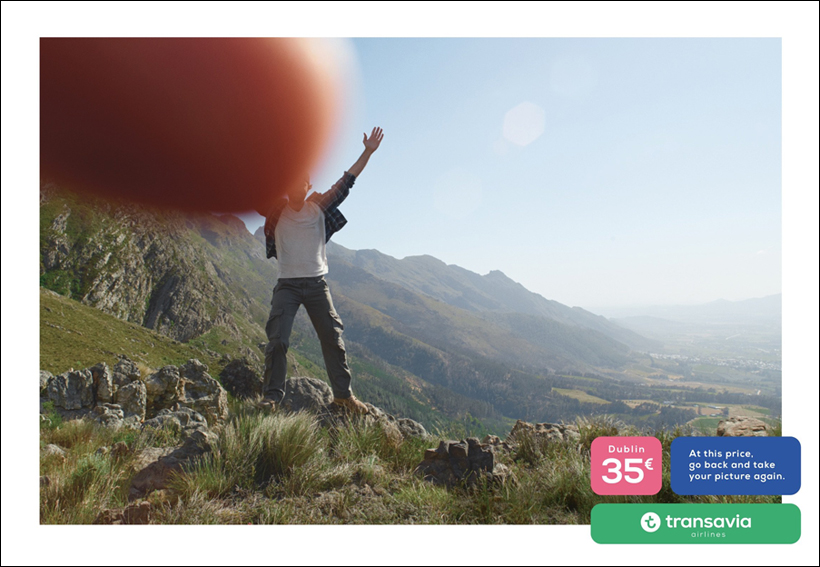
| THE ORIGINAL? Transavia (Outdoor poster) – 03 – 2018 “At this price go back … and take your picture again.” Agency : Humanseven Paris (France) |
LESS ORIGINAL Disneyland Paris (Facebook Post) – 08 – 2018 “A messed up picture? What if we offered you 300 days to catch up?” Agency : Unknown (France) |