
Archiwum miesiąca: lipiec 2017

Revolution

Lakeland Girls In Sports Day

Vauxhall Pyjama Mamas
Post pobrano z: Vauxhall Pyjama Mamas
Vauxhall is running Vauxhall Pyjama Mamas, an advertising campaign promoting the Crossland X SUV. The campaign features Vauxhall-driving mums who defy the glares of their peers to wear their stylish pyjamas all day. They’re seen at the supermarket, in the cafe, and picking up their children from school. Features showcased include the 180˚ rear-view camera, “Cause mamas need eyes in the back of their heads” and versatile room for everyone, except pyjama haters. The Vauxhall Pyjama Mamas advert, directed by music video director Jake Nava, is supplemented by digital, PR, social, CRM, press and out of home elements, including photography by Rankin. A content partnership with Channel 4 consists of short videos featuring humorous conversations between actresses Jessica Hynes and Sally Phillips about being a mum.

Simon Oldfield, Marketing Director for Vauxhall Motors said, “Pyjama Mamas is a punchy and upbeat campaign for our newcomer, the Vauxhall Crossland X. Our brief was to bring something very different to our burgeoning SUV offering, which is due to grow still further in 2017 with the launch of the larger Grandland X later in the year. Our optimistic take on life as well as the, ‘Isn’t life brilliant’ brand positioning have been incorporated throughout the campaign.”
Katie Mackay, Head of Strategy at Mother added, “In a sea of SUV sameness, it’s been a joy to give the Crossland X a platform that befits the swagger and style of the car and its future drivers, while giving Vauxhall a contemporary voice in British culture.”


Vauxhall Pyjama Mamas Credits
The Vauxhall Pyjama Mamas campaign was developed at Mother London by creative director Mark Waites, creatives Charlie Lanus and Lucas Reis, agency producer Natalie Kozlowska, production assistant Amber Lauder, business lead Jonathan Thornton and account director Jo Goldberg.
Filming was shot by director Jake Nava via Cherry Studio, with producer Benedict Cooper, director of photography Manel Ruiz, production manager Russell Hasenberg, production assistant Sera Bal, and photographer Rankin.
Post production was done at The Mill by 2D lead Brad Wood, 2D artists Sole Martin, Nick Sze, James Pratt, Gavin Marler, Eileen Chan, Matt (Wispy) Clarke, David Wishart, colourist Dave ‘Luddy’ Ludlam, colour assists Brendan Buckingham and Thomas Mangham, executive producer Misha Stanford-Harris, production assistant Rosalien van der Bom.
Editor was Ben Stephens at Final Cut with assistant editor Elyse Raphael and producer Frankie Elster.
Sound was designed at Grand Central by Munzie Thind. Music, “Pajamas All Day”, the 2015 track by Hardnox (Las Vegas based MC/DJ brothers Dan and Jim Kehoe), was supervised by Dave Bass at Theodore.
Pajamas All Day Lyrics
I’m a hot mamma jamma
I jam in my pajamas
I put on my pajamas
And then I go bananas
I’m a hot mamma jamma
I jam in my pajamas
I put on my pajamas
And then I go bananas
I’m in…
Pajamas, pajamas, pajamas all day!
Verse 1:
Do I wanna go somewhere?
No way, no school no work got none today
Frosted Flakes and champagne with my OJ
Pajamas all night pajamas all day
Girls wanna hit the club, I don’t care
Bring your pjs to the crib my beds right there
Pajamas in the studio while the beat hits
Waking’ up with Victoria’s Secrets
Cuz all I wanna do is stay home don’t call send a text I won’t answer my phone
My Jammie’s feel fuzzy like a rabbit
Don’t judge me or my junk food habit
Yea! I wanna lay in bed and do nothin’
No plans for the day except to go do nothin’
24 hrs straight lazy and it’s tight
Pajamas all day, pajamas all night
Chorus
Verse 2:
Pajamas all day yup all day
Got fireball in my pumpkin spice latte
Pajami jam I need some models on my runway
I put my slippers on & slide down the hallway
Pajamas all day text the squad ay! Come in dress code or u can go away
I put On My pajamas and go bananas let me see it girls get out ur cameras
Got a girl comin over and I’m hopin that I can get some and not have to watch frozen
Bathtub rubber duckys on a boat and, pajamas back with my drink time to float man/
Yea! I wanna lay in bed and do nothin’
No plans for the day except to go do nothin’
24 hrs straight lazy and it’s tight
Pajamas all day, pajamas all night
Google Home of the Whopper
Post pobrano z: Google Home of the Whopper
Burger King’s Google Home of the Whopper campaign won the Grand Prix for Direct at Cannes International Festival of Creativity 2017, for use of broadcast. Burger King managed to activate Google Home devices through its commercial by asking the question, “OK, Google, what is the Whopper burger?”. Google Home assistants and Android phones with voice search enabled automatically proceeded to read out the answer from the Burger King Wikipedia page. The 15-second commercial, first launched on the Burger King Youtube channel, featured a Burger King attendant trying to describe a Whopper and its fresh ingredients. Running out of time, he ended by asking Google the question, “Ok Google, what is The Whopper burger?”. Complications set in. Internet trolls managed to edit the Burger King Wikipedia entry, adding ingredients like “100% medium sized child” and cyanide. Editors reinstated the original wording. Google then found a way to prevent the ad’s activation of Google Home devices, not long before it was due to be broadcast on TV screens. New versions, with extra audio edits, were launched. Within days after the spot aired, Google Home changed its software to recognize up to six voices only.

According to Miami advertising agency David, the Google Home of the Whopper idea earned 9.3 billion global impressions. It became a global trending topic on YouTube, Facebook, Twitter, and Google Trends, making it Burger King’s most talked about TV spot and most engaged video in the brand’s history. The spot earned $35 million in US media, and created a 500% increase in brand mentions. Within 48 hours of initial launch, the spot was viewed organically 10 million times online. It totaled 15 million online-only views, vs. the 700,000 Google Home devices it targeted. Burger King became the first brand ever to use voice-activated tech to advertise a product, and started a debate around the limits of advertising and invasive technology.
Google Home of the Whopper Credits
The Google Home of the Whopper campaign was developed at David, Miami, by chief creative officer Anselmo Ramos, creative director Antony Kalathara, art director Ricardo Casal, junior art director Richard Cruz, copywriter Juan Javier Peña Plaza and junior copywriter Dan Flora, producer Renata Neumann, strategy director Jon Carla, head of global production Veronica Beach, managing director/head of account Paulo Fogaça, senior account director Carmen Rodriguez, account supervisor Rafael Giorgino, senior business affairs manager Barbara Karalis, account planner Matías Candia, account supervisor Diandra Garcia, account executive Jenny Gobel, working with Burger King global chief marketing officer Fernando Machado and marketing communications lead Diego Suárez.
Filming was shot by director Kris Belman via Caviar LA with executive producer Jasper Thomlinson, director of photography Chris Saul. Editor was Jeff Grippe at Cosmo Street with assistant editor Habib Semaan, producer Chelsea Spensley and artist/colourist Shinya Sato.
Strava “My year in sport”
Post pobrano z: Strava “My year in sport”

STZAP #5
Post pobrano z: STZAP #5

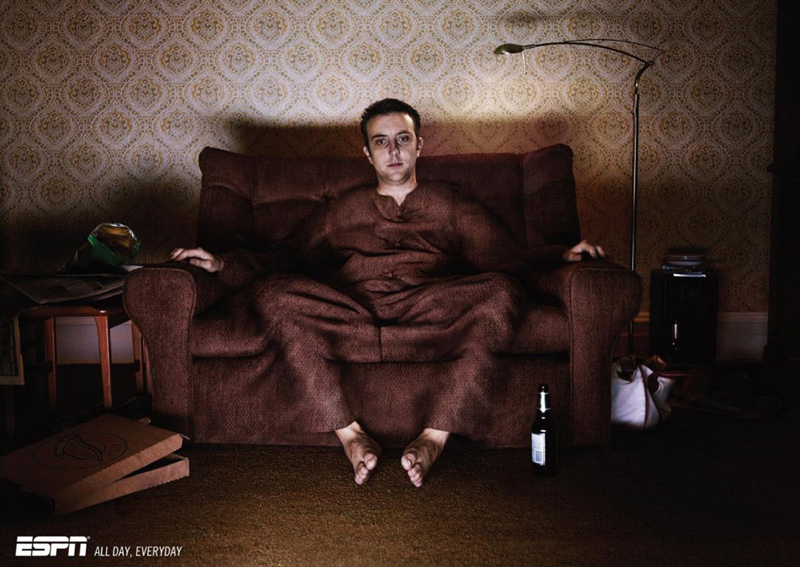
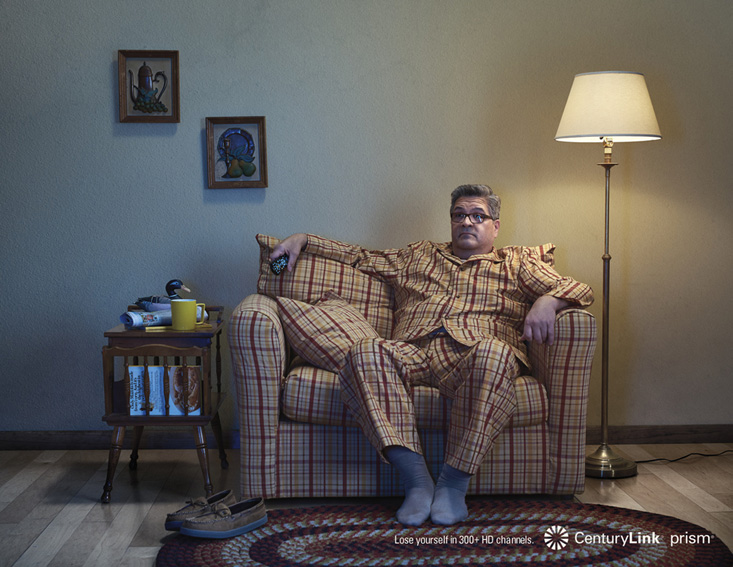
A well camouflaged copycat? / Duo sur canapé
Post pobrano z: A well camouflaged copycat? / Duo sur canapé
 |
 |
| THE ORIGINAL? ESPN TV Channel “all day, everyday” – 2008 Source : Cannes Lions BRONZE Agency : Saatchi & Saatchi (Singapore) |
LESS ORIGINAL Century Link “300HD TV channels” – 2017 Source : Luerzer’s Archive Agency : Arnold, Boston (USA) |
An unscheduled coincidence / Une coïncidence non planifiée?
Post pobrano z: An unscheduled coincidence / Une coïncidence non planifiée?
 |
 |
| THE ORIGINAL? Mc Donald’s– 2017 “schedule some time for a classic” Source : Coloribus Agency : Cossette Vancouver (Canada) |
THE ORIGINAL? Mc Donald’s – 2017 “you’ve earned it” Cannes Lions BRONZE Agency : THJNK (Germany) |
A Huge Directory of Free Fonts that You Can Download
Post pobrano z: A Huge Directory of Free Fonts that You Can Download
Typically, if you’re looking for a free font, the choices many websites offer tend to be somewhat limited. On the other hand, when a website offers thousands of free fonts, it sounds almost too good to be true.
You can also be excused for wondering how you could ever find a free font that meets your needs if you have to sift through thousands of potential candidates.
FFonts Can Help You Build Your Personal Font Library
 FFonts.net offers more than just a few thousand free fonts. This website has in fact compiled tens of thousands of free fonts; somewhere between 40,000 and 50,000 to be more exact; all neatly placed in 87 different categories.
Whenever you come across a free font that appeals to you, you can preview it, add it to your wish list, download it, or continue your search if it’s not exactly to your liking.
FFonts makes it all sound easy, and it is.
Categories
FFonts’ categories are listed on the left side of their web page. As you scroll down, you’ll find categories containing just a few fonts, many that contain several hundred different fonts, and a few that have several thousand to offer.
There’s an 88th category that contains roughly 25,000 fonts that have yet to be categorized or can’t easily be placed in a specific category.
Are you looking for fonts that were popular in the 50s, 60s, or 80s? What about Art Deco, Art Nouveau, Classic, or Calligraphic fonts? There are selections of Formal fonts, Industrial fonts, Corporate fonts, and Professional fonts that could fit in with the appropriate website designs.
Plenty of wild and weird font styles are available and ready for you to browse through in the Quirky fonts, Wild fonts, Messy Fonts, and Funky fonts categories.
If you’re in need of a high-tech font style, there’s a Hi-Tech category, a Computer category, and a Sci-Fi category; and the list goes on. Serif and Sans Serif fonts haven’t been forgotten either.
Finding the Font You Want
You can zero in on the font you’re looking for, or one that’s close enough, by entering a name or keyword in the search box, browsing through a given category, or searching alphabetically.
Bear in mind that browsing through such a large collection of fonts can easily become addictive, and succumbing to impulse shopping when looking through such a large collection is not unheard of.
Fortunately, FFonts provides a wish list you can add to for eventual downloading.
 Once you’ve found the font you want, click on it for a preview. You’ll be provided with a list of characters the font supports and upper and lower-case examples. There’s also a box where you can enter a string of text to get a better picture of how the font will appear in actual use.
The preview page also includes download, web download, wish list, and share buttons.
Downloading
There’s no need to register to download one or more free fonts. You’re limited to 50 per day; more than enough for most purposes. After you hit the download button, you’ll receive an exec file. When you run the exec file, a zip file will be placed on your computer. When you open it, you’ll be presented with several boxes. You’ll probably want to uncheck most or all of them and select “Custom Installation” to avoid having programs you probably don’t want or need installed on your computer.
The FFonts website’s FAQ page provides details on how to install a font under Windows, Mac OS, and Linux. It also contains a cautionary note that suggests installing1,000 fonts or more could slow your computer’s operation.
If you plan to download multiple fonts at once, simply add them to your wish list. All you have to do is hold down the CTRL key and click on each font on your wish list you want to download.
Is FFonts Safe to Use?
FFonts has been on the web for more than 8 years. There were some complaints in years past regarding malware and spanning, but they appear to have been addressed. You’ll still want to make use of the custom installation option to avoid having extras added to your computer (a different browser for example); or, you can opt for the Premium Version to avoid the issue entirely.
Neither Norton Safe Web or McAfee findings reported any security issues, and Scam Advisor gives FFonts a highly trusted rating. The bottom line is that FFonts is safe to use.
When the Premium Version Makes Sense
The FFonts Premium Version is ideal for heavy users. This version enables you to download up to 200 font files and/or 200 web font files per day (versus the standard 50). You also have the option to download the FFonts’ 14,000 font collection.
A premium feature that both heavy and occasional users will like is the absence of ads, allowing you to avoid the possibility of mistakenly downloading a program you don’t want. Priced at $29 per year, the Premium Version is quite affordable.
Summing Up – A Valuable Resource for Designers
Thousands of fonts may sound like a huge number, but having a resource like FFonts to tap into all but guarantees you’ll find the font you need. So many cool and unusual fonts can also inspire you to try new and different design approaches.
As far as pros and cons are concerned, the only real negative about this website are the ads that accompany the standard version downloads. These can, however, be avoided by using custom search, or by selecting the premium version. The preview pages are a definite plus, as is the well thought out font categorization scheme, and the wish list feature that allows you to save fonts and download them later.