Whether you’re a rookie or a seasoned professional, every designer needs a little inspiration from time to time. Even I occasionally catch myself looking for motivational and inspirational quotes to keep me fired up. So for today’s post, I gathered 30 inspiring design quotes that are meant to get you back into the groove of things, in case you have a creative block.
Jared Slyter
Matthew Mascioni
Mushir
Stuart Hodgson
Mela Micosa
Trish Brennan
Steven Elo
Ridhwan Nazli
James Russell
Dalia El Manawi
Mae Othman
Jeremy Vessey
Chloe Park
Jessica Castillo
Naomi Caird
Bharti Patel
Carly Berry
Janelle Rosette Aringo
Clara Lau
Akbar Al Aziz
Martina Flor
Samantha Naufal
Tushar Dharne
Daria Corral
Fabia Moura
Nurlin Adillia
Tanmoy Sarker
Rahul Dogra
Roberto Concepcion
Melisa Mesa
Conclusion
That’s it, Thanks so much for stopping by, I hope you enjoyed this collection and was inspired by the quotes that I have compiled for you. If there are any of them that impacted you more than the others, tell me about it below. Until next time, have a great day.
Whether you’re a rookie or a seasoned professional, every designer needs a little inspiration from time to time. Even I occasionally catch myself looking for motivational and inspirational quotes to keep me fired up. So for today’s post, I gathered 30 inspiring design quotes that are meant to get you back into the groove of things, in case you have a creative block.
Jared Slyter
Matthew Mascioni
Mushir
Stuart Hodgson
Mela Micosa
Trish Brennan
Steven Elo
Ridhwan Nazli
James Russell
Dalia El Manawi
Mae Othman
Jeremy Vessey
Chloe Park
Jessica Castillo
Naomi Caird
Bharti Patel
Carly Berry
Janelle Rosette Aringo
Clara Lau
Akbar Al Aziz
Martina Flor
Samantha Naufal
Tushar Dharne
Daria Corral
Fabia Moura
Nurlin Adillia
Tanmoy Sarker
Rahul Dogra
Roberto Concepcion
Melisa Mesa
Conclusion
That’s it, Thanks so much for stopping by, I hope you enjoyed this collection and was inspired by the quotes that I have compiled for you. If there are any of them that impacted you more than the others, tell me about it below. Until next time, have a great day.
Whether you’re a rookie or a seasoned professional, every designer needs a little inspiration from time to time. Even I occasionally catch myself looking for motivational and inspirational quotes to keep me fired up. So for today’s post, I gathered 30 inspiring design quotes that are meant to get you back into the groove of things, in case you have a creative block.
Jared Slyter
Matthew Mascioni
Mushir
Stuart Hodgson
Mela Micosa
Trish Brennan
Steven Elo
Ridhwan Nazli
James Russell
Dalia El Manawi
Mae Othman
Jeremy Vessey
Chloe Park
Jessica Castillo
Naomi Caird
Bharti Patel
Carly Berry
Janelle Rosette Aringo
Clara Lau
Akbar Al Aziz
Martina Flor
Samantha Naufal
Tushar Dharne
Daria Corral
Fabia Moura
Nurlin Adillia
Tanmoy Sarker
Rahul Dogra
Roberto Concepcion
Melisa Mesa
Conclusion
That’s it, Thanks so much for stopping by, I hope you enjoyed this collection and was inspired by the quotes that I have compiled for you. If there are any of them that impacted you more than the others, tell me about it below. Until next time, have a great day.
As kids, we all loved these four-colors pens that allowed us to do our homework using only one pen. It wasn’t the most functional device and didn’t have the best design, but it gave us a feeling of empowerement.
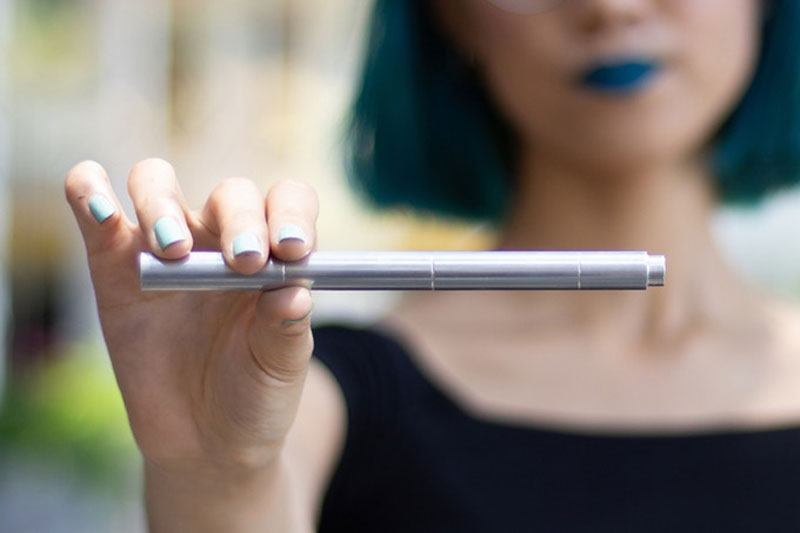
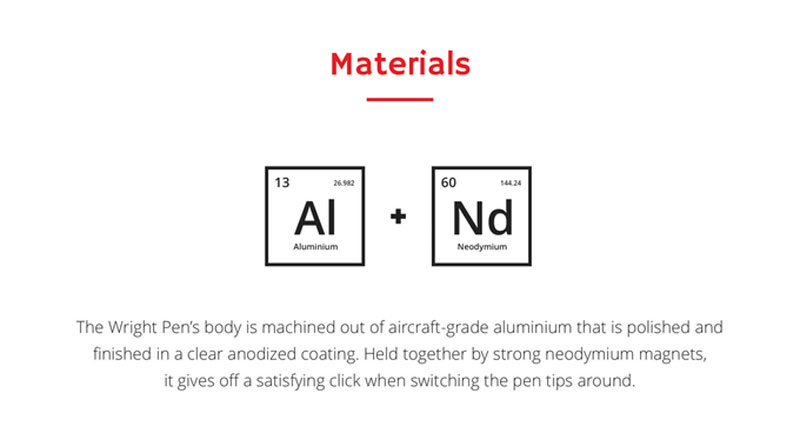
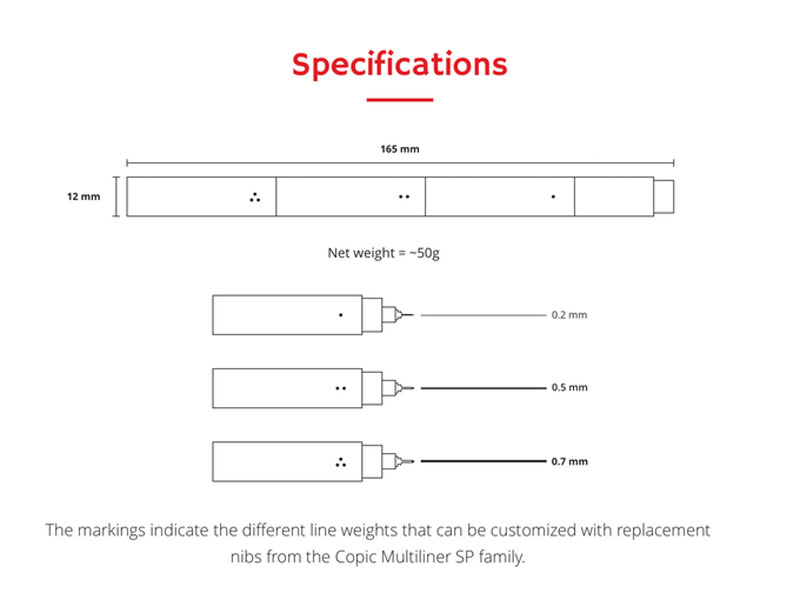
The Wright Pen is also an all-in-one device, but it allows you to access three widths of pens quickly. This pen is very well designed, with a particular attention to details. The three pens assemble in one by going inside each other, with a magnetic effect that keep them together well.
Built with strong materials and gorgeous aesthetics, it is the perfect tool for creative designer, compulsive doodlers, and architects, among others. It is now being financed through Kickstarter and already reached its goal, but it doesn’t mean you can’t go help them more!
As kids, we all loved these four-colors pens that allowed us to do our homework using only one pen. It wasn’t the most functional device and didn’t have the best design, but it gave us a feeling of empowerement.
The Wright Pen is also an all-in-one device, but it allows you to access three widths of pens quickly. This pen is very well designed, with a particular attention to details. The three pens assemble in one by going inside each other, with a magnetic effect that keep them together well.
Built with strong materials and gorgeous aesthetics, it is the perfect tool for creative designer, compulsive doodlers, and architects, among others. It is now being financed through Kickstarter and already reached its goal, but it doesn’t mean you can’t go help them more!
Every week, we’ll give you an overview of the best deals for designers, make sure you don’t miss any by subscribing to our deals feed. You can also follow the recently launched website Type Deals if you are looking for free fonts or font deals.
TemplateMonster Halloween Deals
TemplateMonster is marketplace of Digital products. You will find different templates designs, Elementor Marketplace, plugins and graphics for any taste.
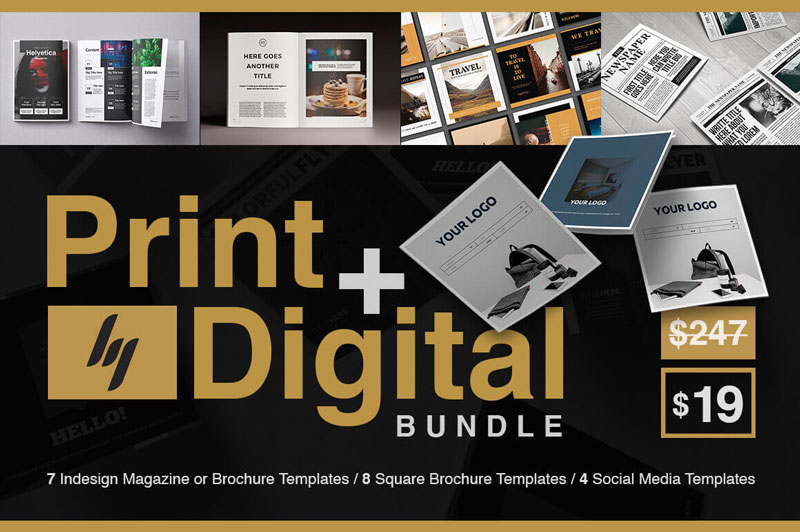
Indesign Print and Digital Bundle of 200+ Customizable Pages
This bountiful bundle will get your graphic groove going! Featuring 7 bestselling professional Indesign magazine and brochure templates all in Letter Size and A4 Size, you’ll snag more than 220 unique design pages. There’s also 8 square trifold brochures and 4 Social Media templates. It’s the perfect marriage of online and offline, with you in the center of it all.
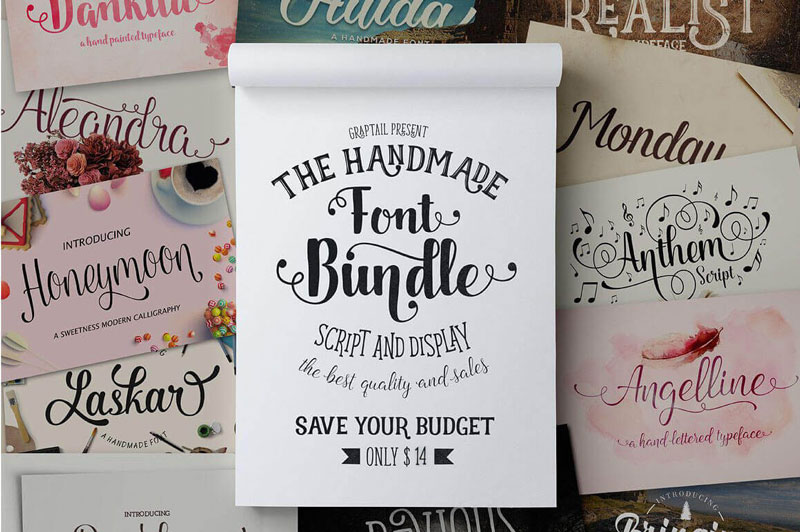
44 Unique, Premium Handwritten Fonts from Graptail
Go ahead and give your typeface toolbox some love. With this Mighty Deal from Graptail you’ll get yourself 44 unique handwritten fonts! Made from 25 different font families, this collection is incredibly flexible especially when you add in loads of OpenType features from swashes to alternates. No matter what project you’re currently working on, you’re sure to find the perfect font in this collection.
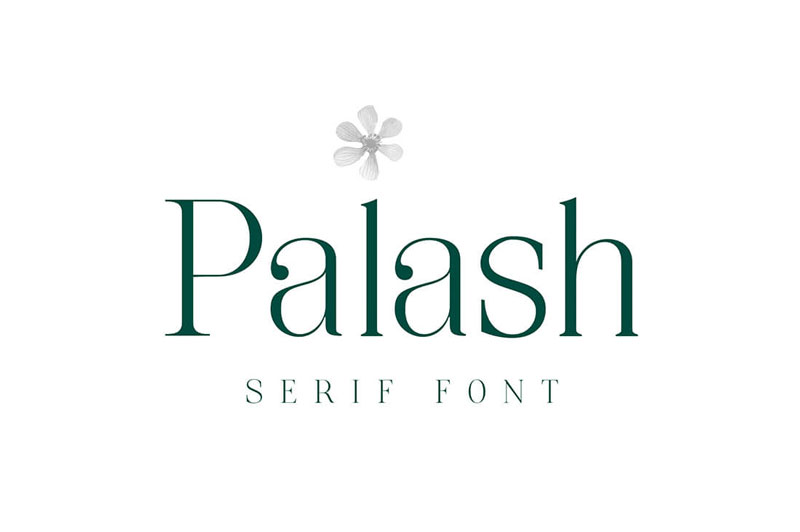
If you’re in the market for a gorgeous and resourceful typeface, then you owe it to yourself to check out Palash. This Serif font works wonderfully on large sizes and designs that need open wide spaces. It’s the perfect choice for a wide range of printed projects, even supporting multiple languages.
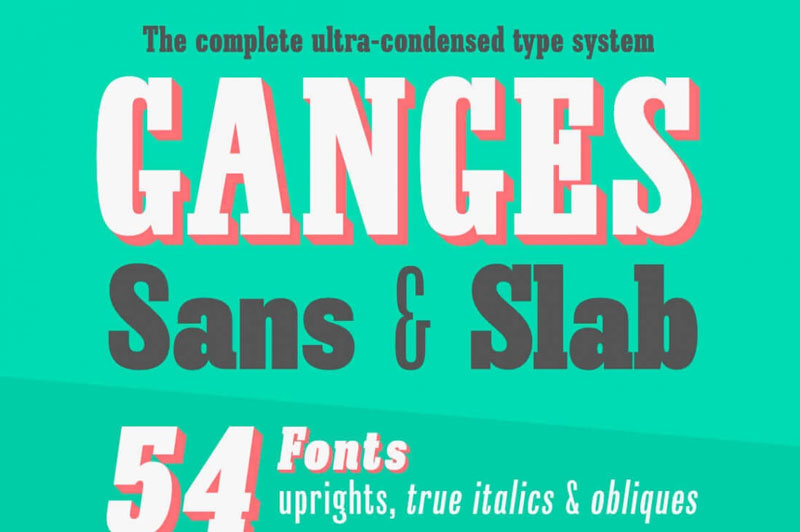
Inspired by European advertising typography from the late 19th century, the Ganges Sans and Ganges Slab Font Families offer up a complete ultra-condensed type system. With 54 total fonts in the set, you’ll get a huge variety of styles and weights, helping you create the perfect print project, whether that’s a book cover, logo, poster or anything editorially based.
You know how you open a „project” in a local code editor? I guess different editors have different terminology for it, but essentially what you are doing is opening a folder/directory and it shows you a sidebar full of files and folders you can navigate through and such.
Typically there is one parent folder, and everything else is within that folder. Right? Well, it doesn’t have to be! That’s where symbolic links come in.
Otherwise known as symlinks, they are like pointers to another place. While you don’t have to actually move the folder you are referencing, you can create a pointer to it that behaves as if you did.
You can create them right from the command line:
ln -s /path/to/original/ /path/to/link
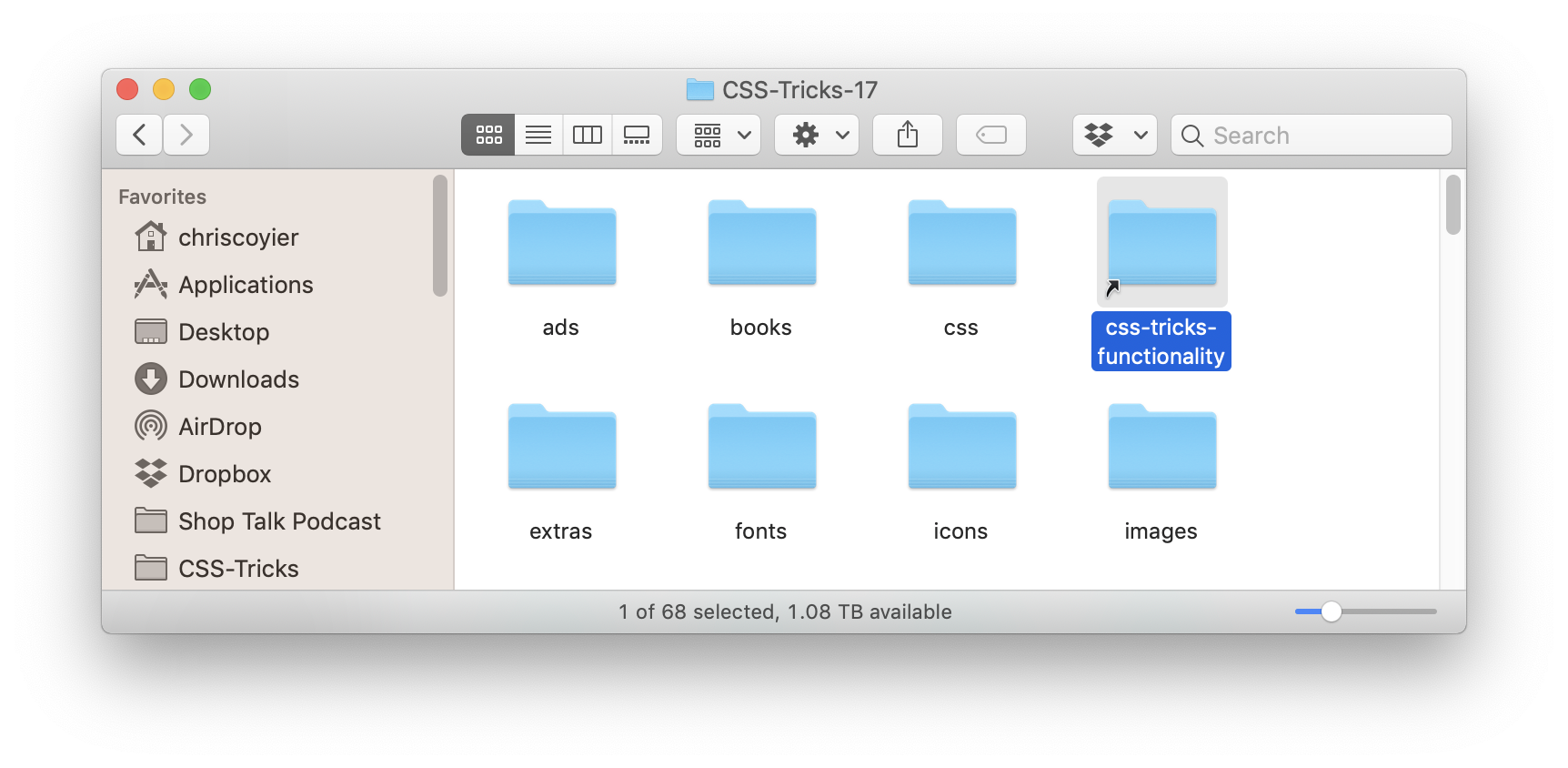
You’ll get a link that looks like an „alias” on macOS. Ya know, the things you can make by right-clicking an item or going File > Make Alias. But they are different. In my experience, aliases tend not to work in code editors, but symlinks do.
Looks like an alias, but it’s really a symlink.
I was actually lazy (hey, I prefer GUIs for just about everything) and used Nick Zitzmann’s symboliclinker context menu plugin to help make the link I wanted (and allow me to make other ones super easy).
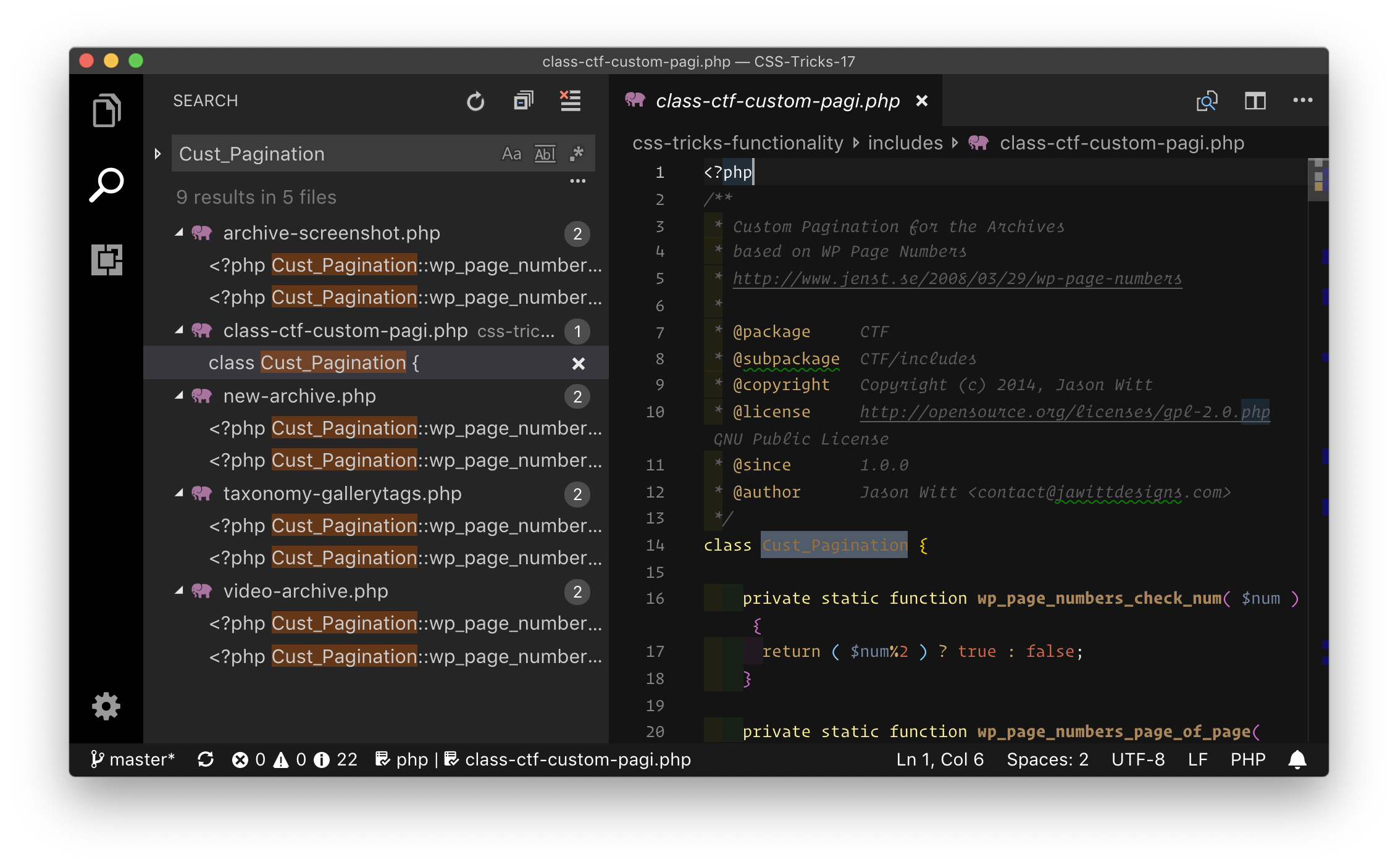
Why bother? I’ve had a handful of occasions over the years, but here’s one that just came up for me. I’m working on a WordPress theme, and there is a WordPress Functionality Plugin that goes with it. Ideally, I’d have just my theme folder open in my code editor (no need to have the entire WordPress root there, that would just slow my editor and make searching a mess). But I’d also like to have that plugin open at the same time, so in case I’m calling functions and such that the plugin controls, I can see both. But these folders are in totally different places…
No matter, I can put a symlink to the plugin in the theme. (You may want to .gitignore it, depending on your deployment setup and such.) Now I can search and find things in both places like I want:
I know that some editors have their own concept of this, like VS Code’s Multi-root Workspaces and how you can Project > Add Folder to Project in Sublime. But symlinks are a way to do the same thing but in a cross-editor and cross-system way that everyone can use!
monday.com is a centralized platform for teams to manage every detail of their work, from high-level roadmap planning to the specifics of day-to-day tasks, while building a culture of transparency. It is a tool for an any-sized team, which can start with two freelancers working together to thousands collaborating across the globe. The tool is really popular amongst non-tech teams, often replacing burdensome excel files, whiteboards, and excessively long meetings.
The main thing is that it’s not limited to tech companies, it is used by churches, construction companies, schools and universities, startups, fortune 500 companies including WeWork, Samsung, Discovery Channel, Wix, NBC, General Assembly, McDonalds, Uber, Wix, AOL, and Adidas. Currently, it has over 22,000 paying teams.
monday.com is a tool to help people work better together. monday.com is not a project management tool because it isn’t projects that need managing, it’s people. People are any company’s most valuable resource and as people, we all face the same workplace challenges; communicating with others, not feeling appreciated or motivated to do our jobs, a lack of understanding of how our work fits into the bigger picture, among so many others. Those are the essential problems Monday is trying to solve.
What can this app do?
Creating and managing project’s milestones
Creating and assigning task
Attaching files to any project’s tabhe projects on the go.
Using mobile applications to manage projects
Communicating with your team members
Updating team using the news feed
Possible to keep clients in the loop
Organizing the organization into teams
Creating detailed project’s charts and reports
Tracking the time your team members spend on tasks
Managing projects’ financials
Website as well as a desktop app for mac and windows
monday.com aims to make every user feel empowered and part of something bigger than their own individual tasks, and as a result, to boost collective productivity and transparency.
monday.com is a centralized platform for teams to manage every detail of their work, from high-level roadmap planning to the specifics of day-to-day tasks, while building a culture of transparency. It is a tool for an any-sized team, which can start with two freelancers working together to thousands collaborating across the globe. The tool is really popular amongst non-tech teams, often replacing burdensome excel files, whiteboards, and excessively long meetings.
The main thing is that it’s not limited to tech companies, it is used by churches, construction companies, schools and universities, startups, fortune 500 companies including WeWork, Samsung, Discovery Channel, Wix, NBC, General Assembly, McDonalds, Uber, Wix, AOL, and Adidas. Currently, it has over 22,000 paying teams.
monday.com is a tool to help people work better together. monday.com is not a project management tool because it isn’t projects that need managing, it’s people. People are any company’s most valuable resource and as people, we all face the same workplace challenges; communicating with others, not feeling appreciated or motivated to do our jobs, a lack of understanding of how our work fits into the bigger picture, among so many others. Those are the essential problems Monday is trying to solve.
What can this app do?
Creating and managing project’s milestones
Creating and assigning task
Attaching files to any project’s tabhe projects on the go.
Using mobile applications to manage projects
Communicating with your team members
Updating team using the news feed
Possible to keep clients in the loop
Organizing the organization into teams
Creating detailed project’s charts and reports
Tracking the time your team members spend on tasks
Managing projects’ financials
Website as well as a desktop app for mac and windows
monday.com aims to make every user feel empowered and part of something bigger than their own individual tasks, and as a result, to boost collective productivity and transparency.
Photography isn’t the only way to represent your brand on your website. There are other ways like illustration, You can use illustrations to make your website stand out from the rest. Illustrations are becoming more and more popular, and some designers are really pushing the limits with some gorgeous ones. I personally love to draw and always looking at beautiful illustrations for inspiration when it comes across to my work but I’m nowhere near what these designers can do, so here are 25 beautiful examples of Illustrated websites that I gathered to inspire you.
Barrel Recap 2017
Rise To The 2018 Challenge
Pixity Land
Danish Sait
Animal
Newlytics
Baunfire
Major Savage
Reverend Danger
Malika Favre
In Pieces
PEZ
Mi Banxico
Future Living
Adult Swim Singles 2016
BIG
Ufo.lt
Plavacek.net
Bank Of England
Every Last Drop
Your Plan, Your Planet
Genesis
Kick My Habits
Mint Design Company
LightHouse Brewing
Agregator najlepszych postów o designie, webdesignie, cssie i Internecie
 Jared Slyter
 Matthew Mascioni
 Mushir
 Stuart Hodgson
 Mela Micosa
 Trish Brennan
 Steven Elo
 Ridhwan Nazli
 James Russell
 Dalia El Manawi
 Mae Othman
 Jeremy Vessey
 Chloe Park
 Jessica Castillo
 Naomi Caird
 Bharti Patel
 Carly Berry
 Janelle Rosette Aringo
 Clara Lau
 Akbar Al Aziz
 Martina Flor
 Samantha Naufal
 Tushar Dharne
 Daria Corral
 Fabia Moura
 Nurlin Adillia
 Tanmoy Sarker
 Rahul Dogra
 Roberto Concepcion
 Melisa Mesa