The interesting of using watercolors to bring one’s ability and an image in their head to life is a skill not as intimidating as it may pose to some. The whole idea to harmonize a room and truly captures the purpose of the artist. Watercolor paintings are considered a unique way to creatively represent landscape, illusions, expressions, and bright feelings using water-soluble pigments. Watercolor may seem like an elementary form of art medium but with the right amount of practice, dexterity, and determination, even this seemingly childish material for painting can help you come up with great pieces.
If you have decided you’d like to try making your own watercolor paintings, here are 25 great examples to help inspire you. Just make sure to click the images to support the artists.
If you’re just getting into online advertising or hoping to boost your online traffic with better advertisements, ad banners are the way to go.
Ad banners are currently one of the most ubiquitous forms of marketing used on the internet. Companies use them for everything from raising their brand profile to increasing engagement, announcing discounts, and promoting products. They provide an affordable, effective and measurable method to successfully target your ideal audience.
But what exactly is an ad banner? An ad banner, also called a banner ad or a web banner, is essentially an advertisement consisting of an image with text or a multimedia object that is displayed on a selected web page. It works in much the same way as a physical banner alerting you to a discount on a specific product in a store would entice you to take a closer look and maybe buy the product.
The sole purpose of an ad banner, therefore, is to catch the eye of visitors on a host website and get them interested enough to click the ad banner, which will take them to the advertiser’s website where the advertiser will try to close the deal.
7 Components of a Compelling Banner Design
The million dollar question, then, is how do you create a web banner that will attract your ideal customer/client and cause them to click through to your website? First, you need to understand what makes a successful ad banner.
Before I begin, I want to remind you to KISS. That’s right, Keep It Simple Sunshine. Newbies to design often labour under the mistaken notion that they need to add loads of stuff to make their design effective. But with all design, including ad banner design, your best strategy should be to use a few key elements well. Remember, viewers are probably only going to glance at your web banner for a nanosecond, so you need to focus on making a few elements stand out rather than packing your ad with everything but the kitchen sink.
1. Get Your Dimensions Right
According to Google AdSense, the most successful standard banner sizes are:
728×90px — Leaderboard
300×600px — Half Page
336×280px — Large Rectangle
300×250px — Medium Rectangle
We’ll talk about this a bit more later, but for now it’s something for you to be aware of and keep in mind.
2. Incorporate Your Brand
Your ad banner is an extension of your company, so its design should be consistent with your company’s brand identity. This means you need to build an ad banner that incorporates your company’s logo, font styles, colour scheme and general style so that when your prospective client/customer clicks through from the ad banner to the dedicated landing page you’ve created for your offer, they’ll feel confident that they’re in the right place because the two will match each other.
3. Make Your Heading the Centre of Attention
Your ad banner heading needs to be the first thing that your target audience will see, so it’s got to catch their attention with its colour, size, and message. At first glance, it should tell your audience what your ad is about, and it should entice them to keep reading, e.g. „Valentine’s Day Sale”.
4. Use Subtitles Smartly
This is not always necessary, but if you use secondary text, it should be smaller or a lighter font weight than your heading text, easily readable, and less than ten words. It should give just enough information to get the readers interested and leave them wanting more, e.g. „50% off all items”.
5. A Picture Is Worth a Thousand Words
Of course, this doesn’t mean you always have to use images, but if you do, they should be beautiful, luscious images that complement your message and are relevant to your product.
6. Don’t Forget a 'Call to Action’ Button
Every banner needs a 'call to action’ button. This is a button with text like ‘Buy Now’, ‘Shop Now’, ‘Enter to win’, etc. that makes the reader act by clicking the button.
7. Smaller Is Better
… when it comes to the size of your files, that is. According to Google Ads, your ad file needs to be under 150 KB so that it loads fast on the page before viewers scroll down and miss it entirely.
Use an Online Banner Maker
Now, the next thing you need to consider is how to put these elements all together to create an effective design.
This can be a tall order if you’re not a seasoned designer, but don’t worry—we’ve got two great resources for all you novices out there to help you make the perfect ad banner. These will also work for seasoned designers who need to turn over a project quickly and don’t have the time to create a design from scratch.
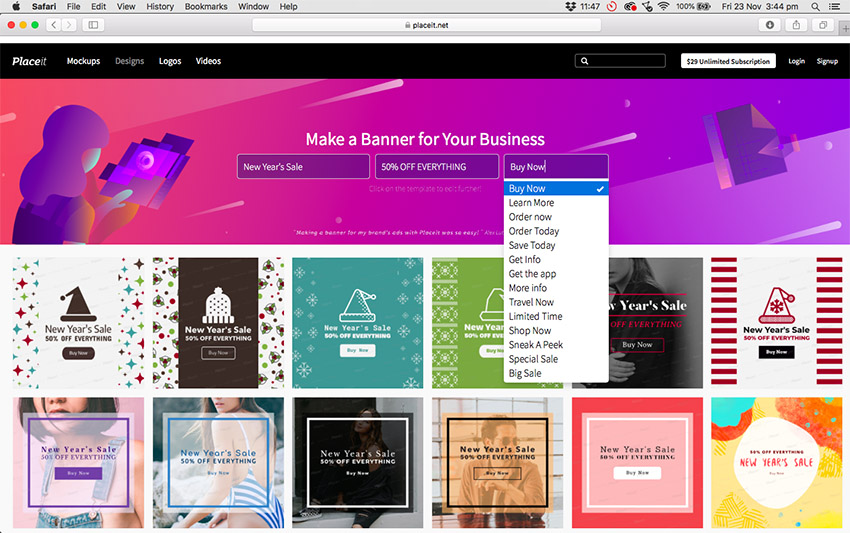
This online banner generator offers hundreds of affordable banner design templates that help you make compelling banners quickly and painlessly. But the thing I love the most about this ad creator is that you can enter your headline, subtitle and call to action in the header, and the banner maker app will show you how your specific text looks on all the banner design templates on offer. Totally cool and amazing! Let me show you what I mean.
How to Use Banner Design Templates
Let’s say you want to create a stunning ad banner design to advertise a New Year’s Sale. All you need to do is follow these simple steps to have your own great banner ready in minutes.
Enter your text in the Heading, Subtitle, and Call to Action bars. Notice that if you can’t come up with a call to action, this online ad creator provides a number of prompts for you.
As an example, I’ve entered information for a New Year Sale for a fictitious clothing shop client. As you can see in the image below, all the banner templates update with the information I’ve added.
3. Select a Banner Design Template
Peruse the banner ad templates, and when you see a banner design you like and that is appropriate for your business, double-click on it. This will open it up in the custom banner maker.
4. Customise Your Banner Template
Starting with the controls on the left and working your way down from the top, you can modify your text and change the font style and colour to match your brand. I’m happy with the font style as it matches the brand of my fictitious client, but I changed the colour from red to orange to match their brand.
Now let’s move to the controls on the right and work from the top. Remember earlier I mentioned that there were four ad banner dimensions that according to Google AdSense work the best? Well, at the very top right of the custom banner maker, you can change your ad banner dimensions from the default 1080x1080px to any dimension you require. I changed mine to the medium rectangle size of 300×250px.
I then changed the colour of the lines sandwiching „New Year’s Sale”. I changed the button design and colour again to correspond with my fictional client’s brand. I kept the image of the model for the same reason—it corresponded with my client’s brand image.
Scrolling down the page, you have two additional options. If you get stuck while you’re customising your design, you can try one of the presets on offer. They are all different versions of the banner template you chose and can help you see how your template would look with different settings applied.
Alternatively, just below the presets, you can see your selected colours and text applied to different banner design templates for more design inspiration.
5. Download Your Banner Design
Once you’re satisfied with your design, hit the Download button at the top of the screen and download your banner design for a small fee. Alternatively, if you regularly need to create ad banners, flyers, posters, social media banners etc., then the monthly plan may be the best deal for you.
20 Best Banner Design Templates
Now that you know how easy it is to use the online banner maker, these 20 best web banner designs will get you even more excited about creating your own banner.
Customise this gorgeous Home Design Store Banner Ad Maker template by uploading photos from your own home design portfolio and promote your business on websites your ideal customers frequent. The template offers all sorts of features like beautiful gradient overlays and fantastic frames for dividing up the banner space in different ways.
Capture the romance and whimsy of a wedding with the Banner Generator for Wedding Planners. The template offers beautiful photos and graphics, and you can even change the dimensions to fit perfectly in Instagram posts.
Use this funky web banner design to entice customers to pop on over to your online eyewear shop and browse your merchandise. The template uses playful illustrations of frames and loads of cool graphics, and it even offers a space to add a promotion code.
Whether you’re selling eggs, meat, or fresh fruit and vegetables, the Banner Maker for Grocery Stores template offers an exciting array of alluring images to hook your potential customers. Combine them with the wonderful hand-drawn icons and the large array of stylish and modern fonts on offer, and you have everything you need to create a knock-out web banner design.
A great half-page banner template, the Ad Banner Maker for an Online Clothing Sale template is perfect for showing off your clothing photos and creating a bold modern banner for any website.
The Banner Maker for Furniture Store Promo Codes uses a minimalist approach to web banner design. Using a strong, appealing photo, a beautiful cursive font in the header, and a bold, modern font for the call to action button, the template is an ode to the power of simplicity.
If you run an ice-cream business, this is the banner template for you, but really it’s also a great web banner design for any number of businesses. Select one of their tantalising images or upload one of your own, promise a giveaway, and watch the customers roll in.
Summer Online Banner Maker is a light and playful banner template that uses illustration and fun background elements to reference the joy of summer while enticing visitors to click the call to action button and join the fun.
Looking for a great banner template to drum up business for a home care business? Check out the Home Care Online Banner Maker template. It’s simple, customisable, and can also be adapted to create a social media banner.
Another excellent furniture store banner template from the banner generator, Ad Banner Template for Furniture Store Giveaway is an elegant, eye-catching way to grab your prospective clients’ attention, thanks to its prominent image overlaid with creative fonts.
The banner you create for your travel agency needs to inspire wanderlust. The Online Banner Ad Maker for Travel Agency template will do just that with its choice of beautiful images from around the world. It’s easy to customise with your brand fonts and colours using the super online banner maker controls.
Another great example of a half-page banner template, the Camera Giveaway Ad Banner Maker uses images of a range of cameras and lenses. And, of course, the banner creator helps you modify your template so that it’ll be ready to add to your ad campaign in no time.
With its cool black and white images and strong modern fonts, this ad banner uses a very specific aesthetic to communicate polish and sophistication. Ad Banner Creator for Store Sales is a great banner template for brands that sell classic and timeless clothing.
Another great banner template that uses fabulous illustration and playful text, Custom Promotional Online Banner Maker is a great reminder that offering stuff for free is a great way to get clicks. Just make sure that the freebie is an example of the fantastic products you offer, and you’ll probably gain a loyal customer.
A great way to attract clicks is to ask more questions than you answer. Is this a conceptual art piece? Am I going to get an extra 30% off a cool piece of furniture or a ginormous pink balloon? How could you not click to find out?
Minimal Discount Online Banner Maker carries minimalism to the next level. The web banner design rests heavily on the magnetism of the images provided (or the images you upload) and the power of one large badge that rests in the lower right corner of the banner. This badge acts as the banner’s text box and button as well. You can add your header text or a call to action, but whatever you do, make it irresistible.
Promoting your art supply business online is a cinch with the Ad Maker for Art Supplies Shop template. The template offers lots of fun art-inspired graphics, and you can make it as colourful and playful as you like.
Another great banner ad template that uses gorgeous black and white photos and strong modern text, Black Friday Sales Online Banner Template is a clean and alluring template that your target audience won’t be able to resist.
Since Christmas comes every year, it’s always a good idea to have the Christmas Sale Ad Generator template on standby for when you need it. It’s a versatile template that can be used for a wide variety of businesses and customised to reflect your particular brand.
A beautifully designed banner targeting shoe shops but ideal for a variety of merchandise, the wonderful 50% Off Shoes Ad Banner Template is a joy to use. You can add photos of your own merchandise, change the background colour of the right side of the banner, and add a wide variety of fun graphics and effects or upload your own.
More Terrific Banner Design Templates
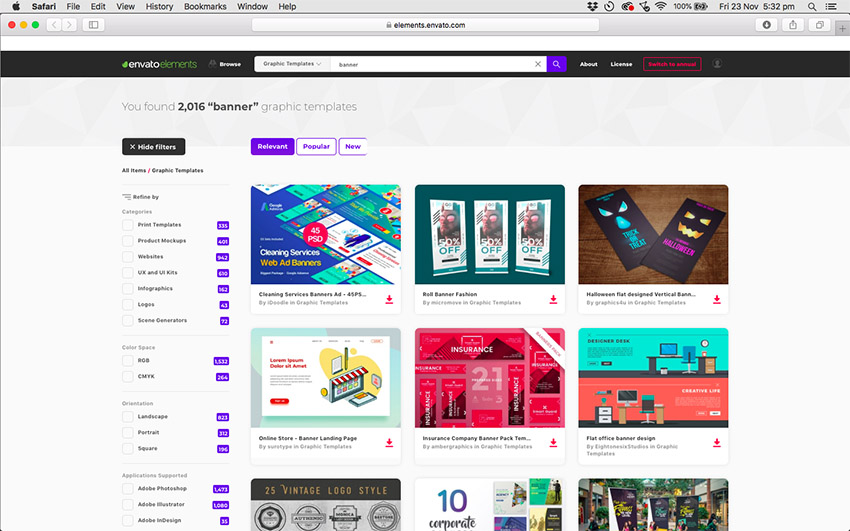
Now let’s move to the second great resource for web banner design, Envato Elements.
These banner ad templates are more suitable for those who have some knowledge of Adobe Photoshop and Illustrator. If that’s you then head on over to Elements and take a look at their terrific banner templates. Here are just a few to whet your appetite.
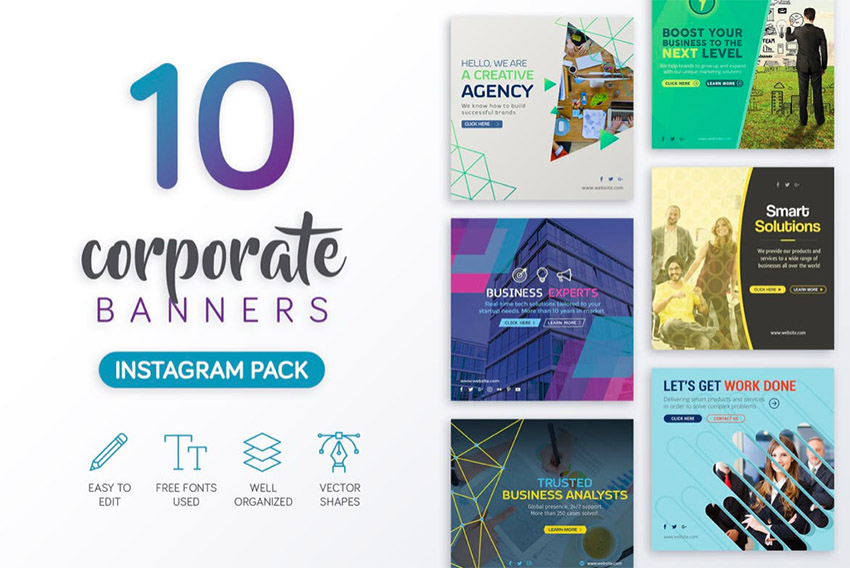
This eye-catching collection of corporate banner design templates is perfect for small and medium businesses who may not have a budget to hire a designer. The pack contains 10 creative layouts designed with Adobe Photoshop. The layered PSD files are easy to customise with editable text and fully scalable vector shapes.
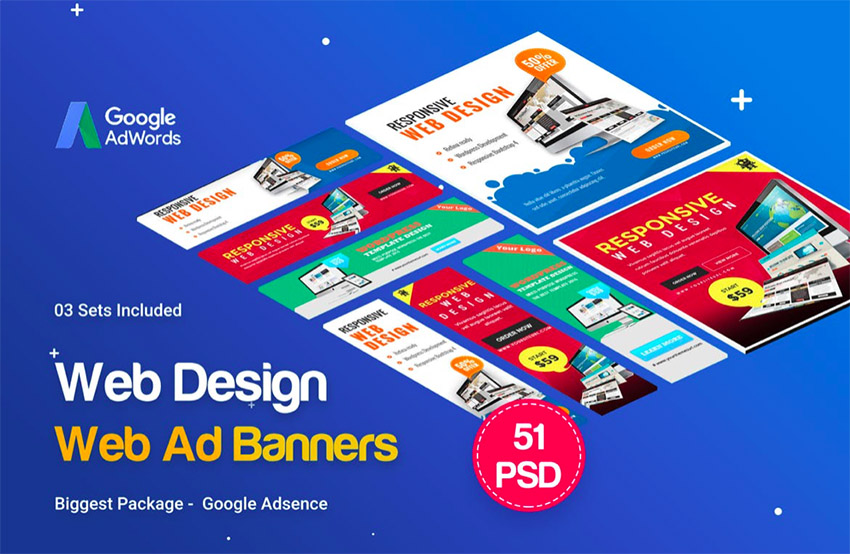
This collection of 25 banner ad templates is designed to fit Google’s recommended sizes for online ad banners. The PSD files are provided in well-organised layers for easy and targeted customisation. The templates also use smart objects and vector shapes that can be scaled and customised to fit your needs. A really versatile and useful collection.
These three sets of web banner design templates contain three of the four most successful standard banner sizes—the half page, leaderboard, and large rectangle—which can be scaled down to fulfil the fourth most successful standard banner size, the medium rectangle. As is the case with all the templates found at Envato Elements, the PSD files contained in the template can all be customised to suit your needs.
These are just a small sample of the thousands of web banner designs to be found at Envato Elements, and you can download as many as you like for one affordable price. What’s also great is that the price also gives you access to thousands of other creative graphics and templates that you can also use as often as you like. Now that’s a deal that’s hard to beat!
Select Your Favourite Custom Banner Maker
This is just a small sample of the terrific banner templates you can customise and download at both Placeit and Envato Elements. If you haven’t found just the right one for you here, head on over to both sites and have a browse. I just know there’s a web banner design there you can use to take your business to the heights you and it deserve. And be sure to let us know what you think of our list and if you’ve found a banner template you just can’t do without. Looking forward to hearing all about it.
By the way, if you’re looking for a YouTube channel banner template, a Facebook banner template, or any other social media banner template, check out last week’s article, 20+ Social Media Image Maker Templates for Instagram, Facebook + More. Have a read—you won’t be disappointed.
If you’re just getting into online advertising or hoping to boost your online traffic with better advertisements, ad banners are the way to go.
Ad banners are currently one of the most ubiquitous forms of marketing used on the internet. Companies use them for everything from raising their brand profile to increasing engagement, announcing discounts, and promoting products. They provide an affordable, effective and measurable method to successfully target your ideal audience.
But what exactly is an ad banner? An ad banner, also called a banner ad or a web banner, is essentially an advertisement consisting of an image with text or a multimedia object that is displayed on a selected web page. It works in much the same way as a physical banner alerting you to a discount on a specific product in a store would entice you to take a closer look and maybe buy the product.
The sole purpose of an ad banner, therefore, is to catch the eye of visitors on a host website and get them interested enough to click the ad banner, which will take them to the advertiser’s website where the advertiser will try to close the deal.
7 Components of a Compelling Banner Design
The million dollar question, then, is how do you create a web banner that will attract your ideal customer/client and cause them to click through to your website? First, you need to understand what makes a successful ad banner.
Before I begin, I want to remind you to KISS. That’s right, Keep It Simple Sunshine. Newbies to design often labour under the mistaken notion that they need to add loads of stuff to make their design effective. But with all design, including ad banner design, your best strategy should be to use a few key elements well. Remember, viewers are probably only going to glance at your web banner for a nanosecond, so you need to focus on making a few elements stand out rather than packing your ad with everything but the kitchen sink.
1. Get Your Dimensions Right
According to Google AdSense, the most successful standard banner sizes are:
728×90px — Leaderboard
300×600px — Half Page
336×280px — Large Rectangle
300×250px — Medium Rectangle
We’ll talk about this a bit more later, but for now it’s something for you to be aware of and keep in mind.
2. Incorporate Your Brand
Your ad banner is an extension of your company, so its design should be consistent with your company’s brand identity. This means you need to build an ad banner that incorporates your company’s logo, font styles, colour scheme and general style so that when your prospective client/customer clicks through from the ad banner to the dedicated landing page you’ve created for your offer, they’ll feel confident that they’re in the right place because the two will match each other.
3. Make Your Heading the Centre of Attention
Your ad banner heading needs to be the first thing that your target audience will see, so it’s got to catch their attention with its colour, size, and message. At first glance, it should tell your audience what your ad is about, and it should entice them to keep reading, e.g. „Valentine’s Day Sale”.
4. Use Subtitles Smartly
This is not always necessary, but if you use secondary text, it should be smaller or a lighter font weight than your heading text, easily readable, and less than ten words. It should give just enough information to get the readers interested and leave them wanting more, e.g. „50% off all items”.
5. A Picture Is Worth a Thousand Words
Of course, this doesn’t mean you always have to use images, but if you do, they should be beautiful, luscious images that complement your message and are relevant to your product.
6. Don’t Forget a 'Call to Action’ Button
Every banner needs a 'call to action’ button. This is a button with text like ‘Buy Now’, ‘Shop Now’, ‘Enter to win’, etc. that makes the reader act by clicking the button.
7. Smaller Is Better
… when it comes to the size of your files, that is. According to Google Ads, your ad file needs to be under 150 KB so that it loads fast on the page before viewers scroll down and miss it entirely.
Use an Online Banner Maker
Now, the next thing you need to consider is how to put these elements all together to create an effective design.
This can be a tall order if you’re not a seasoned designer, but don’t worry—we’ve got two great resources for all you novices out there to help you make the perfect ad banner. These will also work for seasoned designers who need to turn over a project quickly and don’t have the time to create a design from scratch.
This online banner generator offers hundreds of affordable banner design templates that help you make compelling banners quickly and painlessly. But the thing I love the most about this ad creator is that you can enter your headline, subtitle and call to action in the header, and the banner maker app will show you how your specific text looks on all the banner design templates on offer. Totally cool and amazing! Let me show you what I mean.
How to Use Banner Design Templates
Let’s say you want to create a stunning ad banner design to advertise a New Year’s Sale. All you need to do is follow these simple steps to have your own great banner ready in minutes.
Enter your text in the Heading, Subtitle, and Call to Action bars. Notice that if you can’t come up with a call to action, this online ad creator provides a number of prompts for you.
As an example, I’ve entered information for a New Year Sale for a fictitious clothing shop client. As you can see in the image below, all the banner templates update with the information I’ve added.
3. Select a Banner Design Template
Peruse the banner ad templates, and when you see a banner design you like and that is appropriate for your business, double-click on it. This will open it up in the custom banner maker.
4. Customise Your Banner Template
Starting with the controls on the left and working your way down from the top, you can modify your text and change the font style and colour to match your brand. I’m happy with the font style as it matches the brand of my fictitious client, but I changed the colour from red to orange to match their brand.
Now let’s move to the controls on the right and work from the top. Remember earlier I mentioned that there were four ad banner dimensions that according to Google AdSense work the best? Well, at the very top right of the custom banner maker, you can change your ad banner dimensions from the default 1080x1080px to any dimension you require. I changed mine to the medium rectangle size of 300×250px.
I then changed the colour of the lines sandwiching „New Year’s Sale”. I changed the button design and colour again to correspond with my fictional client’s brand. I kept the image of the model for the same reason—it corresponded with my client’s brand image.
Scrolling down the page, you have two additional options. If you get stuck while you’re customising your design, you can try one of the presets on offer. They are all different versions of the banner template you chose and can help you see how your template would look with different settings applied.
Alternatively, just below the presets, you can see your selected colours and text applied to different banner design templates for more design inspiration.
5. Download Your Banner Design
Once you’re satisfied with your design, hit the Download button at the top of the screen and download your banner design for a small fee. Alternatively, if you regularly need to create ad banners, flyers, posters, social media banners etc., then the monthly plan may be the best deal for you.
20 Best Banner Design Templates
Now that you know how easy it is to use the online banner maker, these 20 best web banner designs will get you even more excited about creating your own banner.
Customise this gorgeous Home Design Store Banner Ad Maker template by uploading photos from your own home design portfolio and promote your business on websites your ideal customers frequent. The template offers all sorts of features like beautiful gradient overlays and fantastic frames for dividing up the banner space in different ways.
Capture the romance and whimsy of a wedding with the Banner Generator for Wedding Planners. The template offers beautiful photos and graphics, and you can even change the dimensions to fit perfectly in Instagram posts.
Use this funky web banner design to entice customers to pop on over to your online eyewear shop and browse your merchandise. The template uses playful illustrations of frames and loads of cool graphics, and it even offers a space to add a promotion code.
Whether you’re selling eggs, meat, or fresh fruit and vegetables, the Banner Maker for Grocery Stores template offers an exciting array of alluring images to hook your potential customers. Combine them with the wonderful hand-drawn icons and the large array of stylish and modern fonts on offer, and you have everything you need to create a knock-out web banner design.
A great half-page banner template, the Ad Banner Maker for an Online Clothing Sale template is perfect for showing off your clothing photos and creating a bold modern banner for any website.
The Banner Maker for Furniture Store Promo Codes uses a minimalist approach to web banner design. Using a strong, appealing photo, a beautiful cursive font in the header, and a bold, modern font for the call to action button, the template is an ode to the power of simplicity.
If you run an ice-cream business, this is the banner template for you, but really it’s also a great web banner design for any number of businesses. Select one of their tantalising images or upload one of your own, promise a giveaway, and watch the customers roll in.
Summer Online Banner Maker is a light and playful banner template that uses illustration and fun background elements to reference the joy of summer while enticing visitors to click the call to action button and join the fun.
Looking for a great banner template to drum up business for a home care business? Check out the Home Care Online Banner Maker template. It’s simple, customisable, and can also be adapted to create a social media banner.
Another excellent furniture store banner template from the banner generator, Ad Banner Template for Furniture Store Giveaway is an elegant, eye-catching way to grab your prospective clients’ attention, thanks to its prominent image overlaid with creative fonts.
The banner you create for your travel agency needs to inspire wanderlust. The Online Banner Ad Maker for Travel Agency template will do just that with its choice of beautiful images from around the world. It’s easy to customise with your brand fonts and colours using the super online banner maker controls.
Another great example of a half-page banner template, the Camera Giveaway Ad Banner Maker uses images of a range of cameras and lenses. And, of course, the banner creator helps you modify your template so that it’ll be ready to add to your ad campaign in no time.
With its cool black and white images and strong modern fonts, this ad banner uses a very specific aesthetic to communicate polish and sophistication. Ad Banner Creator for Store Sales is a great banner template for brands that sell classic and timeless clothing.
Another great banner template that uses fabulous illustration and playful text, Custom Promotional Online Banner Maker is a great reminder that offering stuff for free is a great way to get clicks. Just make sure that the freebie is an example of the fantastic products you offer, and you’ll probably gain a loyal customer.
A great way to attract clicks is to ask more questions than you answer. Is this a conceptual art piece? Am I going to get an extra 30% off a cool piece of furniture or a ginormous pink balloon? How could you not click to find out?
Minimal Discount Online Banner Maker carries minimalism to the next level. The web banner design rests heavily on the magnetism of the images provided (or the images you upload) and the power of one large badge that rests in the lower right corner of the banner. This badge acts as the banner’s text box and button as well. You can add your header text or a call to action, but whatever you do, make it irresistible.
Promoting your art supply business online is a cinch with the Ad Maker for Art Supplies Shop template. The template offers lots of fun art-inspired graphics, and you can make it as colourful and playful as you like.
Another great banner ad template that uses gorgeous black and white photos and strong modern text, Black Friday Sales Online Banner Template is a clean and alluring template that your target audience won’t be able to resist.
Since Christmas comes every year, it’s always a good idea to have the Christmas Sale Ad Generator template on standby for when you need it. It’s a versatile template that can be used for a wide variety of businesses and customised to reflect your particular brand.
A beautifully designed banner targeting shoe shops but ideal for a variety of merchandise, the wonderful 50% Off Shoes Ad Banner Template is a joy to use. You can add photos of your own merchandise, change the background colour of the right side of the banner, and add a wide variety of fun graphics and effects or upload your own.
More Terrific Banner Design Templates
Now let’s move to the second great resource for web banner design, Envato Elements.
These banner ad templates are more suitable for those who have some knowledge of Adobe Photoshop and Illustrator. If that’s you then head on over to Elements and take a look at their terrific banner templates. Here are just a few to whet your appetite.
This eye-catching collection of corporate banner design templates is perfect for small and medium businesses who may not have a budget to hire a designer. The pack contains 10 creative layouts designed with Adobe Photoshop. The layered PSD files are easy to customise with editable text and fully scalable vector shapes.
This collection of 25 banner ad templates is designed to fit Google’s recommended sizes for online ad banners. The PSD files are provided in well-organised layers for easy and targeted customisation. The templates also use smart objects and vector shapes that can be scaled and customised to fit your needs. A really versatile and useful collection.
These three sets of web banner design templates contain three of the four most successful standard banner sizes—the half page, leaderboard, and large rectangle—which can be scaled down to fulfil the fourth most successful standard banner size, the medium rectangle. As is the case with all the templates found at Envato Elements, the PSD files contained in the template can all be customised to suit your needs.
These are just a small sample of the thousands of web banner designs to be found at Envato Elements, and you can download as many as you like for one affordable price. What’s also great is that the price also gives you access to thousands of other creative graphics and templates that you can also use as often as you like. Now that’s a deal that’s hard to beat!
Select Your Favourite Custom Banner Maker
This is just a small sample of the terrific banner templates you can customise and download at both Placeit and Envato Elements. If you haven’t found just the right one for you here, head on over to both sites and have a browse. I just know there’s a web banner design there you can use to take your business to the heights you and it deserve. And be sure to let us know what you think of our list and if you’ve found a banner template you just can’t do without. Looking forward to hearing all about it.
By the way, if you’re looking for a YouTube channel banner template, a Facebook banner template, or any other social media banner template, check out last week’s article, 20+ Social Media Image Maker Templates for Instagram, Facebook + More. Have a read—you won’t be disappointed.
If you’re just getting into online advertising or hoping to boost your online traffic with better advertisements, ad banners are the way to go.
Ad banners are currently one of the most ubiquitous forms of marketing used on the internet. Companies use them for everything from raising their brand profile to increasing engagement, announcing discounts, and promoting products. They provide an affordable, effective and measurable method to successfully target your ideal audience.
But what exactly is an ad banner? An ad banner, also called a banner ad or a web banner, is essentially an advertisement consisting of an image with text or a multimedia object that is displayed on a selected web page. It works in much the same way as a physical banner alerting you to a discount on a specific product in a store would entice you to take a closer look and maybe buy the product.
The sole purpose of an ad banner, therefore, is to catch the eye of visitors on a host website and get them interested enough to click the ad banner, which will take them to the advertiser’s website where the advertiser will try to close the deal.
7 Components of a Compelling Banner Design
The million dollar question, then, is how do you create a web banner that will attract your ideal customer/client and cause them to click through to your website? First, you need to understand what makes a successful ad banner.
Before I begin, I want to remind you to KISS. That’s right, Keep It Simple Sunshine. Newbies to design often labour under the mistaken notion that they need to add loads of stuff to make their design effective. But with all design, including ad banner design, your best strategy should be to use a few key elements well. Remember, viewers are probably only going to glance at your web banner for a nanosecond, so you need to focus on making a few elements stand out rather than packing your ad with everything but the kitchen sink.
1. Get Your Dimensions Right
According to Google AdSense, the most successful standard banner sizes are:
728×90px — Leaderboard
300×600px — Half Page
336×280px — Large Rectangle
300×250px — Medium Rectangle
We’ll talk about this a bit more later, but for now it’s something for you to be aware of and keep in mind.
2. Incorporate Your Brand
Your ad banner is an extension of your company, so its design should be consistent with your company’s brand identity. This means you need to build an ad banner that incorporates your company’s logo, font styles, colour scheme and general style so that when your prospective client/customer clicks through from the ad banner to the dedicated landing page you’ve created for your offer, they’ll feel confident that they’re in the right place because the two will match each other.
3. Make Your Heading the Centre of Attention
Your ad banner heading needs to be the first thing that your target audience will see, so it’s got to catch their attention with its colour, size, and message. At first glance, it should tell your audience what your ad is about, and it should entice them to keep reading, e.g. „Valentine’s Day Sale”.
4. Use Subtitles Smartly
This is not always necessary, but if you use secondary text, it should be smaller or a lighter font weight than your heading text, easily readable, and less than ten words. It should give just enough information to get the readers interested and leave them wanting more, e.g. „50% off all items”.
5. A Picture Is Worth a Thousand Words
Of course, this doesn’t mean you always have to use images, but if you do, they should be beautiful, luscious images that complement your message and are relevant to your product.
6. Don’t Forget a 'Call to Action’ Button
Every banner needs a 'call to action’ button. This is a button with text like ‘Buy Now’, ‘Shop Now’, ‘Enter to win’, etc. that makes the reader act by clicking the button.
7. Smaller Is Better
… when it comes to the size of your files, that is. According to Google Ads, your ad file needs to be under 150 KB so that it loads fast on the page before viewers scroll down and miss it entirely.
Use an Online Banner Maker
Now, the next thing you need to consider is how to put these elements all together to create an effective design.
This can be a tall order if you’re not a seasoned designer, but don’t worry—we’ve got two great resources for all you novices out there to help you make the perfect ad banner. These will also work for seasoned designers who need to turn over a project quickly and don’t have the time to create a design from scratch.
This online banner generator offers hundreds of affordable banner design templates that help you make compelling banners quickly and painlessly. But the thing I love the most about this ad creator is that you can enter your headline, subtitle and call to action in the header, and the banner maker app will show you how your specific text looks on all the banner design templates on offer. Totally cool and amazing! Let me show you what I mean.
How to Use Banner Design Templates
Let’s say you want to create a stunning ad banner design to advertise a New Year’s Sale. All you need to do is follow these simple steps to have your own great banner ready in minutes.
Enter your text in the Heading, Subtitle, and Call to Action bars. Notice that if you can’t come up with a call to action, this online ad creator provides a number of prompts for you.
As an example, I’ve entered information for a New Year Sale for a fictitious clothing shop client. As you can see in the image below, all the banner templates update with the information I’ve added.
3. Select a Banner Design Template
Peruse the banner ad templates, and when you see a banner design you like and that is appropriate for your business, double-click on it. This will open it up in the custom banner maker.
4. Customise Your Banner Template
Starting with the controls on the left and working your way down from the top, you can modify your text and change the font style and colour to match your brand. I’m happy with the font style as it matches the brand of my fictitious client, but I changed the colour from red to orange to match their brand.
Now let’s move to the controls on the right and work from the top. Remember earlier I mentioned that there were four ad banner dimensions that according to Google AdSense work the best? Well, at the very top right of the custom banner maker, you can change your ad banner dimensions from the default 1080x1080px to any dimension you require. I changed mine to the medium rectangle size of 300×250px.
I then changed the colour of the lines sandwiching „New Year’s Sale”. I changed the button design and colour again to correspond with my fictional client’s brand. I kept the image of the model for the same reason—it corresponded with my client’s brand image.
Scrolling down the page, you have two additional options. If you get stuck while you’re customising your design, you can try one of the presets on offer. They are all different versions of the banner template you chose and can help you see how your template would look with different settings applied.
Alternatively, just below the presets, you can see your selected colours and text applied to different banner design templates for more design inspiration.
5. Download Your Banner Design
Once you’re satisfied with your design, hit the Download button at the top of the screen and download your banner design for a small fee. Alternatively, if you regularly need to create ad banners, flyers, posters, social media banners etc., then the monthly plan may be the best deal for you.
20 Best Banner Design Templates
Now that you know how easy it is to use the online banner maker, these 20 best web banner designs will get you even more excited about creating your own banner.
Customise this gorgeous Home Design Store Banner Ad Maker template by uploading photos from your own home design portfolio and promote your business on websites your ideal customers frequent. The template offers all sorts of features like beautiful gradient overlays and fantastic frames for dividing up the banner space in different ways.
Capture the romance and whimsy of a wedding with the Banner Generator for Wedding Planners. The template offers beautiful photos and graphics, and you can even change the dimensions to fit perfectly in Instagram posts.
Use this funky web banner design to entice customers to pop on over to your online eyewear shop and browse your merchandise. The template uses playful illustrations of frames and loads of cool graphics, and it even offers a space to add a promotion code.
Whether you’re selling eggs, meat, or fresh fruit and vegetables, the Banner Maker for Grocery Stores template offers an exciting array of alluring images to hook your potential customers. Combine them with the wonderful hand-drawn icons and the large array of stylish and modern fonts on offer, and you have everything you need to create a knock-out web banner design.
A great half-page banner template, the Ad Banner Maker for an Online Clothing Sale template is perfect for showing off your clothing photos and creating a bold modern banner for any website.
The Banner Maker for Furniture Store Promo Codes uses a minimalist approach to web banner design. Using a strong, appealing photo, a beautiful cursive font in the header, and a bold, modern font for the call to action button, the template is an ode to the power of simplicity.
If you run an ice-cream business, this is the banner template for you, but really it’s also a great web banner design for any number of businesses. Select one of their tantalising images or upload one of your own, promise a giveaway, and watch the customers roll in.
Summer Online Banner Maker is a light and playful banner template that uses illustration and fun background elements to reference the joy of summer while enticing visitors to click the call to action button and join the fun.
Looking for a great banner template to drum up business for a home care business? Check out the Home Care Online Banner Maker template. It’s simple, customisable, and can also be adapted to create a social media banner.
Another excellent furniture store banner template from the banner generator, Ad Banner Template for Furniture Store Giveaway is an elegant, eye-catching way to grab your prospective clients’ attention, thanks to its prominent image overlaid with creative fonts.
The banner you create for your travel agency needs to inspire wanderlust. The Online Banner Ad Maker for Travel Agency template will do just that with its choice of beautiful images from around the world. It’s easy to customise with your brand fonts and colours using the super online banner maker controls.
Another great example of a half-page banner template, the Camera Giveaway Ad Banner Maker uses images of a range of cameras and lenses. And, of course, the banner creator helps you modify your template so that it’ll be ready to add to your ad campaign in no time.
With its cool black and white images and strong modern fonts, this ad banner uses a very specific aesthetic to communicate polish and sophistication. Ad Banner Creator for Store Sales is a great banner template for brands that sell classic and timeless clothing.
Another great banner template that uses fabulous illustration and playful text, Custom Promotional Online Banner Maker is a great reminder that offering stuff for free is a great way to get clicks. Just make sure that the freebie is an example of the fantastic products you offer, and you’ll probably gain a loyal customer.
A great way to attract clicks is to ask more questions than you answer. Is this a conceptual art piece? Am I going to get an extra 30% off a cool piece of furniture or a ginormous pink balloon? How could you not click to find out?
Minimal Discount Online Banner Maker carries minimalism to the next level. The web banner design rests heavily on the magnetism of the images provided (or the images you upload) and the power of one large badge that rests in the lower right corner of the banner. This badge acts as the banner’s text box and button as well. You can add your header text or a call to action, but whatever you do, make it irresistible.
Promoting your art supply business online is a cinch with the Ad Maker for Art Supplies Shop template. The template offers lots of fun art-inspired graphics, and you can make it as colourful and playful as you like.
Another great banner ad template that uses gorgeous black and white photos and strong modern text, Black Friday Sales Online Banner Template is a clean and alluring template that your target audience won’t be able to resist.
Since Christmas comes every year, it’s always a good idea to have the Christmas Sale Ad Generator template on standby for when you need it. It’s a versatile template that can be used for a wide variety of businesses and customised to reflect your particular brand.
A beautifully designed banner targeting shoe shops but ideal for a variety of merchandise, the wonderful 50% Off Shoes Ad Banner Template is a joy to use. You can add photos of your own merchandise, change the background colour of the right side of the banner, and add a wide variety of fun graphics and effects or upload your own.
More Terrific Banner Design Templates
Now let’s move to the second great resource for web banner design, Envato Elements.
These banner ad templates are more suitable for those who have some knowledge of Adobe Photoshop and Illustrator. If that’s you then head on over to Elements and take a look at their terrific banner templates. Here are just a few to whet your appetite.
This eye-catching collection of corporate banner design templates is perfect for small and medium businesses who may not have a budget to hire a designer. The pack contains 10 creative layouts designed with Adobe Photoshop. The layered PSD files are easy to customise with editable text and fully scalable vector shapes.
This collection of 25 banner ad templates is designed to fit Google’s recommended sizes for online ad banners. The PSD files are provided in well-organised layers for easy and targeted customisation. The templates also use smart objects and vector shapes that can be scaled and customised to fit your needs. A really versatile and useful collection.
These three sets of web banner design templates contain three of the four most successful standard banner sizes—the half page, leaderboard, and large rectangle—which can be scaled down to fulfil the fourth most successful standard banner size, the medium rectangle. As is the case with all the templates found at Envato Elements, the PSD files contained in the template can all be customised to suit your needs.
These are just a small sample of the thousands of web banner designs to be found at Envato Elements, and you can download as many as you like for one affordable price. What’s also great is that the price also gives you access to thousands of other creative graphics and templates that you can also use as often as you like. Now that’s a deal that’s hard to beat!
Select Your Favourite Custom Banner Maker
This is just a small sample of the terrific banner templates you can customise and download at both Placeit and Envato Elements. If you haven’t found just the right one for you here, head on over to both sites and have a browse. I just know there’s a web banner design there you can use to take your business to the heights you and it deserve. And be sure to let us know what you think of our list and if you’ve found a banner template you just can’t do without. Looking forward to hearing all about it.
By the way, if you’re looking for a YouTube channel banner template, a Facebook banner template, or any other social media banner template, check out last week’s article, 20+ Social Media Image Maker Templates for Instagram, Facebook + More. Have a read—you won’t be disappointed.
In this tutorial, you will learn how to turn a photo into art. I will explain everything in so much detail that everyone can create the effect, even those who have just opened Photoshop for the first time.
The effect shown above is the one I will show you how to create in this tutorial. If you would like to create the even more advanced photo art effect shown below, using just a single click and in only a few minutes, then check out my Paint Photoshop Action.
What You’ll Need
To recreate the design above, you will need the following resources:
First, open the photo that you want to work with. To open your photo, go to File > Open, choose your photo, and click Open. Now, before we get started, just check a couple of things:
Your photo should be in RGB Color mode, 8 Bits/Channel. To check this, go to Image > Mode.
For best results, your photo size should be 2000–3500 px wide/high. To check this, go to Image > Image Size.
Your photo should be the Background layer. If it is not, go to Layer > New > Background from Layer.
Step 2
If you have changed the image size in the previous step, in the History panel, click on the camera icon to create a new snapshot. Then, set the Snapshot 1 as the source of the history brush tool.
2. How to Create the Painting Effect
Step 1
In this section, we are going to create the painting effect. Go to Layer > New > Layer to create a new layer and name it Painting_Large_Details.
Step 2
Now choose the Art History Brush Tool (Y), and set the Area to 500 px, Tolerance to 0 px, and Style to Tight Long. Then, pick a soft brush, set the Diameter to 20 px, and brush over the whole photo.
Step 3
Go to Layer > New > Layer to create a new layer and name it Painting_Large_Details.
Step 4
Now choose the Art History Brush Tool (Y), and set the Area to 500 px, Tolerance to 0 px, and Style to Tight Long. Then, pick a soft brush, set the Diameter to 10 px, and brush over the whole photo.
Step 5
Go to Layer > Layer Mask > Hide All to add a layer mask that hides the whole layer.
Step 6
Now set the foreground color to #000000, choose the Brush Tool (B), pick a soft brush, and brush over the area where you want more details to appear. Feel free to use different brush sizes.
Step 7
Go to Layer > New > Layer to create a new layer and name it Painting_Small_Details.
Step 8
Now choose the Art History Brush Tool (Y), and set the Area to 500 px, Tolerance to 0 px, and Style to Tight Long. Then, pick a soft brush, set the Diameter to 5 px, and brush over the whole photo.
Step 9
Go to Layer > Layer Mask > Hide All to add a layer mask that hides the whole layer.
Step 10
Now set the foreground color to #000000, choose the Brush Tool (B), pick a soft brush, and brush over the area where you want more details to appear. Feel free to use different brush sizes.
3. How to Create the Emboss Effect
Step 1
In this section, we are going to create the emboss effect. Press Control-Alt-Shift-E on your keyboard to make a screenshot, and then press Control-Shift-U to desaturate this layer.
Step 2
Go to Filter > Stylize > Emboss and set the Angle to 135°, Height to 3 px, and Amount to 200%.
Step 3
Now change the Blending Mode of this layer to Hard Light, and name it Emboss Effect.
You Made It!
Congratulations, you have succeeded! Here is our final result:
If you would like to create the even more advanced photo art effect
shown below, using just a single click and in only a few minutes, then
check out my Paint Photoshop Action.
The action will create amazing, realistic painting photo effects from your photos with no work at all from your side! You just open your photo and play the action. It’s really that simple! The action
will do all the work for you, leaving you fully layered and customizable
results that you can further modify.
The action also creates ten preset color looks and five overlay textures that you can
choose from.
The action comes with a detailed video tutorial that demonstrates how to use the action and customize the results to get the most out of the effect.
In this tutorial, I’m going to teach you how to create a Photoshop sketch effect. You will learn how to turn your photos into amazing, advanced sketches. I…
In this tutorial, you will learn how to create an amazing photo effect inspired by the Grand Theft Auto V video game art style. Even if you’re a Photoshop…
In this tutorial, you will learn how to turn a photo into art. I will explain everything in so much detail that everyone can create the effect, even those who have just opened Photoshop for the first time.
The effect shown above is the one I will show you how to create in this tutorial. If you would like to create the even more advanced photo art effect shown below, using just a single click and in only a few minutes, then check out my Paint Photoshop Action.
What You’ll Need
To recreate the design above, you will need the following resources:
First, open the photo that you want to work with. To open your photo, go to File > Open, choose your photo, and click Open. Now, before we get started, just check a couple of things:
Your photo should be in RGB Color mode, 8 Bits/Channel. To check this, go to Image > Mode.
For best results, your photo size should be 2000–3500 px wide/high. To check this, go to Image > Image Size.
Your photo should be the Background layer. If it is not, go to Layer > New > Background from Layer.
Step 2
If you have changed the image size in the previous step, in the History panel, click on the camera icon to create a new snapshot. Then, set the Snapshot 1 as the source of the history brush tool.
2. How to Create the Painting Effect
Step 1
In this section, we are going to create the painting effect. Go to Layer > New > Layer to create a new layer and name it Painting_Large_Details.
Step 2
Now choose the Art History Brush Tool (Y), and set the Area to 500 px, Tolerance to 0 px, and Style to Tight Long. Then, pick a soft brush, set the Diameter to 20 px, and brush over the whole photo.
Step 3
Go to Layer > New > Layer to create a new layer and name it Painting_Large_Details.
Step 4
Now choose the Art History Brush Tool (Y), and set the Area to 500 px, Tolerance to 0 px, and Style to Tight Long. Then, pick a soft brush, set the Diameter to 10 px, and brush over the whole photo.
Step 5
Go to Layer > Layer Mask > Hide All to add a layer mask that hides the whole layer.
Step 6
Now set the foreground color to #000000, choose the Brush Tool (B), pick a soft brush, and brush over the area where you want more details to appear. Feel free to use different brush sizes.
Step 7
Go to Layer > New > Layer to create a new layer and name it Painting_Small_Details.
Step 8
Now choose the Art History Brush Tool (Y), and set the Area to 500 px, Tolerance to 0 px, and Style to Tight Long. Then, pick a soft brush, set the Diameter to 5 px, and brush over the whole photo.
Step 9
Go to Layer > Layer Mask > Hide All to add a layer mask that hides the whole layer.
Step 10
Now set the foreground color to #000000, choose the Brush Tool (B), pick a soft brush, and brush over the area where you want more details to appear. Feel free to use different brush sizes.
3. How to Create the Emboss Effect
Step 1
In this section, we are going to create the emboss effect. Press Control-Alt-Shift-E on your keyboard to make a screenshot, and then press Control-Shift-U to desaturate this layer.
Step 2
Go to Filter > Stylize > Emboss and set the Angle to 135°, Height to 3 px, and Amount to 200%.
Step 3
Now change the Blending Mode of this layer to Hard Light, and name it Emboss Effect.
You Made It!
Congratulations, you have succeeded! Here is our final result:
If you would like to create the even more advanced photo art effect
shown below, using just a single click and in only a few minutes, then
check out my Paint Photoshop Action.
The action will create amazing, realistic painting photo effects from your photos with no work at all from your side! You just open your photo and play the action. It’s really that simple! The action
will do all the work for you, leaving you fully layered and customizable
results that you can further modify.
The action also creates ten preset color looks and five overlay textures that you can
choose from.
The action comes with a detailed video tutorial that demonstrates how to use the action and customize the results to get the most out of the effect.
In this tutorial, I’m going to teach you how to create a Photoshop sketch effect. You will learn how to turn your photos into amazing, advanced sketches. I…
In this tutorial, you will learn how to create an amazing photo effect inspired by the Grand Theft Auto V video game art style. Even if you’re a Photoshop…
Fan-Art is a broad category of art that includes any visual artwork inspired by a work of fiction you like, such as an anime, television show, a novel series, or comic book. Making fan-art is a great way to show your love of a character or series, and practice your drawing skills. There are some fantastic fan artworks, which I believe, would have made any of the characters I’m about to show you appear even more awesome. These fan arts are inspired by numerous genres, and there are some which might have been the outcome of a lot of hard work, and that is why they look vastly different from their movie appearance.
So I gathered 30 Fan-Art pieces that are worthy of a look. Just make sure to click the images to support these artists.
Brilliant minds shouldn’t be distracted from their studies by part-time jobs.
The ETH Zurich is one of the most renowned universities in the world. Each year, the 50 most outstanding science students receive financial support through the ETH Excellence Scholarship Programme. This allows them to concentrate solely on their master’s degrees and ensures they have the time they need to carry out excellent research. The ETH Excellence Scholarships are funded by donations. The campaign uses the example of the famous ETH graduate Albert Einstein to show how paradox it would be, if brilliant minds were distracted from their studies by part-time jobs. Albert Einstein studied at the ETH Zurich from 1896 to 1900. After publishing his Theory of Relativity in 1905, he taught here from 1912 to 1914 as a professor of theoretical physics.
Brilliant minds shouldn’t be distracted from their studies by part-time jobs.
The ETH Zurich is one of the most renowned universities in the world. Each year, the 50 most outstanding science students receive financial support through the ETH Excellence Scholarship Programme. This allows them to concentrate solely on their master’s degrees and ensures they have the time they need to carry out excellent research. The ETH Excellence Scholarships are funded by donations. The campaign uses the example of the famous ETH graduate Albert Einstein to show how paradox it would be, if brilliant minds were distracted from their studies by part-time jobs. Albert Einstein studied at the ETH Zurich from 1896 to 1900. After publishing his Theory of Relativity in 1905, he taught here from 1912 to 1914 as a professor of theoretical physics.
Brilliant minds shouldn’t be distracted from their studies by part-time jobs.
The ETH Zurich is one of the most renowned universities in the world. Each year, the 50 most outstanding science students receive financial support through the ETH Excellence Scholarship Programme. This allows them to concentrate solely on their master’s degrees and ensures they have the time they need to carry out excellent research. The ETH Excellence Scholarships are funded by donations. The campaign uses the example of the famous ETH graduate Albert Einstein to show how paradox it would be, if brilliant minds were distracted from their studies by part-time jobs. Albert Einstein studied at the ETH Zurich from 1896 to 1900. After publishing his Theory of Relativity in 1905, he taught here from 1912 to 1914 as a professor of theoretical physics.