2016 was only three years ago, but that’s almost a whole other era in web development terms. The JavaScript landscape was in turmoil, with up-and-comer React — as well as a little-known framework called Vue — fighting to dethrone Angular.
Like many other developers, I felt lost. I needed some clarity, and I figured the best way to get it was simply to ask fellow coders what they used, and more importantly, what they enjoyed using. The result was the first ever edition of the now annual State of JavaScript survey.
The State of JavaScript 2018
Things have stabilized in the JavaScript world since then. Turns out you can’t really go wrong with any one of the big three frameworks, and even less mainstream options, like Ember, have managed to build up passionate communities and show no sign of going anywhere.
But while all our attention was fixated on JavaScript, trouble was brewing in CSS land. For years, my impression of CSS’s evolution was slow, incremental progress. Back then, I was pretty sure border-radius support represented the crowning, final achievement of web browser technology.
But all of a sudden, things started picking up. Flexbox came out, representing the first new and widely adopted layout method in over a decade. And Grid came shortly after that, sweeping away years of hacky grid frameworks into the gutter of bad CSS practices.
Something even crazier happened: now that the JavaScript people had stopped creating a new framework every two weeks, they decided to use all their extra free time trying to make CSS even better! And thus CSS-in-JS was born.
And now it’s 2019, and the Flexbox Cheatsheet tab I’ve kept open for the past two years has now been joined by a Grid Cheatsheet, because no matter how many times I use them, I still need to double-check the syntax. And despite writing a popular introduction to CSS-in-JS, I still lazily default to familiar Sass for new projects, promising myself that I’ll „do things properly” the next time.
All this to say that I feel just as lost and confused about CSS in 2019 as I did about JavaScript in 2016. It’s high time CSS got a survey of its own.
Starting from scratch
Coming up with the idea for a CSS survey was easy, but deciding on the questions themselves was far from straightforward. Like I said, I didn’t feel confident in my own CSS knowledge, and simply asking about Sass vs. Less for the 37th time felt like a missed opportunity…
Thankfully, the CSS Gods decided to smile down upon me: while attending the DotJS conference in France I discovered that, not only did fellow speaker Florian Rivoal live in Kyoto, Japan, just like me; but that he was a member of the CSS Working Group! In other words, one of the people who knows the most about CSS on the planet was living a few train stops away from me!
Florian was a huge help in coming up with the overall structure and content of the survey. And he also helped me realize how little I really knew about CSS.
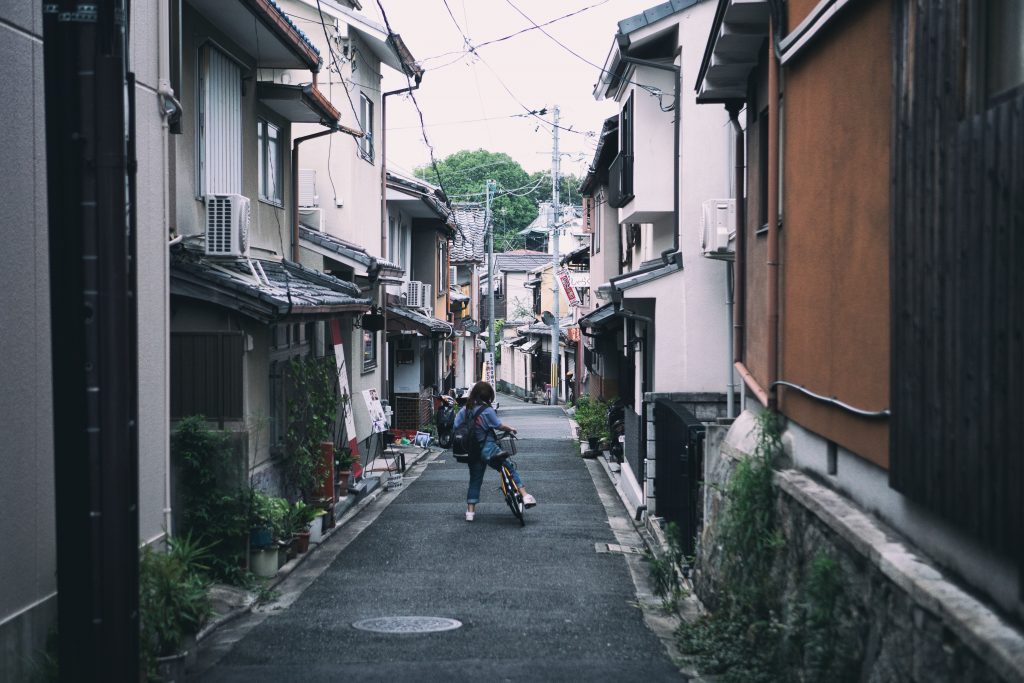
Kyoto, Japan: a hotbed of CSS activity (Photo by Jisu Han)
You don’t know CSS
I’m not only talking about obscure CSS properties here, or even new up-and-coming ones, but about how CSS itself is developed. For example, did you know that the development of the CSS Grid spec was sponsored by Bloomberg, because they needed a way to port the layout of their famous terminal to the web?
Did you ever stop to wonder what top: 30px is supposed to mean on a circular screen, such as the one on a smartwatch? Or did you know that some people are laying out entire printed books in CSS, effectively replacing software like InDesign?
Talking with Florian really expanded my mind to how broad and interesting CSS truly is, and convinced me doing the survey was worth it.
„What do you mean, ‘Make the <table> circular’?” Photo by Artur Łuczka
Myself, personally, I’ve always enjoyed being a generalist in the sense that I happily hop from one side of the great divide to another whenever I feel like it. At the same time, I’m also wholly convinced that the world needs specialists like Florian; people who dedicate their lives to championing and improving a single aspect of the web.
Devaluing the work the work of generalists is not only unfair, but it’s also counter-productive — after all, HTML and CSS are the foundation on which all modern JavaScript frameworks are built; and on the other hand, new patterns and approaches pioneered by CSS-in-JS libraries will hopefully find their way back into vanilla CSS sooner or later.
Thankfully, I feel like a minority of developers hold those views, and those who do generally hold them do so out of ignorance for what the „other side” really stands for more than any well-informed opinion.
So that’s where the survey comes in: I’m not saying I can fill up the divide, but maybe I can throw a couple walkways across, or distribute some jetpacks — you know, whatever works. 🚀
If that sounds good, then the first step is — you guessed it — taking the survey!
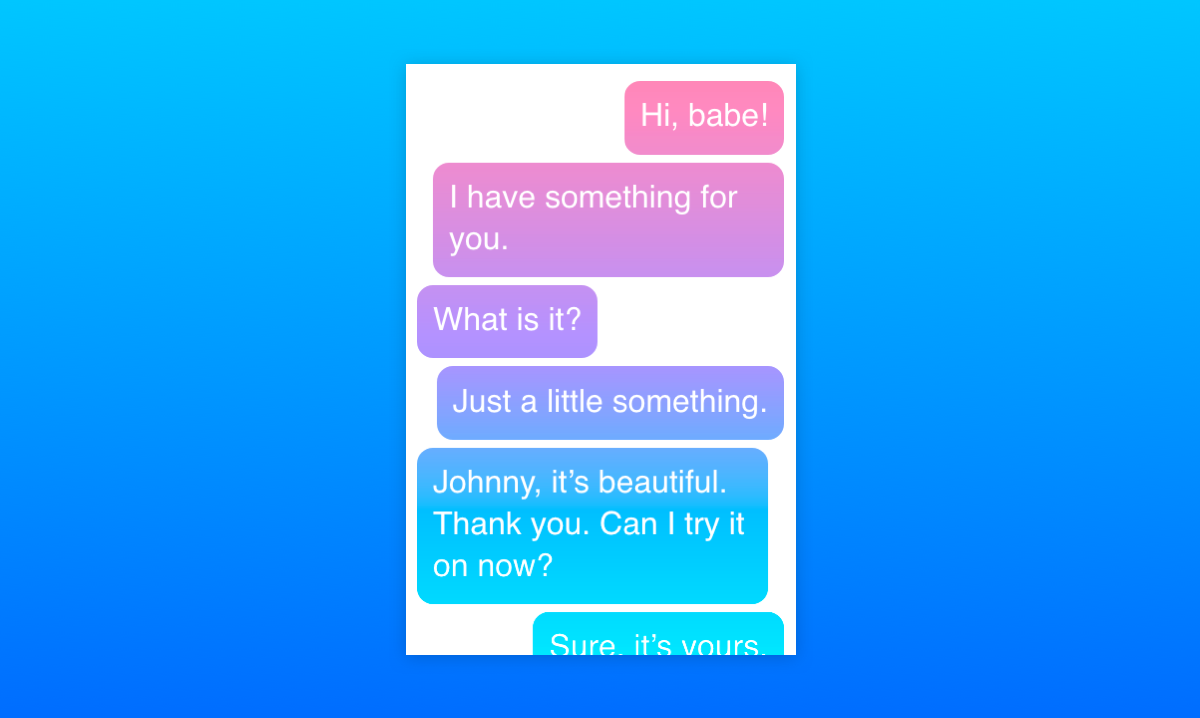
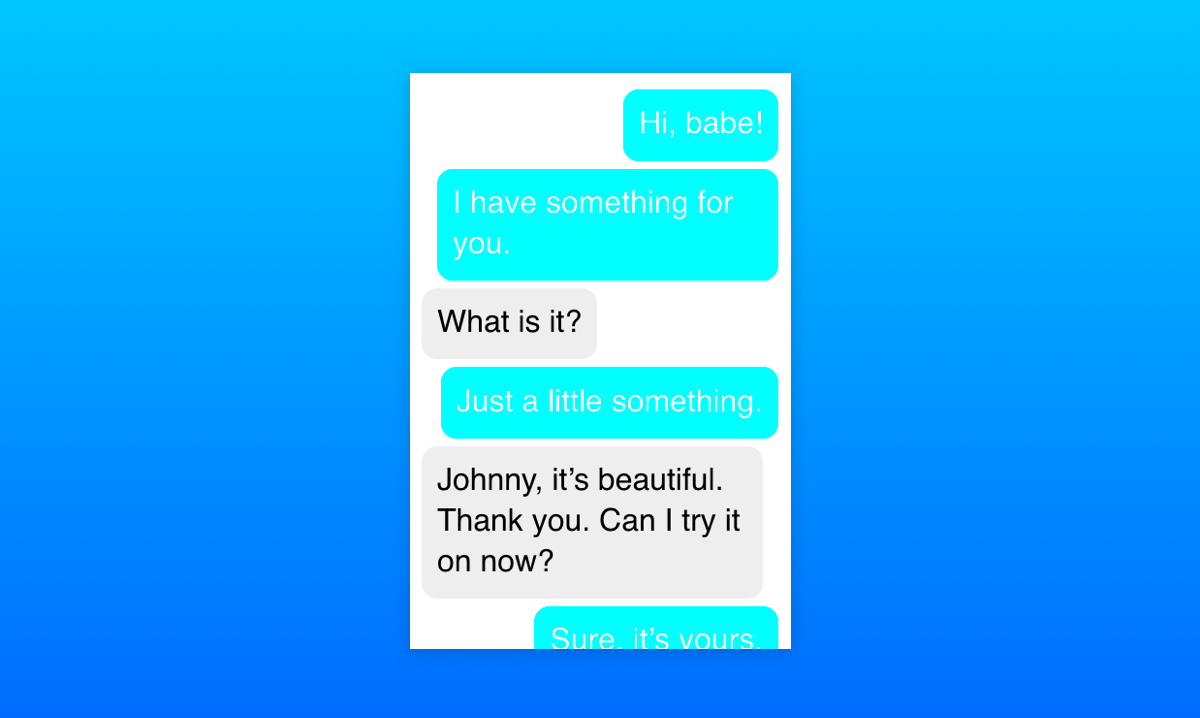
One Sunday morning, I woke up a little earlier than I would’ve liked to, thanks to the persistent buzzing of my phone. I reached out, tapped into Facebook Messenger, and joined the conversation. Pretty soon my attention went from the actual conversations to the funky gradient effect of the message bubbles containing them. Let me show you what I mean:
This is a new feature of Messenger, which allows you to choose a gradient instead of a plain color for the background of the chat messages. It’s currently available on the mobile application as well as Facebook’s site, but not yet on Messenger’s site. The gradient appears “fixed” so that chat bubbles appear to change background color as they scroll vertically.
I thought this looked like something that could be done in CSS, so… challenge accepted!
Let’s walk through my thought process as I attempted to recreate it and explain the CSS features that were used to make it work. Also, we’ll see how Facebook actually implemented it (spoiler alert: not the way I did) and how the two approaches compare.
Getting our hands dirty
First, let’s look at the example again to see what exactly it is that we’re trying to achieve here.
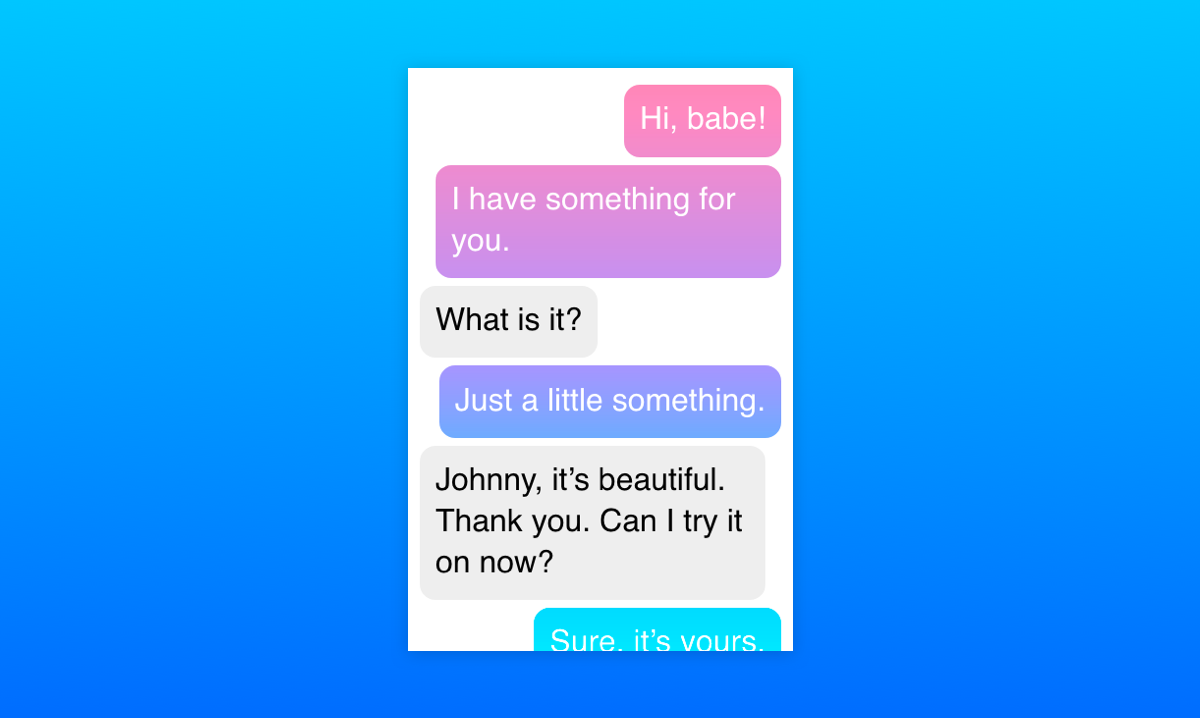
In general, we have a pretty standard messaging layout: messages are divided into bubbles going from top to bottom, ours on the right and the other people in the chat on the left. The ones on the left all have a gray background color, but the ones on the right look like they’re sharing the same fixed background gradient. That’s pretty much it!
Step 1: Set up the layout
This part is pretty simple: let’s arrange the messages in an ordered list and apply some basic CSS to make it look more like an actual messaging application:
<ol class="messages">
  <li class="ours">Hi, babe!</li>
  <li class="ours">I have something for you.</li>
  <li>What is it?</li>
  <li class="ours">Just a little something.</li>
  <li>Johnny, it’s beautiful. Thank you. Can I try it on now?</li>
  <li class="ours">Sure, it’s yours.</li>
  <li>Wait right here.</li>
  <li>I’ll try it on right now.</li>
</ol>
When it comes to dividing the messages to the left and the right, my knee-jerk reaction was to use floats. We could use float: left for messages on the left and float: right for messages on the right to have them stick to different edges. Then, we’d apply clear: both to on each message so they stack. But there’s a much more modern approach — flexbox!
We can use flexbox to stack the list items vertically with flex-direction: column and tell all the children to stick to the left edge (or “align the cross-start margin edges of the flex children with cross-start margin edges of the lines,” if you prefer the technical terms) with align-items: flex-start. Then, we can overwrite the align-items value for individual flex items by setting align-self: flex-end on them.
What, you mean you couldn’t visualize the code based on that? Fine, here’s how that looks:
This is a nasty hack with a pseudo-element on top of the text and mix-blend-mode doesn't work in IE / Edge, but: Yes, this is possible to do with CSS! 😅https://t.co/FLKGvd1YoI
The key clue here is mix-blend-mode, which is a CSS property that allows us to control how the content of an element blends in with what’s behind it. It’s a feature that has been present in Photoshop and other similar tools for a while, but is fairly new to the web. There’s an almanac entry for the property that explains all of its many possible values.
One of the values is screen: it takes the values of the pixels of the background and foreground, inverts them, multiplies them, and inverts them once more. This results in a color that is brighter than the original background color.
The description can seem a little confusing, but what it essentially means is that if the background is monochrome, wherever the background is black, the foreground pixels are shown fully and wherever it is white, white remains.
With mix-blend-mode: screen; on the foreground, we’ll see more of the foreground as the background is darker.
So, for our purposes, the background will be the chat window itself and the foreground will contain an element with the desired gradient set as the background that’s positioned over the background. Then, we apply the appropriate blend mode to the foreground element and restyle the background. We want the background to be black in places where we want the gradient to be shown and white in other places, so we’ll style the bubbles by giving them a plain black background and white text. Oh, and let’s remember to add pointer-events: none to the foreground element so the user can interact with the underlying text.
At this point, I also changed the original HTML a little. The entire chat is a wrapper in an additional container that allows the gradient to stay “fixed” over the scrollable part of the chat:
Now the gradient is being shown where the text bubbles are under it! However, we only want it to be shown over our bubbles — the ones along the right edge. A hint to how that can be achieved is hidden in MDN’s description of the mix-blend-mode property:
The mix-blend-mode CSS property sets how an element’s content should blend with the content of the element’s parent and the element’s background.
That’s right! The background. Of course, the effect only takes into account the HTML elements that are behind the current element and have a lower stack order. Fortunately, the stacking order of elements can easily be changed with the z-index property. So all we have to do is to give the chat bubbles on the left a higher z-index than that of the foreground element and they will be raised above it, outside of the influence of mix-blend-mode! Then we can style them however we want.
The gradient applied to the chat bubbles.
Let’s talk browser support
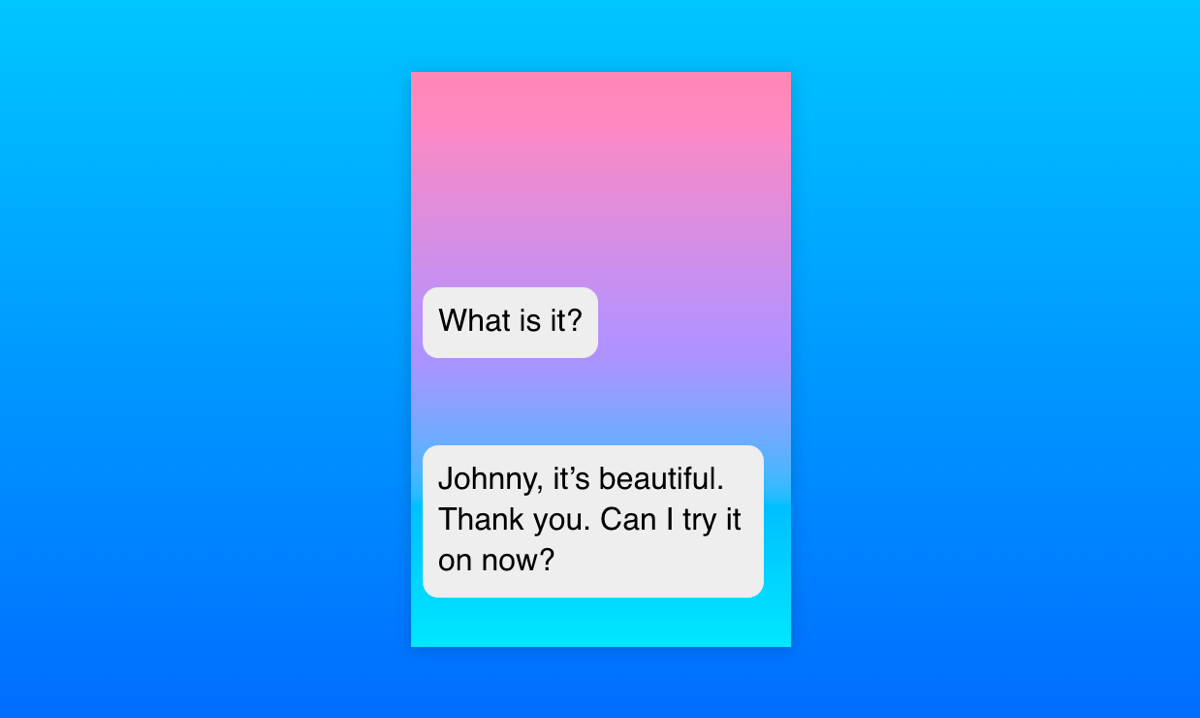
At the time of writing, mix-blend-mode is not supported at all in Internet Explorer and Edge. In those browsers, the gradient is laid over the whole chat and others’ bubbles appear on top of it, which is not an ideal solution.
This browser support data is from Caniuse, which has more detail. A number indicates that browser supports the feature at that version and up.
Desktop
Chrome
Opera
Firefox
IE
Edge
Safari
41
29
32
No
No
TP
Mobile / Tablet
iOS Safari
Opera Mobile
Opera Mini
Android
Android Chrome
Android Firefox
12.2
46
No
67
71
64
So, this is what we get in unsupported browsers:
How browsers that don’t support mix-blend-mode render the chat.
Fortunately, all the browsers that support mix-blend-mode also support CSS Feature Queries. Using them allows us to write fallback styles for unsupported browsers first and include the fancy effects for the browsers that support them. This way, even if a user can’t see the full effect, they can still see the whole chat and interact with it:
A simplified UI for older browsers, falling back to a plain cyan background color.
Here’s the final Pen with the full effect and fallback styles:
Turns out that Facebook’s solution is almost the opposite of what we’ve covered here. Instead of laying the gradient over the chat and cutting holes in it, they apply the gradient as a fixed background image to the whole chat. The chat itself is filled with a whole bunch of empty elements with white backgrounds and borders, except where the gradient should be visible.
The final HTML rendered by the Facebook Messenger React app is pretty verbose and hard to navigate, so I recreated a minimal example to demonstrate it. A lot of the empty HTML elements can be switched for pseudo-elements instead:
As you can see, the end result looks similar to the mix-blend-mode solution, but with a little bit of extra markup. Additionally, their approach provides more flexibility for rich content, like images and emojis . The mix-blend-mode approach doesn’t really work if the background is anything but monochrome and I haven’t been able to come up with a way to “raise” inner content above the gradient or get around this limitation in another way.
Because of this limitation, it’s wiser to use Facebook’s approach in an actual chat application. Still, our solution using mix-blend-mode showcases an interesting way to use one of the most under-appreciated CSS properties in modern web design and hopefully it has given you some ideas on what you could do with it!
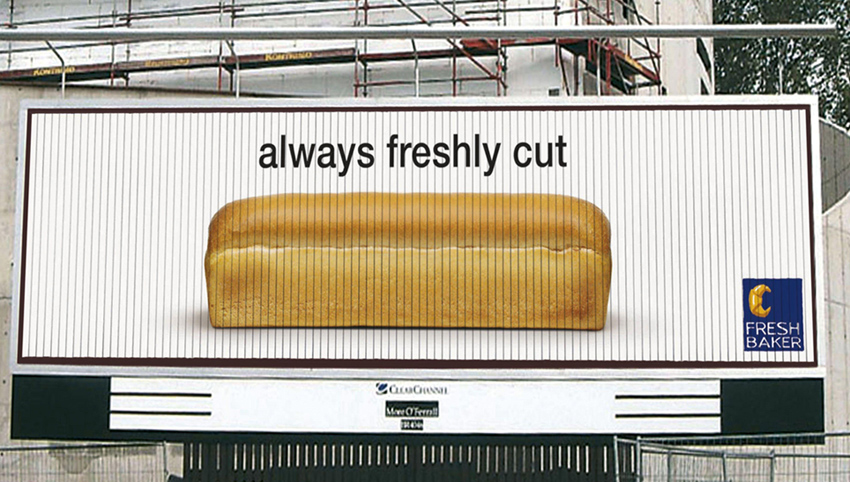
THE ORIGINAL? The awake baker “always freshly cut” – 2005 Ad made on a trivision rotating billboard
Source : Eurobest Awards SILVER
Agency : Duval Guillaume Brussels (Belgium)
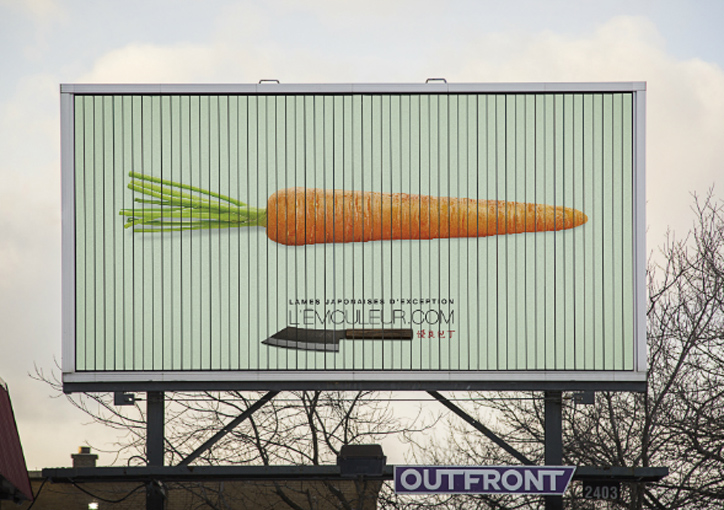
LESS ORIGINAL L’émouleur – Japanese knive blades –2019 Ad made on a trivision rotating billboard
Source : Grenier aux Nouvelles
Agency : Dentsu Bos (Canada)
THE ORIGINAL? The awake baker “always freshly cut” – 2005 Ad made on a trivision rotating billboard
Source : Eurobest Awards SILVER
Agency : Duval Guillaume Brussels (Belgium)
LESS ORIGINAL L’émouleur – Japanese knive blades –2019 Ad made on a trivision rotating billboard
Source : Grenier aux Nouvelles
Agency : Dentsu Bos (Canada)
THE ORIGINAL? The awake baker “always freshly cut” – 2005 Ad made on a trivision rotating billboard
Source : Eurobest Awards SILVER
Agency : Duval Guillaume Brussels (Belgium)
LESS ORIGINAL L’émouleur – Japanese knive blades –2019 Ad made on a trivision rotating billboard
Source : Grenier aux Nouvelles
Agency : Dentsu Bos (Canada)
There are so many tools and assets designers and artists can add to their virtual toolbox that it’s hard to know where to begin! Stop the guessing game and check out this must-have list of fantastic and fun digital assets from Envato Market and Envato Elements for Adobe Photoshop users everywhere. From actions to textures, you’ll never know what the next job calls for, so take this list for a spin!
Actions: Photo Effects
First up in this list: Adobe Photoshop Actions. Below you’ll find photo effect actions that are perfect for designs and artists alike. Whether you want to run through several images for a shop or a client’s website, using actions to apply elegant or unique photo effects will speed up your process or even inspire other creative endeavors!
I love the look of quick, sketchy photo effects. These are especially great for showing the use of a gallery web theme or similar content to prospective clients. Make quick work of transforming stock images in a template or your own images in a marketing campaign.
Combine photos in a trendy, double-exposure style quickly and easily with this photo effect action. Whether you’re designing a marketing blast or an event flier, this action keeps your content on point.
This energy-inspired photo effect is fantastic for event fliers, advertisements, and more. Easily turn sports figures or dancers into superheroes with the click of a button.
Take your love of geometric shapes to the next level! This high-energy Photoshop action allows you to fill in your subject with any color, and then play the action for an incredible geometric result. Experiment on portraits and landscape photography for a unique effect!
Flex your ferocious power with this insane Photoshop action. In two simple steps, this action helps you create an awesome masterpiece inspired by traditional art. Create a pencil sketch that glows with fiery colors with this amazing action.
Are you a fan of impressive typography? Then you’ll definitely love this action! Explore the endless possibilities with an action that adds bold typography to your photos. Simply fill in your subject and press play! Watch the magic unfold to reveal a gorgeous work of art in seconds!
Glitch photo effects are a popular trend in the industry today. They simulate old-school TV glitches known for distorting any subject on the screen. And you can achieve that incredible glitch look with this phenomenal action. Included is a one-click action with all the adjustment settings you need for a fantastic result!
Create the dreamy look of soft-focus photography with this helpful action. Simply brush over the area where you would like to apply the effect and presto! Instantly blur any background while adding gorgeous bokeh spots for that extra special touch.
Actions: Text Effects
Our next little list of Adobe Photoshop Actions covers text effects! Transform content for web templates, advertising and marketing, and more in the click of a button! All of these are just the tip of the iceberg when it comes to text effects, and may inspire you to create and save some of your own.
This is just one of many fantastic sets of eye-catching 3D text effects with a variety of looks, from rocks to wood and more. This set allows you to spend more time designing and less time working out how to transform type into something fun and artistic.
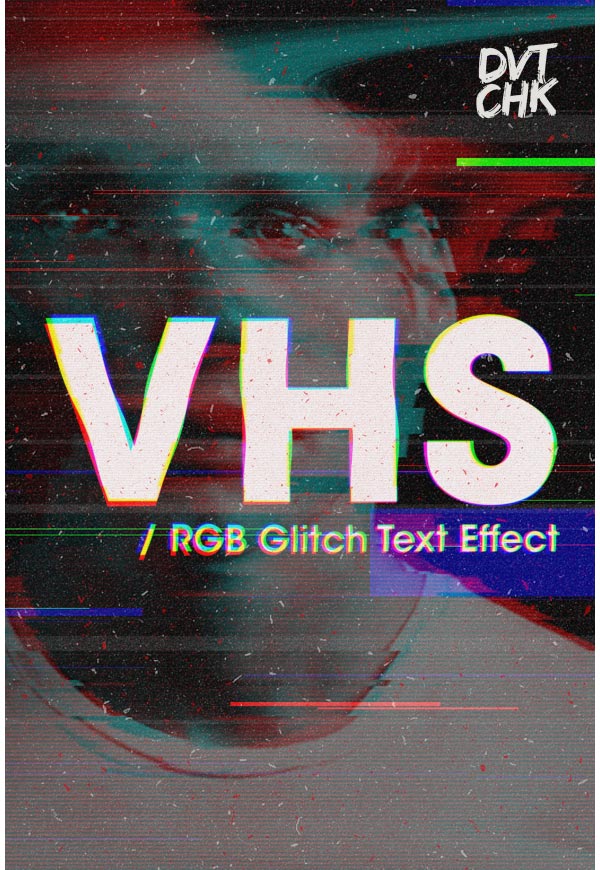
Walk down memory lane with this VHS glitch-inspired text effect. I love fun actions like these for event fliers, posters, and marketing campaigns. With nineties nostalgia in full swing, having a text effect like this in your arsenal is a must.
For a text effect bundle that’s focused on vintage styles in its entirety, these actions fit the bill brilliantly. Make quick work of applying professional and complex vintage-inspired design styles to any text or even logotypes.
If you’re still feeling a little nostalgic then dive into this wicked collection of text effects inspired by old-school video games. Explore 12 unique effects as well as fully editable vector backgrounds you can customize yourself. Download today to get started on your next video game logo!
Enjoy the bright lights of the Las Vegas strip with this vibrant collection of retro text effects. Designed to reflect iconic eras in typography and design, this set includes 10 Photoshop files with seven colors you can easily adjust. Works best in CS6 and even includes a help file for more instruction.
Each day, talented designers come up with new ways to create impressive text effects. And you can achieve the glorious look of a realistic knit sweater with this fuzzy set. Create a realistic sweater text effect with premade patterns and graphic elements you can easily adjust.
Create phenomenally bold text with this set of exquisite gold and metal effects. Great for beginners to 3D design, you can achieve an instant 3D effect while applying your favorite metal texture. Experiment with beautiful colors like silver, rose gold, and more for a stunning header design.
Actions: Utilities
Generate a variety of effects and content quickly and easily with Adobe Photoshop Utilities. I love these for fun content like map generators or presentation materials.
This utility is such a fun and cool way to present portfolio content or even create isometric designs for various projects. Add some depth and dimension into your work without leaving the familiarity of Adobe Photoshop.
Whether you’re proposing illustrated content to a publisher or client in pop-up book form and need a quick and tangible way to do so, or just want to wow your clients or portfolio visitors with something fun, this pop-up book maker is a fun and fantastic utility to have in your actions toolbox.
Make quick work of compiling brand and identity for yourself or clients with a seamless cover and profile picture maker for Facebook. Spend more time working on other projects rather than wasting time aligning and planning out your Facebook page’s cover image.
Create stunning app icons in a matter of seconds with this awesome icon generator. Designed with unique, high-quality styles that are perfect for your next project, enjoy 14 kinds of frameworks with 15 basic textures to choose from. Also included are additional social media icons for your convenience.
We don’t always have time for the hobbies we love most. And that’s where amazing Photoshop actions come into play. Achieve incredible realism with this stunning embroidery action. This set includes four different actions with three unique materials for a variety of effects!
Generate the look of an animated glitch effect with this super cool Photoshop action! Great for low-resolution content like GIF animations and banners, this download includes 12 color options that are fully editable for a non-destructive result.
Styles
Similar to actions but entirely based on Layer Styles, this content will speed up your design process without making you wait for steps to run and your computer to catch up. From text effects to fun app styles, have fun and explore your layer style options!
Keep things fun and fancy with these cartoon text effects. Bam, pow, and wow your clients with fantastic text effects perfect for posters, fliers, and more!
Transform icons and logotypes quickly and easily into 30 different styles. From long shadows to stickers and more, this set is a fantastic way to quickly refresh any icon set.
Another fun style bundle, this one transforms text and other content into vintage-styled comics. Textures and styles based on and created from real comics pack this bundle with a nostalgic look that’ll transport you to an old comic and card shop instantly.
Travel back in time to the bright neon lights of the eighties. This awesome set of Photoshop layer styles allows you to create a retro 80’s text effect in no time at all. Enjoy 18 total Photoshop files with unique styles available in various colors for an interesting spin on a header or logo.
Create gorgeous 3D typography with this amazing set of pro layer styles. This set includes four different styles that work great at 300 dpi. Also included is an easy-to-follow help file as well as simple backgrounds you can easily adjust.
The beautiful aesthetics of vintage typography will never go out of style. And you can enjoy these effects yourself with this incredible set of vintage black and white layer styles. With just one click, you’ll be one step closer to vintage effects in no time at all!
Achieve that realistic concrete look with this set of graphic styles. Simply add your text or logo into the designated smart objects and presto! You’ve got an instant concrete look. Choose from three different concrete textures to get the final look you desire.
Brushes
Whether you’re touching up a photo or creating a lovely digital painting, brushes are a must for every designer and artist. From special effects to realistic media, you’ll find several must-haves in the list below.
Add a literal splash of color with these watercolor splash brushes. Whether you’re creating fun typographic designs or marketing materials, they mimic real media wonderfully without your having to break out paint.
Apply a bokeh effect manually to photographs and other images with these dreamy bokeh brushes. Also fantastic for creating abstract backgrounds and other content.
Realistic brushes like this smoke effect set are wonderful for adding effects to photographs or other media. Much like the other textured brushes above, they also work wonderfully for creating textures within digital paintings.
This huge set of realistic media brushes is fantastic for adding a real media touch to your design work or creating beautiful digital drawings. With everything from ink pens to markers to watercolor brushes, this set is one of the best around.
Have some more fun with realistic photo brushes like this flame and fire set. Whether you’re editing photographs or creating digital paintings, a set like this gives you fantastic texture options.
With 90 brushes in this set, you will find nearly every coffee stain ring or splash at the ready in glorious high resolution and perfect for print design and more.
From spray paint to scribbled textures, this bundle of brushes is fantastic for adding a graffiti-inspired style to your design work and other digital projects. Transform original artwork into a graffiti-like piece or add some texture to a poster or flier design for a music event.
Add a handcrafted touch to your projects with this set of 51 watercolor brushes. Perfect for posters and marketing campaigns, these brushes mimic the look of real media without requiring expert painting skills.
Nab yourself a set of gouache and acrylic-styled brushes for some fantastically textured brushes that make quick work of sketching with pressure-sensitive graphics tablets.
Transform your content into vintage-inspired images with this set of 30 particle brushes. These brushes also work well for mimicking lighting effects, displacement effects, and more!
Create the fantastic look of space with this beautiful set of nebula brushes. The textures of these brushes work perfectly for creating grunge, watercolor, and other similar creations if you paint digitally as well. So get started on your next space painting today!
When you’re finished creating space, add these stunning lens flare and star brushes to the mix! This set includes 42 brilliant brushes that are super easy to use. Great for any luxurious texture, add a bit of sparkle to your work by downloading these brushes today!
Achieve amazing watercolor paintings without ever using a single drop of paint! These Photoshop brushes were created using high-resolution images with a variety of brush strokes. Great for wedding designs and more, incorporate these brushes into your next creative project!
Need inspiration? Then give this pack of halftone Photoshop brushes a try! This pack features 40 different halftone illustration brushes perfect for the budding comic artist. Simply paint over the area where you would like the halftone shading to appear, and create amazing results in seconds!
The key to a successful digital painting is knowing how to shade your illustrations properly. And you can add a beautiful touch of texture to your work with this set of natural shade brushes. Great for portraits, landscapes, and so much more, let your imagination run wild with this incredible brush set!
You can never have enough watercolor brushes! And with this massive set, you get to enjoy 69 wonderful watercolor brushes for all your Photoshop paintings. A bonus set of 11 extra textures is also included to make your work even more spectacular!
A powerful set to add to your collection, this pack features 50 vintage woodblock brushes we’re sure you’ll love! Created from scratch, these brushes feature phenomenal vintage textures to emulate the look of old ink, paper, and blocks of wood.
Textures, Patterns, & Fills
Whether you need textures for producing creative content or a quick background for a graphic design project, you can’t go wrong with a collection of textures, patterns, or fills.
This set of 50 patterns is perfect for adding an industrial or metal-style edge to your work. Whether you need a pattern for print media or web media, these patterns are seamless and ready to go.
This set of patterns is made up of easily editable smart objects. It’s perfect for adding noise with predictable results, allowing for control and speed while designing so you can create the content you want.
Can’t find the perfect patterns? Create your own quickly and easily with this instant pattern generator. Coordinate your design work with a matching pattern set or make quick work of stationery designs with a variety of pattern options from your own content.
Class is certainly in session with this gorgeous set of blackboard patterns. A digital mix of realistic textures with varying chalk dust, this pack includes nine non-seamless blackboard patterns. Great for wedding invites and more, explore endless possibilities for a traditional blackboard result.
Adding unique textures to your designs is one great way to boost visual impact. And you can achieve this easily with this set of grunge patterns. This download includes 15 handcrafted grunge patterns to decorate your designs.
Sit back and relax with a glass of red wine and this delicious pattern. This pattern can be easily deconstructed to create the style you would like. Experiment with different graphics and more to achieve a beautiful design you’ll want to toast to!
Or stand out with this eclectic mix of watercolor patterns. Choose from 30 different vector patterns that have been carefully handcrafted and digitized for your convenience. Create original designs that are definitely like no other with this amazing pattern set!
Shapes
Our final section covers Shapes. This is fun, pre-made content that will allow you to add and edit decorative buttons, banners, and other elements to your work as easily as working with vector assets.
Focusing on badge creation or need something quick and easy to add to your content? Look no further than this set of 135 elements perfect for a quick logo template.
What I love about hand-drawn shape sets is that each set is as different and unique as everyone’s personal handwriting. This set is perfect for a sketchy, rougher shape style when creating content with a handmade touch.
For a classy touch to blog templates, stationery, and more, this set of elegant monogram frames comes with multiple document types and 77 distinct frame styles in total.
Sunburst shapes are almost iconic in the design industry. And you can choose from 24 incredible sunburst shapes that are all resizable in Adobe Photoshop. Change the colors easily to enjoy an incredible sunburst result.
Create a gorgeous photo effect with a unique hand painted mask. This set includes 30 photo mask shapes that were each painted by hand. Upgrade your designs to a whole new level with traditional hand painted masks for more edge.
Since geometric designs are the current rage, why not add a bit of gold to the mix? These high-resolution shapes feature 30 designs ranging from simple lines to incredible 3D shapes. Create a fantastic background texture or brilliant geometric poster using these remarkable shapes.
Need a beautiful wreath fast? Then enjoy this pack of 24 wreath shapes for Adobe Photoshop. Use them as creative elements in your designs or to highlight your logos with style. Keep the shapes as is, or change them easily with the help of Adobe Illustrator.
Conclusion
This list of fantastic resources aims to highlight useful and must-have content for graphic designers and artists who use Adobe Photoshop. Chances are we’ve missed some Envato Market and Envato Elements items that you think would be an excellent asset to any graphic designer’s toolbox. Share those links in the comment section below, and let this kit be a jumping-off point for building your ultimate digital asset kit.
There are so many tools and assets designers and artists can add to their virtual toolbox that it’s hard to know where to begin! Stop the guessing game and check out this must-have list of fantastic and fun digital assets from Envato Market and Envato Elements for Adobe Photoshop users everywhere. From actions to textures, you’ll never know what the next job calls for, so take this list for a spin!
Actions: Photo Effects
First up in this list: Adobe Photoshop Actions. Below you’ll find photo effect actions that are perfect for designs and artists alike. Whether you want to run through several images for a shop or a client’s website, using actions to apply elegant or unique photo effects will speed up your process or even inspire other creative endeavors!
I love the look of quick, sketchy photo effects. These are especially great for showing the use of a gallery web theme or similar content to prospective clients. Make quick work of transforming stock images in a template or your own images in a marketing campaign.
Combine photos in a trendy, double-exposure style quickly and easily with this photo effect action. Whether you’re designing a marketing blast or an event flier, this action keeps your content on point.
This energy-inspired photo effect is fantastic for event fliers, advertisements, and more. Easily turn sports figures or dancers into superheroes with the click of a button.
Take your love of geometric shapes to the next level! This high-energy Photoshop action allows you to fill in your subject with any color, and then play the action for an incredible geometric result. Experiment on portraits and landscape photography for a unique effect!
Flex your ferocious power with this insane Photoshop action. In two simple steps, this action helps you create an awesome masterpiece inspired by traditional art. Create a pencil sketch that glows with fiery colors with this amazing action.
Are you a fan of impressive typography? Then you’ll definitely love this action! Explore the endless possibilities with an action that adds bold typography to your photos. Simply fill in your subject and press play! Watch the magic unfold to reveal a gorgeous work of art in seconds!
Glitch photo effects are a popular trend in the industry today. They simulate old-school TV glitches known for distorting any subject on the screen. And you can achieve that incredible glitch look with this phenomenal action. Included is a one-click action with all the adjustment settings you need for a fantastic result!
Create the dreamy look of soft-focus photography with this helpful action. Simply brush over the area where you would like to apply the effect and presto! Instantly blur any background while adding gorgeous bokeh spots for that extra special touch.
Actions: Text Effects
Our next little list of Adobe Photoshop Actions covers text effects! Transform content for web templates, advertising and marketing, and more in the click of a button! All of these are just the tip of the iceberg when it comes to text effects, and may inspire you to create and save some of your own.
This is just one of many fantastic sets of eye-catching 3D text effects with a variety of looks, from rocks to wood and more. This set allows you to spend more time designing and less time working out how to transform type into something fun and artistic.
Walk down memory lane with this VHS glitch-inspired text effect. I love fun actions like these for event fliers, posters, and marketing campaigns. With nineties nostalgia in full swing, having a text effect like this in your arsenal is a must.
For a text effect bundle that’s focused on vintage styles in its entirety, these actions fit the bill brilliantly. Make quick work of applying professional and complex vintage-inspired design styles to any text or even logotypes.
If you’re still feeling a little nostalgic then dive into this wicked collection of text effects inspired by old-school video games. Explore 12 unique effects as well as fully editable vector backgrounds you can customize yourself. Download today to get started on your next video game logo!
Enjoy the bright lights of the Las Vegas strip with this vibrant collection of retro text effects. Designed to reflect iconic eras in typography and design, this set includes 10 Photoshop files with seven colors you can easily adjust. Works best in CS6 and even includes a help file for more instruction.
Each day, talented designers come up with new ways to create impressive text effects. And you can achieve the glorious look of a realistic knit sweater with this fuzzy set. Create a realistic sweater text effect with premade patterns and graphic elements you can easily adjust.
Create phenomenally bold text with this set of exquisite gold and metal effects. Great for beginners to 3D design, you can achieve an instant 3D effect while applying your favorite metal texture. Experiment with beautiful colors like silver, rose gold, and more for a stunning header design.
Actions: Utilities
Generate a variety of effects and content quickly and easily with Adobe Photoshop Utilities. I love these for fun content like map generators or presentation materials.
This utility is such a fun and cool way to present portfolio content or even create isometric designs for various projects. Add some depth and dimension into your work without leaving the familiarity of Adobe Photoshop.
Whether you’re proposing illustrated content to a publisher or client in pop-up book form and need a quick and tangible way to do so, or just want to wow your clients or portfolio visitors with something fun, this pop-up book maker is a fun and fantastic utility to have in your actions toolbox.
Make quick work of compiling brand and identity for yourself or clients with a seamless cover and profile picture maker for Facebook. Spend more time working on other projects rather than wasting time aligning and planning out your Facebook page’s cover image.
Create stunning app icons in a matter of seconds with this awesome icon generator. Designed with unique, high-quality styles that are perfect for your next project, enjoy 14 kinds of frameworks with 15 basic textures to choose from. Also included are additional social media icons for your convenience.
We don’t always have time for the hobbies we love most. And that’s where amazing Photoshop actions come into play. Achieve incredible realism with this stunning embroidery action. This set includes four different actions with three unique materials for a variety of effects!
Generate the look of an animated glitch effect with this super cool Photoshop action! Great for low-resolution content like GIF animations and banners, this download includes 12 color options that are fully editable for a non-destructive result.
Styles
Similar to actions but entirely based on Layer Styles, this content will speed up your design process without making you wait for steps to run and your computer to catch up. From text effects to fun app styles, have fun and explore your layer style options!
Keep things fun and fancy with these cartoon text effects. Bam, pow, and wow your clients with fantastic text effects perfect for posters, fliers, and more!
Transform icons and logotypes quickly and easily into 30 different styles. From long shadows to stickers and more, this set is a fantastic way to quickly refresh any icon set.
Another fun style bundle, this one transforms text and other content into vintage-styled comics. Textures and styles based on and created from real comics pack this bundle with a nostalgic look that’ll transport you to an old comic and card shop instantly.
Travel back in time to the bright neon lights of the eighties. This awesome set of Photoshop layer styles allows you to create a retro 80’s text effect in no time at all. Enjoy 18 total Photoshop files with unique styles available in various colors for an interesting spin on a header or logo.
Create gorgeous 3D typography with this amazing set of pro layer styles. This set includes four different styles that work great at 300 dpi. Also included is an easy-to-follow help file as well as simple backgrounds you can easily adjust.
The beautiful aesthetics of vintage typography will never go out of style. And you can enjoy these effects yourself with this incredible set of vintage black and white layer styles. With just one click, you’ll be one step closer to vintage effects in no time at all!
Achieve that realistic concrete look with this set of graphic styles. Simply add your text or logo into the designated smart objects and presto! You’ve got an instant concrete look. Choose from three different concrete textures to get the final look you desire.
Brushes
Whether you’re touching up a photo or creating a lovely digital painting, brushes are a must for every designer and artist. From special effects to realistic media, you’ll find several must-haves in the list below.
Add a literal splash of color with these watercolor splash brushes. Whether you’re creating fun typographic designs or marketing materials, they mimic real media wonderfully without your having to break out paint.
Apply a bokeh effect manually to photographs and other images with these dreamy bokeh brushes. Also fantastic for creating abstract backgrounds and other content.
Realistic brushes like this smoke effect set are wonderful for adding effects to photographs or other media. Much like the other textured brushes above, they also work wonderfully for creating textures within digital paintings.
This huge set of realistic media brushes is fantastic for adding a real media touch to your design work or creating beautiful digital drawings. With everything from ink pens to markers to watercolor brushes, this set is one of the best around.
Have some more fun with realistic photo brushes like this flame and fire set. Whether you’re editing photographs or creating digital paintings, a set like this gives you fantastic texture options.
With 90 brushes in this set, you will find nearly every coffee stain ring or splash at the ready in glorious high resolution and perfect for print design and more.
From spray paint to scribbled textures, this bundle of brushes is fantastic for adding a graffiti-inspired style to your design work and other digital projects. Transform original artwork into a graffiti-like piece or add some texture to a poster or flier design for a music event.
Add a handcrafted touch to your projects with this set of 51 watercolor brushes. Perfect for posters and marketing campaigns, these brushes mimic the look of real media without requiring expert painting skills.
Nab yourself a set of gouache and acrylic-styled brushes for some fantastically textured brushes that make quick work of sketching with pressure-sensitive graphics tablets.
Transform your content into vintage-inspired images with this set of 30 particle brushes. These brushes also work well for mimicking lighting effects, displacement effects, and more!
Create the fantastic look of space with this beautiful set of nebula brushes. The textures of these brushes work perfectly for creating grunge, watercolor, and other similar creations if you paint digitally as well. So get started on your next space painting today!
When you’re finished creating space, add these stunning lens flare and star brushes to the mix! This set includes 42 brilliant brushes that are super easy to use. Great for any luxurious texture, add a bit of sparkle to your work by downloading these brushes today!
Achieve amazing watercolor paintings without ever using a single drop of paint! These Photoshop brushes were created using high-resolution images with a variety of brush strokes. Great for wedding designs and more, incorporate these brushes into your next creative project!
Need inspiration? Then give this pack of halftone Photoshop brushes a try! This pack features 40 different halftone illustration brushes perfect for the budding comic artist. Simply paint over the area where you would like the halftone shading to appear, and create amazing results in seconds!
The key to a successful digital painting is knowing how to shade your illustrations properly. And you can add a beautiful touch of texture to your work with this set of natural shade brushes. Great for portraits, landscapes, and so much more, let your imagination run wild with this incredible brush set!
You can never have enough watercolor brushes! And with this massive set, you get to enjoy 69 wonderful watercolor brushes for all your Photoshop paintings. A bonus set of 11 extra textures is also included to make your work even more spectacular!
A powerful set to add to your collection, this pack features 50 vintage woodblock brushes we’re sure you’ll love! Created from scratch, these brushes feature phenomenal vintage textures to emulate the look of old ink, paper, and blocks of wood.
Textures, Patterns, & Fills
Whether you need textures for producing creative content or a quick background for a graphic design project, you can’t go wrong with a collection of textures, patterns, or fills.
This set of 50 patterns is perfect for adding an industrial or metal-style edge to your work. Whether you need a pattern for print media or web media, these patterns are seamless and ready to go.
This set of patterns is made up of easily editable smart objects. It’s perfect for adding noise with predictable results, allowing for control and speed while designing so you can create the content you want.
Can’t find the perfect patterns? Create your own quickly and easily with this instant pattern generator. Coordinate your design work with a matching pattern set or make quick work of stationery designs with a variety of pattern options from your own content.
Class is certainly in session with this gorgeous set of blackboard patterns. A digital mix of realistic textures with varying chalk dust, this pack includes nine non-seamless blackboard patterns. Great for wedding invites and more, explore endless possibilities for a traditional blackboard result.
Adding unique textures to your designs is one great way to boost visual impact. And you can achieve this easily with this set of grunge patterns. This download includes 15 handcrafted grunge patterns to decorate your designs.
Sit back and relax with a glass of red wine and this delicious pattern. This pattern can be easily deconstructed to create the style you would like. Experiment with different graphics and more to achieve a beautiful design you’ll want to toast to!
Or stand out with this eclectic mix of watercolor patterns. Choose from 30 different vector patterns that have been carefully handcrafted and digitized for your convenience. Create original designs that are definitely like no other with this amazing pattern set!
Shapes
Our final section covers Shapes. This is fun, pre-made content that will allow you to add and edit decorative buttons, banners, and other elements to your work as easily as working with vector assets.
Focusing on badge creation or need something quick and easy to add to your content? Look no further than this set of 135 elements perfect for a quick logo template.
What I love about hand-drawn shape sets is that each set is as different and unique as everyone’s personal handwriting. This set is perfect for a sketchy, rougher shape style when creating content with a handmade touch.
For a classy touch to blog templates, stationery, and more, this set of elegant monogram frames comes with multiple document types and 77 distinct frame styles in total.
Sunburst shapes are almost iconic in the design industry. And you can choose from 24 incredible sunburst shapes that are all resizable in Adobe Photoshop. Change the colors easily to enjoy an incredible sunburst result.
Create a gorgeous photo effect with a unique hand painted mask. This set includes 30 photo mask shapes that were each painted by hand. Upgrade your designs to a whole new level with traditional hand painted masks for more edge.
Since geometric designs are the current rage, why not add a bit of gold to the mix? These high-resolution shapes feature 30 designs ranging from simple lines to incredible 3D shapes. Create a fantastic background texture or brilliant geometric poster using these remarkable shapes.
Need a beautiful wreath fast? Then enjoy this pack of 24 wreath shapes for Adobe Photoshop. Use them as creative elements in your designs or to highlight your logos with style. Keep the shapes as is, or change them easily with the help of Adobe Illustrator.
Conclusion
This list of fantastic resources aims to highlight useful and must-have content for graphic designers and artists who use Adobe Photoshop. Chances are we’ve missed some Envato Market and Envato Elements items that you think would be an excellent asset to any graphic designer’s toolbox. Share those links in the comment section below, and let this kit be a jumping-off point for building your ultimate digital asset kit.
There are so many tools and assets designers and artists can add to their virtual toolbox that it’s hard to know where to begin! Stop the guessing game and check out this must-have list of fantastic and fun digital assets from Envato Market and Envato Elements for Adobe Photoshop users everywhere. From actions to textures, you’ll never know what the next job calls for, so take this list for a spin!
Actions: Photo Effects
First up in this list: Adobe Photoshop Actions. Below you’ll find photo effect actions that are perfect for designs and artists alike. Whether you want to run through several images for a shop or a client’s website, using actions to apply elegant or unique photo effects will speed up your process or even inspire other creative endeavors!
I love the look of quick, sketchy photo effects. These are especially great for showing the use of a gallery web theme or similar content to prospective clients. Make quick work of transforming stock images in a template or your own images in a marketing campaign.
Combine photos in a trendy, double-exposure style quickly and easily with this photo effect action. Whether you’re designing a marketing blast or an event flier, this action keeps your content on point.
This energy-inspired photo effect is fantastic for event fliers, advertisements, and more. Easily turn sports figures or dancers into superheroes with the click of a button.
Take your love of geometric shapes to the next level! This high-energy Photoshop action allows you to fill in your subject with any color, and then play the action for an incredible geometric result. Experiment on portraits and landscape photography for a unique effect!
Flex your ferocious power with this insane Photoshop action. In two simple steps, this action helps you create an awesome masterpiece inspired by traditional art. Create a pencil sketch that glows with fiery colors with this amazing action.
Are you a fan of impressive typography? Then you’ll definitely love this action! Explore the endless possibilities with an action that adds bold typography to your photos. Simply fill in your subject and press play! Watch the magic unfold to reveal a gorgeous work of art in seconds!
Glitch photo effects are a popular trend in the industry today. They simulate old-school TV glitches known for distorting any subject on the screen. And you can achieve that incredible glitch look with this phenomenal action. Included is a one-click action with all the adjustment settings you need for a fantastic result!
Create the dreamy look of soft-focus photography with this helpful action. Simply brush over the area where you would like to apply the effect and presto! Instantly blur any background while adding gorgeous bokeh spots for that extra special touch.
Actions: Text Effects
Our next little list of Adobe Photoshop Actions covers text effects! Transform content for web templates, advertising and marketing, and more in the click of a button! All of these are just the tip of the iceberg when it comes to text effects, and may inspire you to create and save some of your own.
This is just one of many fantastic sets of eye-catching 3D text effects with a variety of looks, from rocks to wood and more. This set allows you to spend more time designing and less time working out how to transform type into something fun and artistic.
Walk down memory lane with this VHS glitch-inspired text effect. I love fun actions like these for event fliers, posters, and marketing campaigns. With nineties nostalgia in full swing, having a text effect like this in your arsenal is a must.
For a text effect bundle that’s focused on vintage styles in its entirety, these actions fit the bill brilliantly. Make quick work of applying professional and complex vintage-inspired design styles to any text or even logotypes.
If you’re still feeling a little nostalgic then dive into this wicked collection of text effects inspired by old-school video games. Explore 12 unique effects as well as fully editable vector backgrounds you can customize yourself. Download today to get started on your next video game logo!
Enjoy the bright lights of the Las Vegas strip with this vibrant collection of retro text effects. Designed to reflect iconic eras in typography and design, this set includes 10 Photoshop files with seven colors you can easily adjust. Works best in CS6 and even includes a help file for more instruction.
Each day, talented designers come up with new ways to create impressive text effects. And you can achieve the glorious look of a realistic knit sweater with this fuzzy set. Create a realistic sweater text effect with premade patterns and graphic elements you can easily adjust.
Create phenomenally bold text with this set of exquisite gold and metal effects. Great for beginners to 3D design, you can achieve an instant 3D effect while applying your favorite metal texture. Experiment with beautiful colors like silver, rose gold, and more for a stunning header design.
Actions: Utilities
Generate a variety of effects and content quickly and easily with Adobe Photoshop Utilities. I love these for fun content like map generators or presentation materials.
This utility is such a fun and cool way to present portfolio content or even create isometric designs for various projects. Add some depth and dimension into your work without leaving the familiarity of Adobe Photoshop.
Whether you’re proposing illustrated content to a publisher or client in pop-up book form and need a quick and tangible way to do so, or just want to wow your clients or portfolio visitors with something fun, this pop-up book maker is a fun and fantastic utility to have in your actions toolbox.
Make quick work of compiling brand and identity for yourself or clients with a seamless cover and profile picture maker for Facebook. Spend more time working on other projects rather than wasting time aligning and planning out your Facebook page’s cover image.
Create stunning app icons in a matter of seconds with this awesome icon generator. Designed with unique, high-quality styles that are perfect for your next project, enjoy 14 kinds of frameworks with 15 basic textures to choose from. Also included are additional social media icons for your convenience.
We don’t always have time for the hobbies we love most. And that’s where amazing Photoshop actions come into play. Achieve incredible realism with this stunning embroidery action. This set includes four different actions with three unique materials for a variety of effects!
Generate the look of an animated glitch effect with this super cool Photoshop action! Great for low-resolution content like GIF animations and banners, this download includes 12 color options that are fully editable for a non-destructive result.
Styles
Similar to actions but entirely based on Layer Styles, this content will speed up your design process without making you wait for steps to run and your computer to catch up. From text effects to fun app styles, have fun and explore your layer style options!
Keep things fun and fancy with these cartoon text effects. Bam, pow, and wow your clients with fantastic text effects perfect for posters, fliers, and more!
Transform icons and logotypes quickly and easily into 30 different styles. From long shadows to stickers and more, this set is a fantastic way to quickly refresh any icon set.
Another fun style bundle, this one transforms text and other content into vintage-styled comics. Textures and styles based on and created from real comics pack this bundle with a nostalgic look that’ll transport you to an old comic and card shop instantly.
Travel back in time to the bright neon lights of the eighties. This awesome set of Photoshop layer styles allows you to create a retro 80’s text effect in no time at all. Enjoy 18 total Photoshop files with unique styles available in various colors for an interesting spin on a header or logo.
Create gorgeous 3D typography with this amazing set of pro layer styles. This set includes four different styles that work great at 300 dpi. Also included is an easy-to-follow help file as well as simple backgrounds you can easily adjust.
The beautiful aesthetics of vintage typography will never go out of style. And you can enjoy these effects yourself with this incredible set of vintage black and white layer styles. With just one click, you’ll be one step closer to vintage effects in no time at all!
Achieve that realistic concrete look with this set of graphic styles. Simply add your text or logo into the designated smart objects and presto! You’ve got an instant concrete look. Choose from three different concrete textures to get the final look you desire.
Brushes
Whether you’re touching up a photo or creating a lovely digital painting, brushes are a must for every designer and artist. From special effects to realistic media, you’ll find several must-haves in the list below.
Add a literal splash of color with these watercolor splash brushes. Whether you’re creating fun typographic designs or marketing materials, they mimic real media wonderfully without your having to break out paint.
Apply a bokeh effect manually to photographs and other images with these dreamy bokeh brushes. Also fantastic for creating abstract backgrounds and other content.
Realistic brushes like this smoke effect set are wonderful for adding effects to photographs or other media. Much like the other textured brushes above, they also work wonderfully for creating textures within digital paintings.
This huge set of realistic media brushes is fantastic for adding a real media touch to your design work or creating beautiful digital drawings. With everything from ink pens to markers to watercolor brushes, this set is one of the best around.
Have some more fun with realistic photo brushes like this flame and fire set. Whether you’re editing photographs or creating digital paintings, a set like this gives you fantastic texture options.
With 90 brushes in this set, you will find nearly every coffee stain ring or splash at the ready in glorious high resolution and perfect for print design and more.
From spray paint to scribbled textures, this bundle of brushes is fantastic for adding a graffiti-inspired style to your design work and other digital projects. Transform original artwork into a graffiti-like piece or add some texture to a poster or flier design for a music event.
Add a handcrafted touch to your projects with this set of 51 watercolor brushes. Perfect for posters and marketing campaigns, these brushes mimic the look of real media without requiring expert painting skills.
Nab yourself a set of gouache and acrylic-styled brushes for some fantastically textured brushes that make quick work of sketching with pressure-sensitive graphics tablets.
Transform your content into vintage-inspired images with this set of 30 particle brushes. These brushes also work well for mimicking lighting effects, displacement effects, and more!
Create the fantastic look of space with this beautiful set of nebula brushes. The textures of these brushes work perfectly for creating grunge, watercolor, and other similar creations if you paint digitally as well. So get started on your next space painting today!
When you’re finished creating space, add these stunning lens flare and star brushes to the mix! This set includes 42 brilliant brushes that are super easy to use. Great for any luxurious texture, add a bit of sparkle to your work by downloading these brushes today!
Achieve amazing watercolor paintings without ever using a single drop of paint! These Photoshop brushes were created using high-resolution images with a variety of brush strokes. Great for wedding designs and more, incorporate these brushes into your next creative project!
Need inspiration? Then give this pack of halftone Photoshop brushes a try! This pack features 40 different halftone illustration brushes perfect for the budding comic artist. Simply paint over the area where you would like the halftone shading to appear, and create amazing results in seconds!
The key to a successful digital painting is knowing how to shade your illustrations properly. And you can add a beautiful touch of texture to your work with this set of natural shade brushes. Great for portraits, landscapes, and so much more, let your imagination run wild with this incredible brush set!
You can never have enough watercolor brushes! And with this massive set, you get to enjoy 69 wonderful watercolor brushes for all your Photoshop paintings. A bonus set of 11 extra textures is also included to make your work even more spectacular!
A powerful set to add to your collection, this pack features 50 vintage woodblock brushes we’re sure you’ll love! Created from scratch, these brushes feature phenomenal vintage textures to emulate the look of old ink, paper, and blocks of wood.
Textures, Patterns, & Fills
Whether you need textures for producing creative content or a quick background for a graphic design project, you can’t go wrong with a collection of textures, patterns, or fills.
This set of 50 patterns is perfect for adding an industrial or metal-style edge to your work. Whether you need a pattern for print media or web media, these patterns are seamless and ready to go.
This set of patterns is made up of easily editable smart objects. It’s perfect for adding noise with predictable results, allowing for control and speed while designing so you can create the content you want.
Can’t find the perfect patterns? Create your own quickly and easily with this instant pattern generator. Coordinate your design work with a matching pattern set or make quick work of stationery designs with a variety of pattern options from your own content.
Class is certainly in session with this gorgeous set of blackboard patterns. A digital mix of realistic textures with varying chalk dust, this pack includes nine non-seamless blackboard patterns. Great for wedding invites and more, explore endless possibilities for a traditional blackboard result.
Adding unique textures to your designs is one great way to boost visual impact. And you can achieve this easily with this set of grunge patterns. This download includes 15 handcrafted grunge patterns to decorate your designs.
Sit back and relax with a glass of red wine and this delicious pattern. This pattern can be easily deconstructed to create the style you would like. Experiment with different graphics and more to achieve a beautiful design you’ll want to toast to!
Or stand out with this eclectic mix of watercolor patterns. Choose from 30 different vector patterns that have been carefully handcrafted and digitized for your convenience. Create original designs that are definitely like no other with this amazing pattern set!
Shapes
Our final section covers Shapes. This is fun, pre-made content that will allow you to add and edit decorative buttons, banners, and other elements to your work as easily as working with vector assets.
Focusing on badge creation or need something quick and easy to add to your content? Look no further than this set of 135 elements perfect for a quick logo template.
What I love about hand-drawn shape sets is that each set is as different and unique as everyone’s personal handwriting. This set is perfect for a sketchy, rougher shape style when creating content with a handmade touch.
For a classy touch to blog templates, stationery, and more, this set of elegant monogram frames comes with multiple document types and 77 distinct frame styles in total.
Sunburst shapes are almost iconic in the design industry. And you can choose from 24 incredible sunburst shapes that are all resizable in Adobe Photoshop. Change the colors easily to enjoy an incredible sunburst result.
Create a gorgeous photo effect with a unique hand painted mask. This set includes 30 photo mask shapes that were each painted by hand. Upgrade your designs to a whole new level with traditional hand painted masks for more edge.
Since geometric designs are the current rage, why not add a bit of gold to the mix? These high-resolution shapes feature 30 designs ranging from simple lines to incredible 3D shapes. Create a fantastic background texture or brilliant geometric poster using these remarkable shapes.
Need a beautiful wreath fast? Then enjoy this pack of 24 wreath shapes for Adobe Photoshop. Use them as creative elements in your designs or to highlight your logos with style. Keep the shapes as is, or change them easily with the help of Adobe Illustrator.
Conclusion
This list of fantastic resources aims to highlight useful and must-have content for graphic designers and artists who use Adobe Photoshop. Chances are we’ve missed some Envato Market and Envato Elements items that you think would be an excellent asset to any graphic designer’s toolbox. Share those links in the comment section below, and let this kit be a jumping-off point for building your ultimate digital asset kit.
There are so many tools and assets designers and artists can add to their virtual toolbox that it’s hard to know where to begin! Stop the guessing game and check out this must-have list of fantastic and fun digital assets from Envato Market and Envato Elements for Adobe Photoshop users everywhere. From actions to textures, you’ll never know what the next job calls for, so take this list for a spin!
Actions: Photo Effects
First up in this list: Adobe Photoshop Actions. Below you’ll find photo effect actions that are perfect for designs and artists alike. Whether you want to run through several images for a shop or a client’s website, using actions to apply elegant or unique photo effects will speed up your process or even inspire other creative endeavors!
I love the look of quick, sketchy photo effects. These are especially great for showing the use of a gallery web theme or similar content to prospective clients. Make quick work of transforming stock images in a template or your own images in a marketing campaign.
Combine photos in a trendy, double-exposure style quickly and easily with this photo effect action. Whether you’re designing a marketing blast or an event flier, this action keeps your content on point.
This energy-inspired photo effect is fantastic for event fliers, advertisements, and more. Easily turn sports figures or dancers into superheroes with the click of a button.
Take your love of geometric shapes to the next level! This high-energy Photoshop action allows you to fill in your subject with any color, and then play the action for an incredible geometric result. Experiment on portraits and landscape photography for a unique effect!
Flex your ferocious power with this insane Photoshop action. In two simple steps, this action helps you create an awesome masterpiece inspired by traditional art. Create a pencil sketch that glows with fiery colors with this amazing action.
Are you a fan of impressive typography? Then you’ll definitely love this action! Explore the endless possibilities with an action that adds bold typography to your photos. Simply fill in your subject and press play! Watch the magic unfold to reveal a gorgeous work of art in seconds!
Glitch photo effects are a popular trend in the industry today. They simulate old-school TV glitches known for distorting any subject on the screen. And you can achieve that incredible glitch look with this phenomenal action. Included is a one-click action with all the adjustment settings you need for a fantastic result!
Create the dreamy look of soft-focus photography with this helpful action. Simply brush over the area where you would like to apply the effect and presto! Instantly blur any background while adding gorgeous bokeh spots for that extra special touch.
Actions: Text Effects
Our next little list of Adobe Photoshop Actions covers text effects! Transform content for web templates, advertising and marketing, and more in the click of a button! All of these are just the tip of the iceberg when it comes to text effects, and may inspire you to create and save some of your own.
This is just one of many fantastic sets of eye-catching 3D text effects with a variety of looks, from rocks to wood and more. This set allows you to spend more time designing and less time working out how to transform type into something fun and artistic.
Walk down memory lane with this VHS glitch-inspired text effect. I love fun actions like these for event fliers, posters, and marketing campaigns. With nineties nostalgia in full swing, having a text effect like this in your arsenal is a must.
For a text effect bundle that’s focused on vintage styles in its entirety, these actions fit the bill brilliantly. Make quick work of applying professional and complex vintage-inspired design styles to any text or even logotypes.
If you’re still feeling a little nostalgic then dive into this wicked collection of text effects inspired by old-school video games. Explore 12 unique effects as well as fully editable vector backgrounds you can customize yourself. Download today to get started on your next video game logo!
Enjoy the bright lights of the Las Vegas strip with this vibrant collection of retro text effects. Designed to reflect iconic eras in typography and design, this set includes 10 Photoshop files with seven colors you can easily adjust. Works best in CS6 and even includes a help file for more instruction.
Each day, talented designers come up with new ways to create impressive text effects. And you can achieve the glorious look of a realistic knit sweater with this fuzzy set. Create a realistic sweater text effect with premade patterns and graphic elements you can easily adjust.
Create phenomenally bold text with this set of exquisite gold and metal effects. Great for beginners to 3D design, you can achieve an instant 3D effect while applying your favorite metal texture. Experiment with beautiful colors like silver, rose gold, and more for a stunning header design.
Actions: Utilities
Generate a variety of effects and content quickly and easily with Adobe Photoshop Utilities. I love these for fun content like map generators or presentation materials.
This utility is such a fun and cool way to present portfolio content or even create isometric designs for various projects. Add some depth and dimension into your work without leaving the familiarity of Adobe Photoshop.
Whether you’re proposing illustrated content to a publisher or client in pop-up book form and need a quick and tangible way to do so, or just want to wow your clients or portfolio visitors with something fun, this pop-up book maker is a fun and fantastic utility to have in your actions toolbox.
Make quick work of compiling brand and identity for yourself or clients with a seamless cover and profile picture maker for Facebook. Spend more time working on other projects rather than wasting time aligning and planning out your Facebook page’s cover image.
Create stunning app icons in a matter of seconds with this awesome icon generator. Designed with unique, high-quality styles that are perfect for your next project, enjoy 14 kinds of frameworks with 15 basic textures to choose from. Also included are additional social media icons for your convenience.
We don’t always have time for the hobbies we love most. And that’s where amazing Photoshop actions come into play. Achieve incredible realism with this stunning embroidery action. This set includes four different actions with three unique materials for a variety of effects!
Generate the look of an animated glitch effect with this super cool Photoshop action! Great for low-resolution content like GIF animations and banners, this download includes 12 color options that are fully editable for a non-destructive result.
Styles
Similar to actions but entirely based on Layer Styles, this content will speed up your design process without making you wait for steps to run and your computer to catch up. From text effects to fun app styles, have fun and explore your layer style options!
Keep things fun and fancy with these cartoon text effects. Bam, pow, and wow your clients with fantastic text effects perfect for posters, fliers, and more!
Transform icons and logotypes quickly and easily into 30 different styles. From long shadows to stickers and more, this set is a fantastic way to quickly refresh any icon set.
Another fun style bundle, this one transforms text and other content into vintage-styled comics. Textures and styles based on and created from real comics pack this bundle with a nostalgic look that’ll transport you to an old comic and card shop instantly.
Travel back in time to the bright neon lights of the eighties. This awesome set of Photoshop layer styles allows you to create a retro 80’s text effect in no time at all. Enjoy 18 total Photoshop files with unique styles available in various colors for an interesting spin on a header or logo.
Create gorgeous 3D typography with this amazing set of pro layer styles. This set includes four different styles that work great at 300 dpi. Also included is an easy-to-follow help file as well as simple backgrounds you can easily adjust.
The beautiful aesthetics of vintage typography will never go out of style. And you can enjoy these effects yourself with this incredible set of vintage black and white layer styles. With just one click, you’ll be one step closer to vintage effects in no time at all!
Achieve that realistic concrete look with this set of graphic styles. Simply add your text or logo into the designated smart objects and presto! You’ve got an instant concrete look. Choose from three different concrete textures to get the final look you desire.
Brushes
Whether you’re touching up a photo or creating a lovely digital painting, brushes are a must for every designer and artist. From special effects to realistic media, you’ll find several must-haves in the list below.
Add a literal splash of color with these watercolor splash brushes. Whether you’re creating fun typographic designs or marketing materials, they mimic real media wonderfully without your having to break out paint.
Apply a bokeh effect manually to photographs and other images with these dreamy bokeh brushes. Also fantastic for creating abstract backgrounds and other content.
Realistic brushes like this smoke effect set are wonderful for adding effects to photographs or other media. Much like the other textured brushes above, they also work wonderfully for creating textures within digital paintings.
This huge set of realistic media brushes is fantastic for adding a real media touch to your design work or creating beautiful digital drawings. With everything from ink pens to markers to watercolor brushes, this set is one of the best around.
Have some more fun with realistic photo brushes like this flame and fire set. Whether you’re editing photographs or creating digital paintings, a set like this gives you fantastic texture options.
With 90 brushes in this set, you will find nearly every coffee stain ring or splash at the ready in glorious high resolution and perfect for print design and more.
From spray paint to scribbled textures, this bundle of brushes is fantastic for adding a graffiti-inspired style to your design work and other digital projects. Transform original artwork into a graffiti-like piece or add some texture to a poster or flier design for a music event.
Add a handcrafted touch to your projects with this set of 51 watercolor brushes. Perfect for posters and marketing campaigns, these brushes mimic the look of real media without requiring expert painting skills.
Nab yourself a set of gouache and acrylic-styled brushes for some fantastically textured brushes that make quick work of sketching with pressure-sensitive graphics tablets.
Transform your content into vintage-inspired images with this set of 30 particle brushes. These brushes also work well for mimicking lighting effects, displacement effects, and more!
Create the fantastic look of space with this beautiful set of nebula brushes. The textures of these brushes work perfectly for creating grunge, watercolor, and other similar creations if you paint digitally as well. So get started on your next space painting today!
When you’re finished creating space, add these stunning lens flare and star brushes to the mix! This set includes 42 brilliant brushes that are super easy to use. Great for any luxurious texture, add a bit of sparkle to your work by downloading these brushes today!
Achieve amazing watercolor paintings without ever using a single drop of paint! These Photoshop brushes were created using high-resolution images with a variety of brush strokes. Great for wedding designs and more, incorporate these brushes into your next creative project!
Need inspiration? Then give this pack of halftone Photoshop brushes a try! This pack features 40 different halftone illustration brushes perfect for the budding comic artist. Simply paint over the area where you would like the halftone shading to appear, and create amazing results in seconds!
The key to a successful digital painting is knowing how to shade your illustrations properly. And you can add a beautiful touch of texture to your work with this set of natural shade brushes. Great for portraits, landscapes, and so much more, let your imagination run wild with this incredible brush set!
You can never have enough watercolor brushes! And with this massive set, you get to enjoy 69 wonderful watercolor brushes for all your Photoshop paintings. A bonus set of 11 extra textures is also included to make your work even more spectacular!
A powerful set to add to your collection, this pack features 50 vintage woodblock brushes we’re sure you’ll love! Created from scratch, these brushes feature phenomenal vintage textures to emulate the look of old ink, paper, and blocks of wood.
Textures, Patterns, & Fills
Whether you need textures for producing creative content or a quick background for a graphic design project, you can’t go wrong with a collection of textures, patterns, or fills.
This set of 50 patterns is perfect for adding an industrial or metal-style edge to your work. Whether you need a pattern for print media or web media, these patterns are seamless and ready to go.
This set of patterns is made up of easily editable smart objects. It’s perfect for adding noise with predictable results, allowing for control and speed while designing so you can create the content you want.
Can’t find the perfect patterns? Create your own quickly and easily with this instant pattern generator. Coordinate your design work with a matching pattern set or make quick work of stationery designs with a variety of pattern options from your own content.
Class is certainly in session with this gorgeous set of blackboard patterns. A digital mix of realistic textures with varying chalk dust, this pack includes nine non-seamless blackboard patterns. Great for wedding invites and more, explore endless possibilities for a traditional blackboard result.
Adding unique textures to your designs is one great way to boost visual impact. And you can achieve this easily with this set of grunge patterns. This download includes 15 handcrafted grunge patterns to decorate your designs.
Sit back and relax with a glass of red wine and this delicious pattern. This pattern can be easily deconstructed to create the style you would like. Experiment with different graphics and more to achieve a beautiful design you’ll want to toast to!
Or stand out with this eclectic mix of watercolor patterns. Choose from 30 different vector patterns that have been carefully handcrafted and digitized for your convenience. Create original designs that are definitely like no other with this amazing pattern set!
Shapes
Our final section covers Shapes. This is fun, pre-made content that will allow you to add and edit decorative buttons, banners, and other elements to your work as easily as working with vector assets.
Focusing on badge creation or need something quick and easy to add to your content? Look no further than this set of 135 elements perfect for a quick logo template.
What I love about hand-drawn shape sets is that each set is as different and unique as everyone’s personal handwriting. This set is perfect for a sketchy, rougher shape style when creating content with a handmade touch.
For a classy touch to blog templates, stationery, and more, this set of elegant monogram frames comes with multiple document types and 77 distinct frame styles in total.
Sunburst shapes are almost iconic in the design industry. And you can choose from 24 incredible sunburst shapes that are all resizable in Adobe Photoshop. Change the colors easily to enjoy an incredible sunburst result.
Create a gorgeous photo effect with a unique hand painted mask. This set includes 30 photo mask shapes that were each painted by hand. Upgrade your designs to a whole new level with traditional hand painted masks for more edge.
Since geometric designs are the current rage, why not add a bit of gold to the mix? These high-resolution shapes feature 30 designs ranging from simple lines to incredible 3D shapes. Create a fantastic background texture or brilliant geometric poster using these remarkable shapes.
Need a beautiful wreath fast? Then enjoy this pack of 24 wreath shapes for Adobe Photoshop. Use them as creative elements in your designs or to highlight your logos with style. Keep the shapes as is, or change them easily with the help of Adobe Illustrator.
Conclusion
This list of fantastic resources aims to highlight useful and must-have content for graphic designers and artists who use Adobe Photoshop. Chances are we’ve missed some Envato Market and Envato Elements items that you think would be an excellent asset to any graphic designer’s toolbox. Share those links in the comment section below, and let this kit be a jumping-off point for building your ultimate digital asset kit.
There are so many tools and assets designers and artists can add to their virtual toolbox that it’s hard to know where to begin! Stop the guessing game and check out this must-have list of fantastic and fun digital assets from Envato Market and Envato Elements for Adobe Photoshop users everywhere. From actions to textures, you’ll never know what the next job calls for, so take this list for a spin!
Actions: Photo Effects
First up in this list: Adobe Photoshop Actions. Below you’ll find photo effect actions that are perfect for designs and artists alike. Whether you want to run through several images for a shop or a client’s website, using actions to apply elegant or unique photo effects will speed up your process or even inspire other creative endeavors!
I love the look of quick, sketchy photo effects. These are especially great for showing the use of a gallery web theme or similar content to prospective clients. Make quick work of transforming stock images in a template or your own images in a marketing campaign.
Combine photos in a trendy, double-exposure style quickly and easily with this photo effect action. Whether you’re designing a marketing blast or an event flier, this action keeps your content on point.
This energy-inspired photo effect is fantastic for event fliers, advertisements, and more. Easily turn sports figures or dancers into superheroes with the click of a button.
Take your love of geometric shapes to the next level! This high-energy Photoshop action allows you to fill in your subject with any color, and then play the action for an incredible geometric result. Experiment on portraits and landscape photography for a unique effect!
Flex your ferocious power with this insane Photoshop action. In two simple steps, this action helps you create an awesome masterpiece inspired by traditional art. Create a pencil sketch that glows with fiery colors with this amazing action.
Are you a fan of impressive typography? Then you’ll definitely love this action! Explore the endless possibilities with an action that adds bold typography to your photos. Simply fill in your subject and press play! Watch the magic unfold to reveal a gorgeous work of art in seconds!
Glitch photo effects are a popular trend in the industry today. They simulate old-school TV glitches known for distorting any subject on the screen. And you can achieve that incredible glitch look with this phenomenal action. Included is a one-click action with all the adjustment settings you need for a fantastic result!
Create the dreamy look of soft-focus photography with this helpful action. Simply brush over the area where you would like to apply the effect and presto! Instantly blur any background while adding gorgeous bokeh spots for that extra special touch.
Actions: Text Effects
Our next little list of Adobe Photoshop Actions covers text effects! Transform content for web templates, advertising and marketing, and more in the click of a button! All of these are just the tip of the iceberg when it comes to text effects, and may inspire you to create and save some of your own.
This is just one of many fantastic sets of eye-catching 3D text effects with a variety of looks, from rocks to wood and more. This set allows you to spend more time designing and less time working out how to transform type into something fun and artistic.
Walk down memory lane with this VHS glitch-inspired text effect. I love fun actions like these for event fliers, posters, and marketing campaigns. With nineties nostalgia in full swing, having a text effect like this in your arsenal is a must.
For a text effect bundle that’s focused on vintage styles in its entirety, these actions fit the bill brilliantly. Make quick work of applying professional and complex vintage-inspired design styles to any text or even logotypes.
If you’re still feeling a little nostalgic then dive into this wicked collection of text effects inspired by old-school video games. Explore 12 unique effects as well as fully editable vector backgrounds you can customize yourself. Download today to get started on your next video game logo!
Enjoy the bright lights of the Las Vegas strip with this vibrant collection of retro text effects. Designed to reflect iconic eras in typography and design, this set includes 10 Photoshop files with seven colors you can easily adjust. Works best in CS6 and even includes a help file for more instruction.
Each day, talented designers come up with new ways to create impressive text effects. And you can achieve the glorious look of a realistic knit sweater with this fuzzy set. Create a realistic sweater text effect with premade patterns and graphic elements you can easily adjust.
Create phenomenally bold text with this set of exquisite gold and metal effects. Great for beginners to 3D design, you can achieve an instant 3D effect while applying your favorite metal texture. Experiment with beautiful colors like silver, rose gold, and more for a stunning header design.
Actions: Utilities
Generate a variety of effects and content quickly and easily with Adobe Photoshop Utilities. I love these for fun content like map generators or presentation materials.
This utility is such a fun and cool way to present portfolio content or even create isometric designs for various projects. Add some depth and dimension into your work without leaving the familiarity of Adobe Photoshop.
Whether you’re proposing illustrated content to a publisher or client in pop-up book form and need a quick and tangible way to do so, or just want to wow your clients or portfolio visitors with something fun, this pop-up book maker is a fun and fantastic utility to have in your actions toolbox.
Make quick work of compiling brand and identity for yourself or clients with a seamless cover and profile picture maker for Facebook. Spend more time working on other projects rather than wasting time aligning and planning out your Facebook page’s cover image.
Create stunning app icons in a matter of seconds with this awesome icon generator. Designed with unique, high-quality styles that are perfect for your next project, enjoy 14 kinds of frameworks with 15 basic textures to choose from. Also included are additional social media icons for your convenience.
We don’t always have time for the hobbies we love most. And that’s where amazing Photoshop actions come into play. Achieve incredible realism with this stunning embroidery action. This set includes four different actions with three unique materials for a variety of effects!
Generate the look of an animated glitch effect with this super cool Photoshop action! Great for low-resolution content like GIF animations and banners, this download includes 12 color options that are fully editable for a non-destructive result.
Styles
Similar to actions but entirely based on Layer Styles, this content will speed up your design process without making you wait for steps to run and your computer to catch up. From text effects to fun app styles, have fun and explore your layer style options!
Keep things fun and fancy with these cartoon text effects. Bam, pow, and wow your clients with fantastic text effects perfect for posters, fliers, and more!
Transform icons and logotypes quickly and easily into 30 different styles. From long shadows to stickers and more, this set is a fantastic way to quickly refresh any icon set.
Another fun style bundle, this one transforms text and other content into vintage-styled comics. Textures and styles based on and created from real comics pack this bundle with a nostalgic look that’ll transport you to an old comic and card shop instantly.
Travel back in time to the bright neon lights of the eighties. This awesome set of Photoshop layer styles allows you to create a retro 80’s text effect in no time at all. Enjoy 18 total Photoshop files with unique styles available in various colors for an interesting spin on a header or logo.
Create gorgeous 3D typography with this amazing set of pro layer styles. This set includes four different styles that work great at 300 dpi. Also included is an easy-to-follow help file as well as simple backgrounds you can easily adjust.
The beautiful aesthetics of vintage typography will never go out of style. And you can enjoy these effects yourself with this incredible set of vintage black and white layer styles. With just one click, you’ll be one step closer to vintage effects in no time at all!
Achieve that realistic concrete look with this set of graphic styles. Simply add your text or logo into the designated smart objects and presto! You’ve got an instant concrete look. Choose from three different concrete textures to get the final look you desire.
Brushes
Whether you’re touching up a photo or creating a lovely digital painting, brushes are a must for every designer and artist. From special effects to realistic media, you’ll find several must-haves in the list below.
Add a literal splash of color with these watercolor splash brushes. Whether you’re creating fun typographic designs or marketing materials, they mimic real media wonderfully without your having to break out paint.
Apply a bokeh effect manually to photographs and other images with these dreamy bokeh brushes. Also fantastic for creating abstract backgrounds and other content.
Realistic brushes like this smoke effect set are wonderful for adding effects to photographs or other media. Much like the other textured brushes above, they also work wonderfully for creating textures within digital paintings.
This huge set of realistic media brushes is fantastic for adding a real media touch to your design work or creating beautiful digital drawings. With everything from ink pens to markers to watercolor brushes, this set is one of the best around.
Have some more fun with realistic photo brushes like this flame and fire set. Whether you’re editing photographs or creating digital paintings, a set like this gives you fantastic texture options.
With 90 brushes in this set, you will find nearly every coffee stain ring or splash at the ready in glorious high resolution and perfect for print design and more.
From spray paint to scribbled textures, this bundle of brushes is fantastic for adding a graffiti-inspired style to your design work and other digital projects. Transform original artwork into a graffiti-like piece or add some texture to a poster or flier design for a music event.
Add a handcrafted touch to your projects with this set of 51 watercolor brushes. Perfect for posters and marketing campaigns, these brushes mimic the look of real media without requiring expert painting skills.
Nab yourself a set of gouache and acrylic-styled brushes for some fantastically textured brushes that make quick work of sketching with pressure-sensitive graphics tablets.
Transform your content into vintage-inspired images with this set of 30 particle brushes. These brushes also work well for mimicking lighting effects, displacement effects, and more!
Create the fantastic look of space with this beautiful set of nebula brushes. The textures of these brushes work perfectly for creating grunge, watercolor, and other similar creations if you paint digitally as well. So get started on your next space painting today!
When you’re finished creating space, add these stunning lens flare and star brushes to the mix! This set includes 42 brilliant brushes that are super easy to use. Great for any luxurious texture, add a bit of sparkle to your work by downloading these brushes today!
Achieve amazing watercolor paintings without ever using a single drop of paint! These Photoshop brushes were created using high-resolution images with a variety of brush strokes. Great for wedding designs and more, incorporate these brushes into your next creative project!
Need inspiration? Then give this pack of halftone Photoshop brushes a try! This pack features 40 different halftone illustration brushes perfect for the budding comic artist. Simply paint over the area where you would like the halftone shading to appear, and create amazing results in seconds!
The key to a successful digital painting is knowing how to shade your illustrations properly. And you can add a beautiful touch of texture to your work with this set of natural shade brushes. Great for portraits, landscapes, and so much more, let your imagination run wild with this incredible brush set!
You can never have enough watercolor brushes! And with this massive set, you get to enjoy 69 wonderful watercolor brushes for all your Photoshop paintings. A bonus set of 11 extra textures is also included to make your work even more spectacular!
A powerful set to add to your collection, this pack features 50 vintage woodblock brushes we’re sure you’ll love! Created from scratch, these brushes feature phenomenal vintage textures to emulate the look of old ink, paper, and blocks of wood.
Textures, Patterns, & Fills
Whether you need textures for producing creative content or a quick background for a graphic design project, you can’t go wrong with a collection of textures, patterns, or fills.
This set of 50 patterns is perfect for adding an industrial or metal-style edge to your work. Whether you need a pattern for print media or web media, these patterns are seamless and ready to go.
This set of patterns is made up of easily editable smart objects. It’s perfect for adding noise with predictable results, allowing for control and speed while designing so you can create the content you want.
Can’t find the perfect patterns? Create your own quickly and easily with this instant pattern generator. Coordinate your design work with a matching pattern set or make quick work of stationery designs with a variety of pattern options from your own content.
Class is certainly in session with this gorgeous set of blackboard patterns. A digital mix of realistic textures with varying chalk dust, this pack includes nine non-seamless blackboard patterns. Great for wedding invites and more, explore endless possibilities for a traditional blackboard result.
Adding unique textures to your designs is one great way to boost visual impact. And you can achieve this easily with this set of grunge patterns. This download includes 15 handcrafted grunge patterns to decorate your designs.
Sit back and relax with a glass of red wine and this delicious pattern. This pattern can be easily deconstructed to create the style you would like. Experiment with different graphics and more to achieve a beautiful design you’ll want to toast to!
Or stand out with this eclectic mix of watercolor patterns. Choose from 30 different vector patterns that have been carefully handcrafted and digitized for your convenience. Create original designs that are definitely like no other with this amazing pattern set!
Shapes
Our final section covers Shapes. This is fun, pre-made content that will allow you to add and edit decorative buttons, banners, and other elements to your work as easily as working with vector assets.
Focusing on badge creation or need something quick and easy to add to your content? Look no further than this set of 135 elements perfect for a quick logo template.
What I love about hand-drawn shape sets is that each set is as different and unique as everyone’s personal handwriting. This set is perfect for a sketchy, rougher shape style when creating content with a handmade touch.
For a classy touch to blog templates, stationery, and more, this set of elegant monogram frames comes with multiple document types and 77 distinct frame styles in total.
Sunburst shapes are almost iconic in the design industry. And you can choose from 24 incredible sunburst shapes that are all resizable in Adobe Photoshop. Change the colors easily to enjoy an incredible sunburst result.
Create a gorgeous photo effect with a unique hand painted mask. This set includes 30 photo mask shapes that were each painted by hand. Upgrade your designs to a whole new level with traditional hand painted masks for more edge.
Since geometric designs are the current rage, why not add a bit of gold to the mix? These high-resolution shapes feature 30 designs ranging from simple lines to incredible 3D shapes. Create a fantastic background texture or brilliant geometric poster using these remarkable shapes.
Need a beautiful wreath fast? Then enjoy this pack of 24 wreath shapes for Adobe Photoshop. Use them as creative elements in your designs or to highlight your logos with style. Keep the shapes as is, or change them easily with the help of Adobe Illustrator.
Conclusion
This list of fantastic resources aims to highlight useful and must-have content for graphic designers and artists who use Adobe Photoshop. Chances are we’ve missed some Envato Market and Envato Elements items that you think would be an excellent asset to any graphic designer’s toolbox. Share those links in the comment section below, and let this kit be a jumping-off point for building your ultimate digital asset kit.
Agregator najlepszych postów o designie, webdesignie, cssie i Internecie