We put the WhatsApp talk bubble into scenes that a driver sees, with messages a person would receive being late. Thus it seems that the pedestrian is giving the order for the driver to accelerate towards her. Thus showing that those who pay attention on the phone while driving can confuse things.
We put the WhatsApp talk bubble into scenes that a driver sees, with messages a person would receive being late. Thus it seems that the pedestrian is giving the order for the driver to accelerate towards her. Thus showing that those who pay attention on the phone while driving can confuse things.
In this tutorial, you will learn how to create Photoshop color effects for pictures using a light leak overlay and how to add an atmospheric fade effect with gradient fills and gradient maps.
1.How to Create a Color Photo Effect Using a Gradient Map
Step 1
To create a color photo effect, we’ll use a gradient map adjustment layer. Press Control-O and select the image you want to use.
Step 2
Go to Layer > New Adjustment Layer > Gradient Map.
Step 3
Double-Click on the gradient map icon and create a gradient with the following settings:
Color: #4a595f; Location: 0%
Color:#ba8254; Location: 100%
Step 4
Change the Blending Mode of the gradient map to Color.
2.How to Create Light Leaks in Photoshop
Step 1
Now we can start to create the light leaks. Go to Layer > New Fill Layer > Gradient.
Step 2
Double Click on the Gradient Fill layer and use the following settings:
Style: Reflected
Angle: -50.53°
Color:#89515e; Location: 0%
Color: #d26348; Location: 46%
Color: #ff9f3b; Location: 100%
Step 3
Change the Blending Mode of the gradient fill to Lighten.
Step 4
Create another gradient fill layer as we just did above, but use the following settings:
Style: Reflected
Angle: -160°
Color:#fd605b; Location: 26%
Color: #533664; Location: 46%
Color: #e05929; Location: 76%
Opacity: 0%; Location: 0%
Opacity: 100%; Location: 16%
Opacity: 100%; Location: 31%
Opacity: 100%; Location: 67%
Opacity: 100%; Location: 70%
Opacity: 0%; Location: 73%
Step 5
Change the Blending Mode of the gradient fill to Lighten.
Step 6
And for the last light leaks, let’s create another gradient fill layer with the following settings:
Style: Linear
Angle: 140°
Color:#454543; Location: 0%
Color: #d96331; Location: 52%
Color: #d79863; Location: 100%
Opacity: 100%; Location: 23%
Opacity: 55%; Location: 27%
Opacity: 100%; Location: 40%
Opacity: 55%; Location: 69%
Opacity: 100%; Location: 90%
Step 7
Change the Blending Mode of the last gradient fill to Lighten.
Step 8
And finally, to make our image look a little more „faded”, we need to create another adjustment layer. Go to Layer > New Adjustment Layer > Exposure and set the Offset to +0.0200.
Awesome Work, You’re Now Done!
In this simple way, we can create a light leak Photoshop action using gradient maps and gradient fill layers to achieve different Photoshop color effects.
I hope you’ve enjoyed this tutorial, and feel free to contact me for any help with it. If you want to create similar effects using Photoshop actions for portraits, check my Faded Presets for Stories Action, which has a lot of fade effect Photoshop presets and light leak overlays, in my portfolio on GraphicRiver.
If you want to learn how to create similar Photoshop effects, be sure to check these tutorials:
In this tutorial, you will learn how to create Photoshop color effects for pictures using a light leak overlay and how to add an atmospheric fade effect with gradient fills and gradient maps.
1.How to Create a Color Photo Effect Using a Gradient Map
Step 1
To create a color photo effect, we’ll use a gradient map adjustment layer. Press Control-O and select the image you want to use.
Step 2
Go to Layer > New Adjustment Layer > Gradient Map.
Step 3
Double-Click on the gradient map icon and create a gradient with the following settings:
Color: #4a595f; Location: 0%
Color:#ba8254; Location: 100%
Step 4
Change the Blending Mode of the gradient map to Color.
2.How to Create Light Leaks in Photoshop
Step 1
Now we can start to create the light leaks. Go to Layer > New Fill Layer > Gradient.
Step 2
Double Click on the Gradient Fill layer and use the following settings:
Style: Reflected
Angle: -50.53°
Color:#89515e; Location: 0%
Color: #d26348; Location: 46%
Color: #ff9f3b; Location: 100%
Step 3
Change the Blending Mode of the gradient fill to Lighten.
Step 4
Create another gradient fill layer as we just did above, but use the following settings:
Style: Reflected
Angle: -160°
Color:#fd605b; Location: 26%
Color: #533664; Location: 46%
Color: #e05929; Location: 76%
Opacity: 0%; Location: 0%
Opacity: 100%; Location: 16%
Opacity: 100%; Location: 31%
Opacity: 100%; Location: 67%
Opacity: 100%; Location: 70%
Opacity: 0%; Location: 73%
Step 5
Change the Blending Mode of the gradient fill to Lighten.
Step 6
And for the last light leaks, let’s create another gradient fill layer with the following settings:
Style: Linear
Angle: 140°
Color:#454543; Location: 0%
Color: #d96331; Location: 52%
Color: #d79863; Location: 100%
Opacity: 100%; Location: 23%
Opacity: 55%; Location: 27%
Opacity: 100%; Location: 40%
Opacity: 55%; Location: 69%
Opacity: 100%; Location: 90%
Step 7
Change the Blending Mode of the last gradient fill to Lighten.
Step 8
And finally, to make our image look a little more „faded”, we need to create another adjustment layer. Go to Layer > New Adjustment Layer > Exposure and set the Offset to +0.0200.
Awesome Work, You’re Now Done!
In this simple way, we can create a light leak Photoshop action using gradient maps and gradient fill layers to achieve different Photoshop color effects.
I hope you’ve enjoyed this tutorial, and feel free to contact me for any help with it. If you want to create similar effects using Photoshop actions for portraits, check my Faded Presets for Stories Action, which has a lot of fade effect Photoshop presets and light leak overlays, in my portfolio on GraphicRiver.
If you want to learn how to create similar Photoshop effects, be sure to check these tutorials:
In this tutorial, you will learn how to create Photoshop color effects for pictures using a light leak overlay and how to add an atmospheric fade effect with gradient fills and gradient maps.
1.How to Create a Color Photo Effect Using a Gradient Map
Step 1
To create a color photo effect, we’ll use a gradient map adjustment layer. Press Control-O and select the image you want to use.
Step 2
Go to Layer > New Adjustment Layer > Gradient Map.
Step 3
Double-Click on the gradient map icon and create a gradient with the following settings:
Color: #4a595f; Location: 0%
Color:#ba8254; Location: 100%
Step 4
Change the Blending Mode of the gradient map to Color.
2.How to Create Light Leaks in Photoshop
Step 1
Now we can start to create the light leaks. Go to Layer > New Fill Layer > Gradient.
Step 2
Double Click on the Gradient Fill layer and use the following settings:
Style: Reflected
Angle: -50.53°
Color:#89515e; Location: 0%
Color: #d26348; Location: 46%
Color: #ff9f3b; Location: 100%
Step 3
Change the Blending Mode of the gradient fill to Lighten.
Step 4
Create another gradient fill layer as we just did above, but use the following settings:
Style: Reflected
Angle: -160°
Color:#fd605b; Location: 26%
Color: #533664; Location: 46%
Color: #e05929; Location: 76%
Opacity: 0%; Location: 0%
Opacity: 100%; Location: 16%
Opacity: 100%; Location: 31%
Opacity: 100%; Location: 67%
Opacity: 100%; Location: 70%
Opacity: 0%; Location: 73%
Step 5
Change the Blending Mode of the gradient fill to Lighten.
Step 6
And for the last light leaks, let’s create another gradient fill layer with the following settings:
Style: Linear
Angle: 140°
Color:#454543; Location: 0%
Color: #d96331; Location: 52%
Color: #d79863; Location: 100%
Opacity: 100%; Location: 23%
Opacity: 55%; Location: 27%
Opacity: 100%; Location: 40%
Opacity: 55%; Location: 69%
Opacity: 100%; Location: 90%
Step 7
Change the Blending Mode of the last gradient fill to Lighten.
Step 8
And finally, to make our image look a little more „faded”, we need to create another adjustment layer. Go to Layer > New Adjustment Layer > Exposure and set the Offset to +0.0200.
Awesome Work, You’re Now Done!
In this simple way, we can create a light leak Photoshop action using gradient maps and gradient fill layers to achieve different Photoshop color effects.
I hope you’ve enjoyed this tutorial, and feel free to contact me for any help with it. If you want to create similar effects using Photoshop actions for portraits, check my Faded Presets for Stories Action, which has a lot of fade effect Photoshop presets and light leak overlays, in my portfolio on GraphicRiver.
If you want to learn how to create similar Photoshop effects, be sure to check these tutorials:
In this tutorial, you will learn how to create Photoshop color effects for pictures using a light leak overlay and how to add an atmospheric fade effect with gradient fills and gradient maps.
1.How to Create a Color Photo Effect Using a Gradient Map
Step 1
To create a color photo effect, we’ll use a gradient map adjustment layer. Press Control-O and select the image you want to use.
Step 2
Go to Layer > New Adjustment Layer > Gradient Map.
Step 3
Double-Click on the gradient map icon and create a gradient with the following settings:
Color: #4a595f; Location: 0%
Color:#ba8254; Location: 100%
Step 4
Change the Blending Mode of the gradient map to Color.
2.How to Create Light Leaks in Photoshop
Step 1
Now we can start to create the light leaks. Go to Layer > New Fill Layer > Gradient.
Step 2
Double Click on the Gradient Fill layer and use the following settings:
Style: Reflected
Angle: -50.53°
Color:#89515e; Location: 0%
Color: #d26348; Location: 46%
Color: #ff9f3b; Location: 100%
Step 3
Change the Blending Mode of the gradient fill to Lighten.
Step 4
Create another gradient fill layer as we just did above, but use the following settings:
Style: Reflected
Angle: -160°
Color:#fd605b; Location: 26%
Color: #533664; Location: 46%
Color: #e05929; Location: 76%
Opacity: 0%; Location: 0%
Opacity: 100%; Location: 16%
Opacity: 100%; Location: 31%
Opacity: 100%; Location: 67%
Opacity: 100%; Location: 70%
Opacity: 0%; Location: 73%
Step 5
Change the Blending Mode of the gradient fill to Lighten.
Step 6
And for the last light leaks, let’s create another gradient fill layer with the following settings:
Style: Linear
Angle: 140°
Color:#454543; Location: 0%
Color: #d96331; Location: 52%
Color: #d79863; Location: 100%
Opacity: 100%; Location: 23%
Opacity: 55%; Location: 27%
Opacity: 100%; Location: 40%
Opacity: 55%; Location: 69%
Opacity: 100%; Location: 90%
Step 7
Change the Blending Mode of the last gradient fill to Lighten.
Step 8
And finally, to make our image look a little more „faded”, we need to create another adjustment layer. Go to Layer > New Adjustment Layer > Exposure and set the Offset to +0.0200.
Awesome Work, You’re Now Done!
In this simple way, we can create a light leak Photoshop action using gradient maps and gradient fill layers to achieve different Photoshop color effects.
I hope you’ve enjoyed this tutorial, and feel free to contact me for any help with it. If you want to create similar effects using Photoshop actions for portraits, check my Faded Presets for Stories Action, which has a lot of fade effect Photoshop presets and light leak overlays, in my portfolio on GraphicRiver.
If you want to learn how to create similar Photoshop effects, be sure to check these tutorials:
Clean and pretty straight to the point, the Auckland baseball font is a stunner. Its elegant and minimalist design looks wonderful on fabrics and apparel, and it’s great for a team logo. Download it to get five alternates, ligatures, and swashes.
Batter up, slugger! This next baseball font features a classic retro design. Just type out your team name or logo into the font tester to see how it fits. Simple and effective, this modern typeface includes condensed, regular, and even script styles. Try it out!
Or check out this next baseball typeface, the Cosmoball font. Created by designer wacaksara, this baseball script font is bold and fluid. Its handwritten style gives it a nice casual flair, so it’ll pair wonderfully with eBooks, headlines, and so much more. Give it a try!
You can also achieve out-of-this-world layering effects with the Headster font family. Mix and match unique design elements for the best combination of vintage label designs. Add extra quick details like shadows or engraved text effects!
Bon voyage! Set up your next flyer with the fantastic Bon Voyage baseball jersey font. Featuring a classic sports look, this retro font duo lets you customize the style with ease. Create limitless combinations for a refreshed sports logo.
Inspired by retro typography? Now you can incorporate that authentic Fenway Park experience with this exciting typeface. This baseball jersey font is inspired by real team logos. Use it for posters, invites, or custom graphics.
Need a good college logo? Try out the Ballege typeface. Strong and professional, this college-inspired logo definitely commands some space. Test out the regular, oblique and bold variations to see which you prefer. Ten weights included.
The Montheim vintage script is a stunning retro font with a full, medium weight. Included in this download is a complete set of letters, numbers, and punctuation. Inspired by the retro typography movements, this font looks good on just about any vertical or horizontal layout.
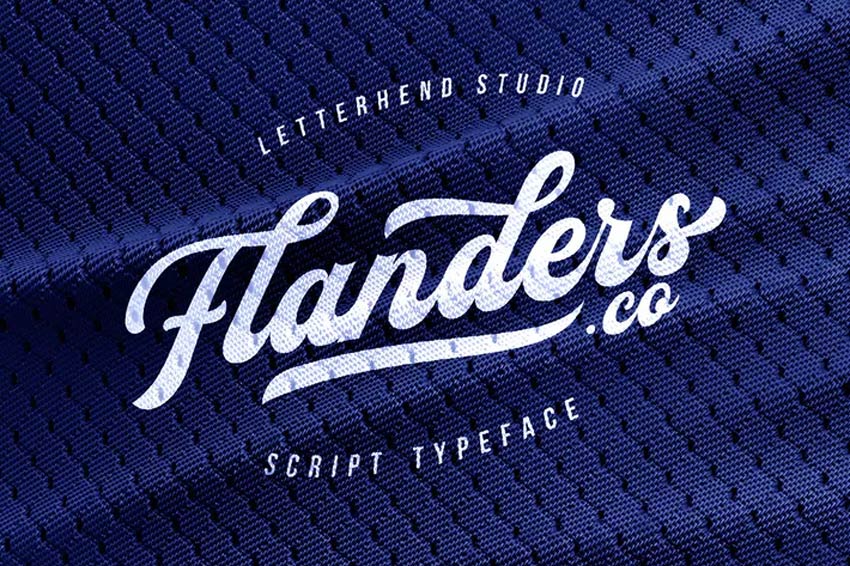
Looking for a quirky script font? Try out the Megattor Script font. Designed by Letterhend Studio, this cheeky font will add a flirty touch to any traditional sports theme. Create perfect hand-lettering posters with a natural handwriting feel. Try it out!
A mix of street and vintage, the Mattoa baseball font is definitely bold. Get 100% access to standard vintage characters, with support for extra characters and ligatures. Make sure to see the preview images to check out the cool swash alternates!
A retro font with over 400 glyphs, the Seren baseball script font looks great with added texture. Customize your logos with additional brush effects to make the most of this font. Letters, numbers, and basic punctuation are all included.
Complete your jersey with an awesome quote. The Milestone jersey font includes all the standard letter characters along with additional ornaments. Add a quick tail to the end of your brand or customize a team name. Enjoy regular and script versions in this set.
Here’s another fantastic baseball font with a classic tail. Perfect for restaurants or modern corporations, this typeface can be used with clean or rough aesthetics. Add a touch of grit for a grunge feel or keep it regular for a nice result. Add it to your collection!
Some modern baseball fonts feature a unique graffiti vibe. The Agistha baseball font, for instance, is our next example. Easily create creative logotypes or typography by simply installing this font. Use it for graphics, websites, and posters.
Some fonts fit many themes, like the Westdjava jersey font. This retro font script is great for sports themes but can also work for weddings, blogs, and more. Use it on various projects for a clean and professional look. Multilingual support is also included.
Many designers use sports fonts for video game titles, movie intros, and marketing campaigns. The Battams jersey font is made by using a constant line weight with an oval tip line. Customize your titles even further with additional perks like swashes and alternates.
This next font is a magnificent script typeface with lots of charisma. Use it for an official logotype or just try it out as a quick test. Bold and modern, this baseball script font is easy to install. Use it on both Macs and PCs.
Make unique 3D typography with the Marsmello baseball font. This script is clean and subtle, with a casual appearance that mimics old cartoon graphics. Use it by itself or add a quick shadow like the graphic below. Add it to your collection today!
Our next bold script font is the Marttabuck typeface. Created by Letterhend Studio, this vintage baseball font has a full and energetic appearance. Use it to announce your brand with a special handwritten look. Try out the regular and special font styles for different effects.
Here’s another superb corporate font inspired by college logos and lettering. The Mourbout font family would look stunning as a monogram or logo. An exclusive display typeface with elegant serif details, this type features regular and italic versions.
This next font duo includes sans and script typefaces. Pipetton is a classic retro font with an incredible baseball feel. A complete set of characters are included, as well as alternates, ligatures, and cool swashes. Give it a try!
Or make a long-lasting brand with this incredible vintage typeface. Frankey is an extraordinary baseball font with lots of charm. A mix of old and new, this set includes letters, numbers, and accented characters. Create beautiful designs for web or print work.
More Font Inspiration
Whether you’re looking for a classic baseball font or a more modern aesthetic, these retro typefaces are the best baseball fonts around. Remember to bookmark this post to rediscover your favorites.
Looking for more inspiration? Check out these articles:
Clean and pretty straight to the point, the Auckland baseball font is a stunner. Its elegant and minimalist design looks wonderful on fabrics and apparel, and it’s great for a team logo. Download it to get five alternates, ligatures, and swashes.
Batter up, slugger! This next baseball font features a classic retro design. Just type out your team name or logo into the font tester to see how it fits. Simple and effective, this modern typeface includes condensed, regular, and even script styles. Try it out!
Or check out this next baseball typeface, the Cosmoball font. Created by designer wacaksara, this baseball script font is bold and fluid. Its handwritten style gives it a nice casual flair, so it’ll pair wonderfully with eBooks, headlines, and so much more. Give it a try!
You can also achieve out-of-this-world layering effects with the Headster font family. Mix and match unique design elements for the best combination of vintage label designs. Add extra quick details like shadows or engraved text effects!
Bon voyage! Set up your next flyer with the fantastic Bon Voyage baseball jersey font. Featuring a classic sports look, this retro font duo lets you customize the style with ease. Create limitless combinations for a refreshed sports logo.
Inspired by retro typography? Now you can incorporate that authentic Fenway Park experience with this exciting typeface. This baseball jersey font is inspired by real team logos. Use it for posters, invites, or custom graphics.
Need a good college logo? Try out the Ballege typeface. Strong and professional, this college-inspired logo definitely commands some space. Test out the regular, oblique and bold variations to see which you prefer. Ten weights included.
The Montheim vintage script is a stunning retro font with a full, medium weight. Included in this download is a complete set of letters, numbers, and punctuation. Inspired by the retro typography movements, this font looks good on just about any vertical or horizontal layout.
Looking for a quirky script font? Try out the Megattor Script font. Designed by Letterhend Studio, this cheeky font will add a flirty touch to any traditional sports theme. Create perfect hand-lettering posters with a natural handwriting feel. Try it out!
A mix of street and vintage, the Mattoa baseball font is definitely bold. Get 100% access to standard vintage characters, with support for extra characters and ligatures. Make sure to see the preview images to check out the cool swash alternates!
A retro font with over 400 glyphs, the Seren baseball script font looks great with added texture. Customize your logos with additional brush effects to make the most of this font. Letters, numbers, and basic punctuation are all included.
Complete your jersey with an awesome quote. The Milestone jersey font includes all the standard letter characters along with additional ornaments. Add a quick tail to the end of your brand or customize a team name. Enjoy regular and script versions in this set.
Here’s another fantastic baseball font with a classic tail. Perfect for restaurants or modern corporations, this typeface can be used with clean or rough aesthetics. Add a touch of grit for a grunge feel or keep it regular for a nice result. Add it to your collection!
Some modern baseball fonts feature a unique graffiti vibe. The Agistha baseball font, for instance, is our next example. Easily create creative logotypes or typography by simply installing this font. Use it for graphics, websites, and posters.
Some fonts fit many themes, like the Westdjava jersey font. This retro font script is great for sports themes but can also work for weddings, blogs, and more. Use it on various projects for a clean and professional look. Multilingual support is also included.
Many designers use sports fonts for video game titles, movie intros, and marketing campaigns. The Battams jersey font is made by using a constant line weight with an oval tip line. Customize your titles even further with additional perks like swashes and alternates.
This next font is a magnificent script typeface with lots of charisma. Use it for an official logotype or just try it out as a quick test. Bold and modern, this baseball script font is easy to install. Use it on both Macs and PCs.
Make unique 3D typography with the Marsmello baseball font. This script is clean and subtle, with a casual appearance that mimics old cartoon graphics. Use it by itself or add a quick shadow like the graphic below. Add it to your collection today!
Our next bold script font is the Marttabuck typeface. Created by Letterhend Studio, this vintage baseball font has a full and energetic appearance. Use it to announce your brand with a special handwritten look. Try out the regular and special font styles for different effects.
Here’s another superb corporate font inspired by college logos and lettering. The Mourbout font family would look stunning as a monogram or logo. An exclusive display typeface with elegant serif details, this type features regular and italic versions.
This next font duo includes sans and script typefaces. Pipetton is a classic retro font with an incredible baseball feel. A complete set of characters are included, as well as alternates, ligatures, and cool swashes. Give it a try!
Or make a long-lasting brand with this incredible vintage typeface. Frankey is an extraordinary baseball font with lots of charm. A mix of old and new, this set includes letters, numbers, and accented characters. Create beautiful designs for web or print work.
More Font Inspiration
Whether you’re looking for a classic baseball font or a more modern aesthetic, these retro typefaces are the best baseball fonts around. Remember to bookmark this post to rediscover your favorites.
Looking for more inspiration? Check out these articles:
Clean and pretty straight to the point, the Auckland baseball font is a stunner. Its elegant and minimalist design looks wonderful on fabrics and apparel, and it’s great for a team logo. Download it to get five alternates, ligatures, and swashes.
Batter up, slugger! This next baseball font features a classic retro design. Just type out your team name or logo into the font tester to see how it fits. Simple and effective, this modern typeface includes condensed, regular, and even script styles. Try it out!
Or check out this next baseball typeface, the Cosmoball font. Created by designer wacaksara, this baseball script font is bold and fluid. Its handwritten style gives it a nice casual flair, so it’ll pair wonderfully with eBooks, headlines, and so much more. Give it a try!
You can also achieve out-of-this-world layering effects with the Headster font family. Mix and match unique design elements for the best combination of vintage label designs. Add extra quick details like shadows or engraved text effects!
Bon voyage! Set up your next flyer with the fantastic Bon Voyage baseball jersey font. Featuring a classic sports look, this retro font duo lets you customize the style with ease. Create limitless combinations for a refreshed sports logo.
Inspired by retro typography? Now you can incorporate that authentic Fenway Park experience with this exciting typeface. This baseball jersey font is inspired by real team logos. Use it for posters, invites, or custom graphics.
Need a good college logo? Try out the Ballege typeface. Strong and professional, this college-inspired logo definitely commands some space. Test out the regular, oblique and bold variations to see which you prefer. Ten weights included.
The Montheim vintage script is a stunning retro font with a full, medium weight. Included in this download is a complete set of letters, numbers, and punctuation. Inspired by the retro typography movements, this font looks good on just about any vertical or horizontal layout.
Looking for a quirky script font? Try out the Megattor Script font. Designed by Letterhend Studio, this cheeky font will add a flirty touch to any traditional sports theme. Create perfect hand-lettering posters with a natural handwriting feel. Try it out!
A mix of street and vintage, the Mattoa baseball font is definitely bold. Get 100% access to standard vintage characters, with support for extra characters and ligatures. Make sure to see the preview images to check out the cool swash alternates!
A retro font with over 400 glyphs, the Seren baseball script font looks great with added texture. Customize your logos with additional brush effects to make the most of this font. Letters, numbers, and basic punctuation are all included.
Complete your jersey with an awesome quote. The Milestone jersey font includes all the standard letter characters along with additional ornaments. Add a quick tail to the end of your brand or customize a team name. Enjoy regular and script versions in this set.
Here’s another fantastic baseball font with a classic tail. Perfect for restaurants or modern corporations, this typeface can be used with clean or rough aesthetics. Add a touch of grit for a grunge feel or keep it regular for a nice result. Add it to your collection!
Some modern baseball fonts feature a unique graffiti vibe. The Agistha baseball font, for instance, is our next example. Easily create creative logotypes or typography by simply installing this font. Use it for graphics, websites, and posters.
Some fonts fit many themes, like the Westdjava jersey font. This retro font script is great for sports themes but can also work for weddings, blogs, and more. Use it on various projects for a clean and professional look. Multilingual support is also included.
Many designers use sports fonts for video game titles, movie intros, and marketing campaigns. The Battams jersey font is made by using a constant line weight with an oval tip line. Customize your titles even further with additional perks like swashes and alternates.
This next font is a magnificent script typeface with lots of charisma. Use it for an official logotype or just try it out as a quick test. Bold and modern, this baseball script font is easy to install. Use it on both Macs and PCs.
Make unique 3D typography with the Marsmello baseball font. This script is clean and subtle, with a casual appearance that mimics old cartoon graphics. Use it by itself or add a quick shadow like the graphic below. Add it to your collection today!
Our next bold script font is the Marttabuck typeface. Created by Letterhend Studio, this vintage baseball font has a full and energetic appearance. Use it to announce your brand with a special handwritten look. Try out the regular and special font styles for different effects.
Here’s another superb corporate font inspired by college logos and lettering. The Mourbout font family would look stunning as a monogram or logo. An exclusive display typeface with elegant serif details, this type features regular and italic versions.
This next font duo includes sans and script typefaces. Pipetton is a classic retro font with an incredible baseball feel. A complete set of characters are included, as well as alternates, ligatures, and cool swashes. Give it a try!
Or make a long-lasting brand with this incredible vintage typeface. Frankey is an extraordinary baseball font with lots of charm. A mix of old and new, this set includes letters, numbers, and accented characters. Create beautiful designs for web or print work.
More Font Inspiration
Whether you’re looking for a classic baseball font or a more modern aesthetic, these retro typefaces are the best baseball fonts around. Remember to bookmark this post to rediscover your favorites.
Looking for more inspiration? Check out these articles:
Clean and pretty straight to the point, the Auckland baseball font is a stunner. Its elegant and minimalist design looks wonderful on fabrics and apparel, and it’s great for a team logo. Download it to get five alternates, ligatures, and swashes.
Batter up, slugger! This next baseball font features a classic retro design. Just type out your team name or logo into the font tester to see how it fits. Simple and effective, this modern typeface includes condensed, regular, and even script styles. Try it out!
Or check out this next baseball typeface, the Cosmoball font. Created by designer wacaksara, this baseball script font is bold and fluid. Its handwritten style gives it a nice casual flair, so it’ll pair wonderfully with eBooks, headlines, and so much more. Give it a try!
You can also achieve out-of-this-world layering effects with the Headster font family. Mix and match unique design elements for the best combination of vintage label designs. Add extra quick details like shadows or engraved text effects!
Bon voyage! Set up your next flyer with the fantastic Bon Voyage baseball jersey font. Featuring a classic sports look, this retro font duo lets you customize the style with ease. Create limitless combinations for a refreshed sports logo.
Inspired by retro typography? Now you can incorporate that authentic Fenway Park experience with this exciting typeface. This baseball jersey font is inspired by real team logos. Use it for posters, invites, or custom graphics.
Need a good college logo? Try out the Ballege typeface. Strong and professional, this college-inspired logo definitely commands some space. Test out the regular, oblique and bold variations to see which you prefer. Ten weights included.
The Montheim vintage script is a stunning retro font with a full, medium weight. Included in this download is a complete set of letters, numbers, and punctuation. Inspired by the retro typography movements, this font looks good on just about any vertical or horizontal layout.
Looking for a quirky script font? Try out the Megattor Script font. Designed by Letterhend Studio, this cheeky font will add a flirty touch to any traditional sports theme. Create perfect hand-lettering posters with a natural handwriting feel. Try it out!
A mix of street and vintage, the Mattoa baseball font is definitely bold. Get 100% access to standard vintage characters, with support for extra characters and ligatures. Make sure to see the preview images to check out the cool swash alternates!
A retro font with over 400 glyphs, the Seren baseball script font looks great with added texture. Customize your logos with additional brush effects to make the most of this font. Letters, numbers, and basic punctuation are all included.
Complete your jersey with an awesome quote. The Milestone jersey font includes all the standard letter characters along with additional ornaments. Add a quick tail to the end of your brand or customize a team name. Enjoy regular and script versions in this set.
Here’s another fantastic baseball font with a classic tail. Perfect for restaurants or modern corporations, this typeface can be used with clean or rough aesthetics. Add a touch of grit for a grunge feel or keep it regular for a nice result. Add it to your collection!
Some modern baseball fonts feature a unique graffiti vibe. The Agistha baseball font, for instance, is our next example. Easily create creative logotypes or typography by simply installing this font. Use it for graphics, websites, and posters.
Some fonts fit many themes, like the Westdjava jersey font. This retro font script is great for sports themes but can also work for weddings, blogs, and more. Use it on various projects for a clean and professional look. Multilingual support is also included.
Many designers use sports fonts for video game titles, movie intros, and marketing campaigns. The Battams jersey font is made by using a constant line weight with an oval tip line. Customize your titles even further with additional perks like swashes and alternates.
This next font is a magnificent script typeface with lots of charisma. Use it for an official logotype or just try it out as a quick test. Bold and modern, this baseball script font is easy to install. Use it on both Macs and PCs.
Make unique 3D typography with the Marsmello baseball font. This script is clean and subtle, with a casual appearance that mimics old cartoon graphics. Use it by itself or add a quick shadow like the graphic below. Add it to your collection today!
Our next bold script font is the Marttabuck typeface. Created by Letterhend Studio, this vintage baseball font has a full and energetic appearance. Use it to announce your brand with a special handwritten look. Try out the regular and special font styles for different effects.
Here’s another superb corporate font inspired by college logos and lettering. The Mourbout font family would look stunning as a monogram or logo. An exclusive display typeface with elegant serif details, this type features regular and italic versions.
This next font duo includes sans and script typefaces. Pipetton is a classic retro font with an incredible baseball feel. A complete set of characters are included, as well as alternates, ligatures, and cool swashes. Give it a try!
Or make a long-lasting brand with this incredible vintage typeface. Frankey is an extraordinary baseball font with lots of charm. A mix of old and new, this set includes letters, numbers, and accented characters. Create beautiful designs for web or print work.
More Font Inspiration
Whether you’re looking for a classic baseball font or a more modern aesthetic, these retro typefaces are the best baseball fonts around. Remember to bookmark this post to rediscover your favorites.
Looking for more inspiration? Check out these articles: