In the relentless tide of modern marketing, where consumers are bombarded with thousands of advertisements daily, creativity stands as the vital force that separates memorable campaigns from forgettable noise. It’s no longer enough for advertisements to simply showcase products or services – they must tell compelling stories, evoke emotions, and forge genuine connections with audiences. Creativity in advertising isn’t merely about artistic expression; it’s the strategic catalyst that transforms commercial messages into cultural moments, driving both brand recognition and business results.
The most impactful advertising campaigns of our time have all shared one fundamental characteristic: they dared to break conventional boundaries. From Apple’s legendary “1984” commercial to Dove’s “Real Beauty” campaign, creative innovation has consistently proven its ability to not only capture attention but also reshape societal conversations. In today’s digital age, where consumers can easily skip, block, or ignore traditional advertising, creativity has become even more crucial as the key to voluntary engagement.
Research consistently demonstrates that creative advertisements generate significantly higher recall rates and positive brand associations. A study by Nielsen found that creative quality can be responsible for up to 47% of sales contribution, making it the single most important factor in advertising effectiveness. Yet creativity in advertising extends beyond mere artistic flair – it encompasses innovative media usage, unexpected storytelling approaches, and the ability to present familiar concepts from fresh perspectives.
Moreover, creativity serves as the bridge between brands and human experience, transforming product features into emotional benefits and corporate messages into shared values. In an era where authenticity and relevance reign supreme, creative advertising has evolved from being a luxury to becoming an absolute necessity. It’s the difference between speaking at audiences and speaking with them, between pushing products and sharing visions.
1. Timex
Timex takes a jab at smart watches in this clever ad, subtly pointing at one of the main defaults of smart watches, the fact that they are somewhat stressing you.
2. Ryanair
The company, which specializes in cheap flights, brilliantly demonstrates just how cheap its flights are by comparing the price of a flight with the price of a pizza.
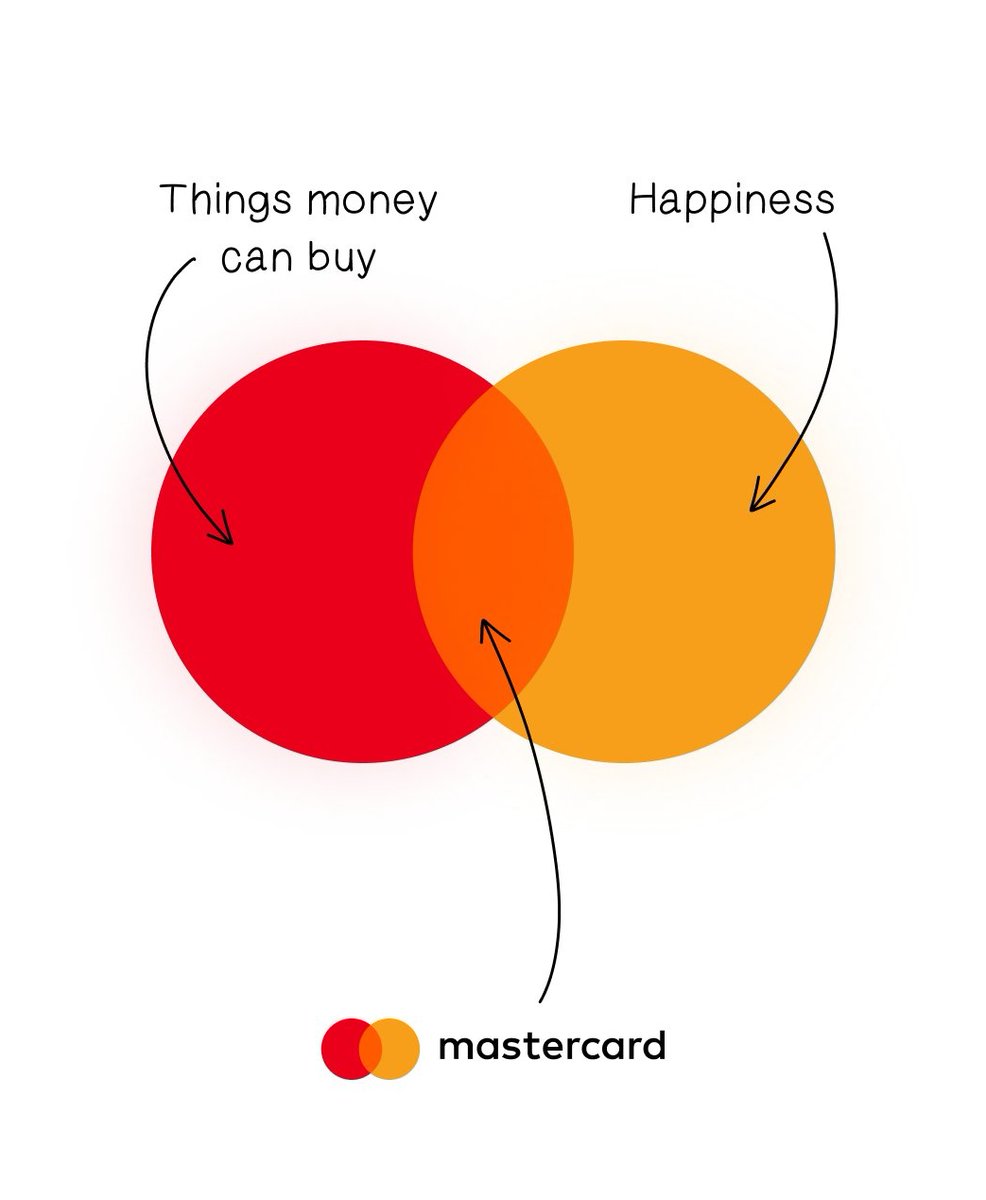
3. Mastercard
Masterclass capitilizes on its existing slogans to deliver a simple but powerful message.
4. New Balance
A simple observation that send the best message: these shoes are for everyone.
5. Durex
Durex shows how expensive it can be to forget to wear a condom, compares it with the price of its product.
6. Sam
A very clever ad, showing what it could look like if you don’t have a graphic designer.
7. KFC
Imitation is the ultimate flattery, KFC knows it and uses it as a sales argument.
8. Reykjavík Metropolitan Police
Visually unappealing, this ad is still powerful and doesn’t leave any space for doubt.
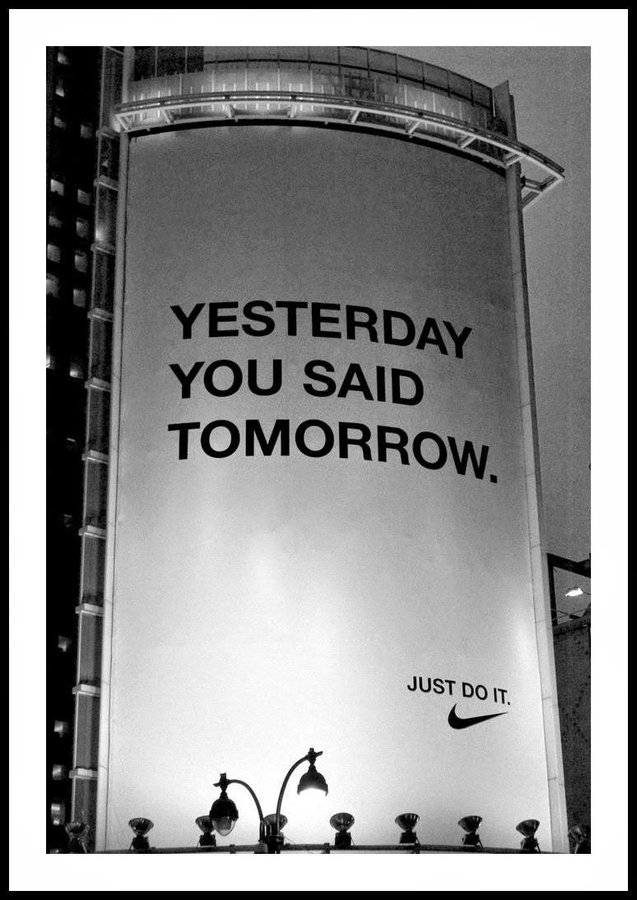
9. Nike
Nike’s “Just do it” slogan is very clear, this ad makes it even clearer. No excuses!
10. IKEA
A funny parody of Balenciaga’s fashion by IKEA, demonstrating that you don’t need to spend a lot of money to wear ugly clothes.
11. Tesla
Tesla’s marketing managers know what you will read first and took advantage of it for this campaign, letting you feel exactly how fast Tesla’s cars accelerate.
12. Raid
A bit brutal, but the most visual way to let you understand exactly how powerful Raid’s products are.
Alt text is one of those things in my muscle memory that pops up anytime I’m working with an image element. The attribute almost writes itself.
<img src="image.jpg" alt="">
Or if you use Emmet, that’s autocompleted for you. Don’t forget the alt text! Use it even if there’s no need for it, as an empty string is simply skipped by screen readers. That’s called “nulling” the alternative text and many screen readers simply announce the image file name. Just be sure it’s truly an empty string because even a space gets picked up by some assistive tech, which causes a screen reader to completely skip the image:
Probably is doing a lot of lifting there because not all images are equal when it comes to content and context. Emma Cionca and Tanner Kohler have a fresh study on those situations where you probably don’t need alt. It’s a well-written and researched piece and I’m rounding up some nuggets from it.
What Users Need from Alt Text
It’s the same as what anyone else would need from an image: an easy path to accomplish basic tasks. A product image is a good example of that. Providing a visual smooths the path to purchasing because it’s context about what the item looks like and what to expect when you get it. Not providing an image almost adds friction to the experience if you have to stop and ask customer support basic questions about the size and color of that shirt you want.
So, yes. Describe that image in alt! But maybe “describe” isn’t the best wording because the article moves on to make the next point…
Quit Describing What Images Look Like
The article gets into a common trap that I’m all too guilty of, which is describing an image in a way that I find helpful. Or, as the article says, it’s a lot like I’m telling myself, “I’ll describe it in the alt text so screen-reader users can imagine what they aren’t seeing.”
That’s the wrong way of going about it. Getting back to the example of a product image, the article outlines how a screen reader might approach it:
For example, here’s how a screen-reader user might approach a product page:
Jump between the page headers to get a sense of the page structure.
Explore the details of a specific section with the heading label Product Description.
Encounter an image and wonder “What information that I might have missed elsewhere does this image communicate about the product?”
Interesting! Where I might encounter an image and evaluate it based on the text around it, a screen reader is already questioning what content has been missed around it. This passage is one I need to reflect on (emphasis mine):
Most of the time, screen-reader users don’t wonder what images look like. Instead, they want to know their purpose. (Exceptions to this rule might include websites presenting images, such as artwork, purely for visual enjoyment, or users who could previously see and have lost their sight.)
OK, so how in the heck do we know when an image needs describing? It feels so awkward making what’s ultimately a subjective decision. Even so, the article presents three questions to pose to ourselves to determine the best route.
Is the image repetitive? Is the task-related information in the image also found elsewhere on the page?
Is the image referential? Does the page copy directly reference the image?
Is the image efficient? Could alt text help users more efficiently complete a task?
This is the meat of the article, so I’m gonna break those out.
Is the image repetitive?
Repetitive in the sense that the content around it is already doing a bang-up job painting a picture. If the image is already aptly “described” by content, then perhaps it’s possible to get away with nulling the alt attribute.
This is the figure the article uses to make the point (and, yes, I’m alt-ing it):
The caption for this image describes exactly what the image communicates. Therefore, any alt text for the image will be redundant and a waste of time for screen-reader users. In this case, the actual alt text was the same as the caption. Coming across the same information twice in a row feels even more confusing and unnecessary.
The happy path:
<img src="image.jpg" alt="">
But check this out this image about informal/semi-formal table setting showing how it is not described by the text around it (and, no, I’m not alt-ing it):
If I was to describe this image, I might get carried away describing the diagram and all the points outlined in the legend. If I can read all of that, then a screen reader should, too, right? Not exactly. I really appreciate the slew of examples provided in the article. A sampling:
Bread plate and butter knife, located in the top left corner.
Dessert fork, placed horizontally at the top center.
Dessert spoon, placed horizontally at the top center, below the dessert fork.
The second image I dropped in that last section is a good example of a referential image because I directly referenced it in the content preceding it. I nulled the alt attribute because of that. But what I messed up is not making the image recognizable to screen readers. If the alt attribute is null, then the screen reader skips it. But the screen reader should still know it’s there even if it’s aptly described.
The happy path:
<img src="image.jpg" alt="">
Remember that a screen reader may announce the image’s file name. So maybe use that as an opportunity to both call out the image and briefly describe it. Again, we want the screen reader to announce the image if we make mention of it in the content around it. Simply skipping it may cause more confusion than clarity.
Is the image efficient?
My mind always goes to performance when I see the word efficient pop up in reference to images. But in this context the article means whether or not the image can help visitors efficiently complete a task.
If the image helps complete a task, say purchasing a product, then yes, the image needs alt text. But if the content surrounding it already does the job then we can leave it null (alt="") or skip it (alt=" ") if there’s no mention of it.
Wrapping up
I put a little demo together with some testing results from a few different screen readers to see how all of that shakes out.
Alt text is one of those things in my muscle memory that pops up anytime I’m working with an image element. The attribute almost writes itself.
<img src="image.jpg" alt="">
Or if you use Emmet, that’s autocompleted for you. Don’t forget the alt text! Use it even if there’s no need for it, as an empty string is simply skipped by screen readers. That’s called “nulling” the alternative text and many screen readers simply announce the image file name. Just be sure it’s truly an empty string because even a space gets picked up by some assistive tech, which causes a screen reader to completely skip the image:
Probably is doing a lot of lifting there because not all images are equal when it comes to content and context. Emma Cionca and Tanner Kohler have a fresh study on those situations where you probably don’t need alt. It’s a well-written and researched piece and I’m rounding up some nuggets from it.
What Users Need from Alt Text
It’s the same as what anyone else would need from an image: an easy path to accomplish basic tasks. A product image is a good example of that. Providing a visual smooths the path to purchasing because it’s context about what the item looks like and what to expect when you get it. Not providing an image almost adds friction to the experience if you have to stop and ask customer support basic questions about the size and color of that shirt you want.
So, yes. Describe that image in alt! But maybe “describe” isn’t the best wording because the article moves on to make the next point…
Quit Describing What Images Look Like
The article gets into a common trap that I’m all too guilty of, which is describing an image in a way that I find helpful. Or, as the article says, it’s a lot like I’m telling myself, “I’ll describe it in the alt text so screen-reader users can imagine what they aren’t seeing.”
That’s the wrong way of going about it. Getting back to the example of a product image, the article outlines how a screen reader might approach it:
For example, here’s how a screen-reader user might approach a product page:
Jump between the page headers to get a sense of the page structure.
Explore the details of a specific section with the heading label Product Description.
Encounter an image and wonder “What information that I might have missed elsewhere does this image communicate about the product?”
Interesting! Where I might encounter an image and evaluate it based on the text around it, a screen reader is already questioning what content has been missed around it. This passage is one I need to reflect on (emphasis mine):
Most of the time, screen-reader users don’t wonder what images look like. Instead, they want to know their purpose. (Exceptions to this rule might include websites presenting images, such as artwork, purely for visual enjoyment, or users who could previously see and have lost their sight.)
OK, so how in the heck do we know when an image needs describing? It feels so awkward making what’s ultimately a subjective decision. Even so, the article presents three questions to pose to ourselves to determine the best route.
Is the image repetitive? Is the task-related information in the image also found elsewhere on the page?
Is the image referential? Does the page copy directly reference the image?
Is the image efficient? Could alt text help users more efficiently complete a task?
This is the meat of the article, so I’m gonna break those out.
Is the image repetitive?
Repetitive in the sense that the content around it is already doing a bang-up job painting a picture. If the image is already aptly “described” by content, then perhaps it’s possible to get away with nulling the alt attribute.
This is the figure the article uses to make the point (and, yes, I’m alt-ing it):
The caption for this image describes exactly what the image communicates. Therefore, any alt text for the image will be redundant and a waste of time for screen-reader users. In this case, the actual alt text was the same as the caption. Coming across the same information twice in a row feels even more confusing and unnecessary.
The happy path:
<img src="image.jpg" alt="">
But check this out this image about informal/semi-formal table setting showing how it is not described by the text around it (and, no, I’m not alt-ing it):
If I was to describe this image, I might get carried away describing the diagram and all the points outlined in the legend. If I can read all of that, then a screen reader should, too, right? Not exactly. I really appreciate the slew of examples provided in the article. A sampling:
Bread plate and butter knife, located in the top left corner.
Dessert fork, placed horizontally at the top center.
Dessert spoon, placed horizontally at the top center, below the dessert fork.
The second image I dropped in that last section is a good example of a referential image because I directly referenced it in the content preceding it. I nulled the alt attribute because of that. But what I messed up is not making the image recognizable to screen readers. If the alt attribute is null, then the screen reader skips it. But the screen reader should still know it’s there even if it’s aptly described.
The happy path:
<img src="image.jpg" alt="">
Remember that a screen reader may announce the image’s file name. So maybe use that as an opportunity to both call out the image and briefly describe it. Again, we want the screen reader to announce the image if we make mention of it in the content around it. Simply skipping it may cause more confusion than clarity.
Is the image efficient?
My mind always goes to performance when I see the word efficient pop up in reference to images. But in this context the article means whether or not the image can help visitors efficiently complete a task.
If the image helps complete a task, say purchasing a product, then yes, the image needs alt text. But if the content surrounding it already does the job then we can leave it null (alt="") or skip it (alt=" ") if there’s no mention of it.
Wrapping up
I put a little demo together with some testing results from a few different screen readers to see how all of that shakes out.
In San Diego, sophisticated remodeling trends blend coastal charm with modern luxury. Custom cabinetry, natural stone finishes, and eco-friendly materials are key. Open-concept layouts maximize space and natural light, perfect for the sunny climate. Features like outdoor kitchens, spa-inspired bathrooms, and smart-home technology elevate homes with lasting style. Speaking to San Diego home remodeling experts can provide further clarity on the ongoing and outgoing trends.
People who own homes always want to improve their living areas to show off their taste and keep up with conveniences. Home renovation trends are always shifting, and there are always new ideas for those who want a mix of style and usefulness. This article delves into the trends that are turning houses into retreats filled with luxury.
Renovating Responsibly: Making Decisions for Home Improvements
Nowadays, sustainability is a factor to consider in home renovations. Using eco-friendly materials and energy systems not only helps reduce the impact on the environment but also increases a home’s value. Bamboo flooring, reclaimed wood, and fixtures made from recycled metal are favored options by homeowners who care about the environment. Moreover, installing panels and smart thermostats can substantially decrease energy expenses while improving efficiency. Embracing these practices goes hand in hand with the trend towards eco-friendly living, making them a priority for many people.
Exploring the Benefits of Open Floor Plans
Open floor plans are becoming increasingly popular. They create connected spaces within a home by eliminating walls to promote a seamless flow between areas. This enhances natural light and encourages social interactions among residents and guests. The integration of spaces, such as dining and kitchen areas, provides a sense of openness and spaciousness. This layout is ideal for those who frequently host gatherings, allowing guests to move freely without obstructions. Additionally, the open-concept design offers flexibility to modify the arrangement of spaces over time to adapt to changing needs. It’s a modern approach to functional and inviting home design.
Enhancing Your Bathroom with Luxury Upgrades
In recent times, bathrooms have evolved into havens of tranquility and luxury for people at home. Homeowners are now more inclined towards creating spa bathrooms that include elements such as rain showers and stand-alone bathtubs along with heated floors for added comfort. The use of premium materials like marble or quartz for countertops adds a touch of elegance and sophistication to these spaces.
The Emergence of Intelligent Home Technology
Advanced homes epitomize contemporary living at its finest, with technology seamlessly integrated to improve security and convenience while optimizing energy usage. Voice-controlled assistants manage lighting ambiance adjustments and temperature settings alongside entertainment options for smoother operations. Enhanced security measures, including monitoring and intelligent locks, provide a sense of reassurance. As technology progresses further, homes will increasingly cater to the needs of individuals seeking innovative lifestyle solutions.
Eternal Kitchen Styles
In every household’s heartbeat lies the kitchen’s essence. An evolving blend of beauty and practicality, its design approach stands the test of time by embracing elements like stone countertops and wooden cabinetry for a touch of nature indoors. Soft hues and shades create a sound ambiance within these spaces, while splashes of colors inject individuality and character. Modern appliances harmoniously integrate into the kitchen environment, marrying fashion with functionality. A focus on storage solutions ensures that kitchens maintain their charm and allure by keeping clutter at bay.
Al Fresco Areas for Relaxing Outdoors
Turning spaces into additions to homes has become increasingly popular among homeowners lately. Headquarters for relaxation and social gatherings are provided by patios, gardens, and decks. Outdoor kitchens, firesides, and cozy seating areas enhance the pleasure throughout the year. Landscaping is pivotal in crafting relaxing atmospheres, and flora and eco-friendly watering systems are taking the lead. These outdoor oases provide a sanctuary for homeowners looking to commune with nature while staying on their property.
Tailored Interior Decorating
Home renovation continues to be influenced by the desire for customization as people look to create living spaces that mirror their style and preferences. Custom-made furniture and unique artwork add a touch to homes and bring out their personality. Tailoring color palettes and incorporating design elements into each room helps tell a story. This trend highlights the importance of expressing individuality and imagination by designing living spaces.
In Summary
Modern home improvement trends provide homeowners with the chance to design living areas that combine sophistication with eco-friendliness and high-tech features effectively. By embracing these ideas and designs in home renovation projects, you can turn your living spaces into retreats that cater to contemporary lifestyles and reflect your individual tastes. Whether it’s opting for materials or embracing open-plan layouts and smart home devices, the latest trends in home renovation point toward the direction of tomorrow’s living spaces. Homeowners who value these aspects will undoubtedly elevate the ambiance of their home, drawing a balance between coziness and elegance.
In San Diego, sophisticated remodeling trends blend coastal charm with modern luxury. Custom cabinetry, natural stone finishes, and eco-friendly materials are key. Open-concept layouts maximize space and natural light, perfect for the sunny climate. Features like outdoor kitchens, spa-inspired bathrooms, and smart-home technology elevate homes with lasting style. Speaking to San Diego home remodeling experts can provide further clarity on the ongoing and outgoing trends.
People who own homes always want to improve their living areas to show off their taste and keep up with conveniences. Home renovation trends are always shifting, and there are always new ideas for those who want a mix of style and usefulness. This article delves into the trends that are turning houses into retreats filled with luxury.
Renovating Responsibly: Making Decisions for Home Improvements
Nowadays, sustainability is a factor to consider in home renovations. Using eco-friendly materials and energy systems not only helps reduce the impact on the environment but also increases a home’s value. Bamboo flooring, reclaimed wood, and fixtures made from recycled metal are favored options by homeowners who care about the environment. Moreover, installing panels and smart thermostats can substantially decrease energy expenses while improving efficiency. Embracing these practices goes hand in hand with the trend towards eco-friendly living, making them a priority for many people.
Exploring the Benefits of Open Floor Plans
Open floor plans are becoming increasingly popular. They create connected spaces within a home by eliminating walls to promote a seamless flow between areas. This enhances natural light and encourages social interactions among residents and guests. The integration of spaces, such as dining and kitchen areas, provides a sense of openness and spaciousness. This layout is ideal for those who frequently host gatherings, allowing guests to move freely without obstructions. Additionally, the open-concept design offers flexibility to modify the arrangement of spaces over time to adapt to changing needs. It’s a modern approach to functional and inviting home design.
Enhancing Your Bathroom with Luxury Upgrades
In recent times, bathrooms have evolved into havens of tranquility and luxury for people at home. Homeowners are now more inclined towards creating spa bathrooms that include elements such as rain showers and stand-alone bathtubs along with heated floors for added comfort. The use of premium materials like marble or quartz for countertops adds a touch of elegance and sophistication to these spaces.
The Emergence of Intelligent Home Technology
Advanced homes epitomize contemporary living at its finest, with technology seamlessly integrated to improve security and convenience while optimizing energy usage. Voice-controlled assistants manage lighting ambiance adjustments and temperature settings alongside entertainment options for smoother operations. Enhanced security measures, including monitoring and intelligent locks, provide a sense of reassurance. As technology progresses further, homes will increasingly cater to the needs of individuals seeking innovative lifestyle solutions.
Eternal Kitchen Styles
In every household’s heartbeat lies the kitchen’s essence. An evolving blend of beauty and practicality, its design approach stands the test of time by embracing elements like stone countertops and wooden cabinetry for a touch of nature indoors. Soft hues and shades create a sound ambiance within these spaces, while splashes of colors inject individuality and character. Modern appliances harmoniously integrate into the kitchen environment, marrying fashion with functionality. A focus on storage solutions ensures that kitchens maintain their charm and allure by keeping clutter at bay.
Al Fresco Areas for Relaxing Outdoors
Turning spaces into additions to homes has become increasingly popular among homeowners lately. Headquarters for relaxation and social gatherings are provided by patios, gardens, and decks. Outdoor kitchens, firesides, and cozy seating areas enhance the pleasure throughout the year. Landscaping is pivotal in crafting relaxing atmospheres, and flora and eco-friendly watering systems are taking the lead. These outdoor oases provide a sanctuary for homeowners looking to commune with nature while staying on their property.
Tailored Interior Decorating
Home renovation continues to be influenced by the desire for customization as people look to create living spaces that mirror their style and preferences. Custom-made furniture and unique artwork add a touch to homes and bring out their personality. Tailoring color palettes and incorporating design elements into each room helps tell a story. This trend highlights the importance of expressing individuality and imagination by designing living spaces.
In Summary
Modern home improvement trends provide homeowners with the chance to design living areas that combine sophistication with eco-friendliness and high-tech features effectively. By embracing these ideas and designs in home renovation projects, you can turn your living spaces into retreats that cater to contemporary lifestyles and reflect your individual tastes. Whether it’s opting for materials or embracing open-plan layouts and smart home devices, the latest trends in home renovation point toward the direction of tomorrow’s living spaces. Homeowners who value these aspects will undoubtedly elevate the ambiance of their home, drawing a balance between coziness and elegance.
To pick the right payment tool for advertising, you need to take a few key steps. First, analyze the market. Second, define the goals of your ad campaigns. Third, be ready to test different options. Right now, virtual cards are the most reliable tool for ad payments. They offer secure, hassle-free transactions, help prevent payment blocks, and make budgeting easier.
In this article, we’ll explore how to choose virtual cards for your digital campaigns. We’ll break down the key features to look for, using examples from three top-rated virtual card providers with positive user feedback.
Read on for a review of PSTNET, Ezzocard, and Abcard.
1. PSTNET
PSTNET is a financial platform that issues different types of Visa and Mastercard virtual cards. For ad payments, it offers segmented cards tailored to specific platforms, a universal ad card, and even premium credit cards for advertising.
The service provides 25+ trusted BINs from U.S. and European banks, which helps minimize the risk of encountering blocked or flagged payments. You can issue unlimited cards with zero transaction fees, and there’s no charge for frozen or blocked card operations.
PST.NET also includes a BIN-checker called “Pulse.” This tool lets you check card type, issuing region, billing thresholds, average monthly spending, and approval/rejection rates.
Key Features:
Card Funding: Supports 18 cryptocurrencies (BTC, USDT TRC20, ERC20, and others), SWIFT/SEPA bank transfers, and other Visa/Mastercard cards
Withdrawals: 0% commission in USDT
Team Collaboration Tools: Assign tasks, set roles, manage card limits, and access detailed financial reports
3D Secure Technology: Ensures secure transactions
Telegram Bot: Get 3D Secure codes and service updates in real time
Registration: Sign up via Apple ID, Google, Telegram, WhatsApp, or email
Support: Instant assistance via Telegram, WhatsApp, or live chat
2. Ezzocard
Ezzocard specializes in prepaid Visa and Mastercard virtual cards for online payments. The standout feature of Ezzocard is its simplicity and speed of card issuance. Users don’t need to complete a verification process, making it easy to get started. The cards come with BINs from U.S., U.K., and European banks.
While Ezzocard doesn’t charge transaction fees, there’s a card issuance fee based on the card’s value and type. Cards are available in denominations ranging from $10 to $2,000.
Key Features:
Card Funding: Supports 9 cryptocurrencies (BTC, USDT TRC20, ERC20, and others) and popular crypto wallets
Withdrawals: Available on select cards
Team Collaboration Tools: Not available
3D Secure Technology: Supported on some cards
Registration: No data verification required; registration takes just one minute
Support: Available via live chat on the website or email
3. AnyBill
AnyBill focuses on virtual cards designed for advertising. Its cards are compatible with Visa, Mastercard, and UnionPay systems. Users can choose from 5 trusted BINs from U.K., U.S., and European banks.
You can issue unlimited cards, but each card requires a minimum deposit of $500. Abcard charges zero transaction fees and has a 4.5% fee for card balance top-ups.
Key Features:
Card Funding: USDT only (TRC20, ERC20)
Withdrawals: Available in USDT
Team Collaboration Tools: Assign roles, manage tasks, and access financial reports
3D Secure Technology: Supported on select BINs
Registration: Standard form with quick account verification via Telegram bot
Support: Assistance available via live chat on the website or email
Virtual cards are a game-changer for digital teams, helping minimize payment blocks on ad platforms, simplify budget management, and save valuable time.
Choosing the right provider depends on your specific needs. Key factors to consider include fees, limits, funding and withdrawal options, team tools, and advanced security features like 3D Secure.
Each team has unique goals, so the “perfect” card is the one that aligns with your objectives. All the providers in this review are well-suited for ad payments thanks to their specialized features.
PSTNET offers extensive tools for large ad teams, including trusted BINs and cashback options. Ezzocard is ideal for a quick start without verification, while Abcard stands out for its streamlined dashboard and focused crypto functionality.
Ultimately, every service has its strengths. Test and choose the one that fits your goals best.
To pick the right payment tool for advertising, you need to take a few key steps. First, analyze the market. Second, define the goals of your ad campaigns. Third, be ready to test different options. Right now, virtual cards are the most reliable tool for ad payments. They offer secure, hassle-free transactions, help prevent payment blocks, and make budgeting easier.
In this article, we’ll explore how to choose virtual cards for your digital campaigns. We’ll break down the key features to look for, using examples from three top-rated virtual card providers with positive user feedback.
Read on for a review of PSTNET, Ezzocard, and Abcard.
1. PSTNET
PSTNET is a financial platform that issues different types of Visa and Mastercard virtual cards. For ad payments, it offers segmented cards tailored to specific platforms, a universal ad card, and even premium credit cards for advertising.
The service provides 25+ trusted BINs from U.S. and European banks, which helps minimize the risk of encountering blocked or flagged payments. You can issue unlimited cards with zero transaction fees, and there’s no charge for frozen or blocked card operations.
PST.NET also includes a BIN-checker called “Pulse.” This tool lets you check card type, issuing region, billing thresholds, average monthly spending, and approval/rejection rates.
Key Features:
Card Funding: Supports 18 cryptocurrencies (BTC, USDT TRC20, ERC20, and others), SWIFT/SEPA bank transfers, and other Visa/Mastercard cards
Withdrawals: 0% commission in USDT
Team Collaboration Tools: Assign tasks, set roles, manage card limits, and access detailed financial reports
3D Secure Technology: Ensures secure transactions
Telegram Bot: Get 3D Secure codes and service updates in real time
Registration: Sign up via Apple ID, Google, Telegram, WhatsApp, or email
Support: Instant assistance via Telegram, WhatsApp, or live chat
2. Ezzocard
Ezzocard specializes in prepaid Visa and Mastercard virtual cards for online payments. The standout feature of Ezzocard is its simplicity and speed of card issuance. Users don’t need to complete a verification process, making it easy to get started. The cards come with BINs from U.S., U.K., and European banks.
While Ezzocard doesn’t charge transaction fees, there’s a card issuance fee based on the card’s value and type. Cards are available in denominations ranging from $10 to $2,000.
Key Features:
Card Funding: Supports 9 cryptocurrencies (BTC, USDT TRC20, ERC20, and others) and popular crypto wallets
Withdrawals: Available on select cards
Team Collaboration Tools: Not available
3D Secure Technology: Supported on some cards
Registration: No data verification required; registration takes just one minute
Support: Available via live chat on the website or email
3. AnyBill
AnyBill focuses on virtual cards designed for advertising. Its cards are compatible with Visa, Mastercard, and UnionPay systems. Users can choose from 5 trusted BINs from U.K., U.S., and European banks.
You can issue unlimited cards, but each card requires a minimum deposit of $500. Abcard charges zero transaction fees and has a 4.5% fee for card balance top-ups.
Key Features:
Card Funding: USDT only (TRC20, ERC20)
Withdrawals: Available in USDT
Team Collaboration Tools: Assign roles, manage tasks, and access financial reports
3D Secure Technology: Supported on select BINs
Registration: Standard form with quick account verification via Telegram bot
Support: Assistance available via live chat on the website or email
Virtual cards are a game-changer for digital teams, helping minimize payment blocks on ad platforms, simplify budget management, and save valuable time.
Choosing the right provider depends on your specific needs. Key factors to consider include fees, limits, funding and withdrawal options, team tools, and advanced security features like 3D Secure.
Each team has unique goals, so the “perfect” card is the one that aligns with your objectives. All the providers in this review are well-suited for ad payments thanks to their specialized features.
PSTNET offers extensive tools for large ad teams, including trusted BINs and cashback options. Ezzocard is ideal for a quick start without verification, while Abcard stands out for its streamlined dashboard and focused crypto functionality.
Ultimately, every service has its strengths. Test and choose the one that fits your goals best.
The mission: Provide a dashboard within the WordPress admin area for browsing Google Analytics data for all your blogs.
The catch? You’ve got about 900 live blogs, spread across about 25 WordPress multisite instances. Some instances have just one blog, others have as many as 250. In other words, what you need is to compress a data set that normally takes a very long time to compile into a single user-friendly screen.
The implementation details are entirely up to you, but the final result should look like this Figma comp:
I want to walk you through my approach and some of the interesting challenges I faced coming up with it, as well as the occasional nitty-gritty detail in between. I’ll cover topics like the WordPress REST API, choosing between a JavaScript or PHP approach, rate/time limits in production web environments, security, custom database design — and even a touch of AI. But first, a little orientation.
Let’s define some terms
We’re about to cover a lot of ground, so it’s worth spending a couple of moments reviewing some key terms we’ll be using throughout this post.
What is WordPress multisite?
WordPress Multisite is a feature of WordPress core — no plugins required — whereby you can run multiple blogs (or websites, or stores, or what have you) from a single WordPress installation. All the blogs share the same WordPress core files, wp-content folder, and MySQL database. However, each blog gets its own folder within wp-content/uploads for its uploaded media, and its own set of database tables for its posts, categories, options, etc. Users can be members of some or all blogs within the multisite installation.
What is WordPress multi-multisite?
It’s just a nickname for managing multiple instances of WordPress multisite. It can get messy to have different customers share one multisite instance, so I prefer to break it up so that each customer has their own multisite, but they can have many blogs within their multisite.
So that’s different from a “Network of Networks”?
It’s apparently possible to run multiple instances of WordPress multisite against the same WordPress core installation. I’ve never looked into this, but I recall hearing about it over the years. I’ve heard the term “Network of Networks” and I like it, but that is not the scenario I’m covering in this article.
Why do you keep saying “blogs”? Do people still blog?
You betcha! And people read them, too. You’re reading one right now. Hence, the need for a robust analytics solution. But this article could just as easily be about any sort of WordPress site. I happen to be dealing with blogs, and the word “blog” is a concise way to express “a subsite within a WordPress multisite instance”.
One more thing: In this article, I’ll use the term dashboard site to refer to the site from which I observe the compiled analytics data. I’ll use the term client sites to refer to the 25 multisites I pull data from.
My implementation
My strategy was to write one WordPress plugin that is installed on all 25 client sites, as well as on the dashboard site. The plugin serves two purposes:
Expose data at API endpoints of the client sites
Scrape the data from the client sites from the dashboard site, cache it in the database, and display it in a dashboard.
The WordPress REST API is the Backbone
The WordPress REST API is my favorite part of WordPress. Out of the box, WordPress exposes default WordPress stuff like posts, authors, comments, media files, etc., via the WordPress REST API. You can see an example of this by navigating to /wp-json from any WordPress site, including CSS-Tricks. Here’s the REST API root for the WordPress Developer Resources site:
The root URL for the WordPress REST API exposes structured JSON data, such as this example from the WordPress Developer Resources website.
What’s so great about this? WordPress ships with everything developers need to extend the WordPress REST API and publish custom endpoints. Exposing data via an API endpoint is a fantastic way to share it with other websites that need to consume it, and that’s exactly what I did:
We don’t need to get into every endpoint’s details, but I want to highlight one thing. First, I provided a function that returns all my endpoints in an array. Next, I wrote a function to loop through the array and register each array member as a WordPress REST API endpoint. Rather than doing both steps in one function, this decoupling allows me to easily retrieve the array of endpoints in other parts of my plugin to do other interesting things with them, such as exposing them to JavaScript. More on that shortly.
Once registered, the custom API endpoints are observable in an ordinary web browser like in the example above, or via purpose-built tools for API work, such as Postman:
PHP vs. JavaScript
I tend to prefer writing applications in PHP whenever possible, as opposed to JavaScript, and executing logic on the server, as nature intended, rather than in the browser. So, what would that look like on this project?
On the dashboard site, upon some event, such as the user clicking a “refresh data” button or perhaps a cron job, the server would make an HTTP request to each of the 25 multisite installs.
Each multisite install would query all of its blogs and consolidate its analytics data into one response per multisite.
Unfortunately, this strategy falls apart for a couple of reasons:
PHP operates synchronously, meaning you wait for one line of code to execute before moving to the next. This means that we’d be waiting for all 25 multisites to respond in series. That’s sub-optimal.
My production environment has a max execution limit of 60 seconds, and some of my multisites contain hundreds of blogs. Querying their analytics data takes a second or two per blog.
Damn. I had no choice but to swallow hard and commit to writing the application logic in JavaScript. Not my favorite, but an eerily elegant solution for this case:
Due to the asynchronous nature of JavaScript, it pings all 25 Multisites at once.
The endpoint on each Multisite returns a list of all the blogs on that Multisite.
The JavaScript compiles that list of blogs and (sort of) pings all 900 at once.
All 900 blogs take about one-to-two seconds to respond concurrently.
Holy cow, it just went from this:
( 1 second per Multisite * 25 installs ) + ( 1 second per blog * 900 blogs ) = roughly 925 seconds to scrape all the data.
To this:
1 second for all the Multisites at once + 1 second for all 900 blogs at once = roughly 2 seconds to scrape all the data.
That is, in theory. In practice, two factors enforce a delay:
Browsers have a limit as to how many concurrent HTTP requests they will allow, both per domain and regardless of domain. I’m having trouble finding documentation on what those limits are. Based on observing the network panel in Chrome while working on this, I’d say it’s about 50-100.
Web hosts have a limit on how many requests they can handle within a given period, both per IP address and overall. I was frequently getting a “429; Too Many Requests” response from my production environment, so I introduced a delay of 150 milliseconds between requests. They still operate concurrently, it’s just that they’re forced to wait 150ms per blog. Maybe “stagger” is a better word than “wait” in this context:
Open the code
async function getBlogsDetails(blogs) {
let promises = [];
// Iterate and set timeouts to stagger requests by 100ms each
blogs.forEach((blog, index) => {
if (typeof blog.url === 'undefined') {
return;
}
let id = blog.id;
const url = blog.url + '/' + blogDetailsEnpointPath + '?uncache=' + getRandomInt();
// Create a promise that resolves after 150ms delay per blog index
const delayedPromise = new Promise(resolve => {
setTimeout(async () => {
try {
const blogResult = await fetchBlogDetails(url, id);
if( typeof blogResult.urls == 'undefined' ) {
console.error( url, id, blogResult );
} else if( ! blogResult.urls ) {
console.error( blogResult );
} else if( blogResult.urls.length == 0 ) {
console.error( blogResult );
} else {
console.log( blogResult );
}
resolve(blogResult);
} catch (error) {
console.error(`Error fetching details for blog ID ${id}:`, error);
resolve(null); // Resolve with null to handle errors gracefully
}
}, index * 150); // Offset each request by 100ms
});
promises.push(delayedPromise);
});
// Wait for all requests to complete
const blogsResults = await Promise.all(promises);
// Filter out any null results in case of caught errors
return blogsResults.filter(result => result !== null);
}
With these limitations factored in, I found that it takes about 170 seconds to scrape all 900 blogs. This is acceptable because I cache the results, meaning the user only has to wait once at the start of each work session.
The result of all this madness — this incredible barrage of Ajax calls, is just plain fun to watch:
PHP and JavaScript: Connecting the dots
I registered my endpoints in PHP and called them in JavaScript. Merging these two worlds is often an annoying and bug-prone part of any project. To make it as easy as possible, I use wp_localize_script():
When you do, take my endpoint URLs, bundle them up as JSON, and inject them into the HTML document as a global variable for my JavaScript to read. This is leveraging the point I noted earlier where I took care to provide a convenient function for defining the endpoint URLs, which other functions can then invoke without fear of causing any side effects.
Here’s how that ended up looking:
The JSON and its associated JavaScript file, where I pass information from PHP to JavaScript using wp_localize_script().
Auth: Fort Knox or Sandbox?
We need to talk about authentication. To what degree do these endpoints need to be protected by server-side logic? Although exposing analytics data is not nearly as sensitive as, say, user passwords, I’d prefer to keep things reasonably locked up. Also, since some of these endpoints perform a lot of database queries and Google Analytics API calls, it’d be weird to sit here and be vulnerable to weirdos who might want to overload my database or Google Analytics rate limits.
That’s why I registered an application password on each of the 25 client sites. Using an app password in php is quite simple. You can authenticate the HTTP requests just like any basic authentication scheme.
I’m using JavaScript, so I had to localize them first, as described in the previous section. With that in place, I was able to append these credentials when making an Ajax call:
async function fetchBlogsOfInstall(url, id) {
let install = lexblog_network_analytics.installs[id];
let pw = install.pw;
let user = install.user;
// Create a Basic Auth token
let token = btoa(`${user}:${pw}`);
let auth = {
'Authorization': `Basic ${token}`
};
try {
let data = await $.ajax({
url: url,
method: 'GET',
dataType: 'json',
headers: auth
});
return data;
} catch (error) {
console.error('Request failed:', error);
return [];
}
}
That file uses this cool function called btoa() for turning the raw username and password combo into basic authentication.
The part where we say, “Oh Right, CORS.”
Whenever I have a project where Ajax calls are flying around all over the place, working reasonably well in my local environment, I always have a brief moment of panic when I try it on a real website, only to get errors like this:
Oh. Right. CORS. Most reasonably secure websites do not allow other websites to make arbitrary Ajax requests. In this project, I absolutely do need the Dashboard Site to make many Ajax calls to the 25 client sites, so I have to tell the client sites to allow CORS:
<?php
// ...
function __construct() {
add_action( 'rest_api_init', array( $this, 'maybe_add_cors_headers' ), 10 );
}
function maybe_add_cors_headers() {
// Only allow CORS for the endpoints that pertain to this plugin.
if( $this->is_dba() ) {
add_filter( 'rest_pre_serve_request', array( $this, 'send_cors_headers' ), 10, 2 );
}
}
function is_dba() {
$url = $this->get_current_url();
$ep_urls = $this->get_endpoint_urls();
$out = in_array( $url, $ep_urls );
return $out;
}
function send_cors_headers( $served, $result ) {
// Only allow CORS from the dashboard site.
$dashboard_site_url = $this->get_dashboard_site_url();
header( "Access-Control-Allow-Origin: $dashboard_site_url" );
header( 'Access-Control-Allow-Headers: Origin, X-Requested-With, Content-Type, Accept, Authorization' );
header( 'Access-Control-Allow-Methods: GET, OPTIONS' );
return $served;
}
[...]
}
You’ll note that I’m following the principle of least privilege by taking steps to only allow CORS where it’s necessary.
Auth, Part 2: I’ve been known to auth myself
I authenticated an Ajax call from the dashboard site to the client sites. I registered some logic on all the client sites to allow the request to pass CORS. But then, back on the dashboard site, I had to get that response from the browser to the server.
The answer, again, was to make an Ajax call to the WordPress REST API endpoint for storing the data. But since this was an actual database write, not merely a read, it was more important than ever to authenticate. I did this by requiring that the current user be logged into WordPress and possess sufficient privileges. But how would the browser know about this?
In PHP, when registering our endpoints, we provide a permissions callback to make sure the current user is an admin:
JavaScript can use this — it’s able to identify the current user — because, once again, that data is localized. The current user is represented by their nonce:
async function insertBlog( data ) {
let url = lexblog_network_analytics.endpoint_urls.insert_blog;
try {
await $.ajax({
url: url,
method: 'POST',
dataType: 'json',
data: data,
headers: {
'X-WP-Nonce': getNonce()
}
});
} catch (error) {
console.error('Failed to store blogs:', error);
}
}
function getNonce() {
if( typeof wpApiSettings.nonce == 'undefined' ) { return false; }
return wpApiSettings.nonce;
}
The wpApiSettings.nonce global variable is automatically present in all WordPress admin screens. I didn’t have to localize that. WordPress core did it for me.
Cache is King
Compressing the Google Analytics data from 900 domains into a three-minute loading .gif is decent, but it would be totally unacceptable to have to wait for that long multiple times per work session. Therefore I cache the results of all 25 client sites in the database of the dashboard site.
I’ve written before about using the WordPress Transients API for caching data, and I could have used it on this project. However, something about the tremendous volume of data and the complexity implied within the Figma design made me consider a different approach. I like the saying, “The wider the base, the higher the peak,” and it applies here. Given that the user needs to query and sort the data by date, author, and metadata, I think stashing everything into a single database cell — which is what a transient is — would feel a little claustrophobic. Instead, I dialed up E.F. Codd and used a relational database model via custom tables:
In the Dashboard Site, I created seven custom database tables, including one relational table, to cache the data from the 25 client sites, as shown in the image.
It’s been years since I’ve paged through Larry Ullman’s career-defining (as in, my career) books on database design, but I came into this project with a general idea of what a good architecture would look like. As for the specific details — things like column types — I foresaw a lot of Stack Overflow time in my future. Fortunately, LLMs love MySQL and I was able to scaffold out my requirements using DocBlocks and let Sam Altman fill in the blanks:
Open the code
<?php
/**
* Provides the SQL code for creating the Blogs table. It has columns for:
* - ID: The ID for the blog. This should just autoincrement and is the primary key.
* - name: The name of the blog. Required.
* - slug: A machine-friendly version of the blog name. Required.
* - url: The url of the blog. Required.
* - mapped_domain: The vanity domain name of the blog. Optional.
* - install: The name of the Multisite install where this blog was scraped from. Required.
* - registered: The date on which this blog began publishing posts. Optional.
* - firm_id: The ID of the firm that publishes this blog. This will be used as a foreign key to relate to the Firms table. Optional.
* - practice_area_id: The ID of the firm that publishes this blog. This will be used as a foreign key to relate to the PracticeAreas table. Optional.
* - amlaw: Either a 0 or a 1, to indicate if the blog comes from an AmLaw firm. Required.
* - subscriber_count: The number of email subscribers for this blog. Optional.
* - day_view_count: The number of views for this blog today. Optional.
* - week_view_count: The number of views for this blog this week. Optional.
* - month_view_count: The number of views for this blog this month. Optional.
* - year_view_count: The number of views for this blog this year. Optional.
*
* @return string The SQL for generating the blogs table.
*/
function get_blogs_table_sql() {
$slug = 'blogs';
$out = "CREATE TABLE {$this->get_prefix()}_$slug (
id BIGINT NOT NULL AUTO_INCREMENT,
slug VARCHAR(255) NOT NULL,
name VARCHAR(255) NOT NULL,
url VARCHAR(255) NOT NULL UNIQUE, /* adding unique constraint */
mapped_domain VARCHAR(255) UNIQUE,
install VARCHAR(255) NOT NULL,
registered DATE DEFAULT NULL,
firm_id BIGINT,
practice_area_id BIGINT,
amlaw TINYINT NOT NULL,
subscriber_count BIGINT,
day_view_count BIGINT,
week_view_count BIGINT,
month_view_count BIGINT,
year_view_count BIGINT,
PRIMARY KEY (id),
FOREIGN KEY (firm_id) REFERENCES {$this->get_prefix()}_firms(id),
FOREIGN KEY (practice_area_id) REFERENCES {$this->get_prefix()}_practice_areas(id)
) DEFAULT CHARSET=utf8mb4;";
return $out;
}
In that file, I quickly wrote a DocBlock for each function, and let the OpenAI playground spit out the SQL. I tested the result and suggested some rigorous type-checking for values that should always be formatted as numbers or dates, but that was the only adjustment I had to make. I think that’s the correct use of AI at this moment: You come in with a strong idea of what the result should be, AI fills in the details, and you debate with it until the details reflect what you mostly already knew.
How it’s going
I’ve implemented most of the user stories now. Certainly enough to release an MVP and begin gathering whatever insights this data might have for us:
It’s working!
One interesting data point thus far: Although all the blogs are on the topic of legal matters (they are lawyer blogs, after all), blogs that cover topics with a more general appeal seem to drive more traffic. Blogs about the law as it pertains to food, cruise ships, germs, and cannabis, for example. Furthermore, the largest law firms on our network don’t seem to have much of a foothold there. Smaller firms are doing a better job of connecting with a wider audience. I’m positive that other insights will emerge as we work more deeply with this.
Regrets? I’ve had a few.
This project probably would have been a nice opportunity to apply a modern JavaScript framework, or just no framework at all. I like React and I can imagine how cool it would be to have this application be driven by the various changes in state rather than… drumroll… a couple thousand lines of jQuery!
I like jQuery’s ajax() method, and I like the jQueryUI autocomplete component. Also, there’s less of a performance concern here than on a public-facing front-end. Since this screen is in the WordPress admin area, I’m not concerned about Google admonishing me for using an extra library. And I’m just faster with jQuery. Use whatever you want.
I also think it would be interesting to put AWS to work here and see what could be done through Lambda functions. Maybe I could get Lambda to make all 25 plus 900 requests concurrently with no worries about browser limitations. Heck, maybe I could get it to cycle through IP addresses and sidestep the 429 rate limit as well.
And what about cron? Cron could do a lot of work for us here. It could compile the data on each of the 25 client sites ahead of time, meaning that the initial three-minute refresh time goes away. Writing an application in cron, initially, I think is fine. Coming back six months later to debug something is another matter. Not my favorite. I might revisit this later on, but for now, the cron-free implementation meets the MVP goal.
I have not provided a line-by-line tutorial here, or even a working repo for you to download, and that level of detail was never my intention. I wanted to share high-level strategy decisions that might be of interest to fellow Multi-Multisite people. Have you faced a similar challenge? I’d love to hear about it in the comments!