Archiwum kategorii: Web Tools

How to Make a Movie Poster in Photoshop

Post pobrano z: How to Make a Movie Poster in Photoshop

Final product image
What You’ll Be Creating

Today we will be learning how to make a movie poster in Adobe Photoshop, paired with Placeit’s poster maker!

We will be focusing on creating a gritty post-apocalyptic color grade using adjustment layers, and you’ll also learn how to apply quick and easy typography with Placeit. Let’s get started! 

What You’ll Need

You’ll need the following resources to complete this project:

Find more resources on Envato Elements! Or check out this roundup of the best ready-made movie poster templates:

1. How to Create a Red and Black Silhouetted Character

To start everything off, we will be creating our base and the main focus of our poster. In a real movie poster, this is where the hero would be located!

Step 1

Create a 4349 x 5907 px canvas with a Resolution of 300

Step 2

Create a Color Fill Layer and fill it with black. 

Using the Gradient or Brush Tool, create a red #ef0000 to transparent gradient coming from the bottom of the canvas. 

gradient

Step 3

Using a massive, soft, round Brush Tool, paint a black shadow gradient coming in from the left and right sides of the canvas. 

gradient

Step 4

Use the Rectangle Tool to create a long red #ff0000 vertical rectangle going from the top of the canvas to the bottom. 

stripe

Step 5

Drop in the Post-apocalypse female character and clip her into the red rectangle.  

Set the female image to Multiply.

Group all of your background layers into a group named „Base.”

subject

2. How to Plan Out and Place an Effective Composition

Next, we want to place our secondary characters—in this case, our hero’s enemies.

 Step 1

Take Nuclear survivor 1 and Nuclear survivor 2  and place them side by side, but facing away from each other. This will help frame the main female character.

place other subjects

Step 2

Next, place Nuclear survivor 3 between the previous survivors. 

To help place him and get his positioning just right, loosely extract him from his background using the Lasso Tool—just enough so that you can see behind the character. 

place other subject

Step 3

Finally, drag and drop Nuclear survivor 4 onto your canvas, setting the layer to Lighten.

He will represent our main bad guy, so let’s not only make him bigger but also place him looming over all the other characters.

Placing all your characters before extracting them is helpful when you have multiple poses or people to choose from. It will keep you from wasting time removing the background of people or objects you end up not using. 

place final subject

3.  How to Create a Gritty Post-Apocalyptic Photo Effect

Before we go any further, we are going to add a gritty color grade. Most of the time I save this step for last, but given the intensity of this effect in particular, it’s best to do it earlier on so you have a better vision of the outcome.

These are layered from bottom to top and should be placed above all future layers from here on out. 

Step 1

Create a Color Lookup adjustment layer. 

Color Lookup Settings

  • 3DLUT: Bleach Bypass 
  • Opacity: 50%
color lookup result

Step 2

Create a Color Lookup adjustment layer. 

Color Lookup Settings

  • 3DLUT: Foggy Night
  • Opacity: 20%
color lookup result

Step 3

Create a Color Lookup adjustment layer. 

Color Lookup Settings

  • 3DLUT: Crisp Warm
  • Opacity: 40%
color lookup result

Step 4

Create a Color Lookup adjustment layer. 

Color Lookup Settings

  • 3DLUT: Edgey Amber
  • Opacity: 50%
color lookup result

Step 5

Create a Color Lookup adjustment layer. 

Color Lookup Settings

  • 3DLUT: Horror Blue
  • Opacity: 100%
  • Layer Mode: Darker Color
color lookup result

Step 6

Create a Selective Color adjustment layer. 

Selective Color Settings

Reds

  • Yellow: +100%

Blues

  • Cyan: +100%
  • Magenta: +3%
  • Yellow: -96%
selective color result

Step 7

Create a Color Lookup adjustment layer. 

Color Lookup Settings

  • 3DLUT: Teal Orange Plus Contrast 
  • Opacity: 62%
  • Layer Mode: Color

Group all of your adjustment layers together, naming the group „Color Grade.”

color lookup result

4. How to Composite Multiple Subjects Together  

Now that we have our colors fleshed out and our characters placed, we can finally composite them all together.

Step 1

Extract the left and right characters using your preferred method; mine is the Pen Tool. Check out my How to Create a Honey Bee Themed Photo Manipulation to see how I extract subjects!

Now is the time to get their exact positioning just right. 

exstract subjects

Step 2

Extract and place your third subject located in the front. I also went ahead and enlarged him slightly to give the characters more of a hierarchy. 

adjust subjects

Step 3

Extract the fourth, largest character using the Magic Wand Tool. We want this character to have mostly highlights and be roughly extracted with a lot of jagged and torn edges. 

Make sure the layer is still set to Lighten and place it behind all other characters. 

Group all of your characters into a group named „Subjects.”

final layers

5. How to Draw Highlights and Blend Characters Quickly

Given the darkness of the overall image, it’s important to make sure your characters pop against their background; adding some strong highlights is a great way to do that!

Step 1

Create a New Layer above the „Subjects” group. 

Paint a red, somewhat sloppy outline around your three lower subjects using a small, hard round Brush. 

If you don’t have a graphics tablet, bring up the Smoothing of the brush to 30-50% and use the Smudge Tool to taper out the ends of the lines.

add red highlight

Step 2

Create a New Layer above your red outline. 

Using a large, soft, round Brush, paint a black shadow below your three lower subjects. 

Make sure not to hide any crucial details such as the subject’s weapons, while also making sure the bottom edges of the subjects aren’t showing and it’s a smooth black transition. 
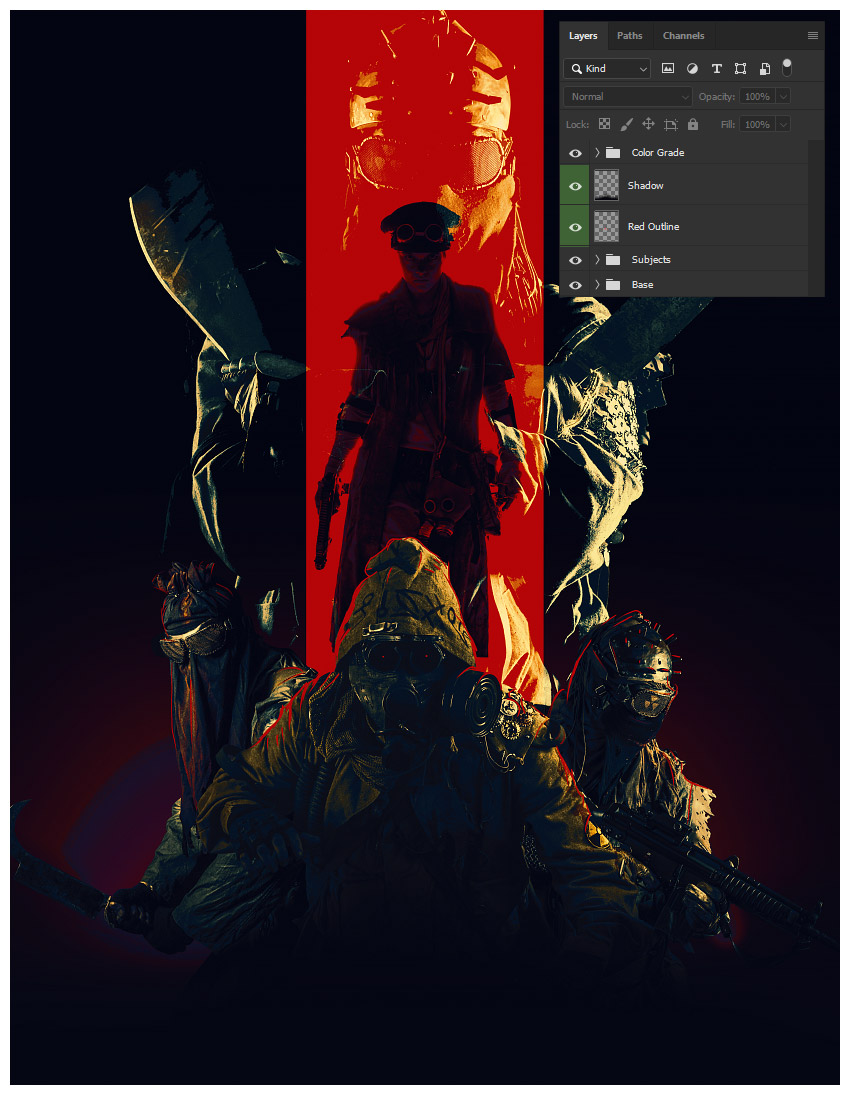
add shadow

6. How to Add Typography Using Placeit’s Poster Maker

Finally, we will be bringing our poster into Placeit’s poster maker to add our movie’s title and other relevant text!

Step 1

Save your poster design as either a JPG or PNG at a max of 12 MB in size. 

I’d suggest making your width at least 3600 px.

Step 2

See all of the poster templates available by going to www.placeit.net  > Designs and searching „Poster”.

I will be using the first option, Horror Film Poster Template.

templates

Step 3

Scroll down to see some of the horror genres presets available.

I will be using „Ritual”. Although this is a horror preset and our film is more in the post-apocalyptic action genre, Placeit gives you tons of customization options! 

horror presets

Step 4

While Placeit has a library of images available to use, we, of course, will be using our own. 

Do this by selecting Custom Image on the right-hand side where the background images are located.

Select your saved poster PNG or JPG image.

Crop your image using Placeit’s simple slider crop feature if needed. 

crop image

Step 5

Add your own text by replacing the text found on the left-hand side of the screen. 

The changes happen live and in real time!

add text

Step 6

Once all your text is decided, you can start to change the color, font face, and font placement! 

I will be using a pale-yellow color #f4d150 for the title font to make it stand out. 

Use the Color Picker Tool in Photoshop to pick colors right off your poster.

color text

Step 7

Next, I will be changing the font to Ultra.

change placement of text

Step 8

Finally, to finish everything up, I am going to arrange our poster text.

To do this in Placeit, drag and place the text wherever you want it. Once again, it’s all live editing! 

It also has guides to help you align everything perfectly! 

We’ve Done It!

The only thing more important than the composition or color story of a movie poster is the text itself! It must be bold, readable, and something that draws the eye to it!  

So, as always, keep experimenting with different techniques, and don’t forget to post your version below, along with any questions, comments, or critiques!

final

Looking to learn more? Why not check out the following excellent photo manipulation tutorials:

7 Color Palette Generators that Will Make Your Brand Pop

Post pobrano z: 7 Color Palette Generators that Will Make Your Brand Pop

As of January 2019, there were over 1 billion websites in the world (and counting!). In this veritable landslide of code, what can you do to make your website stand out at the end of the day?

The answer is so basic that it’s often overlooked. A website’s color palette often makes all the difference in the amount of attention it gets.

Why Color?

There are many reasons – both aesthetic and scientific – that play into why you should carefully select your website’s color palette.

For one, your color palette is an expression of your brand or business’s personality. The aim is to find something that jives with your brand and showcases how unique your brand really is.

When it comes to science, know that one study found that 92.6% percent of shoppers claim that color is the primary factor influencing their purchasing decisions. In another study performed by the University of Loyola, Maryland, it was discovered that brand recognition is boosted by 80 percent when the right colors are used.

How to Find the Right Color Combination

Creating a color scheme that fits your brand is no easy feat. In fact, color theorists use multiple rules and guidelines to help them assemble sets of colors.

Luckily, you don’t have to. There are two types of tools you can find online that allow you to create color palettes:

  1. Color Palette Galleries: In these, either humans or algorithms compile beautifully matched color schemes. This is the best choice for you if don’t understand color theory.
  2. Color Palette Generators: You can use these to design your color palette manually. To use color palette generators, start by choosing a color palettes you like. From there, adjust the combinations, hues, contrast and lightness. Some tools, like COLOURlovers, allow you to look at galleries and use a generator.

Read on for reviews of our top color palette generators to help you create a site that with a color palette that shines.

1. COLOURlovers

colourlovers

COLOURlovers proclaims itself an international creative community. In fact, it is 8 million users strong.

You could spend hours on this website, it’s that comprehensive. And at first, you might even find COLOURlover’s interface a bit overwhelming. Though it’s definitely not the simplest of the color palette generators on this list, with so much going for it, it’s worth taking the time to peruse all COLOURlovers has to offer.

coulourlovers palettes

On COLOURlovers, you can browse color palettes contributed by millions of users (along with commercially-generated color palettes), shapes, patterns, or the latest trends. If you’d like to brush up on your color theory, you can read articles on the psychology of color in relation to products or troubleshoot your color quandaries on the forums.

As we alluded to in our introduction, COLOURlovers is a tool where you not only can you view palettes, but you can also create palettes of your own.

Pros:

  • Millions of custom color palettes to choose from
  • Convenient sorting function
  • Easy to find hex and RGB codes for all colors

Cons:

  • Interface can be overwhelming for those just looking for simple color schemes

2. Coolors

coolors

Coolors is one of the easiest color palette generators to use. All you have to do is hit your spacebar to generate a new 5-color palette (and click on colors to lock them in). This tool also allows you to view alternative shades of all of the colors of your palette at the same time and adjust hue saturation and brightness.

coolors color palette generator

This color palette generator also lets you create a profile and keep your palettes filed under names and tags for easy retrieval.

On the technical side of things, Coolors allows you to export or save color palettes as SVG, PNG, SVG, SCSS or COPIC. You can download Coolors as an iOS app, Adobe Photoshop or Illustrator plugin, and a Chrome extension.

Pros:

  • Very simple interface
  • Ability to find different shades, hues, and saturation
  • Saving color palettes makes working on multiple projects a cinch

Cons:

  • To find a color scheme you like, you might have to click through a ton of palettes

3. BrandColors

brandcolors

BrandColors is as straightforward as it sounds. The site is a resource for color palettes of well-known brand names. The originator says the site was born because he needed a handy reference for himself (which started out with 30 colors).

Now, the site includes brand name colors for Delta Airlines, DHL, eBay, and Ferrari, to name a few.

brandcolors color palettes

The list of brand name colors on this site is quite comprehensive (and organized alphabetically), but if you feel there’s something missing, you can still make a suggestion for the site’s creator to add a brand.

BrandColors also enables you to Share the URL to your color palette or download it in ASE (Adobe), CSS, Sass, LESS, or Stylus.

Pros:

  • Alphabetical organization makes it easy to find specific brand color palettes
  • Links to brand URL for design inspiration

Cons:

  • Difficult to find hex codes for specific colors if you don’t know where to look

4. Colr

colr.org

As you can see from the screenshot below, Colr breaks your image down into tiny, colorful boxes. Click on a box to view the color, or choose to view the scheme as a whole.

colr pixel color palette generators - example

The most unique aspect of this tool is that it allows for some extra flexibility, as you can ask the tool to fetch a random Flickr image or upload your own.

Colr also gives you access to a few other tools, like a search engine that generates the color schemes used on websites, and the opportunity to view the latest schemes created by other users.

Pros:

  • Perfect for finding specific colors in images for editing purposes
  • Extensive search function for finding color palettes
  • Neat way to find website color schemes for your own web design inspiration

Cons:

  • Interface is a bit outdated
  • Not all websites you search will have available color palettes, which can be frustrating


5. Palettable

palettable

Palettable reminds us of a dating app – only the choice is much simpler. Instead of looking for the love of your life, you’re just flipping through colors.

To start off, the site presents you with your first color. It will choose your next color based on whether you Like or Dislike the color before it.

palettable color palette generators

You can have a maximum of five colors in your palette at once. Otherwise, you can opt to trash a color, or adjust the hue.

This color palette generator is for those who are looking for simple fun. The fact that the color combos are based on the input of thousands of designers doesn’t hurt either.

Pros:

  • Fun way to find new color schemes
  • Algorithm matching colors based on likes and dislikes works well

Cons:

  • Hard to take seriously if you’re a designer in need of true color palettes

6. Palette Cam

palette cam

This app has a 4.7/5 start rating in the App Store, and it’s free!

If you like the colors you see in the world around you, this could be the color palette generator for you. All you do is snap a photo and use the app to display the color palette of your photo.

palette cam color palette generators - examples

Plus you can easily access the RGB and hex codes to use in any upcoming projects.

Pros:

  • Great way to find color inspiration on the go
  • Versatile tool – create color palettes, determine hex codes, use your camera or library images
  • Inspiration page helps you find color palettes to suit your needs

Cons:

  • Only available in the App Store for iOS devices

7. Material Design Palette

material design palette

The Material Design Palette tool is also super simple to use. All you need to do is select two colors from the tiles and your work is done!

material design color palette generators

The color palette generator automatically comes up with a four-color palette that you can download or Tweet. Plus, you can easily view the hex codes, making it easy to use colors you like on your next project, regardless of whether you use this tool to copy anything to your clipboard or not.

Pros:

  • Easy to customize beautiful color palettes based on your own color choice
  • Social sharing is neat if you network with other designers
  • Easy access to hex codes

Cons:

  • Can only choose two colors at a time, which can be limiting for those that need complex color palettes

Conclusion

And there you have it! Some of the coolest color palette generators around that are designed to help you put together the perfect color scheme for your website.

If you’ve been inspired by these color palette generators, but are still on the fence about which color scheme to use, try looking at other factors to help aid your decision.

For example, different colors attract different types of people and inspire specific moods. For instance, the color red provokes energy and may spur customers to give in to impulse shopping. On the other hand, blue instills a sense of trust and security. Take a look around to see that this is true. Banks often use blue color schemes, and retail stores often use red color schemes. You can have the same effect over your site visitors depending on what actions you want them to take.

And if you’re thinking about launching a new website and need a little inspiration, be sure to check out our roundups of stunning Squarespace sites and real-life Wix examples to get you started in the right direction.

Lastly, don’t forget to enjoy selecting your splashes of color. After all, playing with color is supposed to be fun.

The post 7 Color Palette Generators that Will Make Your Brand Pop appeared first on WebresourcesDepot.

7 Color Palette Generators that Will Make Your Brand Pop

Post pobrano z: 7 Color Palette Generators that Will Make Your Brand Pop

As of January 2019, there were over 1 billion websites in the world (and counting!). In this veritable landslide of code, what can you do to make your website stand out at the end of the day?

The answer is so basic that it’s often overlooked. A website’s color palette often makes all the difference in the amount of attention it gets.

Why Color?

There are many reasons – both aesthetic and scientific – that play into why you should carefully select your website’s color palette.

For one, your color palette is an expression of your brand or business’s personality. The aim is to find something that jives with your brand and showcases how unique your brand really is.

When it comes to science, know that one study found that 92.6% percent of shoppers claim that color is the primary factor influencing their purchasing decisions. In another study performed by the University of Loyola, Maryland, it was discovered that brand recognition is boosted by 80 percent when the right colors are used.

How to Find the Right Color Combination

Creating a color scheme that fits your brand is no easy feat. In fact, color theorists use multiple rules and guidelines to help them assemble sets of colors.

Luckily, you don’t have to. There are two types of tools you can find online that allow you to create color palettes:

  1. Color Palette Galleries: In these, either humans or algorithms compile beautifully matched color schemes. This is the best choice for you if don’t understand color theory.
  2. Color Palette Generators: You can use these to design your color palette manually. To use color palette generators, start by choosing a color palettes you like. From there, adjust the combinations, hues, contrast and lightness. Some tools, like COLOURlovers, allow you to look at galleries and use a generator.

Read on for reviews of our top color palette generators to help you create a site that with a color palette that shines.

1. COLOURlovers

colourlovers

COLOURlovers proclaims itself an international creative community. In fact, it is 8 million users strong.

You could spend hours on this website, it’s that comprehensive. And at first, you might even find COLOURlover’s interface a bit overwhelming. Though it’s definitely not the simplest of the color palette generators on this list, with so much going for it, it’s worth taking the time to peruse all COLOURlovers has to offer.

coulourlovers palettes

On COLOURlovers, you can browse color palettes contributed by millions of users (along with commercially-generated color palettes), shapes, patterns, or the latest trends. If you’d like to brush up on your color theory, you can read articles on the psychology of color in relation to products or troubleshoot your color quandaries on the forums.

As we alluded to in our introduction, COLOURlovers is a tool where you not only can you view palettes, but you can also create palettes of your own.

Pros:

  • Millions of custom color palettes to choose from
  • Convenient sorting function
  • Easy to find hex and RGB codes for all colors

Cons:

  • Interface can be overwhelming for those just looking for simple color schemes

2. Coolors

coolors

Coolors is one of the easiest color palette generators to use. All you have to do is hit your spacebar to generate a new 5-color palette (and click on colors to lock them in). This tool also allows you to view alternative shades of all of the colors of your palette at the same time and adjust hue saturation and brightness.

coolors color palette generator

This color palette generator also lets you create a profile and keep your palettes filed under names and tags for easy retrieval.

On the technical side of things, Coolors allows you to export or save color palettes as SVG, PNG, SVG, SCSS or COPIC. You can download Coolors as an iOS app, Adobe Photoshop or Illustrator plugin, and a Chrome extension.

Pros:

  • Very simple interface
  • Ability to find different shades, hues, and saturation
  • Saving color palettes makes working on multiple projects a cinch

Cons:

  • To find a color scheme you like, you might have to click through a ton of palettes

3. BrandColors

brandcolors

BrandColors is as straightforward as it sounds. The site is a resource for color palettes of well-known brand names. The originator says the site was born because he needed a handy reference for himself (which started out with 30 colors).

Now, the site includes brand name colors for Delta Airlines, DHL, eBay, and Ferrari, to name a few.

brandcolors color palettes

The list of brand name colors on this site is quite comprehensive (and organized alphabetically), but if you feel there’s something missing, you can still make a suggestion for the site’s creator to add a brand.

BrandColors also enables you to Share the URL to your color palette or download it in ASE (Adobe), CSS, Sass, LESS, or Stylus.

Pros:

  • Alphabetical organization makes it easy to find specific brand color palettes
  • Links to brand URL for design inspiration

Cons:

  • Difficult to find hex codes for specific colors if you don’t know where to look

4. Colr

colr.org

As you can see from the screenshot below, Colr breaks your image down into tiny, colorful boxes. Click on a box to view the color, or choose to view the scheme as a whole.

colr pixel color palette generators - example

The most unique aspect of this tool is that it allows for some extra flexibility, as you can ask the tool to fetch a random Flickr image or upload your own.

Colr also gives you access to a few other tools, like a search engine that generates the color schemes used on websites, and the opportunity to view the latest schemes created by other users.

Pros:

  • Perfect for finding specific colors in images for editing purposes
  • Extensive search function for finding color palettes
  • Neat way to find website color schemes for your own web design inspiration

Cons:

  • Interface is a bit outdated
  • Not all websites you search will have available color palettes, which can be frustrating


5. Palettable

palettable

Palettable reminds us of a dating app – only the choice is much simpler. Instead of looking for the love of your life, you’re just flipping through colors.

To start off, the site presents you with your first color. It will choose your next color based on whether you Like or Dislike the color before it.

palettable color palette generators

You can have a maximum of five colors in your palette at once. Otherwise, you can opt to trash a color, or adjust the hue.

This color palette generator is for those who are looking for simple fun. The fact that the color combos are based on the input of thousands of designers doesn’t hurt either.

Pros:

  • Fun way to find new color schemes
  • Algorithm matching colors based on likes and dislikes works well

Cons:

  • Hard to take seriously if you’re a designer in need of true color palettes

6. Palette Cam

palette cam

This app has a 4.7/5 start rating in the App Store, and it’s free!

If you like the colors you see in the world around you, this could be the color palette generator for you. All you do is snap a photo and use the app to display the color palette of your photo.

palette cam color palette generators - examples

Plus you can easily access the RGB and hex codes to use in any upcoming projects.

Pros:

  • Great way to find color inspiration on the go
  • Versatile tool – create color palettes, determine hex codes, use your camera or library images
  • Inspiration page helps you find color palettes to suit your needs

Cons:

  • Only available in the App Store for iOS devices

7. Material Design Palette

material design palette

The Material Design Palette tool is also super simple to use. All you need to do is select two colors from the tiles and your work is done!

material design color palette generators

The color palette generator automatically comes up with a four-color palette that you can download or Tweet. Plus, you can easily view the hex codes, making it easy to use colors you like on your next project, regardless of whether you use this tool to copy anything to your clipboard or not.

Pros:

  • Easy to customize beautiful color palettes based on your own color choice
  • Social sharing is neat if you network with other designers
  • Easy access to hex codes

Cons:

  • Can only choose two colors at a time, which can be limiting for those that need complex color palettes

Conclusion

And there you have it! Some of the coolest color palette generators around that are designed to help you put together the perfect color scheme for your website.

If you’ve been inspired by these color palette generators, but are still on the fence about which color scheme to use, try looking at other factors to help aid your decision.

For example, different colors attract different types of people and inspire specific moods. For instance, the color red provokes energy and may spur customers to give in to impulse shopping. On the other hand, blue instills a sense of trust and security. Take a look around to see that this is true. Banks often use blue color schemes, and retail stores often use red color schemes. You can have the same effect over your site visitors depending on what actions you want them to take.

And if you’re thinking about launching a new website and need a little inspiration, be sure to check out our roundups of stunning Squarespace sites and real-life Wix examples to get you started in the right direction.

Lastly, don’t forget to enjoy selecting your splashes of color. After all, playing with color is supposed to be fun.

The post 7 Color Palette Generators that Will Make Your Brand Pop appeared first on WebresourcesDepot.

7 Color Palette Generators that Will Make Your Brand Pop

Post pobrano z: 7 Color Palette Generators that Will Make Your Brand Pop

As of January 2019, there were over 1 billion websites in the world (and counting!). In this veritable landslide of code, what can you do to make your website stand out at the end of the day?

The answer is so basic that it’s often overlooked. A website’s color palette often makes all the difference in the amount of attention it gets.

Why Color?

There are many reasons – both aesthetic and scientific – that play into why you should carefully select your website’s color palette.

For one, your color palette is an expression of your brand or business’s personality. The aim is to find something that jives with your brand and showcases how unique your brand really is.

When it comes to science, know that one study found that 92.6% percent of shoppers claim that color is the primary factor influencing their purchasing decisions. In another study performed by the University of Loyola, Maryland, it was discovered that brand recognition is boosted by 80 percent when the right colors are used.

How to Find the Right Color Combination

Creating a color scheme that fits your brand is no easy feat. In fact, color theorists use multiple rules and guidelines to help them assemble sets of colors.

Luckily, you don’t have to. There are two types of tools you can find online that allow you to create color palettes:

  1. Color Palette Galleries: In these, either humans or algorithms compile beautifully matched color schemes. This is the best choice for you if don’t understand color theory.
  2. Color Palette Generators: You can use these to design your color palette manually. To use color palette generators, start by choosing a color palettes you like. From there, adjust the combinations, hues, contrast and lightness. Some tools, like COLOURlovers, allow you to look at galleries and use a generator.

Read on for reviews of our top color palette generators to help you create a site that with a color palette that shines.

1. COLOURlovers

colourlovers

COLOURlovers proclaims itself an international creative community. In fact, it is 8 million users strong.

You could spend hours on this website, it’s that comprehensive. And at first, you might even find COLOURlover’s interface a bit overwhelming. Though it’s definitely not the simplest of the color palette generators on this list, with so much going for it, it’s worth taking the time to peruse all COLOURlovers has to offer.

coulourlovers palettes

On COLOURlovers, you can browse color palettes contributed by millions of users (along with commercially-generated color palettes), shapes, patterns, or the latest trends. If you’d like to brush up on your color theory, you can read articles on the psychology of color in relation to products or troubleshoot your color quandaries on the forums.

As we alluded to in our introduction, COLOURlovers is a tool where you not only can you view palettes, but you can also create palettes of your own.

Pros:

  • Millions of custom color palettes to choose from
  • Convenient sorting function
  • Easy to find hex and RGB codes for all colors

Cons:

  • Interface can be overwhelming for those just looking for simple color schemes

2. Coolors

coolors

Coolors is one of the easiest color palette generators to use. All you have to do is hit your spacebar to generate a new 5-color palette (and click on colors to lock them in). This tool also allows you to view alternative shades of all of the colors of your palette at the same time and adjust hue saturation and brightness.

coolors color palette generator

This color palette generator also lets you create a profile and keep your palettes filed under names and tags for easy retrieval.

On the technical side of things, Coolors allows you to export or save color palettes as SVG, PNG, SVG, SCSS or COPIC. You can download Coolors as an iOS app, Adobe Photoshop or Illustrator plugin, and a Chrome extension.

Pros:

  • Very simple interface
  • Ability to find different shades, hues, and saturation
  • Saving color palettes makes working on multiple projects a cinch

Cons:

  • To find a color scheme you like, you might have to click through a ton of palettes

3. BrandColors

brandcolors

BrandColors is as straightforward as it sounds. The site is a resource for color palettes of well-known brand names. The originator says the site was born because he needed a handy reference for himself (which started out with 30 colors).

Now, the site includes brand name colors for Delta Airlines, DHL, eBay, and Ferrari, to name a few.

brandcolors color palettes

The list of brand name colors on this site is quite comprehensive (and organized alphabetically), but if you feel there’s something missing, you can still make a suggestion for the site’s creator to add a brand.

BrandColors also enables you to Share the URL to your color palette or download it in ASE (Adobe), CSS, Sass, LESS, or Stylus.

Pros:

  • Alphabetical organization makes it easy to find specific brand color palettes
  • Links to brand URL for design inspiration

Cons:

  • Difficult to find hex codes for specific colors if you don’t know where to look

4. Colr

colr.org

As you can see from the screenshot below, Colr breaks your image down into tiny, colorful boxes. Click on a box to view the color, or choose to view the scheme as a whole.

colr pixel color palette generators - example

The most unique aspect of this tool is that it allows for some extra flexibility, as you can ask the tool to fetch a random Flickr image or upload your own.

Colr also gives you access to a few other tools, like a search engine that generates the color schemes used on websites, and the opportunity to view the latest schemes created by other users.

Pros:

  • Perfect for finding specific colors in images for editing purposes
  • Extensive search function for finding color palettes
  • Neat way to find website color schemes for your own web design inspiration

Cons:

  • Interface is a bit outdated
  • Not all websites you search will have available color palettes, which can be frustrating


5. Palettable

palettable

Palettable reminds us of a dating app – only the choice is much simpler. Instead of looking for the love of your life, you’re just flipping through colors.

To start off, the site presents you with your first color. It will choose your next color based on whether you Like or Dislike the color before it.

palettable color palette generators

You can have a maximum of five colors in your palette at once. Otherwise, you can opt to trash a color, or adjust the hue.

This color palette generator is for those who are looking for simple fun. The fact that the color combos are based on the input of thousands of designers doesn’t hurt either.

Pros:

  • Fun way to find new color schemes
  • Algorithm matching colors based on likes and dislikes works well

Cons:

  • Hard to take seriously if you’re a designer in need of true color palettes

6. Palette Cam

palette cam

This app has a 4.7/5 start rating in the App Store, and it’s free!

If you like the colors you see in the world around you, this could be the color palette generator for you. All you do is snap a photo and use the app to display the color palette of your photo.

palette cam color palette generators - examples

Plus you can easily access the RGB and hex codes to use in any upcoming projects.

Pros:

  • Great way to find color inspiration on the go
  • Versatile tool – create color palettes, determine hex codes, use your camera or library images
  • Inspiration page helps you find color palettes to suit your needs

Cons:

  • Only available in the App Store for iOS devices

7. Material Design Palette

material design palette

The Material Design Palette tool is also super simple to use. All you need to do is select two colors from the tiles and your work is done!

material design color palette generators

The color palette generator automatically comes up with a four-color palette that you can download or Tweet. Plus, you can easily view the hex codes, making it easy to use colors you like on your next project, regardless of whether you use this tool to copy anything to your clipboard or not.

Pros:

  • Easy to customize beautiful color palettes based on your own color choice
  • Social sharing is neat if you network with other designers
  • Easy access to hex codes

Cons:

  • Can only choose two colors at a time, which can be limiting for those that need complex color palettes

Conclusion

And there you have it! Some of the coolest color palette generators around that are designed to help you put together the perfect color scheme for your website.

If you’ve been inspired by these color palette generators, but are still on the fence about which color scheme to use, try looking at other factors to help aid your decision.

For example, different colors attract different types of people and inspire specific moods. For instance, the color red provokes energy and may spur customers to give in to impulse shopping. On the other hand, blue instills a sense of trust and security. Take a look around to see that this is true. Banks often use blue color schemes, and retail stores often use red color schemes. You can have the same effect over your site visitors depending on what actions you want them to take.

And if you’re thinking about launching a new website and need a little inspiration, be sure to check out our roundups of stunning Squarespace sites and real-life Wix examples to get you started in the right direction.

Lastly, don’t forget to enjoy selecting your splashes of color. After all, playing with color is supposed to be fun.

The post 7 Color Palette Generators that Will Make Your Brand Pop appeared first on WebresourcesDepot.

7 Color Palette Generators that Will Make Your Brand Pop

Post pobrano z: 7 Color Palette Generators that Will Make Your Brand Pop

As of January 2019, there were over 1 billion websites in the world (and counting!). In this veritable landslide of code, what can you do to make your website stand out at the end of the day?

The answer is so basic that it’s often overlooked. A website’s color palette often makes all the difference in the amount of attention it gets.

Why Color?

There are many reasons – both aesthetic and scientific – that play into why you should carefully select your website’s color palette.

For one, your color palette is an expression of your brand or business’s personality. The aim is to find something that jives with your brand and showcases how unique your brand really is.

When it comes to science, know that one study found that 92.6% percent of shoppers claim that color is the primary factor influencing their purchasing decisions. In another study performed by the University of Loyola, Maryland, it was discovered that brand recognition is boosted by 80 percent when the right colors are used.

How to Find the Right Color Combination

Creating a color scheme that fits your brand is no easy feat. In fact, color theorists use multiple rules and guidelines to help them assemble sets of colors.

Luckily, you don’t have to. There are two types of tools you can find online that allow you to create color palettes:

  1. Color Palette Galleries: In these, either humans or algorithms compile beautifully matched color schemes. This is the best choice for you if don’t understand color theory.
  2. Color Palette Generators: You can use these to design your color palette manually. To use color palette generators, start by choosing a color palettes you like. From there, adjust the combinations, hues, contrast and lightness. Some tools, like COLOURlovers, allow you to look at galleries and use a generator.

Read on for reviews of our top color palette generators to help you create a site that with a color palette that shines.

1. COLOURlovers

colourlovers

COLOURlovers proclaims itself an international creative community. In fact, it is 8 million users strong.

You could spend hours on this website, it’s that comprehensive. And at first, you might even find COLOURlover’s interface a bit overwhelming. Though it’s definitely not the simplest of the color palette generators on this list, with so much going for it, it’s worth taking the time to peruse all COLOURlovers has to offer.

coulourlovers palettes

On COLOURlovers, you can browse color palettes contributed by millions of users (along with commercially-generated color palettes), shapes, patterns, or the latest trends. If you’d like to brush up on your color theory, you can read articles on the psychology of color in relation to products or troubleshoot your color quandaries on the forums.

As we alluded to in our introduction, COLOURlovers is a tool where you not only can you view palettes, but you can also create palettes of your own.

Pros:

  • Millions of custom color palettes to choose from
  • Convenient sorting function
  • Easy to find hex and RGB codes for all colors

Cons:

  • Interface can be overwhelming for those just looking for simple color schemes

2. Coolors

coolors

Coolors is one of the easiest color palette generators to use. All you have to do is hit your spacebar to generate a new 5-color palette (and click on colors to lock them in). This tool also allows you to view alternative shades of all of the colors of your palette at the same time and adjust hue saturation and brightness.

coolors color palette generator

This color palette generator also lets you create a profile and keep your palettes filed under names and tags for easy retrieval.

On the technical side of things, Coolors allows you to export or save color palettes as SVG, PNG, SVG, SCSS or COPIC. You can download Coolors as an iOS app, Adobe Photoshop or Illustrator plugin, and a Chrome extension.

Pros:

  • Very simple interface
  • Ability to find different shades, hues, and saturation
  • Saving color palettes makes working on multiple projects a cinch

Cons:

  • To find a color scheme you like, you might have to click through a ton of palettes

3. BrandColors

brandcolors

BrandColors is as straightforward as it sounds. The site is a resource for color palettes of well-known brand names. The originator says the site was born because he needed a handy reference for himself (which started out with 30 colors).

Now, the site includes brand name colors for Delta Airlines, DHL, eBay, and Ferrari, to name a few.

brandcolors color palettes

The list of brand name colors on this site is quite comprehensive (and organized alphabetically), but if you feel there’s something missing, you can still make a suggestion for the site’s creator to add a brand.

BrandColors also enables you to Share the URL to your color palette or download it in ASE (Adobe), CSS, Sass, LESS, or Stylus.

Pros:

  • Alphabetical organization makes it easy to find specific brand color palettes
  • Links to brand URL for design inspiration

Cons:

  • Difficult to find hex codes for specific colors if you don’t know where to look

4. Colr

colr.org

As you can see from the screenshot below, Colr breaks your image down into tiny, colorful boxes. Click on a box to view the color, or choose to view the scheme as a whole.

colr pixel color palette generators - example

The most unique aspect of this tool is that it allows for some extra flexibility, as you can ask the tool to fetch a random Flickr image or upload your own.

Colr also gives you access to a few other tools, like a search engine that generates the color schemes used on websites, and the opportunity to view the latest schemes created by other users.

Pros:

  • Perfect for finding specific colors in images for editing purposes
  • Extensive search function for finding color palettes
  • Neat way to find website color schemes for your own web design inspiration

Cons:

  • Interface is a bit outdated
  • Not all websites you search will have available color palettes, which can be frustrating


5. Palettable

palettable

Palettable reminds us of a dating app – only the choice is much simpler. Instead of looking for the love of your life, you’re just flipping through colors.

To start off, the site presents you with your first color. It will choose your next color based on whether you Like or Dislike the color before it.

palettable color palette generators

You can have a maximum of five colors in your palette at once. Otherwise, you can opt to trash a color, or adjust the hue.

This color palette generator is for those who are looking for simple fun. The fact that the color combos are based on the input of thousands of designers doesn’t hurt either.

Pros:

  • Fun way to find new color schemes
  • Algorithm matching colors based on likes and dislikes works well

Cons:

  • Hard to take seriously if you’re a designer in need of true color palettes

6. Palette Cam

palette cam

This app has a 4.7/5 start rating in the App Store, and it’s free!

If you like the colors you see in the world around you, this could be the color palette generator for you. All you do is snap a photo and use the app to display the color palette of your photo.

palette cam color palette generators - examples

Plus you can easily access the RGB and hex codes to use in any upcoming projects.

Pros:

  • Great way to find color inspiration on the go
  • Versatile tool – create color palettes, determine hex codes, use your camera or library images
  • Inspiration page helps you find color palettes to suit your needs

Cons:

  • Only available in the App Store for iOS devices

7. Material Design Palette

material design palette

The Material Design Palette tool is also super simple to use. All you need to do is select two colors from the tiles and your work is done!

material design color palette generators

The color palette generator automatically comes up with a four-color palette that you can download or Tweet. Plus, you can easily view the hex codes, making it easy to use colors you like on your next project, regardless of whether you use this tool to copy anything to your clipboard or not.

Pros:

  • Easy to customize beautiful color palettes based on your own color choice
  • Social sharing is neat if you network with other designers
  • Easy access to hex codes

Cons:

  • Can only choose two colors at a time, which can be limiting for those that need complex color palettes

Conclusion

And there you have it! Some of the coolest color palette generators around that are designed to help you put together the perfect color scheme for your website.

If you’ve been inspired by these color palette generators, but are still on the fence about which color scheme to use, try looking at other factors to help aid your decision.

For example, different colors attract different types of people and inspire specific moods. For instance, the color red provokes energy and may spur customers to give in to impulse shopping. On the other hand, blue instills a sense of trust and security. Take a look around to see that this is true. Banks often use blue color schemes, and retail stores often use red color schemes. You can have the same effect over your site visitors depending on what actions you want them to take.

And if you’re thinking about launching a new website and need a little inspiration, be sure to check out our roundups of stunning Squarespace sites and real-life Wix examples to get you started in the right direction.

Lastly, don’t forget to enjoy selecting your splashes of color. After all, playing with color is supposed to be fun.

The post 7 Color Palette Generators that Will Make Your Brand Pop appeared first on WebresourcesDepot.

7 Color Palette Generators that Will Make Your Brand Pop

Post pobrano z: 7 Color Palette Generators that Will Make Your Brand Pop

As of January 2019, there were over 1 billion websites in the world (and counting!). In this veritable landslide of code, what can you do to make your website stand out at the end of the day?

The answer is so basic that it’s often overlooked. A website’s color palette often makes all the difference in the amount of attention it gets.

Why Color?

There are many reasons – both aesthetic and scientific – that play into why you should carefully select your website’s color palette.

For one, your color palette is an expression of your brand or business’s personality. The aim is to find something that jives with your brand and showcases how unique your brand really is.

When it comes to science, know that one study found that 92.6% percent of shoppers claim that color is the primary factor influencing their purchasing decisions. In another study performed by the University of Loyola, Maryland, it was discovered that brand recognition is boosted by 80 percent when the right colors are used.

How to Find the Right Color Combination

Creating a color scheme that fits your brand is no easy feat. In fact, color theorists use multiple rules and guidelines to help them assemble sets of colors.

Luckily, you don’t have to. There are two types of tools you can find online that allow you to create color palettes:

  1. Color Palette Galleries: In these, either humans or algorithms compile beautifully matched color schemes. This is the best choice for you if don’t understand color theory.
  2. Color Palette Generators: You can use these to design your color palette manually. To use color palette generators, start by choosing a color palettes you like. From there, adjust the combinations, hues, contrast and lightness. Some tools, like COLOURlovers, allow you to look at galleries and use a generator.

Read on for reviews of our top color palette generators to help you create a site that with a color palette that shines.

1. COLOURlovers

colourlovers

COLOURlovers proclaims itself an international creative community. In fact, it is 8 million users strong.

You could spend hours on this website, it’s that comprehensive. And at first, you might even find COLOURlover’s interface a bit overwhelming. Though it’s definitely not the simplest of the color palette generators on this list, with so much going for it, it’s worth taking the time to peruse all COLOURlovers has to offer.

coulourlovers palettes

On COLOURlovers, you can browse color palettes contributed by millions of users (along with commercially-generated color palettes), shapes, patterns, or the latest trends. If you’d like to brush up on your color theory, you can read articles on the psychology of color in relation to products or troubleshoot your color quandaries on the forums.

As we alluded to in our introduction, COLOURlovers is a tool where you not only can you view palettes, but you can also create palettes of your own.

Pros:

  • Millions of custom color palettes to choose from
  • Convenient sorting function
  • Easy to find hex and RGB codes for all colors

Cons:

  • Interface can be overwhelming for those just looking for simple color schemes

2. Coolors

coolors

Coolors is one of the easiest color palette generators to use. All you have to do is hit your spacebar to generate a new 5-color palette (and click on colors to lock them in). This tool also allows you to view alternative shades of all of the colors of your palette at the same time and adjust hue saturation and brightness.

coolors color palette generator

This color palette generator also lets you create a profile and keep your palettes filed under names and tags for easy retrieval.

On the technical side of things, Coolors allows you to export or save color palettes as SVG, PNG, SVG, SCSS or COPIC. You can download Coolors as an iOS app, Adobe Photoshop or Illustrator plugin, and a Chrome extension.

Pros:

  • Very simple interface
  • Ability to find different shades, hues, and saturation
  • Saving color palettes makes working on multiple projects a cinch

Cons:

  • To find a color scheme you like, you might have to click through a ton of palettes

3. BrandColors

brandcolors

BrandColors is as straightforward as it sounds. The site is a resource for color palettes of well-known brand names. The originator says the site was born because he needed a handy reference for himself (which started out with 30 colors).

Now, the site includes brand name colors for Delta Airlines, DHL, eBay, and Ferrari, to name a few.

brandcolors color palettes

The list of brand name colors on this site is quite comprehensive (and organized alphabetically), but if you feel there’s something missing, you can still make a suggestion for the site’s creator to add a brand.

BrandColors also enables you to Share the URL to your color palette or download it in ASE (Adobe), CSS, Sass, LESS, or Stylus.

Pros:

  • Alphabetical organization makes it easy to find specific brand color palettes
  • Links to brand URL for design inspiration

Cons:

  • Difficult to find hex codes for specific colors if you don’t know where to look

4. Colr

colr.org

As you can see from the screenshot below, Colr breaks your image down into tiny, colorful boxes. Click on a box to view the color, or choose to view the scheme as a whole.

colr pixel color palette generators - example

The most unique aspect of this tool is that it allows for some extra flexibility, as you can ask the tool to fetch a random Flickr image or upload your own.

Colr also gives you access to a few other tools, like a search engine that generates the color schemes used on websites, and the opportunity to view the latest schemes created by other users.

Pros:

  • Perfect for finding specific colors in images for editing purposes
  • Extensive search function for finding color palettes
  • Neat way to find website color schemes for your own web design inspiration

Cons:

  • Interface is a bit outdated
  • Not all websites you search will have available color palettes, which can be frustrating


5. Palettable

palettable

Palettable reminds us of a dating app – only the choice is much simpler. Instead of looking for the love of your life, you’re just flipping through colors.

To start off, the site presents you with your first color. It will choose your next color based on whether you Like or Dislike the color before it.

palettable color palette generators

You can have a maximum of five colors in your palette at once. Otherwise, you can opt to trash a color, or adjust the hue.

This color palette generator is for those who are looking for simple fun. The fact that the color combos are based on the input of thousands of designers doesn’t hurt either.

Pros:

  • Fun way to find new color schemes
  • Algorithm matching colors based on likes and dislikes works well

Cons:

  • Hard to take seriously if you’re a designer in need of true color palettes

6. Palette Cam

palette cam

This app has a 4.7/5 start rating in the App Store, and it’s free!

If you like the colors you see in the world around you, this could be the color palette generator for you. All you do is snap a photo and use the app to display the color palette of your photo.

palette cam color palette generators - examples

Plus you can easily access the RGB and hex codes to use in any upcoming projects.

Pros:

  • Great way to find color inspiration on the go
  • Versatile tool – create color palettes, determine hex codes, use your camera or library images
  • Inspiration page helps you find color palettes to suit your needs

Cons:

  • Only available in the App Store for iOS devices

7. Material Design Palette

material design palette

The Material Design Palette tool is also super simple to use. All you need to do is select two colors from the tiles and your work is done!

material design color palette generators

The color palette generator automatically comes up with a four-color palette that you can download or Tweet. Plus, you can easily view the hex codes, making it easy to use colors you like on your next project, regardless of whether you use this tool to copy anything to your clipboard or not.

Pros:

  • Easy to customize beautiful color palettes based on your own color choice
  • Social sharing is neat if you network with other designers
  • Easy access to hex codes

Cons:

  • Can only choose two colors at a time, which can be limiting for those that need complex color palettes

Conclusion

And there you have it! Some of the coolest color palette generators around that are designed to help you put together the perfect color scheme for your website.

If you’ve been inspired by these color palette generators, but are still on the fence about which color scheme to use, try looking at other factors to help aid your decision.

For example, different colors attract different types of people and inspire specific moods. For instance, the color red provokes energy and may spur customers to give in to impulse shopping. On the other hand, blue instills a sense of trust and security. Take a look around to see that this is true. Banks often use blue color schemes, and retail stores often use red color schemes. You can have the same effect over your site visitors depending on what actions you want them to take.

And if you’re thinking about launching a new website and need a little inspiration, be sure to check out our roundups of stunning Squarespace sites and real-life Wix examples to get you started in the right direction.

Lastly, don’t forget to enjoy selecting your splashes of color. After all, playing with color is supposed to be fun.

The post 7 Color Palette Generators that Will Make Your Brand Pop appeared first on WebresourcesDepot.

7 Color Palette Generators that Will Make Your Brand Pop

Post pobrano z: 7 Color Palette Generators that Will Make Your Brand Pop

As of January 2019, there were over 1 billion websites in the world (and counting!). In this veritable landslide of code, what can you do to make your website stand out at the end of the day?

The answer is so basic that it’s often overlooked. A website’s color palette often makes all the difference in the amount of attention it gets.

Why Color?

There are many reasons – both aesthetic and scientific – that play into why you should carefully select your website’s color palette.

For one, your color palette is an expression of your brand or business’s personality. The aim is to find something that jives with your brand and showcases how unique your brand really is.

When it comes to science, know that one study found that 92.6% percent of shoppers claim that color is the primary factor influencing their purchasing decisions. In another study performed by the University of Loyola, Maryland, it was discovered that brand recognition is boosted by 80 percent when the right colors are used.

How to Find the Right Color Combination

Creating a color scheme that fits your brand is no easy feat. In fact, color theorists use multiple rules and guidelines to help them assemble sets of colors.

Luckily, you don’t have to. There are two types of tools you can find online that allow you to create color palettes:

  1. Color Palette Galleries: In these, either humans or algorithms compile beautifully matched color schemes. This is the best choice for you if don’t understand color theory.
  2. Color Palette Generators: You can use these to design your color palette manually. To use color palette generators, start by choosing a color palettes you like. From there, adjust the combinations, hues, contrast and lightness. Some tools, like COLOURlovers, allow you to look at galleries and use a generator.

Read on for reviews of our top color palette generators to help you create a site that with a color palette that shines.

1. COLOURlovers

colourlovers

COLOURlovers proclaims itself an international creative community. In fact, it is 8 million users strong.

You could spend hours on this website, it’s that comprehensive. And at first, you might even find COLOURlover’s interface a bit overwhelming. Though it’s definitely not the simplest of the color palette generators on this list, with so much going for it, it’s worth taking the time to peruse all COLOURlovers has to offer.

coulourlovers palettes

On COLOURlovers, you can browse color palettes contributed by millions of users (along with commercially-generated color palettes), shapes, patterns, or the latest trends. If you’d like to brush up on your color theory, you can read articles on the psychology of color in relation to products or troubleshoot your color quandaries on the forums.

As we alluded to in our introduction, COLOURlovers is a tool where you not only can you view palettes, but you can also create palettes of your own.

Pros:

  • Millions of custom color palettes to choose from
  • Convenient sorting function
  • Easy to find hex and RGB codes for all colors

Cons:

  • Interface can be overwhelming for those just looking for simple color schemes

2. Coolors

coolors

Coolors is one of the easiest color palette generators to use. All you have to do is hit your spacebar to generate a new 5-color palette (and click on colors to lock them in). This tool also allows you to view alternative shades of all of the colors of your palette at the same time and adjust hue saturation and brightness.

coolors color palette generator

This color palette generator also lets you create a profile and keep your palettes filed under names and tags for easy retrieval.

On the technical side of things, Coolors allows you to export or save color palettes as SVG, PNG, SVG, SCSS or COPIC. You can download Coolors as an iOS app, Adobe Photoshop or Illustrator plugin, and a Chrome extension.

Pros:

  • Very simple interface
  • Ability to find different shades, hues, and saturation
  • Saving color palettes makes working on multiple projects a cinch

Cons:

  • To find a color scheme you like, you might have to click through a ton of palettes

3. BrandColors

brandcolors

BrandColors is as straightforward as it sounds. The site is a resource for color palettes of well-known brand names. The originator says the site was born because he needed a handy reference for himself (which started out with 30 colors).

Now, the site includes brand name colors for Delta Airlines, DHL, eBay, and Ferrari, to name a few.

brandcolors color palettes

The list of brand name colors on this site is quite comprehensive (and organized alphabetically), but if you feel there’s something missing, you can still make a suggestion for the site’s creator to add a brand.

BrandColors also enables you to Share the URL to your color palette or download it in ASE (Adobe), CSS, Sass, LESS, or Stylus.

Pros:

  • Alphabetical organization makes it easy to find specific brand color palettes
  • Links to brand URL for design inspiration

Cons:

  • Difficult to find hex codes for specific colors if you don’t know where to look

4. Colr

colr.org

As you can see from the screenshot below, Colr breaks your image down into tiny, colorful boxes. Click on a box to view the color, or choose to view the scheme as a whole.

colr pixel color palette generators - example

The most unique aspect of this tool is that it allows for some extra flexibility, as you can ask the tool to fetch a random Flickr image or upload your own.

Colr also gives you access to a few other tools, like a search engine that generates the color schemes used on websites, and the opportunity to view the latest schemes created by other users.

Pros:

  • Perfect for finding specific colors in images for editing purposes
  • Extensive search function for finding color palettes
  • Neat way to find website color schemes for your own web design inspiration

Cons:

  • Interface is a bit outdated
  • Not all websites you search will have available color palettes, which can be frustrating


5. Palettable

palettable

Palettable reminds us of a dating app – only the choice is much simpler. Instead of looking for the love of your life, you’re just flipping through colors.

To start off, the site presents you with your first color. It will choose your next color based on whether you Like or Dislike the color before it.

palettable color palette generators

You can have a maximum of five colors in your palette at once. Otherwise, you can opt to trash a color, or adjust the hue.

This color palette generator is for those who are looking for simple fun. The fact that the color combos are based on the input of thousands of designers doesn’t hurt either.

Pros:

  • Fun way to find new color schemes
  • Algorithm matching colors based on likes and dislikes works well

Cons:

  • Hard to take seriously if you’re a designer in need of true color palettes

6. Palette Cam

palette cam

This app has a 4.7/5 start rating in the App Store, and it’s free!

If you like the colors you see in the world around you, this could be the color palette generator for you. All you do is snap a photo and use the app to display the color palette of your photo.

palette cam color palette generators - examples

Plus you can easily access the RGB and hex codes to use in any upcoming projects.

Pros:

  • Great way to find color inspiration on the go
  • Versatile tool – create color palettes, determine hex codes, use your camera or library images
  • Inspiration page helps you find color palettes to suit your needs

Cons:

  • Only available in the App Store for iOS devices

7. Material Design Palette

material design palette

The Material Design Palette tool is also super simple to use. All you need to do is select two colors from the tiles and your work is done!

material design color palette generators

The color palette generator automatically comes up with a four-color palette that you can download or Tweet. Plus, you can easily view the hex codes, making it easy to use colors you like on your next project, regardless of whether you use this tool to copy anything to your clipboard or not.

Pros:

  • Easy to customize beautiful color palettes based on your own color choice
  • Social sharing is neat if you network with other designers
  • Easy access to hex codes

Cons:

  • Can only choose two colors at a time, which can be limiting for those that need complex color palettes

Conclusion

And there you have it! Some of the coolest color palette generators around that are designed to help you put together the perfect color scheme for your website.

If you’ve been inspired by these color palette generators, but are still on the fence about which color scheme to use, try looking at other factors to help aid your decision.

For example, different colors attract different types of people and inspire specific moods. For instance, the color red provokes energy and may spur customers to give in to impulse shopping. On the other hand, blue instills a sense of trust and security. Take a look around to see that this is true. Banks often use blue color schemes, and retail stores often use red color schemes. You can have the same effect over your site visitors depending on what actions you want them to take.

And if you’re thinking about launching a new website and need a little inspiration, be sure to check out our roundups of stunning Squarespace sites and real-life Wix examples to get you started in the right direction.

Lastly, don’t forget to enjoy selecting your splashes of color. After all, playing with color is supposed to be fun.

The post 7 Color Palette Generators that Will Make Your Brand Pop appeared first on WebresourcesDepot.

7 Color Palette Generators that Will Make Your Brand Pop

Post pobrano z: 7 Color Palette Generators that Will Make Your Brand Pop

As of January 2019, there were over 1 billion websites in the world (and counting!). In this veritable landslide of code, what can you do to make your website stand out at the end of the day?

The answer is so basic that it’s often overlooked. A website’s color palette often makes all the difference in the amount of attention it gets.

Why Color?

There are many reasons – both aesthetic and scientific – that play into why you should carefully select your website’s color palette.

For one, your color palette is an expression of your brand or business’s personality. The aim is to find something that jives with your brand and showcases how unique your brand really is.

When it comes to science, know that one study found that 92.6% percent of shoppers claim that color is the primary factor influencing their purchasing decisions. In another study performed by the University of Loyola, Maryland, it was discovered that brand recognition is boosted by 80 percent when the right colors are used.

How to Find the Right Color Combination

Creating a color scheme that fits your brand is no easy feat. In fact, color theorists use multiple rules and guidelines to help them assemble sets of colors.

Luckily, you don’t have to. There are two types of tools you can find online that allow you to create color palettes:

  1. Color Palette Galleries: In these, either humans or algorithms compile beautifully matched color schemes. This is the best choice for you if don’t understand color theory.
  2. Color Palette Generators: You can use these to design your color palette manually. To use color palette generators, start by choosing a color palettes you like. From there, adjust the combinations, hues, contrast and lightness. Some tools, like COLOURlovers, allow you to look at galleries and use a generator.

Read on for reviews of our top color palette generators to help you create a site that with a color palette that shines.

1. COLOURlovers

colourlovers

COLOURlovers proclaims itself an international creative community. In fact, it is 8 million users strong.

You could spend hours on this website, it’s that comprehensive. And at first, you might even find COLOURlover’s interface a bit overwhelming. Though it’s definitely not the simplest of the color palette generators on this list, with so much going for it, it’s worth taking the time to peruse all COLOURlovers has to offer.

coulourlovers palettes

On COLOURlovers, you can browse color palettes contributed by millions of users (along with commercially-generated color palettes), shapes, patterns, or the latest trends. If you’d like to brush up on your color theory, you can read articles on the psychology of color in relation to products or troubleshoot your color quandaries on the forums.

As we alluded to in our introduction, COLOURlovers is a tool where you not only can you view palettes, but you can also create palettes of your own.

Pros:

  • Millions of custom color palettes to choose from
  • Convenient sorting function
  • Easy to find hex and RGB codes for all colors

Cons:

  • Interface can be overwhelming for those just looking for simple color schemes

2. Coolors

coolors

Coolors is one of the easiest color palette generators to use. All you have to do is hit your spacebar to generate a new 5-color palette (and click on colors to lock them in). This tool also allows you to view alternative shades of all of the colors of your palette at the same time and adjust hue saturation and brightness.

coolors color palette generator

This color palette generator also lets you create a profile and keep your palettes filed under names and tags for easy retrieval.

On the technical side of things, Coolors allows you to export or save color palettes as SVG, PNG, SVG, SCSS or COPIC. You can download Coolors as an iOS app, Adobe Photoshop or Illustrator plugin, and a Chrome extension.

Pros:

  • Very simple interface
  • Ability to find different shades, hues, and saturation
  • Saving color palettes makes working on multiple projects a cinch

Cons:

  • To find a color scheme you like, you might have to click through a ton of palettes

3. BrandColors

brandcolors

BrandColors is as straightforward as it sounds. The site is a resource for color palettes of well-known brand names. The originator says the site was born because he needed a handy reference for himself (which started out with 30 colors).

Now, the site includes brand name colors for Delta Airlines, DHL, eBay, and Ferrari, to name a few.

brandcolors color palettes

The list of brand name colors on this site is quite comprehensive (and organized alphabetically), but if you feel there’s something missing, you can still make a suggestion for the site’s creator to add a brand.

BrandColors also enables you to Share the URL to your color palette or download it in ASE (Adobe), CSS, Sass, LESS, or Stylus.

Pros:

  • Alphabetical organization makes it easy to find specific brand color palettes
  • Links to brand URL for design inspiration

Cons:

  • Difficult to find hex codes for specific colors if you don’t know where to look

4. Colr

colr.org

As you can see from the screenshot below, Colr breaks your image down into tiny, colorful boxes. Click on a box to view the color, or choose to view the scheme as a whole.

colr pixel color palette generators - example

The most unique aspect of this tool is that it allows for some extra flexibility, as you can ask the tool to fetch a random Flickr image or upload your own.

Colr also gives you access to a few other tools, like a search engine that generates the color schemes used on websites, and the opportunity to view the latest schemes created by other users.

Pros:

  • Perfect for finding specific colors in images for editing purposes
  • Extensive search function for finding color palettes
  • Neat way to find website color schemes for your own web design inspiration

Cons:

  • Interface is a bit outdated
  • Not all websites you search will have available color palettes, which can be frustrating


5. Palettable

palettable

Palettable reminds us of a dating app – only the choice is much simpler. Instead of looking for the love of your life, you’re just flipping through colors.

To start off, the site presents you with your first color. It will choose your next color based on whether you Like or Dislike the color before it.

palettable color palette generators

You can have a maximum of five colors in your palette at once. Otherwise, you can opt to trash a color, or adjust the hue.

This color palette generator is for those who are looking for simple fun. The fact that the color combos are based on the input of thousands of designers doesn’t hurt either.

Pros:

  • Fun way to find new color schemes
  • Algorithm matching colors based on likes and dislikes works well

Cons:

  • Hard to take seriously if you’re a designer in need of true color palettes

6. Palette Cam

palette cam

This app has a 4.7/5 start rating in the App Store, and it’s free!

If you like the colors you see in the world around you, this could be the color palette generator for you. All you do is snap a photo and use the app to display the color palette of your photo.

palette cam color palette generators - examples

Plus you can easily access the RGB and hex codes to use in any upcoming projects.

Pros:

  • Great way to find color inspiration on the go
  • Versatile tool – create color palettes, determine hex codes, use your camera or library images
  • Inspiration page helps you find color palettes to suit your needs

Cons:

  • Only available in the App Store for iOS devices

7. Material Design Palette

material design palette

The Material Design Palette tool is also super simple to use. All you need to do is select two colors from the tiles and your work is done!

material design color palette generators

The color palette generator automatically comes up with a four-color palette that you can download or Tweet. Plus, you can easily view the hex codes, making it easy to use colors you like on your next project, regardless of whether you use this tool to copy anything to your clipboard or not.

Pros:

  • Easy to customize beautiful color palettes based on your own color choice
  • Social sharing is neat if you network with other designers
  • Easy access to hex codes

Cons:

  • Can only choose two colors at a time, which can be limiting for those that need complex color palettes

Conclusion

And there you have it! Some of the coolest color palette generators around that are designed to help you put together the perfect color scheme for your website.

If you’ve been inspired by these color palette generators, but are still on the fence about which color scheme to use, try looking at other factors to help aid your decision.

For example, different colors attract different types of people and inspire specific moods. For instance, the color red provokes energy and may spur customers to give in to impulse shopping. On the other hand, blue instills a sense of trust and security. Take a look around to see that this is true. Banks often use blue color schemes, and retail stores often use red color schemes. You can have the same effect over your site visitors depending on what actions you want them to take.

And if you’re thinking about launching a new website and need a little inspiration, be sure to check out our roundups of stunning Squarespace sites and real-life Wix examples to get you started in the right direction.

Lastly, don’t forget to enjoy selecting your splashes of color. After all, playing with color is supposed to be fun.

The post 7 Color Palette Generators that Will Make Your Brand Pop appeared first on WebresourcesDepot.

7 Color Palette Generators that Will Make Your Brand Pop

Post pobrano z: 7 Color Palette Generators that Will Make Your Brand Pop

As of January 2019, there were over 1 billion websites in the world (and counting!). In this veritable landslide of code, what can you do to make your website stand out at the end of the day?

The answer is so basic that it’s often overlooked. A website’s color palette often makes all the difference in the amount of attention it gets.

Why Color?

There are many reasons – both aesthetic and scientific – that play into why you should carefully select your website’s color palette.

For one, your color palette is an expression of your brand or business’s personality. The aim is to find something that jives with your brand and showcases how unique your brand really is.

When it comes to science, know that one study found that 92.6% percent of shoppers claim that color is the primary factor influencing their purchasing decisions. In another study performed by the University of Loyola, Maryland, it was discovered that brand recognition is boosted by 80 percent when the right colors are used.

How to Find the Right Color Combination

Creating a color scheme that fits your brand is no easy feat. In fact, color theorists use multiple rules and guidelines to help them assemble sets of colors.

Luckily, you don’t have to. There are two types of tools you can find online that allow you to create color palettes:

  1. Color Palette Galleries: In these, either humans or algorithms compile beautifully matched color schemes. This is the best choice for you if don’t understand color theory.
  2. Color Palette Generators: You can use these to design your color palette manually. To use color palette generators, start by choosing a color palettes you like. From there, adjust the combinations, hues, contrast and lightness. Some tools, like COLOURlovers, allow you to look at galleries and use a generator.

Read on for reviews of our top color palette generators to help you create a site that with a color palette that shines.

1. COLOURlovers

colourlovers

COLOURlovers proclaims itself an international creative community. In fact, it is 8 million users strong.

You could spend hours on this website, it’s that comprehensive. And at first, you might even find COLOURlover’s interface a bit overwhelming. Though it’s definitely not the simplest of the color palette generators on this list, with so much going for it, it’s worth taking the time to peruse all COLOURlovers has to offer.

coulourlovers palettes

On COLOURlovers, you can browse color palettes contributed by millions of users (along with commercially-generated color palettes), shapes, patterns, or the latest trends. If you’d like to brush up on your color theory, you can read articles on the psychology of color in relation to products or troubleshoot your color quandaries on the forums.

As we alluded to in our introduction, COLOURlovers is a tool where you not only can you view palettes, but you can also create palettes of your own.

Pros:

  • Millions of custom color palettes to choose from
  • Convenient sorting function
  • Easy to find hex and RGB codes for all colors

Cons:

  • Interface can be overwhelming for those just looking for simple color schemes

2. Coolors

coolors

Coolors is one of the easiest color palette generators to use. All you have to do is hit your spacebar to generate a new 5-color palette (and click on colors to lock them in). This tool also allows you to view alternative shades of all of the colors of your palette at the same time and adjust hue saturation and brightness.

coolors color palette generator

This color palette generator also lets you create a profile and keep your palettes filed under names and tags for easy retrieval.

On the technical side of things, Coolors allows you to export or save color palettes as SVG, PNG, SVG, SCSS or COPIC. You can download Coolors as an iOS app, Adobe Photoshop or Illustrator plugin, and a Chrome extension.

Pros:

  • Very simple interface
  • Ability to find different shades, hues, and saturation
  • Saving color palettes makes working on multiple projects a cinch

Cons:

  • To find a color scheme you like, you might have to click through a ton of palettes

3. BrandColors

brandcolors

BrandColors is as straightforward as it sounds. The site is a resource for color palettes of well-known brand names. The originator says the site was born because he needed a handy reference for himself (which started out with 30 colors).

Now, the site includes brand name colors for Delta Airlines, DHL, eBay, and Ferrari, to name a few.

brandcolors color palettes

The list of brand name colors on this site is quite comprehensive (and organized alphabetically), but if you feel there’s something missing, you can still make a suggestion for the site’s creator to add a brand.

BrandColors also enables you to Share the URL to your color palette or download it in ASE (Adobe), CSS, Sass, LESS, or Stylus.

Pros:

  • Alphabetical organization makes it easy to find specific brand color palettes
  • Links to brand URL for design inspiration

Cons:

  • Difficult to find hex codes for specific colors if you don’t know where to look

4. Colr

colr.org

As you can see from the screenshot below, Colr breaks your image down into tiny, colorful boxes. Click on a box to view the color, or choose to view the scheme as a whole.

colr pixel color palette generators - example

The most unique aspect of this tool is that it allows for some extra flexibility, as you can ask the tool to fetch a random Flickr image or upload your own.

Colr also gives you access to a few other tools, like a search engine that generates the color schemes used on websites, and the opportunity to view the latest schemes created by other users.

Pros:

  • Perfect for finding specific colors in images for editing purposes
  • Extensive search function for finding color palettes
  • Neat way to find website color schemes for your own web design inspiration

Cons:

  • Interface is a bit outdated
  • Not all websites you search will have available color palettes, which can be frustrating


5. Palettable

palettable

Palettable reminds us of a dating app – only the choice is much simpler. Instead of looking for the love of your life, you’re just flipping through colors.

To start off, the site presents you with your first color. It will choose your next color based on whether you Like or Dislike the color before it.

palettable color palette generators

You can have a maximum of five colors in your palette at once. Otherwise, you can opt to trash a color, or adjust the hue.

This color palette generator is for those who are looking for simple fun. The fact that the color combos are based on the input of thousands of designers doesn’t hurt either.

Pros:

  • Fun way to find new color schemes
  • Algorithm matching colors based on likes and dislikes works well

Cons:

  • Hard to take seriously if you’re a designer in need of true color palettes

6. Palette Cam

palette cam

This app has a 4.7/5 start rating in the App Store, and it’s free!

If you like the colors you see in the world around you, this could be the color palette generator for you. All you do is snap a photo and use the app to display the color palette of your photo.

palette cam color palette generators - examples

Plus you can easily access the RGB and hex codes to use in any upcoming projects.

Pros:

  • Great way to find color inspiration on the go
  • Versatile tool – create color palettes, determine hex codes, use your camera or library images
  • Inspiration page helps you find color palettes to suit your needs

Cons:

  • Only available in the App Store for iOS devices

7. Material Design Palette

material design palette

The Material Design Palette tool is also super simple to use. All you need to do is select two colors from the tiles and your work is done!

material design color palette generators

The color palette generator automatically comes up with a four-color palette that you can download or Tweet. Plus, you can easily view the hex codes, making it easy to use colors you like on your next project, regardless of whether you use this tool to copy anything to your clipboard or not.

Pros:

  • Easy to customize beautiful color palettes based on your own color choice
  • Social sharing is neat if you network with other designers
  • Easy access to hex codes

Cons:

  • Can only choose two colors at a time, which can be limiting for those that need complex color palettes

Conclusion

And there you have it! Some of the coolest color palette generators around that are designed to help you put together the perfect color scheme for your website.

If you’ve been inspired by these color palette generators, but are still on the fence about which color scheme to use, try looking at other factors to help aid your decision.

For example, different colors attract different types of people and inspire specific moods. For instance, the color red provokes energy and may spur customers to give in to impulse shopping. On the other hand, blue instills a sense of trust and security. Take a look around to see that this is true. Banks often use blue color schemes, and retail stores often use red color schemes. You can have the same effect over your site visitors depending on what actions you want them to take.

And if you’re thinking about launching a new website and need a little inspiration, be sure to check out our roundups of stunning Squarespace sites and real-life Wix examples to get you started in the right direction.

Lastly, don’t forget to enjoy selecting your splashes of color. After all, playing with color is supposed to be fun.

The post 7 Color Palette Generators that Will Make Your Brand Pop appeared first on WebresourcesDepot.

7 Color Palette Generators that Will Make Your Brand Pop

Post pobrano z: 7 Color Palette Generators that Will Make Your Brand Pop

As of January 2019, there were over 1 billion websites in the world (and counting!). In this veritable landslide of code, what can you do to make your website stand out at the end of the day?

The answer is so basic that it’s often overlooked. A website’s color palette often makes all the difference in the amount of attention it gets.

Why Color?

There are many reasons – both aesthetic and scientific – that play into why you should carefully select your website’s color palette.

For one, your color palette is an expression of your brand or business’s personality. The aim is to find something that jives with your brand and showcases how unique your brand really is.

When it comes to science, know that one study found that 92.6% percent of shoppers claim that color is the primary factor influencing their purchasing decisions. In another study performed by the University of Loyola, Maryland, it was discovered that brand recognition is boosted by 80 percent when the right colors are used.

How to Find the Right Color Combination

Creating a color scheme that fits your brand is no easy feat. In fact, color theorists use multiple rules and guidelines to help them assemble sets of colors.

Luckily, you don’t have to. There are two types of tools you can find online that allow you to create color palettes:

  1. Color Palette Galleries: In these, either humans or algorithms compile beautifully matched color schemes. This is the best choice for you if don’t understand color theory.
  2. Color Palette Generators: You can use these to design your color palette manually. To use color palette generators, start by choosing a color palettes you like. From there, adjust the combinations, hues, contrast and lightness. Some tools, like COLOURlovers, allow you to look at galleries and use a generator.

Read on for reviews of our top color palette generators to help you create a site that with a color palette that shines.

1. COLOURlovers

colourlovers

COLOURlovers proclaims itself an international creative community. In fact, it is 8 million users strong.

You could spend hours on this website, it’s that comprehensive. And at first, you might even find COLOURlover’s interface a bit overwhelming. Though it’s definitely not the simplest of the color palette generators on this list, with so much going for it, it’s worth taking the time to peruse all COLOURlovers has to offer.

coulourlovers palettes

On COLOURlovers, you can browse color palettes contributed by millions of users (along with commercially-generated color palettes), shapes, patterns, or the latest trends. If you’d like to brush up on your color theory, you can read articles on the psychology of color in relation to products or troubleshoot your color quandaries on the forums.

As we alluded to in our introduction, COLOURlovers is a tool where you not only can you view palettes, but you can also create palettes of your own.

Pros:

  • Millions of custom color palettes to choose from
  • Convenient sorting function
  • Easy to find hex and RGB codes for all colors

Cons:

  • Interface can be overwhelming for those just looking for simple color schemes

2. Coolors

coolors

Coolors is one of the easiest color palette generators to use. All you have to do is hit your spacebar to generate a new 5-color palette (and click on colors to lock them in). This tool also allows you to view alternative shades of all of the colors of your palette at the same time and adjust hue saturation and brightness.

coolors color palette generator

This color palette generator also lets you create a profile and keep your palettes filed under names and tags for easy retrieval.

On the technical side of things, Coolors allows you to export or save color palettes as SVG, PNG, SVG, SCSS or COPIC. You can download Coolors as an iOS app, Adobe Photoshop or Illustrator plugin, and a Chrome extension.

Pros:

  • Very simple interface
  • Ability to find different shades, hues, and saturation
  • Saving color palettes makes working on multiple projects a cinch

Cons:

  • To find a color scheme you like, you might have to click through a ton of palettes

3. BrandColors

brandcolors

BrandColors is as straightforward as it sounds. The site is a resource for color palettes of well-known brand names. The originator says the site was born because he needed a handy reference for himself (which started out with 30 colors).

Now, the site includes brand name colors for Delta Airlines, DHL, eBay, and Ferrari, to name a few.

brandcolors color palettes

The list of brand name colors on this site is quite comprehensive (and organized alphabetically), but if you feel there’s something missing, you can still make a suggestion for the site’s creator to add a brand.

BrandColors also enables you to Share the URL to your color palette or download it in ASE (Adobe), CSS, Sass, LESS, or Stylus.

Pros:

  • Alphabetical organization makes it easy to find specific brand color palettes
  • Links to brand URL for design inspiration

Cons:

  • Difficult to find hex codes for specific colors if you don’t know where to look

4. Colr

colr.org

As you can see from the screenshot below, Colr breaks your image down into tiny, colorful boxes. Click on a box to view the color, or choose to view the scheme as a whole.

colr pixel color palette generators - example

The most unique aspect of this tool is that it allows for some extra flexibility, as you can ask the tool to fetch a random Flickr image or upload your own.

Colr also gives you access to a few other tools, like a search engine that generates the color schemes used on websites, and the opportunity to view the latest schemes created by other users.

Pros:

  • Perfect for finding specific colors in images for editing purposes
  • Extensive search function for finding color palettes
  • Neat way to find website color schemes for your own web design inspiration

Cons:

  • Interface is a bit outdated
  • Not all websites you search will have available color palettes, which can be frustrating


5. Palettable

palettable

Palettable reminds us of a dating app – only the choice is much simpler. Instead of looking for the love of your life, you’re just flipping through colors.

To start off, the site presents you with your first color. It will choose your next color based on whether you Like or Dislike the color before it.

palettable color palette generators

You can have a maximum of five colors in your palette at once. Otherwise, you can opt to trash a color, or adjust the hue.

This color palette generator is for those who are looking for simple fun. The fact that the color combos are based on the input of thousands of designers doesn’t hurt either.

Pros:

  • Fun way to find new color schemes
  • Algorithm matching colors based on likes and dislikes works well

Cons:

  • Hard to take seriously if you’re a designer in need of true color palettes

6. Palette Cam

palette cam

This app has a 4.7/5 start rating in the App Store, and it’s free!

If you like the colors you see in the world around you, this could be the color palette generator for you. All you do is snap a photo and use the app to display the color palette of your photo.

palette cam color palette generators - examples

Plus you can easily access the RGB and hex codes to use in any upcoming projects.

Pros:

  • Great way to find color inspiration on the go
  • Versatile tool – create color palettes, determine hex codes, use your camera or library images
  • Inspiration page helps you find color palettes to suit your needs

Cons:

  • Only available in the App Store for iOS devices

7. Material Design Palette

material design palette

The Material Design Palette tool is also super simple to use. All you need to do is select two colors from the tiles and your work is done!

material design color palette generators

The color palette generator automatically comes up with a four-color palette that you can download or Tweet. Plus, you can easily view the hex codes, making it easy to use colors you like on your next project, regardless of whether you use this tool to copy anything to your clipboard or not.

Pros:

  • Easy to customize beautiful color palettes based on your own color choice
  • Social sharing is neat if you network with other designers
  • Easy access to hex codes

Cons:

  • Can only choose two colors at a time, which can be limiting for those that need complex color palettes

Conclusion

And there you have it! Some of the coolest color palette generators around that are designed to help you put together the perfect color scheme for your website.

If you’ve been inspired by these color palette generators, but are still on the fence about which color scheme to use, try looking at other factors to help aid your decision.

For example, different colors attract different types of people and inspire specific moods. For instance, the color red provokes energy and may spur customers to give in to impulse shopping. On the other hand, blue instills a sense of trust and security. Take a look around to see that this is true. Banks often use blue color schemes, and retail stores often use red color schemes. You can have the same effect over your site visitors depending on what actions you want them to take.

And if you’re thinking about launching a new website and need a little inspiration, be sure to check out our roundups of stunning Squarespace sites and real-life Wix examples to get you started in the right direction.

Lastly, don’t forget to enjoy selecting your splashes of color. After all, playing with color is supposed to be fun.

The post 7 Color Palette Generators that Will Make Your Brand Pop appeared first on WebresourcesDepot.