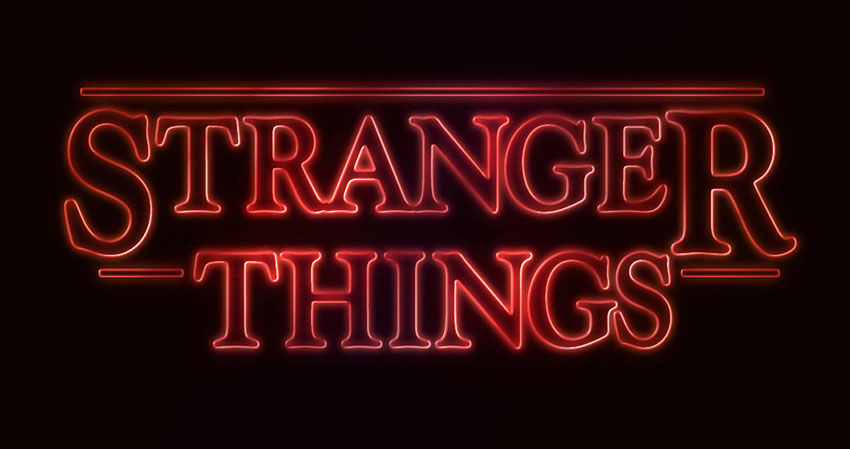
This very quick tutorial will show you an easy way to create a text effect inspired by the 'Stranger Things’ series, using only layer styles and some simple adjustments. Let’s get started!
This text effect was inspired by the many Layer Styles available on Envato Market. You can get a very similar style named Stranger Twins, which is available to download and use in Adobe Photoshop.
Tutorial Assets
The following assets were used during the production of this tutorial:
Create a new 1280 x 720px document, and fill the Background with the color #0c0101.
Step 2
Create the text in White using the font Indira K.
The original font used is Benguiat, but this is a free alternative that you can use instead.
Set the Size to a value around 141 pt, and check the Faux Bold and All Caps icons in the Character panel (Window > Character).
Step 3
Change the Tracking value to -100.
Step 4
Change the Vertical Scale to 115. This will stretch the text vertically.
2. Adjust the Bigger Letters
Step 1
Select (highlight) the first letter of your text, and change its Size to a value around 212 pt.
Step 2
Next, you’ll need to change the Baseline Shift value in order to move the big letter downwards, until its top is on the same level as the tops of the rest of the letters.
To do that, you can either enter numerical values, or scrub the Set the baseline shift icon to the left.
Step 3
Do the same for the last letter of the first line of text, or whatever other letters you like.
3. Adjust the Kerning
Step 1
Place the text cursor between the first two letters you have, and change the Kerning to a value you think looks good.
Step 2
Depending on your text and the result you’re looking for, adjust the Kerning for the rest of the letters you have. Not all the letters should be adjusted, just the ones you think need that.
Step 3
Once you’re done, change the text layer’s Fill value to 0.
4. Style the Text
Double-click the text layer to apply the following layer style:
Step 1
Add a Bevel and Emboss with these settings:
Style: Stroke Emboss
Depth: 220
Size: 3
Uncheck the Use Global Light box
Angle: 156
Altitude: 37
Gloss Contour: Cone – Inverted
Check the Anti-aliased box
Highlight Mode – Opacity: 35%
Shadow Mode – Opacity: 50%
Step 2
Add a Contour with these settings:
Contour: Cove – Deep
Check the Anti-aliased box.
Step 3
Add a Stroke with these settings:
Size: 3
Position: Inside
Color: #ce1725
Step 4
Add an Inner Glow with these settings:
Opacity: 50%
Noise: 5%
Color: #ea0f0f
Size: 17
Step 5
Add an Outer Glow with these settings:
Opacity: 50%
Noise: 5%
Color: #ea2314
Size: 12
Range: 60%
Step 6
This will style the text. Right-click the styled text layer, and choose Copy Layer Style.
5. Create the Rectangle Shapes
Step 1
Pick the Rounded Rectangle Tool, and set the Radius in the Options bar to 2. Click-drag to create a rectangle above the text, with a Height value around 7px.
Then, click-drag to create more rectangles at the beginning and end of the second line of text, or anywhere else you’d like to add them. Just make sure to maintain the same Height for all the rectangles you create.
Step 2
Change all the rectangle layers’ Fill value to 0.
6. Style the Rectangles
Right-click any of the rectangle layers you have, and choose Paste Layer Style. This will apply the same layer style copied from the text layer.
After that, double-click the styled rectangle layer to adjust some of the values:
Step 1
Add a Bevel and Emboss with these settings:
Size: 2
Step 2
Add a Stroke with these settings:
Size: 2
Position: Outside
Step 3
Add an Inner Glow with these settings:
Size: 5
Step 4
Add an Outer Glow with these settings:
Size: 17
Step 5
Right-click the styled rectangle layer, and choose Copy Layer Style.
Step 6
Select the other rectangle layers you have, right-click any of them, and choose Paste Layer Style.
Step 7
Place the text and rectangle layers in a group, and call it Text Effect.
7. Style the Group
Double-click the Text Effect group to apply the following layer style:
Step 1
Add a Gradient Overlay with these settings:
Check the Dither box
Blend Mode: Soft Light
Style: Reflected
Angle: 135
Create the Gradient fill using the colors #fbe7c2 to the left and #e69f99 to the right
Step 2
Add another Gradient Overlay effect with these settings:
Check the Dither box
Blend Mode: Overlay
Style: Reflected
Angle: 135
Use the faucet 10 gradient fill
Step 3
Add an Outer Glow with these settings:
Opacity: 20%
Color: #de1b22
Size: 34
Range: 60%
This will enhance the effect.
8. Add Some Light Spots
Step 1
Set the Foreground Color to #451d08, and then create a new layer on top of all layers, call it Light, and change its Blend Mode to Color Dodge.
Step 2
Pick the Brush Tool, and choose a big, soft, round tip. Then start clicking over some letters to brighten them up.
You can change the tip’s size, and play around with the Opacity value in the Options bar to control the intensity of the light spots you’re adding.
Step 3
Click the Create new fill or adjustment layer icon in the Layers panel, and choose Hue/Saturation.
Step 4
Change the Saturation value to 35, and the Lightness to 15, or any other values you like.
9. Adjust the Coloring
Step 1
Add a Gradient adjustment layer on top of the Text Effect group.
Create the gradient fill using the colors #5c456e to the right, #b26b73 in the center, and #fda982 to the left. Change the Style to Reflected, the Angle to 155, and the Scale to 55%.
Step 2
Change the Gradient layer’s Blend Mode to Color, and its Opacity to 35%.
Congratulations! You’re Done
In this tutorial, we created the text and modified it using the different Character panel options and settings. Then we styled the text, created the rectangles, and styled them as well.
After that, we grouped all the layers and added one more layer style. Finally, we added some light spots and a gradient adjustment layer to modify the coloring of the final result.
Please feel free to leave your comments, suggestions, and outcomes below.
This very quick tutorial will show you an easy way to create a text effect inspired by the 'Stranger Things’ series, using only layer styles and some simple adjustments. Let’s get started!
This text effect was inspired by the many Layer Styles available on Envato Market. You can get a very similar style named Stranger Twins, which is available to download and use in Adobe Photoshop.
Tutorial Assets
The following assets were used during the production of this tutorial:
Create a new 1280 x 720px document, and fill the Background with the color #0c0101.
Step 2
Create the text in White using the font Indira K.
The original font used is Benguiat, but this is a free alternative that you can use instead.
Set the Size to a value around 141 pt, and check the Faux Bold and All Caps icons in the Character panel (Window > Character).
Step 3
Change the Tracking value to -100.
Step 4
Change the Vertical Scale to 115. This will stretch the text vertically.
2. Adjust the Bigger Letters
Step 1
Select (highlight) the first letter of your text, and change its Size to a value around 212 pt.
Step 2
Next, you’ll need to change the Baseline Shift value in order to move the big letter downwards, until its top is on the same level as the tops of the rest of the letters.
To do that, you can either enter numerical values, or scrub the Set the baseline shift icon to the left.
Step 3
Do the same for the last letter of the first line of text, or whatever other letters you like.
3. Adjust the Kerning
Step 1
Place the text cursor between the first two letters you have, and change the Kerning to a value you think looks good.
Step 2
Depending on your text and the result you’re looking for, adjust the Kerning for the rest of the letters you have. Not all the letters should be adjusted, just the ones you think need that.
Step 3
Once you’re done, change the text layer’s Fill value to 0.
4. Style the Text
Double-click the text layer to apply the following layer style:
Step 1
Add a Bevel and Emboss with these settings:
Style: Stroke Emboss
Depth: 220
Size: 3
Uncheck the Use Global Light box
Angle: 156
Altitude: 37
Gloss Contour: Cone – Inverted
Check the Anti-aliased box
Highlight Mode – Opacity: 35%
Shadow Mode – Opacity: 50%
Step 2
Add a Contour with these settings:
Contour: Cove – Deep
Check the Anti-aliased box.
Step 3
Add a Stroke with these settings:
Size: 3
Position: Inside
Color: #ce1725
Step 4
Add an Inner Glow with these settings:
Opacity: 50%
Noise: 5%
Color: #ea0f0f
Size: 17
Step 5
Add an Outer Glow with these settings:
Opacity: 50%
Noise: 5%
Color: #ea2314
Size: 12
Range: 60%
Step 6
This will style the text. Right-click the styled text layer, and choose Copy Layer Style.
5. Create the Rectangle Shapes
Step 1
Pick the Rounded Rectangle Tool, and set the Radius in the Options bar to 2. Click-drag to create a rectangle above the text, with a Height value around 7px.
Then, click-drag to create more rectangles at the beginning and end of the second line of text, or anywhere else you’d like to add them. Just make sure to maintain the same Height for all the rectangles you create.
Step 2
Change all the rectangle layers’ Fill value to 0.
6. Style the Rectangles
Right-click any of the rectangle layers you have, and choose Paste Layer Style. This will apply the same layer style copied from the text layer.
After that, double-click the styled rectangle layer to adjust some of the values:
Step 1
Add a Bevel and Emboss with these settings:
Size: 2
Step 2
Add a Stroke with these settings:
Size: 2
Position: Outside
Step 3
Add an Inner Glow with these settings:
Size: 5
Step 4
Add an Outer Glow with these settings:
Size: 17
Step 5
Right-click the styled rectangle layer, and choose Copy Layer Style.
Step 6
Select the other rectangle layers you have, right-click any of them, and choose Paste Layer Style.
Step 7
Place the text and rectangle layers in a group, and call it Text Effect.
7. Style the Group
Double-click the Text Effect group to apply the following layer style:
Step 1
Add a Gradient Overlay with these settings:
Check the Dither box
Blend Mode: Soft Light
Style: Reflected
Angle: 135
Create the Gradient fill using the colors #fbe7c2 to the left and #e69f99 to the right
Step 2
Add another Gradient Overlay effect with these settings:
Check the Dither box
Blend Mode: Overlay
Style: Reflected
Angle: 135
Use the faucet 10 gradient fill
Step 3
Add an Outer Glow with these settings:
Opacity: 20%
Color: #de1b22
Size: 34
Range: 60%
This will enhance the effect.
8. Add Some Light Spots
Step 1
Set the Foreground Color to #451d08, and then create a new layer on top of all layers, call it Light, and change its Blend Mode to Color Dodge.
Step 2
Pick the Brush Tool, and choose a big, soft, round tip. Then start clicking over some letters to brighten them up.
You can change the tip’s size, and play around with the Opacity value in the Options bar to control the intensity of the light spots you’re adding.
Step 3
Click the Create new fill or adjustment layer icon in the Layers panel, and choose Hue/Saturation.
Step 4
Change the Saturation value to 35, and the Lightness to 15, or any other values you like.
9. Adjust the Coloring
Step 1
Add a Gradient adjustment layer on top of the Text Effect group.
Create the gradient fill using the colors #5c456e to the right, #b26b73 in the center, and #fda982 to the left. Change the Style to Reflected, the Angle to 155, and the Scale to 55%.
Step 2
Change the Gradient layer’s Blend Mode to Color, and its Opacity to 35%.
Congratulations! You’re Done
In this tutorial, we created the text and modified it using the different Character panel options and settings. Then we styled the text, created the rectangles, and styled them as well.
After that, we grouped all the layers and added one more layer style. Finally, we added some light spots and a gradient adjustment layer to modify the coloring of the final result.
Please feel free to leave your comments, suggestions, and outcomes below.
It’s almost Halloween! That special time of the year when stores pack their shelves with candy and we all dress up as our favorite ghouls.
And what better way to celebrate our favorite monsters and urban legends then with a spooktacular collection of Halloween invites and flyers you can only find on Envato Market? Here we have curated a selection of 50 to satisfy all your party needs.
Looking for more to choose from? Browse the wide selection of templates available to you on Envato Market.
Or enlist the help of a design professional by contacting the good folks at Envato Studio.
Halloween Invitations
You can’t have a party without sending out a few invites. These Halloween invitations will make you want to throw your very own costume party and celebrate in style.
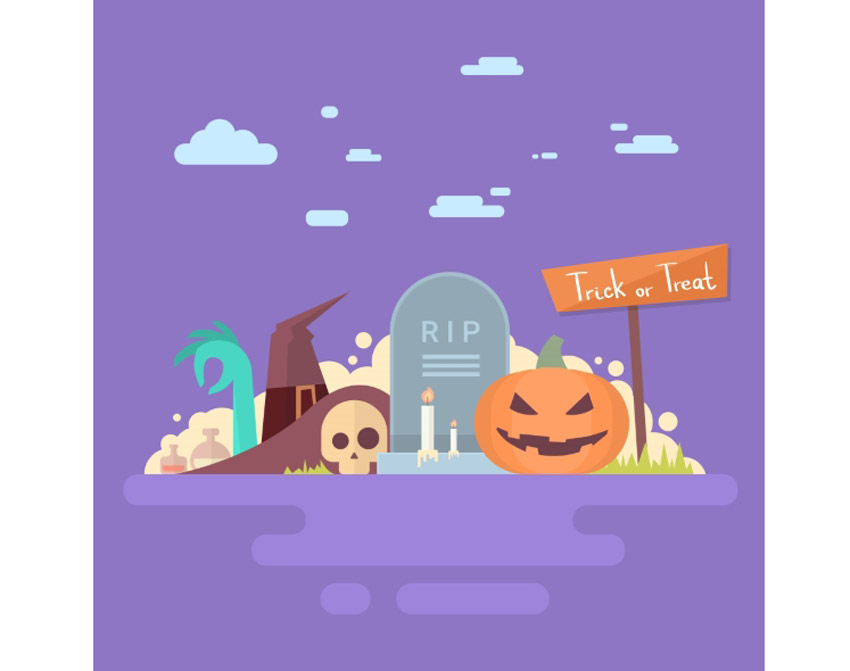
Great for kids parties, this Halloween invitation is super cute and bright. Enjoy the playful design complete with a tombstone, pumpkin, and witch hat.
Kick off your ghoulish celebrations with this invitation template. This simple design features dripping font and a creepy graveyard design at the bottom.
Inspired by the classics, this Halloween invite features several stills from horror classics with some fantastic fonts you can download for free. Pick from three versions and several color combinations.
Monster mash anyone? Summon your friends to eat, drink, and be scary with this fun and simple Halloween party invite. With two themes available and text ready-to-edit, choose from portrait or landscape orientation for your invites.
Keep it simple with this stylish invitation. This invite contains spooky ghosts against a starry sky. Enjoy the delightful design for a sweet take on Halloween invitations.
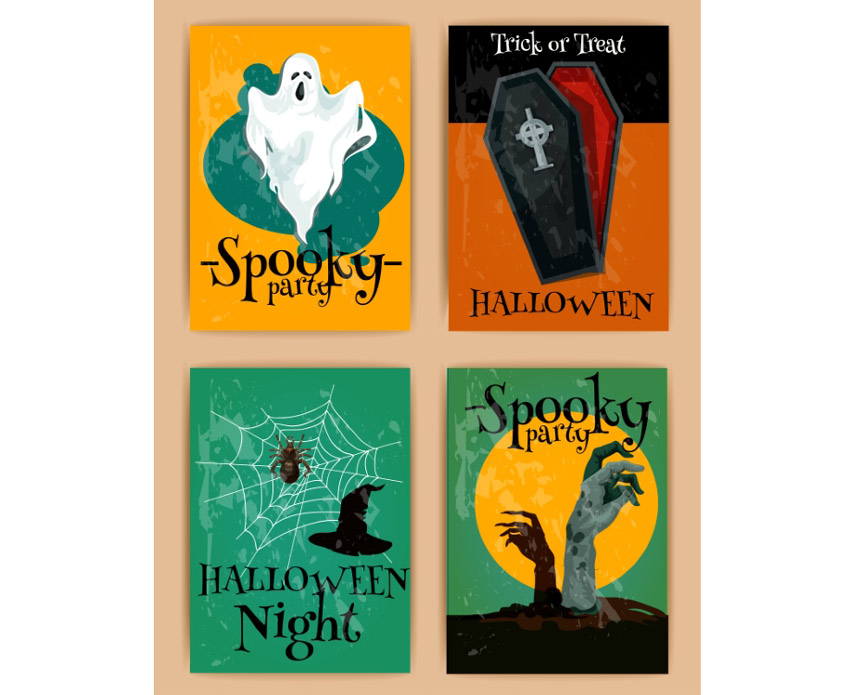
Add some retro charm to your holiday invites! This awesome collection includes four different designs to choose from. They go great with spooky Halloween themes and are sure to impress your party goers.
This creative set of invitations provides a variation of three fun designs to choose from. Pick from designs like Frankenstein, a werewolf, and a creepy pumpkin to bring a simple quirky flair to your invites.
Are you a rebellious trick or treater wreaking havoc in the night? Then kick off your Halloween celebrations with this simple invite design. Editable in both Photoshop and Illustrator, you can customize this design no matter your Adobe product preferences.
Choose from different party themes to set your invite apart from others. This pack features spooky, minimalist designs with witch, ghost, and skull elements. Customize it easily by changing the fully editable text.
Looking for a simple design that is haunting yet straight to the point? Check out this Halloween invitation that features an elegant cemetery silhouette that is subtle enough to fill you with fear. With a fully layered PSD file you can choose to customize the colors and text to fill your needs.
This 2-for-1 deal packs a punch with a simple design you can use for either an invitation or party flyer. Change the background color to switch up the design or edit the text to fill your needs with Adobe Illustrator.
Love the simplicity of black and white? This chalkboard design features a simple composition that allows the typography and details of your party shine. It’s fully customizable and even comes with free fonts!
Get your friends and family together for a fun costume party with this flyer invitation. This design features a cartoon theme perfect for all ages. Get access to three different color schemes to fit the style of your party.
What fun designs will you carve on your pumpkins this Halloween? Invite your friends over for a messy good time, and reward the winners with candy. Use this simple design for your invitations featuring a pumpkin, black cat, and simple yellow ribbons.
This beautiful and simple design showcases several fun fonts to highlight all your party details. Available in the format for Adobe Illustrator, customize this invite with your own text and location.
Need something short and sweet? This simple design features a beautiful purple night sky with creepy elements from a church cemetery. Create your invites quick and easy by just switching out the bottom text with your own location and contact details.
Watch out for the zombie attack with this wicked invitation flyer. This flyer features an apocalpytic theme with fire, destruction, and zombies, of course. Entertain your friends with the invite of the year!
Do you like pumpkins, bats, or haunted houses? Choose from three simple designs with this set of Halloween party invitations. These designs use the vector EPS format, and you can easily customize the text for your celebration.
You don’t always have to creep everyone out to have a good time. This simple party invitation features a cute trio of characters that you can interchange with several different colors. Editable in several formats, use this design for your kid’s party and school celebrations.
This beautiful yet simple design features a frame of skulls and other fall goodies to frame your choice of text. Add a hint of grunge to your party with this vintage-themed invitation.
If you love bold colors and witches then this is the invite for you! Choose this invite made from 100% vector elements with easily resizable vectors. Shock your friends with these bold neon colors and choose something a little out of the box for this Halloween.
Business card or spooky party invite? This unique design features a layout and composition specially-made for business card printing. It utilizes a standard 3.5 x 2 inch design with high resolution for a fantastic high-quality result.
Check out this colorful party invite featuring interchangeable skull and pumpkin designs. Edit your text with free fonts and set your celebrations into effect with this easy to use layout.
Having a costume party for all your friends? Pick this fun card that features a flyer full of fun cartoon characters taking their own spin on your favorite Halloween costumes.
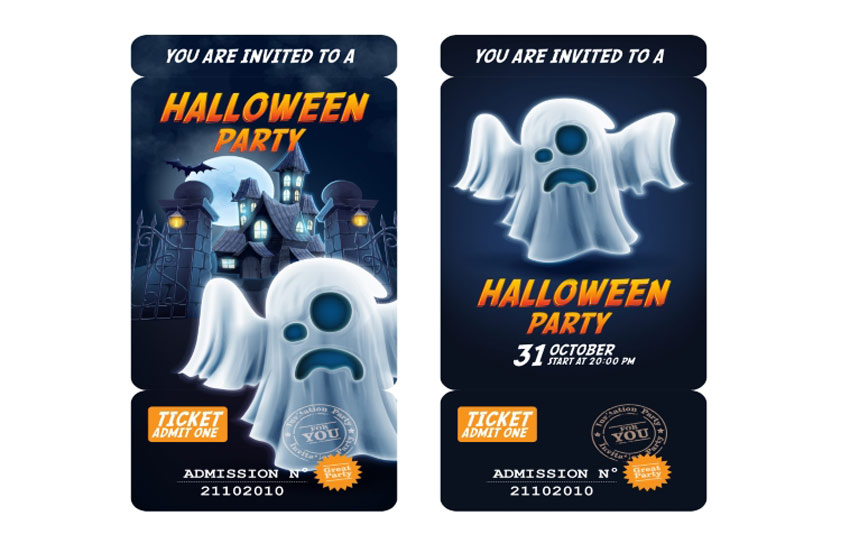
This unique Halloween invitation gives you the option of giving admission tickets to your friends. Simply bring the entire invite, and include an admission number for your exclusive party.
Here is another great admission ticket design utilizing a traditional Halloween pumpkin instead. Choose between a pumpkin along a simple background or an intricate back drop to celebrate your Halloween bash.
Cast a spell on all your friends with this clean Halloween invitation. This design features beautiful calligraphy along with an easy to use design you can customize in Adobe Illustrator.
Who knew zombies could be so beautiful? This vector design features two deadly zombie hands reaching out of their grave to celebrate your upcoming party. With fun details like bats, gravestones, and an owl, impress your friends with this beautiful yet simple design.
Boil, boil, toil, and trouble! Impress your friends with this Halloween invite featuring a scary pumpkin and fierce green fire. Choose to keep the fonts as is or incorporate your own for added customization.
Halloween Flyers
Whether you’re staying home with friends or dancing the night away, these Halloween flyers will make you want to get up off your feet. Let’s just hope that they’re still attached when you do!
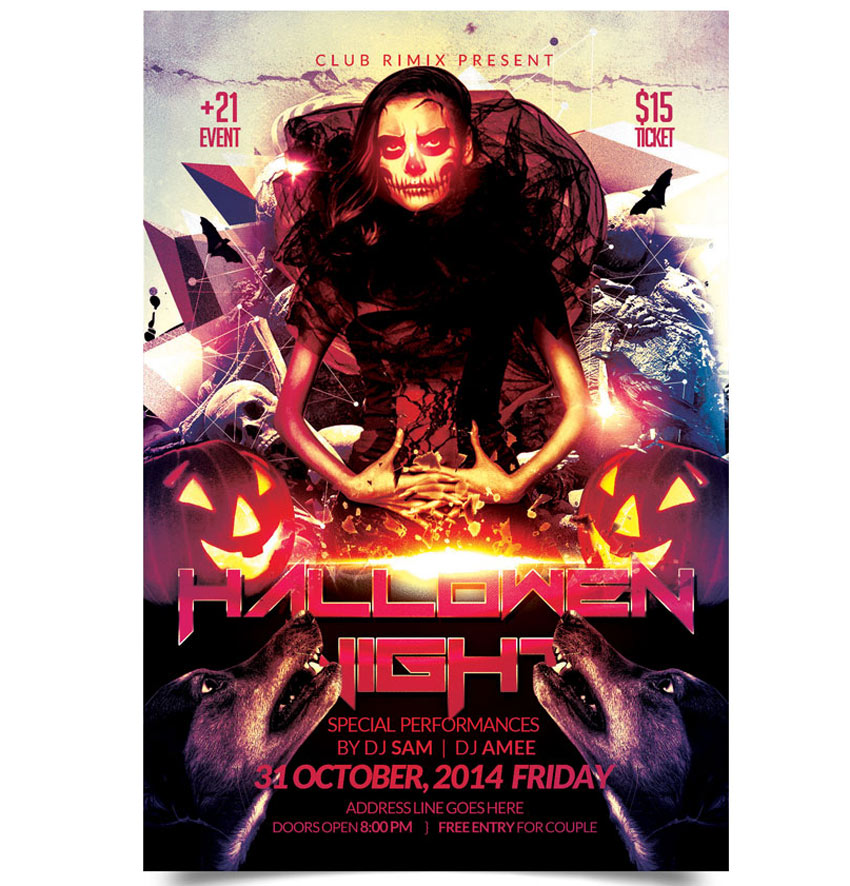
Kick off the holiday with the party of the year! This flyer features an awesome club theme with 3D text and more. Download several print ready files available in two convenient sizes.
Create a big impact with this bold and beautiful Halloween flyer. This template features a colorful design with neon text elements you can easily adjust. Enjoy one fully layered Photoshop file with links to the fonts used.
Get ready to dance all night with this show stopping party flyer. This flyer contains impressive abstract elements combined with a Halloween theme. Download this print ready file and get ready to use it right away!
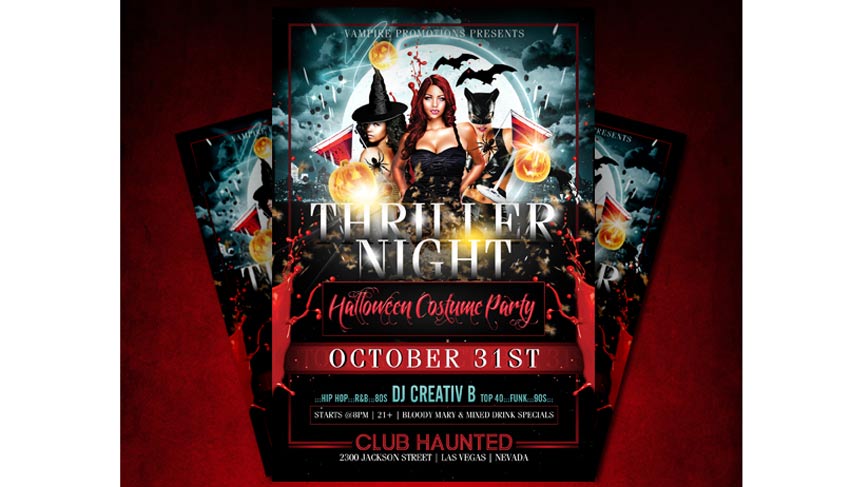
If you’re holding a party for the adults, try out this Halloween flyer for your nightclub or party events. With links to fonts used and several design variations, insert your own beautiful vixens to bring in your sinfully good times.
Create chills up the spines of your party goers with this party flyer. This template features a haunted forest vibes with chunky, grunge text. Update it easily with the help of Adobe Photoshop. It’s a flyer that’s perfect for beginners.
Care to dance with a flaming scarecrow? Creep out your friends with this haunting design which includes six awesome scarecrows, two pre designed versions, and more custom elements to choose from.
Creep out your party goers with this scary flyer. This flyer features a horror movie design reminiscent of iconic movie scenes. It’s great for any flyer or invitation and super easy to customize.
If you’re looking for a grunge look for your flyer, then look no further. This illustrative poster design features a fun grunge look that is matched with unique fonts and elements. Interchange your details with this easy-to-use template.
Don’t get caught in the spooky cobwebs! This cool flyer design features a black and white color theme for a nice, minimalist vibe. Simply switch out the party details to add your own in a matter of minutes!
Having a zombie-themed party at your place? Try out this Halloween flyer to creep out your friends and let them know of the shenanigans ahead. Available in three colors styles and organized layers, this flyer is sure to wake the undead.
Rock out at this year’s festival with this epic flyer template. This template features a rock and roll skull design with minimalist vector details. Choose from three different colors to enjoy this flyer in gold, white, and blue designs.
Feeling a little slimey? Chances are you’ve gotten yourself into a sticky situation with this Halloween flyer. This design features an organized PSD file for easy editing and free fonts you can download in seconds. So get slimey in no time with this fun party flyer!
Celebrate the night the dead walk the earth with this quirky zombie flyer. Choose from three different versions, and even a different hand position to promote your zombie event.
If you’re looking for a kid-friendly design, then this is the flyer for you. With adorable vector elements and different monster cartoons to choose from, your child will have a blast knowing they have the coolest flyer on the block.
Enter at your own risk. This flyer features a dark haunted house along with a spooky design. With its elements so easy to customize, all you’ll need to is add your own text below and get ready to party!
Add some shiny elements to your flyer for a hot design. This template features gold 3D elements like skulls and pumpkins for a sophisticated alternative. Swap out the title and additional text elements to get started with this flyer today!
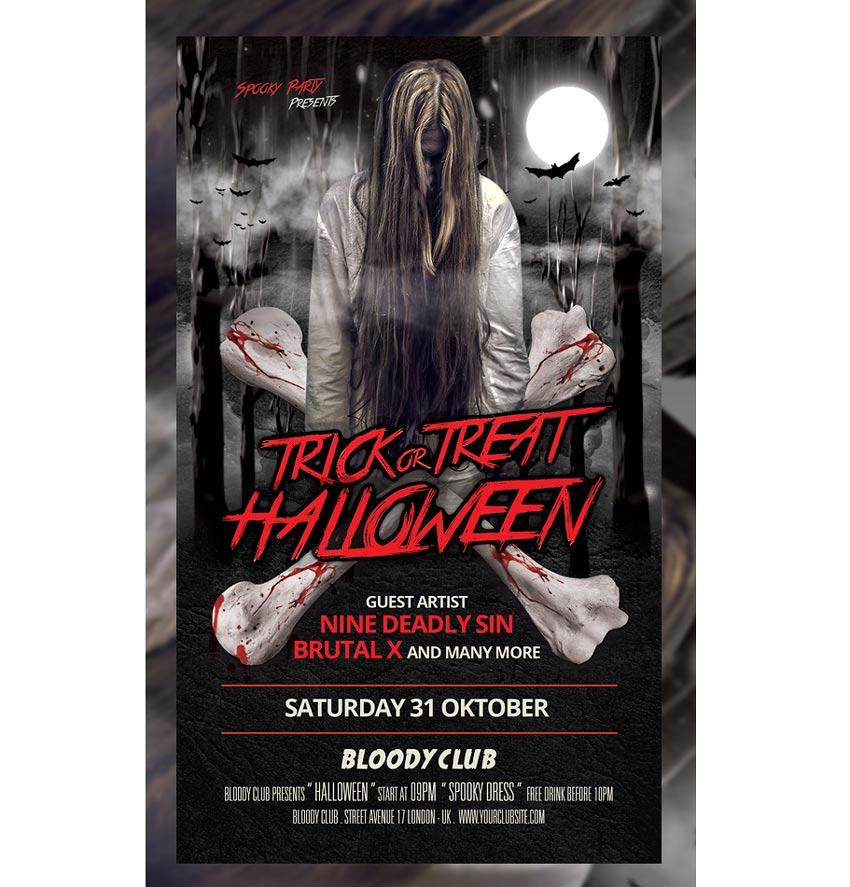
Want to keep your friends up at night? Scare them with this super spooky Halloween template before they even show up to your party. Edit the text easily in Adobe Photoshop, and switch out the main photo with a choice of your own possessed model from Photodune.
Bbbbraaainnns! This Halloween flyer features a bright design and colorful zombie that will be sure to charm the limbs off your friends. With two color options available, check out this flyer in its easily editable PSD format.
Did anyone invite zombies to this party? This bloody flyer design features dripping text and customizable elements you can edit in Adobe Photoshop. Change out the images with your own zombies or download some stocks from Photodune.
It’s alive! If you’ve been hiding out in a secret laboratory, then this flyer may be for you. Surprise your friends with your deadly creation with this fun Halloween design. Edit in Adobe Photoshop and choose from several different colors to finalize your monster creation.
Looking for a simple design that is easy to print? Check out this grunge Halloween party flyer with graphic elements. Customize the text to fit your party details and celebrate your festivities in style.
Zombies like parties too! Bring in Halloween this year with a fun zombie party using this flyer design. It features colorful Halloween elements and splashes of grunge to keep things a little dirty.
Feeling a little vintage? Celebrate your feelings of nostalgia with this spooky flyer design. With its fully editable file and easy-to-use PSD format, change the colors to reflect your theme with this print ready poster.
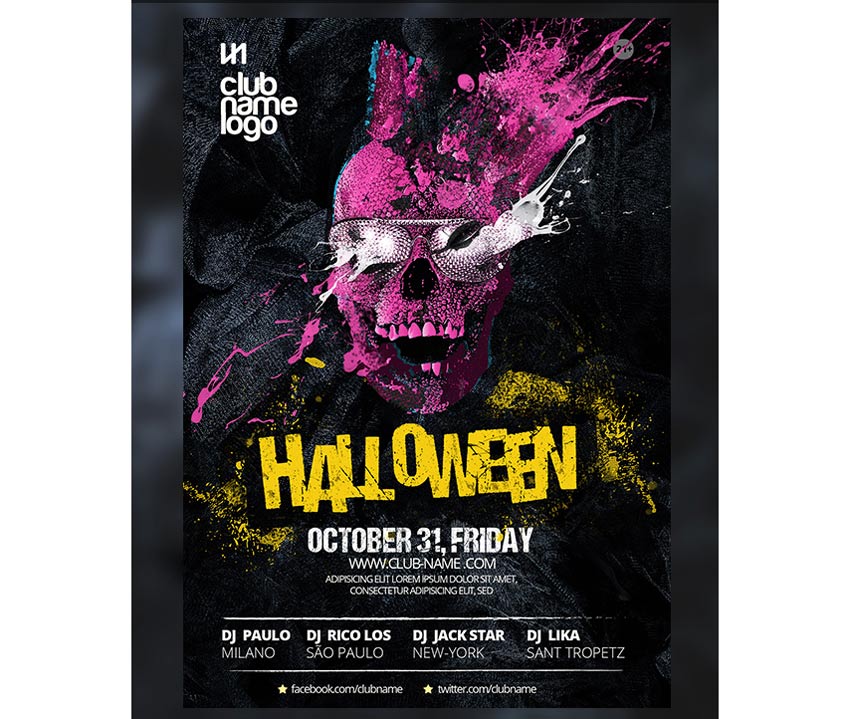
Yes, this awesome skull is included! With an explosive pink design, everyone will be read to dance the night away at your Halloween event. Included with this template are links to the fonts used for this easy-to-edit PSD file.
This flyer has all your favorite Halloween elements in one. With a fun ghoulish text atop a skull backdrop, you can let your event shine with this simple design and bold color. Fully editable in Adobe Photoshop, change out the colors or keep this beautiful yellow to go with your Halloween theme.
If simple elements are more your style, check out this retro design. Featuring adorable Halloween elements like bats, pumpkins, and even your very own Dracula, invite your friends to your next horror party with this quick and easy flyer.
Don’t get too close or you just might end up for dinner! This Halloween flyer features a large vector design that is easily resizable in Photoshop. Choose from several vibrant colors and scare your friends with this monstrous design.
Trick or Treat? This Halloween design features a cool night time color palette with glowing pumpkins. Kick off your party or event with this ready-to-print flyer with guides for your understanding.
Allude to your love of voodoo with this fun Halloween design. With a giant spider web, voodoo doll, and additional spooky elements, easily customize this illustrative poster with different colors and unique fonts.
Invite the neighbors over for a fun game of trunk or treat. Packed with three design variations, this template features ghost, pumpkin, and fire themes. Get access to six files and free fonts in one convenient download!
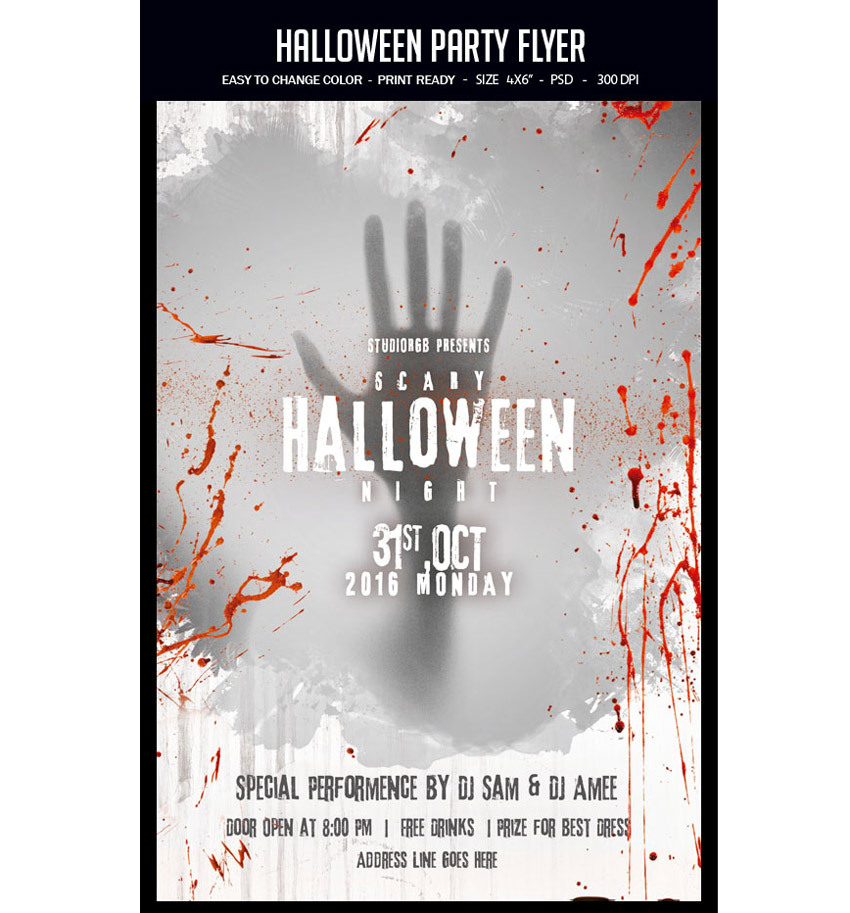
Need a hand? This Halloween flyer features a mysterious spooky hand that slashes through the poster design. And with the image included, all you’ll need to do is switch out the text with your own party information!
If the other designs aren’t quite your speed, then try out this gorgeous Halloween flyer. Featuring a large skull with an elegant flower head piece, show off your love of fashion and style with this unique event poster. Customize the colors to your liking and take relief in knowing that all the images are included!
Need a quick flyer design with realistic elements? Check out this
impressive Halloween flyer packed with all the resources that you see.
Easily modify text, switch the colors around, and add or remove objects
to the layered PSD file.
Celebrate your favorite holiday in the comfort of your home with this haunted house theme. This template features a clean, modern design with bold text against a candlelit background. Just add your address and official event date to get your party started.
Conclusion
This list is jam-packed with Halloween resources for the avid designer familiar with Adobe Photoshop and Illustrator. But with thousands of flyers available at your fingertips, chances are we’ve missed a few to add to your personal collection. Be sure to browse Envato Market for more resources and let us know your favorites in the comments below!
It’s almost Halloween! That special time of the year when stores pack their shelves with candy and we all dress up as our favorite ghouls.
And what better way to celebrate our favorite monsters and urban legends then with a spooktacular collection of Halloween invites and flyers you can only find on Envato Market? Here we have curated a selection of 50 to satisfy all your party needs.
Looking for more to choose from? Browse the wide selection of templates available to you on Envato Market.
Or enlist the help of a design professional by contacting the good folks at Envato Studio.
Halloween Invitations
You can’t have a party without sending out a few invites. These Halloween invitations will make you want to throw your very own costume party and celebrate in style.
Great for kids parties, this Halloween invitation is super cute and bright. Enjoy the playful design complete with a tombstone, pumpkin, and witch hat.
Kick off your ghoulish celebrations with this invitation template. This simple design features dripping font and a creepy graveyard design at the bottom.
Inspired by the classics, this Halloween invite features several stills from horror classics with some fantastic fonts you can download for free. Pick from three versions and several color combinations.
Monster mash anyone? Summon your friends to eat, drink, and be scary with this fun and simple Halloween party invite. With two themes available and text ready-to-edit, choose from portrait or landscape orientation for your invites.
Keep it simple with this stylish invitation. This invite contains spooky ghosts against a starry sky. Enjoy the delightful design for a sweet take on Halloween invitations.
Add some retro charm to your holiday invites! This awesome collection includes four different designs to choose from. They go great with spooky Halloween themes and are sure to impress your party goers.
This creative set of invitations provides a variation of three fun designs to choose from. Pick from designs like Frankenstein, a werewolf, and a creepy pumpkin to bring a simple quirky flair to your invites.
Are you a rebellious trick or treater wreaking havoc in the night? Then kick off your Halloween celebrations with this simple invite design. Editable in both Photoshop and Illustrator, you can customize this design no matter your Adobe product preferences.
Choose from different party themes to set your invite apart from others. This pack features spooky, minimalist designs with witch, ghost, and skull elements. Customize it easily by changing the fully editable text.
Looking for a simple design that is haunting yet straight to the point? Check out this Halloween invitation that features an elegant cemetery silhouette that is subtle enough to fill you with fear. With a fully layered PSD file you can choose to customize the colors and text to fill your needs.
This 2-for-1 deal packs a punch with a simple design you can use for either an invitation or party flyer. Change the background color to switch up the design or edit the text to fill your needs with Adobe Illustrator.
Love the simplicity of black and white? This chalkboard design features a simple composition that allows the typography and details of your party shine. It’s fully customizable and even comes with free fonts!
Get your friends and family together for a fun costume party with this flyer invitation. This design features a cartoon theme perfect for all ages. Get access to three different color schemes to fit the style of your party.
What fun designs will you carve on your pumpkins this Halloween? Invite your friends over for a messy good time, and reward the winners with candy. Use this simple design for your invitations featuring a pumpkin, black cat, and simple yellow ribbons.
This beautiful and simple design showcases several fun fonts to highlight all your party details. Available in the format for Adobe Illustrator, customize this invite with your own text and location.
Need something short and sweet? This simple design features a beautiful purple night sky with creepy elements from a church cemetery. Create your invites quick and easy by just switching out the bottom text with your own location and contact details.
Watch out for the zombie attack with this wicked invitation flyer. This flyer features an apocalpytic theme with fire, destruction, and zombies, of course. Entertain your friends with the invite of the year!
Do you like pumpkins, bats, or haunted houses? Choose from three simple designs with this set of Halloween party invitations. These designs use the vector EPS format, and you can easily customize the text for your celebration.
You don’t always have to creep everyone out to have a good time. This simple party invitation features a cute trio of characters that you can interchange with several different colors. Editable in several formats, use this design for your kid’s party and school celebrations.
This beautiful yet simple design features a frame of skulls and other fall goodies to frame your choice of text. Add a hint of grunge to your party with this vintage-themed invitation.
If you love bold colors and witches then this is the invite for you! Choose this invite made from 100% vector elements with easily resizable vectors. Shock your friends with these bold neon colors and choose something a little out of the box for this Halloween.
Business card or spooky party invite? This unique design features a layout and composition specially-made for business card printing. It utilizes a standard 3.5 x 2 inch design with high resolution for a fantastic high-quality result.
Check out this colorful party invite featuring interchangeable skull and pumpkin designs. Edit your text with free fonts and set your celebrations into effect with this easy to use layout.
Having a costume party for all your friends? Pick this fun card that features a flyer full of fun cartoon characters taking their own spin on your favorite Halloween costumes.
This unique Halloween invitation gives you the option of giving admission tickets to your friends. Simply bring the entire invite, and include an admission number for your exclusive party.
Here is another great admission ticket design utilizing a traditional Halloween pumpkin instead. Choose between a pumpkin along a simple background or an intricate back drop to celebrate your Halloween bash.
Cast a spell on all your friends with this clean Halloween invitation. This design features beautiful calligraphy along with an easy to use design you can customize in Adobe Illustrator.
Who knew zombies could be so beautiful? This vector design features two deadly zombie hands reaching out of their grave to celebrate your upcoming party. With fun details like bats, gravestones, and an owl, impress your friends with this beautiful yet simple design.
Boil, boil, toil, and trouble! Impress your friends with this Halloween invite featuring a scary pumpkin and fierce green fire. Choose to keep the fonts as is or incorporate your own for added customization.
Halloween Flyers
Whether you’re staying home with friends or dancing the night away, these Halloween flyers will make you want to get up off your feet. Let’s just hope that they’re still attached when you do!
Kick off the holiday with the party of the year! This flyer features an awesome club theme with 3D text and more. Download several print ready files available in two convenient sizes.
Create a big impact with this bold and beautiful Halloween flyer. This template features a colorful design with neon text elements you can easily adjust. Enjoy one fully layered Photoshop file with links to the fonts used.
Get ready to dance all night with this show stopping party flyer. This flyer contains impressive abstract elements combined with a Halloween theme. Download this print ready file and get ready to use it right away!
If you’re holding a party for the adults, try out this Halloween flyer for your nightclub or party events. With links to fonts used and several design variations, insert your own beautiful vixens to bring in your sinfully good times.
Create chills up the spines of your party goers with this party flyer. This template features a haunted forest vibes with chunky, grunge text. Update it easily with the help of Adobe Photoshop. It’s a flyer that’s perfect for beginners.
Care to dance with a flaming scarecrow? Creep out your friends with this haunting design which includes six awesome scarecrows, two pre designed versions, and more custom elements to choose from.
Creep out your party goers with this scary flyer. This flyer features a horror movie design reminiscent of iconic movie scenes. It’s great for any flyer or invitation and super easy to customize.
If you’re looking for a grunge look for your flyer, then look no further. This illustrative poster design features a fun grunge look that is matched with unique fonts and elements. Interchange your details with this easy-to-use template.
Don’t get caught in the spooky cobwebs! This cool flyer design features a black and white color theme for a nice, minimalist vibe. Simply switch out the party details to add your own in a matter of minutes!
Having a zombie-themed party at your place? Try out this Halloween flyer to creep out your friends and let them know of the shenanigans ahead. Available in three colors styles and organized layers, this flyer is sure to wake the undead.
Rock out at this year’s festival with this epic flyer template. This template features a rock and roll skull design with minimalist vector details. Choose from three different colors to enjoy this flyer in gold, white, and blue designs.
Feeling a little slimey? Chances are you’ve gotten yourself into a sticky situation with this Halloween flyer. This design features an organized PSD file for easy editing and free fonts you can download in seconds. So get slimey in no time with this fun party flyer!
Celebrate the night the dead walk the earth with this quirky zombie flyer. Choose from three different versions, and even a different hand position to promote your zombie event.
If you’re looking for a kid-friendly design, then this is the flyer for you. With adorable vector elements and different monster cartoons to choose from, your child will have a blast knowing they have the coolest flyer on the block.
Enter at your own risk. This flyer features a dark haunted house along with a spooky design. With its elements so easy to customize, all you’ll need to is add your own text below and get ready to party!
Add some shiny elements to your flyer for a hot design. This template features gold 3D elements like skulls and pumpkins for a sophisticated alternative. Swap out the title and additional text elements to get started with this flyer today!
Want to keep your friends up at night? Scare them with this super spooky Halloween template before they even show up to your party. Edit the text easily in Adobe Photoshop, and switch out the main photo with a choice of your own possessed model from Photodune.
Bbbbraaainnns! This Halloween flyer features a bright design and colorful zombie that will be sure to charm the limbs off your friends. With two color options available, check out this flyer in its easily editable PSD format.
Did anyone invite zombies to this party? This bloody flyer design features dripping text and customizable elements you can edit in Adobe Photoshop. Change out the images with your own zombies or download some stocks from Photodune.
It’s alive! If you’ve been hiding out in a secret laboratory, then this flyer may be for you. Surprise your friends with your deadly creation with this fun Halloween design. Edit in Adobe Photoshop and choose from several different colors to finalize your monster creation.
Looking for a simple design that is easy to print? Check out this grunge Halloween party flyer with graphic elements. Customize the text to fit your party details and celebrate your festivities in style.
Zombies like parties too! Bring in Halloween this year with a fun zombie party using this flyer design. It features colorful Halloween elements and splashes of grunge to keep things a little dirty.
Feeling a little vintage? Celebrate your feelings of nostalgia with this spooky flyer design. With its fully editable file and easy-to-use PSD format, change the colors to reflect your theme with this print ready poster.
Yes, this awesome skull is included! With an explosive pink design, everyone will be read to dance the night away at your Halloween event. Included with this template are links to the fonts used for this easy-to-edit PSD file.
This flyer has all your favorite Halloween elements in one. With a fun ghoulish text atop a skull backdrop, you can let your event shine with this simple design and bold color. Fully editable in Adobe Photoshop, change out the colors or keep this beautiful yellow to go with your Halloween theme.
If simple elements are more your style, check out this retro design. Featuring adorable Halloween elements like bats, pumpkins, and even your very own Dracula, invite your friends to your next horror party with this quick and easy flyer.
Don’t get too close or you just might end up for dinner! This Halloween flyer features a large vector design that is easily resizable in Photoshop. Choose from several vibrant colors and scare your friends with this monstrous design.
Trick or Treat? This Halloween design features a cool night time color palette with glowing pumpkins. Kick off your party or event with this ready-to-print flyer with guides for your understanding.
Allude to your love of voodoo with this fun Halloween design. With a giant spider web, voodoo doll, and additional spooky elements, easily customize this illustrative poster with different colors and unique fonts.
Invite the neighbors over for a fun game of trunk or treat. Packed with three design variations, this template features ghost, pumpkin, and fire themes. Get access to six files and free fonts in one convenient download!
Need a hand? This Halloween flyer features a mysterious spooky hand that slashes through the poster design. And with the image included, all you’ll need to do is switch out the text with your own party information!
If the other designs aren’t quite your speed, then try out this gorgeous Halloween flyer. Featuring a large skull with an elegant flower head piece, show off your love of fashion and style with this unique event poster. Customize the colors to your liking and take relief in knowing that all the images are included!
Need a quick flyer design with realistic elements? Check out this
impressive Halloween flyer packed with all the resources that you see.
Easily modify text, switch the colors around, and add or remove objects
to the layered PSD file.
Celebrate your favorite holiday in the comfort of your home with this haunted house theme. This template features a clean, modern design with bold text against a candlelit background. Just add your address and official event date to get your party started.
Conclusion
This list is jam-packed with Halloween resources for the avid designer familiar with Adobe Photoshop and Illustrator. But with thousands of flyers available at your fingertips, chances are we’ve missed a few to add to your personal collection. Be sure to browse Envato Market for more resources and let us know your favorites in the comments below!
It’s almost Halloween! That special time of the year when stores pack their shelves with candy and we all dress up as our favorite ghouls.
And what better way to celebrate our favorite monsters and urban legends then with a spooktacular collection of Halloween invites and flyers you can only find on Envato Market? Here we have curated a selection of 50 to satisfy all your party needs.
Looking for more to choose from? Browse the wide selection of templates available to you on Envato Market.
Or enlist the help of a design professional by contacting the good folks at Envato Studio.
Halloween Invitations
You can’t have a party without sending out a few invites. These Halloween invitations will make you want to throw your very own costume party and celebrate in style.
Great for kids parties, this Halloween invitation is super cute and bright. Enjoy the playful design complete with a tombstone, pumpkin, and witch hat.
Kick off your ghoulish celebrations with this invitation template. This simple design features dripping font and a creepy graveyard design at the bottom.
Inspired by the classics, this Halloween invite features several stills from horror classics with some fantastic fonts you can download for free. Pick from three versions and several color combinations.
Monster mash anyone? Summon your friends to eat, drink, and be scary with this fun and simple Halloween party invite. With two themes available and text ready-to-edit, choose from portrait or landscape orientation for your invites.
Keep it simple with this stylish invitation. This invite contains spooky ghosts against a starry sky. Enjoy the delightful design for a sweet take on Halloween invitations.
Add some retro charm to your holiday invites! This awesome collection includes four different designs to choose from. They go great with spooky Halloween themes and are sure to impress your party goers.
This creative set of invitations provides a variation of three fun designs to choose from. Pick from designs like Frankenstein, a werewolf, and a creepy pumpkin to bring a simple quirky flair to your invites.
Are you a rebellious trick or treater wreaking havoc in the night? Then kick off your Halloween celebrations with this simple invite design. Editable in both Photoshop and Illustrator, you can customize this design no matter your Adobe product preferences.
Choose from different party themes to set your invite apart from others. This pack features spooky, minimalist designs with witch, ghost, and skull elements. Customize it easily by changing the fully editable text.
Looking for a simple design that is haunting yet straight to the point? Check out this Halloween invitation that features an elegant cemetery silhouette that is subtle enough to fill you with fear. With a fully layered PSD file you can choose to customize the colors and text to fill your needs.
This 2-for-1 deal packs a punch with a simple design you can use for either an invitation or party flyer. Change the background color to switch up the design or edit the text to fill your needs with Adobe Illustrator.
Love the simplicity of black and white? This chalkboard design features a simple composition that allows the typography and details of your party shine. It’s fully customizable and even comes with free fonts!
Get your friends and family together for a fun costume party with this flyer invitation. This design features a cartoon theme perfect for all ages. Get access to three different color schemes to fit the style of your party.
What fun designs will you carve on your pumpkins this Halloween? Invite your friends over for a messy good time, and reward the winners with candy. Use this simple design for your invitations featuring a pumpkin, black cat, and simple yellow ribbons.
This beautiful and simple design showcases several fun fonts to highlight all your party details. Available in the format for Adobe Illustrator, customize this invite with your own text and location.
Need something short and sweet? This simple design features a beautiful purple night sky with creepy elements from a church cemetery. Create your invites quick and easy by just switching out the bottom text with your own location and contact details.
Watch out for the zombie attack with this wicked invitation flyer. This flyer features an apocalpytic theme with fire, destruction, and zombies, of course. Entertain your friends with the invite of the year!
Do you like pumpkins, bats, or haunted houses? Choose from three simple designs with this set of Halloween party invitations. These designs use the vector EPS format, and you can easily customize the text for your celebration.
You don’t always have to creep everyone out to have a good time. This simple party invitation features a cute trio of characters that you can interchange with several different colors. Editable in several formats, use this design for your kid’s party and school celebrations.
This beautiful yet simple design features a frame of skulls and other fall goodies to frame your choice of text. Add a hint of grunge to your party with this vintage-themed invitation.
If you love bold colors and witches then this is the invite for you! Choose this invite made from 100% vector elements with easily resizable vectors. Shock your friends with these bold neon colors and choose something a little out of the box for this Halloween.
Business card or spooky party invite? This unique design features a layout and composition specially-made for business card printing. It utilizes a standard 3.5 x 2 inch design with high resolution for a fantastic high-quality result.
Check out this colorful party invite featuring interchangeable skull and pumpkin designs. Edit your text with free fonts and set your celebrations into effect with this easy to use layout.
Having a costume party for all your friends? Pick this fun card that features a flyer full of fun cartoon characters taking their own spin on your favorite Halloween costumes.
This unique Halloween invitation gives you the option of giving admission tickets to your friends. Simply bring the entire invite, and include an admission number for your exclusive party.
Here is another great admission ticket design utilizing a traditional Halloween pumpkin instead. Choose between a pumpkin along a simple background or an intricate back drop to celebrate your Halloween bash.
Cast a spell on all your friends with this clean Halloween invitation. This design features beautiful calligraphy along with an easy to use design you can customize in Adobe Illustrator.
Who knew zombies could be so beautiful? This vector design features two deadly zombie hands reaching out of their grave to celebrate your upcoming party. With fun details like bats, gravestones, and an owl, impress your friends with this beautiful yet simple design.
Boil, boil, toil, and trouble! Impress your friends with this Halloween invite featuring a scary pumpkin and fierce green fire. Choose to keep the fonts as is or incorporate your own for added customization.
Halloween Flyers
Whether you’re staying home with friends or dancing the night away, these Halloween flyers will make you want to get up off your feet. Let’s just hope that they’re still attached when you do!
Kick off the holiday with the party of the year! This flyer features an awesome club theme with 3D text and more. Download several print ready files available in two convenient sizes.
Create a big impact with this bold and beautiful Halloween flyer. This template features a colorful design with neon text elements you can easily adjust. Enjoy one fully layered Photoshop file with links to the fonts used.
Get ready to dance all night with this show stopping party flyer. This flyer contains impressive abstract elements combined with a Halloween theme. Download this print ready file and get ready to use it right away!
If you’re holding a party for the adults, try out this Halloween flyer for your nightclub or party events. With links to fonts used and several design variations, insert your own beautiful vixens to bring in your sinfully good times.
Create chills up the spines of your party goers with this party flyer. This template features a haunted forest vibes with chunky, grunge text. Update it easily with the help of Adobe Photoshop. It’s a flyer that’s perfect for beginners.
Care to dance with a flaming scarecrow? Creep out your friends with this haunting design which includes six awesome scarecrows, two pre designed versions, and more custom elements to choose from.
Creep out your party goers with this scary flyer. This flyer features a horror movie design reminiscent of iconic movie scenes. It’s great for any flyer or invitation and super easy to customize.
If you’re looking for a grunge look for your flyer, then look no further. This illustrative poster design features a fun grunge look that is matched with unique fonts and elements. Interchange your details with this easy-to-use template.
Don’t get caught in the spooky cobwebs! This cool flyer design features a black and white color theme for a nice, minimalist vibe. Simply switch out the party details to add your own in a matter of minutes!
Having a zombie-themed party at your place? Try out this Halloween flyer to creep out your friends and let them know of the shenanigans ahead. Available in three colors styles and organized layers, this flyer is sure to wake the undead.
Rock out at this year’s festival with this epic flyer template. This template features a rock and roll skull design with minimalist vector details. Choose from three different colors to enjoy this flyer in gold, white, and blue designs.
Feeling a little slimey? Chances are you’ve gotten yourself into a sticky situation with this Halloween flyer. This design features an organized PSD file for easy editing and free fonts you can download in seconds. So get slimey in no time with this fun party flyer!
Celebrate the night the dead walk the earth with this quirky zombie flyer. Choose from three different versions, and even a different hand position to promote your zombie event.
If you’re looking for a kid-friendly design, then this is the flyer for you. With adorable vector elements and different monster cartoons to choose from, your child will have a blast knowing they have the coolest flyer on the block.
Enter at your own risk. This flyer features a dark haunted house along with a spooky design. With its elements so easy to customize, all you’ll need to is add your own text below and get ready to party!
Add some shiny elements to your flyer for a hot design. This template features gold 3D elements like skulls and pumpkins for a sophisticated alternative. Swap out the title and additional text elements to get started with this flyer today!
Want to keep your friends up at night? Scare them with this super spooky Halloween template before they even show up to your party. Edit the text easily in Adobe Photoshop, and switch out the main photo with a choice of your own possessed model from Photodune.
Bbbbraaainnns! This Halloween flyer features a bright design and colorful zombie that will be sure to charm the limbs off your friends. With two color options available, check out this flyer in its easily editable PSD format.
Did anyone invite zombies to this party? This bloody flyer design features dripping text and customizable elements you can edit in Adobe Photoshop. Change out the images with your own zombies or download some stocks from Photodune.
It’s alive! If you’ve been hiding out in a secret laboratory, then this flyer may be for you. Surprise your friends with your deadly creation with this fun Halloween design. Edit in Adobe Photoshop and choose from several different colors to finalize your monster creation.
Looking for a simple design that is easy to print? Check out this grunge Halloween party flyer with graphic elements. Customize the text to fit your party details and celebrate your festivities in style.
Zombies like parties too! Bring in Halloween this year with a fun zombie party using this flyer design. It features colorful Halloween elements and splashes of grunge to keep things a little dirty.
Feeling a little vintage? Celebrate your feelings of nostalgia with this spooky flyer design. With its fully editable file and easy-to-use PSD format, change the colors to reflect your theme with this print ready poster.
Yes, this awesome skull is included! With an explosive pink design, everyone will be read to dance the night away at your Halloween event. Included with this template are links to the fonts used for this easy-to-edit PSD file.
This flyer has all your favorite Halloween elements in one. With a fun ghoulish text atop a skull backdrop, you can let your event shine with this simple design and bold color. Fully editable in Adobe Photoshop, change out the colors or keep this beautiful yellow to go with your Halloween theme.
If simple elements are more your style, check out this retro design. Featuring adorable Halloween elements like bats, pumpkins, and even your very own Dracula, invite your friends to your next horror party with this quick and easy flyer.
Don’t get too close or you just might end up for dinner! This Halloween flyer features a large vector design that is easily resizable in Photoshop. Choose from several vibrant colors and scare your friends with this monstrous design.
Trick or Treat? This Halloween design features a cool night time color palette with glowing pumpkins. Kick off your party or event with this ready-to-print flyer with guides for your understanding.
Allude to your love of voodoo with this fun Halloween design. With a giant spider web, voodoo doll, and additional spooky elements, easily customize this illustrative poster with different colors and unique fonts.
Invite the neighbors over for a fun game of trunk or treat. Packed with three design variations, this template features ghost, pumpkin, and fire themes. Get access to six files and free fonts in one convenient download!
Need a hand? This Halloween flyer features a mysterious spooky hand that slashes through the poster design. And with the image included, all you’ll need to do is switch out the text with your own party information!
If the other designs aren’t quite your speed, then try out this gorgeous Halloween flyer. Featuring a large skull with an elegant flower head piece, show off your love of fashion and style with this unique event poster. Customize the colors to your liking and take relief in knowing that all the images are included!
Need a quick flyer design with realistic elements? Check out this
impressive Halloween flyer packed with all the resources that you see.
Easily modify text, switch the colors around, and add or remove objects
to the layered PSD file.
Celebrate your favorite holiday in the comfort of your home with this haunted house theme. This template features a clean, modern design with bold text against a candlelit background. Just add your address and official event date to get your party started.
Conclusion
This list is jam-packed with Halloween resources for the avid designer familiar with Adobe Photoshop and Illustrator. But with thousands of flyers available at your fingertips, chances are we’ve missed a few to add to your personal collection. Be sure to browse Envato Market for more resources and let us know your favorites in the comments below!
It’s almost Halloween! That special time of the year when stores pack their shelves with candy and we all dress up as our favorite ghouls.
And what better way to celebrate our favorite monsters and urban legends then with a spooktacular collection of Halloween invites and flyers you can only find on Envato Market? Here we have curated a selection of 50 to satisfy all your party needs.
Looking for more to choose from? Browse the wide selection of templates available to you on Envato Market.
Or enlist the help of a design professional by contacting the good folks at Envato Studio.
Halloween Invitations
You can’t have a party without sending out a few invites. These Halloween invitations will make you want to throw your very own costume party and celebrate in style.
Great for kids parties, this Halloween invitation is super cute and bright. Enjoy the playful design complete with a tombstone, pumpkin, and witch hat.
Kick off your ghoulish celebrations with this invitation template. This simple design features dripping font and a creepy graveyard design at the bottom.
Inspired by the classics, this Halloween invite features several stills from horror classics with some fantastic fonts you can download for free. Pick from three versions and several color combinations.
Monster mash anyone? Summon your friends to eat, drink, and be scary with this fun and simple Halloween party invite. With two themes available and text ready-to-edit, choose from portrait or landscape orientation for your invites.
Keep it simple with this stylish invitation. This invite contains spooky ghosts against a starry sky. Enjoy the delightful design for a sweet take on Halloween invitations.
Add some retro charm to your holiday invites! This awesome collection includes four different designs to choose from. They go great with spooky Halloween themes and are sure to impress your party goers.
This creative set of invitations provides a variation of three fun designs to choose from. Pick from designs like Frankenstein, a werewolf, and a creepy pumpkin to bring a simple quirky flair to your invites.
Are you a rebellious trick or treater wreaking havoc in the night? Then kick off your Halloween celebrations with this simple invite design. Editable in both Photoshop and Illustrator, you can customize this design no matter your Adobe product preferences.
Choose from different party themes to set your invite apart from others. This pack features spooky, minimalist designs with witch, ghost, and skull elements. Customize it easily by changing the fully editable text.
Looking for a simple design that is haunting yet straight to the point? Check out this Halloween invitation that features an elegant cemetery silhouette that is subtle enough to fill you with fear. With a fully layered PSD file you can choose to customize the colors and text to fill your needs.
This 2-for-1 deal packs a punch with a simple design you can use for either an invitation or party flyer. Change the background color to switch up the design or edit the text to fill your needs with Adobe Illustrator.
Love the simplicity of black and white? This chalkboard design features a simple composition that allows the typography and details of your party shine. It’s fully customizable and even comes with free fonts!
Get your friends and family together for a fun costume party with this flyer invitation. This design features a cartoon theme perfect for all ages. Get access to three different color schemes to fit the style of your party.
What fun designs will you carve on your pumpkins this Halloween? Invite your friends over for a messy good time, and reward the winners with candy. Use this simple design for your invitations featuring a pumpkin, black cat, and simple yellow ribbons.
This beautiful and simple design showcases several fun fonts to highlight all your party details. Available in the format for Adobe Illustrator, customize this invite with your own text and location.
Need something short and sweet? This simple design features a beautiful purple night sky with creepy elements from a church cemetery. Create your invites quick and easy by just switching out the bottom text with your own location and contact details.
Watch out for the zombie attack with this wicked invitation flyer. This flyer features an apocalpytic theme with fire, destruction, and zombies, of course. Entertain your friends with the invite of the year!
Do you like pumpkins, bats, or haunted houses? Choose from three simple designs with this set of Halloween party invitations. These designs use the vector EPS format, and you can easily customize the text for your celebration.
You don’t always have to creep everyone out to have a good time. This simple party invitation features a cute trio of characters that you can interchange with several different colors. Editable in several formats, use this design for your kid’s party and school celebrations.
This beautiful yet simple design features a frame of skulls and other fall goodies to frame your choice of text. Add a hint of grunge to your party with this vintage-themed invitation.
If you love bold colors and witches then this is the invite for you! Choose this invite made from 100% vector elements with easily resizable vectors. Shock your friends with these bold neon colors and choose something a little out of the box for this Halloween.
Business card or spooky party invite? This unique design features a layout and composition specially-made for business card printing. It utilizes a standard 3.5 x 2 inch design with high resolution for a fantastic high-quality result.
Check out this colorful party invite featuring interchangeable skull and pumpkin designs. Edit your text with free fonts and set your celebrations into effect with this easy to use layout.
Having a costume party for all your friends? Pick this fun card that features a flyer full of fun cartoon characters taking their own spin on your favorite Halloween costumes.
This unique Halloween invitation gives you the option of giving admission tickets to your friends. Simply bring the entire invite, and include an admission number for your exclusive party.
Here is another great admission ticket design utilizing a traditional Halloween pumpkin instead. Choose between a pumpkin along a simple background or an intricate back drop to celebrate your Halloween bash.
Cast a spell on all your friends with this clean Halloween invitation. This design features beautiful calligraphy along with an easy to use design you can customize in Adobe Illustrator.
Who knew zombies could be so beautiful? This vector design features two deadly zombie hands reaching out of their grave to celebrate your upcoming party. With fun details like bats, gravestones, and an owl, impress your friends with this beautiful yet simple design.
Boil, boil, toil, and trouble! Impress your friends with this Halloween invite featuring a scary pumpkin and fierce green fire. Choose to keep the fonts as is or incorporate your own for added customization.
Halloween Flyers
Whether you’re staying home with friends or dancing the night away, these Halloween flyers will make you want to get up off your feet. Let’s just hope that they’re still attached when you do!
Kick off the holiday with the party of the year! This flyer features an awesome club theme with 3D text and more. Download several print ready files available in two convenient sizes.
Create a big impact with this bold and beautiful Halloween flyer. This template features a colorful design with neon text elements you can easily adjust. Enjoy one fully layered Photoshop file with links to the fonts used.
Get ready to dance all night with this show stopping party flyer. This flyer contains impressive abstract elements combined with a Halloween theme. Download this print ready file and get ready to use it right away!
If you’re holding a party for the adults, try out this Halloween flyer for your nightclub or party events. With links to fonts used and several design variations, insert your own beautiful vixens to bring in your sinfully good times.
Create chills up the spines of your party goers with this party flyer. This template features a haunted forest vibes with chunky, grunge text. Update it easily with the help of Adobe Photoshop. It’s a flyer that’s perfect for beginners.
Care to dance with a flaming scarecrow? Creep out your friends with this haunting design which includes six awesome scarecrows, two pre designed versions, and more custom elements to choose from.
Creep out your party goers with this scary flyer. This flyer features a horror movie design reminiscent of iconic movie scenes. It’s great for any flyer or invitation and super easy to customize.
If you’re looking for a grunge look for your flyer, then look no further. This illustrative poster design features a fun grunge look that is matched with unique fonts and elements. Interchange your details with this easy-to-use template.
Don’t get caught in the spooky cobwebs! This cool flyer design features a black and white color theme for a nice, minimalist vibe. Simply switch out the party details to add your own in a matter of minutes!
Having a zombie-themed party at your place? Try out this Halloween flyer to creep out your friends and let them know of the shenanigans ahead. Available in three colors styles and organized layers, this flyer is sure to wake the undead.
Rock out at this year’s festival with this epic flyer template. This template features a rock and roll skull design with minimalist vector details. Choose from three different colors to enjoy this flyer in gold, white, and blue designs.
Feeling a little slimey? Chances are you’ve gotten yourself into a sticky situation with this Halloween flyer. This design features an organized PSD file for easy editing and free fonts you can download in seconds. So get slimey in no time with this fun party flyer!
Celebrate the night the dead walk the earth with this quirky zombie flyer. Choose from three different versions, and even a different hand position to promote your zombie event.
If you’re looking for a kid-friendly design, then this is the flyer for you. With adorable vector elements and different monster cartoons to choose from, your child will have a blast knowing they have the coolest flyer on the block.
Enter at your own risk. This flyer features a dark haunted house along with a spooky design. With its elements so easy to customize, all you’ll need to is add your own text below and get ready to party!
Add some shiny elements to your flyer for a hot design. This template features gold 3D elements like skulls and pumpkins for a sophisticated alternative. Swap out the title and additional text elements to get started with this flyer today!
Want to keep your friends up at night? Scare them with this super spooky Halloween template before they even show up to your party. Edit the text easily in Adobe Photoshop, and switch out the main photo with a choice of your own possessed model from Photodune.
Bbbbraaainnns! This Halloween flyer features a bright design and colorful zombie that will be sure to charm the limbs off your friends. With two color options available, check out this flyer in its easily editable PSD format.
Did anyone invite zombies to this party? This bloody flyer design features dripping text and customizable elements you can edit in Adobe Photoshop. Change out the images with your own zombies or download some stocks from Photodune.
It’s alive! If you’ve been hiding out in a secret laboratory, then this flyer may be for you. Surprise your friends with your deadly creation with this fun Halloween design. Edit in Adobe Photoshop and choose from several different colors to finalize your monster creation.
Looking for a simple design that is easy to print? Check out this grunge Halloween party flyer with graphic elements. Customize the text to fit your party details and celebrate your festivities in style.
Zombies like parties too! Bring in Halloween this year with a fun zombie party using this flyer design. It features colorful Halloween elements and splashes of grunge to keep things a little dirty.
Feeling a little vintage? Celebrate your feelings of nostalgia with this spooky flyer design. With its fully editable file and easy-to-use PSD format, change the colors to reflect your theme with this print ready poster.
Yes, this awesome skull is included! With an explosive pink design, everyone will be read to dance the night away at your Halloween event. Included with this template are links to the fonts used for this easy-to-edit PSD file.
This flyer has all your favorite Halloween elements in one. With a fun ghoulish text atop a skull backdrop, you can let your event shine with this simple design and bold color. Fully editable in Adobe Photoshop, change out the colors or keep this beautiful yellow to go with your Halloween theme.
If simple elements are more your style, check out this retro design. Featuring adorable Halloween elements like bats, pumpkins, and even your very own Dracula, invite your friends to your next horror party with this quick and easy flyer.
Don’t get too close or you just might end up for dinner! This Halloween flyer features a large vector design that is easily resizable in Photoshop. Choose from several vibrant colors and scare your friends with this monstrous design.
Trick or Treat? This Halloween design features a cool night time color palette with glowing pumpkins. Kick off your party or event with this ready-to-print flyer with guides for your understanding.
Allude to your love of voodoo with this fun Halloween design. With a giant spider web, voodoo doll, and additional spooky elements, easily customize this illustrative poster with different colors and unique fonts.
Invite the neighbors over for a fun game of trunk or treat. Packed with three design variations, this template features ghost, pumpkin, and fire themes. Get access to six files and free fonts in one convenient download!
Need a hand? This Halloween flyer features a mysterious spooky hand that slashes through the poster design. And with the image included, all you’ll need to do is switch out the text with your own party information!
If the other designs aren’t quite your speed, then try out this gorgeous Halloween flyer. Featuring a large skull with an elegant flower head piece, show off your love of fashion and style with this unique event poster. Customize the colors to your liking and take relief in knowing that all the images are included!
Need a quick flyer design with realistic elements? Check out this
impressive Halloween flyer packed with all the resources that you see.
Easily modify text, switch the colors around, and add or remove objects
to the layered PSD file.
Celebrate your favorite holiday in the comfort of your home with this haunted house theme. This template features a clean, modern design with bold text against a candlelit background. Just add your address and official event date to get your party started.
Conclusion
This list is jam-packed with Halloween resources for the avid designer familiar with Adobe Photoshop and Illustrator. But with thousands of flyers available at your fingertips, chances are we’ve missed a few to add to your personal collection. Be sure to browse Envato Market for more resources and let us know your favorites in the comments below!
It’s almost Halloween! That special time of the year when stores pack their shelves with candy and we all dress up as our favorite ghouls.
And what better way to celebrate our favorite monsters and urban legends then with a spooktacular collection of Halloween invites and flyers you can only find on Envato Market? Here we have curated a selection of 50 to satisfy all your party needs.
Looking for more to choose from? Browse the wide selection of templates available to you on Envato Market.
Or enlist the help of a design professional by contacting the good folks at Envato Studio.
Halloween Invitations
You can’t have a party without sending out a few invites. These Halloween invitations will make you want to throw your very own costume party and celebrate in style.
Great for kids parties, this Halloween invitation is super cute and bright. Enjoy the playful design complete with a tombstone, pumpkin, and witch hat.
Kick off your ghoulish celebrations with this invitation template. This simple design features dripping font and a creepy graveyard design at the bottom.
Inspired by the classics, this Halloween invite features several stills from horror classics with some fantastic fonts you can download for free. Pick from three versions and several color combinations.
Monster mash anyone? Summon your friends to eat, drink, and be scary with this fun and simple Halloween party invite. With two themes available and text ready-to-edit, choose from portrait or landscape orientation for your invites.
Keep it simple with this stylish invitation. This invite contains spooky ghosts against a starry sky. Enjoy the delightful design for a sweet take on Halloween invitations.
Add some retro charm to your holiday invites! This awesome collection includes four different designs to choose from. They go great with spooky Halloween themes and are sure to impress your party goers.
This creative set of invitations provides a variation of three fun designs to choose from. Pick from designs like Frankenstein, a werewolf, and a creepy pumpkin to bring a simple quirky flair to your invites.
Are you a rebellious trick or treater wreaking havoc in the night? Then kick off your Halloween celebrations with this simple invite design. Editable in both Photoshop and Illustrator, you can customize this design no matter your Adobe product preferences.
Choose from different party themes to set your invite apart from others. This pack features spooky, minimalist designs with witch, ghost, and skull elements. Customize it easily by changing the fully editable text.
Looking for a simple design that is haunting yet straight to the point? Check out this Halloween invitation that features an elegant cemetery silhouette that is subtle enough to fill you with fear. With a fully layered PSD file you can choose to customize the colors and text to fill your needs.
This 2-for-1 deal packs a punch with a simple design you can use for either an invitation or party flyer. Change the background color to switch up the design or edit the text to fill your needs with Adobe Illustrator.
Love the simplicity of black and white? This chalkboard design features a simple composition that allows the typography and details of your party shine. It’s fully customizable and even comes with free fonts!
Get your friends and family together for a fun costume party with this flyer invitation. This design features a cartoon theme perfect for all ages. Get access to three different color schemes to fit the style of your party.
What fun designs will you carve on your pumpkins this Halloween? Invite your friends over for a messy good time, and reward the winners with candy. Use this simple design for your invitations featuring a pumpkin, black cat, and simple yellow ribbons.
This beautiful and simple design showcases several fun fonts to highlight all your party details. Available in the format for Adobe Illustrator, customize this invite with your own text and location.
Need something short and sweet? This simple design features a beautiful purple night sky with creepy elements from a church cemetery. Create your invites quick and easy by just switching out the bottom text with your own location and contact details.
Watch out for the zombie attack with this wicked invitation flyer. This flyer features an apocalpytic theme with fire, destruction, and zombies, of course. Entertain your friends with the invite of the year!
Do you like pumpkins, bats, or haunted houses? Choose from three simple designs with this set of Halloween party invitations. These designs use the vector EPS format, and you can easily customize the text for your celebration.
You don’t always have to creep everyone out to have a good time. This simple party invitation features a cute trio of characters that you can interchange with several different colors. Editable in several formats, use this design for your kid’s party and school celebrations.
This beautiful yet simple design features a frame of skulls and other fall goodies to frame your choice of text. Add a hint of grunge to your party with this vintage-themed invitation.
If you love bold colors and witches then this is the invite for you! Choose this invite made from 100% vector elements with easily resizable vectors. Shock your friends with these bold neon colors and choose something a little out of the box for this Halloween.
Business card or spooky party invite? This unique design features a layout and composition specially-made for business card printing. It utilizes a standard 3.5 x 2 inch design with high resolution for a fantastic high-quality result.
Check out this colorful party invite featuring interchangeable skull and pumpkin designs. Edit your text with free fonts and set your celebrations into effect with this easy to use layout.
Having a costume party for all your friends? Pick this fun card that features a flyer full of fun cartoon characters taking their own spin on your favorite Halloween costumes.
This unique Halloween invitation gives you the option of giving admission tickets to your friends. Simply bring the entire invite, and include an admission number for your exclusive party.
Here is another great admission ticket design utilizing a traditional Halloween pumpkin instead. Choose between a pumpkin along a simple background or an intricate back drop to celebrate your Halloween bash.
Cast a spell on all your friends with this clean Halloween invitation. This design features beautiful calligraphy along with an easy to use design you can customize in Adobe Illustrator.
Who knew zombies could be so beautiful? This vector design features two deadly zombie hands reaching out of their grave to celebrate your upcoming party. With fun details like bats, gravestones, and an owl, impress your friends with this beautiful yet simple design.
Boil, boil, toil, and trouble! Impress your friends with this Halloween invite featuring a scary pumpkin and fierce green fire. Choose to keep the fonts as is or incorporate your own for added customization.
Halloween Flyers
Whether you’re staying home with friends or dancing the night away, these Halloween flyers will make you want to get up off your feet. Let’s just hope that they’re still attached when you do!
Kick off the holiday with the party of the year! This flyer features an awesome club theme with 3D text and more. Download several print ready files available in two convenient sizes.
Create a big impact with this bold and beautiful Halloween flyer. This template features a colorful design with neon text elements you can easily adjust. Enjoy one fully layered Photoshop file with links to the fonts used.
Get ready to dance all night with this show stopping party flyer. This flyer contains impressive abstract elements combined with a Halloween theme. Download this print ready file and get ready to use it right away!
If you’re holding a party for the adults, try out this Halloween flyer for your nightclub or party events. With links to fonts used and several design variations, insert your own beautiful vixens to bring in your sinfully good times.
Create chills up the spines of your party goers with this party flyer. This template features a haunted forest vibes with chunky, grunge text. Update it easily with the help of Adobe Photoshop. It’s a flyer that’s perfect for beginners.
Care to dance with a flaming scarecrow? Creep out your friends with this haunting design which includes six awesome scarecrows, two pre designed versions, and more custom elements to choose from.
Creep out your party goers with this scary flyer. This flyer features a horror movie design reminiscent of iconic movie scenes. It’s great for any flyer or invitation and super easy to customize.
If you’re looking for a grunge look for your flyer, then look no further. This illustrative poster design features a fun grunge look that is matched with unique fonts and elements. Interchange your details with this easy-to-use template.
Don’t get caught in the spooky cobwebs! This cool flyer design features a black and white color theme for a nice, minimalist vibe. Simply switch out the party details to add your own in a matter of minutes!
Having a zombie-themed party at your place? Try out this Halloween flyer to creep out your friends and let them know of the shenanigans ahead. Available in three colors styles and organized layers, this flyer is sure to wake the undead.
Rock out at this year’s festival with this epic flyer template. This template features a rock and roll skull design with minimalist vector details. Choose from three different colors to enjoy this flyer in gold, white, and blue designs.
Feeling a little slimey? Chances are you’ve gotten yourself into a sticky situation with this Halloween flyer. This design features an organized PSD file for easy editing and free fonts you can download in seconds. So get slimey in no time with this fun party flyer!
Celebrate the night the dead walk the earth with this quirky zombie flyer. Choose from three different versions, and even a different hand position to promote your zombie event.
If you’re looking for a kid-friendly design, then this is the flyer for you. With adorable vector elements and different monster cartoons to choose from, your child will have a blast knowing they have the coolest flyer on the block.
Enter at your own risk. This flyer features a dark haunted house along with a spooky design. With its elements so easy to customize, all you’ll need to is add your own text below and get ready to party!
Add some shiny elements to your flyer for a hot design. This template features gold 3D elements like skulls and pumpkins for a sophisticated alternative. Swap out the title and additional text elements to get started with this flyer today!
Want to keep your friends up at night? Scare them with this super spooky Halloween template before they even show up to your party. Edit the text easily in Adobe Photoshop, and switch out the main photo with a choice of your own possessed model from Photodune.
Bbbbraaainnns! This Halloween flyer features a bright design and colorful zombie that will be sure to charm the limbs off your friends. With two color options available, check out this flyer in its easily editable PSD format.
Did anyone invite zombies to this party? This bloody flyer design features dripping text and customizable elements you can edit in Adobe Photoshop. Change out the images with your own zombies or download some stocks from Photodune.
It’s alive! If you’ve been hiding out in a secret laboratory, then this flyer may be for you. Surprise your friends with your deadly creation with this fun Halloween design. Edit in Adobe Photoshop and choose from several different colors to finalize your monster creation.
Looking for a simple design that is easy to print? Check out this grunge Halloween party flyer with graphic elements. Customize the text to fit your party details and celebrate your festivities in style.
Zombies like parties too! Bring in Halloween this year with a fun zombie party using this flyer design. It features colorful Halloween elements and splashes of grunge to keep things a little dirty.
Feeling a little vintage? Celebrate your feelings of nostalgia with this spooky flyer design. With its fully editable file and easy-to-use PSD format, change the colors to reflect your theme with this print ready poster.
Yes, this awesome skull is included! With an explosive pink design, everyone will be read to dance the night away at your Halloween event. Included with this template are links to the fonts used for this easy-to-edit PSD file.
This flyer has all your favorite Halloween elements in one. With a fun ghoulish text atop a skull backdrop, you can let your event shine with this simple design and bold color. Fully editable in Adobe Photoshop, change out the colors or keep this beautiful yellow to go with your Halloween theme.
If simple elements are more your style, check out this retro design. Featuring adorable Halloween elements like bats, pumpkins, and even your very own Dracula, invite your friends to your next horror party with this quick and easy flyer.
Don’t get too close or you just might end up for dinner! This Halloween flyer features a large vector design that is easily resizable in Photoshop. Choose from several vibrant colors and scare your friends with this monstrous design.
Trick or Treat? This Halloween design features a cool night time color palette with glowing pumpkins. Kick off your party or event with this ready-to-print flyer with guides for your understanding.
Allude to your love of voodoo with this fun Halloween design. With a giant spider web, voodoo doll, and additional spooky elements, easily customize this illustrative poster with different colors and unique fonts.
Invite the neighbors over for a fun game of trunk or treat. Packed with three design variations, this template features ghost, pumpkin, and fire themes. Get access to six files and free fonts in one convenient download!
Need a hand? This Halloween flyer features a mysterious spooky hand that slashes through the poster design. And with the image included, all you’ll need to do is switch out the text with your own party information!
If the other designs aren’t quite your speed, then try out this gorgeous Halloween flyer. Featuring a large skull with an elegant flower head piece, show off your love of fashion and style with this unique event poster. Customize the colors to your liking and take relief in knowing that all the images are included!
Need a quick flyer design with realistic elements? Check out this
impressive Halloween flyer packed with all the resources that you see.
Easily modify text, switch the colors around, and add or remove objects
to the layered PSD file.
Celebrate your favorite holiday in the comfort of your home with this haunted house theme. This template features a clean, modern design with bold text against a candlelit background. Just add your address and official event date to get your party started.
Conclusion
This list is jam-packed with Halloween resources for the avid designer familiar with Adobe Photoshop and Illustrator. But with thousands of flyers available at your fingertips, chances are we’ve missed a few to add to your personal collection. Be sure to browse Envato Market for more resources and let us know your favorites in the comments below!
It’s almost Halloween! That special time of the year when stores pack their shelves with candy and we all dress up as our favorite ghouls.
And what better way to celebrate our favorite monsters and urban legends then with a spooktacular collection of Halloween invites and flyers you can only find on Envato Market? Here we have curated a selection of 50 to satisfy all your party needs.
Looking for more to choose from? Browse the wide selection of templates available to you on Envato Market.
Or enlist the help of a design professional by contacting the good folks at Envato Studio.
Halloween Invitations
You can’t have a party without sending out a few invites. These Halloween invitations will make you want to throw your very own costume party and celebrate in style.
Great for kids parties, this Halloween invitation is super cute and bright. Enjoy the playful design complete with a tombstone, pumpkin, and witch hat.
Kick off your ghoulish celebrations with this invitation template. This simple design features dripping font and a creepy graveyard design at the bottom.
Inspired by the classics, this Halloween invite features several stills from horror classics with some fantastic fonts you can download for free. Pick from three versions and several color combinations.
Monster mash anyone? Summon your friends to eat, drink, and be scary with this fun and simple Halloween party invite. With two themes available and text ready-to-edit, choose from portrait or landscape orientation for your invites.
Keep it simple with this stylish invitation. This invite contains spooky ghosts against a starry sky. Enjoy the delightful design for a sweet take on Halloween invitations.
Add some retro charm to your holiday invites! This awesome collection includes four different designs to choose from. They go great with spooky Halloween themes and are sure to impress your party goers.
This creative set of invitations provides a variation of three fun designs to choose from. Pick from designs like Frankenstein, a werewolf, and a creepy pumpkin to bring a simple quirky flair to your invites.
Are you a rebellious trick or treater wreaking havoc in the night? Then kick off your Halloween celebrations with this simple invite design. Editable in both Photoshop and Illustrator, you can customize this design no matter your Adobe product preferences.
Choose from different party themes to set your invite apart from others. This pack features spooky, minimalist designs with witch, ghost, and skull elements. Customize it easily by changing the fully editable text.
Looking for a simple design that is haunting yet straight to the point? Check out this Halloween invitation that features an elegant cemetery silhouette that is subtle enough to fill you with fear. With a fully layered PSD file you can choose to customize the colors and text to fill your needs.
This 2-for-1 deal packs a punch with a simple design you can use for either an invitation or party flyer. Change the background color to switch up the design or edit the text to fill your needs with Adobe Illustrator.
Love the simplicity of black and white? This chalkboard design features a simple composition that allows the typography and details of your party shine. It’s fully customizable and even comes with free fonts!
Get your friends and family together for a fun costume party with this flyer invitation. This design features a cartoon theme perfect for all ages. Get access to three different color schemes to fit the style of your party.
What fun designs will you carve on your pumpkins this Halloween? Invite your friends over for a messy good time, and reward the winners with candy. Use this simple design for your invitations featuring a pumpkin, black cat, and simple yellow ribbons.
This beautiful and simple design showcases several fun fonts to highlight all your party details. Available in the format for Adobe Illustrator, customize this invite with your own text and location.
Need something short and sweet? This simple design features a beautiful purple night sky with creepy elements from a church cemetery. Create your invites quick and easy by just switching out the bottom text with your own location and contact details.
Watch out for the zombie attack with this wicked invitation flyer. This flyer features an apocalpytic theme with fire, destruction, and zombies, of course. Entertain your friends with the invite of the year!
Do you like pumpkins, bats, or haunted houses? Choose from three simple designs with this set of Halloween party invitations. These designs use the vector EPS format, and you can easily customize the text for your celebration.
You don’t always have to creep everyone out to have a good time. This simple party invitation features a cute trio of characters that you can interchange with several different colors. Editable in several formats, use this design for your kid’s party and school celebrations.
This beautiful yet simple design features a frame of skulls and other fall goodies to frame your choice of text. Add a hint of grunge to your party with this vintage-themed invitation.
If you love bold colors and witches then this is the invite for you! Choose this invite made from 100% vector elements with easily resizable vectors. Shock your friends with these bold neon colors and choose something a little out of the box for this Halloween.
Business card or spooky party invite? This unique design features a layout and composition specially-made for business card printing. It utilizes a standard 3.5 x 2 inch design with high resolution for a fantastic high-quality result.
Check out this colorful party invite featuring interchangeable skull and pumpkin designs. Edit your text with free fonts and set your celebrations into effect with this easy to use layout.
Having a costume party for all your friends? Pick this fun card that features a flyer full of fun cartoon characters taking their own spin on your favorite Halloween costumes.
This unique Halloween invitation gives you the option of giving admission tickets to your friends. Simply bring the entire invite, and include an admission number for your exclusive party.
Here is another great admission ticket design utilizing a traditional Halloween pumpkin instead. Choose between a pumpkin along a simple background or an intricate back drop to celebrate your Halloween bash.
Cast a spell on all your friends with this clean Halloween invitation. This design features beautiful calligraphy along with an easy to use design you can customize in Adobe Illustrator.
Who knew zombies could be so beautiful? This vector design features two deadly zombie hands reaching out of their grave to celebrate your upcoming party. With fun details like bats, gravestones, and an owl, impress your friends with this beautiful yet simple design.
Boil, boil, toil, and trouble! Impress your friends with this Halloween invite featuring a scary pumpkin and fierce green fire. Choose to keep the fonts as is or incorporate your own for added customization.
Halloween Flyers
Whether you’re staying home with friends or dancing the night away, these Halloween flyers will make you want to get up off your feet. Let’s just hope that they’re still attached when you do!
Kick off the holiday with the party of the year! This flyer features an awesome club theme with 3D text and more. Download several print ready files available in two convenient sizes.
Create a big impact with this bold and beautiful Halloween flyer. This template features a colorful design with neon text elements you can easily adjust. Enjoy one fully layered Photoshop file with links to the fonts used.
Get ready to dance all night with this show stopping party flyer. This flyer contains impressive abstract elements combined with a Halloween theme. Download this print ready file and get ready to use it right away!
If you’re holding a party for the adults, try out this Halloween flyer for your nightclub or party events. With links to fonts used and several design variations, insert your own beautiful vixens to bring in your sinfully good times.
Create chills up the spines of your party goers with this party flyer. This template features a haunted forest vibes with chunky, grunge text. Update it easily with the help of Adobe Photoshop. It’s a flyer that’s perfect for beginners.
Care to dance with a flaming scarecrow? Creep out your friends with this haunting design which includes six awesome scarecrows, two pre designed versions, and more custom elements to choose from.
Creep out your party goers with this scary flyer. This flyer features a horror movie design reminiscent of iconic movie scenes. It’s great for any flyer or invitation and super easy to customize.
If you’re looking for a grunge look for your flyer, then look no further. This illustrative poster design features a fun grunge look that is matched with unique fonts and elements. Interchange your details with this easy-to-use template.
Don’t get caught in the spooky cobwebs! This cool flyer design features a black and white color theme for a nice, minimalist vibe. Simply switch out the party details to add your own in a matter of minutes!
Having a zombie-themed party at your place? Try out this Halloween flyer to creep out your friends and let them know of the shenanigans ahead. Available in three colors styles and organized layers, this flyer is sure to wake the undead.
Rock out at this year’s festival with this epic flyer template. This template features a rock and roll skull design with minimalist vector details. Choose from three different colors to enjoy this flyer in gold, white, and blue designs.
Feeling a little slimey? Chances are you’ve gotten yourself into a sticky situation with this Halloween flyer. This design features an organized PSD file for easy editing and free fonts you can download in seconds. So get slimey in no time with this fun party flyer!
Celebrate the night the dead walk the earth with this quirky zombie flyer. Choose from three different versions, and even a different hand position to promote your zombie event.
If you’re looking for a kid-friendly design, then this is the flyer for you. With adorable vector elements and different monster cartoons to choose from, your child will have a blast knowing they have the coolest flyer on the block.
Enter at your own risk. This flyer features a dark haunted house along with a spooky design. With its elements so easy to customize, all you’ll need to is add your own text below and get ready to party!
Add some shiny elements to your flyer for a hot design. This template features gold 3D elements like skulls and pumpkins for a sophisticated alternative. Swap out the title and additional text elements to get started with this flyer today!
Want to keep your friends up at night? Scare them with this super spooky Halloween template before they even show up to your party. Edit the text easily in Adobe Photoshop, and switch out the main photo with a choice of your own possessed model from Photodune.
Bbbbraaainnns! This Halloween flyer features a bright design and colorful zombie that will be sure to charm the limbs off your friends. With two color options available, check out this flyer in its easily editable PSD format.
Did anyone invite zombies to this party? This bloody flyer design features dripping text and customizable elements you can edit in Adobe Photoshop. Change out the images with your own zombies or download some stocks from Photodune.
It’s alive! If you’ve been hiding out in a secret laboratory, then this flyer may be for you. Surprise your friends with your deadly creation with this fun Halloween design. Edit in Adobe Photoshop and choose from several different colors to finalize your monster creation.
Looking for a simple design that is easy to print? Check out this grunge Halloween party flyer with graphic elements. Customize the text to fit your party details and celebrate your festivities in style.
Zombies like parties too! Bring in Halloween this year with a fun zombie party using this flyer design. It features colorful Halloween elements and splashes of grunge to keep things a little dirty.
Feeling a little vintage? Celebrate your feelings of nostalgia with this spooky flyer design. With its fully editable file and easy-to-use PSD format, change the colors to reflect your theme with this print ready poster.
Yes, this awesome skull is included! With an explosive pink design, everyone will be read to dance the night away at your Halloween event. Included with this template are links to the fonts used for this easy-to-edit PSD file.
This flyer has all your favorite Halloween elements in one. With a fun ghoulish text atop a skull backdrop, you can let your event shine with this simple design and bold color. Fully editable in Adobe Photoshop, change out the colors or keep this beautiful yellow to go with your Halloween theme.
If simple elements are more your style, check out this retro design. Featuring adorable Halloween elements like bats, pumpkins, and even your very own Dracula, invite your friends to your next horror party with this quick and easy flyer.
Don’t get too close or you just might end up for dinner! This Halloween flyer features a large vector design that is easily resizable in Photoshop. Choose from several vibrant colors and scare your friends with this monstrous design.
Trick or Treat? This Halloween design features a cool night time color palette with glowing pumpkins. Kick off your party or event with this ready-to-print flyer with guides for your understanding.
Allude to your love of voodoo with this fun Halloween design. With a giant spider web, voodoo doll, and additional spooky elements, easily customize this illustrative poster with different colors and unique fonts.
Invite the neighbors over for a fun game of trunk or treat. Packed with three design variations, this template features ghost, pumpkin, and fire themes. Get access to six files and free fonts in one convenient download!
Need a hand? This Halloween flyer features a mysterious spooky hand that slashes through the poster design. And with the image included, all you’ll need to do is switch out the text with your own party information!
If the other designs aren’t quite your speed, then try out this gorgeous Halloween flyer. Featuring a large skull with an elegant flower head piece, show off your love of fashion and style with this unique event poster. Customize the colors to your liking and take relief in knowing that all the images are included!
Need a quick flyer design with realistic elements? Check out this
impressive Halloween flyer packed with all the resources that you see.
Easily modify text, switch the colors around, and add or remove objects
to the layered PSD file.
Celebrate your favorite holiday in the comfort of your home with this haunted house theme. This template features a clean, modern design with bold text against a candlelit background. Just add your address and official event date to get your party started.
Conclusion
This list is jam-packed with Halloween resources for the avid designer familiar with Adobe Photoshop and Illustrator. But with thousands of flyers available at your fingertips, chances are we’ve missed a few to add to your personal collection. Be sure to browse Envato Market for more resources and let us know your favorites in the comments below!
It’s almost Halloween! That special time of the year when stores pack their shelves with candy and we all dress up as our favorite ghouls.
And what better way to celebrate our favorite monsters and urban legends then with a spooktacular collection of Halloween invites and flyers you can only find on Envato Market? Here we have curated a selection of 50 to satisfy all your party needs.
Looking for more to choose from? Browse the wide selection of templates available to you on Envato Market.
Or enlist the help of a design professional by contacting the good folks at Envato Studio.
Halloween Invitations
You can’t have a party without sending out a few invites. These Halloween invitations will make you want to throw your very own costume party and celebrate in style.
Great for kids parties, this Halloween invitation is super cute and bright. Enjoy the playful design complete with a tombstone, pumpkin, and witch hat.
Kick off your ghoulish celebrations with this invitation template. This simple design features dripping font and a creepy graveyard design at the bottom.
Inspired by the classics, this Halloween invite features several stills from horror classics with some fantastic fonts you can download for free. Pick from three versions and several color combinations.
Monster mash anyone? Summon your friends to eat, drink, and be scary with this fun and simple Halloween party invite. With two themes available and text ready-to-edit, choose from portrait or landscape orientation for your invites.
Keep it simple with this stylish invitation. This invite contains spooky ghosts against a starry sky. Enjoy the delightful design for a sweet take on Halloween invitations.
Add some retro charm to your holiday invites! This awesome collection includes four different designs to choose from. They go great with spooky Halloween themes and are sure to impress your party goers.
This creative set of invitations provides a variation of three fun designs to choose from. Pick from designs like Frankenstein, a werewolf, and a creepy pumpkin to bring a simple quirky flair to your invites.
Are you a rebellious trick or treater wreaking havoc in the night? Then kick off your Halloween celebrations with this simple invite design. Editable in both Photoshop and Illustrator, you can customize this design no matter your Adobe product preferences.
Choose from different party themes to set your invite apart from others. This pack features spooky, minimalist designs with witch, ghost, and skull elements. Customize it easily by changing the fully editable text.
Looking for a simple design that is haunting yet straight to the point? Check out this Halloween invitation that features an elegant cemetery silhouette that is subtle enough to fill you with fear. With a fully layered PSD file you can choose to customize the colors and text to fill your needs.
This 2-for-1 deal packs a punch with a simple design you can use for either an invitation or party flyer. Change the background color to switch up the design or edit the text to fill your needs with Adobe Illustrator.
Love the simplicity of black and white? This chalkboard design features a simple composition that allows the typography and details of your party shine. It’s fully customizable and even comes with free fonts!
Get your friends and family together for a fun costume party with this flyer invitation. This design features a cartoon theme perfect for all ages. Get access to three different color schemes to fit the style of your party.
What fun designs will you carve on your pumpkins this Halloween? Invite your friends over for a messy good time, and reward the winners with candy. Use this simple design for your invitations featuring a pumpkin, black cat, and simple yellow ribbons.
This beautiful and simple design showcases several fun fonts to highlight all your party details. Available in the format for Adobe Illustrator, customize this invite with your own text and location.
Need something short and sweet? This simple design features a beautiful purple night sky with creepy elements from a church cemetery. Create your invites quick and easy by just switching out the bottom text with your own location and contact details.
Watch out for the zombie attack with this wicked invitation flyer. This flyer features an apocalpytic theme with fire, destruction, and zombies, of course. Entertain your friends with the invite of the year!
Do you like pumpkins, bats, or haunted houses? Choose from three simple designs with this set of Halloween party invitations. These designs use the vector EPS format, and you can easily customize the text for your celebration.
You don’t always have to creep everyone out to have a good time. This simple party invitation features a cute trio of characters that you can interchange with several different colors. Editable in several formats, use this design for your kid’s party and school celebrations.
This beautiful yet simple design features a frame of skulls and other fall goodies to frame your choice of text. Add a hint of grunge to your party with this vintage-themed invitation.
If you love bold colors and witches then this is the invite for you! Choose this invite made from 100% vector elements with easily resizable vectors. Shock your friends with these bold neon colors and choose something a little out of the box for this Halloween.
Business card or spooky party invite? This unique design features a layout and composition specially-made for business card printing. It utilizes a standard 3.5 x 2 inch design with high resolution for a fantastic high-quality result.
Check out this colorful party invite featuring interchangeable skull and pumpkin designs. Edit your text with free fonts and set your celebrations into effect with this easy to use layout.
Having a costume party for all your friends? Pick this fun card that features a flyer full of fun cartoon characters taking their own spin on your favorite Halloween costumes.
This unique Halloween invitation gives you the option of giving admission tickets to your friends. Simply bring the entire invite, and include an admission number for your exclusive party.
Here is another great admission ticket design utilizing a traditional Halloween pumpkin instead. Choose between a pumpkin along a simple background or an intricate back drop to celebrate your Halloween bash.
Cast a spell on all your friends with this clean Halloween invitation. This design features beautiful calligraphy along with an easy to use design you can customize in Adobe Illustrator.
Who knew zombies could be so beautiful? This vector design features two deadly zombie hands reaching out of their grave to celebrate your upcoming party. With fun details like bats, gravestones, and an owl, impress your friends with this beautiful yet simple design.
Boil, boil, toil, and trouble! Impress your friends with this Halloween invite featuring a scary pumpkin and fierce green fire. Choose to keep the fonts as is or incorporate your own for added customization.
Halloween Flyers
Whether you’re staying home with friends or dancing the night away, these Halloween flyers will make you want to get up off your feet. Let’s just hope that they’re still attached when you do!
Kick off the holiday with the party of the year! This flyer features an awesome club theme with 3D text and more. Download several print ready files available in two convenient sizes.
Create a big impact with this bold and beautiful Halloween flyer. This template features a colorful design with neon text elements you can easily adjust. Enjoy one fully layered Photoshop file with links to the fonts used.
Get ready to dance all night with this show stopping party flyer. This flyer contains impressive abstract elements combined with a Halloween theme. Download this print ready file and get ready to use it right away!
If you’re holding a party for the adults, try out this Halloween flyer for your nightclub or party events. With links to fonts used and several design variations, insert your own beautiful vixens to bring in your sinfully good times.
Create chills up the spines of your party goers with this party flyer. This template features a haunted forest vibes with chunky, grunge text. Update it easily with the help of Adobe Photoshop. It’s a flyer that’s perfect for beginners.
Care to dance with a flaming scarecrow? Creep out your friends with this haunting design which includes six awesome scarecrows, two pre designed versions, and more custom elements to choose from.
Creep out your party goers with this scary flyer. This flyer features a horror movie design reminiscent of iconic movie scenes. It’s great for any flyer or invitation and super easy to customize.
If you’re looking for a grunge look for your flyer, then look no further. This illustrative poster design features a fun grunge look that is matched with unique fonts and elements. Interchange your details with this easy-to-use template.
Don’t get caught in the spooky cobwebs! This cool flyer design features a black and white color theme for a nice, minimalist vibe. Simply switch out the party details to add your own in a matter of minutes!
Having a zombie-themed party at your place? Try out this Halloween flyer to creep out your friends and let them know of the shenanigans ahead. Available in three colors styles and organized layers, this flyer is sure to wake the undead.
Rock out at this year’s festival with this epic flyer template. This template features a rock and roll skull design with minimalist vector details. Choose from three different colors to enjoy this flyer in gold, white, and blue designs.
Feeling a little slimey? Chances are you’ve gotten yourself into a sticky situation with this Halloween flyer. This design features an organized PSD file for easy editing and free fonts you can download in seconds. So get slimey in no time with this fun party flyer!
Celebrate the night the dead walk the earth with this quirky zombie flyer. Choose from three different versions, and even a different hand position to promote your zombie event.
If you’re looking for a kid-friendly design, then this is the flyer for you. With adorable vector elements and different monster cartoons to choose from, your child will have a blast knowing they have the coolest flyer on the block.
Enter at your own risk. This flyer features a dark haunted house along with a spooky design. With its elements so easy to customize, all you’ll need to is add your own text below and get ready to party!
Add some shiny elements to your flyer for a hot design. This template features gold 3D elements like skulls and pumpkins for a sophisticated alternative. Swap out the title and additional text elements to get started with this flyer today!
Want to keep your friends up at night? Scare them with this super spooky Halloween template before they even show up to your party. Edit the text easily in Adobe Photoshop, and switch out the main photo with a choice of your own possessed model from Photodune.
Bbbbraaainnns! This Halloween flyer features a bright design and colorful zombie that will be sure to charm the limbs off your friends. With two color options available, check out this flyer in its easily editable PSD format.
Did anyone invite zombies to this party? This bloody flyer design features dripping text and customizable elements you can edit in Adobe Photoshop. Change out the images with your own zombies or download some stocks from Photodune.
It’s alive! If you’ve been hiding out in a secret laboratory, then this flyer may be for you. Surprise your friends with your deadly creation with this fun Halloween design. Edit in Adobe Photoshop and choose from several different colors to finalize your monster creation.
Looking for a simple design that is easy to print? Check out this grunge Halloween party flyer with graphic elements. Customize the text to fit your party details and celebrate your festivities in style.
Zombies like parties too! Bring in Halloween this year with a fun zombie party using this flyer design. It features colorful Halloween elements and splashes of grunge to keep things a little dirty.
Feeling a little vintage? Celebrate your feelings of nostalgia with this spooky flyer design. With its fully editable file and easy-to-use PSD format, change the colors to reflect your theme with this print ready poster.
Yes, this awesome skull is included! With an explosive pink design, everyone will be read to dance the night away at your Halloween event. Included with this template are links to the fonts used for this easy-to-edit PSD file.
This flyer has all your favorite Halloween elements in one. With a fun ghoulish text atop a skull backdrop, you can let your event shine with this simple design and bold color. Fully editable in Adobe Photoshop, change out the colors or keep this beautiful yellow to go with your Halloween theme.
If simple elements are more your style, check out this retro design. Featuring adorable Halloween elements like bats, pumpkins, and even your very own Dracula, invite your friends to your next horror party with this quick and easy flyer.
Don’t get too close or you just might end up for dinner! This Halloween flyer features a large vector design that is easily resizable in Photoshop. Choose from several vibrant colors and scare your friends with this monstrous design.
Trick or Treat? This Halloween design features a cool night time color palette with glowing pumpkins. Kick off your party or event with this ready-to-print flyer with guides for your understanding.
Allude to your love of voodoo with this fun Halloween design. With a giant spider web, voodoo doll, and additional spooky elements, easily customize this illustrative poster with different colors and unique fonts.
Invite the neighbors over for a fun game of trunk or treat. Packed with three design variations, this template features ghost, pumpkin, and fire themes. Get access to six files and free fonts in one convenient download!
Need a hand? This Halloween flyer features a mysterious spooky hand that slashes through the poster design. And with the image included, all you’ll need to do is switch out the text with your own party information!
If the other designs aren’t quite your speed, then try out this gorgeous Halloween flyer. Featuring a large skull with an elegant flower head piece, show off your love of fashion and style with this unique event poster. Customize the colors to your liking and take relief in knowing that all the images are included!
Need a quick flyer design with realistic elements? Check out this
impressive Halloween flyer packed with all the resources that you see.
Easily modify text, switch the colors around, and add or remove objects
to the layered PSD file.
Celebrate your favorite holiday in the comfort of your home with this haunted house theme. This template features a clean, modern design with bold text against a candlelit background. Just add your address and official event date to get your party started.
Conclusion
This list is jam-packed with Halloween resources for the avid designer familiar with Adobe Photoshop and Illustrator. But with thousands of flyers available at your fingertips, chances are we’ve missed a few to add to your personal collection. Be sure to browse Envato Market for more resources and let us know your favorites in the comments below!
One of my favorite developments in software development has been the advent of serverless. As a developer who has a tendency to get bogged down in the details of deployment and DevOps, it’s refreshing to be given a mode of building web applications that simply abstracts scaling and infrastructure away from me. Serverless has made me better at actually shipping projects!
That being said, if you’re new to serverless, it may be unclear how to translate the things that you already know into a new paradigm. If you’re a front-end developer, you may have no experience with what serverless purports to abstract away from you – so how do you even get started?
Today, I’ll try to help demystify the practical part of working with serverless by taking a project from idea to production, using Cloudflare Workers. Our project will be a daily leaderboard, called „Repo Hunt” inspired by sites like Product Hunt and Reddit, where users can submit and upvote cool open-source projects from GitHub and GitLab. You can see the final version of the site, published here.
Workers is a serverless application platform built on top of Cloudflare’s network. When you publish a project to Cloudflare Workers, it’s immediately distributed across 180 (and growing) cities around the world, meaning that regardless of where your users are located, your Workers application will be served from a nearby Cloudflare server with extremely low latency. On top of that, the Workers team has gone all-in on developer experience: our newest release, at the beginning of this month, introduced a fully-featured command line tool called Wrangler, which manages building, uploading, and publishing your serverless applications with a few easy-to-learn and powerful commands.
The end result is a platform that allows you to simply write JavaScript and deploy it to a URL – no more worrying about what „Docker” means, or if your application will fall over when it makes it to the front page of Hacker News!
If you’re the type that wants to see the project ahead of time, before hopping into a long tutorial, you’re in luck! The source for this project is available on GitHub. With that, let’s jump in to the command-line and build something rad.
Installing Wrangler and preparing our workspace
Wrangler is the command-line tool for generating, building, and publishing Cloudflare Workers projects. We’ve made it super easy to install, especially if you’ve worked with npm before:
npm install -g @cloudflare/wrangler
Once you’ve installed Wrangler, you can use the generate command to make a new project. Wrangler projects use „templates” which are code repositories built for re-use by developers building with Workers. We maintain a growing list of templates to help you build all kind of projects in Workers: check out our Template Gallery to get started!
In this tutorial, we’ll use the „Router” template, which allows you to build URL-based projects on top of Workers. The generate command takes two arguments: first, the name of your project (I’ll use repo-hunt), and a Git URL. This is my favorite part of the generate command: you can use all kinds of templates by pointing Wrangler at a GitHub URL, so sharing, forking, and collaborating on templates is super easy. Let’s run the generate command now:
wrangler generate repo-hunt https://github.com/cloudflare/worker-template-router
cd repo-hunt
The Router template includes support for building projects with webpack, so you can add npm modules to your project, and use all the JavaScript tooling you know and love. In addition, as you might expect, the template includes a Router class, which allows you to handle routes in your Worker, and tie them to a function. Let’s look at a simple example: setting up an instance of Router, handling a GET request to /, and returning a response to the client:
// index.js
const Router = require('./router')

addEventListener('fetch', event => {
  event.respondWith(handleRequest(event.request))
})

async function handleRequest(request) {
  try {
    const r = new Router()
    r.get('/', () => new Response("Hello, world!"))
    const resp = await r.route(request)
    return resp
  } catch (err) {
    return new Response(err)
  }
}
All Workers applications begin by listening to the fetch event, which is an incoming request from a client to your application. Inside of that event listener, it’s common practice to call a handleRequest function, which looks at the incoming request and determines how to respond. When handling an incoming fetch event, which indicates an incoming request, a Workers script should always return a Response back to the user: it’s a similar request/response pattern to many web frameworks, like Express, so if you’ve worked with web frameworks before, it should feel quite familiar!
In our example, we’ll make use of a few routes: a „root” route (/), which will render the homepage of our site; a form for submitting new repos, at /post, and a special route for accepting POST requests, when a user submits a repo from the form, at /repo.
Building a route and rendering a template
The first route that we’ll set up is the „root” route, at the path /. This will be where repos submitted by the community will be rendered. For now, let’s get some practice defining a route, and returning plain HTML. This pattern is common enough in Workers applications that it makes sense to understand it first, before we move on to some more interesting bits!
To begin, we’ll update index.js to set up an instance of a Router, handle any GET requests to /, and call the function index, from handlers/index.js (more on that shortly):
// index.js
const Router = require('./router')
const index = require('./handlers/index')

addEventListener('fetch', event => {
  event.respondWith(handleRequest(event.request))
})

function handleRequest(request) {
  try {
    const r = new Router()
    r.get('/', index)
    return r.route(request)
  } catch (err) {
    return new Response(err)
  }
}
As with the example index.js in the previous section, our code listens for a fetch event, and responds by calling the handleRequest function. The handleRequest function sets up an instance of Router, which will call the index function on any GET requests to /. With the router setup, we route the incoming request, using r.route, and return it as the response to the client. If anything goes wrong, we simply wrap the content of the function in a try/catch block, and return the err to the client (a note here: in production applications, you may want something more robust here, like logging to an exception monitoring tool).
To continue setting up our route handler, we’ll create a new file, handlers/index.js, which will take the incoming request and return a HTML response to the client:
Our handler function is simple: it returns a new instance of Response with the text „Hello, world!” as well as a headers object that sets the Content-Type header to text/html – this tells the browser to render the incoming response as an HTML document. This means that when a client makes a GET request to the route /, a new HTML response will be constructed with the text „Hello, world!” and returned to the user.
Wrangler has a preview function, perfect for testing the HTML output of our new function. Let’s run it now to ensure that our application works as expected:
wrangler preview
The preview command should open up a new tab in your browser, after building your Workers application and uploading it to our testing playground. In the Preview tab, you should see your rendered HTML response:
With our HTML response appearing in browser, let’s make our handler function a bit more exciting, by returning some nice looking HTML. To do this, we’ll set up a corresponding index „template” for our route handler: when a request comes into the index handler, it will call the template and return an HTML string, to give the client a proper user interface as the response. To start, let’s update handlers/index.js to return a response using our template (and, in addition, set up a try/catch block to catch any errors, and return them as the response):
As you might imagine, we need to set up a corresponding template! We’ll create a new file, templates/index.js, and return an HTML string, using ES6 template strings:
Our template function returns a simple HTML string, which is set to the body of our Response, in handlers/index.js. For our final snippet of templating for our first route, let’s do something slightly more interesting: creating a templates/layout.js file, which will be the base „layout” that all of our templates will render into. This will allow us to set some consistent styling and formatting for all the templates. In templates/layout.js:
This is a big chunk of HTML code, but breaking it down, there’s only a few important things to note: first, this layout variable is a function! A body variable is passed in, intended to be included inside of a div right in the middle of the HTML snippet. In addition, we include the Bulmahttps://bulma.io) CSS frameworkhttps://bulma.io), for a bit of easy styling in our project, and a navigation bar, to tell users *what* this site is, with a link to submit new repositories.
To use our layout template, we’ll import it in templates/index.js, and wrap our HTML string with it:
With that, we can run wrangler preview again, to see our nicely rendered HTML page, with a bit of styling help from Bulma:
Storing and retrieving data with Workers KV
Most web applications aren’t very useful without some sort of data persistence. Workers KV is a key-value store built for use with Workers – think of it as a super-fast and globally distributed Redis. In our application, we’ll use KV to store all of the data for our application: each time a user submits a new repository, it will be stored in KV, and we’ll also generate a daily array of repositories to render on the home page.
A quick note: at the time of writing, usage of Workers KV requires a paid Workers plan. Read more in the „Pricing” section of the Workers docs here.
Inside of a Workers application, you can refer to a pre-defined KV namespace, which we’ll create inside of the Cloudflare UI, and bind to our application once it’s been deployed to the Workers application. In this tutorial, we’ll use a KV namespace called REPO_HUNT, and as part of the deployment process, we’ll make sure to attach it to our application, so that any references in the code to REPO_HUNT will correctly resolve to the KV namespace.
Before we hop into creating data inside of our namespace, let’s look at the basics of working with KV inside of your Workers application. Given a namespace (e.g. REPO_HUNT), we can set a key with a given value, using put:
The API is super simple, which is great for web developers who want to start building applications with the Workers platform, without having to dive into relational databases or any kind of external data service. In our case, we’ll store the data for our application by saving:
A repo object, stored at the key repos:$id, where $id is a generated UUID for a newly submitted repo.
A day array, stored at the key $date (e.g. "6/24/2019"), containing a list of repo IDs, which indicate the submitted repos for that day.
We’ll begin by implementing support for submitting repositories, and making our first writes to our KV namespace by saving the repository data in the object we specified above. Along the way, we’ll create a simple JavaScript class for interfacing with our store – we’ll make use of that class again, when we move on to rendering the homepage, where we’ll retrieve the repository data, build a UI, and finish our example application.
Allowing user-submitted data
No matter what the application is, it seems that web developers always end up having to write forms. In our case, we’ll build a simple form for users to submit repositories.
At the beginning of this tutorial, we set up index.js to handle incoming GET requests to the root route (`/). To support users adding new repositories, we’ll add another route, GET /post, which will render a form template to users. In index.js:
// index.js

// ...

const post = require('./handlers/post')

// ...

function handleRequest(request) {
  try {
    const r = new Router()
    r.get('/', index)
    r.get('/post', post)
    return r.route(request)
  } catch (err) {
    return new Response(err)
  }
}
In addition to a new route handler in index.js, we’ll also add handlers/post.js, a new function handler that will render an associated template as an HTML response to the user:
The final piece of the puzzle is the HTML template itself – like our previous template example, we’ll re-use the layout template we’ve built, and wrap a simple three-field form with it, exporting the HTML string from templates/post.js:
Using wrangler preview, we can navigate to the path /post and see our rendered form:
If you look at the definition of the actual form tag in our template, you’ll notice that we’re making a POST request to the path /repo. To receive the form data, and persist it into our KV store, we’ll go through the process of adding another handler. In index.js:
// index.js

// ...

const create = require('./handlers/create')

// ...

function handleRequest(request) {
  try {
    const r = new Router()
    r.get('/', index)
    r.get('/post', post)
    r.post('/repo', create)
    return r.route(request)
  } catch (err) {
    return new Response(err)
  }
}
When a form is sent to an endpoint, it’s sent as a query string. To make our lives easier, we’ll include the qs library in our project, which will allow us to simply parse the incoming query string as a JS object. In the command line, we’ll add qs simply by using npm. While we’re here, let’s also install the node-uuid package, which we’ll use later to generate IDs for new incoming data. To install them both, use npm’s install --save subcommand:
npm install --save qs uuid
With that, we can implement the corresponding handler function for POST /repo. In handlers/create.js:
// handlers/create.js
const qs = require('qs')

const handler = async request => {
  try {
    const body = await request.text()

    if (!body) {
      throw new Error('Incorrect data')
    }

    const data = qs.parse(body)

    // TODOs:
    // - Create repo
    // - Save repo
    // - Add to today's repos on the homepage

    return new Response('ok', { headers: { Location: '/' }, status: 301 })
  } catch (err) {
    return new Response(err, { status: 400 })
  }
}

module.exports = handler
Our handler function is pretty straightforward — it calls text on the request, waiting for the promise to resolve to get back our query string body. If no body element is provided with the request, the handler throws an error (which returns with a status code of 400, thanks to our try/catch block). Given a valid body, we call parse on the imported qs package, and get some data back. For now, we’ve stubbed out our intentions for the remainder of this code: first, we’ll create a repo, based on the data. We’ll save that repo, and then add it to the array of today’s repos, to be rendered on the home page.
To write our repo data into KV, we’ll build two simple ES6 classes, to do a bit of light validation and define some persistence methods for our data types. While you could just call REPO_HUNT.put directly, if you’re working with large amounts of similar data, it can be nice to do something like new Repo(data).save() – in fact, we’ll implement something almost exactly like this, so that working with a Repo is incredibly easy and consistent.
Let’s define store/repo.js, which will contain a Repo class. With this class, we can instantiate new Repo objects, and using the constructor method, we can pass in data, and validate it, before continuing to use it in our code.
// store/repo.js
const uuid = require('uuid/v4')

class Repo {
  constructor({ id, description, name, submitted_at, url }) {
    this.id = id || uuid()
    this.description = description

    if (!name) {
      throw new Error(`Missing name in data`)
    } else {
      this.name = name
    }

    this.submitted_at = submitted_at || Number(new Date())

    try {
      const urlObj = new URL(url)
      const whitelist = ['github.com', 'gitlab.com']

      if (!whitelist.some(valid => valid === urlObj.host)) {
        throw new Error('The URL provided is not a repository')
      }
    } catch (err) {
      throw new Error('The URL provided is not valid')
    }

    this.url = url
  }

  save() {
    return REPO_HUNT.put(`repos:${this.id}`, JSON.stringify(this))
  }
}

module.exports = Repo
Even if you aren’t super familiar with the constructor function in an ES6 class, this example should still be fairly easy to understand. When we want to create a new instance of a Repo, we pass the relevant data to constructor as an object, using ES6’s destructuring assignment to pull each value out into its own key. With those variables, we walk through each of them, assigning this.$key (e.g. this.name, this.description, etc) to the passed-in value.
Many of these values have a „default” value: for instance, if no ID is passed to the constructor, we’ll generate a new one, using our previously-saved uuid package’s v4 variant to generate a new UUID, using uuid(). For submitted_at, we’ll generate a new instance of Date and convert it to a Unix timestamp, and for url, we’ll insure that the URL is both valid *and* is from github.com or gitlab.com to ensure that users are submitting genuine repos.
With that, the save function, which can be called on an instance of Repo, inserts a JSON-stringified version of the Repo instance into KV, setting the key as repos:$id. Back in handlers/create.js, we’ll import the Repo class, and save a new Repo using our previously parsed data:
With that, a new Repo based on incoming form data should actually be persisted into Workers KV! While the repo is being saved, we also want to set up another data model, Day, which contains a simple list of the repositories that were submitted by users for a specific day. Let’s create another file, store/day.js, and flesh it out:
Note that the code for this isn’t even a class — it’s an object with key-value pairs, where the values are functions! We’ll add more to this soon, but the single function we’ve defined, add, loads any existing repos from today’s date (using the function today to generate a date string, used as the key in KV), and adds a new Repo, based on the id argument passed into the function. Back inside of handlers/create.js, we’ll make sure to import and call this new function, so that any new repos are added immediately to today’s list of repos:
Our repo data now persists into KV and it’s added to a listing of the repos submitted by users for today’s date. Let’s move on to the final piece of our tutorial, to take that data, and render it on the homepage.
Rendering data
At this point, we’ve implemented rendering HTML pages in a Workers application, as well as taking incoming data, and persisting it to Workers KV. It shouldn’t surprise you to learn that taking that data from KV, and rendering an HTML page with it, our homepage, is quite similar to everything we’ve done up until now. Recall that the path / is tied to our index handler: in that file, we’ll want to load the repos for today’s date, and pass them into the template, in order to be rendered. There’s a few pieces we need to implement to get that working – to start, let’s look at handlers/index.js:
// handlers/index.js

// ...
const Day = require('../store/day')

const handler = async () => {
  try {
    let repos = await Day.getRepos()
    return new Response(template(repos), { headers })
  } catch (err) {
    return new Response(`Error! ${err} for ${JSON.stringify(repos)}`)
  }
}

// ...
While the general structure of the function handler should stay the same, we’re now ready to put some genuine data into our application. We should import the Day module, and inside of the handler, call await Day.getRepos to get a list of repos back (don’t worry, we’ll implement the corresponding functions soon). With that set of repos, we pass them into our template function, meaning that we’ll be able to actually render them inside of the HTML.
Inside of Day.getRepos, we need to load the list of repo IDs from inside KV, and for each of them, load the corresponding repo data from KV. In store/day.js:
The getRepos function reuses our previously defined todayData function, which returns a list of ids. If that list has *any* IDs, we want to actually retrieve those repositories. Again, we’ll call a function that we haven’t quite defined yet, importing the Repo class and calling Repo.findMany, passing in our list of IDs. As you might imagine, we should hop over to store/repo.js, and implement the accompanying function:
To support finding all the repos for a set of IDs, we define two class-level or static functions, find and findMany which uses Promise.all to call find for each ID in the set, and waits for them all to finish before resolving the promise. The bulk of the logic, inside of find, looks up the repo by its ID (using the previously-defined key, repos:$id), parses the JSON string, and returns a newly instantiated instance of Repo.
Now that we can look up repositories from KV, we should take that data and actually render it in our template. In handlers/index.js, we passed in the repos array to the template function defined in templates/index.js. In that file, we’ll take that repos array, and render chunks of HTML for each repo inside of it:
Breaking this file down, we have two primary functions: template (an updated version of our original exported function), which takes an array of repos, maps through them, calling repoTemplate, to generate an array of HTML strings. If repos is an empty array, the function simply returns a p tag with an empty state. The repoTemplate function uses destructuring assignment to set the variables description, name, submitted_at, and url from inside of the repo object being passed to the function, and renders each of them into fairly simple HTML, leaning on Bulma’s CSS classes to quickly define a media object layout.
And with that, we’re done writing code for our project! After coding a pretty comprehensive full-stack application on top of Workers, we’re on the final step: deploying the application to the Workers platform.
Deploying your site to workers.dev
Every Workers user can claim a free Workers.dev subdomain, after signing up for a Cloudflare account. In Wrangler, we’ve made it super easy to claim and configure your subdomain, using the subdomain subcommand. Each account gets one Workers.dev subdomain, so choose wisely!
wrangler subdomain my-cool-subdomain
With a configured subdomain, we can now deploy our code! The name property in wrangler.toml will indicate the final URL that our application will be deployed to: in my codebase, the name is set to repo-hunt, and my subdomain is signalnerve.workers.dev, so my final URL for my project will be repo-hunt.signalnerve.workers.dev. Let’s deploy the project, using the publish command:
wrangler publish
Before we can view the project in browser, we have one more step to complete: going into the Cloudflare UI, creating a KV namespace, and binding it to our project. To start this process, log into your Cloudflare dashboard, and select the „Workers” tab on the right side of the page.
Inside of the Workers section of your dashboard, find the „KV” menu item, and create a new namespace, matching the namespace you used in your codebase (if you followed the code samples, this will be REPO_HUNT).
In the listing of KV namespaces, copy your namespace ID. Back in our project, we’ll add a `kv-namespaces` key to our `wrangler.toml`, to use our new namespace in the codebase:
# wrangler.toml
[[kv-namespaces]]
binding = "REPO_HUNT"
id = "$yourNamespaceId"
To make sure your project is using the new KV namespace, publish your project one last time:
wrangler publish
With that, your application should be able to successfully read and write from your KV namespace. Opening my project’s URL should show the final version of our project — a full, data-driven application without needing to manage any servers, built entirely on the Workers platform!
What’s next?
In this tutorial, we built a full-stack serverless application on top of the Workers platform, using Wrangler, Cloudflare’s command-line tool for building and deploying Workers applications. There’s a ton of things that you could do to continue to add to this application: for instance, the ability to upvote submissions, or even to allow comments and other kinds of data. If you’d like to see the finished codebase for this project, check out the GitHub repo!
The Workers team maintains a constantly growing list of new templates to begin building projects with – if you want to see what you can build, make sure to check out our Template Gallery. In addition, make sure to check out some of the tutorials in the Workers documentation, such as building a Slack bot, or a QR code generator.
If you went through the whole tutorial (or if you’re building cool things you want to share), I’d love to hear about how it went on Twitter. If you’re interested in serverless and want to keep up with any new tutorials I’m publishing, make sure to join my newsletter and subscribe to my YouTube channel!