32 Best Twitch Banners Using a Banner Maker (Including Offline Banner Designs)

Post pobrano z: 32 Best Twitch Banners Using a Banner Maker (Including Offline Banner Designs)

Looking to create an awesome banner design (or Twitch offline banner) for your Twitch channel? Well, we’ve got the perfect tool for you, a Twitch banner maker! This Twitch Banner Maker from Placeit offers terrific banner templates and Twitch offline banners that will help you create your very own profile or offline banner quickly and easily. 

The templates from this online banner maker are all sized optimally at 1200 x 380 pixels for profile banners and 1920 x 1080 pixels for offline banners and contain all the controls you need to easily customise your template. Let me show you how. 

Want to know how to create a Twitch banner without using Photoshop? Check out this video tutorial from our Envato Tuts+ YouTube channel on how to use a Twitch banner maker. 

How to Make a Banner Quickly and Easily

1. Navigate to the Twitch Banner Maker at Placeit.

How to Make a Banner Quickly and Easily

2. Review the Twitch banner templates (or Twitch offline banners) on offer and select the one you like the most.

How to Make a Banner Quickly and Easily

3. Use the Twitch banner template provided by the digital banner maker to make your very own banner design.

  • Starting with the controls on the left, you can add your own text and change the font style.
How to Make a Banner Quickly and Easily
  • Moving to the controls below the text options, you can change the graphics used in the design or add your own. 
How to Make a Banner Quickly and Easily
  • Moving to the controls on the right, you can change your background image, add your own custom image if you’d like, or opt to use no background image at all.
How to Make a Banner Quickly and Easily
  • Now use the controls highlighted on the online banner maker below to change the colour of the text, graphics, background, and social media icons. 
How to Make a Banner Quickly and Easily

4. You can resize any of your text or graphics and move them around to find the layout that’s right for you.

If you’re not happy with the changes you’ve made, you can reset the layout to return the design to its original layout.

How to Make a Banner Quickly and Easily

5. Once you’re satisfied with your banner design, hit the download button at the top of the screen and download your custom banner design for a small fee. 

If you regularly need to create banners, logos, flyers, posters, social media banners, etc., then the monthly plan may be the best deal for you. 

That’s how to make a banner in five simple steps using a digital banner maker.  

How to Make a Banner Quickly and Easily

16 Best Twitch Offline Banners

1. Simple Twitch Offline Banner Maker With Speed of Light Images

Simple Twitch Offline Banner Maker with Speed of Light Images

If you’re looking for a banner design with a bit of sophistication, check out this beautifully designed offline banner template which features a gorgeous speed of light effect overlaid by bold text and a beautiful background of clean lines with subtle shadow effects.

2. Twitch Offline Banner Template With Industrial Background Images

Twitch Offline Banner Template with Industrial Background Images

This template offers an alternative take on the previous design. Gone is the speed of light effect, and the subtle, understated tones of the background are replaced with brighter contrasting colours designed to arrest the eye and stimulate the senses.

3. Minimalist Twitch Offline Banner Design Template

Minimalist Twitch Offline Banner Design Template

If you’re looking for a more playful theme, this may be more your cup of tea. The template’s background image incorporates Japanese references with Mount Fuji and cherry blossoms. 

4. Twitch Offline Banner Creator With Curved Lines Vector

Twitch Offline Banner Creator with Curved Lines Vector

This template incorporates lovely wireframe shapes in warm and cool colours against a gorgeous midnight blue background. The shapes frame the text beautifully so that the eye is focused on it. 

5. Twitch Offline Banner Generator With Tetris Clipart

Twitch Offline Banner Generator with Tetris Clipart

What better way to reference gaming culture than with Tetris shapes in riotous colour? Just add your text, customise the colours, and your template is ready to use. 

6. Twitch Offline Banner Maker for a Minimalist Twitch Account

Twitch Offline Banner Maker for a Minimalist Twitch Account

If your taste tends towards simplicity, this minimalist banner may appeal to you. It features clean, bold text, striking lines and circles at the top and bottom of the design, and a solid background—which you can change to any colour that suits your needs.

7. Twitch Offline Banner Maker With Spray Paint Clipart

Twitch Offline Banner Maker with Spray Paint Clipart

A template with a whole lot of attitude, this banner features an eye-catching retro font, a flare accent, and a gorgeous textured background with bold colours. 

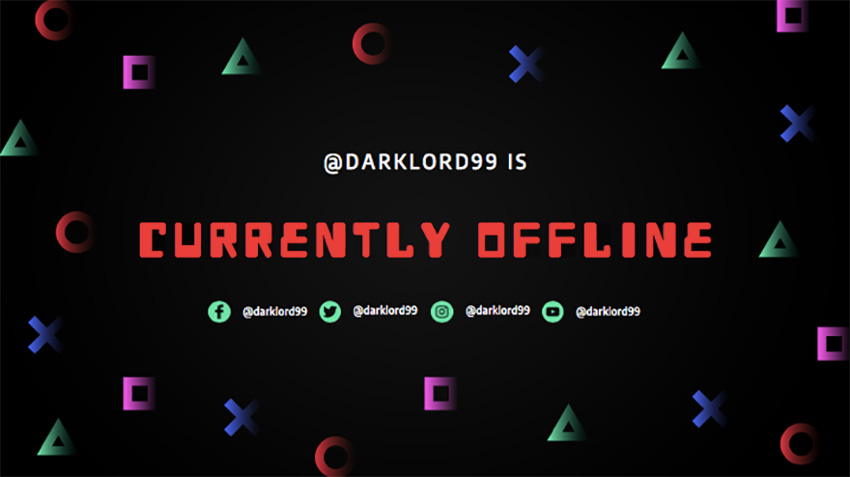
8. Twitch Offline Banner Design Template With Gaming Symbols
Twitch Offline Banner Design Template with Gaming Symbols

Use this classic gaming font surrounded by colourful geometric shapes to bring a vintage flair to your banner. Customisation is as easy as adding your text and selecting your colours. 

9. Offline Twitch Banner Generator With Space Background

Offline Twitch Banner Generator with Space Background

Let your imagination soar with this space-themed background featuring a smoking psychedelic planet. Totally trippy!

10. Twitch Offline Banner Generator With Diagonal Lines

Twitch Offline Banner Generator with Diagonal Lines

This template offers a different take on the space theme, with speeding light trails in riveting, engaging colours. Just add your text, select a font, add your colour scheme, and your template is ready to download. 

11. Twitch Offline Banner Maker With Colorful Background

Twitch Offline Banner Maker with Colorful Background

Inspire your followers with this terrific upbeat template which offers loads of riotous colours and shapes that are both engaging and fun.  

12. Offline Twitch Banner Generator

Offline Twitch Banner Generator

What could be cooler than this exploding galaxy background? If it’s not to your taste, no problem. The template offers loads of other terrific backgrounds that are bound to appeal. 

13. Twitch Offline Banner Maker With Microchip Clipart

Twitch Offline Banner Maker with Microchip Clipart

How can you not like this offline banner featuring a circuit board background? Add your details and take it for a spin. 

14. Twitch Offline Banner Maker With Tech Images

Twitch Offline Banner Maker with Tech Images

The aurora borealis has been mesmerising people for centuries, and this banner design uses its stunning patterns tastefully to show off some pretty awesome graphics and fonts. 

15. Offline Twitch Banner Generator

Offline Twitch Banner Generator

Another intergalactic theme, this banner template combines a terrific array of colours, patterns and fonts to create an attention-getting design. 

16. Twitch Offline Banner Maker With a Geometric Background With Square

Twitch Offline Banner Maker with a Geometric Background with Square

Riffing off the idea of buildings silhouetted against the skyline, this template uses stacked rectangle shapes to create a gorgeous backdrop for your information. Add your text, change the font and colours if you want, and your job is done.

16 Best Twitch Profile Banners

Before we jump into the free Twitch banners, let’s have a look at some of the many Twitch banner designs available. These give you more customising options than the free Twitch banners and will give you a more unique design to your channel.

1. Twitch Banner Creator With Aurora Borealis Background

Twitch Banner Creator with Aurora Borealis Background

The sister banner to Twitch Offline Banner Maker With Tech Images above, this profile banner uses a similarly stunning aurora borealis background paired with similar awesome graphics and fonts. 

2. Twitch Banner Generator With Space Visuals

Twitch Banner Generator with Space Visuals

This galaxy-themed profile banner uses clean text and colours that pop. Customise it by adding your own text and social media handle.

3. Twitch Banner Template With Custom Gaming Designs

Twitch Banner Template with Custom Gaming Designs

If action adventure is your thing, there’s no better way to let your potential followers know that than with this cool custom banner maker featuring a terrific selection of background images and bold, attention-getting fonts. 

4. Girly Twitch Banner Maker With Abstract Backgrounds

irly Twitch Banner Maker with Abstract Backgrounds

A bright, colourful and fun banner your Twitch audiences will love. Choose one of the terrific backgrounds, add your text, change font style and colour, and then add your social media profiles to complete your customisation.

5. Live Stream Gaming Banner Maker for Twitch

Live Stream Gaming Banner Maker for Twitch

This gaming banner lets you add any number of backgrounds from a wide selection of images or upload your own image if you prefer. Change your text and your banner is ready to use. 

6. Twitch Banner Template With Video Game Background

Twitch Banner Template with Video Game Background

If you’re looking for a fun, colourful gaming theme for your profile banner, this is it. Swap out backgrounds and change colours and fonts to make this great theme your very own. 

7. Twitch Banner Maker With Abstract Stars

 Twitch Banner Maker with Abstract Stars

Cool background, clean fonts, and bright colours make this template a great choice for your Twitch profile banner.

8. Twitch Banner Generator With Purple Gradients

Twitch Banner Generator with Purple Gradients

The perfect design for Twitch users looking for a profile banner template. The template features a beautiful gradient background, gorgeous graphics, and a stylish font. This highly customisable template offers you several options for changing the graphics and adding an image to the background if you so desire. 

9. Twitch Banner Template for Gamers

Twitch Banner Template for Gamers

Looking for a profile banner with a nightmarish edge? Then this is the perfect custom banner maker for you. The template offers a great selection of exciting images and clever fonts you can experiment with to help give the template your own unique stamp.

10. Twitch Banner Design Template With Milky Way Background

Twitch Banner Design Template with Milky Way Background

An intergalactic theme for a space age profile banner. The template offers lots of choice of fabulous backgrounds, graphics, and fonts to customise your design.

11. Live Streaming Twitch Banner Maker

Live Streaming Twitch Banner Maker

Groovy colours, fun shapes, and retro font. A terrific profile banner for those who like playful designs. 

12. Twitch Banner Template for a Streaming Twitch Channel

 Twitch Banner Template for a Streaming Twitch Channel

Another profile banner for those who like to keep things light, this banner features gorgeous geometric shapes in beautiful bright colours and an awesome Tetris-style font. 

13. Minimalist Twitch Banner Generator

Minimalist Twitch Banner Generator

Keep things simple but eye-catching with this banner, which features bold stripes that you can colour in 

14. Twitch Banner Template With Gaming Icons

Twitch Banner Template with Gaming Icons

Another one for the retro category. Use this terrific banner template with its gradient background and vintage graphics to make a statement. 

15. Online Banner Maker for Twitch With Geometric Shapes

Online Banner Maker for Twitch with Geometric Shapes

Create any number of awesome banners with this geometric themed profile banner. Just enter your text, select your font style and colour, and you’re set.

16. Linear Graphic Twitch Banner Maker

Linear Graphic Twitch Banner Maker

Wonderfully versatile, this profile banner template features a great range of backgrounds, fonts, and graphic elements to enhance your design. Mix and match them and you’ve got a terrific banner in minutes.

Free Twitch Banners

Placeit offers some free Twitch banners which may change from time to time. As of the day of publishing, this is currently their offering of free Twitch banners ready for you to download.

Free Twitch Banners on Placeit

Use the Digital Banner Maker and Create Your Own Banner Design

Online banner makers are a terrific tool to help you make a banner for your Twitch channel quickly and easily, with minimal cost. 

These 32 Twitch banners/Twitch offline banners are just a few of the banners that you can create with the custom banner maker at Placeit. I hope they have given you tons of banner ideas and you now feel confident that you know how to make a banner for your Twitch channel. Use your favourite template to make your own banner and share it with us here. We’d love to see what you come up with.

And if you’re interested in designing other resources like flyers, movie posters, magazine covers, etc., here are some great templates for you:

KISS FM: Patti Smith, Keith Richards, Paul McCartney

Post pobrano z: KISS FM: Patti Smith, Keith Richards, Paul McCartney
Print
KISS FM

Keith Richards (76), Patti Smith (73) and Paul McCartney (77) are just a handful of the world-famous iconic rock stars in their senior years bursting with vitality and talent on stage. These stars appear in a new ad campaign by Kiss FM, a radio station specializing in rock.

Created by agency AlmapBBDO, the new campaign features the message “Long Live Rock n’ Roll. Stay at Home”, stressing the key role of social distancing in saving lives, especially among high-risk groups, according to healthcare specialists. All the musicians featured in the campaign are old enough to count among the people more at risk during the Covid-19 pandemic.

“Kiss FM´s new ad campaign reminds us that, except in urgent situations, going out of our homes now means putting several people at risk, especially senior ones, like our parents, grandparents and even our idols”, says Marcelo Nogueira, executive creative director at AlmapBBDO.

Long Live Rock n’ Roll. Stay at Home


Advertising Agency:AlmapBBDO, São Paulo, Brazil
CCO:Luiz Sanches
Ecd:Marcelo Nogueira
Creative:Marcelo Pignatari, Lucas Andrade
Illustration and motion:Fabio Vido, Caio Caieira
Account:Maysa Oliveira, Felipe Elias Oliveira, Nathalia Chaves, Ana Carolina Manfio
Production Team:Vera Jacinto, Diego Villas Bôas, Aline Silva
Audio Company:Jamute

KISS FM: Patti Smith, Keith Richards, Paul McCartney

Post pobrano z: KISS FM: Patti Smith, Keith Richards, Paul McCartney
Print
KISS FM

Keith Richards (76), Patti Smith (73) and Paul McCartney (77) are just a handful of the world-famous iconic rock stars in their senior years bursting with vitality and talent on stage. These stars appear in a new ad campaign by Kiss FM, a radio station specializing in rock.

Created by agency AlmapBBDO, the new campaign features the message “Long Live Rock n’ Roll. Stay at Home”, stressing the key role of social distancing in saving lives, especially among high-risk groups, according to healthcare specialists. All the musicians featured in the campaign are old enough to count among the people more at risk during the Covid-19 pandemic.

“Kiss FM´s new ad campaign reminds us that, except in urgent situations, going out of our homes now means putting several people at risk, especially senior ones, like our parents, grandparents and even our idols”, says Marcelo Nogueira, executive creative director at AlmapBBDO.

Long Live Rock n’ Roll. Stay at Home


Advertising Agency:AlmapBBDO, São Paulo, Brazil
CCO:Luiz Sanches
Ecd:Marcelo Nogueira
Creative:Marcelo Pignatari, Lucas Andrade
Illustration and motion:Fabio Vido, Caio Caieira
Account:Maysa Oliveira, Felipe Elias Oliveira, Nathalia Chaves, Ana Carolina Manfio
Production Team:Vera Jacinto, Diego Villas Bôas, Aline Silva
Audio Company:Jamute

Front-End Challenges

Post pobrano z: Front-End Challenges

My favorite way to level up as a front-end developer is to do the work. Literally just build websites. If you can do it for money, great, you should. If the websites you make can help yourself or anyone else you care about, then that’s also great. In lieu of that, you can also make things simply for the sake of making them, and you’ll still level up. It’s certainly better than just reading about things!

Here’s some resources that encourage you to level up by building things for the sake of leveling up, if you’re up to it.

Frontend Mentor

It looks like this recently launched, and it’s what inspired this post. This idea of giving people front-end work to do is enough to build a business around! Some of them are free, and some of them are not.

HackerRank

Other businesses have centered themselves around this too. HackerRank is all about getting jobs and hiring, so they’ve got a very strong agenda, but part of the way they do that is putting you through these skill tests (solving challenges) which are meant to asses you, but you can certainly learn from them too.

Others like this: Codewars, ChallengeRocket, Codesignal, Topcoder (Jeepers, VCs must love this idea.)

Coderbyte

Coderbyte has paid plans too, and they’re designed to leveling up your job interviewing skills with challenges.

Classic situation: sometimes the site is the product and you’re the customer, and sometimes hiring companies are the customer and you’re the product.

Build Dribbble shots

Here’s the classic move: find something you like on Dribbble, rebuild it. The @keyframers often do it. Tim Evko’s Practice site used to pick a shot for you (along with random GitHub issues and random coding challenges), but the Dribbble part appears broken at the moment. The other stuff still works!

Matt Delac used to do a series along these lines. Indrek Lasn also does it in Medium posts.

Front-End Challenges Club

Andy Bell did a Front-End Challenges Club for a while, and while I think it’s on break, you can view the archives.

CodePen Challenges

CodePen Challenges run every week are are a prompt (along with ideas and resources) for building whatever you like. Low key.

100 Days of CSS Challenge

Matthias Martin created 100 days of CSS challenges. They are all there for you to see, including entries from other people — but the point is for you to give it a shot yourself, of course.

Daily UI

Daily UI challenges gives you a new challenge every day that starts when you sign up (and it’s free). Lots of people complete the challenge with code.

Frontloops

Frontloops charges $19 for 30 challenges, which includes information, advice, assets, and a solution.

CSSBattle

If your idea of a fun challenge is mimicking a design in as few bytes of code as possible, CSSBattle will appeal to you.

Writing things as tersely as possible is often called “Code Golf” and there is a challenge site for that too.

Ace Front End

Ace Front End has challenges that focus specifically on vanilla HTML, CSS, and JavaScript.

I just happened to notice that the first challenge is a drop down navigation menu, and it doesn’t handle things like aria-expanded. I’m not entirely sure how big of a problem that is and I don’t mean to pick on Ace Front End — it’s just a reminder that there could be problems with any of these challenges. But that doesn’t mean you can’t learn something from them.

Codier

Codier has public challenges that include solutions posted by other users.

rendezvous with cassidoo

Cassidy’s weekly newsletter includes a challenge in every issue.


Rina Diane Caballar quoting Tim Carry in Extending the Limits of CSS:

Carry’s advice is to start with a real-world object—the interface of a gaming console or a calculator, for example—and to try to recreate it using only CSS. “A great way to push the boundaries with a language is to make something that the language wasn’t meant to be doing in the first place,” he says.

The post Front-End Challenges appeared first on CSS-Tricks.

Front-End Challenges

Post pobrano z: Front-End Challenges

My favorite way to level up as a front-end developer is to do the work. Literally just build websites. If you can do it for money, great, you should. If the websites you make can help yourself or anyone else you care about, then that’s also great. In lieu of that, you can also make things simply for the sake of making them, and you’ll still level up. It’s certainly better than just reading about things!

Here’s some resources that encourage you to level up by building things for the sake of leveling up, if you’re up to it.

Frontend Mentor

It looks like this recently launched, and it’s what inspired this post. This idea of giving people front-end work to do is enough to build a business around! Some of them are free, and some of them are not.

HackerRank

Other businesses have centered themselves around this too. HackerRank is all about getting jobs and hiring, so they’ve got a very strong agenda, but part of the way they do that is putting you through these skill tests (solving challenges) which are meant to asses you, but you can certainly learn from them too.

Others like this: Codewars, ChallengeRocket, Codesignal, Topcoder (Jeepers, VCs must love this idea.)

Coderbyte

Coderbyte has paid plans too, and they’re designed to leveling up your job interviewing skills with challenges.

Classic situation: sometimes the site is the product and you’re the customer, and sometimes hiring companies are the customer and you’re the product.

Build Dribbble shots

Here’s the classic move: find something you like on Dribbble, rebuild it. The @keyframers often do it. Tim Evko’s Practice site used to pick a shot for you (along with random GitHub issues and random coding challenges), but the Dribbble part appears broken at the moment. The other stuff still works!

Matt Delac used to do a series along these lines. Indrek Lasn also does it in Medium posts.

Front-End Challenges Club

Andy Bell did a Front-End Challenges Club for a while, and while I think it’s on break, you can view the archives.

CodePen Challenges

CodePen Challenges run every week are are a prompt (along with ideas and resources) for building whatever you like. Low key.

100 Days of CSS Challenge

Matthias Martin created 100 days of CSS challenges. They are all there for you to see, including entries from other people — but the point is for you to give it a shot yourself, of course.

Daily UI

Daily UI challenges gives you a new challenge every day that starts when you sign up (and it’s free). Lots of people complete the challenge with code.

Frontloops

Frontloops charges $19 for 30 challenges, which includes information, advice, assets, and a solution.

CSSBattle

If your idea of a fun challenge is mimicking a design in as few bytes of code as possible, CSSBattle will appeal to you.

Writing things as tersely as possible is often called “Code Golf” and there is a challenge site for that too.

Ace Front End

Ace Front End has challenges that focus specifically on vanilla HTML, CSS, and JavaScript.

I just happened to notice that the first challenge is a drop down navigation menu, and it doesn’t handle things like aria-expanded. I’m not entirely sure how big of a problem that is and I don’t mean to pick on Ace Front End — it’s just a reminder that there could be problems with any of these challenges. But that doesn’t mean you can’t learn something from them.

Codier

Codier has public challenges that include solutions posted by other users.

rendezvous with cassidoo

Cassidy’s weekly newsletter includes a challenge in every issue.


Rina Diane Caballar quoting Tim Carry in Extending the Limits of CSS:

Carry’s advice is to start with a real-world object—the interface of a gaming console or a calculator, for example—and to try to recreate it using only CSS. “A great way to push the boundaries with a language is to make something that the language wasn’t meant to be doing in the first place,” he says.

The post Front-End Challenges appeared first on CSS-Tricks.

Front-End Challenges

Post pobrano z: Front-End Challenges

My favorite way to level up as a front-end developer is to do the work. Literally just build websites. If you can do it for money, great, you should. If the websites you make can help yourself or anyone else you care about, then that’s also great. In lieu of that, you can also make things simply for the sake of making them, and you’ll still level up. It’s certainly better than just reading about things!

Here’s some resources that encourage you to level up by building things for the sake of leveling up, if you’re up to it.

Frontend Mentor

It looks like this recently launched, and it’s what inspired this post. This idea of giving people front-end work to do is enough to build a business around! Some of them are free, and some of them are not.

HackerRank

Other businesses have centered themselves around this too. HackerRank is all about getting jobs and hiring, so they’ve got a very strong agenda, but part of the way they do that is putting you through these skill tests (solving challenges) which are meant to asses you, but you can certainly learn from them too.

Others like this: Codewars, ChallengeRocket, Codesignal, Topcoder (Jeepers, VCs must love this idea.)

Coderbyte

Coderbyte has paid plans too, and they’re designed to leveling up your job interviewing skills with challenges.

Classic situation: sometimes the site is the product and you’re the customer, and sometimes hiring companies are the customer and you’re the product.

Build Dribbble shots

Here’s the classic move: find something you like on Dribbble, rebuild it. The @keyframers often do it. Tim Evko’s Practice site used to pick a shot for you (along with random GitHub issues and random coding challenges), but the Dribbble part appears broken at the moment. The other stuff still works!

Matt Delac used to do a series along these lines. Indrek Lasn also does it in Medium posts.

Front-End Challenges Club

Andy Bell did a Front-End Challenges Club for a while, and while I think it’s on break, you can view the archives.

CodePen Challenges

CodePen Challenges run every week are are a prompt (along with ideas and resources) for building whatever you like. Low key.

100 Days of CSS Challenge

Matthias Martin created 100 days of CSS challenges. They are all there for you to see, including entries from other people — but the point is for you to give it a shot yourself, of course.

Daily UI

Daily UI challenges gives you a new challenge every day that starts when you sign up (and it’s free). Lots of people complete the challenge with code.

Frontloops

Frontloops charges $19 for 30 challenges, which includes information, advice, assets, and a solution.

CSSBattle

If your idea of a fun challenge is mimicking a design in as few bytes of code as possible, CSSBattle will appeal to you.

Writing things as tersely as possible is often called “Code Golf” and there is a challenge site for that too.

Ace Front End

Ace Front End has challenges that focus specifically on vanilla HTML, CSS, and JavaScript.

I just happened to notice that the first challenge is a drop down navigation menu, and it doesn’t handle things like aria-expanded. I’m not entirely sure how big of a problem that is and I don’t mean to pick on Ace Front End — it’s just a reminder that there could be problems with any of these challenges. But that doesn’t mean you can’t learn something from them.

Codier

Codier has public challenges that include solutions posted by other users.

rendezvous with cassidoo

Cassidy’s weekly newsletter includes a challenge in every issue.


Rina Diane Caballar quoting Tim Carry in Extending the Limits of CSS:

Carry’s advice is to start with a real-world object—the interface of a gaming console or a calculator, for example—and to try to recreate it using only CSS. “A great way to push the boundaries with a language is to make something that the language wasn’t meant to be doing in the first place,” he says.

The post Front-End Challenges appeared first on CSS-Tricks.