If you are searching for an alternative bundler to webpack, you might want to take a look at FuseBox. It builds on what webpack offers — code-splitting, hot module reloading, dynamic imports, etc. — but code-splitting in FuseBox requires zero configuration by default (although webpack will offer the same as ofversion 4.0).
Instead, FuseBox is built for simplicity (in the form of less complicated configuration) and performance (by including aggressive caching methods). Plus, it can be extended to use tons of plugins that can handle anything you need above and beyond the defaults.
Oh yeah, and if you are a fan of TypeScript, you might be interested in knowing that FuseBox makes it a first-class citizen. That means you can write an application in Typescript — with no configuration! — and it will use the Typescript transpiler to compile scripts by default. Don’t plan on using Typescript? No worries, the transpiler will handle any JavaScript. Yet another bonus!
To illustrate just how fast it is to to get up and running, let’s build the bones of a sample application that’s usually scaffolded with create-react-app. Everything we’re doing will be onGitHub if you want to follow along.
FuseBox is not the only alternative to webpack, of course. There are plenty and, in fact, Maks Akymenko has a great write-up on Parcel which is another great alternative worth looking into.
The basic setup
Start by creating a new project directory and initializing it with npm:
## Create the directory
mkdir csstricks-fusebox-react && $_
## Initialize with npm default options
npm init -y
Now we can install some dependencies. We’re going to build the app in React, so we’ll need that as well as react-dom.
npm install --save react react-dom
Next, we’ll install FuseBox and Typescript as dependencies. We’ll toss Uglify in there as well for help minifying our scripts and add support for writing styles in Sass.
Alright, now let’s create a src folder in the root of the project directory (which can be done manually). Add the following files (`app.js and index.js) in there, including the contents:
// App.js

import * as React from "react";
import * as logo from "./logo.svg";

const App = () => {
  return (
    <div className="App">
      <header className="App-header">
        <img src={logo} className="App-logo" alt="logo" />
        <h1 className="App-title">Welcome to React</h1>
      </header>
      <p className="App-intro">
        To get started, edit `src/App.js` and save to reload.
      </p>
    </div>
  )
};

export default App;
You may have noticed that we’re importing an SVG file. You can download it directly from the GitHub repo.
// index.js

import * as React from "react";
import * as ReactDOM from "react-dom";
import App from "./App"

ReactDOM.render(
  <App />, document.getElementById('root')
);
You can see that the way we handle importing files is a little different than a typical React app. That’s because FuseBox does not polyfill imports by default.
So, instead of doing this:
import React from "react";
…we’re doing this:
import * as React from "react";
<!-- ./src/index.html -->

<!DOCTYPE html>
<html lang="en">
  <head>
    <title>CSSTricks Fusebox React</title>
    $css
  </head>

  <body>
    <noscript>
      You need to enable JavaScript to run this app.
    </noscript>
    <div id="root"></div>
    $bundles
  </body>
</html>
Styling isn’t really the point of this post, but let’s drop some in there to dress things up a bit. We’ll have two stylesheets. The first is for the App component and saved as App.css.
OK, we’re all done with the initial housekeeping. On to extending FuseBox with some goodies!
Plugins and configuration
We said earlier that configuring FuseBox is designed to be way less complex than the likes of webpack — and that’s true! Create a file called fuse.js in the root directory of the application.
We start with importing the plugins we’ll be making use of, all the plugins come from the FuseBox package we installed.
We identified plugins in the first line of the configuration file, but now we’ve got to call them. We’re using the plugins pretty much as-is, but definitely check out what the CSSPlugin, SVGPlugin and WebIndexPlugin have to offer if you want more fine-grained control over the options.
What the heck is this? When we initialized the FuseBox instance, we specified an output using dist/$name.js. The value for $name is provided by the bundle() method. In our case, we set the value as app. That means that when the application is bundled, the output destination will be dist/app.js.
The instructions() method defines how FuseBox should deal with the code. In our case, we’re telling it to start with index.js and to execute it after it’s loaded.
The hmr() method is used for cases where we want to update the user when a file changes, this usually involves updating the browser when a file changes. Meanwhile, watch() re-bundles the bundled code after every saved change.
With that, we’ll cap it off by launching the build process with fuse.run() at the end of the configuration file. Here’s everything we just covered put together:
Now we can run the application from the terminal by running node fuse. This will start the build process which creates the dist folder that contains the bundled code and the template we specified in the configuration. After the build process is done, we can point the browser to http://localhost:4444/ to see our app.
Running tasks with Sparky
FuseBox includes a task runner that can be used to automate a build process. It’s called Sparky and you can think of it as sorta like Grunt and Gulp, the difference being that it is built on top of FuseBox with built-in access to FuseBox plugins and the FuseBox API.
We don’t have to use it, but task runners make development a lot easier by automating things we’d otherwise have to do manually and it makes sense to use what’s specifically designed for FuseBox.
To use it, we’ll update the configuration we have in fuse.js, starting with some imports that go at the top of the file:
Next, we’ll define a context, which will look similar to what we already have. We’re basically wrapping what we did in a context and setConfig(), then initializing FuseBox in the return:
It’s possible to pass a class, function or plain object to a context. In the above scenario, we’re passing functions, specifically setConfig() and createBundle(). setConfig() initializes FuseBox and sets up the plugins. createBundle() does what you might expect by the name, which is bundling the code. Again, the difference from what we did before is that we’re embedding both functionalities into different functions which are contained in the context object.
We want our task runner to run tasks, right? Here are a few examples we can define:
The first task will be responsible for cleaning the dist directory. The first argument is the name of the task, while the second is the function that gets called when the task runs.
To call the first task, we can do node fuse clean from the terminal.
When a task is named default (which is the first argument as in the second task), that task will be the one that gets called by default when running node fuse — in this case, that’s the second task in our configuration. Other tasks need to be will need to be called explicitly in terminal, like node fuse<task_name>.
So, our second task is the default and three arguments are passed into it. The first is the name of the task (`default`), the second (["clean"]) is an array of dependencies that should be called before the task itself is executed, and the third is a function (fuse.dev()) that gets the initialized FuseBox instance and begins the bundling and build process.
Now we can run things with node fuse in the terminal. You have the option to add these to your package.json file if that’s more comfortable and familiar to you. The script section would look like this:
All in all, FuseBox is an interesting alternative to webpack for all your application bundling needs. As we saw, it offers the same sort of power that we all tend to like about webpack, but with a way less complicated configuration process that makes it much easier to get up and running, thanks to built-in Typescript support, performance considerations, and a task runner that’s designed to take advantage of the FuseBox API.
What we look at was a pretty simple example. In practice, you’re likely going to be working with more complex applications, but the concepts and principles are the same. It’s nice to know that FuseBox is capable of handling more than what’s baked into it, but that the initial setup is still super streamlined.
If you’re looking for more information about FuseBox, it’s site and documentation are obviously great starting point. the following links are also super helpful to get more perspective on how others are setting it up and using it on projects.
In this week’s roundup: Firefox gains locksmith-like powers, Samsung’s Galaxy Store starts supporting Progressive Web Apps, CSS Subgrid is shipping in Firefox 70, and a new study confirms that users prefer to tap into content rather than scroll through it.
Let’s get into the news.
Securely generated passwords in Firefox
Firefox now suggests a securely generated password when the user focuses an <input> element that has the autocomplete="new-password" attribute value. This option is also available via the context menu on any password field.
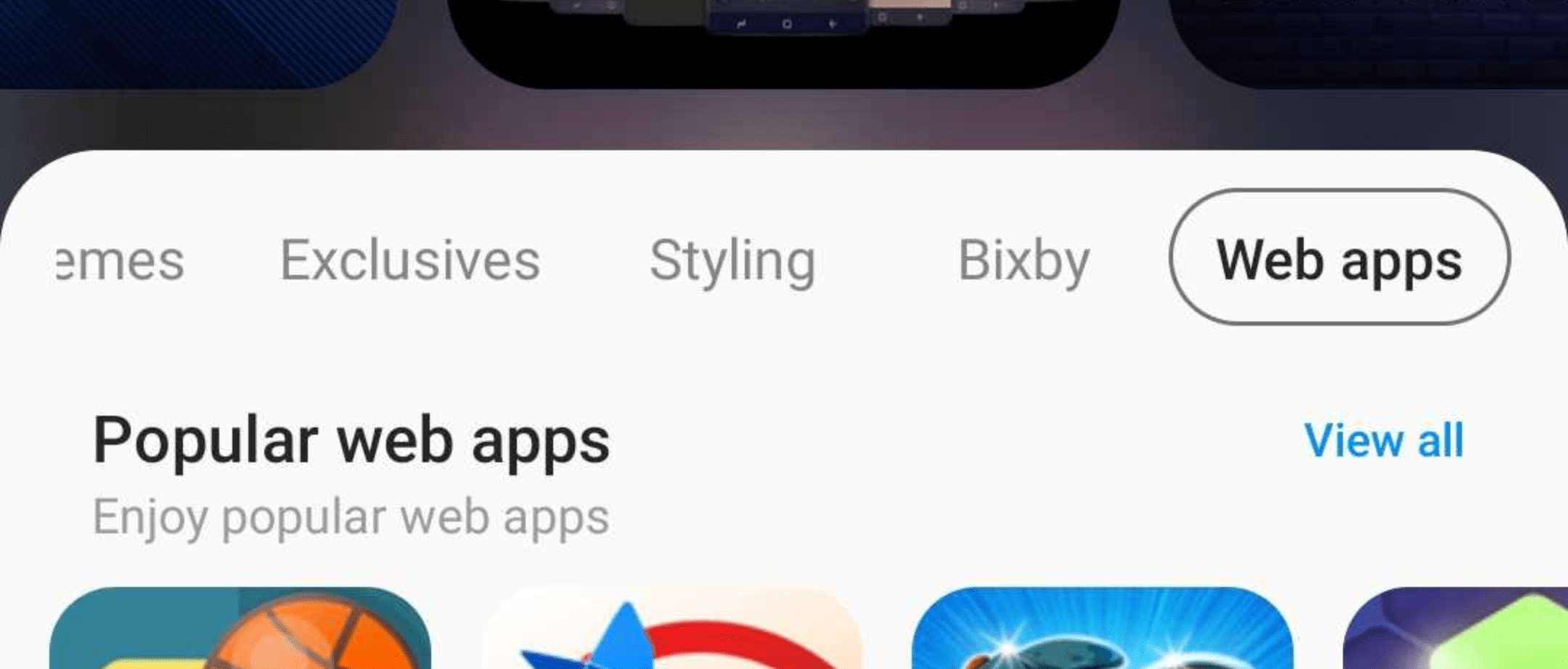
Samsung has started adding Progressive Web Apps (PWA) to its app store, Samsung Galaxy Store, which is available on Samsung devices. The new “Web apps” category is visible initially only in the United States. If you own a PWA, you can send its URL to pwasupport@samsung.com, and Samsung will help you get onboarded into Galaxy Store.
According to a study commissioned by Google, the majority of people prefer tappable stories over scrolling articles when consuming content on the mobile web. Google is using this study to promote AMP Stories, which is a format for tappable stories on the mobile web.
Both studies had participants interact with real-world examples of tappable stories on the mobile web as well as scrolling article equivalents. Forrester found that 64% of respondents preferred the tappable mobile web story format over its scrolling article equivalent.
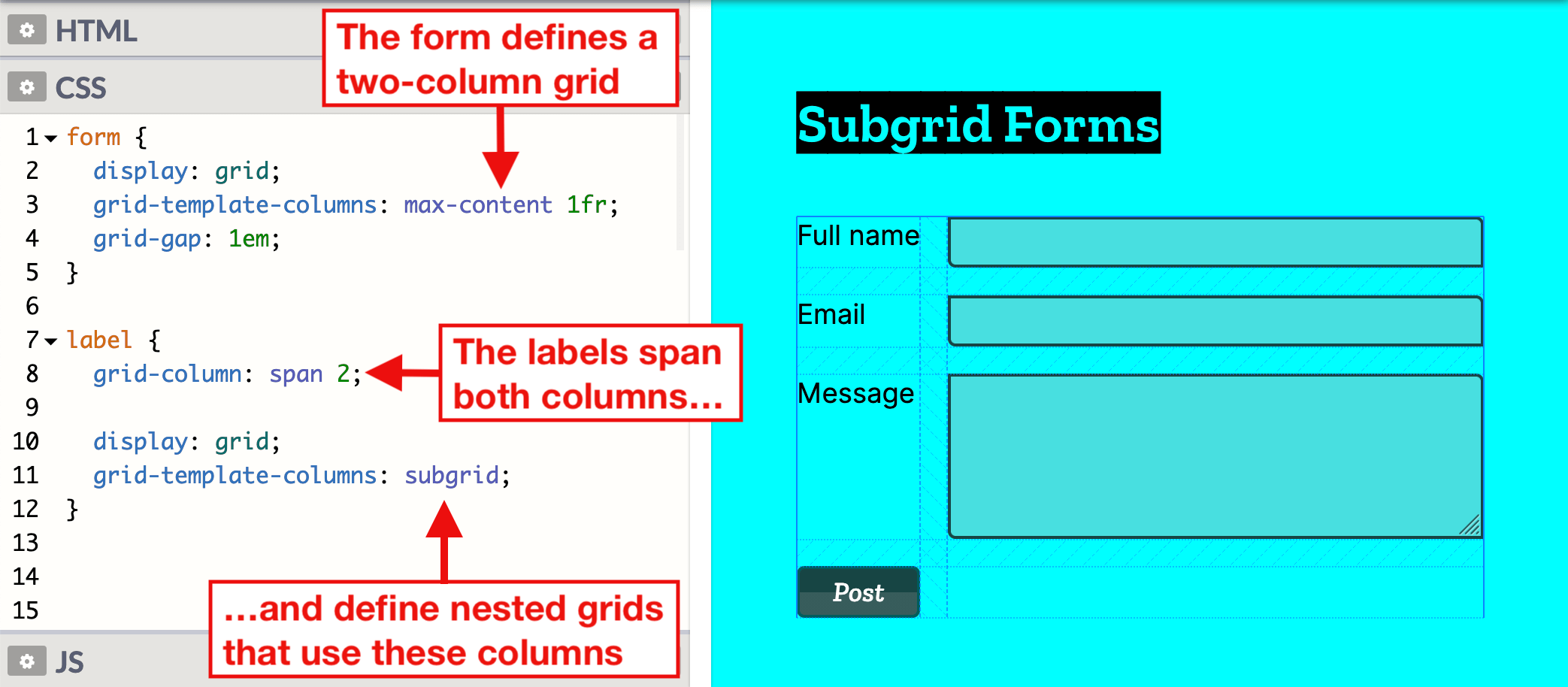
CSS Subgrid is shipping in Firefox next month. This new feature enables grid items of nested grids to be put onto the outer grid, which is useful in situations where the wanted grid items are not direct children of the grid container.
JavaScript has a variety of built-in popup APIs that display special UI for user interaction. Famously:
alert("Hello, World!");
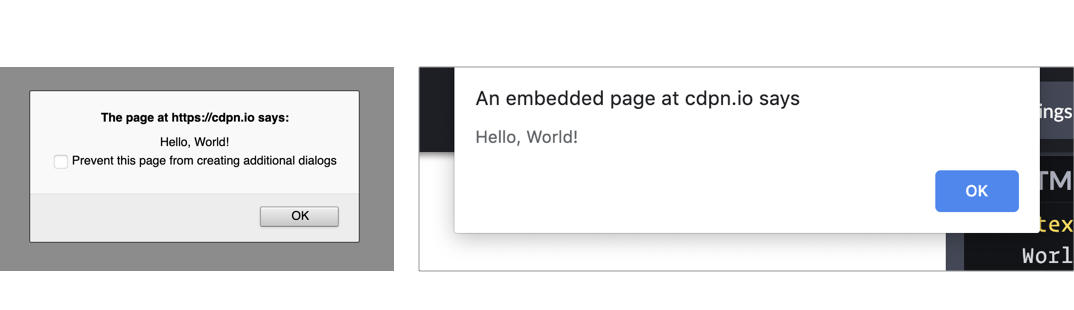
The UI for this varies from browser to browser, but generally you’ll see a little window pop up front and center in a very show-stopping way that contains the message you just passed. Here’s Firefox and Chrome:
Native popups in Firefox (left) and Chrome (right). Note the additional UI preventing additional dialogs in Firefox from triggering it more than once. You can also see how Chrome is pinned to the top of the window.
There is one big problem you should know about up front
JavaScript popups are blocking.
The entire page essentially stops when a popup is open. You can’t interact with anything on the page while one is open — that’s kind of the point of a “modal” but it’s still a UX consideration you should be keenly aware of. And crucially, no other main-thread JavaScript is running while the popup is open, which could (and probably is) unnecessarily preventing your site from doing things it needs to do.
Nine times out of ten, you’d be better off architecting things so that you don’t have to use such heavy-handed stop-everything behavior. Native JavaScript alerts are also implemented by browsers in such a way that you have zero design control. You can’t control *where* they appear on the page or what they look like when they get there. Unless you absolutely need the complete blocking nature of them, it’s almost always better to use a custom user interface that you can design to tailor the experience for the user.
With that out of the way, let’s look at each one of the native popups.
What it’s for: Displaying a simple message or debugging the value of a variable.
How it works: This function takes a string and presents it to the user in a popup with a button with an “OK” label. You can only change the message and not any other aspect, like what the button says.
The Alternative: Like the other alerts, if you have to present a message to the user, it’s probably better to do it in a way that’s tailor-made for what you’re trying to do.
If you’re trying to debug the value of a variable, consider console.log(<code>"`Value of variable:"`, variable); and looking in the console.
window.confirm();
window.confirm("Are you sure?");

<button onclick="confirm('Would you like to play a game?');">Ask Question</button>

let answer = window.confirm("Do you like cats?");
if (answer) {
  // User clicked OK
} else {
  // User clicked Cancel
}
What it’s for: “Are you sure?”-style messages to see if the user really wants to complete the action they’ve initiated.
How it works: You can provide a custom message and popup will give you the option of “OK” or “Cancel,” a value you can then use to see what was returned.
The Alternative: This is a very intrusive way to prompt the user. As Aza Raskin puts it:
…maybe you don’t want to use a warning at all.”
There are any number of ways to ask a user to confirm something. Probably a clear UI with a <button>Confirm</button> wired up to do what you need it to do.
window.prompt();
window.prompt("What’s your name?");

let answer = window.prompt("What is your favorite color?");
// answer is what the user typed in, if anything
What it’s for: Prompting the user for an input. You provide a string (probably formatted like a question) and the user sees a popup with that string, an input they can type into, and “OK” and “Cancel” buttons.
How it works: If the user clicks OK, you’ll get what they entered into the input. If they enter nothing and click OK, you’ll get an empty string. If they choose Cancel, the return value will be null.
The Alternative: Like all of the other native JavaScript alerts, this doesn’t allow you to style or position the alert box. It’s probably better to use a <form> to get information from the user. That way you can provide more context and purposeful design.
window.onbeforeunload();
window.addEventListener("beforeunload", () => {
  // Standard requires the default to be cancelled.
  event.preventDefault();
  // Chrome requires returnValue to be set (via MDN)
  event.returnValue = '';
});
What it’s for: Warn the user before they leave the page. That sounds like it could be very obnoxious, but it isn’t often used obnoxiously. It’s used on sites where you can be doing work and need to explicitly save it. If the user hasn’t saved their work and is about to navigate away, you can use this to warn them. If they *have* saved their work, you should remove it.
How it works: If you’ve attached the beforeunload event to the window (and done the extra things as shown in the snippet above), users will see a popup asking them to confirm if they would like to “Leave” or “Cancel” when attempting to leave the page. Leaving the site may be because the user clicked a link, but it could also be the result of clicking the browser’s refresh or back buttons. You cannot customize the message.
MDN warns that some browsers require the page to be interacted with for it to work at all:
To combat unwanted pop-ups, some browsers don’t display prompts created in beforeunload event handlers unless the page has been interacted with. Moreover, some don’t display them at all.
The Alternative: Nothing that comes to mind. If this is a matter of a user losing work or not, you kinda have to use this. And if they choose to stay, you should be clear about what they should to to make sure it’s safe to leave.
Accessibility
Native JavaScript alerts used to be frowned upon in the accessibility world, but it seems that screen readers have since become smarter in how they deal with them. According to Penn State Accessibility:
The use of an alert box was once discouraged, but they are actually accessible in modern screen readers.
It’s important to take accessibility into account when making your own modals, but there are some great resources like this post by Ire Aderinokun to point you in the right direction.
General alternatives
There are a number of alternatives to native JavaScript popups such as writing your own, using modal window libraries, and using alert libraries. Keep in mind that nothing we’ve covered can fully block JavaScript execution and user interaction, but some can come close by greying out the background and forcing the user to interact with the modal before moving forward.
You may want to look at HTML’s native <dialog> element. Chris recently took a hands-on look) at it. It’s compelling, but apparently suffers from some significant accessibility issues. I’m not entirely sure if building your own would end up better or worse, since handling modals is an extremely non-trivial interactive element to dabble in. Some UI libraries, like Bootstrap, offer modals but the accessibility is still largely in your hands. You might to peek at projects like a11y-dialog.
Wrapping up
Using built-in APIs of the web platform can seem like you’re doing the right thing — instead of shipping buckets of JavaScript to replicate things, you’re using what we already have built-in. But there are serious limitations, UX concerns, and performance considerations at play here, none of which land particularly in favor of using the native JavaScript popups. It’s important to know what they are and how they can be used, but you probably won’t need them a heck of a lot in production web sites.
Indie and enterprise web developers alike are pushing toward a serverless architecture for modern applications. Serverless architectures typically scale well, avoid the need for server provisioning and most importantly are easy and cheap to set up! And that’s why I believe the next evolution for cloud is serverless because it enables developers to focus on writing applications.
With that in mind, let’s build a REST API (because will we ever stop making these?) using 100% serverless technology.
We’re going to do that with Firebase Cloud Functions and FaunaDB, a globally distributed serverless database with native GraphQL.
Those familiar with Firebase know that Google’s serverless app-building tools also provide multiple data storage options: Firebase Realtime Database and Cloud Firestore. Both are valid alternatives to FaunaDB and are effectively serverless.
But why choose FaunaDB when Firestore offers a similar promise and is available with Google’s toolkit? Since our application is quite simple, it does not matter that much. The main difference is that once my application grows and I add multiple collections, then FaunaDB still offers consistency over multiple collections whereas Firestore does not. In this case, I made my choice based on a few other nifty benefits of FaunaDB, which you will discover as you read along — and FaunaDB’s generous free tier doesn’t hurt, either. 😉
In this post, we’ll cover:
Installing Firebase CLI tools
Creating a Firebase project with Hosting and Cloud Function capabilities
Routing URLs to Cloud Functions
Building three REST API calls with Express
Establishing a FaunaDB Collection to track your (my) favorite video games
Creating FaunaDB Documents, accessing them with FaunaDB’s JavaScript client API, and performing basic and intermediate-level queries
And more, of course!
Set Up A Local Firebase Functions Project
For this step, you’ll need Node v8 or higher. Install firebase-tools globally on your machine:
$ npm i -g firebase-tools
Then log into Firebase with this command:
$ firebase login
Make a new directory for your project, e.g. mkdir serverless-rest-api and navigate inside.
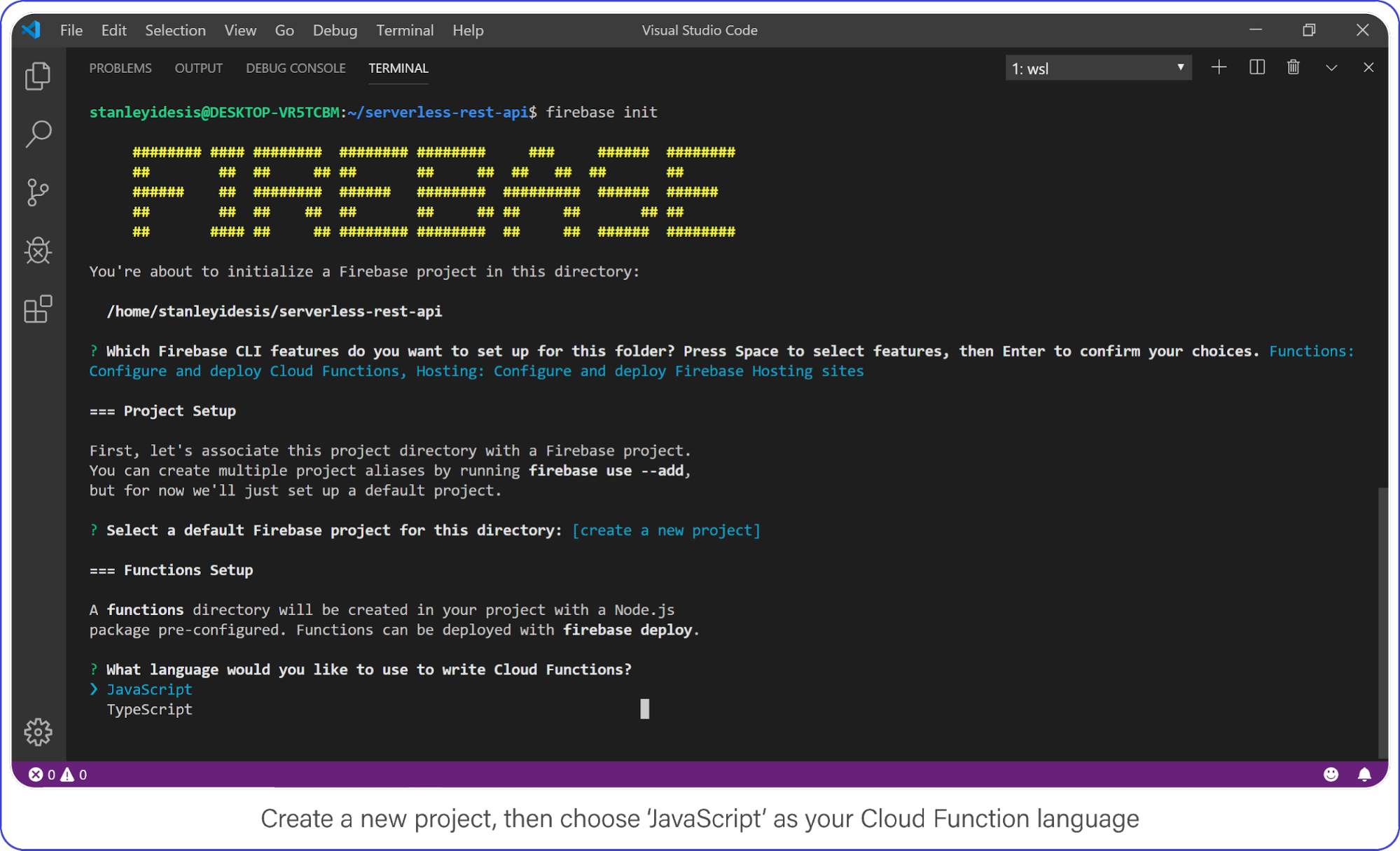
Create a Firebase project in your new directory by executing firebase login.
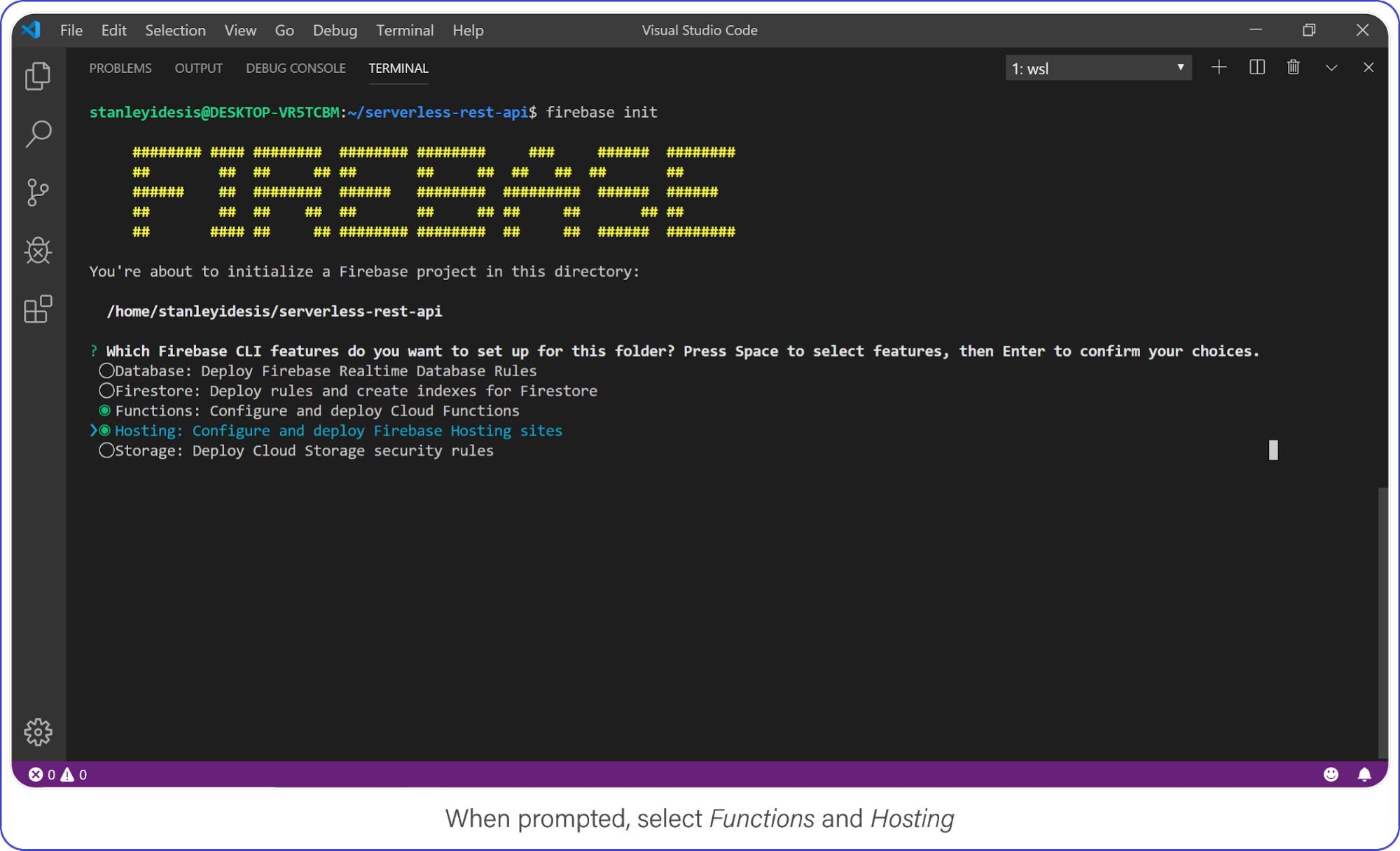
Select Functions and Hosting when prompted.
Choose „functions” and „hosting” when the bubbles appear, create a brand new firebase project, select JavaScript as your language, and choose yes (y) for the remaining options.
Create a new project, then choose JavaScript as your Cloud Function language.
Once complete, enter the functions directory, this is where your code lives and where you’ll add a few NPM packages.
Your API requires Express, CORS, and FaunaDB. Install it all with the following:
$ npm i cors express faunadb
Set Up FaunaDB with NodeJS and Firebase Cloud Functions
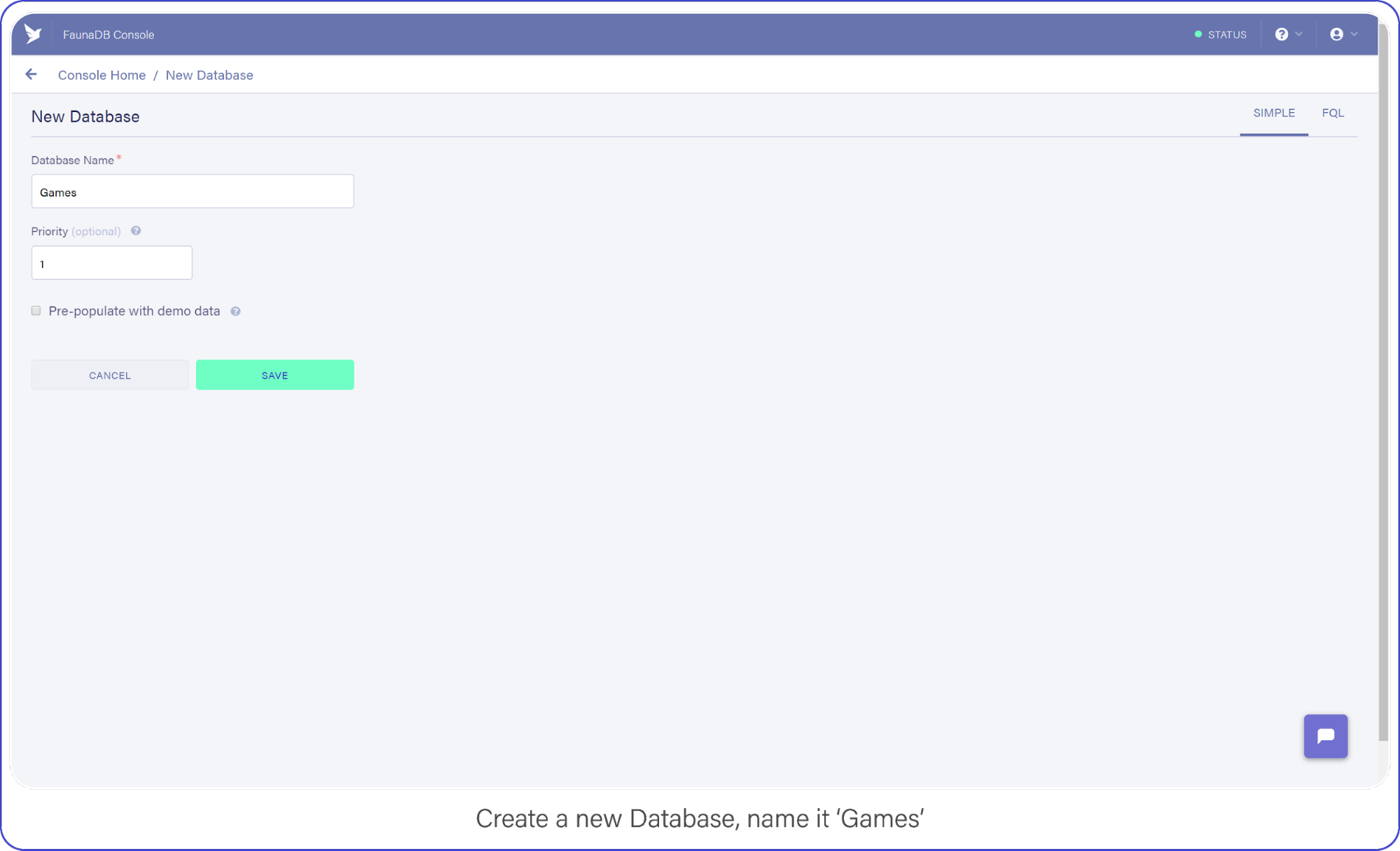
When you’re signed in, go to your FaunaDB console and create your first database, name it „Games.”
You’ll notice that you can create databases inside other databases . So you could make a database for development, one for production or even make one small database per unit test suite. For now we only need ‘Games’ though, so let’s continue.
Create a new database and name it „Games.”
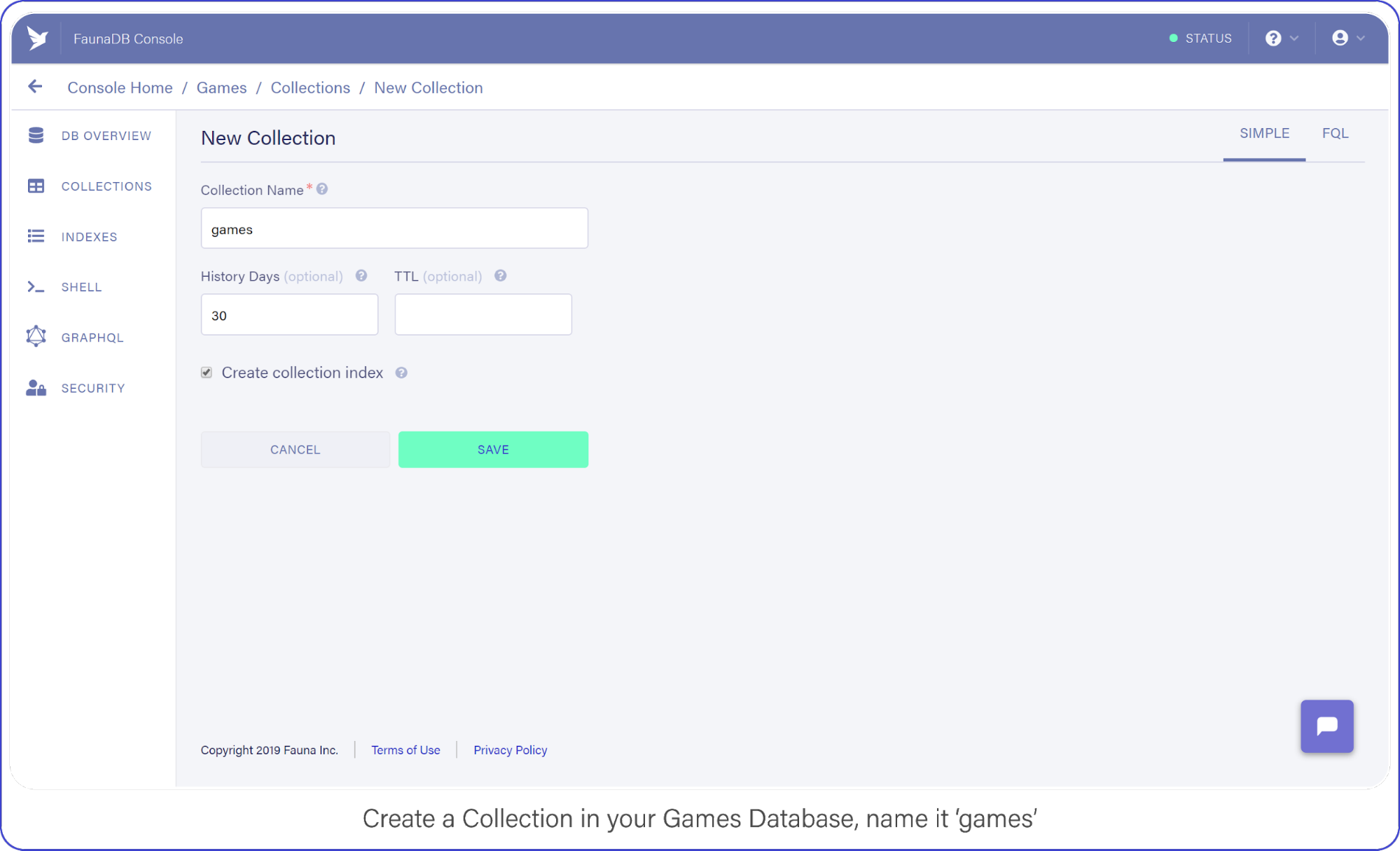
Then tab over to Collections and create your first Collection named ‘games’. Collections will contain your documents (games in this case) and are the equivalent of a table in other databases— don’t worry about payment details, Fauna has a generous free-tier, the reads and writes you perform in this tutorial will definitely not go over that free-tier. At all times you can monitor your usage in the FaunaDB console.
For the purpose of this API, make sure to name your collection ‘games’ because we’re going to be tracking your (my) favorite video games with this nerdy little API.
Create a Collection in your Games Database and name it „Games.”
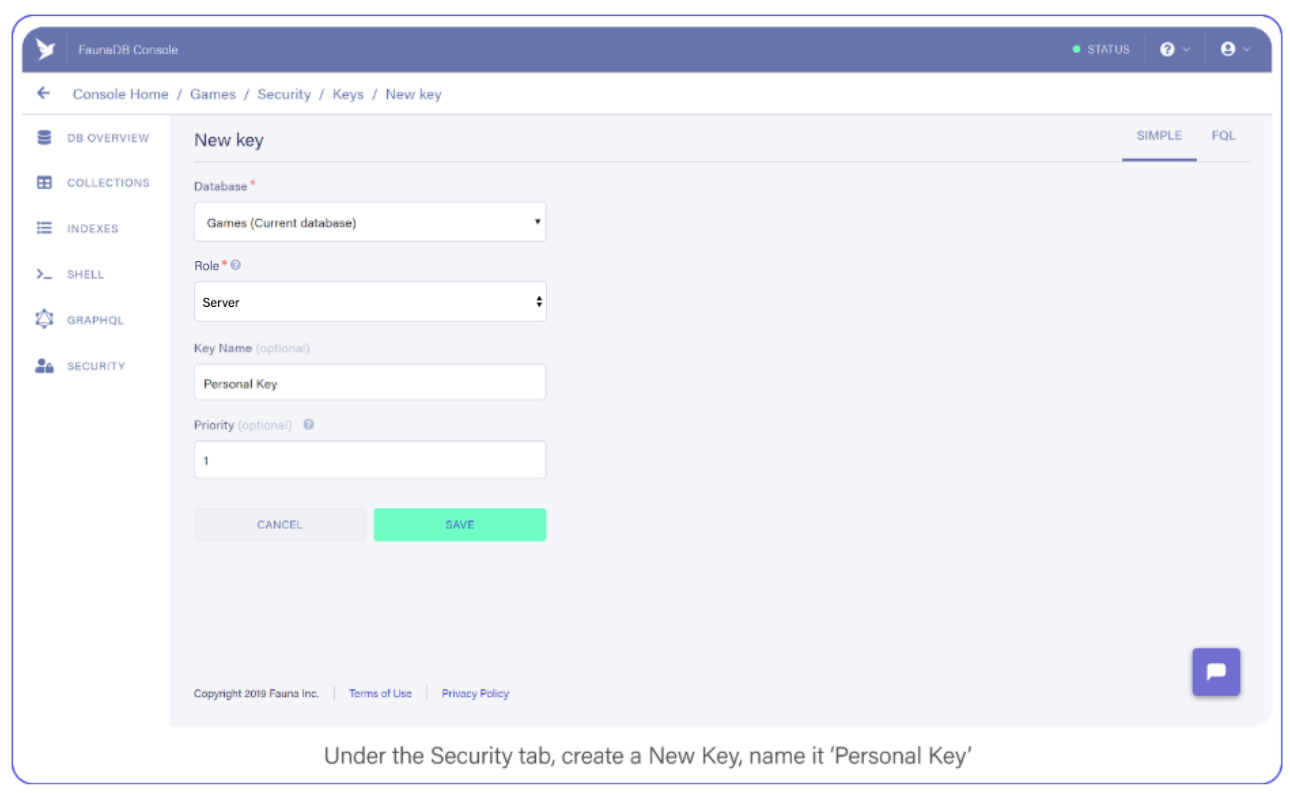
Tab over to Security, and create a new Key and name it „Personal Key.” There are 3 different types of keys, Admin/Server/Client. Admin key is meant to manage multiple databases, A Server key is typically what you use in a backend which allows you to manage one database. Finally a client key is meant for untrusted clients such as your browser. Since we’ll be using this key to access one FaunaDB database in a serverless backend environment, choose ‘Server key’.
Under the Security tab, create a new Key. Name it Personal Key.
Save the key somewhere, you’ll need it shortly.
Build an Express REST API with Firebase Functions
Firebase Functions can respond directly to external HTTPS requests, and the functions pass standard Node Request and Response objects to your code — sweet. This makes Google’s Cloud Function requests accessible to middleware such as Express.
Open index.js inside your functions directory, clear out the pre-filled code, and add the following to enable Firebase Functions:
This creates a cloud function named, “api” and passes all requests directly to your api express server.
Routing an API URL to a Firebase HTTPS Cloud Function
If you deployed right now, your function’s public URL would be something like this: https://project-name.firebaseapp.com/api. That’s a clunky name for an access point if I do say so myself (and I did because I wrote this… who came up with this useless phrase?)
To remedy this predicament, you will use Firebase’s Hosting options to re-route URL globs to your new function.
Open firebase.json and add the following section immediately below the „ignore” array:
This setting assigns all /api/v1/... requests to your brand new function, making it reachable from a domain that humans won’t mind typing into their text editors.
With that, you’re ready to test your API. Your API that does… nothing!
Respond to API Requests with Express and Firebase Functions
Before you run your function locally, let’s give your API something to do.
Add this simple route to your index.js file right above your export statement:
Save your index.js fil, open up your command line, and change into the functions directory.
If you installed Firebase globally, you can run your project by entering the following: firebase serve.
This command runs both the hosting and function environments from your machine.
If Firebase is installed locally in your project directory instead, open package.json and remove the --only functions parameter from your serve command, then run npm run serve from your command line.
Visit localhost:5000/api/v1/ in your browser. If everything was set up just right, you will be greeted by a gif from one of my favorite movies.
And if it’s not one of your favorite movies too, I won’t take it personally but I will say there are other tutorials you could be reading, Bethany.
Now you can leave the hosting and functions emulator running. They will automatically update as you edit your index.js file. Neat, huh?
FaunaDB Indexing
To query data in your games collection, FaunaDB requires an Index.
Indexes generally optimize query performance across all kinds of databases, but in FaunaDB, they are mandatory and you must create them ahead of time.
As a developer just starting out with FaunaDB, this requirement felt like a digital roadblock.
„Why can’t I just query data?” I grimaced as the right side of my mouth tried to meet my eyebrow.
I had to read the documentation and become familiar with how Indexes and the Fauna Query Language (FQL) actually work; whereas Cloud Firestore creates Indexes automatically and gives me stupid-simple ways to access my data. What gives?
Typical databases just let you do what you want and if you do not stop and think: : „is this performant?” or “how much reads will this cost me?” you might have a problem in the long run. Fauna prevents this by requiring an index whenever you query.
As I created complex queries with FQL, I began to appreciate the level of understanding I had when I executed them. Whereas Firestore just gives you free candy and hopes you never ask where it came from as it abstracts away all concerns (such as performance, and more importantly: costs).
Basically, FaunaDB has the flexibility of a NoSQL database coupled with the performance attenuation one expects from a relational SQL database.
We’ll see more examples of how and why in a moment.
As with other NoSQL databases, the documents are JSON-style text blocks with the exception of a few Fauna-specific objects (such as Date used in the "release_date" field).
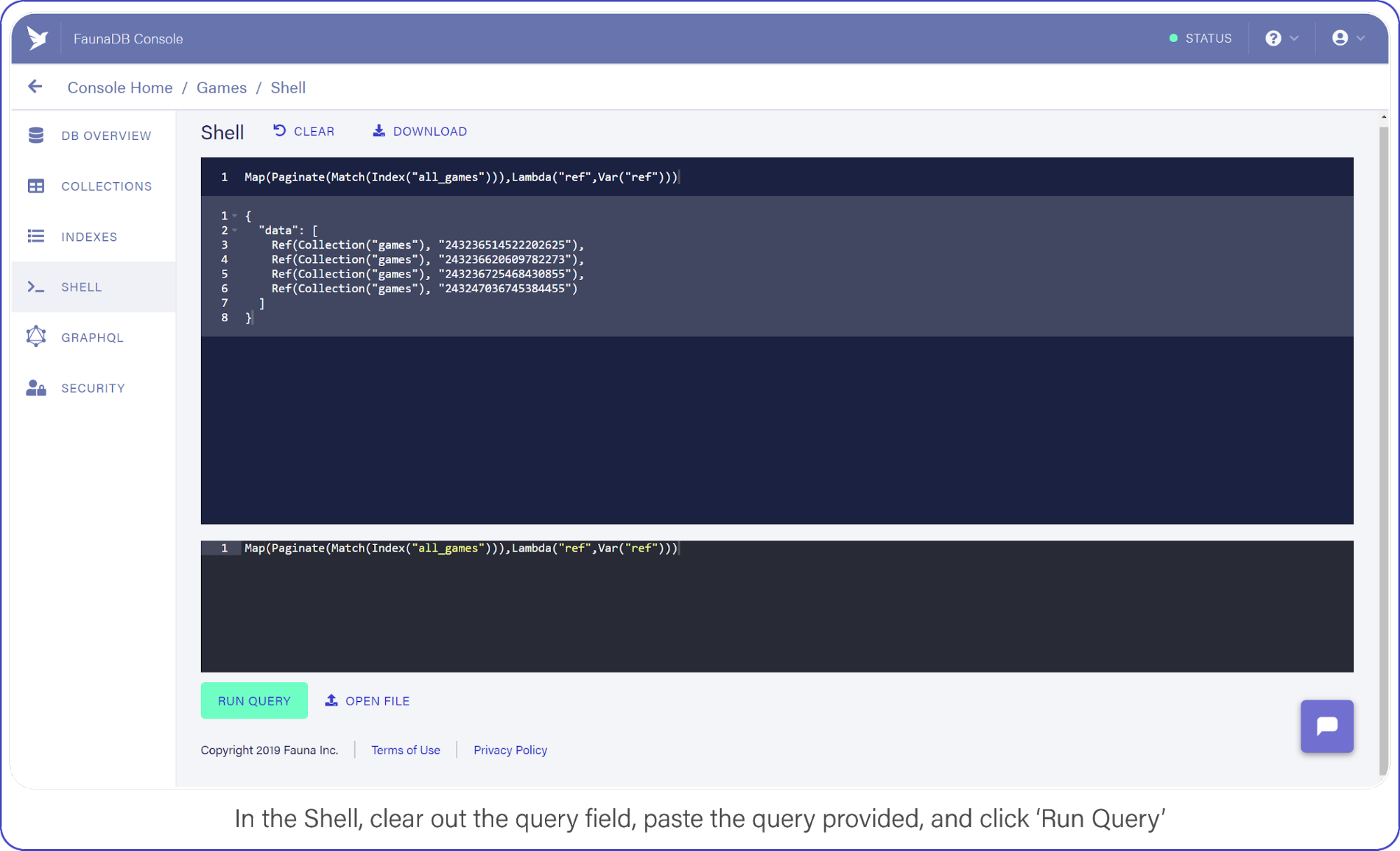
Now switch to the Shell area and clear your query. Paste the following:
And click the "Run Query" button. You should see a list of three items: references to the documents you created a moment ago.
In the Shell, clear out the query field, paste the query provided, and click "Run Query."
It’s a little long in the tooth, but here’s what the query is doing.
Index("all_games") creates a reference to the all_games index which Fauna generated automatically for you when you established your collection.These default indexes are organized by reference and return references as values. So in this case we use the Match function on the index to return a Set of references. Since we do not filter anywhere, we will receive every document in the ‘games’ collection.
The set that was returned from Match is then passed to Paginate. This function as you would expect adds pagination functionality (forward, backward, skip ahead). Lastly, you pass the result of Paginate to Map, which much like its software counterpart lets you perform an operation on each element in a Set and return an array, in this case it is simply returning ref (the reference id).
As we mentioned before, the default index only returns references. The Lambda operation that we fed to Map, pulls this ref field from each entry in the paginated set. The result is an array of references.
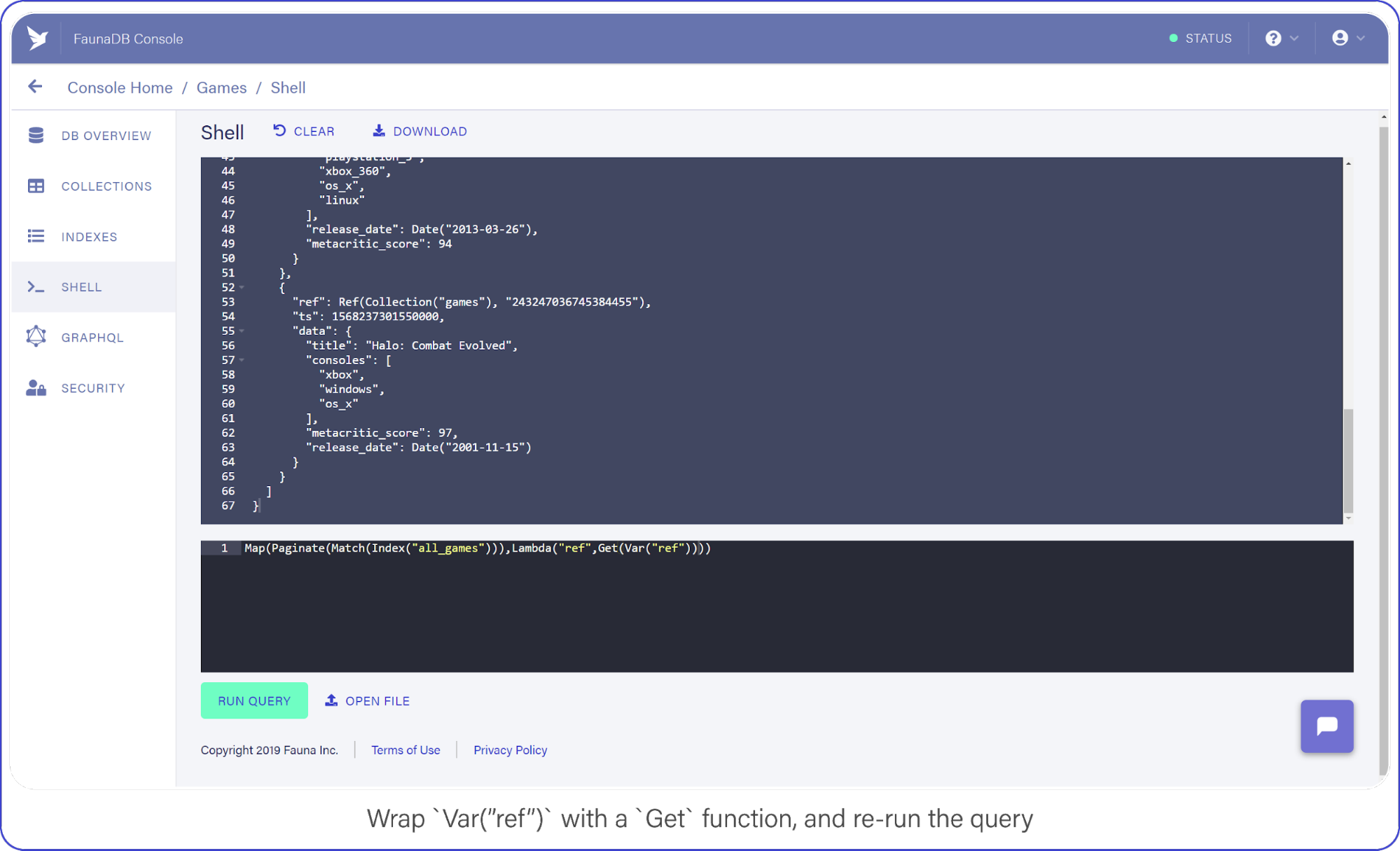
Now that you have a list of references, you can retrieve the data behind the reference by using another function: Get.
Wrap Var("ref") with a Get call and re-run your query, which should look like this:
You perform a Create, pass in your collection, and include data fields that come straight from the body of the request.
client.query returns a Promise, the success-state of which provides a reference to the newly-created document.
And to make sure it’s working, you return the reference to the caller. Let’s see it in action.
Test Firebase Functions Locally with Postman and cURL
Use Postman or cURL to make the following request against localhost:5000/api/v1/ to add Halo: Combat Evolved to your list of games (or whichever Halo is your favorite but absolutely not 4, 5, Reach, Wars, Wars 2, Spartan...)
If everything went right, you should see a reference coming back with your request and a new document show up in your FaunaDB console.
Now that you have some data in your games collection, let’s learn how to retrieve it.
Retrieve FaunaDB Records Using a REST API Request
Earlier, I mentioned that every FaunaDB query requires an Index and that Fauna prevents you from doing inefficient queries. Since our next query will return games filtered by a game console, we can’t simply use a traditional `where` clause since that might be inefficient without an index. In Fauna, we first need to define an index that allows us to filter.
To filter, we need to specify which terms we want to filter on. And by terms, I mean the fields of document you expect to search on.
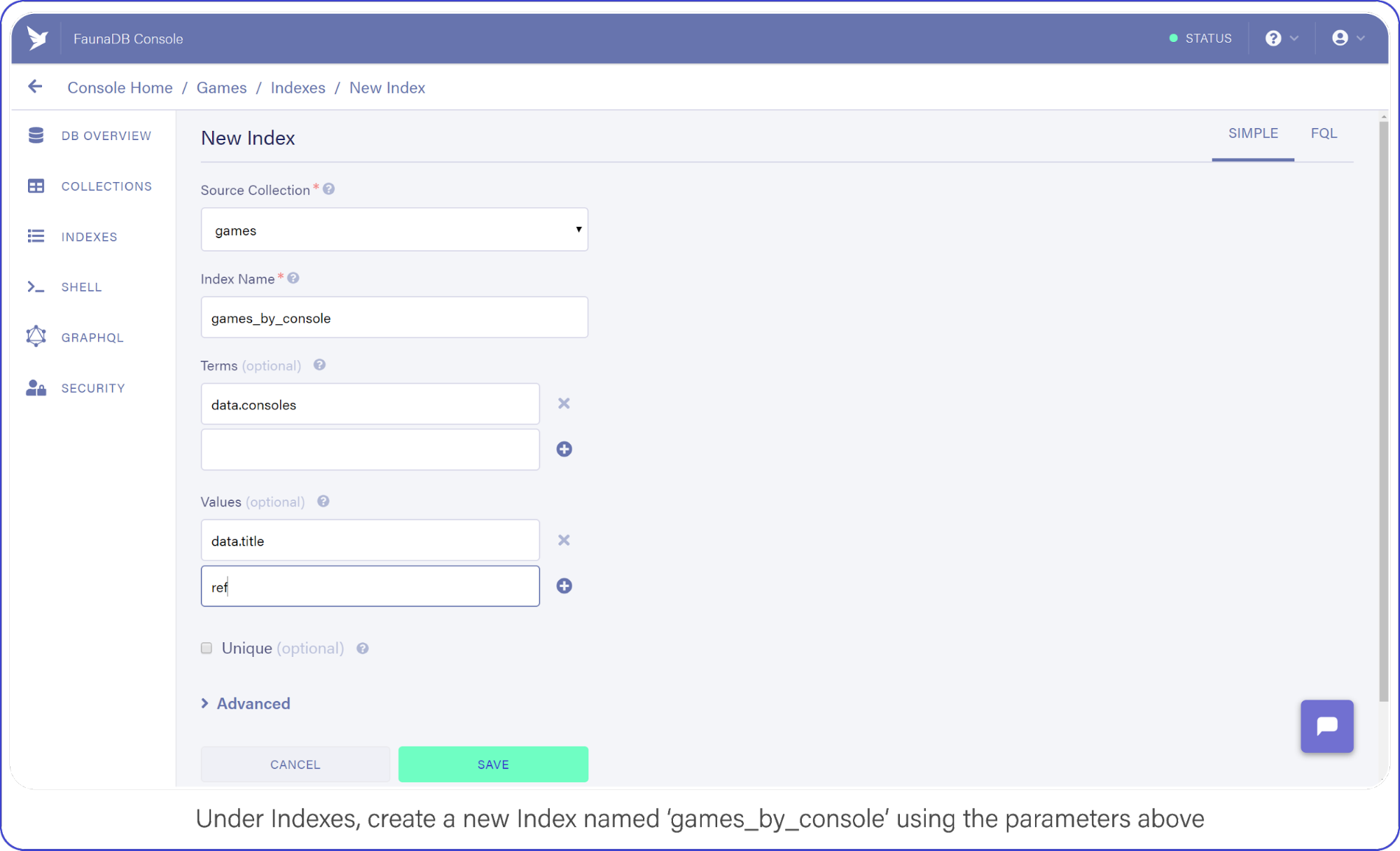
Navigate to Indexes in your FaunaDB Console and create a new one.
Name it games_by_console, set data.consoles as the only term since we will filter on the consoles. Then set data.title and ref as values. Values are indexed by range, but they are also just the values that will be returned by the query. Indexes are in that sense a bit like views, you can create an index that returns a different combination of fields and each index can have different security.
To minimize request overhead, we’ve limited the response data (e.g. values) to titles and the reference.
Your screen should resemble this one:
Under indexes, create a new index named games_by_console using the parameters above.
Click "Save" when you’re ready.
With your Index prepared, you can draft up your next API call.
I chose to represent consoles as a directory path where the console identifier is the sole parameter, e.g. /api/v1/console/playstation_3, not necessarily best practice, but not the worst either — come on now.
This query looks similar to the one you used in your SHELL to retrieve all games, but with a slight modification.This query looks similar to the one you used in your SHELL to retrieve all games, but with a slight modification. Note how your Match function now has a second parameter (req.params.name.toLowerCase()) which is the console identifier that was passed in through the URL.
The Index you made a moment ago, games_by_console, had one Term in it (the consoles array), this corresponds to the parameter we have provided to the match parameter. Basically, the Match function searches for the string you pass as its second argument in the index. The next interesting bit is the Lambda function. Your first encounter with Lamba featured a single string as Lambda’s first argument, “ref.”
However, the games_by_console Index returns two fields per result, the two values you specified earlier when you created the Index (data.title and ref). So basically we receive a paginated set containing tuples of titles and references, but we only need titles. In case your set contains multiple values, the parameter of your lambda will be an array. The array parameter above (`['title', 'ref']`) says that the first value is bound to the text variable title and the second is bound to the variable ref. text parameter. These variables can then be retrieved again further in the query by using Var(‘title’). In this case, both “title” and “ref,” were returned by the index and your Map with Lambda function maps over this list of results and simply returns only the list of titles for each game.
In fauna, the composition of queries happens before they are executed. When you write var q = q.Match(q.Index('games_by_console'))), the variable just contains a query but no query was executed yet. Only when you pass the query to client.query(q) to be executed, it will execute. You can even pass javascript variables in other Fauna FQL functions to start composing queries. his is a big benefit of querying in Fauna vs the chained asynchronous queries required of Firestore. If you ever have tried to generate very complex queries in SQL dynamically, then you will also appreciate the composition and less declarative nature of FQL.
Neat, huh? But Match only returns documents whose fields are exact matches, which doesn’t help the user looking for a game whose title they can barely recall.
Although Fauna does not offer fuzzy searching via indexes (yet), we can provide similar functionality by making an index on all words in the string. Or if we want really flexible fuzzy searching we can use the filter syntax. Note that its is not necessarily a good idea from a performance or cost point of view… but hey, we’ll do it because we can and because it is a great example of how flexible FQL is!
Filtering FaunaDB Documents by Search String
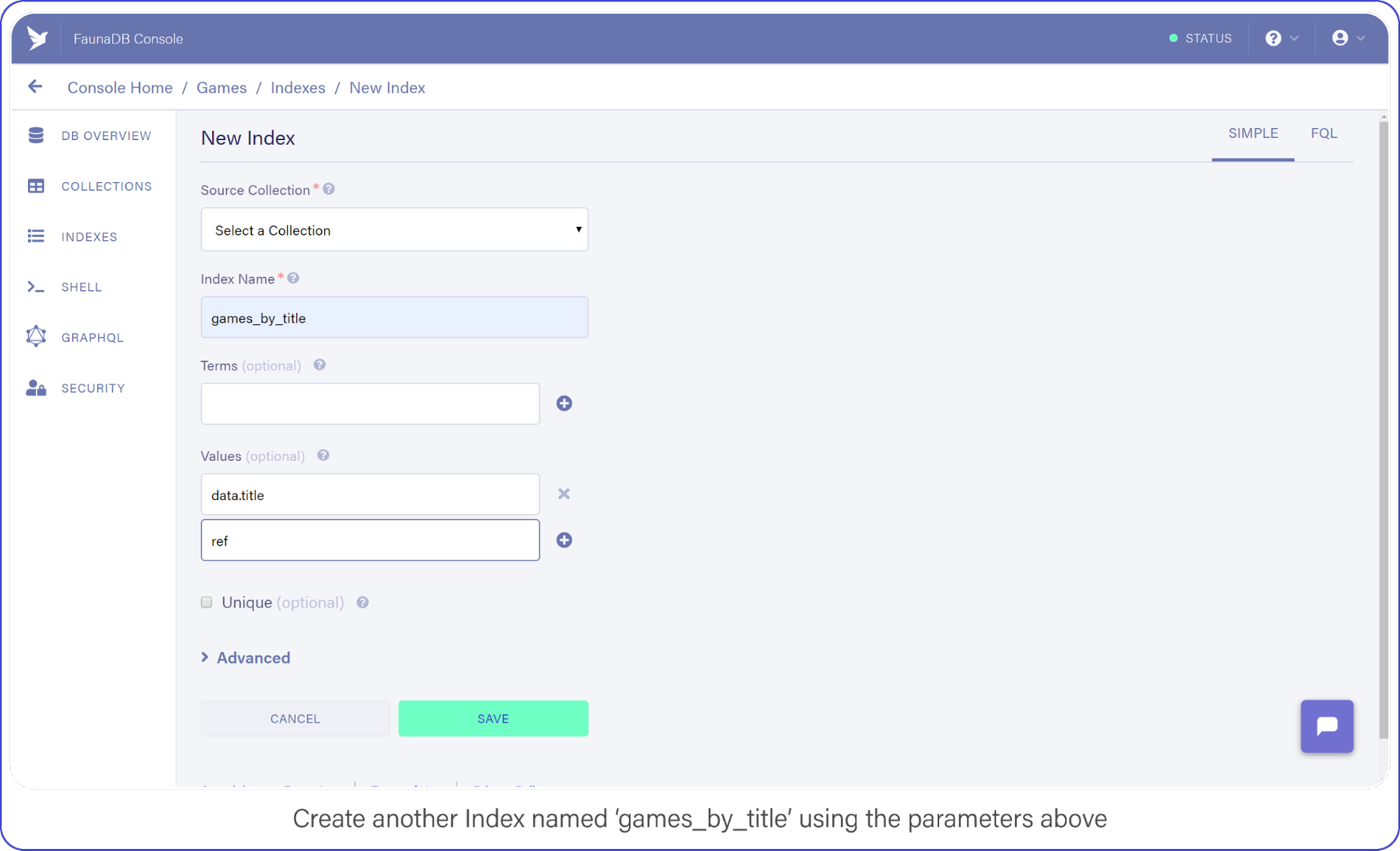
The last API call we are going to construct will let users find titles by name. Head back into your FaunaDB Console, select INDEXES and click NEW INDEX. Name the new Index, games_by_title and leave the Terms empty, you won’t be needing them.
Rather than rely on Match to compare the title to the search string, you will iterate over every game in your collection to find titles that contain the search query.
Remember how we mentioned that indexes are a bit like views. In order to filter on title , we need to include `data.title` as a value returned by the Index. Since we are using Filter on the results of Match, we have to make sure that Match returns the title so we can work with it.
Add data.title and ref as Values, compare your screen to mine:
Create another index called games_by_title using the parameters above.
Click "Save" when you’re ready.
Back in index.js, add your fourth and final API call:
Big breath because I know there are many brackets (Lisp programmers will love this) , but once you understand the components, the full query is quite easy to understand since it’s basically just like coding.
Beginning with the first new function you spot, Filter. Filter is again very similar to the filter you encounter in programming languages. It reduces an Array or Set to a subset based on the result of a Lambda function.
In this Filter, you exclude any game titles that do not contain the user’s search query.
You do that by comparing the result of FindStr (a string finding function similar to JavaScript’s indexOf) to -1, a non-negative value here means FindStr discovered the user’s query in a lowercase-version of the game’s title.
And the result of this Filter is passed to Map, where each document is retrieved and placed in the final result output.
Now you may have thought the obvious: performing a string comparison across four entries is cheap, 2 million…? Not so much.
This is an inefficient way to perform a text search, but it will get the job done for the purpose of this example. (Maybe we should have used ElasticSearch or Solr for this?) Well in that case, FaunaDB is quite perfect as central system to keep your data safe and feed this data into a search engine thanks to the temporal aspect which allows you to ask Fauna: “Hey, give me the last changes since timestamp X?”. So you could setup ElasticSearch next to it and use FaunaDB (soon they have push messages) to update it whenever there are changes. Whoever did this once knows how hard it is to keep such an external search up to date and correct, FaunaDB makes it quite easy.
Don’t You Dare Forget This One Firebase Optimization
A lot of Firebase Cloud Functions code snippets make one terribly wrong assumption: that each function invocation is independent of another.
In reality, Firebase Function instances can remain "hot" for a short period of time, prepared to execute subsequent requests.
This means you should lazy-load your variables and cache the results to help reduce computation time (and money!) during peak activity, here’s how:
let functions, admin, faunadb, q, client, express, cors, api
if (typeof api === 'undefined') {
... // dump the existing code here
}
exports.api = functions.https.onRequest(api)
Deploy Your REST API with Firebase Functions
Finally, deploy both your functions and hosting configuration to Firebase by running firebase deploy from your shell.
Without a custom domain name, refer to your Firebase subdomain when making API requests, e.g. https://{project-name}.firebaseapp.com/api/v1/.
What Next?
FaunaDB has made me a conscientious developer.
When using other schemaless databases, I start off with great intentions by treating documents as if I instantiated them with a DDL (strict types, version numbers, the whole shebang).
While that keeps me organized for a short while, soon after standards fall in favor of speed and my documents splinter: leaving outdated formatting and zombie data behind.
By forcing me to think about how I query my data, which Indexes I need, and how to best manipulate that data before it returns to my server, I remain conscious of my documents.
To aid me in remaining forever organized, my catalog (in FaunaDB Console) of Indexes helps me keep track of everything my documents offer.
And by incorporating this wide range of arithmetic and linguistic functions right into the query language, FaunaDB encourages me to maximize efficiency and keep a close eye on my data-storage policies. Considering the affordable pricing model, I’d sooner run 10k+ data manipulations on FaunaDB’s servers than on a single Cloud Function.
I love this post by Simon Holdorf. He’s got some ideas for how to level up your skills as a front-end developer next year. Here they are:
Build a movie search app using React
Build a chat app with Vue
Build a weather app with Angular
Build a to-do app with Svelte
… and 5 more like that.
All good ideas. All extremely focused on JavaScript frameworks.
I like thinking of being a front-end developer as being someone who is a browser person. You deal with people who use some kind of client to use the web on some kind of device. That’s the job.
Go find a Dribbble shot that appeals to you. Re-build it in HTML and CSS in the cleanest and most accessible way you can.
Find a component you can abstract in your codebase, and abstract it so you can re-use it efficiently. Consider accessibility as you do it. Could you make it more accessible in a way that benefits the entire site? How about your SVG icon component — how’s that looking these days?
Try out a static site generator (perhaps one that isn’t particularly JavaScript focused, just to experience it). What could the data source be? What could you make if you ran the build process on a timed schedule?
Install the Axe accessibility plugin for DevTools and run it on an important site you control. Make changes to improve the accessibility as it suggests.
Spin up a copy of Fractal. Check out how it can help you think about building front-ends as components, even at the HTML and CSS level.
Build a beautiful form in HTML/CSS that does something useful for you, like receive leads for freelance work. Learn all about form validation and see how much you can do in just HTML, then HTML plus some CSS, then with some vanilla JavaScript. Make the form work by using a small dedicated service.
Figure out how to implement an SVG icon system. So many sites these days need an icon set. Inlining SVG is a great simple solution, but how you can abstract that to easily implement it with your workflow? How can it work with the framework you use?
Let’s say you needed to put up a website where the entire thing was the name and address of the company, and a list of hours it is open. What’s the absolute minimum amount of work and technical debt you could incur to do it?
I love this post by Simon Holdorf. He’s got some ideas for how to level up your skills as a front-end developer next year. Here they are:
Build a movie search app using React
Build a chat app with Vue
Build a weather app with Angular
Build a to-do app with Svelte
… and 5 more like that.
All good ideas. All extremely focused on JavaScript frameworks.
I like thinking of being a front-end developer as being someone who is a browser person. You deal with people who use some kind of client to use the web on some kind of device. That’s the job.
Go find a Dribbble shot that appeals to you. Re-build it in HTML and CSS in the cleanest and most accessible way you can.
Find a component you can abstract in your codebase, and abstract it so you can re-use it efficiently. Consider accessibility as you do it. Could you make it more accessible in a way that benefits the entire site? How about your SVG icon component — how’s that looking these days?
Try out a static site generator (perhaps one that isn’t particularly JavaScript focused, just to experience it). What could the data source be? What could you make if you ran the build process on a timed schedule?
Install the Axe accessibility plugin for DevTools and run it on an important site you control. Make changes to improve the accessibility as it suggests.
Spin up a copy of Fractal. Check out how it can help you think about building front-ends as components, even at the HTML and CSS level.
Build a beautiful form in HTML/CSS that does something useful for you, like receive leads for freelance work. Learn all about form validation and see how much you can do in just HTML, then HTML plus some CSS, then with some vanilla JavaScript. Make the form work by using a small dedicated service.
Figure out how to implement an SVG icon system. So many sites these days need an icon set. Inlining SVG is a great simple solution, but how you can abstract that to easily implement it with your workflow? How can it work with the framework you use?
Let’s say you needed to put up a website where the entire thing was the name and address of the company, and a list of hours it is open. What’s the absolute minimum amount of work and technical debt you could incur to do it?
People say JAMstack sites are fast — let’s find out why by looking at real performance metrics! We’ll cover common metrics, like Time to First Byte (TTFB) among others, then compare data across a wide section of sites to see how different ways to slice those sites up compare.
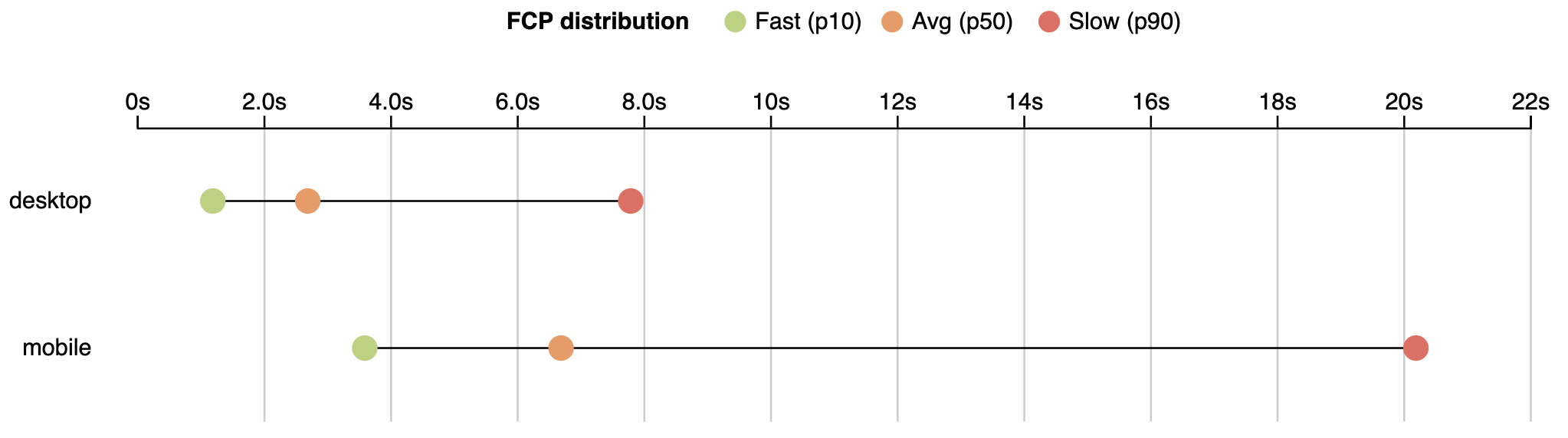
First, I’d like to present a small analysis to provide some background. According to the HTTPArchive metrics report on page loading, users wait an average of 6.7 seconds to see primary content.
First Contentful Paint (FCP) – measures the point at which text or graphics are first rendered to the screen.
The FCP distribution for the 10th, 50th and 90th percentile values as reported on August 1, 2019.
If we are talking about engagement with a page (Time to Interactive), users wait even longer. The average time to interactive is 9.3 seconds.
Time to Interactive (TTI) – a time when user can interact with a page without delay.
TTI distribution for the 10th, 50th and 90th percentile values as reported on August 1, 2019.
State of the real user web performance
The data above is from lab monitoring and doesn’t fully represent real user experience. Real users data based taken from the Chrome User Experience Report (CrUX) shows an even wider picture.
I’ll use data aggregated from users who use mobile devices. Specifically, we will use metrics like:
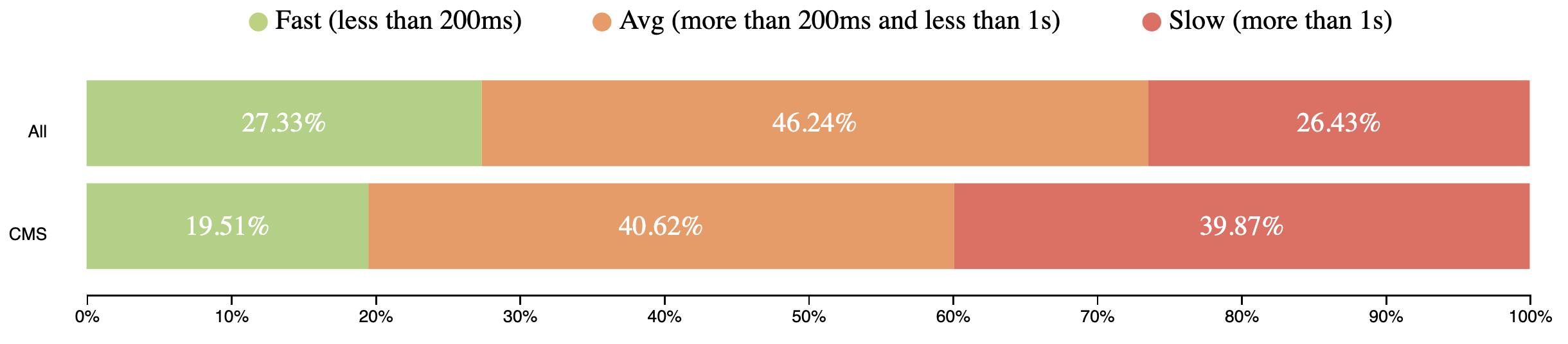
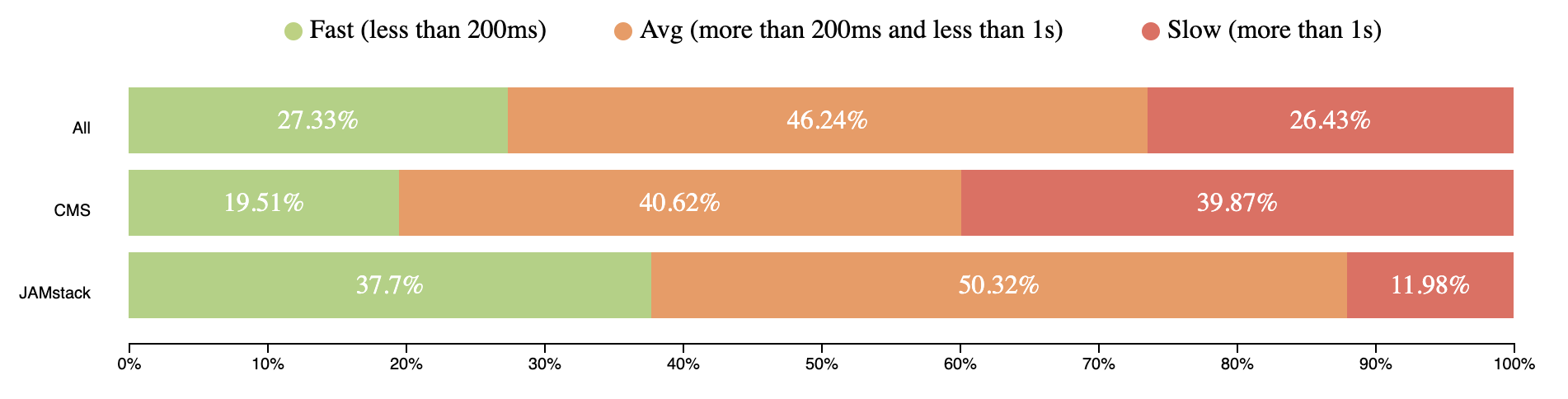
TTFB represents the time browser waits to receive first bytes of the response from server. TTFB takes from 200ms to 1 second for users around the world. It’s a pretty long time to receive the first chunks of the page.
TTFB mobile speed distribution (CrUX, July 2019)
First Contentful Paint
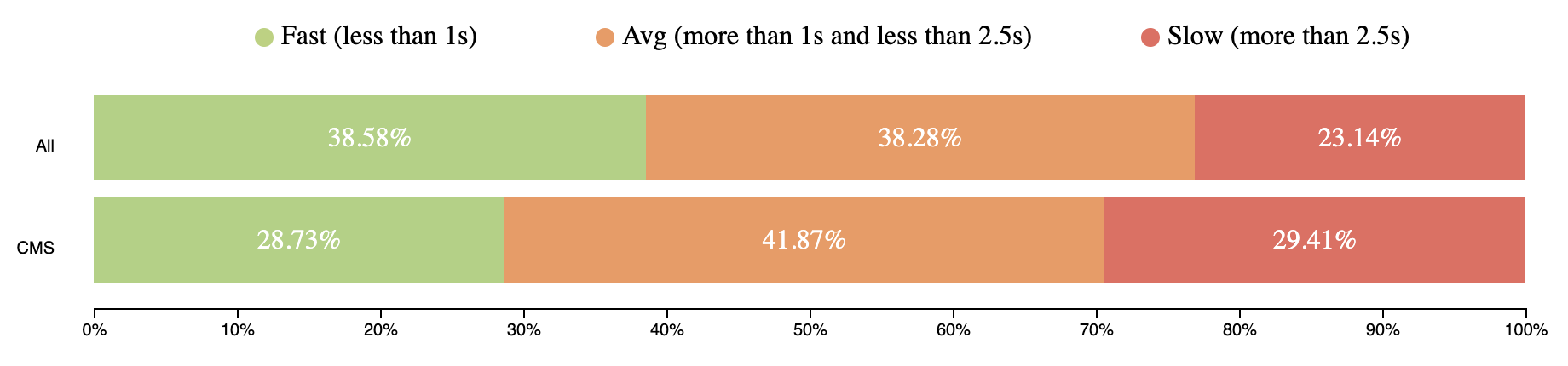
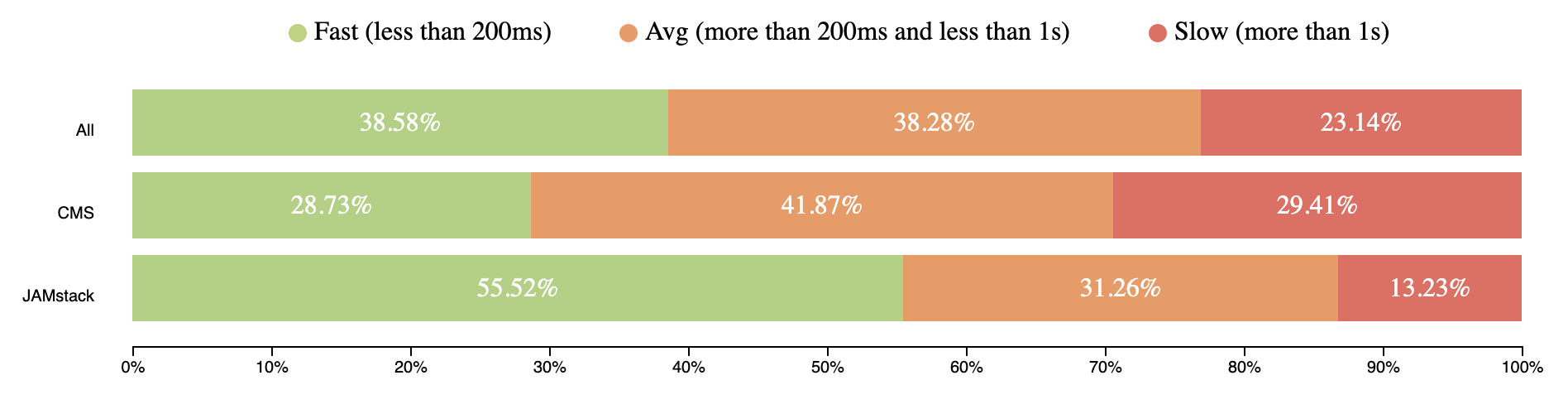
FCP happens after 2.5 seconds for 23% of page views around the world.
FCP mobile speed distribution (CrUX, July 2019)
First Input Delay
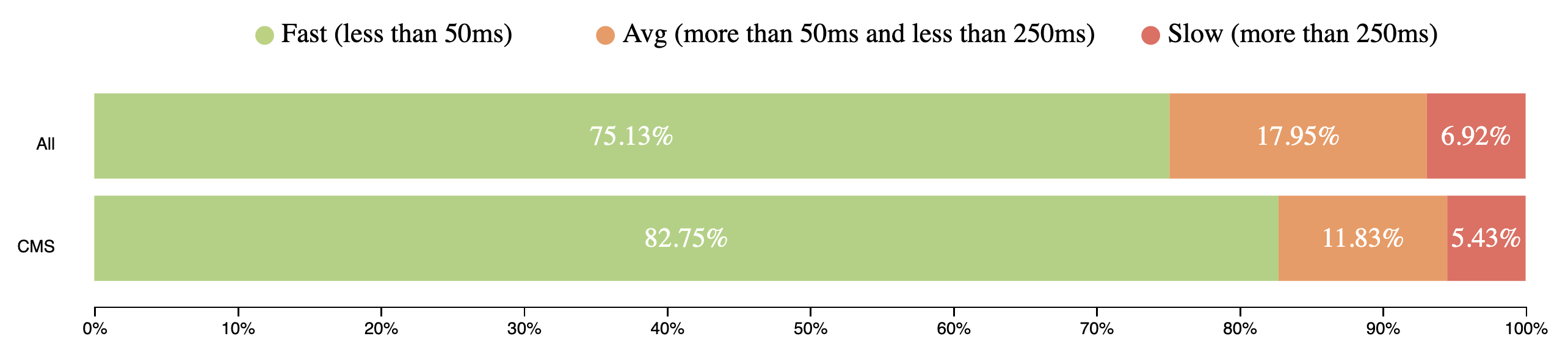
FID metrics show how fast web pages respond to user input (e.g. click, scroll, etc.).
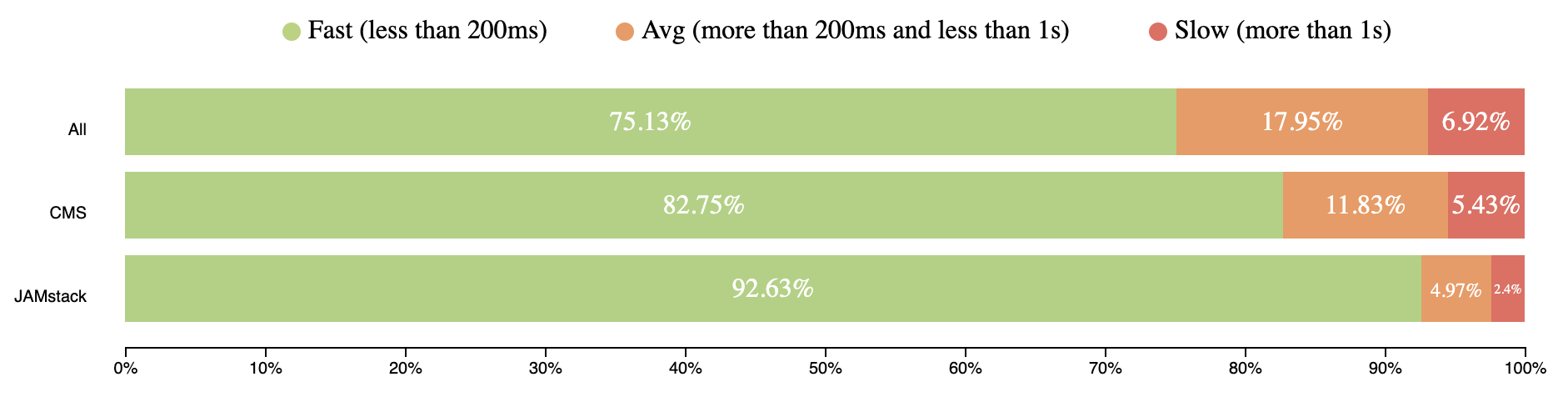
CrUX doesn’t have TTI data due to different restrictions, but has FID, which is even better can reflect page interactivity. Over 75% of mobile user experiences have input delay for 50ms and users didn’t experience any jank.
FID mobile speed distribution (CrUX, July 2019)
You can use the queries below and play with them on this site.
#standardSQL
  SELECT
    REGEXP_REPLACE(yyyymm, '(\\d{4})(\\d{2})', '\\1_\\2_01') AS date,
    UNIX_DATE(CAST(REGEXP_REPLACE(yyyymm, '(\\d{4})(\\d{2})', '\\1-\\2-01') AS DATE)) * 1000 * 60 * 60 * 24 AS timestamp,
    IF(device = 'desktop', 'desktop', 'mobile') AS client,
    ROUND(SUM(fast_fcp) * 100 / (SUM(fast_fcp) + SUM(avg_fcp) + SUM(slow_fcp)), 2) AS fastFCP,
    ROUND(SUM(avg_fcp) * 100 / (SUM(fast_fcp) + SUM(avg_fcp) + SUM(slow_fcp)), 2) AS avgFCP,
    ROUND(SUM(slow_fcp) * 100 / (SUM(fast_fcp) + SUM(avg_fcp) + SUM(slow_fcp)), 2) AS slowFCP,
    ROUND(SUM(fast_fid) * 100 / (SUM(fast_fid) + SUM(avg_fid) + SUM(slow_fid)), 2) AS fastFID,
    ROUND(SUM(avg_fid) * 100 / (SUM(fast_fid) + SUM(avg_fid) + SUM(slow_fid)), 2) AS avgFID,
    ROUND(SUM(slow_fid) * 100 / (SUM(fast_fid) + SUM(avg_fid) + SUM(slow_fid)), 2) AS slowFID
  FROM
    `chrome-ux-report.materialized.device_summary`
  WHERE
    yyyymm = '201907'
  GROUP BY
    date,
    timestamp,
    client
  ORDER BY
    date DESC,
    client
State of Content Management Systems (CMS) performance
CMSs should have become our saviors, helping us build faster sites. But looking at the data, that is not the case. The current state of CMS performance around the world is not so great.
TTFB mobile speed distribution comparison between all web and CMS (CrUX, July 2019)Data from July 2019
E-Commerce websites, a good example of sites that are typically built on a CMS, have really bad stats for page views:
~40% – 1second for TTFB
~30% – more than 1.5 second for FCP
~12% – lag for page interaction.
I faced clients who requested support of IE10-IE11 because the traffic from those users represented 1%, which equalled millions of dollars in revenue. Please, calculate your losses in case 1% of users leave immediately and never came back because of bad performance. If users aren’t happy, business will be unhappy, too.
To get more details about how web performance correlates with revenue, check out WPO Stats. It’s a list of case studies from real companies and their success after improving performance.
With JAMstack, developers do as little rendering on the client as possible, instead using server infrastructure for most things. Not to mention, most JAMstack workflows are great at handling deployments, and helping with scalability, among other benefits. Content is stored statically on a static file hosts and provided to the users via CDN.
I had two years of experience working with one of the popular CMSs for e-commerce and we had a lot of problems with deployments, performance, scalability. The team would spend days and fixing them. It’s not what customers want. These are the sorts of big issues JAMstack solves.
Looking at the CrUX data, JAMstack sites performance looks really solid. The following values are based on sites served by Netlify and GitHub. There is some discussion on the HTTPArchive forum where you can participate to make data more accurate.
Here are the results for TTFB:
TTFB mobile speed distribution comparison between all web, CMS and JAMstack sites (CrUX, July 2019)Data from July 2019
#standardSQL
SELECT
  COUNT(DISTINCT origin) AS n,
  ROUND(SUM(IF(ttfb.start < 200, ttfb.density, 0)) / SUM(ttfb.density), 4) AS fastTTFB,
  ROUND(SUM(IF(ttfb.start >= 200 AND ttfb.start < 1000, ttfb.density, 0)) / SUM(ttfb.density), 4) AS avgTTFB,
  ROUND(SUM(IF(ttfb.start >= 1000, ttfb.density, 0)) / SUM(ttfb.density), 4) AS slowTTFB
FROM
  `chrome-ux-report.all.201907`,
  UNNEST(experimental.time_to_first_byte.histogram.bin) AS ttfb
JOIN
  (SELECT url, REGEXP_EXTRACT(LOWER(CONCAT(respOtherHeaders, resp_x_powered_by, resp_via, resp_server)),
      '(netlify|x-github-request)')
    AS platform
  FROM `httparchive.summary_requests.2019_07_01_mobile`)
ON
  CONCAT(origin, '/') = url
WHERE
  platform IS NOT NULL
ORDER BY
  n DESC
Here’s how FCP shook out:
FCP mobile speed distribution comparison between all web, CMS and JAMstack sites (CrUX, July 2019)
Now let’s look at FID:
FID mobile speed distribution comparison between all web, CMS and JAMstack sites (CrUX, July 2019)Data from July 2019
#standardSQL
  SELECT
    COUNT(DISTINCT origin) AS n,
    ROUND(SUM(IF(fcp.start < 1000, fcp.density, 0)) / SUM(fcp.density), 4) AS fastFCP,
    ROUND(SUM(IF(fcp.start >= 1000 AND fcp.start < 2500, fcp.density, 0)) / SUM(fcp.density), 4) AS avgFCP,
    ROUND(SUM(IF(fcp.start >= 2500, fcp.density, 0)) / SUM(fcp.density), 4) AS slowFCP,
    ROUND(SUM(IF(fid.start < 50, fid.density, 0)) / SUM(fid.density), 4) AS fastFID,
    ROUND(SUM(IF(fid.start >= 50 AND fid.start < 250, fid.density, 0)) / SUM(fid.density), 4) AS avgFID,
    ROUND(SUM(IF(fid.start >= 250, fid.density, 0)) / SUM(fid.density), 4) AS slowFID
  FROM
    `chrome-ux-report.all.201907`,
    UNNEST(first_contentful_paint.histogram.bin) AS fcp,
    UNNEST(experimental.first_input_delay.histogram.bin) AS fid
  JOIN
    (SELECT url, REGEXP_EXTRACT(LOWER(CONCAT(respOtherHeaders, resp_x_powered_by, resp_via, resp_server)),
        '(netlify|x-github-request)')
      AS platform
    FROM `httparchive.summary_requests.2019_07_01_mobile`)
  ON
    CONCAT(origin, '/') = url
  WHERE
    platform IS NOT NULL
  ORDER BY
    n DESC
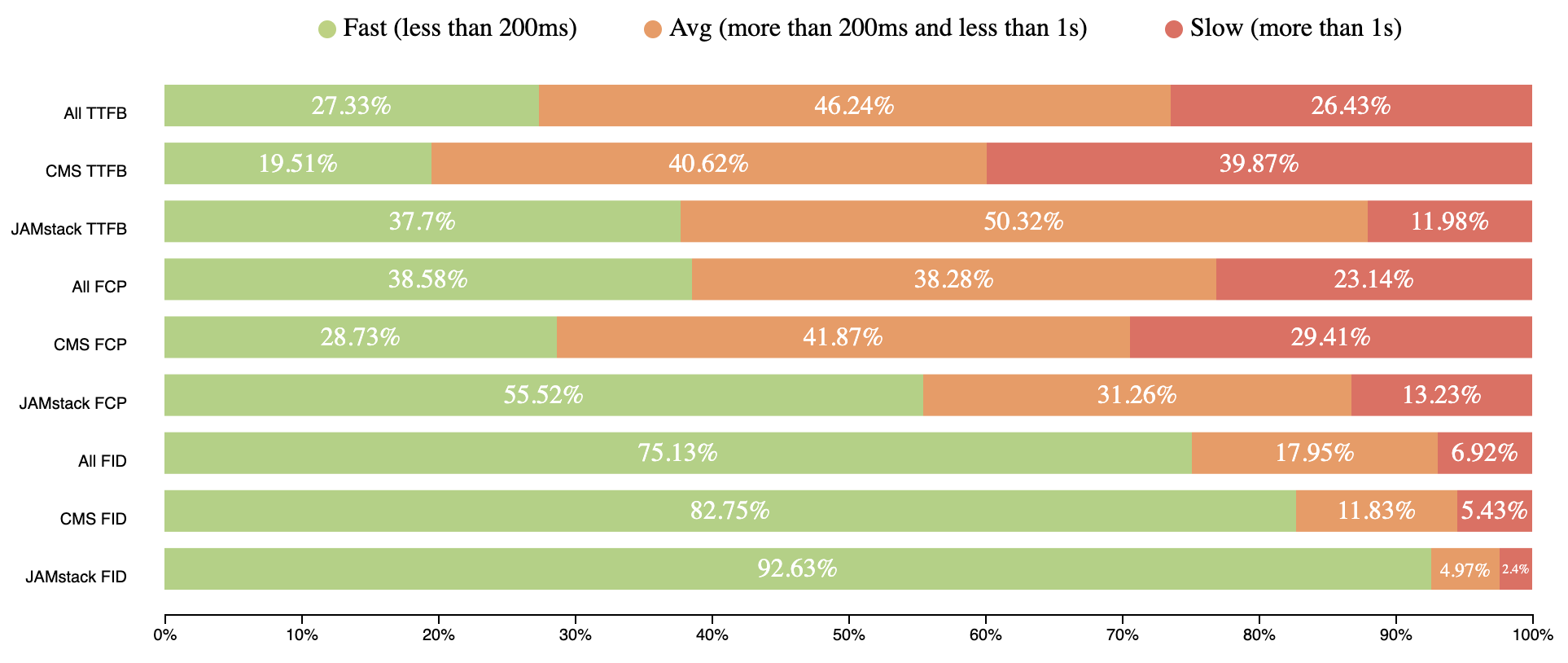
The numbers show the performance of JAMstack sites is the best. The numbers are pretty much the same for mobile and desktop which is even more amazing!
Some highlights from engineering leaders
Let me show you a couple of examples from some prominent folks in the industry:
Out of 468 million requests in the @HTTPArchive, 48% were not served from a CDN. I've visualized where they were served from below. Many of them were requests to 3rd parties. The client requesting them was in Redwood City, CA. Latency matters. #WebPerfpic.twitter.com/0F7nFa1QgM
JAMstack sites are generally CDN-hosted and mitigate TTFB. Since the file hosting is handled by infrastructures like Amazon Web Services or similar, all sites performance can be improved in one fix.
One more real investigation says that it is better to deliver static HTML for better FCP.
Which has a better First Meaningful Paint time?
① a raw 8.5MB HTML file with the full text of every single one of my 27,506 tweets ② a client rendered React site with exactly one tweet on it
(Spoiler: @____lighthouse reports 8.5MB of HTML wins by about 200ms)
Here’s a comparison for all results shown above together:
Mobile speed distribution comparison between all web, CMS and JAMstack sites (CrUX, July 2019)
JAMstack brings better performance to the web by statically serving pages with CDNs. This is important because a fast back-end that takes a long time to reach users will be slow, and likewise, a slow back-end that is quick to reach users will also be slow.
JAMstack hasn’t won the perf race yet, because the number of sites built with it not so huge as for example for CMS, but the intention to win it is really great.
Adding these metrics to a performance budget can be one way make sure you are building good performance into your workflow. Something like:
TTFB: 200ms
FCP: 1s
FID: 50ms
Spend it wisely 🙂
Editor’s note: Artem Denysov is from Stackbit, which is a service that helps tremendously with spinning up JAMstack sites and more upcoming tooling to smooth out some of the workflow edges with JAMstack sites and content. Artem told me he’d like to thank Rick Viscomi, Rob Austin, and Aleksey Kulikov for their help in reviewing the article.
People say JAMstack sites are fast — let’s find out why by looking at real performance metrics! We’ll cover common metrics, like Time to First Byte (TTFB) among others, then compare data across a wide section of sites to see how different ways to slice those sites up compare.
First, I’d like to present a small analysis to provide some background. According to the HTTPArchive metrics report on page loading, users wait an average of 6.7 seconds to see primary content.
First Contentful Paint (FCP) – measures the point at which text or graphics are first rendered to the screen.
The FCP distribution for the 10th, 50th and 90th percentile values as reported on August 1, 2019.
If we are talking about engagement with a page (Time to Interactive), users wait even longer. The average time to interactive is 9.3 seconds.
Time to Interactive (TTI) – a time when user can interact with a page without delay.
TTI distribution for the 10th, 50th and 90th percentile values as reported on August 1, 2019.
State of the real user web performance
The data above is from lab monitoring and doesn’t fully represent real user experience. Real users data based taken from the Chrome User Experience Report (CrUX) shows an even wider picture.
I’ll use data aggregated from users who use mobile devices. Specifically, we will use metrics like:
TTFB represents the time browser waits to receive first bytes of the response from server. TTFB takes from 200ms to 1 second for users around the world. It’s a pretty long time to receive the first chunks of the page.
TTFB mobile speed distribution (CrUX, July 2019)
First Contentful Paint
FCP happens after 2.5 seconds for 23% of page views around the world.
FCP mobile speed distribution (CrUX, July 2019)
First Input Delay
FID metrics show how fast web pages respond to user input (e.g. click, scroll, etc.).
CrUX doesn’t have TTI data due to different restrictions, but has FID, which is even better can reflect page interactivity. Over 75% of mobile user experiences have input delay for 50ms and users didn’t experience any jank.
FID mobile speed distribution (CrUX, July 2019)
You can use the queries below and play with them on this site.
#standardSQL
  SELECT
    REGEXP_REPLACE(yyyymm, '(\\d{4})(\\d{2})', '\\1_\\2_01') AS date,
    UNIX_DATE(CAST(REGEXP_REPLACE(yyyymm, '(\\d{4})(\\d{2})', '\\1-\\2-01') AS DATE)) * 1000 * 60 * 60 * 24 AS timestamp,
    IF(device = 'desktop', 'desktop', 'mobile') AS client,
    ROUND(SUM(fast_fcp) * 100 / (SUM(fast_fcp) + SUM(avg_fcp) + SUM(slow_fcp)), 2) AS fastFCP,
    ROUND(SUM(avg_fcp) * 100 / (SUM(fast_fcp) + SUM(avg_fcp) + SUM(slow_fcp)), 2) AS avgFCP,
    ROUND(SUM(slow_fcp) * 100 / (SUM(fast_fcp) + SUM(avg_fcp) + SUM(slow_fcp)), 2) AS slowFCP,
    ROUND(SUM(fast_fid) * 100 / (SUM(fast_fid) + SUM(avg_fid) + SUM(slow_fid)), 2) AS fastFID,
    ROUND(SUM(avg_fid) * 100 / (SUM(fast_fid) + SUM(avg_fid) + SUM(slow_fid)), 2) AS avgFID,
    ROUND(SUM(slow_fid) * 100 / (SUM(fast_fid) + SUM(avg_fid) + SUM(slow_fid)), 2) AS slowFID
  FROM
    `chrome-ux-report.materialized.device_summary`
  WHERE
    yyyymm = '201907'
  GROUP BY
    date,
    timestamp,
    client
  ORDER BY
    date DESC,
    client
State of Content Management Systems (CMS) performance
CMSs should have become our saviors, helping us build faster sites. But looking at the data, that is not the case. The current state of CMS performance around the world is not so great.
TTFB mobile speed distribution comparison between all web and CMS (CrUX, July 2019)Data from July 2019
E-Commerce websites, a good example of sites that are typically built on a CMS, have really bad stats for page views:
~40% – 1second for TTFB
~30% – more than 1.5 second for FCP
~12% – lag for page interaction.
I faced clients who requested support of IE10-IE11 because the traffic from those users represented 1%, which equalled millions of dollars in revenue. Please, calculate your losses in case 1% of users leave immediately and never came back because of bad performance. If users aren’t happy, business will be unhappy, too.
To get more details about how web performance correlates with revenue, check out WPO Stats. It’s a list of case studies from real companies and their success after improving performance.
With JAMstack, developers do as little rendering on the client as possible, instead using server infrastructure for most things. Not to mention, most JAMstack workflows are great at handling deployments, and helping with scalability, among other benefits. Content is stored statically on a static file hosts and provided to the users via CDN.
I had two years of experience working with one of the popular CMSs for e-commerce and we had a lot of problems with deployments, performance, scalability. The team would spend days and fixing them. It’s not what customers want. These are the sorts of big issues JAMstack solves.
Looking at the CrUX data, JAMstack sites performance looks really solid. The following values are based on sites served by Netlify and GitHub. There is some discussion on the HTTPArchive forum where you can participate to make data more accurate.
Here are the results for TTFB:
TTFB mobile speed distribution comparison between all web, CMS and JAMstack sites (CrUX, July 2019)Data from July 2019
#standardSQL
SELECT
  COUNT(DISTINCT origin) AS n,
  ROUND(SUM(IF(ttfb.start < 200, ttfb.density, 0)) / SUM(ttfb.density), 4) AS fastTTFB,
  ROUND(SUM(IF(ttfb.start >= 200 AND ttfb.start < 1000, ttfb.density, 0)) / SUM(ttfb.density), 4) AS avgTTFB,
  ROUND(SUM(IF(ttfb.start >= 1000, ttfb.density, 0)) / SUM(ttfb.density), 4) AS slowTTFB
FROM
  `chrome-ux-report.all.201907`,
  UNNEST(experimental.time_to_first_byte.histogram.bin) AS ttfb
JOIN
  (SELECT url, REGEXP_EXTRACT(LOWER(CONCAT(respOtherHeaders, resp_x_powered_by, resp_via, resp_server)),
      '(netlify|x-github-request)')
    AS platform
  FROM `httparchive.summary_requests.2019_07_01_mobile`)
ON
  CONCAT(origin, '/') = url
WHERE
  platform IS NOT NULL
ORDER BY
  n DESC
Here’s how FCP shook out:
FCP mobile speed distribution comparison between all web, CMS and JAMstack sites (CrUX, July 2019)
Now let’s look at FID:
FID mobile speed distribution comparison between all web, CMS and JAMstack sites (CrUX, July 2019)Data from July 2019
#standardSQL
  SELECT
    COUNT(DISTINCT origin) AS n,
    ROUND(SUM(IF(fcp.start < 1000, fcp.density, 0)) / SUM(fcp.density), 4) AS fastFCP,
    ROUND(SUM(IF(fcp.start >= 1000 AND fcp.start < 2500, fcp.density, 0)) / SUM(fcp.density), 4) AS avgFCP,
    ROUND(SUM(IF(fcp.start >= 2500, fcp.density, 0)) / SUM(fcp.density), 4) AS slowFCP,
    ROUND(SUM(IF(fid.start < 50, fid.density, 0)) / SUM(fid.density), 4) AS fastFID,
    ROUND(SUM(IF(fid.start >= 50 AND fid.start < 250, fid.density, 0)) / SUM(fid.density), 4) AS avgFID,
    ROUND(SUM(IF(fid.start >= 250, fid.density, 0)) / SUM(fid.density), 4) AS slowFID
  FROM
    `chrome-ux-report.all.201907`,
    UNNEST(first_contentful_paint.histogram.bin) AS fcp,
    UNNEST(experimental.first_input_delay.histogram.bin) AS fid
  JOIN
    (SELECT url, REGEXP_EXTRACT(LOWER(CONCAT(respOtherHeaders, resp_x_powered_by, resp_via, resp_server)),
        '(netlify|x-github-request)')
      AS platform
    FROM `httparchive.summary_requests.2019_07_01_mobile`)
  ON
    CONCAT(origin, '/') = url
  WHERE
    platform IS NOT NULL
  ORDER BY
    n DESC
The numbers show the performance of JAMstack sites is the best. The numbers are pretty much the same for mobile and desktop which is even more amazing!
Some highlights from engineering leaders
Let me show you a couple of examples from some prominent folks in the industry:
Out of 468 million requests in the @HTTPArchive, 48% were not served from a CDN. I've visualized where they were served from below. Many of them were requests to 3rd parties. The client requesting them was in Redwood City, CA. Latency matters. #WebPerfpic.twitter.com/0F7nFa1QgM
JAMstack sites are generally CDN-hosted and mitigate TTFB. Since the file hosting is handled by infrastructures like Amazon Web Services or similar, all sites performance can be improved in one fix.
One more real investigation says that it is better to deliver static HTML for better FCP.
Which has a better First Meaningful Paint time?
① a raw 8.5MB HTML file with the full text of every single one of my 27,506 tweets ② a client rendered React site with exactly one tweet on it
(Spoiler: @____lighthouse reports 8.5MB of HTML wins by about 200ms)
Here’s a comparison for all results shown above together:
Mobile speed distribution comparison between all web, CMS and JAMstack sites (CrUX, July 2019)
JAMstack brings better performance to the web by statically serving pages with CDNs. This is important because a fast back-end that takes a long time to reach users will be slow, and likewise, a slow back-end that is quick to reach users will also be slow.
JAMstack hasn’t won the perf race yet, because the number of sites built with it not so huge as for example for CMS, but the intention to win it is really great.
Adding these metrics to a performance budget can be one way make sure you are building good performance into your workflow. Something like:
TTFB: 200ms
FCP: 1s
FID: 50ms
Spend it wisely 🙂
Editor’s note: Artem Denysov is from Stackbit, which is a service that helps tremendously with spinning up JAMstack sites and more upcoming tooling to smooth out some of the workflow edges with JAMstack sites and content. Artem told me he’d like to thank Rick Viscomi, Rob Austin, and Aleksey Kulikov for their help in reviewing the article.
A reducer is a function that determines changes to an application’s state. It uses the action it receives to determine this change. We have tools, like Redux, that help manage an application’s state changes in a single store so that they behave consistently.
Why do we mention Redux when talking about reducers? Redux relies heavily on reducer functions that take the previous state and an action in order to execute the next state.
We’re going to focus squarely on reducers is in this post. Our goal is to get comfortable working with the reducer function so that we can see how it is used to update the state of an application — and ultimately understand the role they play in a state manager, like Redux.
What we mean by “state”
State changes are based on a user’s interaction, or even something like a network request. If the application’s state is managed by Redux, the changes happen inside a reducer function — this is the only place where state changes happen. The reducer function makes use of the initial state of the application and something called action, to determine what the new state will look like.
If we were in math class, we could say:
initial state + action = new state
In terms of an actual reducer function, that looks like this:
Where do we get that initial state and action? Those are things we define.
The state parameter
The state parameter that gets passed to the reducer function has to be the current state of the application. In this case, we’re calling that our initialState because it will be the first (and current) state and nothing will precede it.
contactReducer(initialState, action)
Let’s say the initial state of our app is an empty list of contacts and our action is adding a new contact to the list.
const initialState = {
  contacts: []
}
That creates our initialState, which is equal to the state parameter we need for the reducer function.
The action parameter
An action is an object that contains two keys and their values. The state update that happens in the reducer is always dependent on the value of action.type. In this scenario, we are demonstrating what happens when the user tries to create a new contact. So, let’s define the action.type as NEW_CONTACT.
There is typically a payload value that contains what the user is sending and would be used to update the state of the application. It is important to note that action.type is required, but action.payload is optional. Making use of payload brings a level of structure to how the action object looks like.
Updating state
The state is meant to be immutable, meaning it shouldn’t be changed directly. To create an updated state, we can make use of Object.assign or opt for the spread operator.
In the above example, we made use of the Object.assign() to make sure that we do not change the state value directly. Instead, it allows us to return a new object which is filled with the state that is passed to it and the payload sent by the user.
To make use of Object.assign(), it is important that the first argument is an empty object. Passing the state as the first argument will cause it to be mutated, which is what we’re trying to avoid in order to keep things consistent.
The spread operator
The alternative to object.assign() is to make use of the spread operator, like so:
This ensures that the incoming state stays intact as we append the new item to the bottom.
Working with a switch statement
Earlier, we noted that the update that happens depends on the value of action.type. The switch statement conditionally determines the kind of update we’re dealing with, based on the value of the action.type.
That means that a typical reducer will look like this:
const addContact = (state, action) => {
  switch (action.type) {
    case 'NEW_CONTACT':
    return {
        ...state, contacts:
        [...state.contacts, action.payload]
    }
    case 'UPDATE_CONTACT':
      return {
        // Handle contact update
      }
    case 'DELETE_CONTACT':
      return {
        // Handle contact delete
      }
    case 'EMPTY_CONTACT_LIST':
      return {
        // Handle contact list
      }
    default:
      return state
  }
}
It’s important that we return state our default for when the value of action.type specified in the action object does not match what we have in the reducer — say, if for some unknown reason, the action looks like this:
Since we don’t have this kind of action type, we’ll want to return what we have in the state (the current state of the application) instead. All that means is we’re unsure of what the user is trying to achieve at the moment.
Putting everything together
Here’s a simple example of how I implemented the reducer function in React.
You can see that I didn’t make use of Redux, but this is very much the same way Redux uses reducers to store and update state changes. The primary state update happens in the reducer function, and the value it returns sets the updated state of the application.
Want to give it a try? You can extend the reducer function to allow the user to update the age of a contact. I’d like to see what you come up with in the comment section!
Understanding the role that reducers play in Redux should give you a better understanding of what happens underneath the hood. If you are interested in reading more about using reducers in Redux, it’s worth checking out the official documentation.