Archiwum kategorii: Web Tools

Creating an Environmentally Friendly Green Type Treatment

Post pobrano z: Creating an Environmentally Friendly Green Type Treatment

Final product image
What You’ll Be Creating

With oil prices the way they are today, everybody is thinking Green. I have done many projects recently that require a Green style applied to the design. In the following Illustrator tutorial, I’ll teach you how to create a Green type treatment. It works great for logos and other design elements.


1. Create Your Text

Step 1

Create a New document that is 8.5 x 11 inches. Choose a typeface for the type treatment (I used „Ubuntu Bold”) and type out what you want. Next, Outline the text by going to Type > Create Outlines.

text to outline

Step 2

With the text selected, create a Linear Gradient from the Gradient panel. Change the color of the first swatch on the Gradient Slider (left swatch) to a light green (I used these CMYK values: C=40, M=0, Y=100, K=0). Change the second swatch on the Gradient Slider to a darker green (C=60 M=16 Y=100 K=0). Use the Gradient Tool (G) to adjust the gradient by clicking at the top of the type and dragging to the bottom of the type so the dark part is at the bottom.

add gradient to text

rotate gradient

2. Create a Leaf

Step 1

Now we’re going to create some leaves. Start by drawing a leaf shape with the Pen Tool (P). Again, with the Pen Tool (P), draw a line that starts at the tip of the leaf and ends in the middle of the bottom part of the leaf. After selecting the line and the leaf shape, press the Divide button in the Pathfinder panel, located on the bottom left side of the panel. Ungroup (Command-Shift-G) the objects so you have two separate shapes.

draw vector eaf
add the stem
divide the shape
finish leaf shape

Step 2

Select both shapes and create the same colored Linear Gradient as the text. Next, select one shape and use the Gradient Tool (G) to click and drag at a 45-degree angle across the leaf half shape. Do this again for the other half of the leaf.

add gradient to leaf

Step 3

With the Pen Tool (P), draw a highlight shape on the top leaf half. Change the highlight shape to a Radial Gradient. Change the left swatch to white and the right swatch to your green color (C=40 M=0 Y=100 K=0).

add highlight to leaf

Step 4

With the Pen Tool (P), create a stem shape and send it behind the leaf shapes. Create a Linear Gradient, make the gradient the same colors as the leaf shapes, and adjust the gradient so the darker green is at the top of the stem.

add gradient stem to leaf

3. Create a Waterdrop

Next come the water droplets. Create an oblong ellipse with the Ellipse Tool (L). Then create a Linear Gradient using the same colors as the leaf and text. Adjust the gradient so the dark side is on the bottom left.

Create another ellipse on top of the previous ellipse and create a Radial Gradient with the same swatches as the highlight gradient. Adjust this gradient so the light part of the gradient is coming from the bottom left.

Create two smaller ellipses with Linear Gradients matching the highlight gradient. Once you are done, group all the ellipses, scale them, and place them on the leaf shapes. You can easily copy the droplet by holding down Alt and dragging a copy.

create vector waterdrop

4. Create a Cute Ladybug

Step 1

The next couple of steps deal with creating the ladybug. Create an ellipse and fill it with a Linear Gradient. Make the first swatch in the gradient a red (C=0 M=100 Y=100 K=0) and the second an even darker red (C=0 M=100 Y=100 K=35). Adjust the gradient so the red color is at the bottom of the ellipse.

Copy (Command-C) the ellipse and Paste it in Front (Command-F). Draw a bigger ellipse that overlaps the center of the original ellipse. After selecting one of the original ellipses and the overlapping circle, press the Intersect Shape Areas button in the Pathfinder panel. Make the intersected shape a Linear Gradient with the first swatch white and the second swatch red. Adjust the gradient so the white is at the top of the shape.

create red gradient circle
add shine to gradient

Step 2

Draw five more ellipses over the ladybug body shape and group them together. Copy (Command-C) the original body ellipse shape and Paste it in Front (Command-F). With the copied body shape and the five ellipses selected, intersect the shapes.

Change the dots to a Linear Gradient with the first swatch a really dark red and the second swatch a black red. Adjust the gradient so the lightest red is at the bottom of the combined shapes. Next, Copy (Command-C) the top highlighted shape of the body and Paste it in Front (Command-F).

Copy (Command-C) the dots and Paste in Front (Command-F). Select the copied highlight and one of the copied dots and Intersect them. Create a Linear Gradient with the first swatch at 60% black and the second at 90% black. Adjust the gradient so the lighter black is at the top of the shape.

add dots and intersect
create ladybug pattern

Step 3

Create another ellipse for the ladybug’s head. Create a gradient the same as that of the top dots, and send the head behind the body shape. Draw an antenna shape with the Pen Tool (P) and place it behind the head. Copy (Command-C) the antenna and Paste it in Front (Command-F). Reflect the antenna by pressing the Flip Horizontal option from the pop-up menu of the Transform panel.

add head to ladybug
create vector ladybug

5. Position Your Elements

Step 1

Draw an ellipse roughly the size of the completed ladybug. Create a Radial Gradient so the inside swatch is black and the outside is white. Set the ellipse to Multiply from the Transparency panel and send it behind the ladybug to the bottom left, creating a drop shadow. After grouping the ladybug and drop shadow, place it on the leaf. Then scale and rotate the ladybug as needed.

create vector shadow
add ladybug to leaf

Step 2

After selecting the leaf and all the elements on it, place them over your text. I placed mine over the first letter of the word.

add leaf to text

Step 3

Copy (Command-C) the leaf and elements, except the ladybug, and Paste (Command-V). Flip the leaf horizontally and scale it down. When scaling, you don’t have to constrain the proportions—this helps the leaf look different from the others. Repeat this step a couple of times around the text.

add more leaves
decorate text with leaves

6. Add Detailing to Refine the Design

Step 1

For the other leaves, we are going to create an Art Brush. You can draw these elements with the Pen Tool (P), but you’ll find it easier and more consistent to use a brush.

Draw an oblong ellipse. Then, with the Direct Selection Tool (A), select the right anchor point in the ellipse. When you select an anchor point, the Control panel will default to the Anchor Point Options. Convert the anchor point to a corner (the first button to the right on the Control panel). Do this again for the left anchor point. Next, squish the ellipse down from the top to half its original size.

create ink vector brush

Step 2

Drag the oval into the Brushes panel and choose New Art Brush. In the Art Brush options, change Colorization to Tints. This lets you change the color of the brush without creating a new brush. You don’t need to change the colors of the brush strokes for this tutorial, but it is good practice.

create new brush
new art brush
brush settings

Step 3

With your new brush, make a swirl shape for a leaf blade. You might need to change the stroke of the brush if it looks too small or too big. When you get a stroke you like, go to Object > Expand. You will also want to clean up the unfilled stroke. An easy way to do this is to go to Object > Path > Clean Up. Make sure all the boxes are checked, and press OK.

draw a curve

Step 4

Select the expanded brush shape and create a Linear Gradient with the same swatches as the original text gradient.

add gradient to curve

Step 5

Repeat the steps for creating the leaf blade around your text. Try to vary the shape and size of the blades.

decorate the text with nature

Step 6

Next, we’re going to add some more water droplets around the text. Simply Copy (Command-C) the droplets on the leaf you already made and Paste (Command-V) them around the text. Also, be sure to vary their size and shape.

add droplets to text

Step 7

Now it’s time to work on the dirt at the bottom of the text. Double-click on the Pencil Tool (N) in the Tools panel to bring up the Pencil Tool Options. Change the Fidelity to 5 to get really smooth lines.

Use your Pencil Tool (N) to draw a small circular shape. Press Alt before you let go to close the shape. Next, create a Radial Gradient with the interior swatch a brown color (C=35 M=60 Y=80 K=25) and the exterior swatch a dark brown color (C=50 M=70 Y=80 K=70). Place the spot on the first letter of your word. Scale the dot down smaller than one of the droplets.

change pencil tool options
create soil
add soil to text

Step 8

Repeat this till you have a pile of dirt spots on your first letter.

add soil around text

Step 9

Copy (Command-C) and Paste the dirt pile until you have covered the very bottom of all the letters.

place soli under text

Step 10

Draw a Radial Gradient ellipse, as you did for the ladybug drop shadow. Squish the ellipse to about half the size. Send the ellipse behind all the artwork and set it to Multiply.

create radial shadow
put shadow under letter

Step 11

Repeat this drop shadow under all the letters.

add shadow under text

Step 12

For the background, create a rectangle with the Rectangle Tool (M) that is the size of your document. Give it a Radial Gradient, and make the interior swatch white and the second swatch a light green (C=13 M=0 Y=38 K=0).

add gradient background

Vector Text Effects

Save time by using these ready-to-use vector text effects:

Doodles Effect

If you want to quickly create some vector doodles, this effect will be perfect for you. Just type your text and choose one of 16 styles to magically give it a hand-drawn effect.

Doodles Text Effect

Knitted Text Effect

This set contains 20 graphic styles that you can use to make your text look knitted. All you need is one click! Afterwards, you can easily customize the effect with the Appearance panel.

Knitted Text Effects Graphic Styles

Vector Watercolor Effect

You can make your text look like realistic watercolor art by using this effect. It’s highly customizable—you can adjust the roughness of the shape, the amount of watercolor, and the position and size of the texture. Choose from 15 textures and 55 paint splashes!

Vector Watercolor Effect

Steampunk Text Effect

Steampunk never goes out of fashion! Add some Victorian style mixed with bolts and cogs to your text with these five highly detailed text effects.

Steam Punk Text Styles Brushes and Backgrounds

Vector Ink Text Effect

Create an effect of hand-drawn typography by using this set of 30 graphic styles and over 40 decorative brushes and patterns. This ink-drawing effect is very eye-catching, yet clean and minimalistic!

Fineliner Type Decorators Tool Kit

Congratulations, You’re Now Done!

Now you have a nice green type treatment!

create nature text effect

If you want, you can learn how to create Photoshop text effects here:

31 Best Fancy Fonts With Decorative Alphabet Letters (2020)

Post pobrano z: 31 Best Fancy Fonts With Decorative Alphabet Letters (2020)

Need fancy text fonts? Check out this inspiring list of premium resources!

Bouchers X1
Use an awesome fancy letter font like this one from Envato Elements in your next project

How do you stand out from the crowd in design? Though many are drawn to the popular minimalist trends, other designers are learning the incredible benefits of bucking trends and going for fancy letter fonts.

Today, we bring you a phenomenal collection of 30 premium fonts to upgrade your work. Transform your designs with stylish, fancy text fonts that will leave your audience in wonder.

Add beautiful characters to your projects with cool letters, swashes, and decorations. No matter your personal style preferences, these premium fonts will freshen up your work for impressive results.

Check out this collection of the best fancy letter fonts from Envato Elements and Envato Market.

Unlimited Fancy Text Fonts From Envato Elements

Envato Elements is the perfect place to find a wide range of fancy fonts. And the great news is that you can download as many fonts as you want for one low price. Let’s take a look at some of the cool fancy fonts you can find at Envato Elements. 

1. MOJITA

This cool fancy font is not for the faint-hearted. It’s for those who know what they want and aren’t afraid to stand out from the crowd. This geometric display typeface features a beautifully balanced intricate design that you won’t find anywhere else. What’s more, if you’re looking for fancy numbers fonts, Mojita’s got you covered. Its numbers are as eye-catching and stylish as its letters. 

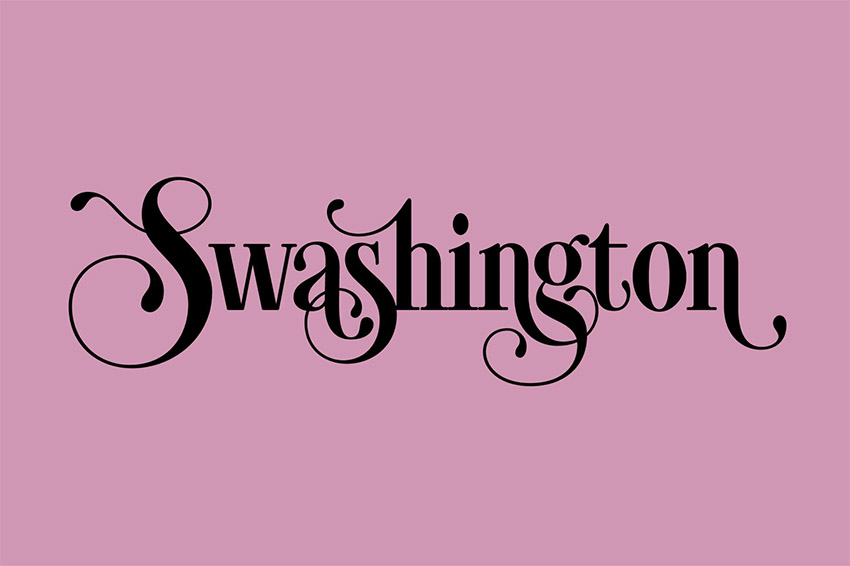
2. Swashington

One of the fancy text fonts to be found at Envato Elements, Swashington is a serif font with a vintage feel. Featuring a terrific collection of swash and ligature variants, Swashington is a great choice when you want to create eye-catching text with a large amount of style and flair.

3. Sheiral Script

Looking for a fancy script font? You can’t do better than the Sheiral Script, with its beautiful fluid strokes that resemble handwriting with a flourish. A fancy script font you can’t do without. 

4. Vallely

This Art Deco influenced font can be used as a fancy tattoo font as well as for labels, titles, or anytime you want your text to stand out. This font is packed with over 350 glyphs and alternate characters, giving you a ton of letter combinations to experiment with.

5. Outistyle

This fancy cursive font comes in two styles: a script and a very textured brush effect. This attractive combination makes for a lighthearted and fun font.  Another great feature of the font is that it comes with swashes and accents that you can mix and match to make your own unique designs. Use it on T-shirts, posters, product packaging, and more. 

6. Hagen

Inspired by avant garde fashion, this fancy text font comes in two weights: heavy and regular. With its distinct flourishes and touches, this serif font is a big favourite for posters, T-shirts, and signs of various sorts. 

7. Ilana Bloom

If you’re looking for fancy calligraphy fonts, you’ll love Ilana Bloom. This modern and feminine font is a hand-lettered typeface that combines script, swashes, and swirls with a clean style. The fancy calligraphy font is perfect for use on wedding cards and other event cards, logos, etc.  

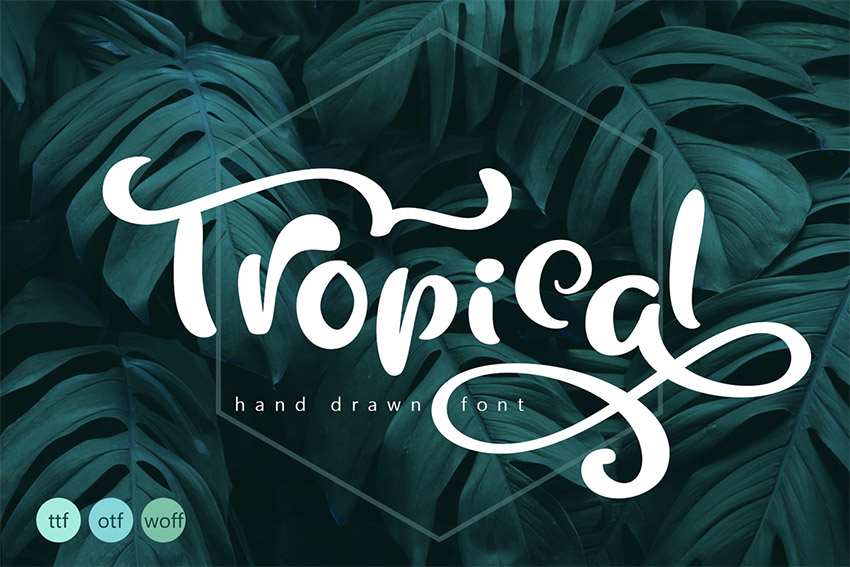
8. Tropical Summer Font

Tropical Summer Font is a fancy calligraphy font that offers alternative upper and lowercase characters with gorgeous flourishes that allow you to create your own unique text for important projects. Use the font to create logos, text for greeting cards, and other special projects. 

9. Funkies Bold Script Font

Funkies is a blast from the past—the 1970s past, that is. This fancy cursive font is just what you need if you want to create lettering on T-shirts, posters, book covers, packaging, etc. The cool fancy font offers many stylistic alternates, stylistic sets, swashes, and ligatures that will keep you experimenting for hours. 

10. Extraordinary

A fancy text font that will make your logos, titles, or signage stand out, Extraordinary is a hand-written script with a whole lot of style. It offers a nice selection of ligatures and alternates to keep things as extraordinary as the name promises. 

11. Moon Line Script

Looking for fancy tattoo fonts with a bit of a difference? Consider the delicate Moon Line Script, which will not only make great tattoos but will also create lovely text for branding, clothes, greeting cards, and much more. The font offers a gorgeous selection of ligatures and alternates, and if you’re looking for fancy number fonts as well, this one may appeal.

12. Morning Glory Font

Morning Glory Font

Our next font is another incredible design inspired by the Victorian era. The Morning Glory typeface is a clever take on the fashion, politics, and creative branding of the past. Use it on many cool projects from clothing merchandise to vintage posters and books! This one is another fancy numbers font for those looking for stand-out numbers. 

13. Pathways Font

Pathways Font

Sometimes, the path you need to take is the one covered in vintage decoration. The Pathways font is the perfect mix of retro design and lovely, handmade script letters. Featuring three different styles, including circular strokes, rectangular strokes, and a rough version, this font is clean and easy to use. 

14. Burnts Maker Font

Burnts Maker Font

Creating messy letters is a lot harder than it looks. That’s why the Burnts Maker font is essential for any new designer. Tag your favorite T-shirts, album covers, and festival posters with fast, hand-drawn letters. Embrace the cool style of street culture with this fancy script font.

15. The Crow – Vintage Style Font

The Crow - Vintage Style Font

Designers are often inspired by famous stories to create their elaborate fonts. And this fancy tattoo font is no different. It draws inspiration from the eclectic vintage typefaces of the past for a full pack of eight creative fonts with fascinating details. Use it on books, posters, and more!

16. Jack Reacher Typeface

Jack Reacher Typeface

Halloween comes around every year, so get prepared early and load up on fancy letter fonts! This awesome Jack Reacher typeface, for instance, is the embodiment of Halloween itself. It features tall, bold letters with sharp serif details for more flair and style. Add it to your Halloween posters for more magic!

17. MacLaurent Font

MacLaurent Font

Do you love vintage design? Many fancy letter fonts incorporate amazing handwritten techniques just like the designs from long ago. Now you can make a well-crafted logo or headline with the fascinating MacLaurent font. A set of display typefaces with upper and lowercase letters, this download also features a helpful web font. 

18. Spacethink Typeface

Spacethink Typeface

Embody the rocker spirit with the awesome Spacethink typeface. Featuring five style options to diversify your projects, this typeface pack is edgy and unique. Get the latest update to enjoy fantastic typefaces for logos, concert gigs, and album covers. 

19. Lucy Glitch Typeface

Lucy Glitch Typeface

Glitch effects are usually applied to photos, but now you can use them for font types too! The awesome Lucy Glitch typeface pulls off the clever look of digital failure for an eye-catching new fancy font. Check out the full set of letters, numbers, and symbols in this set to pair with your next project.

20. Exline

Exline

This super cool fancy font is exactly what you need to make your logos, posters, or T-shirts stand out. The geometric decorative font offers a stand-out collection of numbers for those interested in fancy number fonts. 

More Cool Fancy Fonts From GraphicRiver

If you’re just interested in purchasing one font instead of experimenting with several, then Envato Market may be a better choice for you. You can download a single template for one-time use for a low fee. Let’s take a look at some of the top-quality offerings there. 

21. Geeko Font

Geeko Font

If you love the tech world as much as the next creative, then you’re sure to love the Geeko font. A creative, tech-inspired typeface, this fancy font is influenced by motherboards and supremely minimalist design. Create a compelling logo today with just one extraordinary font!

22. Quality Decorative Font Duo

Quality Decorative Font Duo

Quality is an extraordinary fancy script font like no other. It features a simple script design with inspiring floral decorations for the avid nature enthusiast. Launch your natural brand with a stunning font style that is sleek and sophisticated. Try it out on logos, packaging, and even creative headlines!

23. Soft Vintage Scandinavian Decor Font

Soft Vintage Scandinavian Decor Font

Cultures from all over the world inspire design every day. This soft vintage fancy font is crafted after common Scandinavian patterns and themes. Enjoy your creative process even more by combining this font with beautiful craft projects or vintage-inspired design. Included is one regular font as well as a bold type, and they come in various formats. 

24. Caernarfon Font

Caernarfon Font

The Victorian era was the age of elaborate letters and fascinating decorations. Draw inspiration from this creative era with the impeccable Caernarfon font. Created to emulate the popular styles of vintage branding, this type features a four-font system you can layer for even more impact.

25. Karmela Script

Karmela Script

Looking for fancy tattoo fonts? Check out the stunning Karmela script. Also a great font type for magazines, logos, and more, this font is inspired by the incredible handmade brush lettering of the 50s and 60s. Pair it with your favorite vintage projects for the perfect combo!

26. Auro Font

Auro Font

Explore the futuristic flair of space design with the stunning Auro font. This font features a unique design inspired by the galaxy and various constellations. It gives off a cool, futuristic vibe that is great for space posters, alien themes, and everything in between. Try it out with a bold, glowing effect like the example below!

27. Geomath Font

Geomath Font

Geometric shapes have always been a part of impressive design. That’s why many designers use them in their typefaces, like the Geomath font. This pack features three extraordinary fonts with 175 ornaments to decorate your designs even further. Check it out!

28. Clobot Typeface

Clobot Typeface

Toughen up your brand with mighty, strong letters. The Clobot font is stylish but firm. It features a versatile set of alternative letters and ligature glyphs to allow you to explore many font options. Best suited to posters and T-shirt designs, this typeface is one you’ll definitely want in your arsenal!

29. Hello Stranger Typeface

Hello Stranger Typeface

Hello stranger. Is design on your mind today? Match the perfect fancy cursive font to your typography with this lovely, handwritten typeface. Featuring a natural, handmade design with casually written letters, this font supports many languages and formats. Give it a shot!

30. Space DF

Space DF

2018 love for space design has followed us all the way through 2019 to 2020, and no wonder. Many designers are drawn to space-themed fonts like this futuristic, fancy monogram font. Just plug in your name or favorite phrase to test-drive this font in seconds. Check it out!

31. Brewski Brewery Vintage Typeface

Brewski Brewery Vintage Typeface

Take
your vintage designs to a whole new level with the Brewski Brewery
typeface. Inspired by the relaxed vibes of vintage brewery packaging,
this typeface features strong, hand-drawn letters that are sure to make
an impact. Enjoy a full pack of letters, numbers, and symbols in this
set!

More Font Inspiration

Can’t get enough of  fancy fonts? 

Select Your Favourite Fancy Font Today 

This is just a small sample of the terrific fancy text fonts available at Envato Elements and Envato Market. So if you haven’t found just the right one for you here, head on over to both sites and have a browse to find one that suits your needs or check out these other collections for more inspiration:

31 Best Fancy Fonts With Decorative Alphabet Letters (2020)

Post pobrano z: 31 Best Fancy Fonts With Decorative Alphabet Letters (2020)

Need fancy text fonts? Check out this inspiring list of premium resources!

Bouchers X1
Use an awesome fancy letter font like this one from Envato Elements in your next project

How do you stand out from the crowd in design? Though many are drawn to the popular minimalist trends, other designers are learning the incredible benefits of bucking trends and going for fancy letter fonts.

Today, we bring you a phenomenal collection of 30 premium fonts to upgrade your work. Transform your designs with stylish, fancy text fonts that will leave your audience in wonder.

Add beautiful characters to your projects with cool letters, swashes, and decorations. No matter your personal style preferences, these premium fonts will freshen up your work for impressive results.

Check out this collection of the best fancy letter fonts from Envato Elements and Envato Market.

Unlimited Fancy Text Fonts From Envato Elements

Envato Elements is the perfect place to find a wide range of fancy fonts. And the great news is that you can download as many fonts as you want for one low price. Let’s take a look at some of the cool fancy fonts you can find at Envato Elements. 

1. MOJITA

This cool fancy font is not for the faint-hearted. It’s for those who know what they want and aren’t afraid to stand out from the crowd. This geometric display typeface features a beautifully balanced intricate design that you won’t find anywhere else. What’s more, if you’re looking for fancy numbers fonts, Mojita’s got you covered. Its numbers are as eye-catching and stylish as its letters. 

2. Swashington

One of the fancy text fonts to be found at Envato Elements, Swashington is a serif font with a vintage feel. Featuring a terrific collection of swash and ligature variants, Swashington is a great choice when you want to create eye-catching text with a large amount of style and flair.

3. Sheiral Script

Looking for a fancy script font? You can’t do better than the Sheiral Script, with its beautiful fluid strokes that resemble handwriting with a flourish. A fancy script font you can’t do without. 

4. Vallely

This Art Deco influenced font can be used as a fancy tattoo font as well as for labels, titles, or anytime you want your text to stand out. This font is packed with over 350 glyphs and alternate characters, giving you a ton of letter combinations to experiment with.

5. Outistyle

This fancy cursive font comes in two styles: a script and a very textured brush effect. This attractive combination makes for a lighthearted and fun font.  Another great feature of the font is that it comes with swashes and accents that you can mix and match to make your own unique designs. Use it on T-shirts, posters, product packaging, and more. 

6. Hagen

Inspired by avant garde fashion, this fancy text font comes in two weights: heavy and regular. With its distinct flourishes and touches, this serif font is a big favourite for posters, T-shirts, and signs of various sorts. 

7. Ilana Bloom

If you’re looking for fancy calligraphy fonts, you’ll love Ilana Bloom. This modern and feminine font is a hand-lettered typeface that combines script, swashes, and swirls with a clean style. The fancy calligraphy font is perfect for use on wedding cards and other event cards, logos, etc.  

8. Tropical Summer Font

Tropical Summer Font is a fancy calligraphy font that offers alternative upper and lowercase characters with gorgeous flourishes that allow you to create your own unique text for important projects. Use the font to create logos, text for greeting cards, and other special projects. 

9. Funkies Bold Script Font

Funkies is a blast from the past—the 1970s past, that is. This fancy cursive font is just what you need if you want to create lettering on T-shirts, posters, book covers, packaging, etc. The cool fancy font offers many stylistic alternates, stylistic sets, swashes, and ligatures that will keep you experimenting for hours. 

10. Extraordinary

A fancy text font that will make your logos, titles, or signage stand out, Extraordinary is a hand-written script with a whole lot of style. It offers a nice selection of ligatures and alternates to keep things as extraordinary as the name promises. 

11. Moon Line Script

Looking for fancy tattoo fonts with a bit of a difference? Consider the delicate Moon Line Script, which will not only make great tattoos but will also create lovely text for branding, clothes, greeting cards, and much more. The font offers a gorgeous selection of ligatures and alternates, and if you’re looking for fancy number fonts as well, this one may appeal.

12. Morning Glory Font

Morning Glory Font

Our next font is another incredible design inspired by the Victorian era. The Morning Glory typeface is a clever take on the fashion, politics, and creative branding of the past. Use it on many cool projects from clothing merchandise to vintage posters and books! This one is another fancy numbers font for those looking for stand-out numbers. 

13. Pathways Font

Pathways Font

Sometimes, the path you need to take is the one covered in vintage decoration. The Pathways font is the perfect mix of retro design and lovely, handmade script letters. Featuring three different styles, including circular strokes, rectangular strokes, and a rough version, this font is clean and easy to use. 

14. Burnts Maker Font

Burnts Maker Font

Creating messy letters is a lot harder than it looks. That’s why the Burnts Maker font is essential for any new designer. Tag your favorite T-shirts, album covers, and festival posters with fast, hand-drawn letters. Embrace the cool style of street culture with this fancy script font.

15. The Crow – Vintage Style Font

The Crow - Vintage Style Font

Designers are often inspired by famous stories to create their elaborate fonts. And this fancy tattoo font is no different. It draws inspiration from the eclectic vintage typefaces of the past for a full pack of eight creative fonts with fascinating details. Use it on books, posters, and more!

16. Jack Reacher Typeface

Jack Reacher Typeface

Halloween comes around every year, so get prepared early and load up on fancy letter fonts! This awesome Jack Reacher typeface, for instance, is the embodiment of Halloween itself. It features tall, bold letters with sharp serif details for more flair and style. Add it to your Halloween posters for more magic!

17. MacLaurent Font

MacLaurent Font

Do you love vintage design? Many fancy letter fonts incorporate amazing handwritten techniques just like the designs from long ago. Now you can make a well-crafted logo or headline with the fascinating MacLaurent font. A set of display typefaces with upper and lowercase letters, this download also features a helpful web font. 

18. Spacethink Typeface

Spacethink Typeface

Embody the rocker spirit with the awesome Spacethink typeface. Featuring five style options to diversify your projects, this typeface pack is edgy and unique. Get the latest update to enjoy fantastic typefaces for logos, concert gigs, and album covers. 

19. Lucy Glitch Typeface

Lucy Glitch Typeface

Glitch effects are usually applied to photos, but now you can use them for font types too! The awesome Lucy Glitch typeface pulls off the clever look of digital failure for an eye-catching new fancy font. Check out the full set of letters, numbers, and symbols in this set to pair with your next project.

20. Exline

Exline

This super cool fancy font is exactly what you need to make your logos, posters, or T-shirts stand out. The geometric decorative font offers a stand-out collection of numbers for those interested in fancy number fonts. 

More Cool Fancy Fonts From GraphicRiver

If you’re just interested in purchasing one font instead of experimenting with several, then Envato Market may be a better choice for you. You can download a single template for one-time use for a low fee. Let’s take a look at some of the top-quality offerings there. 

21. Geeko Font

Geeko Font

If you love the tech world as much as the next creative, then you’re sure to love the Geeko font. A creative, tech-inspired typeface, this fancy font is influenced by motherboards and supremely minimalist design. Create a compelling logo today with just one extraordinary font!

22. Quality Decorative Font Duo

Quality Decorative Font Duo

Quality is an extraordinary fancy script font like no other. It features a simple script design with inspiring floral decorations for the avid nature enthusiast. Launch your natural brand with a stunning font style that is sleek and sophisticated. Try it out on logos, packaging, and even creative headlines!

23. Soft Vintage Scandinavian Decor Font

Soft Vintage Scandinavian Decor Font

Cultures from all over the world inspire design every day. This soft vintage fancy font is crafted after common Scandinavian patterns and themes. Enjoy your creative process even more by combining this font with beautiful craft projects or vintage-inspired design. Included is one regular font as well as a bold type, and they come in various formats. 

24. Caernarfon Font

Caernarfon Font

The Victorian era was the age of elaborate letters and fascinating decorations. Draw inspiration from this creative era with the impeccable Caernarfon font. Created to emulate the popular styles of vintage branding, this type features a four-font system you can layer for even more impact.

25. Karmela Script

Karmela Script

Looking for fancy tattoo fonts? Check out the stunning Karmela script. Also a great font type for magazines, logos, and more, this font is inspired by the incredible handmade brush lettering of the 50s and 60s. Pair it with your favorite vintage projects for the perfect combo!

26. Auro Font

Auro Font

Explore the futuristic flair of space design with the stunning Auro font. This font features a unique design inspired by the galaxy and various constellations. It gives off a cool, futuristic vibe that is great for space posters, alien themes, and everything in between. Try it out with a bold, glowing effect like the example below!

27. Geomath Font

Geomath Font

Geometric shapes have always been a part of impressive design. That’s why many designers use them in their typefaces, like the Geomath font. This pack features three extraordinary fonts with 175 ornaments to decorate your designs even further. Check it out!

28. Clobot Typeface

Clobot Typeface

Toughen up your brand with mighty, strong letters. The Clobot font is stylish but firm. It features a versatile set of alternative letters and ligature glyphs to allow you to explore many font options. Best suited to posters and T-shirt designs, this typeface is one you’ll definitely want in your arsenal!

29. Hello Stranger Typeface

Hello Stranger Typeface

Hello stranger. Is design on your mind today? Match the perfect fancy cursive font to your typography with this lovely, handwritten typeface. Featuring a natural, handmade design with casually written letters, this font supports many languages and formats. Give it a shot!

30. Space DF

Space DF

2018 love for space design has followed us all the way through 2019 to 2020, and no wonder. Many designers are drawn to space-themed fonts like this futuristic, fancy monogram font. Just plug in your name or favorite phrase to test-drive this font in seconds. Check it out!

31. Brewski Brewery Vintage Typeface

Brewski Brewery Vintage Typeface

Take
your vintage designs to a whole new level with the Brewski Brewery
typeface. Inspired by the relaxed vibes of vintage brewery packaging,
this typeface features strong, hand-drawn letters that are sure to make
an impact. Enjoy a full pack of letters, numbers, and symbols in this
set!

More Font Inspiration

Can’t get enough of  fancy fonts? 

Select Your Favourite Fancy Font Today 

This is just a small sample of the terrific fancy text fonts available at Envato Elements and Envato Market. So if you haven’t found just the right one for you here, head on over to both sites and have a browse to find one that suits your needs or check out these other collections for more inspiration:

31 Best Fancy Fonts With Decorative Alphabet Letters (2020)

Post pobrano z: 31 Best Fancy Fonts With Decorative Alphabet Letters (2020)

Need fancy text fonts? Check out this inspiring list of premium resources!

Bouchers X1
Use an awesome fancy letter font like this one from Envato Elements in your next project

How do you stand out from the crowd in design? Though many are drawn to the popular minimalist trends, other designers are learning the incredible benefits of bucking trends and going for fancy letter fonts.

Today, we bring you a phenomenal collection of 30 premium fonts to upgrade your work. Transform your designs with stylish, fancy text fonts that will leave your audience in wonder.

Add beautiful characters to your projects with cool letters, swashes, and decorations. No matter your personal style preferences, these premium fonts will freshen up your work for impressive results.

Check out this collection of the best fancy letter fonts from Envato Elements and Envato Market.

Unlimited Fancy Text Fonts From Envato Elements

Envato Elements is the perfect place to find a wide range of fancy fonts. And the great news is that you can download as many fonts as you want for one low price. Let’s take a look at some of the cool fancy fonts you can find at Envato Elements. 

1. MOJITA

This cool fancy font is not for the faint-hearted. It’s for those who know what they want and aren’t afraid to stand out from the crowd. This geometric display typeface features a beautifully balanced intricate design that you won’t find anywhere else. What’s more, if you’re looking for fancy numbers fonts, Mojita’s got you covered. Its numbers are as eye-catching and stylish as its letters. 

2. Swashington

One of the fancy text fonts to be found at Envato Elements, Swashington is a serif font with a vintage feel. Featuring a terrific collection of swash and ligature variants, Swashington is a great choice when you want to create eye-catching text with a large amount of style and flair.

3. Sheiral Script

Looking for a fancy script font? You can’t do better than the Sheiral Script, with its beautiful fluid strokes that resemble handwriting with a flourish. A fancy script font you can’t do without. 

4. Vallely

This Art Deco influenced font can be used as a fancy tattoo font as well as for labels, titles, or anytime you want your text to stand out. This font is packed with over 350 glyphs and alternate characters, giving you a ton of letter combinations to experiment with.

5. Outistyle

This fancy cursive font comes in two styles: a script and a very textured brush effect. This attractive combination makes for a lighthearted and fun font.  Another great feature of the font is that it comes with swashes and accents that you can mix and match to make your own unique designs. Use it on T-shirts, posters, product packaging, and more. 

6. Hagen

Inspired by avant garde fashion, this fancy text font comes in two weights: heavy and regular. With its distinct flourishes and touches, this serif font is a big favourite for posters, T-shirts, and signs of various sorts. 

7. Ilana Bloom

If you’re looking for fancy calligraphy fonts, you’ll love Ilana Bloom. This modern and feminine font is a hand-lettered typeface that combines script, swashes, and swirls with a clean style. The fancy calligraphy font is perfect for use on wedding cards and other event cards, logos, etc.  

8. Tropical Summer Font

Tropical Summer Font is a fancy calligraphy font that offers alternative upper and lowercase characters with gorgeous flourishes that allow you to create your own unique text for important projects. Use the font to create logos, text for greeting cards, and other special projects. 

9. Funkies Bold Script Font

Funkies is a blast from the past—the 1970s past, that is. This fancy cursive font is just what you need if you want to create lettering on T-shirts, posters, book covers, packaging, etc. The cool fancy font offers many stylistic alternates, stylistic sets, swashes, and ligatures that will keep you experimenting for hours. 

10. Extraordinary

A fancy text font that will make your logos, titles, or signage stand out, Extraordinary is a hand-written script with a whole lot of style. It offers a nice selection of ligatures and alternates to keep things as extraordinary as the name promises. 

11. Moon Line Script

Looking for fancy tattoo fonts with a bit of a difference? Consider the delicate Moon Line Script, which will not only make great tattoos but will also create lovely text for branding, clothes, greeting cards, and much more. The font offers a gorgeous selection of ligatures and alternates, and if you’re looking for fancy number fonts as well, this one may appeal.

12. Morning Glory Font

Morning Glory Font

Our next font is another incredible design inspired by the Victorian era. The Morning Glory typeface is a clever take on the fashion, politics, and creative branding of the past. Use it on many cool projects from clothing merchandise to vintage posters and books! This one is another fancy numbers font for those looking for stand-out numbers. 

13. Pathways Font

Pathways Font

Sometimes, the path you need to take is the one covered in vintage decoration. The Pathways font is the perfect mix of retro design and lovely, handmade script letters. Featuring three different styles, including circular strokes, rectangular strokes, and a rough version, this font is clean and easy to use. 

14. Burnts Maker Font

Burnts Maker Font

Creating messy letters is a lot harder than it looks. That’s why the Burnts Maker font is essential for any new designer. Tag your favorite T-shirts, album covers, and festival posters with fast, hand-drawn letters. Embrace the cool style of street culture with this fancy script font.

15. The Crow – Vintage Style Font

The Crow - Vintage Style Font

Designers are often inspired by famous stories to create their elaborate fonts. And this fancy tattoo font is no different. It draws inspiration from the eclectic vintage typefaces of the past for a full pack of eight creative fonts with fascinating details. Use it on books, posters, and more!

16. Jack Reacher Typeface

Jack Reacher Typeface

Halloween comes around every year, so get prepared early and load up on fancy letter fonts! This awesome Jack Reacher typeface, for instance, is the embodiment of Halloween itself. It features tall, bold letters with sharp serif details for more flair and style. Add it to your Halloween posters for more magic!

17. MacLaurent Font

MacLaurent Font

Do you love vintage design? Many fancy letter fonts incorporate amazing handwritten techniques just like the designs from long ago. Now you can make a well-crafted logo or headline with the fascinating MacLaurent font. A set of display typefaces with upper and lowercase letters, this download also features a helpful web font. 

18. Spacethink Typeface

Spacethink Typeface

Embody the rocker spirit with the awesome Spacethink typeface. Featuring five style options to diversify your projects, this typeface pack is edgy and unique. Get the latest update to enjoy fantastic typefaces for logos, concert gigs, and album covers. 

19. Lucy Glitch Typeface

Lucy Glitch Typeface

Glitch effects are usually applied to photos, but now you can use them for font types too! The awesome Lucy Glitch typeface pulls off the clever look of digital failure for an eye-catching new fancy font. Check out the full set of letters, numbers, and symbols in this set to pair with your next project.

20. Exline

Exline

This super cool fancy font is exactly what you need to make your logos, posters, or T-shirts stand out. The geometric decorative font offers a stand-out collection of numbers for those interested in fancy number fonts. 

More Cool Fancy Fonts From GraphicRiver

If you’re just interested in purchasing one font instead of experimenting with several, then Envato Market may be a better choice for you. You can download a single template for one-time use for a low fee. Let’s take a look at some of the top-quality offerings there. 

21. Geeko Font

Geeko Font

If you love the tech world as much as the next creative, then you’re sure to love the Geeko font. A creative, tech-inspired typeface, this fancy font is influenced by motherboards and supremely minimalist design. Create a compelling logo today with just one extraordinary font!

22. Quality Decorative Font Duo

Quality Decorative Font Duo

Quality is an extraordinary fancy script font like no other. It features a simple script design with inspiring floral decorations for the avid nature enthusiast. Launch your natural brand with a stunning font style that is sleek and sophisticated. Try it out on logos, packaging, and even creative headlines!

23. Soft Vintage Scandinavian Decor Font

Soft Vintage Scandinavian Decor Font

Cultures from all over the world inspire design every day. This soft vintage fancy font is crafted after common Scandinavian patterns and themes. Enjoy your creative process even more by combining this font with beautiful craft projects or vintage-inspired design. Included is one regular font as well as a bold type, and they come in various formats. 

24. Caernarfon Font

Caernarfon Font

The Victorian era was the age of elaborate letters and fascinating decorations. Draw inspiration from this creative era with the impeccable Caernarfon font. Created to emulate the popular styles of vintage branding, this type features a four-font system you can layer for even more impact.

25. Karmela Script

Karmela Script

Looking for fancy tattoo fonts? Check out the stunning Karmela script. Also a great font type for magazines, logos, and more, this font is inspired by the incredible handmade brush lettering of the 50s and 60s. Pair it with your favorite vintage projects for the perfect combo!

26. Auro Font

Auro Font

Explore the futuristic flair of space design with the stunning Auro font. This font features a unique design inspired by the galaxy and various constellations. It gives off a cool, futuristic vibe that is great for space posters, alien themes, and everything in between. Try it out with a bold, glowing effect like the example below!

27. Geomath Font

Geomath Font

Geometric shapes have always been a part of impressive design. That’s why many designers use them in their typefaces, like the Geomath font. This pack features three extraordinary fonts with 175 ornaments to decorate your designs even further. Check it out!

28. Clobot Typeface

Clobot Typeface

Toughen up your brand with mighty, strong letters. The Clobot font is stylish but firm. It features a versatile set of alternative letters and ligature glyphs to allow you to explore many font options. Best suited to posters and T-shirt designs, this typeface is one you’ll definitely want in your arsenal!

29. Hello Stranger Typeface

Hello Stranger Typeface

Hello stranger. Is design on your mind today? Match the perfect fancy cursive font to your typography with this lovely, handwritten typeface. Featuring a natural, handmade design with casually written letters, this font supports many languages and formats. Give it a shot!

30. Space DF

Space DF

2018 love for space design has followed us all the way through 2019 to 2020, and no wonder. Many designers are drawn to space-themed fonts like this futuristic, fancy monogram font. Just plug in your name or favorite phrase to test-drive this font in seconds. Check it out!

31. Brewski Brewery Vintage Typeface

Brewski Brewery Vintage Typeface

Take
your vintage designs to a whole new level with the Brewski Brewery
typeface. Inspired by the relaxed vibes of vintage brewery packaging,
this typeface features strong, hand-drawn letters that are sure to make
an impact. Enjoy a full pack of letters, numbers, and symbols in this
set!

More Font Inspiration

Can’t get enough of  fancy fonts? 

Select Your Favourite Fancy Font Today 

This is just a small sample of the terrific fancy text fonts available at Envato Elements and Envato Market. So if you haven’t found just the right one for you here, head on over to both sites and have a browse to find one that suits your needs or check out these other collections for more inspiration:

31 Best Fancy Fonts With Decorative Alphabet Letters (2020)

Post pobrano z: 31 Best Fancy Fonts With Decorative Alphabet Letters (2020)

Need fancy text fonts? Check out this inspiring list of premium resources!

Bouchers X1
Use an awesome fancy letter font like this one from Envato Elements in your next project

How do you stand out from the crowd in design? Though many are drawn to the popular minimalist trends, other designers are learning the incredible benefits of bucking trends and going for fancy letter fonts.

Today, we bring you a phenomenal collection of 30 premium fonts to upgrade your work. Transform your designs with stylish, fancy text fonts that will leave your audience in wonder.

Add beautiful characters to your projects with cool letters, swashes, and decorations. No matter your personal style preferences, these premium fonts will freshen up your work for impressive results.

Check out this collection of the best fancy letter fonts from Envato Elements and Envato Market.

Unlimited Fancy Text Fonts From Envato Elements

Envato Elements is the perfect place to find a wide range of fancy fonts. And the great news is that you can download as many fonts as you want for one low price. Let’s take a look at some of the cool fancy fonts you can find at Envato Elements. 

1. MOJITA

This cool fancy font is not for the faint-hearted. It’s for those who know what they want and aren’t afraid to stand out from the crowd. This geometric display typeface features a beautifully balanced intricate design that you won’t find anywhere else. What’s more, if you’re looking for fancy numbers fonts, Mojita’s got you covered. Its numbers are as eye-catching and stylish as its letters. 

2. Swashington

One of the fancy text fonts to be found at Envato Elements, Swashington is a serif font with a vintage feel. Featuring a terrific collection of swash and ligature variants, Swashington is a great choice when you want to create eye-catching text with a large amount of style and flair.

3. Sheiral Script

Looking for a fancy script font? You can’t do better than the Sheiral Script, with its beautiful fluid strokes that resemble handwriting with a flourish. A fancy script font you can’t do without. 

4. Vallely

This Art Deco influenced font can be used as a fancy tattoo font as well as for labels, titles, or anytime you want your text to stand out. This font is packed with over 350 glyphs and alternate characters, giving you a ton of letter combinations to experiment with.

5. Outistyle

This fancy cursive font comes in two styles: a script and a very textured brush effect. This attractive combination makes for a lighthearted and fun font.  Another great feature of the font is that it comes with swashes and accents that you can mix and match to make your own unique designs. Use it on T-shirts, posters, product packaging, and more. 

6. Hagen

Inspired by avant garde fashion, this fancy text font comes in two weights: heavy and regular. With its distinct flourishes and touches, this serif font is a big favourite for posters, T-shirts, and signs of various sorts. 

7. Ilana Bloom

If you’re looking for fancy calligraphy fonts, you’ll love Ilana Bloom. This modern and feminine font is a hand-lettered typeface that combines script, swashes, and swirls with a clean style. The fancy calligraphy font is perfect for use on wedding cards and other event cards, logos, etc.  

8. Tropical Summer Font

Tropical Summer Font is a fancy calligraphy font that offers alternative upper and lowercase characters with gorgeous flourishes that allow you to create your own unique text for important projects. Use the font to create logos, text for greeting cards, and other special projects. 

9. Funkies Bold Script Font

Funkies is a blast from the past—the 1970s past, that is. This fancy cursive font is just what you need if you want to create lettering on T-shirts, posters, book covers, packaging, etc. The cool fancy font offers many stylistic alternates, stylistic sets, swashes, and ligatures that will keep you experimenting for hours. 

10. Extraordinary

A fancy text font that will make your logos, titles, or signage stand out, Extraordinary is a hand-written script with a whole lot of style. It offers a nice selection of ligatures and alternates to keep things as extraordinary as the name promises. 

11. Moon Line Script

Looking for fancy tattoo fonts with a bit of a difference? Consider the delicate Moon Line Script, which will not only make great tattoos but will also create lovely text for branding, clothes, greeting cards, and much more. The font offers a gorgeous selection of ligatures and alternates, and if you’re looking for fancy number fonts as well, this one may appeal.

12. Morning Glory Font

Morning Glory Font

Our next font is another incredible design inspired by the Victorian era. The Morning Glory typeface is a clever take on the fashion, politics, and creative branding of the past. Use it on many cool projects from clothing merchandise to vintage posters and books! This one is another fancy numbers font for those looking for stand-out numbers. 

13. Pathways Font

Pathways Font

Sometimes, the path you need to take is the one covered in vintage decoration. The Pathways font is the perfect mix of retro design and lovely, handmade script letters. Featuring three different styles, including circular strokes, rectangular strokes, and a rough version, this font is clean and easy to use. 

14. Burnts Maker Font

Burnts Maker Font

Creating messy letters is a lot harder than it looks. That’s why the Burnts Maker font is essential for any new designer. Tag your favorite T-shirts, album covers, and festival posters with fast, hand-drawn letters. Embrace the cool style of street culture with this fancy script font.

15. The Crow – Vintage Style Font

The Crow - Vintage Style Font

Designers are often inspired by famous stories to create their elaborate fonts. And this fancy tattoo font is no different. It draws inspiration from the eclectic vintage typefaces of the past for a full pack of eight creative fonts with fascinating details. Use it on books, posters, and more!

16. Jack Reacher Typeface

Jack Reacher Typeface

Halloween comes around every year, so get prepared early and load up on fancy letter fonts! This awesome Jack Reacher typeface, for instance, is the embodiment of Halloween itself. It features tall, bold letters with sharp serif details for more flair and style. Add it to your Halloween posters for more magic!

17. MacLaurent Font

MacLaurent Font

Do you love vintage design? Many fancy letter fonts incorporate amazing handwritten techniques just like the designs from long ago. Now you can make a well-crafted logo or headline with the fascinating MacLaurent font. A set of display typefaces with upper and lowercase letters, this download also features a helpful web font. 

18. Spacethink Typeface

Spacethink Typeface

Embody the rocker spirit with the awesome Spacethink typeface. Featuring five style options to diversify your projects, this typeface pack is edgy and unique. Get the latest update to enjoy fantastic typefaces for logos, concert gigs, and album covers. 

19. Lucy Glitch Typeface

Lucy Glitch Typeface

Glitch effects are usually applied to photos, but now you can use them for font types too! The awesome Lucy Glitch typeface pulls off the clever look of digital failure for an eye-catching new fancy font. Check out the full set of letters, numbers, and symbols in this set to pair with your next project.

20. Exline

Exline

This super cool fancy font is exactly what you need to make your logos, posters, or T-shirts stand out. The geometric decorative font offers a stand-out collection of numbers for those interested in fancy number fonts. 

More Cool Fancy Fonts From GraphicRiver

If you’re just interested in purchasing one font instead of experimenting with several, then Envato Market may be a better choice for you. You can download a single template for one-time use for a low fee. Let’s take a look at some of the top-quality offerings there. 

21. Geeko Font

Geeko Font

If you love the tech world as much as the next creative, then you’re sure to love the Geeko font. A creative, tech-inspired typeface, this fancy font is influenced by motherboards and supremely minimalist design. Create a compelling logo today with just one extraordinary font!

22. Quality Decorative Font Duo

Quality Decorative Font Duo

Quality is an extraordinary fancy script font like no other. It features a simple script design with inspiring floral decorations for the avid nature enthusiast. Launch your natural brand with a stunning font style that is sleek and sophisticated. Try it out on logos, packaging, and even creative headlines!

23. Soft Vintage Scandinavian Decor Font

Soft Vintage Scandinavian Decor Font

Cultures from all over the world inspire design every day. This soft vintage fancy font is crafted after common Scandinavian patterns and themes. Enjoy your creative process even more by combining this font with beautiful craft projects or vintage-inspired design. Included is one regular font as well as a bold type, and they come in various formats. 

24. Caernarfon Font

Caernarfon Font

The Victorian era was the age of elaborate letters and fascinating decorations. Draw inspiration from this creative era with the impeccable Caernarfon font. Created to emulate the popular styles of vintage branding, this type features a four-font system you can layer for even more impact.

25. Karmela Script

Karmela Script

Looking for fancy tattoo fonts? Check out the stunning Karmela script. Also a great font type for magazines, logos, and more, this font is inspired by the incredible handmade brush lettering of the 50s and 60s. Pair it with your favorite vintage projects for the perfect combo!

26. Auro Font

Auro Font

Explore the futuristic flair of space design with the stunning Auro font. This font features a unique design inspired by the galaxy and various constellations. It gives off a cool, futuristic vibe that is great for space posters, alien themes, and everything in between. Try it out with a bold, glowing effect like the example below!

27. Geomath Font

Geomath Font

Geometric shapes have always been a part of impressive design. That’s why many designers use them in their typefaces, like the Geomath font. This pack features three extraordinary fonts with 175 ornaments to decorate your designs even further. Check it out!

28. Clobot Typeface

Clobot Typeface

Toughen up your brand with mighty, strong letters. The Clobot font is stylish but firm. It features a versatile set of alternative letters and ligature glyphs to allow you to explore many font options. Best suited to posters and T-shirt designs, this typeface is one you’ll definitely want in your arsenal!

29. Hello Stranger Typeface

Hello Stranger Typeface

Hello stranger. Is design on your mind today? Match the perfect fancy cursive font to your typography with this lovely, handwritten typeface. Featuring a natural, handmade design with casually written letters, this font supports many languages and formats. Give it a shot!

30. Space DF

Space DF

2018 love for space design has followed us all the way through 2019 to 2020, and no wonder. Many designers are drawn to space-themed fonts like this futuristic, fancy monogram font. Just plug in your name or favorite phrase to test-drive this font in seconds. Check it out!

31. Brewski Brewery Vintage Typeface

Brewski Brewery Vintage Typeface

Take
your vintage designs to a whole new level with the Brewski Brewery
typeface. Inspired by the relaxed vibes of vintage brewery packaging,
this typeface features strong, hand-drawn letters that are sure to make
an impact. Enjoy a full pack of letters, numbers, and symbols in this
set!

More Font Inspiration

Can’t get enough of  fancy fonts? 

Select Your Favourite Fancy Font Today 

This is just a small sample of the terrific fancy text fonts available at Envato Elements and Envato Market. So if you haven’t found just the right one for you here, head on over to both sites and have a browse to find one that suits your needs or check out these other collections for more inspiration:

31 Best Fancy Fonts With Decorative Alphabet Letters (2020)

Post pobrano z: 31 Best Fancy Fonts With Decorative Alphabet Letters (2020)

Need fancy text fonts? Check out this inspiring list of premium resources!

Bouchers X1
Use an awesome fancy letter font like this one from Envato Elements in your next project

How do you stand out from the crowd in design? Though many are drawn to the popular minimalist trends, other designers are learning the incredible benefits of bucking trends and going for fancy letter fonts.

Today, we bring you a phenomenal collection of 30 premium fonts to upgrade your work. Transform your designs with stylish, fancy text fonts that will leave your audience in wonder.

Add beautiful characters to your projects with cool letters, swashes, and decorations. No matter your personal style preferences, these premium fonts will freshen up your work for impressive results.

Check out this collection of the best fancy letter fonts from Envato Elements and Envato Market.

Unlimited Fancy Text Fonts From Envato Elements

Envato Elements is the perfect place to find a wide range of fancy fonts. And the great news is that you can download as many fonts as you want for one low price. Let’s take a look at some of the cool fancy fonts you can find at Envato Elements. 

1. MOJITA

This cool fancy font is not for the faint-hearted. It’s for those who know what they want and aren’t afraid to stand out from the crowd. This geometric display typeface features a beautifully balanced intricate design that you won’t find anywhere else. What’s more, if you’re looking for fancy numbers fonts, Mojita’s got you covered. Its numbers are as eye-catching and stylish as its letters. 

2. Swashington

One of the fancy text fonts to be found at Envato Elements, Swashington is a serif font with a vintage feel. Featuring a terrific collection of swash and ligature variants, Swashington is a great choice when you want to create eye-catching text with a large amount of style and flair.

3. Sheiral Script

Looking for a fancy script font? You can’t do better than the Sheiral Script, with its beautiful fluid strokes that resemble handwriting with a flourish. A fancy script font you can’t do without. 

4. Vallely

This Art Deco influenced font can be used as a fancy tattoo font as well as for labels, titles, or anytime you want your text to stand out. This font is packed with over 350 glyphs and alternate characters, giving you a ton of letter combinations to experiment with.

5. Outistyle

This fancy cursive font comes in two styles: a script and a very textured brush effect. This attractive combination makes for a lighthearted and fun font.  Another great feature of the font is that it comes with swashes and accents that you can mix and match to make your own unique designs. Use it on T-shirts, posters, product packaging, and more. 

6. Hagen

Inspired by avant garde fashion, this fancy text font comes in two weights: heavy and regular. With its distinct flourishes and touches, this serif font is a big favourite for posters, T-shirts, and signs of various sorts. 

7. Ilana Bloom

If you’re looking for fancy calligraphy fonts, you’ll love Ilana Bloom. This modern and feminine font is a hand-lettered typeface that combines script, swashes, and swirls with a clean style. The fancy calligraphy font is perfect for use on wedding cards and other event cards, logos, etc.  

8. Tropical Summer Font

Tropical Summer Font is a fancy calligraphy font that offers alternative upper and lowercase characters with gorgeous flourishes that allow you to create your own unique text for important projects. Use the font to create logos, text for greeting cards, and other special projects. 

9. Funkies Bold Script Font

Funkies is a blast from the past—the 1970s past, that is. This fancy cursive font is just what you need if you want to create lettering on T-shirts, posters, book covers, packaging, etc. The cool fancy font offers many stylistic alternates, stylistic sets, swashes, and ligatures that will keep you experimenting for hours. 

10. Extraordinary

A fancy text font that will make your logos, titles, or signage stand out, Extraordinary is a hand-written script with a whole lot of style. It offers a nice selection of ligatures and alternates to keep things as extraordinary as the name promises. 

11. Moon Line Script

Looking for fancy tattoo fonts with a bit of a difference? Consider the delicate Moon Line Script, which will not only make great tattoos but will also create lovely text for branding, clothes, greeting cards, and much more. The font offers a gorgeous selection of ligatures and alternates, and if you’re looking for fancy number fonts as well, this one may appeal.

12. Morning Glory Font

Morning Glory Font

Our next font is another incredible design inspired by the Victorian era. The Morning Glory typeface is a clever take on the fashion, politics, and creative branding of the past. Use it on many cool projects from clothing merchandise to vintage posters and books! This one is another fancy numbers font for those looking for stand-out numbers. 

13. Pathways Font

Pathways Font

Sometimes, the path you need to take is the one covered in vintage decoration. The Pathways font is the perfect mix of retro design and lovely, handmade script letters. Featuring three different styles, including circular strokes, rectangular strokes, and a rough version, this font is clean and easy to use. 

14. Burnts Maker Font

Burnts Maker Font

Creating messy letters is a lot harder than it looks. That’s why the Burnts Maker font is essential for any new designer. Tag your favorite T-shirts, album covers, and festival posters with fast, hand-drawn letters. Embrace the cool style of street culture with this fancy script font.

15. The Crow – Vintage Style Font

The Crow - Vintage Style Font

Designers are often inspired by famous stories to create their elaborate fonts. And this fancy tattoo font is no different. It draws inspiration from the eclectic vintage typefaces of the past for a full pack of eight creative fonts with fascinating details. Use it on books, posters, and more!

16. Jack Reacher Typeface

Jack Reacher Typeface

Halloween comes around every year, so get prepared early and load up on fancy letter fonts! This awesome Jack Reacher typeface, for instance, is the embodiment of Halloween itself. It features tall, bold letters with sharp serif details for more flair and style. Add it to your Halloween posters for more magic!

17. MacLaurent Font

MacLaurent Font

Do you love vintage design? Many fancy letter fonts incorporate amazing handwritten techniques just like the designs from long ago. Now you can make a well-crafted logo or headline with the fascinating MacLaurent font. A set of display typefaces with upper and lowercase letters, this download also features a helpful web font. 

18. Spacethink Typeface

Spacethink Typeface

Embody the rocker spirit with the awesome Spacethink typeface. Featuring five style options to diversify your projects, this typeface pack is edgy and unique. Get the latest update to enjoy fantastic typefaces for logos, concert gigs, and album covers. 

19. Lucy Glitch Typeface

Lucy Glitch Typeface

Glitch effects are usually applied to photos, but now you can use them for font types too! The awesome Lucy Glitch typeface pulls off the clever look of digital failure for an eye-catching new fancy font. Check out the full set of letters, numbers, and symbols in this set to pair with your next project.

20. Exline

Exline

This super cool fancy font is exactly what you need to make your logos, posters, or T-shirts stand out. The geometric decorative font offers a stand-out collection of numbers for those interested in fancy number fonts. 

More Cool Fancy Fonts From GraphicRiver

If you’re just interested in purchasing one font instead of experimenting with several, then Envato Market may be a better choice for you. You can download a single template for one-time use for a low fee. Let’s take a look at some of the top-quality offerings there. 

21. Geeko Font

Geeko Font

If you love the tech world as much as the next creative, then you’re sure to love the Geeko font. A creative, tech-inspired typeface, this fancy font is influenced by motherboards and supremely minimalist design. Create a compelling logo today with just one extraordinary font!

22. Quality Decorative Font Duo

Quality Decorative Font Duo

Quality is an extraordinary fancy script font like no other. It features a simple script design with inspiring floral decorations for the avid nature enthusiast. Launch your natural brand with a stunning font style that is sleek and sophisticated. Try it out on logos, packaging, and even creative headlines!

23. Soft Vintage Scandinavian Decor Font

Soft Vintage Scandinavian Decor Font

Cultures from all over the world inspire design every day. This soft vintage fancy font is crafted after common Scandinavian patterns and themes. Enjoy your creative process even more by combining this font with beautiful craft projects or vintage-inspired design. Included is one regular font as well as a bold type, and they come in various formats. 

24. Caernarfon Font

Caernarfon Font

The Victorian era was the age of elaborate letters and fascinating decorations. Draw inspiration from this creative era with the impeccable Caernarfon font. Created to emulate the popular styles of vintage branding, this type features a four-font system you can layer for even more impact.

25. Karmela Script

Karmela Script

Looking for fancy tattoo fonts? Check out the stunning Karmela script. Also a great font type for magazines, logos, and more, this font is inspired by the incredible handmade brush lettering of the 50s and 60s. Pair it with your favorite vintage projects for the perfect combo!

26. Auro Font

Auro Font

Explore the futuristic flair of space design with the stunning Auro font. This font features a unique design inspired by the galaxy and various constellations. It gives off a cool, futuristic vibe that is great for space posters, alien themes, and everything in between. Try it out with a bold, glowing effect like the example below!

27. Geomath Font

Geomath Font

Geometric shapes have always been a part of impressive design. That’s why many designers use them in their typefaces, like the Geomath font. This pack features three extraordinary fonts with 175 ornaments to decorate your designs even further. Check it out!

28. Clobot Typeface

Clobot Typeface

Toughen up your brand with mighty, strong letters. The Clobot font is stylish but firm. It features a versatile set of alternative letters and ligature glyphs to allow you to explore many font options. Best suited to posters and T-shirt designs, this typeface is one you’ll definitely want in your arsenal!

29. Hello Stranger Typeface

Hello Stranger Typeface

Hello stranger. Is design on your mind today? Match the perfect fancy cursive font to your typography with this lovely, handwritten typeface. Featuring a natural, handmade design with casually written letters, this font supports many languages and formats. Give it a shot!

30. Space DF

Space DF

2018 love for space design has followed us all the way through 2019 to 2020, and no wonder. Many designers are drawn to space-themed fonts like this futuristic, fancy monogram font. Just plug in your name or favorite phrase to test-drive this font in seconds. Check it out!

31. Brewski Brewery Vintage Typeface

Brewski Brewery Vintage Typeface

Take
your vintage designs to a whole new level with the Brewski Brewery
typeface. Inspired by the relaxed vibes of vintage brewery packaging,
this typeface features strong, hand-drawn letters that are sure to make
an impact. Enjoy a full pack of letters, numbers, and symbols in this
set!

More Font Inspiration

Can’t get enough of  fancy fonts? 

Select Your Favourite Fancy Font Today 

This is just a small sample of the terrific fancy text fonts available at Envato Elements and Envato Market. So if you haven’t found just the right one for you here, head on over to both sites and have a browse to find one that suits your needs or check out these other collections for more inspiration:

31 Best Fancy Fonts With Decorative Alphabet Letters (2020)

Post pobrano z: 31 Best Fancy Fonts With Decorative Alphabet Letters (2020)

Need fancy text fonts? Check out this inspiring list of premium resources!

Bouchers X1
Use an awesome fancy letter font like this one from Envato Elements in your next project

How do you stand out from the crowd in design? Though many are drawn to the popular minimalist trends, other designers are learning the incredible benefits of bucking trends and going for fancy letter fonts.

Today, we bring you a phenomenal collection of 30 premium fonts to upgrade your work. Transform your designs with stylish, fancy text fonts that will leave your audience in wonder.

Add beautiful characters to your projects with cool letters, swashes, and decorations. No matter your personal style preferences, these premium fonts will freshen up your work for impressive results.

Check out this collection of the best fancy letter fonts from Envato Elements and Envato Market.

Unlimited Fancy Text Fonts From Envato Elements

Envato Elements is the perfect place to find a wide range of fancy fonts. And the great news is that you can download as many fonts as you want for one low price. Let’s take a look at some of the cool fancy fonts you can find at Envato Elements. 

1. MOJITA

This cool fancy font is not for the faint-hearted. It’s for those who know what they want and aren’t afraid to stand out from the crowd. This geometric display typeface features a beautifully balanced intricate design that you won’t find anywhere else. What’s more, if you’re looking for fancy numbers fonts, Mojita’s got you covered. Its numbers are as eye-catching and stylish as its letters. 

2. Swashington

One of the fancy text fonts to be found at Envato Elements, Swashington is a serif font with a vintage feel. Featuring a terrific collection of swash and ligature variants, Swashington is a great choice when you want to create eye-catching text with a large amount of style and flair.

3. Sheiral Script

Looking for a fancy script font? You can’t do better than the Sheiral Script, with its beautiful fluid strokes that resemble handwriting with a flourish. A fancy script font you can’t do without. 

4. Vallely

This Art Deco influenced font can be used as a fancy tattoo font as well as for labels, titles, or anytime you want your text to stand out. This font is packed with over 350 glyphs and alternate characters, giving you a ton of letter combinations to experiment with.

5. Outistyle

This fancy cursive font comes in two styles: a script and a very textured brush effect. This attractive combination makes for a lighthearted and fun font.  Another great feature of the font is that it comes with swashes and accents that you can mix and match to make your own unique designs. Use it on T-shirts, posters, product packaging, and more. 

6. Hagen

Inspired by avant garde fashion, this fancy text font comes in two weights: heavy and regular. With its distinct flourishes and touches, this serif font is a big favourite for posters, T-shirts, and signs of various sorts. 

7. Ilana Bloom

If you’re looking for fancy calligraphy fonts, you’ll love Ilana Bloom. This modern and feminine font is a hand-lettered typeface that combines script, swashes, and swirls with a clean style. The fancy calligraphy font is perfect for use on wedding cards and other event cards, logos, etc.  

8. Tropical Summer Font

Tropical Summer Font is a fancy calligraphy font that offers alternative upper and lowercase characters with gorgeous flourishes that allow you to create your own unique text for important projects. Use the font to create logos, text for greeting cards, and other special projects. 

9. Funkies Bold Script Font

Funkies is a blast from the past—the 1970s past, that is. This fancy cursive font is just what you need if you want to create lettering on T-shirts, posters, book covers, packaging, etc. The cool fancy font offers many stylistic alternates, stylistic sets, swashes, and ligatures that will keep you experimenting for hours. 

10. Extraordinary

A fancy text font that will make your logos, titles, or signage stand out, Extraordinary is a hand-written script with a whole lot of style. It offers a nice selection of ligatures and alternates to keep things as extraordinary as the name promises. 

11. Moon Line Script

Looking for fancy tattoo fonts with a bit of a difference? Consider the delicate Moon Line Script, which will not only make great tattoos but will also create lovely text for branding, clothes, greeting cards, and much more. The font offers a gorgeous selection of ligatures and alternates, and if you’re looking for fancy number fonts as well, this one may appeal.

12. Morning Glory Font

Morning Glory Font

Our next font is another incredible design inspired by the Victorian era. The Morning Glory typeface is a clever take on the fashion, politics, and creative branding of the past. Use it on many cool projects from clothing merchandise to vintage posters and books! This one is another fancy numbers font for those looking for stand-out numbers. 

13. Pathways Font

Pathways Font

Sometimes, the path you need to take is the one covered in vintage decoration. The Pathways font is the perfect mix of retro design and lovely, handmade script letters. Featuring three different styles, including circular strokes, rectangular strokes, and a rough version, this font is clean and easy to use. 

14. Burnts Maker Font

Burnts Maker Font

Creating messy letters is a lot harder than it looks. That’s why the Burnts Maker font is essential for any new designer. Tag your favorite T-shirts, album covers, and festival posters with fast, hand-drawn letters. Embrace the cool style of street culture with this fancy script font.

15. The Crow – Vintage Style Font

The Crow - Vintage Style Font

Designers are often inspired by famous stories to create their elaborate fonts. And this fancy tattoo font is no different. It draws inspiration from the eclectic vintage typefaces of the past for a full pack of eight creative fonts with fascinating details. Use it on books, posters, and more!

16. Jack Reacher Typeface

Jack Reacher Typeface

Halloween comes around every year, so get prepared early and load up on fancy letter fonts! This awesome Jack Reacher typeface, for instance, is the embodiment of Halloween itself. It features tall, bold letters with sharp serif details for more flair and style. Add it to your Halloween posters for more magic!

17. MacLaurent Font

MacLaurent Font

Do you love vintage design? Many fancy letter fonts incorporate amazing handwritten techniques just like the designs from long ago. Now you can make a well-crafted logo or headline with the fascinating MacLaurent font. A set of display typefaces with upper and lowercase letters, this download also features a helpful web font. 

18. Spacethink Typeface

Spacethink Typeface

Embody the rocker spirit with the awesome Spacethink typeface. Featuring five style options to diversify your projects, this typeface pack is edgy and unique. Get the latest update to enjoy fantastic typefaces for logos, concert gigs, and album covers. 

19. Lucy Glitch Typeface

Lucy Glitch Typeface

Glitch effects are usually applied to photos, but now you can use them for font types too! The awesome Lucy Glitch typeface pulls off the clever look of digital failure for an eye-catching new fancy font. Check out the full set of letters, numbers, and symbols in this set to pair with your next project.

20. Exline

Exline

This super cool fancy font is exactly what you need to make your logos, posters, or T-shirts stand out. The geometric decorative font offers a stand-out collection of numbers for those interested in fancy number fonts. 

More Cool Fancy Fonts From GraphicRiver

If you’re just interested in purchasing one font instead of experimenting with several, then Envato Market may be a better choice for you. You can download a single template for one-time use for a low fee. Let’s take a look at some of the top-quality offerings there. 

21. Geeko Font

Geeko Font

If you love the tech world as much as the next creative, then you’re sure to love the Geeko font. A creative, tech-inspired typeface, this fancy font is influenced by motherboards and supremely minimalist design. Create a compelling logo today with just one extraordinary font!

22. Quality Decorative Font Duo

Quality Decorative Font Duo

Quality is an extraordinary fancy script font like no other. It features a simple script design with inspiring floral decorations for the avid nature enthusiast. Launch your natural brand with a stunning font style that is sleek and sophisticated. Try it out on logos, packaging, and even creative headlines!

23. Soft Vintage Scandinavian Decor Font

Soft Vintage Scandinavian Decor Font

Cultures from all over the world inspire design every day. This soft vintage fancy font is crafted after common Scandinavian patterns and themes. Enjoy your creative process even more by combining this font with beautiful craft projects or vintage-inspired design. Included is one regular font as well as a bold type, and they come in various formats. 

24. Caernarfon Font

Caernarfon Font

The Victorian era was the age of elaborate letters and fascinating decorations. Draw inspiration from this creative era with the impeccable Caernarfon font. Created to emulate the popular styles of vintage branding, this type features a four-font system you can layer for even more impact.

25. Karmela Script

Karmela Script

Looking for fancy tattoo fonts? Check out the stunning Karmela script. Also a great font type for magazines, logos, and more, this font is inspired by the incredible handmade brush lettering of the 50s and 60s. Pair it with your favorite vintage projects for the perfect combo!

26. Auro Font

Auro Font

Explore the futuristic flair of space design with the stunning Auro font. This font features a unique design inspired by the galaxy and various constellations. It gives off a cool, futuristic vibe that is great for space posters, alien themes, and everything in between. Try it out with a bold, glowing effect like the example below!

27. Geomath Font

Geomath Font

Geometric shapes have always been a part of impressive design. That’s why many designers use them in their typefaces, like the Geomath font. This pack features three extraordinary fonts with 175 ornaments to decorate your designs even further. Check it out!

28. Clobot Typeface

Clobot Typeface

Toughen up your brand with mighty, strong letters. The Clobot font is stylish but firm. It features a versatile set of alternative letters and ligature glyphs to allow you to explore many font options. Best suited to posters and T-shirt designs, this typeface is one you’ll definitely want in your arsenal!

29. Hello Stranger Typeface

Hello Stranger Typeface

Hello stranger. Is design on your mind today? Match the perfect fancy cursive font to your typography with this lovely, handwritten typeface. Featuring a natural, handmade design with casually written letters, this font supports many languages and formats. Give it a shot!

30. Space DF

Space DF

2018 love for space design has followed us all the way through 2019 to 2020, and no wonder. Many designers are drawn to space-themed fonts like this futuristic, fancy monogram font. Just plug in your name or favorite phrase to test-drive this font in seconds. Check it out!

31. Brewski Brewery Vintage Typeface

Brewski Brewery Vintage Typeface

Take
your vintage designs to a whole new level with the Brewski Brewery
typeface. Inspired by the relaxed vibes of vintage brewery packaging,
this typeface features strong, hand-drawn letters that are sure to make
an impact. Enjoy a full pack of letters, numbers, and symbols in this
set!

More Font Inspiration

Can’t get enough of  fancy fonts? 

Select Your Favourite Fancy Font Today 

This is just a small sample of the terrific fancy text fonts available at Envato Elements and Envato Market. So if you haven’t found just the right one for you here, head on over to both sites and have a browse to find one that suits your needs or check out these other collections for more inspiration:

The Comprehensive Guide to Bevel and Emboss

Post pobrano z: The Comprehensive Guide to Bevel and Emboss

Final product image
What You’ll Be Creating

Always wondered what a Bevel and Emboss Photoshop layer style is, and most importantly how to use it?

From a comprehensive Bevel and Emboss definition to how to bevel text in Photoshop, how to emboss text in Photoshop, or how to use Bevel and Emboss in Photoshop the following tutorial will do its best at providing all the necessary answers so that in the end you’ll be able to master it.

The Bevel and Emboss layer style is one of Photoshop’s most powerful tools when it comes to stylizing your artwork, since you can use it to emboss text, add an inner bevel or any other type of bevel effect, or even create an emboss Photoshop action, all in a matter of moments.

So, if you want to learn how to bevel in Photoshop, or how to create an emboss effect in Photoshop, or what a Photoshop bevel filter is, or maybe what’s the difference between bevel and emboss, or even what Photoshop bevel edges are, then you should definitely give this tutorial a full read.

By doing so, I will walk you through all its ins and outs, and show you how to do simple things such as how to create an emboss effect in Photoshop, how to create a beveled text in Photoshop, or how to bevel in Photoshop, so that you can create Photoshop beveled text segments of your own.

Follow along with us over on our Envato Tuts+ YouTube channel:

The Uses for Bevel and Emboss

Bevel and Emboss is often considered the most powerful and adaptable tools within Photoshop Layer Styles.

The traditional use for Bevel and Emboss is to make something look more three-dimensional by adding highlights and shadows to different parts of your layer, but it doesn’t stop there.

With some special consideration and careful tweaks, you can create styles ranging from reflective chrome and refractive glass to chiseled stone and subtle letterpress graphics.

example of using the bevel and emboss layer style

How to Bevel and Emboss in Photoshop

The Bevel and Emboss dialog boxes are shown below, giving us a slew of new options. These will allow us to set things like bevel height, lighting direction, texture map, and more.

example of bevel and emboss settings

Style

The Style dropdown is where you set the style/location of your bevel and includes the following options:

  • Outer Bevel: This applies the bevel to the outside of the shape you are applying it to.
  • Inner Bevel: This applies the bevel to the inside of the shape you are applying it to.
  • Emboss: This applies the bevel to both the outside and the inside of the shape you are applying it to.
  • Pillow Emboss: This applies the bevel to both the outside and inside of the shape you are applying it to, but in opposite directions.
  • Stroke Emboss: This only works when you also have a stroke effect applied to your layer, and applies the bevel only to the stroke.

It may seem confusing, but simply scrolling through the different Style settings with the Preview box checked will quickly show you how they each work.

example of style settings

In the following example, you can see that with Inner Bevel applied, it only affects the inside of the shape. With the Emboss style applied, the Bevel and Emboss affects both the inside and outside of the shape.

inner bevel versus emboss

Technique

The Technique dropdown menu allows you to set the overall shape of the Bevel and Emboss and includes the following options:

  • Smooth: This setting creates a smooth, rounded edge bevel.
  • Chisel Hard: This setting creates a hard, chiseled edge bevel.
  • Chisel Soft: This setting creates a rougher, chiseled edge bevel.

Again, the best way to see the difference is to scroll through the settings with the Preview box checked.

example of technique settings

In the following example, you can see that text on the left is smoother, while the text on the right looks as if it has been chiseled out of stone.

smooth versus chisel hard

Depth

The Depth slider increases or decreases the apparent depth of the Bevel and Emboss. A lower number creates a less visible 3D effect, while a higher number makes it more dramatic.

depth settings example

In the following example, you can see how increasing the Depth makes the text look more three-dimensional.

example of different depth values

Direction

The Direction radio buttons simply let you choose whether you want your Bevel and Emboss to appear to be extruded towards you or away from you.

direction settings example

In the following example, you can see how the „up” text appears to come out of the page, while the „down” text appears to sink into the page.

example of different direction settings

Size

The Size slider sets the overall size of the Bevel and Emboss. A lower number creates a smaller effect that stays closer to the edges of your shape, while a larger number increases the Bevel and Emboss coverage to a bigger area of your shape.

size settings example

In the following example, the text on the left has a smaller bevel while the one on the right covers much more of the text.

example of different size settings

Soften

The Soften slider allows you to soften any hard edges created by your Bevel and Emboss. It can be helpful in creating soft and squishy looking styles.

soften settings example

In the following example, you can see that increasing the Soften parameter helps us to create a much softer looking surface.

example of different soften settings

Angle and Altitude

The Angle and Altitude area is where you set the position of your light. The Angle sets the horizontal position of your light source, and the Altitude sets the vertical position, or apparent height of your light source. You can also drag the small crosshair around to edit your light source without having to use numeric values.

Checking the „Use Global Light” checkbox will sync these settings with any other lighting related settings in your document like Inner and Outer Shadow.

angle and altitude settings

In the following example, you can see how changing the Angle and Altitude settings affects the perceived location of our light source.

example of different angle and altitude settings

Gloss Contour

Gloss Contour is the secret to creating great glass and metal effects.

The Gloss Contour sets the falloff of the shadows and highlights within our Bevel and Emboss. A linear contour creates a natural-looking falloff, while choosing something like a „sine wave” style contour can create cool, reflective effects.

In addition, the Anti-aliased checkbox will smooth out any jagged edges within your gloss if it is desired.

gloss contour settings example

In the following example, you can see how the text on the left looks nothing like metal, but by changing the Gloss Contour, it begins to look more realistic.

example of different gloss contour settings

Highlight Mode and Opacity

There are two parts to lighting: highlights and shadows.

The Highlight Mode dropdown is where you set the blend mode for your highlights. Screen is the default setting, but you can also try Linear Dodge (Add), and Color Dodge for more dramatic effects.

This is also where you set your highlight color. Most of the time you will leave it at white, but if you want to simulate different color light sources, you can change the highlight to have a tint of color.

The Opacity slider adjusts the intensity of your highlight edges.

highlight and opacity settings example

In the following example you can see how changing the Highlight Mode, Color, and Opacity gives our style a slightly different, warmer look.

example of different highlight modes and opacity levels

Shadow Mode and Opacity

The Shadow Mode dropdown is where you set the blend mode for your shadows. Multiply is the default setting, but you can also try Linear Burn or Color Burn for more dramatic effects.

This is also where you set your shadow color. Most of the time you will leave it at black, but you can also achieve other subtle effects by using different tints of color.

The Opacity slider adjusts the intensity of your shadows.

example of shadow mode and opacity settings

In the following example you can see how changing the Shadow Color and Opacity gives our wood style a subtle „mossy” look.

example of different shadow mode settings

Saving And Loading Default Settings

You can save and load default settings for each effect in the Layer Styles dialog box. By clicking „Make Default”, Photoshop will store whatever settings are currently active as the new default settings for that effect.

By clicking „Reset to Default”, Photoshop will then load whatever settings were last saved. This allows you to experiment and simply reload custom default settings if you want to start over.

example of make default and reset to default options

Contour

The Contour sub-section under Bevel and Emboss allows you to set the overall shape of your bevel. Checking the Anti-aliased checkbox smooths out your Contour, and the Range slider allows you to set the overall coverage of your bevel that you want your chosen contour to apply to.

This is another setting that is easier seen than said.

example of the contour settings

In the following example you can see how changing the Contour to an inverted „U” shape gives our text an indented type of bevel.

example of using different contour settings

Texture

The Texture sub-section under Bevel and Emboss allows you to add a bump map to your style. A bump map makes the surface of your layer to appear higher or lower, giving us the ability to create special effects.

The Pattern area allows us to choose a pattern from Photoshop’s Patterns Palette to use as a bump map. Click the Snap to Origin button to align the Pattern to the origin of your document. You can also click the small „New” icon to create a new preset from your currently select Pattern.

The Scale slider lets you increase or decrease the size of your pattern, and the Depth slider changes the apparent depth of your bump map.

You can check the Invert checkbox to invert your pattern, make white areas black and black areas white.

Lastly, the Link with Layer checkbox locks the Pattern to your layer, so that if you move your layer around after closing the Layer Styles dialog box, the Pattern moves with it.

When the Layer Styles dialog box is open to the Contour sub-section, you can also drag the Pattern around on your canvas to position it manually.

example of the texture settings

In the following example you can see how adding a Pattern to our style can create a dramatically different looking effect. Since the Depth is set to 0 for the text on the left, the Pattern does not affect our style.

example of different texture pattern settings

Expand Your Library

Want to build an extended Photoshop Layer Layer Styles Library, but don’t know exactly where to start? Well, don’t worry since Envato Elements has you covered, giving you a great selection of layer styles such as these ones.

Sloppy Press Layer Styles

Want to give your text that extra typographic feel? This layer style pack is exactly what you’re looking for, since it comes with not one but 33 layer styles that you can use and abuse.

sloppy press photoshop layer styles
Sloppy Press Photoshop Layer Styles by Envato Elements

Ink Stamp Layer Styles

Let’s be honest, giving your artwork that ink stamp look is and will always be an eye-catcher, so why not add this creative layer styles pack to your library in case you need it in future projects.

ink stamp layer styles
Ink Stamp Photoshop Layer Styles by Envato Elements

Retro Etch Vintage Layer Styles

Looking to give your text that vintage look but not too keen on going through the actual process required to do so? Well, if that’s the case, this handcrafted layer style pack has you covered as it will do the job for you.

retro etch vintage layer styles
Retro Etch Vintage Photoshop Layer Styles by Envato Elements

Grow Your Photoshop Skills

Just started out using Adobe Photoshop and feel like learning more of Photoshop? Well, today’s your lucky day since I’ve put together a little list of tutorials that should get you up going for the following days!

The Comprehensive Guide to Bevel and Emboss

Post pobrano z: The Comprehensive Guide to Bevel and Emboss

Final product image
What You’ll Be Creating

Always wondered what a Bevel and Emboss Photoshop layer style is, and most importantly how to use it?

From a comprehensive Bevel and Emboss definition to how to bevel text in Photoshop, how to emboss text in Photoshop, or how to use Bevel and Emboss in Photoshop the following tutorial will do its best at providing all the necessary answers so that in the end you’ll be able to master it.

The Bevel and Emboss layer style is one of Photoshop’s most powerful tools when it comes to stylizing your artwork, since you can use it to emboss text, add an inner bevel or any other type of bevel effect, or even create an emboss Photoshop action, all in a matter of moments.

So, if you want to learn how to bevel in Photoshop, or how to create an emboss effect in Photoshop, or what a Photoshop bevel filter is, or maybe what’s the difference between bevel and emboss, or even what Photoshop bevel edges are, then you should definitely give this tutorial a full read.

By doing so, I will walk you through all its ins and outs, and show you how to do simple things such as how to create an emboss effect in Photoshop, how to create a beveled text in Photoshop, or how to bevel in Photoshop, so that you can create Photoshop beveled text segments of your own.

Follow along with us over on our Envato Tuts+ YouTube channel:

The Uses for Bevel and Emboss

Bevel and Emboss is often considered the most powerful and adaptable tools within Photoshop Layer Styles.

The traditional use for Bevel and Emboss is to make something look more three-dimensional by adding highlights and shadows to different parts of your layer, but it doesn’t stop there.

With some special consideration and careful tweaks, you can create styles ranging from reflective chrome and refractive glass to chiseled stone and subtle letterpress graphics.

example of using the bevel and emboss layer style

How to Bevel and Emboss in Photoshop

The Bevel and Emboss dialog boxes are shown below, giving us a slew of new options. These will allow us to set things like bevel height, lighting direction, texture map, and more.

example of bevel and emboss settings

Style

The Style dropdown is where you set the style/location of your bevel and includes the following options:

  • Outer Bevel: This applies the bevel to the outside of the shape you are applying it to.
  • Inner Bevel: This applies the bevel to the inside of the shape you are applying it to.
  • Emboss: This applies the bevel to both the outside and the inside of the shape you are applying it to.
  • Pillow Emboss: This applies the bevel to both the outside and inside of the shape you are applying it to, but in opposite directions.
  • Stroke Emboss: This only works when you also have a stroke effect applied to your layer, and applies the bevel only to the stroke.

It may seem confusing, but simply scrolling through the different Style settings with the Preview box checked will quickly show you how they each work.

example of style settings

In the following example, you can see that with Inner Bevel applied, it only affects the inside of the shape. With the Emboss style applied, the Bevel and Emboss affects both the inside and outside of the shape.

inner bevel versus emboss

Technique

The Technique dropdown menu allows you to set the overall shape of the Bevel and Emboss and includes the following options:

  • Smooth: This setting creates a smooth, rounded edge bevel.
  • Chisel Hard: This setting creates a hard, chiseled edge bevel.
  • Chisel Soft: This setting creates a rougher, chiseled edge bevel.

Again, the best way to see the difference is to scroll through the settings with the Preview box checked.

example of technique settings

In the following example, you can see that text on the left is smoother, while the text on the right looks as if it has been chiseled out of stone.

smooth versus chisel hard

Depth

The Depth slider increases or decreases the apparent depth of the Bevel and Emboss. A lower number creates a less visible 3D effect, while a higher number makes it more dramatic.

depth settings example

In the following example, you can see how increasing the Depth makes the text look more three-dimensional.

example of different depth values

Direction

The Direction radio buttons simply let you choose whether you want your Bevel and Emboss to appear to be extruded towards you or away from you.

direction settings example

In the following example, you can see how the „up” text appears to come out of the page, while the „down” text appears to sink into the page.

example of different direction settings

Size

The Size slider sets the overall size of the Bevel and Emboss. A lower number creates a smaller effect that stays closer to the edges of your shape, while a larger number increases the Bevel and Emboss coverage to a bigger area of your shape.

size settings example

In the following example, the text on the left has a smaller bevel while the one on the right covers much more of the text.

example of different size settings

Soften

The Soften slider allows you to soften any hard edges created by your Bevel and Emboss. It can be helpful in creating soft and squishy looking styles.

soften settings example

In the following example, you can see that increasing the Soften parameter helps us to create a much softer looking surface.

example of different soften settings

Angle and Altitude

The Angle and Altitude area is where you set the position of your light. The Angle sets the horizontal position of your light source, and the Altitude sets the vertical position, or apparent height of your light source. You can also drag the small crosshair around to edit your light source without having to use numeric values.

Checking the „Use Global Light” checkbox will sync these settings with any other lighting related settings in your document like Inner and Outer Shadow.

angle and altitude settings

In the following example, you can see how changing the Angle and Altitude settings affects the perceived location of our light source.

example of different angle and altitude settings

Gloss Contour

Gloss Contour is the secret to creating great glass and metal effects.

The Gloss Contour sets the falloff of the shadows and highlights within our Bevel and Emboss. A linear contour creates a natural-looking falloff, while choosing something like a „sine wave” style contour can create cool, reflective effects.

In addition, the Anti-aliased checkbox will smooth out any jagged edges within your gloss if it is desired.

gloss contour settings example

In the following example, you can see how the text on the left looks nothing like metal, but by changing the Gloss Contour, it begins to look more realistic.

example of different gloss contour settings

Highlight Mode and Opacity

There are two parts to lighting: highlights and shadows.

The Highlight Mode dropdown is where you set the blend mode for your highlights. Screen is the default setting, but you can also try Linear Dodge (Add), and Color Dodge for more dramatic effects.

This is also where you set your highlight color. Most of the time you will leave it at white, but if you want to simulate different color light sources, you can change the highlight to have a tint of color.

The Opacity slider adjusts the intensity of your highlight edges.

highlight and opacity settings example

In the following example you can see how changing the Highlight Mode, Color, and Opacity gives our style a slightly different, warmer look.

example of different highlight modes and opacity levels

Shadow Mode and Opacity

The Shadow Mode dropdown is where you set the blend mode for your shadows. Multiply is the default setting, but you can also try Linear Burn or Color Burn for more dramatic effects.

This is also where you set your shadow color. Most of the time you will leave it at black, but you can also achieve other subtle effects by using different tints of color.

The Opacity slider adjusts the intensity of your shadows.

example of shadow mode and opacity settings

In the following example you can see how changing the Shadow Color and Opacity gives our wood style a subtle „mossy” look.

example of different shadow mode settings

Saving And Loading Default Settings

You can save and load default settings for each effect in the Layer Styles dialog box. By clicking „Make Default”, Photoshop will store whatever settings are currently active as the new default settings for that effect.

By clicking „Reset to Default”, Photoshop will then load whatever settings were last saved. This allows you to experiment and simply reload custom default settings if you want to start over.

example of make default and reset to default options

Contour

The Contour sub-section under Bevel and Emboss allows you to set the overall shape of your bevel. Checking the Anti-aliased checkbox smooths out your Contour, and the Range slider allows you to set the overall coverage of your bevel that you want your chosen contour to apply to.

This is another setting that is easier seen than said.

example of the contour settings

In the following example you can see how changing the Contour to an inverted „U” shape gives our text an indented type of bevel.

example of using different contour settings

Texture

The Texture sub-section under Bevel and Emboss allows you to add a bump map to your style. A bump map makes the surface of your layer to appear higher or lower, giving us the ability to create special effects.

The Pattern area allows us to choose a pattern from Photoshop’s Patterns Palette to use as a bump map. Click the Snap to Origin button to align the Pattern to the origin of your document. You can also click the small „New” icon to create a new preset from your currently select Pattern.

The Scale slider lets you increase or decrease the size of your pattern, and the Depth slider changes the apparent depth of your bump map.

You can check the Invert checkbox to invert your pattern, make white areas black and black areas white.

Lastly, the Link with Layer checkbox locks the Pattern to your layer, so that if you move your layer around after closing the Layer Styles dialog box, the Pattern moves with it.

When the Layer Styles dialog box is open to the Contour sub-section, you can also drag the Pattern around on your canvas to position it manually.

example of the texture settings

In the following example you can see how adding a Pattern to our style can create a dramatically different looking effect. Since the Depth is set to 0 for the text on the left, the Pattern does not affect our style.

example of different texture pattern settings

Expand Your Library

Want to build an extended Photoshop Layer Layer Styles Library, but don’t know exactly where to start? Well, don’t worry since Envato Elements has you covered, giving you a great selection of layer styles such as these ones.

Sloppy Press Layer Styles

Want to give your text that extra typographic feel? This layer style pack is exactly what you’re looking for, since it comes with not one but 33 layer styles that you can use and abuse.

sloppy press photoshop layer styles
Sloppy Press Photoshop Layer Styles by Envato Elements

Ink Stamp Layer Styles

Let’s be honest, giving your artwork that ink stamp look is and will always be an eye-catcher, so why not add this creative layer styles pack to your library in case you need it in future projects.

ink stamp layer styles
Ink Stamp Photoshop Layer Styles by Envato Elements

Retro Etch Vintage Layer Styles

Looking to give your text that vintage look but not too keen on going through the actual process required to do so? Well, if that’s the case, this handcrafted layer style pack has you covered as it will do the job for you.

retro etch vintage layer styles
Retro Etch Vintage Photoshop Layer Styles by Envato Elements

Grow Your Photoshop Skills

Just started out using Adobe Photoshop and feel like learning more of Photoshop? Well, today’s your lucky day since I’ve put together a little list of tutorials that should get you up going for the following days!

The Comprehensive Guide to Bevel and Emboss

Post pobrano z: The Comprehensive Guide to Bevel and Emboss

Final product image
What You’ll Be Creating

Always wondered what a Bevel and Emboss Photoshop layer style is, and most importantly how to use it?

From a comprehensive Bevel and Emboss definition to how to bevel text in Photoshop, how to emboss text in Photoshop, or how to use Bevel and Emboss in Photoshop the following tutorial will do its best at providing all the necessary answers so that in the end you’ll be able to master it.

The Bevel and Emboss layer style is one of Photoshop’s most powerful tools when it comes to stylizing your artwork, since you can use it to emboss text, add an inner bevel or any other type of bevel effect, or even create an emboss Photoshop action, all in a matter of moments.

So, if you want to learn how to bevel in Photoshop, or how to create an emboss effect in Photoshop, or what a Photoshop bevel filter is, or maybe what’s the difference between bevel and emboss, or even what Photoshop bevel edges are, then you should definitely give this tutorial a full read.

By doing so, I will walk you through all its ins and outs, and show you how to do simple things such as how to create an emboss effect in Photoshop, how to create a beveled text in Photoshop, or how to bevel in Photoshop, so that you can create Photoshop beveled text segments of your own.

Follow along with us over on our Envato Tuts+ YouTube channel:

The Uses for Bevel and Emboss

Bevel and Emboss is often considered the most powerful and adaptable tools within Photoshop Layer Styles.

The traditional use for Bevel and Emboss is to make something look more three-dimensional by adding highlights and shadows to different parts of your layer, but it doesn’t stop there.

With some special consideration and careful tweaks, you can create styles ranging from reflective chrome and refractive glass to chiseled stone and subtle letterpress graphics.

example of using the bevel and emboss layer style

How to Bevel and Emboss in Photoshop

The Bevel and Emboss dialog boxes are shown below, giving us a slew of new options. These will allow us to set things like bevel height, lighting direction, texture map, and more.

example of bevel and emboss settings

Style

The Style dropdown is where you set the style/location of your bevel and includes the following options:

  • Outer Bevel: This applies the bevel to the outside of the shape you are applying it to.
  • Inner Bevel: This applies the bevel to the inside of the shape you are applying it to.
  • Emboss: This applies the bevel to both the outside and the inside of the shape you are applying it to.
  • Pillow Emboss: This applies the bevel to both the outside and inside of the shape you are applying it to, but in opposite directions.
  • Stroke Emboss: This only works when you also have a stroke effect applied to your layer, and applies the bevel only to the stroke.

It may seem confusing, but simply scrolling through the different Style settings with the Preview box checked will quickly show you how they each work.

example of style settings

In the following example, you can see that with Inner Bevel applied, it only affects the inside of the shape. With the Emboss style applied, the Bevel and Emboss affects both the inside and outside of the shape.

inner bevel versus emboss

Technique

The Technique dropdown menu allows you to set the overall shape of the Bevel and Emboss and includes the following options:

  • Smooth: This setting creates a smooth, rounded edge bevel.
  • Chisel Hard: This setting creates a hard, chiseled edge bevel.
  • Chisel Soft: This setting creates a rougher, chiseled edge bevel.

Again, the best way to see the difference is to scroll through the settings with the Preview box checked.

example of technique settings

In the following example, you can see that text on the left is smoother, while the text on the right looks as if it has been chiseled out of stone.

smooth versus chisel hard

Depth

The Depth slider increases or decreases the apparent depth of the Bevel and Emboss. A lower number creates a less visible 3D effect, while a higher number makes it more dramatic.

depth settings example

In the following example, you can see how increasing the Depth makes the text look more three-dimensional.

example of different depth values

Direction

The Direction radio buttons simply let you choose whether you want your Bevel and Emboss to appear to be extruded towards you or away from you.

direction settings example

In the following example, you can see how the „up” text appears to come out of the page, while the „down” text appears to sink into the page.

example of different direction settings

Size

The Size slider sets the overall size of the Bevel and Emboss. A lower number creates a smaller effect that stays closer to the edges of your shape, while a larger number increases the Bevel and Emboss coverage to a bigger area of your shape.

size settings example

In the following example, the text on the left has a smaller bevel while the one on the right covers much more of the text.

example of different size settings

Soften

The Soften slider allows you to soften any hard edges created by your Bevel and Emboss. It can be helpful in creating soft and squishy looking styles.

soften settings example

In the following example, you can see that increasing the Soften parameter helps us to create a much softer looking surface.

example of different soften settings

Angle and Altitude

The Angle and Altitude area is where you set the position of your light. The Angle sets the horizontal position of your light source, and the Altitude sets the vertical position, or apparent height of your light source. You can also drag the small crosshair around to edit your light source without having to use numeric values.

Checking the „Use Global Light” checkbox will sync these settings with any other lighting related settings in your document like Inner and Outer Shadow.

angle and altitude settings

In the following example, you can see how changing the Angle and Altitude settings affects the perceived location of our light source.

example of different angle and altitude settings

Gloss Contour

Gloss Contour is the secret to creating great glass and metal effects.

The Gloss Contour sets the falloff of the shadows and highlights within our Bevel and Emboss. A linear contour creates a natural-looking falloff, while choosing something like a „sine wave” style contour can create cool, reflective effects.

In addition, the Anti-aliased checkbox will smooth out any jagged edges within your gloss if it is desired.

gloss contour settings example

In the following example, you can see how the text on the left looks nothing like metal, but by changing the Gloss Contour, it begins to look more realistic.

example of different gloss contour settings

Highlight Mode and Opacity

There are two parts to lighting: highlights and shadows.

The Highlight Mode dropdown is where you set the blend mode for your highlights. Screen is the default setting, but you can also try Linear Dodge (Add), and Color Dodge for more dramatic effects.

This is also where you set your highlight color. Most of the time you will leave it at white, but if you want to simulate different color light sources, you can change the highlight to have a tint of color.

The Opacity slider adjusts the intensity of your highlight edges.

highlight and opacity settings example

In the following example you can see how changing the Highlight Mode, Color, and Opacity gives our style a slightly different, warmer look.

example of different highlight modes and opacity levels

Shadow Mode and Opacity

The Shadow Mode dropdown is where you set the blend mode for your shadows. Multiply is the default setting, but you can also try Linear Burn or Color Burn for more dramatic effects.

This is also where you set your shadow color. Most of the time you will leave it at black, but you can also achieve other subtle effects by using different tints of color.

The Opacity slider adjusts the intensity of your shadows.

example of shadow mode and opacity settings

In the following example you can see how changing the Shadow Color and Opacity gives our wood style a subtle „mossy” look.

example of different shadow mode settings

Saving And Loading Default Settings

You can save and load default settings for each effect in the Layer Styles dialog box. By clicking „Make Default”, Photoshop will store whatever settings are currently active as the new default settings for that effect.

By clicking „Reset to Default”, Photoshop will then load whatever settings were last saved. This allows you to experiment and simply reload custom default settings if you want to start over.

example of make default and reset to default options

Contour

The Contour sub-section under Bevel and Emboss allows you to set the overall shape of your bevel. Checking the Anti-aliased checkbox smooths out your Contour, and the Range slider allows you to set the overall coverage of your bevel that you want your chosen contour to apply to.

This is another setting that is easier seen than said.

example of the contour settings

In the following example you can see how changing the Contour to an inverted „U” shape gives our text an indented type of bevel.

example of using different contour settings

Texture

The Texture sub-section under Bevel and Emboss allows you to add a bump map to your style. A bump map makes the surface of your layer to appear higher or lower, giving us the ability to create special effects.

The Pattern area allows us to choose a pattern from Photoshop’s Patterns Palette to use as a bump map. Click the Snap to Origin button to align the Pattern to the origin of your document. You can also click the small „New” icon to create a new preset from your currently select Pattern.

The Scale slider lets you increase or decrease the size of your pattern, and the Depth slider changes the apparent depth of your bump map.

You can check the Invert checkbox to invert your pattern, make white areas black and black areas white.

Lastly, the Link with Layer checkbox locks the Pattern to your layer, so that if you move your layer around after closing the Layer Styles dialog box, the Pattern moves with it.

When the Layer Styles dialog box is open to the Contour sub-section, you can also drag the Pattern around on your canvas to position it manually.

example of the texture settings

In the following example you can see how adding a Pattern to our style can create a dramatically different looking effect. Since the Depth is set to 0 for the text on the left, the Pattern does not affect our style.

example of different texture pattern settings

Expand Your Library

Want to build an extended Photoshop Layer Layer Styles Library, but don’t know exactly where to start? Well, don’t worry since Envato Elements has you covered, giving you a great selection of layer styles such as these ones.

Sloppy Press Layer Styles

Want to give your text that extra typographic feel? This layer style pack is exactly what you’re looking for, since it comes with not one but 33 layer styles that you can use and abuse.

sloppy press photoshop layer styles
Sloppy Press Photoshop Layer Styles by Envato Elements

Ink Stamp Layer Styles

Let’s be honest, giving your artwork that ink stamp look is and will always be an eye-catcher, so why not add this creative layer styles pack to your library in case you need it in future projects.

ink stamp layer styles
Ink Stamp Photoshop Layer Styles by Envato Elements

Retro Etch Vintage Layer Styles

Looking to give your text that vintage look but not too keen on going through the actual process required to do so? Well, if that’s the case, this handcrafted layer style pack has you covered as it will do the job for you.

retro etch vintage layer styles
Retro Etch Vintage Photoshop Layer Styles by Envato Elements

Grow Your Photoshop Skills

Just started out using Adobe Photoshop and feel like learning more of Photoshop? Well, today’s your lucky day since I’ve put together a little list of tutorials that should get you up going for the following days!