Post pobrano z: Spotify Pride Month by Gunner & Giant Ant

Post pobrano z: Envato Tuts+ Community Challenge: Created by You, June 2017 Edition
Welcome to our monthly feature of fantastic tutorial results created by
you, the Envato Tuts+ community! Every day, visitors like you take the
time not only to read our tutorials but also to try them out. This is an
assortment of those comment submissions found throughout the Design
& Illustration section. Check out this set of results and join in
for the next roundup, published next month!
Taken from the
comments section of your favorite tutorials, these first pieces are an
assortment of results created with vector drawing programs. Check out
these amazing results!
Ilia Dov created this vibrant Tropical Bungalow from a tutorial by Aliaksei Kruhlenia. She commented:
Thanks for an awesome tutorial! I really enjoyed making that one.

Inspired by this Bodega Illustration from instructor Hector Heredia, Arjen van der Velde recreated the illustration perfectly, commenting:
Thank you for this tutorial!

Lwardi Abdo achieved success from this awesome Road Text Effect tutorial by Andrei Marius. He commented:
This was an amazing tutorial! As a beginner I enjoyed learning new tricks. Thanks for sharing Andrei, here is my result applied to the word, „Nascar.”

User Kinzee_fr created an awesome result inspired by this Space Badge tutorial by Andrei Stefan, commenting:
Here it is. Well, it has some flaws but I tried my best! Thanks for the great tutorial.

Shamus Tobin created a lovely Paper Bird inspired by a tutorial from Beto Garza. He commented:
Here’s a humming bird from my yard.

Camila Fedarkova just loved this Tulip Gradient Mesh tutorial from Diana Toma. She commented:
Thank you for this great tutorial! It’s very easy to follow, even for beginners like myself!

Anna did a wonderful job with this Unicorn Illustration from Nataliya Dolotko. She commented:
You are such a great teacher! All your tutorials are easy to do and are full of useful advice. Please keep it up! Thank you!

Dolphin Trang achieved amazing results with this Super Kawaii Collage from Mary Winkler. She commented:
Thank you so much! This was very useful. Here’s my result.

Captivated by this Naw-Rúz Floral Card from Yulia Sokolova, Dilara Isis Yavuz created a fantastic card of her own. She said:
Inspired by your tutorial, I created a Pokemon-themed spring postcard!

Christopher Hoffmann Jacob did an incredible job with this Stylish Deer tutorial from Beto Garza. He commented:
Great tutorial! I will be using the tips for sure, but I need some more practice because I’m a little rusty!

Let’s
take a look at this next set of results inspired by Adobe Photoshop
tutorials published here on Envato Tuts+. Contributions range from photo
effects to icons and more! Check out these wicked results below!
Hiba recreated this Fur Text Effect from Anderson Luiz perfectly! They commented:
Thank you very much, this is my result.

User SZoeter achieved an amazing result with this Realistic Nose Painting tutorial from Alice Catrinel Ciobotaru, commenting
Nice tutorial! Here’s my result!

Aisha Khan created her own refreshing Flat Drink Illustration with help from a tutorial by Yulia Sokolova. She commented:
Thank you so much for your tutorial. It really helped me improve my Photoshop skills. I really love your work and I hope to use more of these techniques in making works of my own.

User bao007fei just loved this Surreal Underground Scene from instructor Jenny Le, commenting:
Amazing tutorial! Love you Jenny Le!

Naveed Mirza achieved beautiful success with this Glass Text Effect from Jan Stverak. He commented:
Thanks, I love this!

Franck Beaume did a job well done with this Paint Splashing Effect from instructor Melody Nieves. He commented:
Thanks Melody for this great tutorial. Very inspiring and well explained. I could not miss the opportunity to use one of my favorite techniques, so here’s my version. Best regards.

Liya Rybakova created her own adorable Baby Dragon Photo Manipulation from a tutorial by Monika Zagrobelna. She commented simply:
Thank you!

These final
pieces are inspired by an assorted of design tutorials that don’t quite
fit the previous categories. They include everything from print design
to drawing and more! Enjoy these beautiful pieces created by the
community below!
Atka Kaa created a ferocious T-Rex Dinosaur Illustration from a thorough tutorial by Monika Zagrobelna, commenting:
Thanks. It was a bit difficult for me, really. His legs are not very good.

Jael did a superb job with this Wedding Invitation tutorial from Grace Fussell and commented:
Thanks Grace, I decided to use a different font!

Spencer Price showed off his amazing talent using this Cartoon Fundamentals tutorial from Carlos Gomes Cabral. He said:
Stumbled across these tutorials, and I have to say, I love them. Thanks for sharing your talent with others. You helped me come up with this one. Here’s my attempt.

Have
you created a piece based on one of our tutorials here in the Design
& Illustration section of Envato Tuts+? We’re keen for you to share
your results with us! Check out the general guidelines below to join in
with our community:
Thanks to everyone who was highlighted above for sharing your results with the Envato Tuts+ community. We look forward
to checking out your brilliant versions of our tutorials in the near
future, and welcome users new and old to participate in upcoming
showcases.
Jump over to the Envato community forums to show off your creation from one of the many Tuts+ tutorials. Read more about it over here.

Post pobrano z: How to Create 'Eid Mubarak’ Money Cards for Kids in Adobe Illustrator

Money cards are a fabulous idea to present the spirit of Eid and to make giving money to others a little bit more special.
Handing out money or gift cards to children is a common Eid tradition. For a fun way to take it up a notch, in this tutorial we will learn to custom make money cards, by using basic Illustrator tools and some handy shortcuts.
You can find many Eid-themed graphics and templates over on GraphicRiver.
To begin, sketch out your concept.
The sketch below is the concept I had in mind: two card designs, one for girls and the other for boys. There will be a cutout along the arms to slip the money through.
Sketch your concept, scan it, and save as JPG, to upload it onto Adobe Illustrator.
If you are short on time, you can always head over to GraphicRiver to find a selection of illustrated graphics to use.

Open Adobe Illustrator CC. Let’s set up a New Document (File > New or Command-N).
For this project, use the following settings:
Select Print.
Preset Details: Eid_Money_Cards
And click Create.

Place one side of the sketch onto the Artboard.
Place (Command-Shift-P) and drag the image bounding box to take its place on the artboard. Open the Layers panel: Window > Layers.
Open the sub-menu of the Layers panel:
Create New Layer, on top of the ’Sketch’, and name it ’Outline’. File > Save (Command-S).

We begin by laying out our card’s border.
Select the Pen Tool (P), with a Fill of null and black Stroke of 1 pt, and draw half the border.

Next we need to join the borders to create one compound shape, and create a border outline.
Select both borders with the Direct Selection Tool (V). Open the Pathfinder panel: Window > Pathfinder. Select Unite to create a compound shape.

After creating our compound shape, with the border selected, we need to create the inner and outer border lining.
First, to create the outer border:
From the Main Menu: Object > Path > Offset Path:

Second, create the inner border:
Select the original border, with the Selection Tool (V).
Main Menu: Object > Path > Offset Path. To offset inwards, use the minus sign (-), set the Offset to -0.35 cm, and click OK.

Let’s continue by drawing the other symmetrical elements within our design, like the head features and body.
Use the Pen Tool (P), with a black Stroke of 1 pt, and freehand draw half the head, Taqiyah (Islamic Prayer Head Wear), the eye outline, eyebrow, ear and body shape.

Then select the Ellipse Tool (L) and draw in the pupils and cheeks, as well as the neck area.

Let’s mirror the illustrated parts.

Then we need to select each shape and its respective reflection and Unite them, using the Unite option from the Pathfinder panel to create a single compound shape.

Last, select the body shape with the inner border lining and Minus Front, from the Pathfinder panel, so it lines up along the edges.

Next we need to add in the text, but by drawing it.
Instead of working with Arabic fonts and getting lost in letters and rigid-looking font styles, I prefer to draw in the text, for a more personal feel.
Select the Blob Brush Tool (Shift-B) from the Tools panel. The Blob Brush is similar to a thick pen. Select a black Stroke, no Fill. Set the blob size you want to draw the text with, and draw in the text.

Now that the initial basics are laid out, we need to duplicate the artboard for the girl money-card, since they both share similar borders and features.
Select the boy’s Taqiyah Cap, and Lock it using the Command-2 shortcut, so it’s not duplicated with the Artboard.
From the Main Menu: File > Document Setup.
The Document Setup dialog box will open.
Select Edit Artboards.
Hold down the Shift–Alt keys and drag our Artboard onto the girl card sketch, to duplicate it.

The girl is wearing a dress, so we need to adjust her outline and widen the bottom part to form a dress.
Select the Direct Selection Tool (A), select each anchor point separately, hold the Shift key down to constrain movement to a 90° angle, and drag along, as so.

Let’s fill in the remaining details, using some basic tools.
First use the Pen Tool (P), with a Fill to null and black Stroke of 1 pt, and trace in the main line work, as so:

Lock (Command-2) everything except the ears, head hair, and borders.

What we will do is duplicate our elements to create a color fill layer.
In the Layers panel sub-menu, select Duplicate 'Outlines’.

This will create the layer ’Outline Copy’ over the ’Outlines’ layer.

In the ’Fill’ layer, let’s give a color fill to the unlocked shapes.
You may need to Arrange objects, as you color along. Use the following shortcuts:

Unlock All (Command-Option-2) the rest of our elements. Give each one a color Fill of your choice.

Next, with the Selection Tool (V), select the lines that have no fills and Delete, since they will not need a fill.

Lock the ’Fill’ layer, and Unlock 'Outlines’ layer.
Unlock All (Command-Option-2) elements within the Outlines’ layer.
Delete all elements whose outlines we don’t need, like the ears, cheeks, hair, patterns, etc. I left a few, as shown below.

Open the Stroke panel (Window > Stroke), and alter the stroke width of the remaining black strokes to create variance in the artwork.

Next we need to combine the head outline with the body.
Select both the head and body shape of the boy with the Selection Tool (V), and from the Pathfinder panel, Minus Front to subtract from the shape area.

Repeat the same steps, with the girl’s head and body shapes.
Then select the Scissors Tool (C) to cut the away the top anchor points that meet with the boy’s cap and head as well as the girl’s hair and head.

Let’s start by coloring in our black strokes.

Unlock the 'Fill’ layer, and color in all the shapes and arrange the artwork elements so they look harmonious together.

Let’s create the moon crescent for our background.
Make sure you are on the ’Fill’ layer. Select the Ellipse Tool (L), with a black Stroke, and Fill null. Draw two ellipses, overlapping each other.

Next, select both ellipses, and from the Pathfinder panel, Minus Front to subtract from the shape area, and you’ve got yourself a moon!
Give it a yellowish color Fill and place it somewhere on the background setting.
Create another crescent for the girl’s background.

Let’s add stars!
Select the Star Tool under the Rectangle Tool menu, and select a yellowish fill.
Draw stars on both card backgrounds.

Next, we need to create small starlight points.
Select the Blob Brush Tool (Shift-B), from the Tools panel.
Chose light and dark blue stroke colors, for the boy’s background, and draw in blob points of various sizes.
Repeat the process with the girl’s card background, but use white and dark green strokes.

For the final touches, we need to add lighter tones of highlights to some of the elements to give it some pizzazz.
Continue to use the Blob Brush Tool (Shift-B), using a light blue stroke color, and draw in the boy’s thobe (dress) neck tie, and place some highlights on his thobe, a pattern on his hat, and highlights on his face.

Again, use the Blob Brush Tool (Shift-B), and draw in light tone highlights on the girl’s hair and a pattern on the dress. You can even throw in some lip color.

Finally, from the Layers panel, trash the ’Sketch’ layer. File > Save (Command-S) the file.
Print it out on nice semi-glossy thick paper, cut the borders and cut along the outer lining of the arms, and slide the Eid gift money through, and you are done!
Hand out the holiday treats to all the little ones for the Eid holiday.
You can even make them more personalized by writing their names on each card!
Great job! I hope you enjoyed the tutorial, and don’t forget to share your results!
For more fun tutorials like this one, check out my tutorials via my profile (Miss ChatZ) on Envato Tuts+. Have a wonderful Eid!


Post pobrano z: 21 Slick Soccer Logos
There’s no arguing that soccer (or football, depending where you are in the world) is the most popular and most most interesting sport worldwide. It’s actually quote incredible. It’s not just good entertainment; it also has a remarkable ability to bring people, and nations together. It gives people a common interest and platform to engage. Are you convinced yet? If not, here are some quick facts about soccer!
[Source:Medium]
I’ve gone ahead and put together a collection of 21 slick soccer logos for your enjoyment and inspiration! Enjoy!
 Credit:Saurabh Ananth
 Credit:Arkadiusz P?atek
 Credit:Andrew Brynjulson
 Credit:Mateusz Wawrzyniak
 Credit:Rob Gill
 Credit:Brian McDonaugh
 Credit:Ivan Nikoli?
 Credit:Travis Hitchcock
 Credit:Victor Namba
 Credit:Ben Keogh
 Credit:Alan Barba
 Credit:Dimitris Chatzelas
 Credit:Stephen Dyson
 Credit:Ben Peddycord
 Credit:Logo machine
 Credit:Phantom Points Creative
 Credit:Steve Ridgway
 Credit:Domivakero
 Credit:Michael Powers
 Credit:Michele Greco
 Credit:Jose Balsalobre
Post pobrano z: 23 Alternative Beach Photos
There’s nothing like a good beach day; catching rays and swimming in the ocean! It also just so happens that the beach makes for some very picturesque photos, especially when paired with some fog or popping colors. Rather then focus on the classic tropical beach shot, I’ve decided to focus more on the ‘alternative’ shots. To see what I mean, feel free to scroll though the collection below of 23 alternative beach photos that I’ve put together for your enjoyment and inspiration! Enjoy!
Credit to respective artists.
 Credit:Lukas Furlan
 Credit:Lukas Furlan
 Credit:Rob de Winter
 Credit:David Behar
 Credit:Pawel Tomaszewicz
 Credit:Dean West & Glenn Bowman
 Credit:David Behar
 Credit:David Behar
 Credit:David Behar
 Credit:David Behar
 Credit:Katarina Kokalj
 Credit:David Behar
 Credit:Leo Caillard
 Credit:FAVRE LUDWIG
 Credit:David Behar
 Credit:David Behar
 Credit:David Behar
 Credit:David Behar
 Credit:Tiago Marques
 Credit:steinerb3a9
 Credit:Jan Erik Waider
 Credit:Mikel Macua
 Credit:Bernd Walz
Post pobrano z: The Constructivist: play with architecture
When you think of the ugly architecture that thrived in Soviet-era Eastern Europe, “playful” is probably not the first word that comes to mind.
Zupagrafika decided that commie blocks could be fun, and released a book, “The Constructivist”, that lets you play with cutouts of Eastern blocks. The Polish design studio sells the book on its online shop.


Post pobrano z: 10 gorgeous business cards for your inspiration
A collection of great business cards that could inspire you when designing your next card.
A square-shaped business card with recycled paper and good use of textures. Designed by Jana Neil.
A folded business card that took a lot of time and effort. Totally worth it though. Design by Jorge Alvarez.


Business cards made with duplexed wood veneer + letterpressed metallic ink on paper with laser etching on both sides. Design by Mackey Saturday.

Business cards that look like playing cards. Design by Tom Lane.

A nice card with a custom shape and a powerful message. Designed by Andrew Power.

A business card designed to look like the main item required to go do yoga in a gym. Designer unknown.

A very creative business card for a football coach. One side of the card looks like a football field plan and allows to scribble some strategy. Design by Bravo Company.


A cool business card designed to look like a bag tag. Designed for Promptt.

A businn card that mixes many fonts and does it well. Design by Nothing Something.

What would be better than a beer shape for a sports bar business card?

Post pobrano z: A Pretty Good SVG Icon System
I’ve long advocated SVG icon systems. Still do. To name a few benefits: vector-based icons look great in a high pixel density world, SVG offers lots of design control, and they are predictable and performant.
I’ve also often advocated for a SVG icon system that is based on <symbol>s (an „SVG sprite”) and the <use> element for placing them. I’ve changed my mind a little. I don’t think that is a bad way to go, really, but there is certainly a simpler (and perhaps a little better) way to go.
That’s it. Sorry if you were hoping for something fancier.
Like this:
<button>
  <svg class="icon icon-cart" viewBox="0 0 100 100" aria-hidden="true">
    <!-- all your hot svg action, like: -->
    <path d=" ... " />
  </svg>
  Add to Cart
</button>
Or perhaps more practically, with your server-side include of choice:
<button>
  <?php include("/icons/icon-cart.svg"); ?>
  Add to Cart
</button>
Like I said:
<?php include "icon.svg
<% render "icon.svg"
<Icon icon="icon"
{% include "icon.svg"Putting right into markup is a pretty 👍 icon system.
— Chris Coyier (@chriscoyier) May 31, 2017
You need no fancy tooling to make this work. Your folder full of SVG icons remain a folder full of SVG icons. You’ll probably want to optimize them, but that’s about it.
SVG icons included as a <use> reference have a shadow DOM boundary.

This can easily cause confusion. For example:
var playButton = document.querySelector("#play-button-shape");

playButton.addEventListener("click", function() {
  alert("test");
});
That’s not going to work. You’d be targetting the path in the <symbol>, which doesn’t really do anything, and the click handler is kinda lost in the cloning. You’d have to attach a handler like that to the parent , like #play-button.
Likewise, a CSS selector like:
.button #play-button-shape {

}
Will not select anything, as there is a Shadow DOM boundry between those two things.
When you just drop inline SVG right into place, there is no Shadow DOM boundry.
With a <use>/<symbol> system, you have this SVG sprite that is likely included on every page, whether or not they are all used on any given page or not. When you just include inline SVG, the only icons on the page are the ones you are actually using.
I listed that as advantage, but it sorta could go either way. To be fair, it’s possible to cache an SVG sprite (e.g. Ajax for it and inject onto page), which could be pretty efficient.
@Real_CSS_Tricks how cache-friendly is SVG <use>? #SVG #CSS
— Samia Ruponti (@Snowbell1992) June 7, 2017
That’s a bit of a trick question. <use> itself doesn’t have anything to do with caching, it’s about where the SVG is that the <use> is referencing. If the sprite is Ajax’d for, it could be cached. If the sprite is just part of the HTML already, that HTML can be cached. Or the <use> can point to an external file, and that can be cached. That’s pretty tempting, but…
No IE or Edge browser can do this:
<use xlink:href="/icons/sprite.svg#icon-cart" />That is, link to the icon via a relative file path. The only way it works in Microsoft land is to reference an ID to SVG on the same page. There are work arounds for this, such as Ajaxing for the sprite and dumping it onto the page, or libraries like SVG for Everybody that detects browser support and Ajaxs for the bit of SVG it needs and injects it if necessary.
If you end up going the sprite route, as I said, it’s tempting to want to link to the sprite with a relative path to take advantage of caching. But Microsoft browsers kill that, so you have the choice between:
I find myself doing #2 more often, because #1 ends up with async loading icons and that feels janky. But going with #2 means „bloated” HTML cache, meaning that you have this sprite being cached over and over and over on each unique HTML page, which isn’t very efficient.
The same can be said for directly inlining SVG.

Conclusion and TLDR: Because of the simplicity, advantages, and only minor downsides, I suspect directly inlining SVG icons will become the most popular way of handling an SVG icon system.
A Pretty Good SVG Icon System is a post from CSS-Tricks
Post pobrano z: Creating a Design System Process with UXPin
There’s never a better time to work in software. Developers and designers are among the most desired people on the market. Companies all over the world seem to have a never-ending thirst for software experts. In 2003 the U.S. Bureau of Labor Statistics estimated the number of software engineers working in the US to be 677,900 people. In 2016, this number increased over 5× to 3,870,000.
At the same time, design teams grew faster than software development. In the last 5 years, the design-developer ratio increased by an average of 2.5×. These changes put enormous pressure on designers and developers to take on more projects while delivering higher quality faster. But the challenge is that software development doesn’t scale easily.
Scaling through hiring, without first putting standards in place, doesn’t usually end well. With every new hire, the technical and design debt increases. New ideas for color palettes, typography, patterns, code standards or even frameworks appear in the product, increasing the inconsistency and maintenance cost.
Creating a design systems process is one of the best ways to prevent this problem.
For faster and more consistent product development, companies all over the world, including such giants as Salesforce, IBM, Airbnb or Microsoft, started to invest in Design Systems.
Unlike past approaches to setting up standards in software development (pattern libraries, style guides…), design systems are not a static deliverable created from months of work. In fact, design systems are not a deliverable at all – they’re a new process of building software.
A design system reflects the truth about the standard experience in a given organization. It’s both trustworthy documentation and a modular toolkit for designers and developers.
Design systems adapt naturally to changes in the product and sync design and code for an easier way to create consistent experiences.

Over a year ago, the team at UXPin started our user research. After 40+ interviews with design and engineering leaders and a survey of 3,100+ designers and developers, we’ve concluded traditional design tools aren’t good enough to serve this new reality.
They’re too fragmented, disconnected, and unfocused. Design system tools must be a complete hub for design and development.
We’ve summed up the research with simple rules for our first release of UXPin Systems:
With these principles in mind, we released the first design system platform on June 13th 2017.
Using our internal design system as an example, let’s explore how to create the foundation for your design system:
Important disclaimer: All the following examples were created within UXPin only, but the UXPin Design Systems solution also supports Sketch.
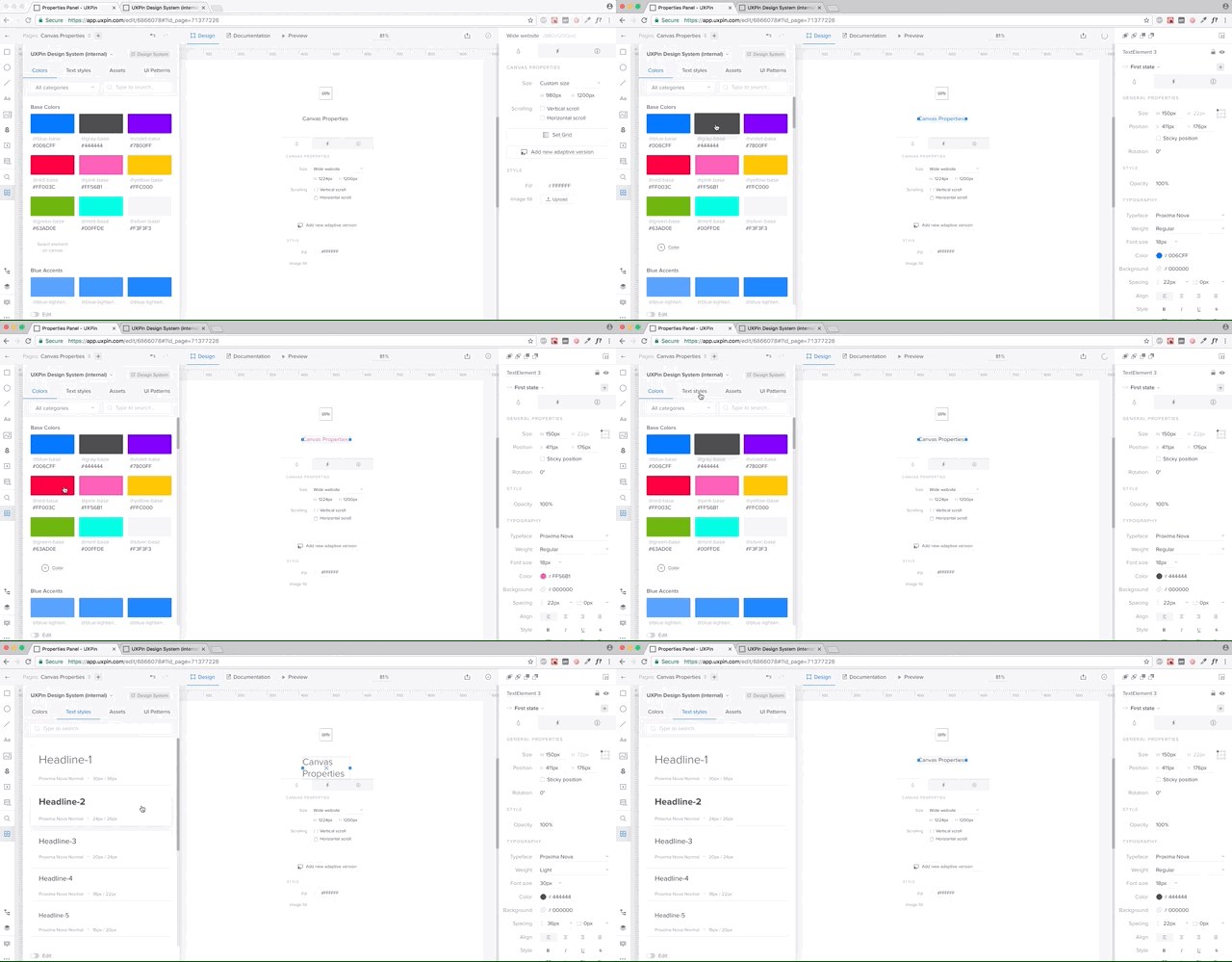
Start with the most prevalent pieces of any design: text styles and a color palette.
In UXPin, both color palette and text styles can be pulled directly from design projects and saved in a shared Design Systems library (an actionable toolkit that’s always synced with design system). Your entire team will always have access to approved styling, minimizing the temptation of introducing yet another typeface or shade of gray.
To add every color or text style, simply select layers in Sketch or UXPin and UXPin will pull the right styling and add it to the system.
All these styles always stay in sync with the library in UXPin or Sketch, which makes for a living system (not just static documentation).
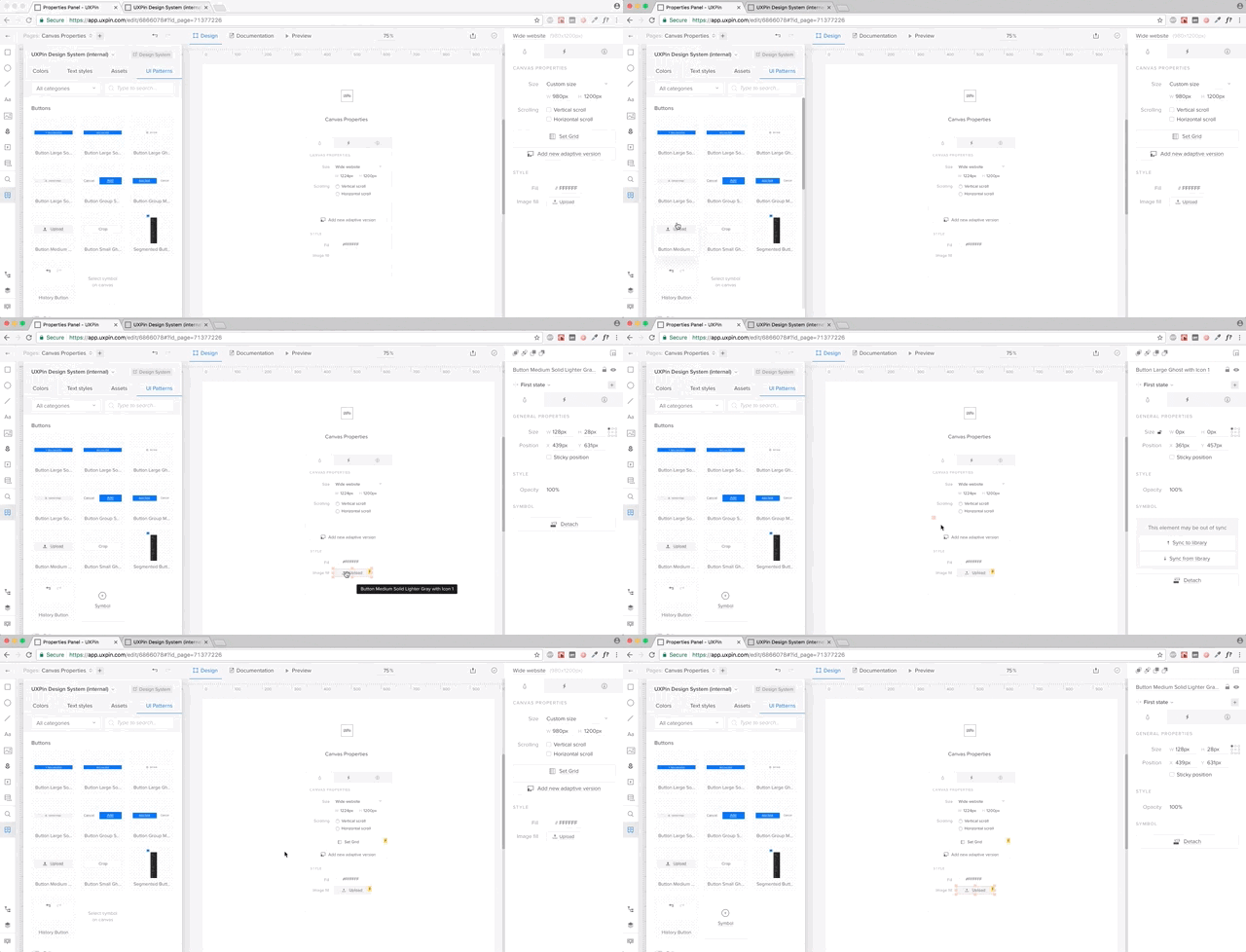
Just like colors and text styles, you can save all your graphic design assets in UXPin Systems.
Think logos, approved stock photos, or icon libraries. You can save all these in the Design Systems Library, which stays in sync with the Design System and your entire team. One library, directly in your tools and always in sync.
You can also save your design patterns in UXPin. All your symbols from UXPin and Sketch can be saved in a Design Systems Library. UXPin symbols can be interactive and animated, so you don’t have to recreate interactions every single time.
Symbols in both UXPin and Sketch have overriding abilities, so you don’t have to worry about your patterns being used in multiple places with different copy. UXPin allows you to adjust the copy however you want and sync everything with the library whenever you’re ready.
It’s a powerful tool to manage all your shared design patterns.
Having a library of shared assets is great, but it’s definitely not enough to solve the problem of scaling software development.
Most solutions stop here and don’t move towards development. We’ve decided to go all the way.
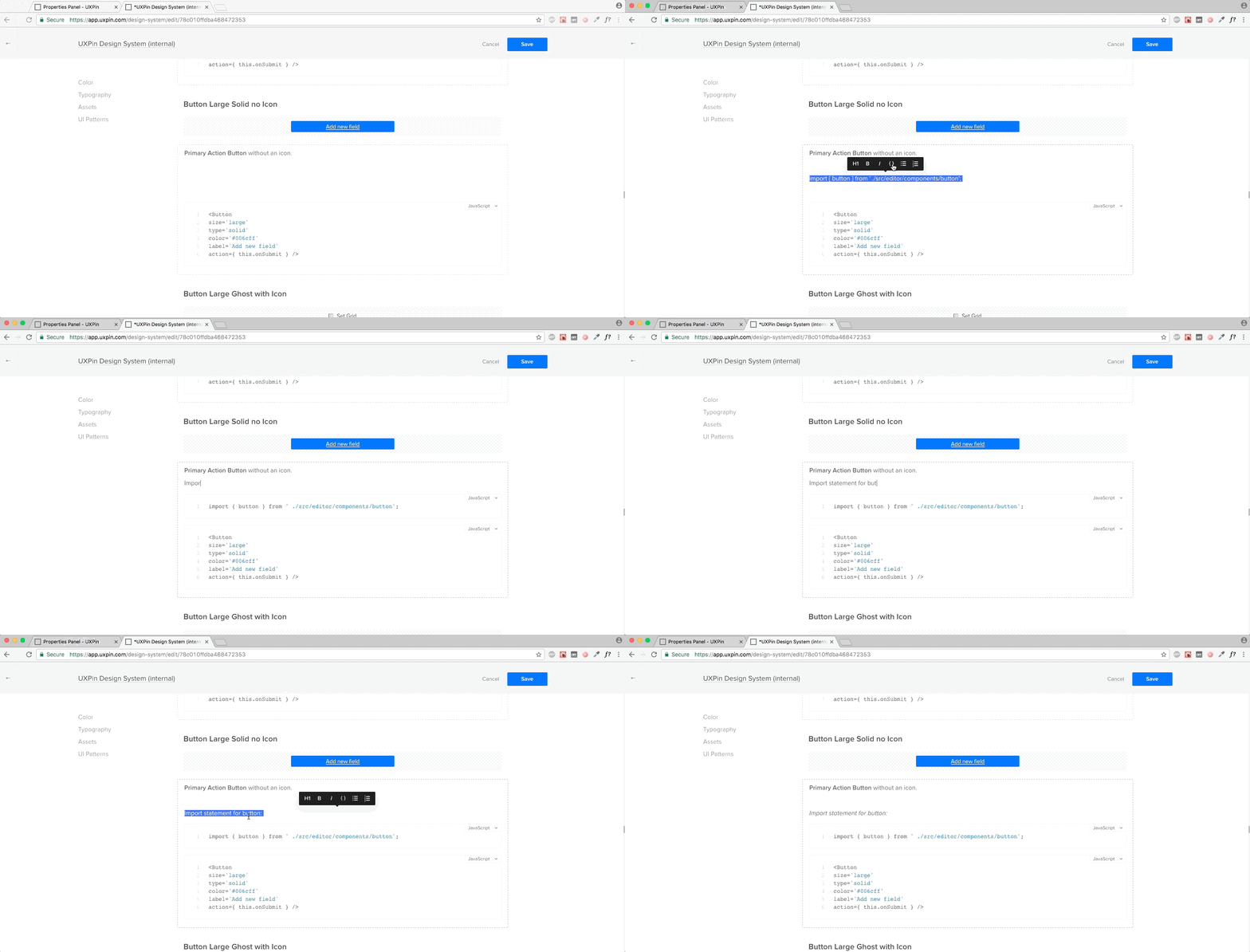
In UXPin Systems all the colors, text styles, assets, and patterns become a living system with one click. Just go into the Design Systems tab in UXPin Dashboard, select your library, and it comes to life.
A new documentation page is automatically created and always stays in sync with your library. If you add a new pattern or a color, it automatically appears in your design system.
Once you’ve generated your system, you can add documentation, including code snippets to any element. The documentation editor makes it very straightforward to document your system.
Again, the documentation is immediately available to your team.
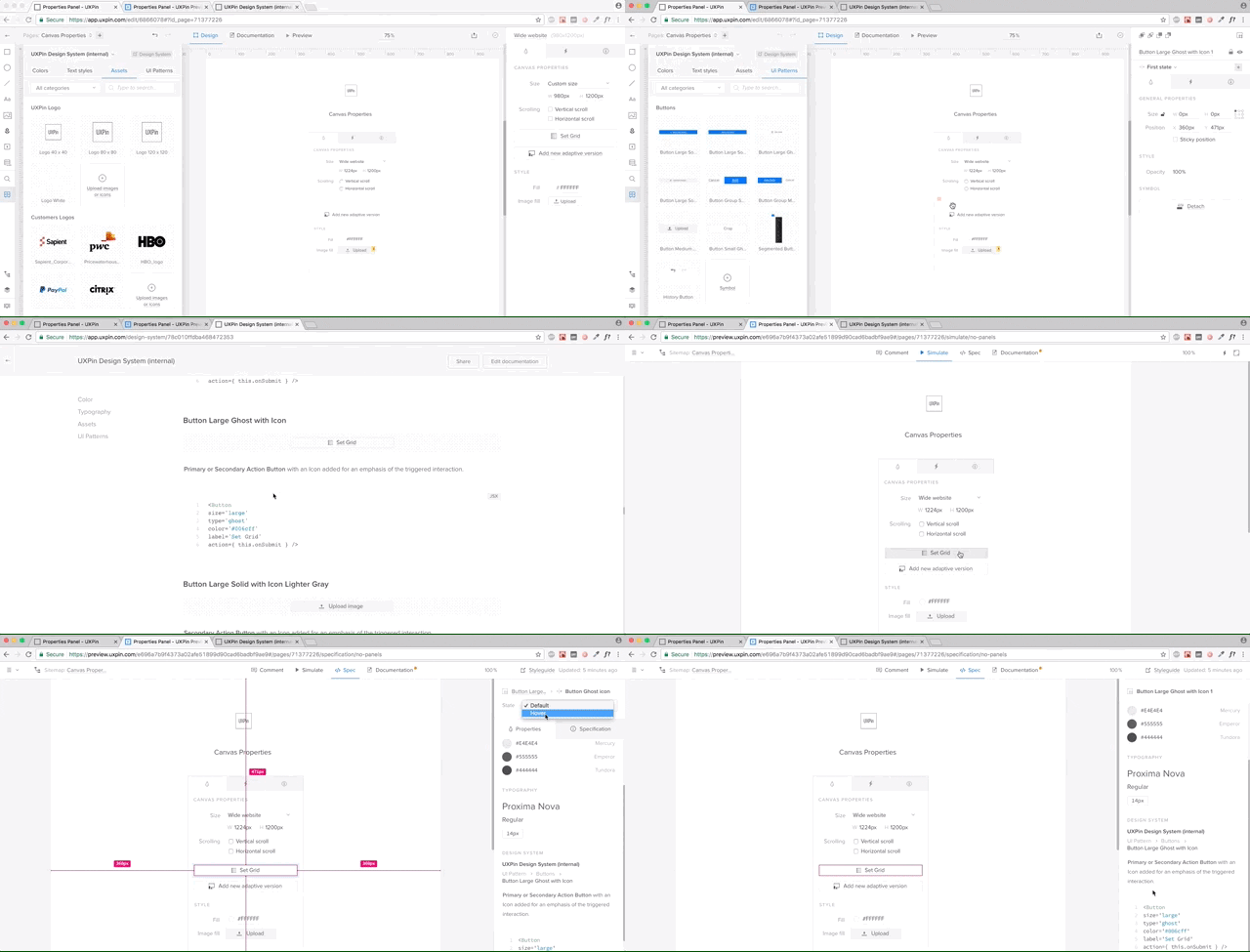
Design system documentation shouldn’t just be a reference document. It needs to be where the action is: in the design projects themselves.
With UXPin, documentation from the design system follows the elements in any project.
If you’re working on yet another sign-up form, once you drop in the symbols from the library, UXPin automatically generates full documentation for developers – including all the information coming from the design system (full markup, information about imports, and names of JavaScript components, etc).
Needless to say, I’m extremely proud of our focus on design systems as the heart of a better software development process. Of course, this is just a beginning.
If you’d like to try out UXPin for yourself, you can go ahead and start a free trial.
Creating a Design System Process with UXPin is a post from CSS-Tricks
Post pobrano z: Form Validation Part 1: Constraint Validation in HTML
Most JavaScript form validation libraries are large, and often require other libraries like jQuery. For example, MailChimp’s embeddable form includes a 140kb validation file (minified). It includes the entire jQuery library, a third-party form validation plugin, and some custom MailChimp code. In fact, that setup is what inspired this new series about modern form validation. What new tools do we have these days for form validation? What is possible? What is still needed?
In this series, I’m going to show you two lightweight ways to validate forms on the front end. Both take advantage of newer web APIs. I’m also going to teach you how to push browser support for these APIs back to IE9 (which provides you with coverage for 99.6% of all web traffic worldwide).
Finally, we’ll take a look at MailChimp’s sign-up form, and provide the same experience with 28× (2,800%) less code.
It’s worth mentioning that front-end form validation can be bypassed. You should always validate your code on the server, too.
Alright, let’s get started!
Through a combination of semantic input types (for example, <input type="email">) and validation attributes (such as required and pattern), browsers can natively validate form inputs and alert users when they’re doing it wrong.
Support for the various input types and attributes varies wildly from browser to browser, but I’ll provide some tricks and workarounds to maximize browser compatibility.
Let’s say you have a text field that is required for a user to fill out before the form can be submitted. Add the required attribute, and supporting browsers will both alert users who don’t fill it out and refuse to let them submit the form.
<input type="text" required>
Do you need the response to be a minimum or maximum number of characters? Use minlength and maxlength to enforce those rules. This example requires a value to be between 3 and 12 characters in length.
<input type="text" minlength="3" maxlength="12">
The pattern attribute let’s you run regex validations against input values. If you, for example, required passwords to contain at least 1 uppercase character, 1 lowercase character, and 1 number, the browser can validate that for you.
<input type="password" pattern="^(?=.*\d)(?=.*[a-z])(?=.*[A-Z])(?!.*\s).*$" required>
If you provide a title attribute with the pattern, the title value will be included with any error message if the pattern doesn’t match.
<input type="password" pattern="^(?=.*\d)(?=.*[a-z])(?=.*[A-Z])(?!.*\s).*$" title="Please include at least 1 uppercase character, 1 lowercase character, and 1 number." required>
You can even combine it with minlength and (as seems to be the case with banks, maxlength) to enforce a minimum or maximum length.
<input type="password" minlength="8" pattern="^(?=.*\d)(?=.*[a-z])(?=.*[A-Z])(?!.*\s).*$" title="Please include at least 1 uppercase character, 1 lowercase character, and 1 number." required>See the Pen Form Validation: Basic Text by Chris Ferdinandi (@cferdinandi) on CodePen.
The number input type only accepts numbers. Browsers will either refuse to accept letters and other characters, or alert users if they use them. Browser support for input[type="number"] varies, but you can supply a pattern as a fallback.
<input type="number" pattern="[-+]?[0-9]">By default, the number input type allows only whole numbers.
You can allow floats (numbers with decimals) with the step attribute. This tells the browser what numeric interval to accept. It can be any numeric value (example, 0.1 ), or any if you want to allow any number.
You should also modify your pattern to allow decimals.
<input type="number" step="any" pattern="[-+]?[0-9]*[.,]?[0-9]+">If the numbers should value between a set of values, the browser can validate those with the min and max attributes. You should also modify your pattern to match. For example, if a number has to be between 3 and 42, you would do this:
<input type="number" min="3" max="42" pattern="[3-42]">See the Pen Form Validation: Numbers by Chris Ferdinandi (@cferdinandi) on CodePen.
The email input type will alert users if the supplied email address is invalid. Like with the number input type, you should supply a pattern for browsers that don’t support this input type.
Email validation regex patterns are a hotly debated issue. I tested a ton of them specifically looking for ones that met RFC822 specs. The one used below, by Richard Willis, was the best one I found.
<input type="email" pattern="^([^\x00-\x20\x22\x28\x29\x2c\x2e\x3a-\x3c\x3e\x40\x5b-\x5d\x7f-\xff]+|\x22([^\x0d\x22\x5c\x80-\xff]|\x5c[\x00-\x7f])*\x22)(\x2e([^\x00-\x20\x22\x28\x29\x2c\x2e\x3a-\x3c\x3e\x40\x5b-\x5d\x7f-\xff]+|\x22([^\x0d\x22\x5c\x80-\xff]|\x5c[\x00-\x7f])*\x22))*\x40([^\x00-\x20\x22\x28\x29\x2c\x2e\x3a-\x3c\x3e\x40\x5b-\x5d\x7f-\xff]+|\x5b([^\x0d\x5b-\x5d\x80-\xff]|\x5c[\x00-\x7f])*\x5d)(\x2e([^\x00-\x20\x22\x28\x29\x2c\x2e\x3a-\x3c\x3e\x40\x5b-\x5d\x7f-\xff]+|\x5b([^\x0d\x5b-\x5d\x80-\xff]|\x5c[\x00-\x7f])*\x5d))*$">One „gotcha” with the the email input type is that it allows email addresses without a TLD (the „example.com” part of „email@example.com”). This is because RFC822, the standard for email addresses, allows for localhost emails which don’t need one.
If you want to require a TLD (and you likely do), you can modify the pattern to force a domain extension like so:
<input type="email" title="The domain portion of the email address is invalid (the portion after the @)." pattern="^([^\x00-\x20\x22\x28\x29\x2c\x2e\x3a-\x3c\x3e\x40\x5b-\x5d\x7f-\xff]+|\x22([^\x0d\x22\x5c\x80-\xff]|\x5c[\x00-\x7f])*\x22)(\x2e([^\x00-\x20\x22\x28\x29\x2c\x2e\x3a-\x3c\x3e\x40\x5b-\x5d\x7f-\xff]+|\x22([^\x0d\x22\x5c\x80-\xff]|\x5c[\x00-\x7f])*\x22))*\x40([^\x00-\x20\x22\x28\x29\x2c\x2e\x3a-\x3c\x3e\x40\x5b-\x5d\x7f-\xff]+|\x5b([^\x0d\x5b-\x5d\x80-\xff]|\x5c[\x00-\x7f])*\x5d)(\x2e([^\x00-\x20\x22\x28\x29\x2c\x2e\x3a-\x3c\x3e\x40\x5b-\x5d\x7f-\xff]+|\x5b([^\x0d\x5b-\x5d\x80-\xff]|\x5c[\x00-\x7f])*\x5d))*(\.\w{2,})+$">Similarly, the url input type will alert users if the supplied value is not a valid URL. Once again, you should supply a pattern for browsers that don’t support this input type. The one included below was adapted from a project by Diego Perini, and is the most robust I’ve encountered.
<input type="url" pattern="^(?:(?:https?|HTTPS?|ftp|FTP):\/\/)(?:\S+(?::\S*)?@)?(?:(?!(?:10|127)(?:\.\d{1,3}){3})(?!(?:169\.254|192\.168)(?:\.\d{1,3}){2})(?!172\.(?:1[6-9]|2\d|3[0-1])(?:\.\d{1,3}){2})(?:[1-9]\d?|1\d\d|2[01]\d|22[0-3])(?:\.(?:1?\d{1,2}|2[0-4]\d|25[0-5])){2}(?:\.(?:[1-9]\d?|1\d\d|2[0-4]\d|25[0-4]))|(?:(?:[a-zA-Z\u00a1-\uffff0-9]-*)*[a-zA-Z\u00a1-\uffff0-9]+)(?:\.(?:[a-zA-Z\u00a1-\uffff0-9]-*)*[a-zA-Z\u00a1-\uffff0-9]+)*)(?::\d{2,5})?(?:[\/?#]\S*)?$">Like the email attribute, url does not require a TLD. If you don’t want to allow for localhost URLs, you can update the pattern to check for a TLD, like this.
<input type="url" title="The URL is a missing a TLD (for example, .com)." pattern="^(?:(?:https?|HTTPS?|ftp|FTP):\/\/)(?:\S+(?::\S*)?@)?(?:(?!(?:10|127)(?:\.\d{1,3}){3})(?!(?:169\.254|192\.168)(?:\.\d{1,3}){2})(?!172\.(?:1[6-9]|2\d|3[0-1])(?:\.\d{1,3}){2})(?:[1-9]\d?|1\d\d|2[01]\d|22[0-3])(?:\.(?:1?\d{1,2}|2[0-4]\d|25[0-5])){2}(?:\.(?:[1-9]\d?|1\d\d|2[0-4]\d|25[0-4]))|(?:(?:[a-zA-Z\u00a1-\uffff0-9]-*)*[a-zA-Z\u00a1-\uffff0-9]+)(?:\.(?:[a-zA-Z\u00a1-\uffff0-9]-*)*[a-zA-Z\u00a1-\uffff0-9]+)*(?:\.(?:[a-zA-Z\u00a1-\uffff]{2,}))\.?)(?::\d{2,5})?(?:[/?#]\S*)?$">See the Pen Form Validation: Email & URLs by Chris Ferdinandi (@cferdinandi) on CodePen.
There are a few really awesome input types that not only validate dates but also provide native date pickers. Unfortunately, Chrome and Mobile Safari are the only two browsers that implement it. (I’ve been waiting years for Firefox to adopt this feature!) Other browsers just display it as a text field.
As always, we can provide a pattern to catch browsers that don’t support it.
The date input type is for standard day/month/year dates.
<input type="date" pattern="(?:19|20)[0-9]{2}-(?:(?:0[1-9]|1[0-2])-(?:0[1-9]|1[0-9]|2[0-9])|(?:(?!02)(?:0[1-9]|1[0-2])-(?:30))|(?:(?:0[13578]|1[02])-31))">In supporting browsers, the selected date is displayed like this: MM/DD/YYYY. But the value is actually in this format: YYYY-MM-DD.
You should provide guidance to users of unsupported browsers about this format—something like, „Please use the YYYY-MM-DD format.” However, you don’t want people visiting with Chrome or Mobile Safari to see this since that’s not the format they’ll see, which is confusing.
See the Pen Form Validation: Dates by Chris Ferdinandi (@cferdinandi) on CodePen.
We can write a simple feature test to check for support, though. We’ll create an input[type="date"] element, add a value that’s not a valid date, and then see if the browser sanitizes it or not. You can then hide the descriptive text for browsers that support the date input type.
<label for="date">Date <span class="description-date">YYYY-MM-DDD</span></label>
<input type="date" id="date" pattern="(?:19|20)[0-9]{2}-(?:(?:0[1-9]|1[0-2])-(?:0[1-9]|1[0-9]|2[0-9])|(?:(?!02)(?:0[1-9]|1[0-2])-(?:30))|(?:(?:0[13578]|1[02])-31))">

<script>
  var isDateSupported = function () {
      var input = document.createElement('input');
      var value = 'a';
      input.setAttribute('type', 'date');
      input.setAttribute('value', value);
      return (input.value !== value);
  };

  if (isDateSupported()) {
      document.documentElement.className += ' supports-date';
  }
</scipt>

<style>
  .supports-date .description-date {
      display: none;
  }
</style>
See the Pen Form Validation: Dates with a Feature Test by Chris Ferdinandi (@cferdinandi) on CodePen.
The time input type let’s visitors select a time, while the month input type let’s them choose from a month/year picker. Once again, we’ll include a pattern for non-supporting browsers.
<input type="time" pattern="(0[0-9]|1[0-9]|2[0-3])(:[0-5][0-9])">
<input type="month" pattern="(?:19|20)[0-9]{2}-(?:(?:0[1-9]|1[0-2]))">
The time input displays time in 12-hour am/pm format, but the value is 24-hour military time. The month input is displayed as May 2017 in supporting browsers, but the value is in YYYY-MM format.
Just like with input[type="date"], you should provide a pattern description that’s hidden in supporting browsers.
See the Pen Form Validation: Add `novalidate` programatically by Chris Ferdinandi (@cferdinandi) on CodePen.
While the Constraint Validation API is easy and light-weight, it does have some drawbacks.
You can style fields that have errors on them with the :invalid pseudo-selector, but you can’t style the error messages themselves.
Behavior is also inconsistent across browsers. Chrome doesn’t display any errors until you try to submit the form. Firefox displays a red border when the field loses focus, but only displays error messages on hover (whereas WebKit browsers keep the errors persistent).
User studies from Christian Holst and Luke Wroblewski (separately) found that displaying an error when the user leaves a field, and keeping that error persistent until the issue is fixed, provided the best and fastest user experience. Bonus CSS tip: style invalid selectors only when they arern’t currently being edited with :not(:focus):invalid { }.
Unfortunately, none of the browsers behave exactly this way by default.
In the next article in this series, I’ll show you how to use the native Constraint Validation API to bolt-in our desired UX with some lightweight JavaScript. No third-party library required!
Form Validation Part 1: Constraint Validation in HTML is a post from CSS-Tricks